Problems? See this thread at archive.org.
I'm so excited for Monday buying my m17x on Monday!So Excited!!
Alienware M17x
CPU: i7 3720QM (3.6 GHz Quad Core)
Full HD Screen (1920 x 1080)
GPU: AMD Radon HD 7970M
Hard Drive 750gb 7200rpm with 32gb mSATA ssd caching drive
Ram 8gb 1600MHz
And bluray DVD drive
Sent From My Rooted EVO 3D
-
-
Congrats! I guess we'll both find out how quick production and shipping is in Canada
-
Guys, as I heard Dell installs RAM (2x8GB) under the bottom and leaves 2 free slots under the palmrest. So, is it possible to ask them nicely to leave 2 free slots under the bottom? I have 2 DIMMS and I would like to set them myself witout taking off the palmrest and the keyboard.
-
I'm not sure if they will give you 2 8GB sticks or 4 4GB sticks. As far as getting them to put them under the keyboard, you can always try, but I doubt they will. Though, it is pretty easy to get under the keyboard. The palm rest never has to be removed. The only thing to really worry about is the plastic bezel. Just be gentle and handle with care.
Edit: Here is a video tutorial: http://www.youtube.com/watch?v=rEC1U1WqG5Y Although, you shouldn't have to unclip the keyboard. Just gently flip it over towards you (upside down on the palm rest). -
My system came with 4x2GB sticks.
It's really easy to get to the 2 under the keyboard. The first try will probably take you some time, but after that, you'll realize how easy it is. I don't know who said you need to remove the palm rest. All you remove is the top bezel and keyboard. -
Thank you! I watched the tutorial and it looks pretty easy to do it myself. I was a bit scared because will never forget the day when I was disassembling l702x to repaste cpu and gpu. That was a nightmare!
So it means Dell can build you the system with 4x2GB DIMMS despite that you placed your order with 2x4GB? How could it be? -
You are very welcome! Just be careful with the bezel since it is relatively thin plastic (annoying/stubborn plastic clips!) and you will be fine.
If you ever decide to repaste, the M17x R3/R4 is a cake-walk. When you take off the back panel both the CPU and GPU are right there for you to work with.
Hope you enjoy your new system! A new laptop is always exciting.
-
Hey guys,
I asked a question earlier about 120hz screens making low fps look more smooth than it would on a 60hz screen. I was playing MW2 on our living room LG 200hz TruMotion TV. The 200hz TruMotion can be turned On/Off.
Then I remembered I had Battlefield 3 on my ps3 hard drive. Which runs at 30fps and noticeably laggy on consoles. So I launched it and got into a game, as soon as I turned on 200hz TruMotion it looked a looot smoother as if it was running at 60fps except when turning fast.
TruMotion does use interpolating but I assume you can apply that 120hz screens on the M17x would show similar smoothness. Thus a single 680m should be able to play crysis and battlefield no problem even IF it was running it at below 60fps. And that is fantastic news!
-
are the 7970m and 680m gpu integrated?
-
What kind of question is that
Sent From My Rooted EVO 3D -
sorry meant to say is the gpu removable or is it integrated to the motherboard
sorry meant to say is the gpu removable or dedicated -
That one makes alittle more sense but is still not right if your trying to ask if the dedicated gpu is removable then yes
Sent From My Rooted EVO 3D -
just started learning about gpu, correct me if im wrong
if i was going to have a 680m card for m17x now
can i upgrade it for a better gpu in the future if its within 100w? or theres other factors to consider? does the same thing applies to cpu upgrade? -
As long as the motherboard supports the new CPU or gpu you can upgrade it from what I know tho the only way to know if a laptops motherboard supports new hardware is to test it but don't take my word on that
Sent From My Rooted EVO 3D -
do anyone know more information regarding to this question?
-
Hi Winkawak.
Quick PC rundown for you
The M17X has (normally, see later) two video interfaces. The first is known as 'integrated'. This is an intel chip built into the CPU. The second is called 'discreet'. It is this one people are looking to for game performance.
The discreet video is on a card that can be replaced. The interface is MMX (slightly different versions between the R3 and R4 but usually interchangable).
So to change the video you get it on an MMX card. It is easy to replace BUT the heatsink needs care and knowledge to remove and replace it. You can find plenty of instructions here.
Now, this changes IF you go for a 3D 120hz model. The integrated video is not connected at all so you only have the discreet card. This HAS to be an Nvidia card as AMD cannot output 120hz. What you actually loose is a technology called optimus/enduro that switches to the lower power integrated video when the power of the descrete card is not needed. Can be problematic though - it's not a fully evolved technology (IMO). So if battery life (or saving the planet) is important to you then a 120hz display is not for you
For a CPU upgrade the easiest way is to look at what dell offer (then ebay one!). There are others you can use but as already said they might not work, being unsupported in the BIOS or the chipset. It's quite a tricky subject so again read threads here and see what people are doing.
Some parts of this are a little simplified but I think you'll get my drift
Here endeth the first lesson
-
As far as I know yes you can upgrade the GPU. As long as its compatible with the laptop I'm pretty sure you will have no problem. Soon enough Nvidia will release their next GPU for the M17x R4 or perhaps M17x R5... and the laptops build structure has not changed. There's plenty of people who have put the 7970m for example, in the M17x R3 or R2 also I'm pretty sure.
What I'm trying to say is I'm in the same situation. I don't want to be stuck with a single 680m, 5 years from now and not be playing games maxed out. I am sure you'll be able to upgrade the GPU no worries.
-
+1
thanks for putting in time helping me -
Hey, you're welcome. nice when someone is clear about what they want to know and their level of experience.
Nothing worse than putting together a diatribe like that to get flamed for 'trying to teach my grandmother to suck eggs'!
-
Lawl
Sent From My Rooted EVO 3D -
I am really struggling to get this thing under a budget
Specs are:
i7-3610QM (2.3GHz - 3.3GHz, 6MB) -
GTX 680M
12GB DDR3 1333MHz
128GB Crucial M4 SSD- 500GB 7200RPM 16MB
Combo Dual Layer SuperMulti DVDRW/CDRW
Killer™ Wireless-N 1103
1 Year GLOBAL Alienware Basic Service Plan Warranty
going for around 2550 ( 2430 with discounts)
adding warrenty is 229 for two years, 369 for three years
with accidental damage cover its 318 for two years and 488 for three years
the reason I am looking at extended warrenty is that it will be shipping to KSA, and I would like the comfort of having my systems under warrenty for the period of usage.
so I'm thinking of slashing unnessery stuff from the configuration but still have a beast -
Hi, i've been waiting forever to aquire one of this awesome laptops. I'm from a country that alienware doesn't exist unless you want to pay x4(which means an already expensive mechine cost EVEN more).
Few questions. My configuration is this so far: we talking about m17x R4
Windows® 7 Home Premium, 64bit
3rd Generation Intel® Core i7-3610QM (6MB Cache, up to 3.3GHz w/ Turbo Boost 2.0)
12GB Dual Channel DDR3 at 1600MHz (4DIMMS)
256GB SSD SATA 6Gb/s
2GB GDDR5 NVIDIA® GeForce® GTX 680M
17.3-inch WideFHD 1920 x 1080 60Hz WLED
Slot-Loading Dual Layer DVD Burner (DVD+-RW, CD-RW)
My Software & Accessories
Stealth Black with Soft Touch Finish
Quasar Blue
My Accessories
1 Year Basic Plan
No Anti-Virus Software Selected
Also Includes
English Keyboard
Alienware Documentation
Shipping Material - Black
Additional Software
90WHr 9-Cell Primary Battery
Standard Nameplate
Killer Wireless-N 1103 a/g/n 3x3 MIMO for Gaming & Video and Bluetooth 4.0
Creative Sound Blaster Recon3Di with THX TruStudio Pro Software
Alienware M17X R4 with Soft Touch
Alienware M17x 240W A/C Adapter
Adobe Acrobat X ReaderCompatibility Alert.
Now here's my questions:
First - bigfootkiller worth it? heard it makes a difference in gaming online. also is it the newest version?
Second - SSD? What type is it? I mean what version? what manafactur? Samsung? Corsair? An exact type of model and all be great. also SSD worth it? Basically i aim to have few games and few movies and im not sure if faster speed for less space is really worth it. What you guys think?
Memory - is 12 really too much? Im looking for this laptop to serve another 3 years.
Generally - did i pick up good configuration?
Also - I bought Alienware Gamer's Headset and Mouse. Mainly because it really be awesome to have whole set. but i'd like to know if its a waste of good money or they actually worth something?
That's it for now. Specially importent to know what type of SSD they are using so i'd appreciate if that be first answer. That's it! -
Hi, looks just fine.
To answer your questions:
I'm not much use with the killer wireless as I'm not a big on-line gamer. All I can say is that it allows you to prioritize anything that is accessing the internet and is aimed at gamers. I never had any problems with the standard dell offering on my last R3 so
The SSD can be any one of a few manufactures, it will depend on what is available/cost to Dell at the time. I got a Samsung PM830 in mine.
The SSD really comes into it's own when loading large files but the real difference you see is windows loading time. Completes just as the logo finishes assembling for me
I'm hearing good reports for the 64mb caching SSD drives performance so coupling this with a decent size HD looks like a good option for gamers. You only get one drive letter to work with as well
Memory, most people agree that anything over 6gb is overkill for a gamer running single applications. It's a simple and cheaper option to do it later if you'r running multiple apps.
Finally, I got the headset and they're ok for the price but there are much better ones out there.
I see you chose the 680m with the 60hz display. If you're not going 3D then the 7970 is a much cheaper option performance/cost wise, but it's a contentious subject
-
Any other types you can tell me about? SSD that is.
-
Sorry no, there is a ton of stuff here on NBR about the performance/stability/cost of different ones in threads here - you're going to have to trawl
-
Questions about RAM and SSD, and HDD combo
enough for gaming for next two years.
6GB 1600MHz or should i opt to 8GB 1600MHz for 75$ extra
or 12GB 1333MHz for 61 $ extra
or 12GB 1600MHz for 114$
looking at the sweet spot for storage
128GB SSD on its own ( Samsung 830 for 179) or ( Crusial M4 for 129)
128GB SSD + 500GB HDD 7200RPM (89 $ for the HDD)
or 256GB on its own (329 for the M4 or 359 for samsung 830) -
Get the 128GB SSD from Newegg right now as the Samsung is going for half price.
-
Bigfoot Killer - How often will you be using wireless? I will be playing on an Ethernet cable so it doesn't really matter for me, however I'm getting Killer wireless just in case. It depends how far your router is, how many walls in between etc.. If you're going to use it elsewhere like college, or at friends houses it could benefit you. However if you're next to the router or its in the next room, I doubt there's any noticeable difference between it / if you pick the better Intel wireless.
SSD - There are few things an SSD would improve. It would make opening applications snappier, and loading game levels a bit faster. Otherwise if you're on a budget at 7,200rpm hdd or hybrid drive is just fine, if you're willing to wait an extra couple seconds for a level to load.. and movies open pretty much instantly anyways. Sorry I don't know the model though.
Memory - 12GB is great, more than enough. It's 1600mhz tho right?
Generally - Yes the system is good and I'm sure you'll love having the full Alienware kit. I already have a Razer Mamba mouse, and I don't need a headset so.. But I'm sure they're great and having the full set is definitely sick
EDIT: If it's within your budget, I would suggest upgrading the CPU so it's not the absolute lowest. I would take the 3720, you're buying an Alienware after all but there's nothing wrong with the CPU I guess I'm just like that, and if it makes any difference the 3610 can't be overclocked. Whatever fits your budget, won't really make a difference.
Enjoy your Alienware
Don't get the 1333MHz, 1600 is todays standard. Gaming for the next two years? 8GB 1600MHz is definitely enough, no games utilize even half of that RAM.. however you'll have other processes running in the background. If you'll be multitasking while gaming then I'd suggest 12GB, otherwise 8GB is great and easily upgradable if need be in the next few years.
And the SSD - 128GB is really too little. I would suggest getting the 128GB SSD for the operating system and some games/applications you want to run fast. And the 500GB HDD for storage and when your SSD fills up.
If budget is the most important...
I would suggest not getting the 1333MHz RAM, 1600MHz is a noticeable improvement and todays standard. However the slightly cheaper option would be buying the RAM yourself and installing it.
The SSD + Hard Drive combo is fine.
Killer Wireless might be a bit overkill, unless you are sometimes in areas where the wireless is kind of far away or not so strong. The Intel wireless would be just fine I'm pretty sure.
If possible within your budget, I would upgrade the CPU to 3720. The 3610 is the lowest one, and can't be overclocked. However if its not in the budget, the 3610 will be just fine, not a noticeable difference really so whatever suits you.
KSA I live in the UAE
If the warranty is really expensive, I'm not sure if it's that worth it. But better safe than sorry
-
is nvidia releasing another mobile gpu this year besides 680m?
680m is the fastest right now but i dont feel it is good enough.
on notebookcheck, benchmark results for 2012 games are only at a average 40fps on ultra with games like alan wake, secret world, max payne 3, risen 2..etc. i was expecting somewhere around 60fps. make me worry because every year with new games being released, 680m performance is going to drop another 10-20fps. which makes it uplayble in ultra. -
quick question on SSD and mSATA SSD
on xoticpc options there are
128GB Crucial Solid State mSATA III (Primary Drive w/ O.S. Installed) ( + 179$ )
and
128GB Crucial M4 C400 Solid State Drive (Up to Sequential Read 500MB/s - Write 175MB/s SSD Serial-ATA III) (SKU – X5R430) ( + 159$ )
whats the differance in speed and performance between the two.
if I use mSATA i could leave the secondary HDD slot empty for future upgrade. -
Can't offer you any info on the speeds (or reliability, which might have a bearing on the price) but fyi, the msata port is sata 2 so slightly slower. From what I read, you'll only notice it in benchmarking. But yes, you can use it the same as one of the HD bays
-
Oh don't worry about the 680m performance. Many of the benchmarks are not accurate so far, the 680m has just arrived to some people. And often include the lowest end processor (3610), etc. Pair it up with a good processor, plenty of RAM, and like a SSD it will be a beauty.
The benchmarks often have 4x MSAA and 16x AF etc which really reduce performance. Keeping everything on ultra, but reducing some of those really demanding but pointless settings it should get 60fps on everything. Not to mention wait until Nvidia releases proper drivers for it, the performance will just keep going up.
Besides, take Battlefield for example, you can notice NO difference between Ultra and High preset except a great increase to your fps. And if you get the 120hz screen, that will smoothen the gameplay and make even 40 fps look like more than 40.
Don't worry
-
I was wondering, is it going to be difficult reinstalling the OS along with all the alienware software if I get the default 2tb drive right now (which is included in the price) and then upgrade to 2 x Crucial 512gb M4 SSD later.
-
msata port is sata 3, there were issues in the past of it running at only sata 2 speeds, but also msata drives are slower the SSD's.
I ran a speed check on my msata: read speed 444MBs and since sata 2 tops out at 300MBs it would have to be sata 3 -
Somewhere on the Alienware boards here there is a post dedicated to listing the steps, once you've read them you can decide for yourself how difficult it will be. Off the top of my head, not difficult, just time consuming.
-
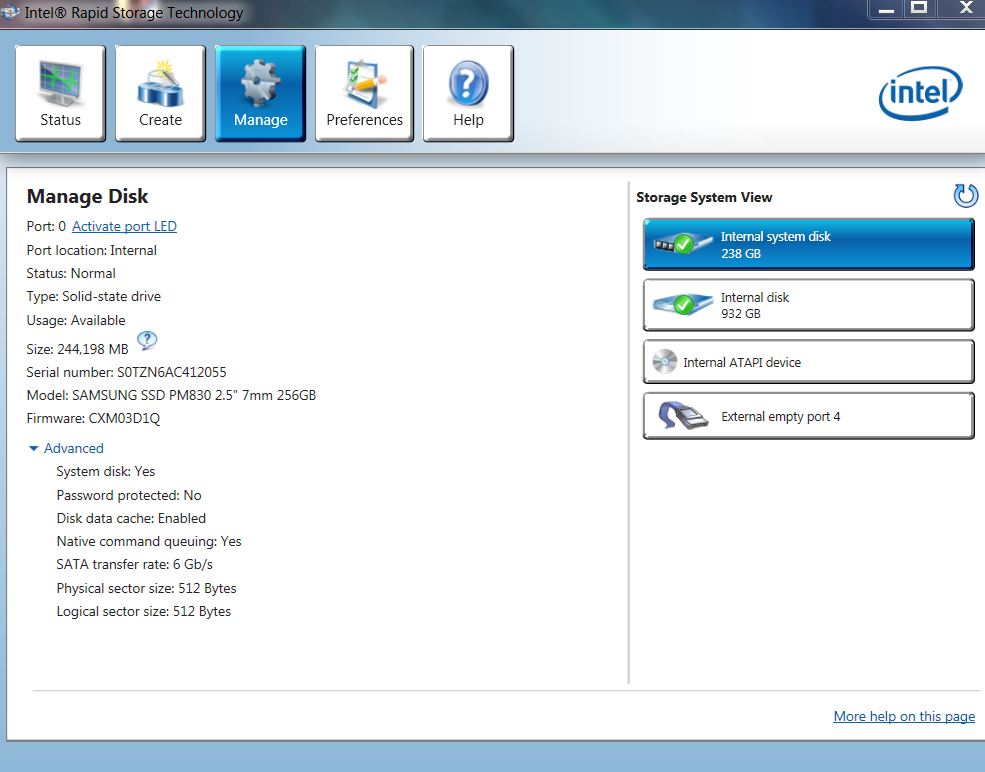
Strange I was told msata port was sata 2 but since I have nothing in it I cant say. The only issue I was aware of 'in the past' was on my R3 where one of the drive bays run at sata 2 even though dell stated it was sata 3. I 'fixed' this problem for very little return in actual performance. No mstata port at all in the R3.
What do you mean by 'msata drives are slower in ssd's'?
Edit: maybe you could confirm it in the intel rst software - you'd see 6gb if it's sata 3
Attached Files:
-
-
The reason you got little in return is, just because the channel can handle 600MBs the drive itself has a max lower then that. I haven't looked in about a week but the top SSD's don't reach the 600MBs read.
I say msata are slower, because if you compare the fastest msata's with the fastest SSD's, the SSD's come out on top.
I'll take a look either tonight or tomorrow night with Intel rst software and see what it says. But it would be pretty amazing if it is only a sata 2 port. -
Thanks. This was the thread that stated that the Msata port is only sata 2 speed:
http://forum.notebookreview.com/alienware-m17x/667733-msata-drive-bay.html#post8572148
Edit: Just for anyone wondering the relevance of this, any configuration that involves a RAID array will only run at the speed of the slowest drive in the array. -
I didn't see anywhere in that thread proof of the statement "msata is sata 2". I did see a picture of a sata 3 msata card, and pictures of benchmarks all running above sata 2 capacities.
Edit: After further research the msata port is only sata 2 based on the page linked below and the fact the the m17x R4 has Intel HM77 Express chipset, which has 2 sata III and 4 sata II.
http://www.intel.com/content/www/us/en/chipsets/performance-chipsets/mobile-chipset-hm77.html
The line that says it all: "Provides up to six SATA ports with up to two ports supporting 6 Gb/s transfer rates." -
Nope, no 'proof' just saying that it runs at 300 not 600. That's why I asked you to look since you actually have it - to confirm one way or the other. But I see you have now - seems that it gives good speeds though. Thanks
-
where can i purchase mobile gpu like gtx680m?
-
Ebay or amazon is as good a place as any.
Dell are not selling the 680 as a separate part yet - i've got an open call with them to be informed when it is - so I can ROFL when i see what they are going to charge for it
-
just saw 2 on ebay
lol and i thought AW was overpricing their gpu
are these discrete gpu hard to install? -
Not really. After taking out the two screws holding the base on and remove it, you have access to remove the fan and card easily. Read the user guide (it is actually a useful document!) and search for tear-down videos to see exactly.
The tricky part is the heatsink which will come out on the card. There are thermal pads and paste that ensure a good thermal contact. You'd need at a minimum to get new paste - please do not ask me what brand, there are as many opinions as there are brands so I use what I prefer, for my own reasons
Best solution if you have never done this stuff before; order a replacement heatsink from Dell. They are not too expensive I believe. I saw one quote at $24.00.
The new heatsink comes with all the pads and paste pre-installed. And a tube of paste in case the pre-installed paste-pad is damaged.
One thing I forgot. If you need to call dell for warranty support you must return the machine to it's original hardware configuration. It's OK to change parts but they only support it with the originals back in. -
i dont own an AW yet
just want to know more about it before i actually get one -
Sure, just realised 'pre-order' But the on-line user manual is a good read about what you get
http://support.dell.com/support/edocs/systems/Alw_M17xR4/en/OM/om_en.pdf
-
i did create a new thread but admin move my post here. so.....yea
-
Hey , getting a new m17x soon, just wondering if it will void my warranty if i install an SSD on my own, have an old R1 and am familiar with the innards of the m17x. Dell overprice their ssd's....
-
As MickyD said to Winkawak,
I'm pretty sure you can install your own SSD and not void the warranty, if a situation occurs later on where you do need to use your warranty, just put the original components back in.
As long as you take YOUR SSD out, and replace the original HDD... it should not void your warranty. So make sure to keep any parts you take out, because warranty is only for the exact laptop you buy. -
Here is the sig file that every dell rep that posts here has:
Dell | Alienware Technical Support Alienware Arena
Opening your case and/or replacing parts yourself does not void your warranty, check our disassemble videos on YouTube
Quickest way to get support from Dell: Twitter via @AlienwareTech or Facebook.com/Alienware using the "message" link.
I can't always reply to PM's, please for extra assistance use any of the Facebook and Twitter links
Alienware M17x R4 Pre-Order Configuration Questions... Ask HERE
Discussion in 'Alienware 17 and M17x' started by katalin_2003, May 1, 2012.