Problems? See this thread at archive.org.
Actually I believe Mandrake proved the ATi GDDR3 4870's are indeed faster than the GTX 280M's.
-
-
Yes, generally speaking.
But about this whole much faster than 260, slightly faster than 280 - all generalisations that cannot be applied to specific scenarios - I have to say that even 260m and 280m are not that far apart. Why? Because a 9800m GTX was not that far behind the 280m; my benchmarks in proper poly-hungry games say just that. Generally speaking, I saw mild difference. -
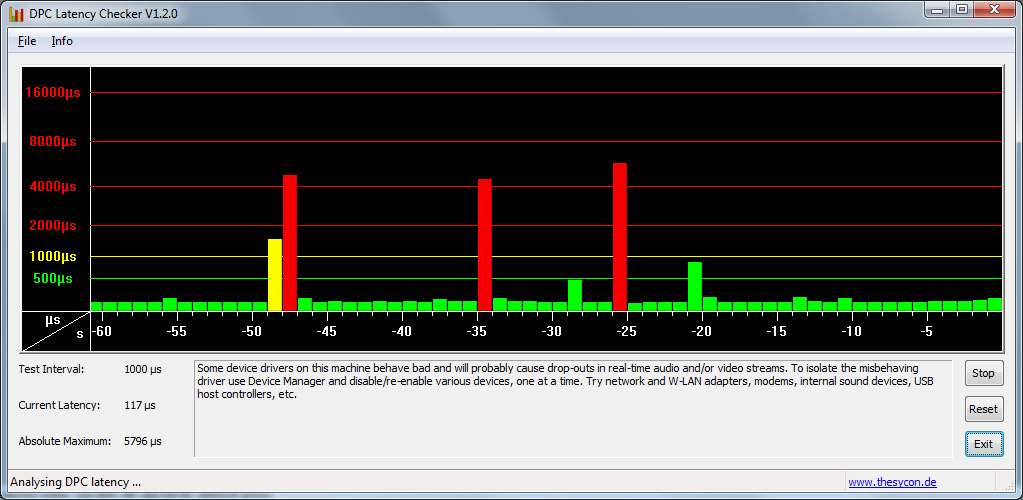
My comment was directed at clax and basically stating, wait and see how the system performs for you. People can easily run the checker and see a barage of red spikes and think 'problem'. It may not cause a negative impact for their/his use. I think its important to remember that we all use our systems differently. What is an issue to one person may not translate into an issue for another. If he does find the system is not performing properly (be it DPC Latency or anything else) then the process is clear - contact Dell and insist on a resolution to the issue.
In regards to OS, yes, it does and will play a role in all of this. We know W7 has issues with this system. Just look at the basic issue of having to tweak the wireless to have it function properly. Yet another reason why I am content and satisfied with Vista and my M17x
----------------------------
On a side note, we have a few dicussion threads on which GPU is more powerful than the other - lets keep this focused on DPC Latency/Stuttering/Lockups as it pertains to the issue Dell is working on. In other words - back on topic folks Thanks all.
-
Thats exactly why I opted for the 260's over the 280's.
-
I have just received mine m17x a week ago and it came with the ATI 4870 gfx. I do occasionally hear a loud pitching sound when I listen to you tube music/videos. However, it is not often but kind of annoying and can even scare me a little as it is rather suddenly when it occurs. Makes me kind of sad considering all the money I have paid for this beautiful machine :,o(
-
What you should is is return it since you have it for less than 21 days. Get the next version instead.
-
Yeah, but I mean they are -really- close, making the change kinda' pointless. Also the difference is even closer when it comes to the 4870 and overall performance in games that -I- care about. The only reason I would be interested in such a card is to solve the 'stuttering', which I don't have at the moment. However, it is too soon to tell where things will head; maybe I'll develop the same problem and demand ATi cards?
-
I just noticed John-B posted an update on the dell page ( http://en.community.dell.com/blogs/.../19591948.aspx?permaPostId=19643895#19643895). It appears to be a response to a comment however I don't see the comment or one which fits - was it removed? Did anyone see what 'scenario' was presented?
-
I think he was referring to my post.
-
Yes I understand that -really- close means really close, again that's why I took the 260s over the 280s, to me the slight difference in the games I play was not enough to justify spending an extra 300 dollars for 280's. As for the 4870's being faster than 280's they are, although it may be only slightly faster in general, I thought it was important enough to point this out to Aristotelhs.
-
I think his 'scenario' was about the comment that talked about how we could be waiting and waiting for this fix until we are out of our one-year warranties and can no longer do anything else about it
Part of Rotsuw's post:
-
Since a lot of things have been said about an incoming fix, I would say those affected should give them an extra week. Say the end of next week to start hell. I just feel with the coming release of the M11x, a lot of the efforts are being headed that way.
After the release of the M11x, there might be more encouraging news. In the meantime, I doubt we will see anything. I would say next Friday 5th (after the M11x is released) serious inquiries should start. I see a better chance then, not earlier. -
I've already started hell, their deadline for me has passed, I've had enough.
-
It has passed? So what have they done for you?
-
If you were referring to my issues BatBoy, I can give an overview and an update.
Essentially, my GPU has some kind of defect in it, because it actually needs to warm up before it will work correctly. On bootup or waking up from sleep (after it's been off for a while), my screen will just flash a series of colors until i restart it (usually a few times).
I was on the phone with tech support for 2 hours running various tests, and nothing seemed to work or show up. Fortunately, they didn't ask me to reinstall windows. They told me they were going to replace my GPU, and I was supposed to get a call from the tech guys who are going to actually replace it today (i got some automated call telling me this, but it took my parents too long to realize it was for me and i couldn't get the phone number down i was supposed to call if i didn't hear anything). They haven't called yet. I was told it could be up to 48 hours so I'm going to give them till tomorrow. If they don't contact me, then customer support is going to be getting a call (especially since I have to go BACK to college this weekend). Though I'm not even sure customer support can help me out with contacting these guys.
I also wasn't really having the latency issues that people here have been reporting (my card is a gtx 260m), though they were showing up on the DPC tests (i just never noticed it while i was doing anything).
So, as of right now, I'm waiting to hear from them. And I basically only have a one day window right now before I'm on the other side of my state. -
I'm in the process of discussing it with them.
-
Alright. Well, keep us updated. I have yet to hear anything helpful, except giving people ATI's. Which technically is helpful. Unless the issues return of course.
-
Sorry Nickkmet... I actually meant NickBarbs - he went the ATI route and his post here indicated he was having issues and his system was unstable. Hopefully Dell resolves the issues you are seeing. Let me know how it works out.
@swg1251: Thanks for posting that. I see it now.
@war: Very interesting point. Quite possible as well. -
i can say this is not a good indication for the rest of the system. anyway i am afraid too as i paid so much money for the logitech z5500 and this ssstutering may harm them too. who will pay then?
Batboy exactly! vista is the perfect os for this machine but i dont know if you have tried win7 just for a while. this os is much faster making the feeling of M17X much smoother. needless to say win7 with its trim support is one way for ssd owners. i wish there was no stutter. -
I am thankful for all you who add useful info and development news to this thread.
I have followed this thread and the previous one very closely and you have saved me a lot of time by trying all kinds of fixes, communicating with people in dell and posting your results here. Kudos. -
I've had stutters with Internet explorer, 3-4 minutes of no response about 2-3 times an hour. Is this what you are talking about? It is a pain, I walk away and do something else while it's thinking. I've watched movies on DVD before with no issue but I've seen stuttering with Youtube when I go full screen, it's annoying because I have to watch the Youtube in a small window given the screen size.
If this is os dependent though I'm confused because then it seems like a driver issue. -
hopefully according to my observations there is still the possibility its an os-driver issue because of the much decreased stuttering on vista (but not absent).
the no response is not due to the gpus for sure. its an IDE controller related issue. in my case i get those lock ups of 3-4 minutes randomly and ONLY when nvidia storage driver is NOT installed (so when i use win7 default driver).
damn it snowed today and the technician didnt come. it snows once or twice a year here in my place. lool. -
nvidia + vista = FTW
ati + win7 = FTW
i have tried it. -
even the fact that we cant set 60hz on win7 nvidia drivers shows that the driver sucks. just one more observation. maybe its just false reading of win7 as it seems to read 59.97hz showing as 59hz on control panel
-
Appears you guys are right, I spoke too soon. Here's what I captured just now... though, I still have noticed a huge improvement over the 260M. It's not 16k-20k, but I still also get 43k spikes if I hit the eject button for the DVD drive.
Attached Files:
-
-
On my M1730, I get a few latency spikes but they aren't as high as the highest ones on the M17x. Now here's the deal, when i get the 16-20k spikes on the beast, the audio doesn't stutter.
Even on the M17x, the audio popping and stuttering happens when I get those massive 50+k spikes. -
Just wanted to show you guys the massive spike I got (check out the absolute max value). Running A03 I have no spikes unless I actually do anything with the laptop. This came from just closing and opening the lid:
![[IMG]](images/storyImages/2zdsim8.jpg)
-
have you seen mines???
reinstall your os to make sure it takes out all the nvidia crude from your system.
then reinstall everything and enable hybrid and use it. -
Lol almost a billion. That's gotta be some kind of record
-
Assuming the DPC checker just stops displaying that many digits, it could be quadrillions!
Kidding aside. Call me optimistic, but I think they are at least on the right path. Hopefully there is something available soon. -
Spikes in the 4-5k range are harmless and invisible both in games and audio/video playback. 16k and above are the real pain. IMHO occasional 3-5k are normal for any system. Tried quite a few machines (mostly desktops) in the last couple of days and ... they all have it. The only difference is that they do not get those huge ones... So, if you are able to stay below 6k - that's good, unless someone can prove otherwise. So far (6 days since the ATI switch) the biggest and very rare spikes are 5.7k (not including the huge one when a dvd was stuck inside and got 10million big one ). I know it's not perfect...that's the best we can get unless return the systems or wait for some magical fix from Nvidia+Dell happy gathering...
-
agreed, no issues with vista. that's why win7 not installed yet
-
Funny I had these issues with Vista as well, but Windows 7 is worse.
-
Yep they're always on the right path, been on the right path for months. There comes a point where you just have to defend yourself and say enough is enough, I'm tired of this repetitive BS and I want it resolved NOW!
-
hi
let's be realistic that we do not have those making even the work of others
Beta testers are all looking for solutions
pay 4380 euros for a lot of problems
this is pathetic
Sorry my English
greetings from Spain -
I'm still trying to work out why I stick with them.
Pre-Dell Alienware m7700 (6800M Ultra) - heat related crashes, partially solved with Fn-F2 key combo to send the fans into overdrive.
Dell XPS 1530 (8600M GT)- GPU chip failure
Dell XPS 1730 (8800M GTX SLi)- Multiple discrete GPU failures.
Dellienware M17x (280M SLi)- DPC latency, pauses, pops, freezes...
All Dell or Alienware, all having GPU related issues, all NVidia... ah well... -
I must add that i have the spikes on Vista too, no difference really.
-
Lets talk about the spikes we're getting when pressing the DVD eject button fiasco.
The spikes caused by just pressing the button must be a hardware related problem or am i wrong ?
Still waiting for Dell to call and i have sent my case all over Dell to various persons and sent them the screen capture of the spikes shown on DPC Latency checker...I also mentioned the problems with the eject button. -
I had an Dell Vostro 1700 once, it worked perfectly...it had nVidia gfx but Intel mobo i think. Shame i sold it, it would had been more usefull to me than my m17x.
-
Eject button always causes stuttering in every computer you'll ever come across. It's pretty normal.
-
Nickbarbs,
You are correct...
When you press the eject button, the system sends a command to the drive to physically eject the disk. The interrupt request doesn't end until the drive acknowledges that the process was completed successfully. No drive will send the acknowledgement until it completes the physical eject maneuver which takes 1-2 seconds.
The only time I've ever seen this not happen is if you have a desktop and hit the button on the drive itself rather than actually issuing an eject command from within Windows. -
Yeah exactly. We really need to move away from stuff like this. Thats like saying WOW WHEN I POWER ON THE MACHINE I NEED TO WAIT FOR IT TO BOOT UP!!! DEFECTIVE! Yikes.
Bottom line is that if you're ejecting a cd you're not gaming or doing anything crazy.. are you going to sit there mashing eject cd all day long while you do your work?!? -
I agree. I just want it to run my games/apps/everyday stuff including music with out large spikes.. if the highest was 5-6k every now and then so be it.. those dont cause the skipping and hangs.. only the ones that are 10k+ on my system... If those go away i would be a happy camper and move on...
Just like the one with the lid opening.. of course that is going to happen.. The sytem is most likely enabling the laptop display in addition to the external.. Of course the few seconds that it takes for that you are going to get a spike as the hardware adjusts for it.. -
i dont need the eject button or open and close the lid for that to happen. i just boot up and bam it's there.
-
Right, you and me both.. I was actually surprised, I let my computer sit unused for 30 min last night with ventrillo on (forgot to logout) and the highest spike was 4.5k...I was suprised... Then I started using it and bam.. 18k, then 16k ect.... -
Dunno if you all noticed a New Thread called Powermizer DPC latency issue - we must report.Link below for site if interested in posting its relevant to problems we are experiencing.
http://forums.nvidia.com/index.php?showtopic=157614&st=0&gopid=991397&#entry991397 -
we should all hop in with our systems. lol.
-
called IRQ's just google it
anythign you say is wrong people will jump on the bandwagon even if they have no idea what it is or have it. -
I'm sorry but i have a problem and reading through these 50 pages made me think its the same of many users, but the problem is that i dont know if we are referring at the same problem when you talk about ''Stuttering''.
My only problem is that when listening to WMP i hear sometimes a sound like 'bzz' very short and random.
For the DPC problem, i dont really know what the consequence are, atm with bios A03 and latest broadcom drivers i got an absolute maximum around 1000 so its really better compared to A02, but does this DPC affect fps in games?
thank you
M17x DPC Latency
Discussion in 'Alienware 17 and M17x' started by Aedaric, Nov 15, 2009.