 Problems? See this thread at archive.org.
Yeah thanks, I opened up my notebook just to make sure it wasn't the crossfire cables and what do ya know, the cable was loose on the card to the right, so I fit it back in snuggly. I thought yay I can cancel the hardware replacement thats suppose to happen this week. I load up magicka and bam still flickers lol along with the black line. Good thing I got 3 year warranty.
-
Check out my new sig lol
-
Hi guys just got my new R2 which comes with a single hd 5870, Im planning to add a second card to it, so I assume when I buy the card it will come with the fan and heatsink as well?
Or do I have to buy it separately? -
It depends where you buy it from.
If you order it thru Dell( downside is the high price but it will be under warranty with them) just ask for a secondary Mobility 5870 KIT and the GPU should come with the heatsink, fan and CF ribbon. Just in case make sure to check all this with the rep.
But a perfect choice would be to go CF 6970 but then you'll have to find a CF cable/ribbon, heatsink and fan.
-
Thanks for your answer, before that I have a very noob question. My M17x comes with two 500gb HDDs, but it is set up in AHCI mode, how do I set it to RAID 0 to gain more performance?
Thanks in advance.
-
Regarding my question above, actually I am quite confuse with the steps that I have to do, it seems like I need to do new clean installation to enable raid.
But what is the correct way?
This is what I thought, dont know whether it is corret or not.
1.Get into the BIOS and enable RAID 0
2.Boot with Windows DVD to do the clean installation.
Is there any other steps that I miss?
Please guide as this is my first AW system. Thanks.
-
ok so do the following (this will wipe out all data on both your drives, so make sure you have anything saved that you wish to keep)
1) Enable RAID in the BIOS
2) When it boots after you save it, you will get the raid option screen, go into the configuration and configure both your drives as raid 0
3) Boot with your restore CD and re-install windows, drivers,etc
I'm not in front of my machine right now so don't have the exact key presses, but give that a try and let us know if you have any problems.
Good luck
-
Hi there Hidz7,
Yup you will need to do a clean OS installation if you want to change to the RAID 0 setup configuration for your Hdds.
You will need to change the hard drive settings like you said in the system BIOS to RAID 0 array. Then if I remember correctly you press I or a button which takes you into the RAID setup menu within DOS. You can then setup your RAID drive size and setup. After that you can re install your OS.
Edit: hahahah Beat me too it Greywolf22 Thanks!
Cheers.
-
Thanks a lot both of you!
Will download all the necessary drivers first and then proceed with the OS installation.
Will update you on how it works!
+rep for you both!
-
The hotkey combo is Ctrl+I. After enabling RAID0 in BIOS a new menu will appear during boot before Windows loads and that's when you use the hotkey combo. Inside of the RAID utility is where you create the drive memberships. Just use the RAID0 defaults and you will be fine.
If you have the BIOS set to RAID0 before doing a clean install, but do not a create RAID0 array, then do a fresh Windows installation you can convert the Windows installation to RAID0 from within Windows using Rapid Store Technology Software. Otherwise, you'll need to grab the F6 drivers from Intel before starting or you'll run into problems during the installation. If you convert the new installation within Windows, your drives will appear as separate equally sized partitions after creating the RAID0 array.
It's easier to convert to RAID0 afterward installing Windows and RST software. It also gives you the opportunity to benchmark before and afterward. RAID0 feels a little bit snappier and boots just a tiny bit quicker, but prepare to be disappointed in overall performance. It's such a small improvement in data transfer rates that it's almost not worth the extra effort. I am running RAID0 right now and wish I had done a regular install because of the extra flexibility in having my data stored on a second drive and have it remain unaffected by what I do on the primary drive. You lose that flexibility with RAID0 and you cannot "undo" the RAID0 once you go that route. -
Thanks for the reply Mr Fox, do you mean if I enable RAID0 I will not be able to re-enable AHCI mode?
-
You can re-enable AHCI mode, but will lose all your data and have to do a complete re-install (assuming you plan to stay in AHCI mode and no longer wish to be in a raid configuration).
-
Oh thanks for the explanation, really appreciate it.
-
Update: Successfully do a clean install to my system and making it works in RAID 0. Thanks a lot guys!
Oh yeah another thing, since I am on a tight budget, I would like to order a 2nd HD5870M to make it works in crossfire and improves gaming performance.
All I need is RV546 (secondary hd5870 which comes with Xfire cable and heatsink) and F605N (the right fan) right?
and I guess it just plug and play right? -
Hey, you're very welcome. This forum is an excellent resource for useful information from people that enjoy helping. +1 Rep for your successful RAID0 installation.
Before you take a leap on buying the CFX kit from Dell, if you have not seen this thread yet you may want to consider this upgrade to supercharge your R2. The 6970 and 6990 CFX will shred 5870 CFX. If you go this route, be sure to keep your old GPU and parts in case you need to make a warranty claim. You'll need the old parts to put back in the R2.
http://forum.notebookreview.com/ali...6970m-your-m17x-r2-single-gpu-crossfirex.html -
Thanks for the info Mr.Fox.
Currently I am in Malaysia for holidays but I will be back to the UK in september for my studies.
Is it possible to get the HD6970M in the UK?
Or I can just straight away ask in that thread?
-
You will want to be quick to get a Dell 6970 as they are being made "End of Life".......
-
steviejones, meaning Dell HD6970s are the best to be installed into the R2 compared to buying the cards from somewhere else?
another thing, is it HD6970M is going to be completely phased out?
or it just dell? -
Not phased out but maybe no longer available due to the Mobility 6990.
-
Thanks for the answer katalin.
I heard that if we use the HD6970s from dell into the R2, it just plug and play without the needs of flashing the vbios.
Is it true? -
No problem, hidz
It's all in the vBIOS It depends which one it has the M17x R3 or the M18x vBIOS.
EDIT: i'll quote this from ichime's guide, he tested more vBIOSes, click the spoiler button:
So basically buy any Mobility 6970 and flash them with Clevo vBIOS. -
Have any R2 users with NVIDIA cards manage to install the most recent drivers offered by nVidia?
-
I haven't tried the latest on the 285M's I will tonight or tomorrow and update you, i curently have bigger issues with incompetent Dell calling me a thief
-
What are they saying???
-
It's a long story but here it goes:
I bought this R2 in sig (a few months ago) and today i called to extend my warranty since i had some money. Everything went smooth and the rep was nice.
A few hours later a woman rep called me and told me that my system can not be serviced as it's the propriety of Dell. It should've been returned as it was replaced
and that i'm in the propriety of stolen goods.
I was like whaat?!! When she first started i thought they're going to replace my system without me asking for anything her french was broken.
I know the laptop WAS a replacement for the guy's M17x (R1) hence the mint condition of the R2, he also told me that since he got it he didn't used it much, which i saw when i got it, new-like condition.
So i asked her: how is it possible then that i was able to transfer ownership and warranty on my name and none of the reps told me anything months ago? Also how come it's still on the site with active warranty?
She simply said "i don't know the answers"
I told her i won't return anything until this thing clears out as i paid for this laptop.
I can tell the guy is not lying as he stopped in Paris from his EU trip (who does that? a very nice person) to give me the laptop still under warranty as the one he sent at first was expired. Even Dell can't beat that lol.
So i sent him a email earlier and from what i understand, Dell contracts a company called OnProcess Technology to manage these returns and pick-ups and something must've gone wrong. But apparently they know he returned his R1 but no longer have access to that data
So next step: he will try to contact the agent who took care of the exchange.
What i hate the most was the tone her voice, telling me non-stop "Dell will recover that system....or it might be a error" yeah right!
Sorry for the wall of writting :/ -
Wow that's crappy and i hope it gets sorted out soon. Nothing bothers me more than the tone of voice. Ask me to do anything and i will bend over backwards. Have an attitude in your tone, or tell me to do something and you can kiss my...well you know. Good luck man. Im are they will realize they messed up.
-
I just hope so, what a week after holiday
How's everything for you? How was it?!
-
Thanks for clarifying things for me, so basically I could just find any HD6970s and reflash them with Clevo vBIOS.
What about the GPU fans?They don't need to be changed right?
Sorry for asking lots of questions here, +1 rep for you for willing to spend your time to answer my question.
and katalin, hope your problem got sorted out fast.
-
You can use the standard alienware m17x-r2 fans and heat sinks with the 6970 cards (you'll need to purchase the secondary heat sink and fan still, as well as a crossfire cable as you won't be able to use the Clevo ones)
-
Thanks for your response Greywolf, I assume we need to buy the M17x R2 secondary heat sink and crossfire cable and install that onto the Clevo HD6970?
-
Hi Hidz7,
That's correct, the Alienware heatsink/crossfire cable/fan all work with the clevo cards. So just replace/install the new clevo cards and then use the alienware heatsink and crossfire cable and you should be all set.
-
Thanks a lot Greywolf for clarifying.+1 rep for you.
EDIT: It seems like I need to spread out the rep before I could rep you, nevermind I'll do that later on.
-
Hello, I had some questions. I'm considering Alienware m17x as one of my choices for a gaming laptop.
Does the m17x have any common reoccuring issues in its line?
What would you say makes it better than other laptops? Or worse?
Pros and cons?
How many years do you think I'd be able to play the newest games that come out?
What do you think makes m17x stand out from its competitors?
Is the m17x the best Alienware model I can get for around 1,500?
Thanks. I know little about buying a gaming laptop, so if you can, try to "spell things out". Links are welcome as well.
-
If you're comfortable with swapping out hardware then you can buy an R2 then install dual 6970's or 6990's which should be good for many years.
I love my R2, it's the best looking gaming notebook out there and this particular model has one of the best screens you can get in an sli/crossfire configuration. So you get a lot of power under the hood and a great looking screen.
If you can get an extended warranty with accidental damage protection then you're in good hands if anything goes wrong. Dell/Alienware has some of the best customer service when it comes to repairing/replacing your notebook. They will usually send someone out the next day and fix your notebook, although in the case of alienware the techs are kinda hit or miss. My first tech was suppose to replace my gpus and motherboard but he broke something else so I had to send it in. If you send it in they will send a box for you to put your notebook in with free shipping then usually you'll get it back in less than a week with next day shipping.
If they can't fix it they will do a full system replacement covered by warranty and you will either get the same system (if it is the current model) or they will build you a new current model system with similar specs. So you don't have to worry about your notebook being outdated forever. Eventually you will get it replaced with an updated model if they cannot fix it. -
Guys, got some question to ask here.
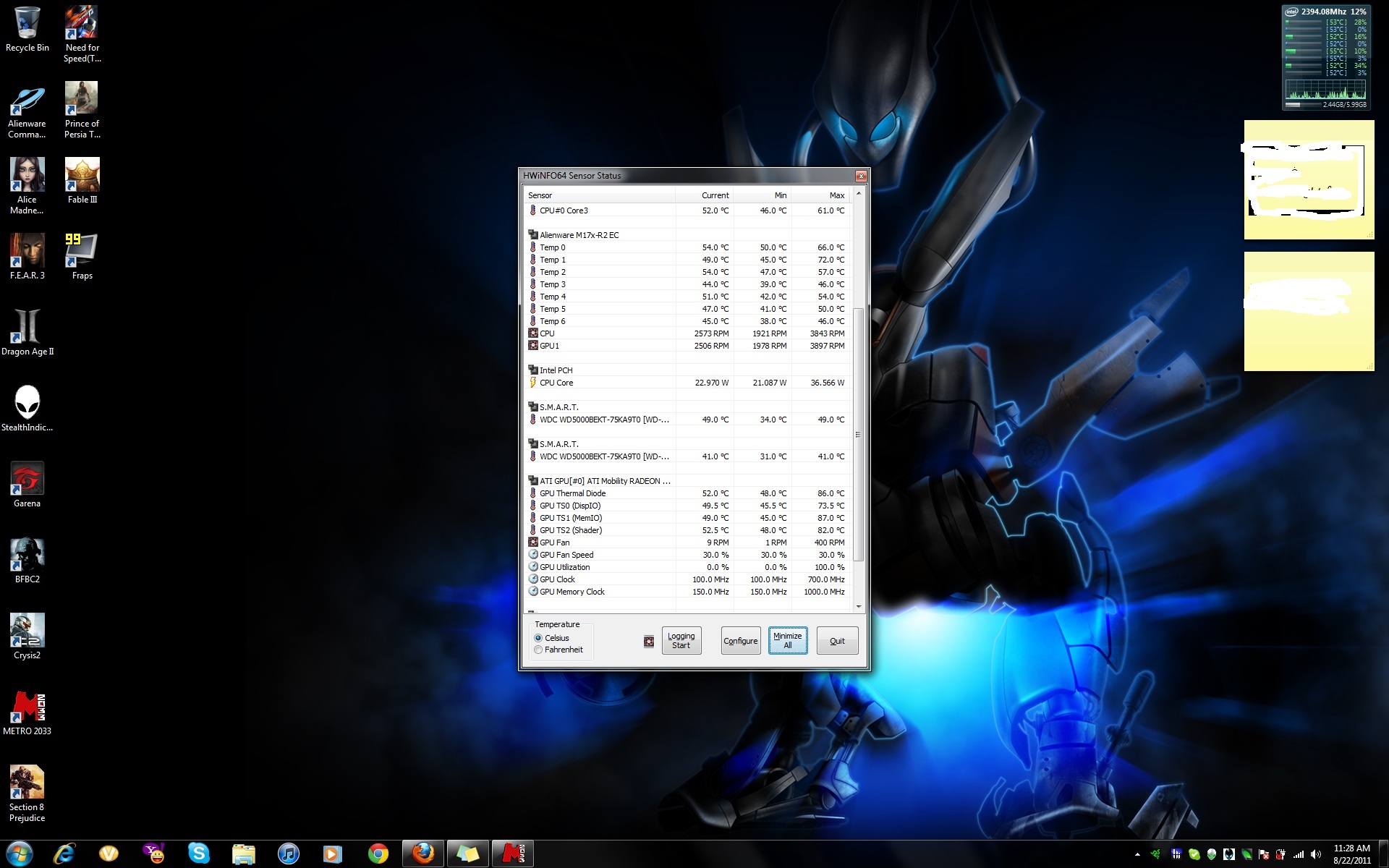
Currently Im still using the single HD5870M, when I'm playing Metro 2033, it stated in the HWinfo64 that the GPU reach 86C!
is that a normal temperature for this card?
and one more thing, at the M17x-R2 EC section, it is stated that CPU and GPU1 fan max at 3800+rpm, but when I looked at the ATI GPU section, it stated that the GPU fan max rpm is only 400RPM.
Is there something wrong with this?
I attached a screenshot of HWinfo64 so that you guys can make some refence.
Thanks a lot in advance guys. Hope to get your help for a newbie like me.
Laptop Forums and Notebook Computer DiscussionAttached Files:
-
-
Yah that is normal a repaste and repad will drop them some. The fan is not an issue because GPU1 is showing the actual RPM of the fan while the one under the GPU section is never accurate.
-
Thanks Mkelliny, glad I didn't have problem. Will do it soon.
+1 rep for helping me.
-
Wow, the dell tech just left, and he sure did a number on my spotless system.
Alright, this is forgivable. Stuff happens.
![[IMG]](images/storyImages/th_IMG_3350.jpg)
Now I'm irritated. Did he not think I would notice?
![[IMG]](images/storyImages/th_IMG_3351.jpg)
LCD wouldn't close right, so I noticed this.
![[IMG]](images/storyImages/th_IMG_3352.jpg)
A nice crack in the chasis. It looks minor, but I think you'd be surprised how flimsly the whole unit feels with this.
![[IMG]](images/storyImages/th_IMG_3353.jpg)
There are a lot of misc screwdriver marks all over the place also
-
Wow jay I feel bad for you, my tech broke the hinge on the led/power panel where the cable connects from the motherboard to the panel. Without this crucial connection the system cannot power on so I don't even know if he fixed the original problem nor do I know what else he screwed up. I guess the rep who I first talked to who advised me to sent it in to depot right away and not deal with the techs was correct. I thought having a tech fix it right away instead of waiting a few more days was better but now I'm without a working notebook for 2 weeks instead.
When you inevitably send it in to depot make sure to write on the piece of paper that you want them to replace the parts that have scratch marks left by the tech and a new keyboard heh. Oh and I bet he lost some screws too, my techs did. -
Thanks for the advice. I talked to the tech who caused the damage, and he was acting oblivious to the damage he caused. Just kept denying it. Whatever, it's already done. Seemed like a really nice guy too, I'm just thinking that working on pricey computers is not his thing.
I emailed the Alienware rep I spoke to earlier about it and told him that I was willing to have it sent to depot. Waiting for a response back.
I'm crossing my fingers that they can make it like new again. The last thing I want is a plasticy R3 to replace the aluminum sexyness of the R2
-
My motherboard has a slight quiet tone when its plugged in and turned off. This is a new mobo and set of gpu's. Was there ever a solution to this? I remember reading about this before.
Does it with the battery too. F it, battery is staying in. I just spent all evening taking the system from stock to were it is now. Had to replace the screen, gpu fans, cpu, optical drive hdd, gpu retention mod, and palmrest. Im spent.
Looks like another call to Dell and another evening tearing apart my laptop to make it stock. This thing is almost perfect except for the mobo squeal which in turn indicates the battery being drained. Plus its annoying.
And to think I just replaced a bunch of new stuff Dell just destroyed. My screen is mint! I just need to redo my gpu paste and pads. They get too hot.
I feel like Im chasing a unicorn
-
Hey, DR, I heard that unicorns are not good techs so leave him alone and take a look at this thread if this is what you mean
http://forum.notebookreview.com/ali...-all-different-noises-finally-resolution.html
Hope it helps
-
Hmm, I have the transistor off error and 5150Joker says to replace the GPUs, I may repaste tonight see if that helps, my Master gets to hot as it is. If not I'll call dell to try and get some new gpus. If that doesn't work, maybe a mobo
-
If you do a repaste, just give it a try with laptop off, without the gpu's installed and with the power cord connected. If it does it, you can rule out the gpu's as being the source of the noise.
-
Very true, I might do othat tonight so that I can narrow it down. Then put on some nailpolish and see if that quites the sound.
-
Update (See about 10 posts back for damage pics)
I took my Alienware M17x to the local computer shop that sent the tech to work on my computer and pointed out all of the defects in the machine caused by the tech. I made it clear that I did not want him to get into any kind of trouble for the damage, just to chalk it up as a learning experience. I was told that this tech was new, which I kind of figured.
Anyways, it sounds like they are going to make things right. I left the computer with the computer shop for a couple hours, and they contacted the Alienware support to order all of the replacement parts necessary. I should be receiving a call tomorrow from Alienware to finalize the service call, and the parts should be sent out. I was told that the tech experienced in Alienware computers would be the one working on my PC.
I'm crossing my fingers. I want to avoid the Dell repair depot if possible.
On another note, my computer is completely unusable as it is right now. Not only did the tech fail to hook up the lights for the keyboard, touchpad, control panel, and speakers... but somehow he managed to forget to re-hook up my GPU fan >.< . -
Wow what a terrible tech.. how does he still have a job? Aren't they trained? Guess I'll send it into depot from now on..
-
To have it treated like a football?
If you know you can dismantle your laptop I would ask the tech to let you do it or if you see that something goes wrong just tell him.
You were the one to pay for it and are going to wait for parts in case something breaks, not him! -
guys, i want to be an alien too
but i have some questions before
i hope you wants to help a ambitious little earthling which is looking at the sky,seeing an ufo and wants to buy it lol. so
(after some research in the forum)
my plan is too buy an r2 with 1920*1200 display but 1 5870m for 1600 dollars
then sell the 5870m and buy an 6990m.replace the 740qm in it with the 940xm
.....then how unforeseen...overclock them:yes: :yes:
so where can i sell the 5870m? where to buy 6990m?
then is the 1920*1200 screen an ips? seems like it.i dont know the name of it.then...
i see the 940xm for example just go up to 2,4 ghz for all cores
how do you guys manage to oc so that all4cores works with over 3ghz? i mean usually 1core goes up to 3,3ghz but 4cores to 2.4ghz in the 940xm. so when all cores working with 3,4ghz in 940xm means 1cores goes up to 4,3ghz? like that?
then i dont think ill use 2cards in it so the r3 gets interesting but the *1200 screen is too inviting (no matter how fast your system is if you have a much worse display you dont see much differenz i think)
an i7-1 with over 3ghz isnt going to bean bottleneck anytime soon right? so r2 rules cause
i think we see amd 7xxx in both r2,r3 cause both mxm b3
and i still have the option for 2 of it then.
-
No, they aren't specifically trained.
As a matter of fact, Alien where (Dell) outsources their onsite service to different companies all over the world. Those technicians are NOT Alien where employees, but work on laptops every single day, and learn as they work. So basically, if it's the first time they touch an Alien where when they come to you, they will learn from there. Usually, they are more than savvy; you might just get unlucky and get a clown to work on your jewel...
As for returning it to the depot, this would be my last call, as I would not be there to see what's happening.
In my case, several tech needed to come to fix my brick, and everytime one of them came here, my rig was already opened and ready to receive the piece of hdw they were coming to replace. Only then I would let them put all back together...
*OFFICIAL* "All Powerful" M17xR2 Edition Owner's Lounge - Part 3
Discussion in 'Alienware 17 and M17x' started by BatBoy, Dec 6, 2010.




![[IMG]](http://s485.photobucket.com/albums/rr213/Jaydizz86/Mobile%20Uploads/?action=view¤t=IMG_3350.jpg)
![[IMG]](http://s485.photobucket.com/albums/rr213/Jaydizz86/Mobile%20Uploads/?action=view¤t=IMG_3351.jpg)
![[IMG]](http://s485.photobucket.com/albums/rr213/Jaydizz86/Mobile%20Uploads/?action=view¤t=IMG_3352.jpg)
![[IMG]](http://s485.photobucket.com/albums/rr213/Jaydizz86/Mobile%20Uploads/?action=view¤t=IMG_3353.jpg)


