Problems? See this thread at archive.org.
The R2 - R3 choice is basically up to you.
Now to try and cover some of your concerns :
Some of those high CPU numbers were achieved with additional cooling.
The RGBLed that the M17x has seems to be far superior in terms of quality compared to the R3 (not saying that the latter is bad either)
With the R3 you get latest tech if that raises any interest for you but you loose on build quality: R2 aluminium body - R3 plastic
As for new GPU options, as you mentioned the 7xxx series, yes they'll physically fit but provided there's BIOS support for them. Which one will never know until testing is made or they're officially supported.
If you want almost the best of both worlds there's the M18x, the real successor of the M17x R2.
-
-
first of all thank you.
whats important for me. you now where i can sell the 5870m?
as long as there is no bottleneck 3ghz with i7-940xm is ok. honestly
ips to tn,alu to plastic then xfire to single....for such a higher price alien,
is a shame i think.the little not even 20 % cpu update in games
940xm to 2820xm is not covering for these serious losses, is what i think.
i believe in the guys here for compatibility of 7xxx cards.
the m18 is abit too expensive for me and does it have 1080 pn too? -
I'm sure you can sell that 5870, it all depends on the price. You can post it in the NBR marketplace(when you'll make a few more posts on NBR), e.bay etc.
Yes, the M18x is 16:9 too
And I agree with, hence for keeping both
-
Guys, sorry another silly question here since this is my first time handling a laptop's GPU, do I need to apply a new thermal paste if I bought a secondary HD5870M, or HD6970M?
For your reference this is the secondary card that I found for HD5870M on ebay,
eBay - The UK's Online Marketplace
Does that need new thermal paste or plug and play?
Thanks in advance guys.
-
I doubt that you'd HAVE to apply new thermal paste (especially since it doesn't look like they removed the heat sink when they pulled it out).
You may want to apply new thermal paste if you feel comfortable in doing so...some higher quality stuff. I personally use OCZ Freeze, but I know there are several other high quality pastes that people here can recommend.
Just depends..if it were me, I'd re-paste them
Good luck! -
Thanks a million greywolf!
It looks like adding gpu is not that complicated, but maybe I have to be more careful when disassembling the laptop though.
Sorry I would like to rep you it says that I need to spread the reputation first.
Sorry for that.
But I'll do that when I have the chance. -
Definitely repaste it!
Don't wait to install it, reassemble the laptop and have a bad surprise that you actually should've done it when you had the chance
What's done it's done, IMHO. -
I might be repasting it, it's good if I can lower the temperature a few degrees.
What brand do you recommend katalin?
-
Basically it doesn't really matter, there's only a negligible difference between brands.
Personally I'm happy with either the MX-4 or IC Diamond, avoid stuff like Arctic Silver 5(may become electrically conductive over time and cause trouble).
If you find the paste to be too thick to apply, put it close to a light bulb while you disassemble your laptop and it will be easier to apply it(it becomes more fluid). -
Great, thanks katalin!
Will do that later.
I would like to +1 rep but it seems like I have to spread the award around first, same goes to Greywolf, nevermind I will rep you guys later on.
-
You don't have to worry about that, just happy to help
Let us know how it went.
Cheers -
My Bigfoot Killer 1103 came in today along with 6970s. Debating on putting it in now or when my 6990s come in.
-
Do everything together, though idk if I would've resisted
Let us know the results and congrats. -
Hi DR, where did you get the BF Killer from?
I'm interested also on the upgrade -
Hi guys I have few more questions here, LOL sorry for asking too much.
Let say if I am about to add another HD5870M to my laptop, what about the VBios?
Currently I have the latest VBios on my single HD5870m, so how do I check the VBios on another HD5870M that I am about to buy? -
When installed run GPU-Z and look in the BIOS Version section, it should be the 5th row going down.
Ask the seller to send you a GPU-Z print screen of the card. Make sure that the card has a CF port. -
According to the seller the card is a secondary card for M17x R2, which comes with heatsink and crossfire cable as well.
Still didn't ask him regarding the VBios, will ask him soon.
I assume both cards need to have the same VBios before it is connected in crossfire right? -
I think it'll be fine, but if not someone here should be able to save their vbios from their secondary 5870 and you should be able to flash it with minimal difficulty. Let us know if you have further questions
-
Then assuming the card is fine, you should be able to flash the proper vBIOS to it if needed.
-
Well i finally bought one!
RRP'd at £1789 I paid £1100
Alienware M17xR3 : Base Stealth Black 1
Processor : Intel Core i7 Processor 2720QM (2.20Ghz, 6MB, 4C) 1
Display : 17.3in WideFHD (1920 x 1080) WLED LCD 1
Camera : Integrated 3.0 Mega Pixel HD Camera 1
Ship Accessory : English Docs 1
Resource DVD : Alienware M17xR3 1
Memory : 4096MB (2x2048) 1333MHz DDR3 Dual Channel 1
Hard Drive: 320GB (7,200rpm) SATA Hard Drive 1
Optical Drive : Blu-Ray Disc (DVD+/-RW + BD-ROM) Drive including software 1
Power Supply : Alienware 240W AC Adapter 1
Power Cord : UK 250V 1
Battery : Primary 9-cell 93W/HR LI-ION 1
Carry Case : Not Included 1
Graphics : 1.5GB GDDR5 NVIDIA GeForce GTX 560M 1
Pretty happy with the end price, spent 2hours with the rep, he was happy at the end of the call, it sounded like the truth but apparently meant he has achieved his stretch wage this month.
I bought the Mrs a lappy at the same time, XPS 15
That retailed at £890 and i paid £700
The RGB LED screen is suppose to be excellent, she will be using it for Photoshop.
Looking at mid sep for delivery
101 Cameras by Adam Frame by Adam Frame 1 £651.00
Dynamically created cart option for holding royalty skus 1
2nd generation Intel® Core™ i5-2410M processor 2.30 GHz with Turbo Boost 2.0 up to 2.90 GHz 1
English Genuine Windows® 7 Home Premium (64 BIT) 1
OS Windows® Recovery Media Not included 1
1 year of coverage included with your PC 1
No Accidental Damage Protection 1
DataSafe Online Backup 2GB - 1 year licence 1
Microsoft® Office Starter: reduced-functionality Word & Excel w/ads. No PowerPoint or Outlook 1
McAfee® SecurityCenter 15 Month Subscription 1
15.6"(40 cm) FHD B+RGLED TL (1920x1080) 1080p with 2.0 Mega Pixel Integrated Camera 1
4096MB (2x2GB) 1333MHz DDR3 Dual Channel 1
8x DVD+/-RW Optical Drive 1
500GB (7,200rpm) Serial ATA Hard Drive 1
Mobile Broadband Module - no SIM card included 1
6-cell 56Whr Lithium Ion battery 1
Internal Backlit UK/Irish Qwerty Keyboard 1
1GB NVIDIA® GeForce® GT 525M Graphics Card 1
Intel® Centrino® Wireless-N 1000 (EUR) 1 -
My 6970's worked like a charm, really happy. Not much for benchmarks,but Rift really rocks now. Temps good. Ichime is the best.
Anyone need some 5870's -
whats your price man ?
-
Thanks guys, so it is like this?
Let say if the vBIOS of the two cards are different, is it going to boot normally after I have installed them in my system?
If it does, then I only need to flash the secondary card, that if only it is still using old vBIOS, am I right guys?
-
Just rec'd my rig. It's an absolute beast.
The RGB screen is simply stunning.
Specs are in my sig -
Congrats. Now flash the modded A10 bios in my Sig and overclock your cpu 5%
RGB is amazing. Maybe the best part. -
Thought I'd just throw up some pics of my setup since I'm bored
![[IMG]](images/storyImages/dscn1656fm.th.jpg)
![[IMG]](images/storyImages/dscn1658o.th.jpg)
![[IMG]](images/storyImages/dscn1659fc.th.jpg)
-
Awesome setup!
Looks like you're getting things unpacked and set up. -
Yup
, and thanks, finally got my internet up and running. And got the important toys setup and orgainized.
When Wired
![[IMG]](images/storyImages/1459768560.png)
When wireless with N6300
![[IMG]](images/storyImages/1459771096.png)
-
DR650SE:
Nice to see your M17x back among with the living and cuddling up to the M11x. I really didn't know how small those things were until I saw that pic. I gotta say, nice speed test scores. I'm stuck with Cox here in Hampton Roads, and Verizon service isn't to stable down here (between protests and outages).
On a unrelated note, does anybody know where I can find, or is anyone one willing to give up, the cloth bag from there R2? I have went through the normal routes; ebay, dell, and google with no success.
Thanks -
Hi guys,
I have a few questions to be asked here.
I just got a secondary fan from dell, but I still haven't get my secondary card as I'm planning to get it in the UK when I arrive there next two weeks.
Is it ok if I just install the fan first?
I mean without the card, would it harm the system in any way?
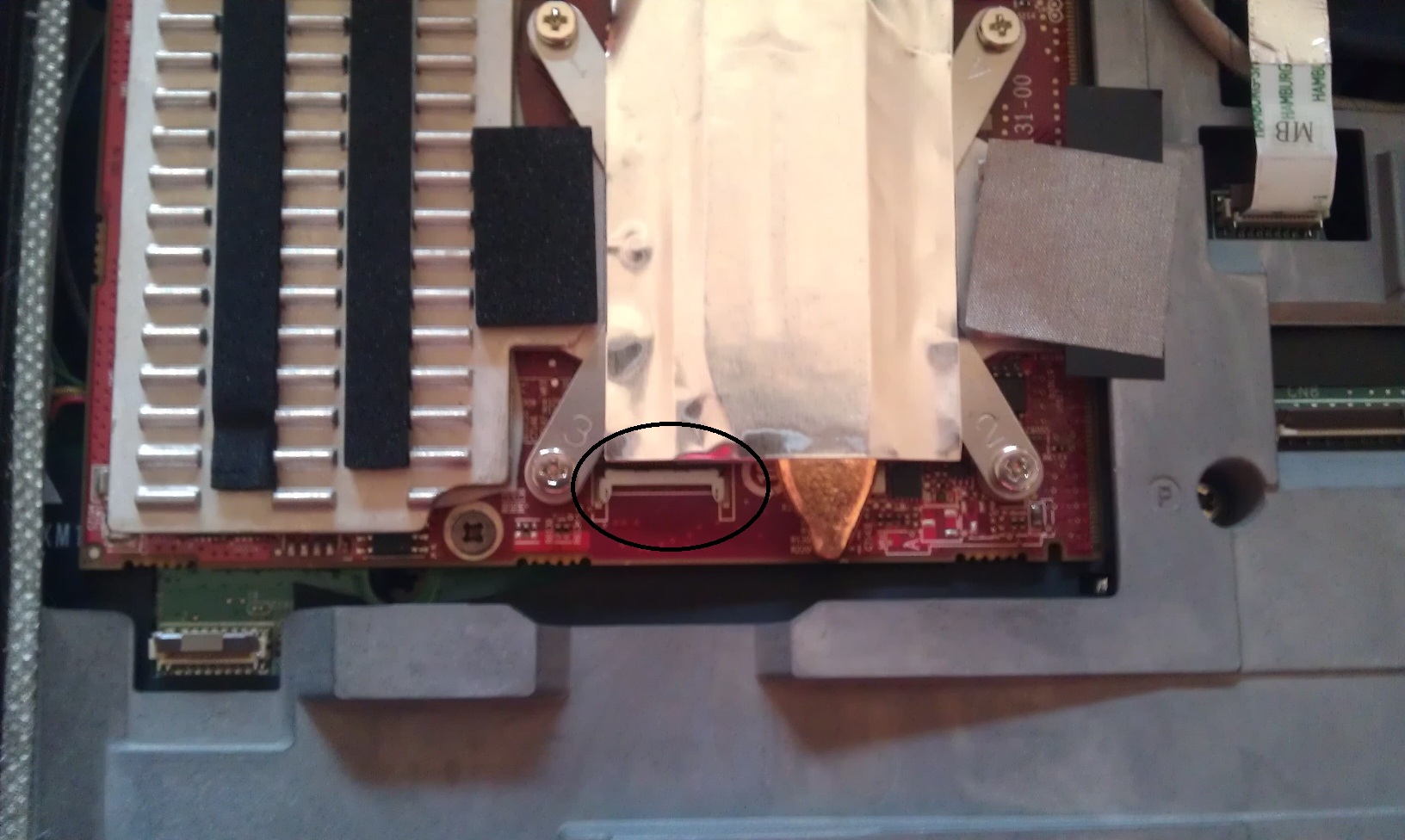
And 1 more thing, below I attached a picture of my primary card, and I would like to make sure the place where the crossfire cable should be attached, is the part that I circled correct?
Thanks in advance guys.
Attached Files:
-
-
Installing the fan without the GPU won't affect the system in anyway, they're controlled by the motherboard and it'll run on idle speed. But why don't you wait for the card to do the job once since you have to go thru the same process for both?
And yes, that's the plug for the cross fire ribbon, make sure you plug it properly so you don't have to go back.
After installing the GPU, resset your CMOS and redo your BIOS settings as they were before if there was anything you changed.
Cheers -
Thanks for the answer katalin, you always give fast response. Really appreciate it.
Forgot to tell that actually I have already installed the secondary fan just now, so if it's okay to let it in there first, so I am relieved.
Regarding the CMOS battery, do I need to take it out when installing the GPU?
What if I just install the secondary GPU without taking out the CMOS battery, will anything bad happen? -
I recommend doing it, you only have to remove the back panel and It's right there near the system fan.
Cheers -
Thanks a lot katalin. Will do that.
I am really grateful there's people like you who is always willing to help.
-
Still lovin my R2!! FINALLY broke down and purchased Crysis 2. Found that my dual 5870hd's do a damn impressive job of playing the campaign on ultra settings with dx11 enabled. Super impressed with my 1 year old laptop.
-
Glad to know that. What average FPS do you get at those settings on 1920x1200 resolution?
-
Actually , I think that the Fan is controlled by the VGA , because when I put 1 HD 5870M in the Chassis , I left the old GTX280M's fan alone , after power on , the fan only ran at max speed for a few second, then completely stop , so is ok to leave it at that , I think
-
The fans are tied to the GPU temperatures for that side. The system bios controls it all though - not the vbios
-
Exactly .
-
I haven't run fraps or anything yet. I will test it out.
On a side note, I read somewhere that Crysis 2 constantly renders water tessellation even when you are in the city streets nowhere near the shore. It just renders the water and the motion of the water underneath the street. You can't see it in game though. There is some kind of mode that shows the rendering of polygons while in game and then you can see the water being rendered under the street. Really weird that Crytek would do that. -
just a quick question... will those thermal pads do the job (5870m)
Phobya Thermalpad Ultra 5W/mk 50x50x1mm - 1x CPU - The Water Cooling Shop
Phobya Thermal Pad XT 7W/mk 1,5mm(120x20mm) - The Water Cooling Shop
i bought both 'just in case"
wich one should i use ? -
Ah good old Crysis 2, that game ran great on the r2. With little Catalyst tweaking I got 40-50 frames on the development edition.
Hey guys I need a favor. Anyone with a black alienware bag that came with the new machine, can you measure it out and get its dimensions? I tried months looking for one and its a no go. I found some really soft cleaning fabric and i figure its time to make one.
Thanks in advance. -
You mean the sleeve, the backpack or the messenger bag, captain?
-
Sleeve that came in the shipping box.
-
Exterior measurements:
L = ~48cm
W= ~33cm -
Thanks katalin i'll let you know when I git the finished product.
-
Is it me, or are the mods (particularly BatBoy) much less active in this forum lately. Been a while since I've seen him around. Though I do hear from him from time to time. I remember back in the day not so long ago, he was prety active. Always with the useful posts, and had lots of patience, where I would tend to throw in some smart A response
. But it seems now days that Mods don't step in here unless they are called into action through post reports.
Wheres our father fugures
hahahaha I enjoyed having them around. Thought it livened things up.
-
I think the Alienware forums are pretty well behaved. But I do agree that BatBoy has been M.I.A. lately.
-
I saw where he posted a brief comment about a week or so ago, but our buddy BatBoy has been sort of a stranger lately.
-
I have noticed that a lot of people are heading towards the route of the M18x. It is not a bad thing, but the newer system does seem to be hogging the attention. Our beloved BatBoy and friends are not exception.
*OFFICIAL* "All Powerful" M17xR2 Edition Owner's Lounge - Part 3
Discussion in 'Alienware 17 and M17x' started by BatBoy, Dec 6, 2010.


![[IMG]](http://img33.imageshack.us/img33/8104/dscn1656fm.jpg)
![[IMG]](http://img62.imageshack.us/img62/7986/dscn1658o.jpg)
![[IMG]](http://img685.imageshack.us/img685/3206/dscn1659fc.jpg)