 Problems? See this thread at archive.org.
Not yet. I only got to use it for 5 hours since I got it. I've been too busy with law school. anyway, I'll still reformat mine next week and redo everything just to make sure that it properly works. I'll post benchmark scores then.
-
-
I think I've read that IC Diamond can scratch your GPU/CPU and heatsink? Is that the case?
-
Yes it can. Will it affect future performance? - probably not. It can remove the markings on the die and scratch the surface of both heatsink and die. Obviously, part of the 'job' of thermal paste is to fill minor imperfections in the surface of the die and heatsink to maximize surface contact and aid in optimal heat transference, so you could argue that the 'next application' of thermal paste would 'fill' any scratches made by ICD during removal. Some users of it seem to use a specific method for removal that limits this abrasive action, however, personally, I feel that there would be alternative products that cause zero damage that would perform pretty much 'as good' as IC Diamond. Have a look at this, and make your own mind up if you want to use it:
IC Diamond warning
http://forum.notebookreview.com/har...upgrades/675601-ic-diamond-thermal-paste.html
Whilst ICD does perform very well, I would not want to damage my stuff in ANY way, shape or form....just for possibly the sake of a couple of degrees cooler than an alternative 'non-abrasive' thermal compound solution. -
The latest thermal compound comparison Thermal Compound Roundup - February 2012 | Hardware Secrets
-
Wow, those guys did some extensive testing, makes me chuckle that they even bothered to test things like mayonnaise, chocolate, toothpaste, lipstick, butter and even diaper ointment as thermal compounds! - WHY????
 - I mean, I know there are some dumb people out there, but who in their right mind would grab a tub of butter and decide to repaste their computer with it!! - man, they must have been bored
LOL.
- I mean, I know there are some dumb people out there, but who in their right mind would grab a tub of butter and decide to repaste their computer with it!! - man, they must have been bored
LOL.
More craziness:
Last edited by a moderator: May 12, 2015 -
You have suggestions on which paste to use and pictures?? -
I've never had any issues with it scratching anything. If applied properly, and not excessively, it works perfectly. The only thing I could think of that would cause scratching is if you rub the heat sink and the GPU back and forth while pressing, which is NOT how you want to spread paste.
-
I have no clue what quantity is required to repaste the CPU & GPU once? There are 1.5g, 5g, and 30g options.
Also what happens if applied excessively? Will it just run over and can one just wipe off the squeezed out bit? -
The 1.5g tube is plenty. Depending on how much you use, I bet you could get at least 3 uses out of it, maybe more. Check YouTube for methods of applying and spreading.
-
Is it really necessary or only if you over clock?
-
If the factory applied thermal compound is doing a good job of keeping temps in line, I would not fix something that is not broken
-
Usually, 85C or more for GPU's and 95C or more for CPU's is concerning. At that time, I would re-paste. Some may argue 90+ is normal for CPU's, but I personally dislike seeing anything in the mid to high 90's, so, I may re-paste more often than others. I also dislike seeing anything above 80C in GPU's.
It is basically user preference when it comes to re-pasting, until the heat is causing performance issues. Just keep in mind: if done properly, it can only help. -
I read ppl who repasted their AW17 never broke the default temp throttle set by Dell.
-
Yeah, me too. Someone earlier said they never got above 71C during a benchmark, which is impressive.
-
We need actual results, not just "I read" and "Someone said" - Anyone who has actually done this, can you post here please?
N -
I downloaded SpeedFan, but have no idea how to use it. It doesn't seem to show the AW 17 fans in the configure menu. Does anyone else now how to use this or another fan program that should work on the AW 17?
-
Search through this thread. I saw it here on this forum. It may have been in the Gaming forum.
Here's one: http://forum.notebookreview.com/gam...032-do-i-need-repaste-780m-3.html#post9285407 -
But thats not on an Alienware. Thats a Clevo. We need somebody to try it on the alienware 17s and 14s (and the 14 is pretty tough to disassemble to the heatsink level if I read the service manual correctly)
N -
That doesn't really make much of a difference. The thermal paste will lower temperatures, no matter what, if applied properly.
-
I used to use hwinfo32 to set the fan control but it is on my R3. My AW17 has not arrived yet, so I'm just giving ideas.
-
At standard clock, on the games I am playing (and in this English heat wave!) I am never going over 74 after using EVGA to raise the fan temp to 77. On the CPU I am max 81. That seems okay to me and in well below your limits?
-
Yeah, that's perfectly fine in my opinion. Just keep an eye on them. Most often, re-pasting is required at least once every 2 years. Some people do it once every year.
-
Sure it does - depends on what Alienware uses on their CPU/GPU.
While I agree that the change will lower temps, the question is, is the drop worth the effort? A 10-20 degree drop is HUGE and well worth the effort to disassemble and reapply the paste. A 1-3 degree drop, in my opinion, not so much (especially on 14s that are hard to get to).
N -
You will see more of a decrease in temperatures with the 14 than you would other devices, simply because it has an inferior cooling system. You will see, at the minimum, a 10C drop in operating temperatures. The temperatures are already high enough that a re-paste would make quite a significant difference. Other variables also play a part in this, like ambient temperature.
I'd be willing to bet a tube of IC Diamond (1.5g) that you will see a 10C drop in operating temperatures, as I have several times. Of course, it must be done properly! :thumbsup: -
Ok, I downloaded that. How do I find the fan control. I found the fan in devices, but it doesn't give much info:
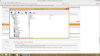
-
Can you click the sensors icon? When you do, it should look like this one:
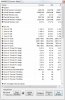
The fan control is the small icon between Reset Min/Max and Logging Start. -
Well, maybe I'll be the guinea pig for this....I have a 14 arriving today. I got it after I sent my 17 back since it wasn't really worth the upgrade from the m17xr4. I wanted to try a 14 and see if I could adapt to the smaller system as my main PC.
I'll see how the 14 is temp-wise, though. It is a bear to disassemble... -
My sensors don't look like that unfortunately. Thanks for your help anyways. Maybe something like the system bios needs to be unlocked or updated:
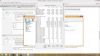
-
Just a guess, are you running in iGPU mode that is why the fans don't show?
-
No, I'm in discrete mode only. Either way the system has two fans and should show the CPU fan. I think Dell locked fan control with their bios for some reason. Maybe with A01 update it will unlock.
-
Sounds good, bro. It can be a pain, but I imagine it becomes quite easy after a bit. It's a small system, so you'll get into the guts pretty quick.
-
Okay man, thanks for trying!
-
The fan speeds don't show until the fans actually kick in. I tested it on mine, during light use like browsing the internet the fans never come on, so it won't even list the fans amoungst the sensors on HWInfo. As soon as a I ran P95 or Unigine Heaven then I saw the fan speeds listed with the corresponding RPM value. If that's what you're referring to, then that could be what you're experiencing. EDIT: ah yes, I see what you mean, the fan icon is missing. Yes, I think you just need to wait for a new version of HWInfo that supports the A17.
-
I'm not sure if Mumak, the author of HWiNFO has added manual fan control for the new machines just yet.....could be wrong, though....his post over on T|I seems to suggest similar: Alienware Fan Control - Page 93
He posted Today:
-
Guys whats is the name of the software to save the lincense for win 8..
I tried to update to 8.1 and an error occured and i will make a clean install later on... -
Cool, thanks for that info. I'll hang on to the program and wait for an update then I guess.
-
I believe it's Advanced Tokens Manager.
-
Hey guys just wondering what the best nvidia properties settings should I have whilst overclockih for benchmarks? I'm not too familiar with all the anisotropic and antialiasing terms and when I read about it online it confuses me more. A screenshot of someone's setting would be awesome.!
-
Please can someone with a new AW17 do me a favour and check this thread http://forum.notebookreview.com/alienware-m17x/725105-alienautopsy-system-history.html and tell me if in their alien autopsy they see the same thing. Getting around 170 event warnings with no idea why! Doesn't seem to be affecting my laptop but would be nice to know if it is just me so I can then decide if I need to talk to AW about it
-
Have you checked Windows Event Viewer? - some of these messages are just windows letting you know that something has started or stopped. Have a look at it, it's divided into categories: Critical, Error, Warning & Information - see if you can see some kind of correlation.
-
Just found in event viewer - error code 1001 - it calls it information in there. (defined as An event that describes the successful operation of a task, such as an application, driver, or service. For example, an Information event is logged when a network driver loads successfully. )
So why would Alien Autopsy give me a big fat orange exclamation mark for information! -
That is awesome. Sounds like it is working more similarly to the 18 except for one GPU, which would be a nice enhancement.
-
Just a quick question - does the AW 17 have a SPDIF optical audio output on any of the headphone ports? It seems to say so on the alienware site, but wanted to be sure
-
The m17x r4 has SPDIF. I don't see it listed for the 17. Maybe it has to do with the new Dolby Digital v4 software.
That was my first thought, but it seems to be a glitch. Implementing the 18's manual switching in the 17 would be nice. -
Ooo, that's a deep question! The simple answer is to leave the NVidia Control Panel settings (which is what I think you're talking about), at the default settings, i.e. don't change anything. But if you're interested about what all the graphics settings are then here's some 'interesting' reading for you:
TweakGuides.com - Nvidia Forceware Tweak Guide
Just follow the hyperlinks to all the terms you don't understand or want to know more about on there. -
Here's where I got it from, under tech specs of the new 17.
Audio and Speakers
Internal High-Definition 5.1 Performance Audio with Dolby Home Theater v4 Software (Standard)
2.0 Speaker configuration
Audio Powered by Klipsch®
7.1 Digtial Audio out using HDMI out connection or S/PDIF Optical port -
Yea, but I don't know what is causing it, as I'm sure it's not supposed to be like this on the AW 17; but on the other hand I'm not sure I want to fix it. I kind of like not having Optius as I get either great battery with the IGPU or Extreame performance with Dedicated mode. Who needs that inbetween that Optimus gives
-
anyone still having wifi issues? my wifi reception is only low on this alienware laptop. my toshiba and other dell laptop seem to have normal high wifi connectivity, but mine has low connectivity. I am in the basement on the opposite end of the house as the router, and i usually still get high wifi reception (4-5) bars. i can't access my router menu, called my cable service provider and they were useless. the problem lies in my AW17, not my network. i am only getting 2-3 bars. If i move closer to the router, i get better service, but this is stupid. i didn't buy this laptop just to be forced to get good wifi only in the same room as the router. internet browsing is fine, it's the download speeds that are really suffering. another forum user was helping me out a day or two ago, and we only got as far as the router menu, but thats a no go as for this time being. is there any other fixes i can do?
-
You using the Broadcom 4352?
-
Wh00t, you can control the fan on the Alienwares? Both CPU and GPU independently?
I thought fan control was only possible on MSI machines..
*OFFICIAL* Alienware 17 Ranger (2013) Owner's Lounge Thread
Discussion in 'Alienware 17 and M17x' started by Mr. Fox, Jun 12, 2013.


