 Problems? See this thread at archive.org.
I have done as you said but it didn't seem to work - I can see it in the "startup" part of task manager in windows 8 but it doesn't run
-
Wasnt the case with mine when i got it. I was getting high 80s on CPU. When i wwent to install an msata on it, i had to take out the heatsink and noticed thet the CPU had thermal paste on only 30% of its surface area. So no wonder i was getting those high temps lol. Applied thermal paste and I am getting 70-75c on CPU while gaming/benchmarking.
Gpu is on a whole other level. I think i have never hit 70c while gaming/benchmarking. -
My CPU on OC is getting up to 78c most of the time lower and my GPU is 70 or so. I may open up and repast mine also can't hurt.

-
Just open NVIDIA Inspector once you've finished rebooting and check the temperature target.
-
70 isn't that high is it? Think mine maxes out around 74
-
The new Nvidia cards can run up to 90 degrees no problem but people just like having peace of mind that they aren't getting too close to the cards max temp. I find that my CPU often runs hotter than the GPU when benchmarking, although since repasting my CPU temps have already dropped by 4 degrees and with Attic Silver 5 they say it takes 200 hours of break in to determine final results so far so good
-
Hi, i recently baught the r5, but i took only the screen as an upgrade^^. i wanted to know if someone can tell me what is the label of the ram module ddr3l so i can afford 8Gb more. And if someone has alos experience on SSD, if the Samsung 840 serie 500gb is good enaugh as my old F120 who still work perfeclty
Thanks! -
I just installed a Samsung 840 500g works great.
-
-
Thanks for the answers,
Is it a problem for performance on timing if i put 8gb kingston with 8gb origin from alienware? ( Even if both are ddr3l 1600hz ) -
It shouldn't be as long as the memory is "Plug and Play." Keep the packaging, though. You may need to return the memory. I've heard of a few members on here trying to upgrade and the system just won't accept it.
-
You cant mix low voltage ram with normal voltage ram - if the Kingston is Lo-Vo, too - and the same clock speed, should be fine. Of course, the ram will default to the lowest clock speed and loosest timings....
-
Was wondering today... I installed 95% of my games on the standard 750GB HDD that it came with. A couple are on the 256GB SSD and I recently added a 1TB hybrid. Would it be worth the trouble and hassle to re-install all my games from my 750GB over to my hybrid?
-
If the game is not data streaming I don't think it'll do much of a difference (by data streaming I mean games such as World of warcraft that constantly load up new stuff)
Loading times and the installation itself would be faster though. -
Ahh... So no actually gaming improvements other than loading times. Not worth it then,
-
Yep, i read it too, but i think the problem was because someone try to mix up ddr3L with ddr3. I think it should not be a problem adding ddr3L. I hope...^^
And yes steviejones133, i thaugh too, hope i will stay with same timing as preconfigured with the system than loosing some speed, that will be not fun for an upgrading
i can upgrade it only in september as my computer is coming home the same day when i take a plane.. :/ -
Yeah, do NOT try mixing DDR3L with DDR3 - mine refused to POST until I removed the DDR3 I was trying to add. It would have been nice if it just ran all of the ram at DDR3 voltages, but oh well...
In fact, I think I may have been that "someone", unfortunately. -
Ok thanks for the confirmation, i will take a try with ddr3l, but thats weird that ddr3l cant afford ddr3 voltage. I hope its not like another 'security' from dell as the gtx780m with throttling issue :/
-
It's most likely that the SoDimm slots on the mobo cannot operate different memory at different voltages at the same time...
-
I understand that completely. I just wish the failure mode was "run all slots at 1.5v" instead of "run all slots at 1.35v, causing the 1.5v ram to fail post", if that makes any sense.
-
Fixing to join the club .. was hesistant but decided to pull the trigger on an entry level if it works out I will gift it out and then pick up a gussied out Alienware 17 for myself
Orderd Aug 1 went into "production" the same day .. ETA changed from 8/19 to 8/22
Here are the specs (In hindsight I wish I would have got the 770m) but i hear the 765m is no slouch, Coming from what I had in my laptop before it should be a major leap)
I figured I could pick up an SSD myself for cheaper then I would have gotten from Dell.
Alienware 17 Base
16GB Dual Channel DDR3L at 1600MHz
NVIDIA GeForce GTX 765M with 2GB GDDR5
750GB 7200RPM SATA 3Gb/s
Windows 8 Pro, 64-bit, English
Slot-Loading 8x SuperMulti Drive (DVDR/RW)
Broadcom 4352 802.11 ac 2x2 and Bluetooth 4.0
8-cell Lithium Ion (86 wHr) Battery
4th Generation Intel(R)Core(TM)i7-4700MQ processor (6MB Cache, up to 3.4GHz w/ Intel(R)Turbo Boost)
17.3 inch (439.42 mm) WLED FHD (1920 x 1080) Anti-Glare Display
On the advice of a few people I know that have had Alienwares good and bad experiences the consensus was to get the "extended warranties" as there is speculation that they put better parts into the builds. Probably a waste of money but I did opt for the 2 year warranty/2 year accidental damage.
This is replacing an old gaming laptop honestly this laptop until recently (gpu fan going out) has been very good to me. I can run a lot of games in full or med/high settings
DON"T LAUGH this rig works for me and will have a place in my game room until it dies
Operating System: Windows 7 Ultimate 64-bit (6.1, Build 7601) Service Pack 1
System Manufacturer: Gateway
System Model: P-7805u
BIOS: Ver 1.00PARTTBL
Processor: Intel(R) Core(TM)2 Duo CPU P8400 @ 2.26GHz (2 CPUs), ~2.3GHz
Memory: 8192MB RAM
DirectX Version: DirectX 11
Display Devices
---------------
Card name: NVIDIA GeForce 9800M GTS
Manufacturer: NVIDIA
Chip type: GeForce 9800M GTS (Cuda 1GB)
DAC type: Integrated RAMDAC
Display Memory: 4069 MB
Dedicated Memory: 997 MB
Shared Memory: 3071 MB
Current Mode: 1440 x 900 (32 bit) (60Hz)
Monitor Name: ACER AL1916W
Driver File Version: 9.18.0013.1070 (English)
Driver Version: 9.18.13.1070
DDI Version: 10
Driver Model: WDDM 1.1
Driver Attributes: Final Retail
Driver Date/Size: 12/3/2012 09:47:14, 18045968 bytes
WHQL Logo'd: Yes
Now to play the waiting game, 15 days to the ETA date of 8/22. -
Enjoy your new system.
-
Thanks looking forward to it I will say if you ever want time to slow down to a crawl then order a custom system. the last 7 days have felt like a month LOL.
If you don't mind me asking why are you selling your AW 17? I only ask because well I just bought a lowered spec one
-
Hey i have just received my new alienware 17 with 770m graphics card and i seem to be maxing out at about 4900-5000 on 3d mark11 and on the tests my fps are a maximum of 30 i have updated bios and graphics card drivers am pretty new to this kinda stuff so if you can dumb stuff down abit that would be cool thanks.
-
Planning to get an Alienware 18. There's nothing wrong with the 17, I just want more power.
-
If it plays the games you like well then its good. :thumbsup: Don't get caught up in the benchmarking unless you want to be spending all your time and money chasing numbers.
I just worry how my games play. -
Hi every one,
I have a quick HDMI out question if any one knows the anwser.
When i plug the laptop into the TV, the laptop will auto-detect and send the picture to the TV no problem. But if i change channels and return to the "video channel" that the laptop is plugged into, it will not send the picture to the TV. The laptop doesnt seem to detect the tv any more.
I had a M17 R4 for a couple of weeks and this issue wasn't present. I had the same TV and HDMI cables.
Some one told me to change HDMI cable. I did try, but it didnt do anything.
Any ideas ?
Also, is there still equivalent to the R4 combination of "FN+F6". I am looking for the function to switch between the various external display options available either simultaneously or separately.
Thanks for any help !!
And thx for the all the input in this owner lounges !! -
Hi, that seems like a pretty good score for you and the GTX 770M, it's in line with what you should be seeing. The following link is a description of the 770M, and shows the performance results from benchmarks & gaming, so that you compare it to what performance you're getting:
NVIDIA GeForce GTX 770M - NotebookCheck.net Tech
I have the same card, albeit it's called a GTX 670MX, but it's the same chip, and it overclocks really well. If you want to see higher scores & more fps, then try overclocking it, but you'll need to flash a modded vBIOS if you want to go higher than +135Mhz on the core speed.
True to a point, but benchmarking is a way to prove that you're getting the performance you would expect for any given GPU, which equates to your card being able to get the frames you should be seeing in a game. -
http://item.mobileweb.ebay.com.au/viewitem?sbk=1&nav=SEARCH&itemId=300943410455
Hello Alienware fans/owners
Today I just bought my first bright new shiny alienware m17x r5 and I already have a question which way to go about it..
The r5 comes with 2x750gb hdd + 64gb msata ssd storage.
I would like to get a Samsung 840 PRO 256gb SSD. But I don't wanna loose one of my 750gb hdd space
So should I just go with an Intel 554, 240gb mSATA SSD?
I would also like to run win7
Any other options? -
NVIDIA GeForce GTX 770M video card benchmark result - Intel Core i7-4800MQ,Alienware 068R5X
So I just got my AW 17 yesterday. I've noticed my physics score is massive, I believe it may be the highest on 3dmark so far for the i7 4800(yes I'm aware it's still a new CPU). But what gives with the low 770 score ? Ill be getting my 780 tomorrow. Free upgrade. I'm hoping to get some better scores with it. I've been reading around about throttling issues and whatnot but ill deal with that when I get my 780. I did notice this new AW17 runs nice and cool compare to my r3(got the AW17 as a replacement). I'm hoping my 780 does better as the 770m scores slightly higher then my 580m did. Any reasons as to why such a low gpu score ? -
Download NVIDIA Inspector and apply the GPU defaults. Your score will increase.
As ironic as it may be, Alienware -- a company known for their 'high performance' gaming systems -- has limited their GPU's to about 62C for efficiency. This is causing throttling and poor gaming performance. NVIDIA Inspector removes this limitation and allows full utilization of your GPU.
-
i do have nvidia inspector already but i didnt know hitting apply defaults would increase my score? my temps stay low, about 2 hours of crysis2/BF3 and 3dmark a few times my gpu didnt go above 67c. i rememeber on my 580m throttle was 77c. why so low now? ive been reading around about how to remove the throttle limit using EVGA precision x? does it really work? my 780m will be here tomorrow so thats the card that ill have to tweak to perfection...the 770m is basically just practice haha. anyways thanks for the tip about inspector. anything else i should know? also what power state for inspector should i be on? P0?
-
I have the 780M and I did exactly as I just suggested above and my scores are just fine. Also, keep in mind that the 770M is nothing in comparison to the 780M. You shouldn't be comparing the scores and worrying about anything.
And there's no need to use EVGA Precision X if you're already using Inspector, but you can if you want to. I did so and noticed a few bugs and reported them to EVGA, they told me it was designed for desktops, not laptops. So, that's about when I stopped using it.
You should read through this thread. A good majority of this thread is discussion about the 'throttling issues' presented with the AW 17. -
Fn F1 is the screen switch button now. When you change that channel on a cheaper TV I find that you have to reset the cable (It does this on my Vizio, but not my Sony). You could try hitting the Refresh button on your remote if you have one.
-
ok awsome cant wait for my 780m!! i will use inspector. i read through this thread and saw what people were doing, looks like for throttle removal/overclocking a modded vbios is needed, which makes sense. only thing i havent found is where to download this modded bios. maybe i overlooked this?
-
Is there an email for Alienware for warrantys or is calling the specific Alienware number in the warranties book the best way to get a hold of them and go about trying to fix the problem? I have not had a lot of time to use my laptop but my problem is still going on, and now I have noticed when the computer goes to sleep and I try to wake it up from sleep, once the power tries to start up the thing crashes/shuts down the way it does when I cold boot it. This problem is extremely aggravating and defeats the purpose of a laptop and it makes using it as a laptop very difficult when I have no way of putting it to sleep or turning it on reliably. I need to contact them asap.
-
has anyone noticed that the optical drive on the new AW 17 is very loud? and likes to tick/click randomly ? or is that just a defective optical drive that i have?
-
Try to reinstall the Intel HD driver, it controls the HDMI output and might make a difference.
Moreover, check your power settings make sure they're set to high performance. Have you moved your mouse around after changing back to HDMI? It might be sending the display to sleep after being inactive for a while. -
Mine is the same way, if nothing is in the drive it is fine, but if something is in the drive, and especially if you are using it to install or burn or watch something it is very loud.
-
Ok well mine randomly makes sounds when nothing is in it. Is that normal? My R3 never did that
-
Yep, very low score for the 770M, temperature throttling perhaps? You could monitor the temperature & clocks at the same time while benchmarking or gaming to see if the clocks drop at any point.
-
This is where most people are getting the vBIOS for the 780M I believe, and it's also where I got the vBIOS for mine (albeit a different card). Tech Inferno forums / svl7 creates modifies the vBIOS files.
NVIDIA Kepler VBIOS mods - Overclocking Editions, modified clocks, voltage tweaks -
i did check my temps after and it only reached a max of 68c on the cpu. i logged my clocks and they do seem a bit unstable going from about 700-800 give or take. this is very weird. any fixes for this ?
-
with this vbios it removes temp throttle? and enables overvolting/overclocking?
-
So I've had my M17 for a month now and I love it so far but there are some issues that concern me. These are my temps after playing about 30 minutes of Far Cry 3 on maxed settings.
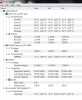
Again this is my first high performance computer and I'm a noob at all this but when I look at the temps on HWMonitor, should I be looking at the value, or the max for temps? This is because the 780M maxed out at 91 degrees which is quite hot right? Note: I didn't do any mods yet but I'm planning on adding the modded vBios soon.
Another HUGE problem I'm having is with the CPU spiking up to 100% all the time. The two games I first played and I still am are Dirt 3 and Far Cry 3 and both of which plays perfectly, until about 30 minutes in the game keeps freezing and whenever it does, it makes a buzzing noise (from the audio not the actual computer). This keeps going on and on so I have to go to task manager to end the game. I noticed on the task manager that the CPU usage spikes up to 100% ever 2 seconds. Even after I end the game, it will keep doing this for about another 15 minutes before it stabilizes at <10% again. I really don't know what this means. The CPU temps when the problem starts are also in the picture above. Please help if you can. Thanks. -
Yep, if you're talking about the 780M, then that's the case I believe from what other users have said in this thread. It will still throttle if the GPU gets really hot (not sure what the default throttling temperature is with the modded vBIOS). And it does enable overvolting & overclocking if you use NVInspector, which I find you have to 'Run As Admin' in order for the voltage & clocks to be applied. Be careful with the overvolting, as that can quite easily damage a GPU. Start with overclocking on it's own at stock voltage & measure clocks & temperatures as you game or benchmark. Then if there's a lot of thermal headroom, and the clocks are not throttling, then you could always gradually try some overvolting which will allow you to reach higher overclocks.
If you're talking about the 770M, I don't know what the temperature throttling behaviour is like on those, as there's not been any reports of the 770M on this thread really, and I don't think there's a modded 770M vBIOS on the Tech Inferno forums either (although I could be mistaken). -
Sounds like you've got a sick laptop, my friend. Couple of questions -
What process takes up your CPU after you exit the game? And what do you use to set your temperature limit?
91C is a bit high. (Higher than I would want my temps after an OC, let alone at stock) I think that might be the cause of your crashing issues - if you can try logging temperature data to a file, you should see the true maximum temperature. (As the computer has not yet crashed when you took this screenshot) Personally, I would not be surprised to see that your card was hitting 105C and doing a thermal cutoff. If that's the case - time to call support, because you have a dead/broken something. (Likely fan controller or fan, and possibly now a sick gpu due to being subjected to that)
Hope you can get this fixed quickly! -
I will reviving my 780m tomorrow so ill be tweaking it shortly after it's installed. After I run plenty of games and benchmarks on it while it's stock.
-
The maximum temperature shown in HWMonitor is probably the most telling figure there. 91 degC is definitely a bit hot for that GPU. Are you using the laptop on a flat surface, not blocking the vents underneath or at the back? If you're not, then it looks like your might have a bad factory paste job on the GPU, unless it's 40degC in your room where you use your laptop. If it is a bad factory paste job, then you can either re-paste it yourself, or Dell will probably do it for you under warranty if you contact them. Even with a good paste job, it's possible you'll run into throttling with the way the A17's seem to be set up with the 780M's, so to fix that if you want to, a lot of those fixes are outlined already in this thread.
The CPU usage is less easy to diagnose from my view point. That sounds like some kind of software setup problem - maybe with Windows or recently installed drivers. I suppose you could restore your computer to a previous back up you've done when it was working without any faults. Or, you could maybe use a System Restore point that was automatically created from a time when your computer was working fine too. -
I'm using the laptop on a glass table so I don't think there is anything blocking the bottom vent and there's nothing behind the laptop to block those vents either. I'll try finding something to put my laptop on top of to let more air through the bottom vents. The room temperature is about 22C degrees.I'll call tell to see why the GPU is getting so hot and the more annoying CPU problem. I don't think a system restore will work because I've been having this problem since day 1. When I got the laptop I installed benchmark software and a few games and just started playing them. Hopefully Dell can do something about this.
*OFFICIAL* Alienware 17 Ranger (2013) Owner's Lounge Thread
Discussion in 'Alienware 17 and M17x' started by Mr. Fox, Jun 12, 2013.


