 Problems? See this thread at archive.org.
i can proudly say im looking to order the new 17" Alienware...........i took gtx780m, 4800MQ i7, True life 120Hz screen............and all the bells & whistles
i think this new design and hardware is the best laptop 2013........yes it is 1000% better then Raze blade pro (because it has way better gpu, screen, keyboard, cooling system......the only thing Razer is better on is the weight & height of course.
for me it was important i got the the 120Hz screen ........cant nearly wait to play in 120FPS on the 120Hz screen
the smoothness and graphics will be mind-blowing.
-
thanks for the answers
THAT'S ABSOLUTELY PREPOSTEROUS! so i can't have a dvd drive i need to change it out with a bay and they are for real saying you can have 4 ssd's but they do't say you will have to get rid of the dvd drive and get an special bay for the extra ssd.. anyway thanks again i know what i'm going to do instead then as i need the dvd drive..
reborn2003 and telcks like this. -
jesus christ...............isnt 2 hard drives enough ????? i have 2 x 750GB 7200rpm + 32GB msata ssd.........exact same set up as with alienware 17 and i have hard time filling them up
and if you want 750GB (or 1000gb more) you can remove your dvd-drive and use that space. -
it's more the quad raid 0 ssd which while give me 1 tb if not less wich is more than enough for me but the raid 0 setup would make it SUPER fast mate i wont fill it with 4 tb harddrive i jsut want the speed.... (=
reborn2003 likes this.
-
Anyone tested the nvidia driver launched in august 20???
Tried to install and it says that my operational system is not supported... Very weird!! -
That's the 326.80. yeah, I have it installed. everything is working great so far. Tried it with BF3, Dirt 3. Far cry 3, Crysis 3, Skyrim, and Arma III [almost every game seems to have a suffix of "3") ] . Never had problems installing it.
reborn2003 and telcks like this.
-
Any improvements???
-
Complete list of all improvements/changes for the 326.80 Beta driver: http://us.download.nvidia.com/Windows/326.80/326.80-win8-win7-notebook-release-notes.pdfarcherarchie likes this.
-
I noticed improvements on Metro Last light, With Physx ON, The game doesn't lag or stutter anymore. I haven't monitored my FPS for the other games since 326.41. But Tayers link above ^^^ should give you a complete list from Nvidia itself.
-
Unless you are constantly moving large packages of data day in and day out, you will never notice the speed difference between quad raid 0 and just a single SSD. (you barely notice a difference between a 64GB SSD cached HDD as well) Also, for the amount of times I use a DVD drive, I would just use an external one if I REALY needed raid 0. I think I used the DVD bay twice since I got the AW 17 in July 14. If you are one of those people that value extreme benchmarking of all systems AW 17 is probably not for you anyway.
-
I agree Iam running two 750 platters in raid 0 with msata cash. Tried it with the ssd as boot found the raid 0 far fast enough. Gives more storage and I can use the ssd for my best games.
Sent from my SPH-D710 using Tapatalk 2 -
Has anyone read the AnandTech | Alienware 17 Gaming Notebook Review review? In one of the pages it says that some of the 780Ms tested have boosts above 900Mhz. No wonder our 3dmark scores are lower.
-
Can one of you guys clarify one thing for me?
Can you map some of the 4 macro keys on top of numpad to function as dedicated volume keys?
Also, if I read correctly some of the last posts, unless I disable the on-screen display for the volume it'll boot me to desktop whenever I try to adjust the volume during games? -
i do not value extreme benchmarks of all systems but i do like the raid 0 ssd setup.. also when i changed my m11x r2 normal hdd into the ssd which only is sata 2 i was pleasently suprised about the performance upgrades and a double raid 0 setup in the new 17 would be awesome as i'm often on the go and i do edit video's and pictures and gaming whise it will perform much better loading faster and such..
i hate waiting.. i disagree with your saying that there will be no diffrence i could feel because it will and while it may not give you better fps it will load alot of things faster.
-
I think I read somewhere, like Toms Hardware, that RAID SSD's don't improve game load time or boot time over one SSD alone. Random reads of small files are slower with RAID 0 SSD. The difference you will see is when moving large files. For everything else other parts of the system would be the limiting factor. That's my understanding from reading on the topic. Actually I found the link to the article I'm referring to, this is a link to the conclusion:
RAID 0: Great For Benchmarks, Not So Much In The Real World - One SSD Vs. Two In RAID: Which Is Better? -
RAID 0 does help with load times. Files are split among drives, therefore, each drive has to load less. As long as all of the drives are of the same brand and are SATA III, you will notice some improvements across the line. It won't be night and day, but you may shave off a few seconds here and there with every additional SSD.
I once watched a video on YouTube of someone putting 24 SSD's in RAID 0 and the system boot time AND the load time of 100 programs was like 12 seconds flat. (I may be off on the numbers, but it was insane.) It looked like an e-bomb on sterioids on the screen with all of the programs loading.
Note: With every SSD you add the chance of drive failure and data loss doubles (in RAID 0).Hearthofsin likes this. -
Some things are speeded up by RAID 0 with SSDs and some things are slowed down. Swings & roundabouts. Large sequential reads is where it's at, everything else is almost not worth considering.
-
Yes you can map the macro keys to volume or other media keys. Mine are currently mapped to Volume Down, Volume Up, Pause/Play, and Fast Forward.
Not sure about the booting to desktop issue, I haven't had it on win8 so far. (though I'm not sure if I ever installed the OSD drivers - which might have something to do with that) -
@Dusk Star i see you have alienware 17 with exactly the specs i was considering buying
! do you mind giving me a short review???
-
Not a problem!
It's been a great laptop so far, no real issues (after uninstalling the audio driver that is), and pretty good performance. Having the CPU performance of a 2600K is really awesome, though the graphics card is slightly lacking. Not poor performance by any means, but less than half the speed of a 780m for instance. You'll be able to play damn near everything on High with no issues, but Ultimate settings are typically out of reach for me. (though I have heard good things about overclocked performance - haven't had the time to test that though) Screen, keyboard and general laptop fit&feel are fantastic, and a bit better than my old r3.
Two things to keep in mind is that the ram is installed as 2x4GB, rather than the 4x2GB in the older models. This leaves two slots open for your own expansion - but be warned they are NOT compatible with standard 1.5v DDR3, and require DDR3L. Also, Dell seems to have removed most of the SSD options from the online configurator - but adding a 2.5" SSD is a piece of cake. Unfortunately, the mSATA drive is not nearly as accessible - it happens to be buried under the palmrest, and requires a pretty extensive disassembly to access.
Finally, SPLURGE ON THE WARRANTY. That really saved me with my r3, and while I haven't had any hardware issues with my new machine the peace of mind is great.
Hope this helps!Hearthofsin likes this. -
thanks for that review mate i also were pretty sure the gtx 765m would be a bit ''weak'' but i was hoping it would be.. a bit better.. to be honest.. it's very future proofed? but then again it uses mxm 3.0 so it's changeable when the 800 series comes out
anyway ! keeping in mind i want to use this for portable gaming only like going to friends house and LAN parties you know is it good to bicycle with for example? or is it killing you hehe ^^
i am aware of the ram stuff.. and the Msata ssd placement and it bothers me and i think it is very wierd.. was going for 32 gigs in it but it's so expensive with the ddr3L ram..... i do have an ssd 128 gb sata 3 lying somewhere thinking about throwing it in the alienware true story that it is easy to put in and will be a great performer..
to sum up some of my questions as they may seem a bit unclear..
1: protability.. does it have it?
2: is it a fine gaming machine if you don't want to max every thing out you throw at it?
3: would you recommend spending more money on the gfx card to make sure it future proofed?
thanks again for the review it was great and i hope you want to answer my questions !
greetings -
1. Portability is fine, I carry mine to class everyday. It is of course a 10lb brick, but with the appropriate backpack it works! Certainly no worse than a textbook. (Though no comparison to a Macbook Air of course)
2. I do a lot of gaming on mine, and it really does excel at that. Again, no maxing out the GPU destroyers like Witcher 2 Ubersampling or Crysis 3 - but you won't be dropping to low settings for a couple of years.
3. I honestly don't know. I don't remember there being as much difference between the 765m and 770m, and going to the 780m costs an extra thousand dollars at the moment. I'm personally waiting for Hawaii to release so I can replace my 765m with something from the red side of the fence again. -
Guys i got my 17 gtx 780m.when i try to update nvidia driver to 320.49 installer says NVIDIA installer cannot continue.my current driver is 311.48.any views guys as am a newbie.thanks
-
Guys, which version of XTU are you using? Setting the oc option in the bios to enabled (BIOS OC Level 1) does not work in my case although I ordered the 4.0Ghz 4900mq. XTU says the multipliers are correctly applied, but it does not show on the stress test (only x36 for 4cores instead of x38).
-
You can try the latest version, which is 326.80. It is working for me.
-
1 ofcourse i know it's no macbook air but that isn't the purpose of it ^^
2 nice so i shouldn't be worried?
3 hawaii in the new 17 sounds good but i'm more into nvidia (= that is just a matter of taste and brand.
thanks for taking the time to answer my questions man !
greetings -
This link will give you all the answers you need for comparing GPUs for gaming performance:
Computer Games on Laptop Graphic Cards - NotebookCheck.net Tech
A quick look on there shows me that the 765M won't run most games from 2013 at Ultra, but can run a few games at Ultra from 2012 and further in the past. It doesn't look good for future proofing with the 765M. If you're buying it for gaming I'd go for the 770M at least, it's 20% faster than the 765M on synthetic benchmarks like 3DMark11, but will probably do way better in games than the 765M as the memory bandwidth is poor for the 765M; also, the 770M will overclock to great effect too if you flash a modified vBIOS, but that can void your warranty if the card dies & Dell finds out about it.
EDIT: In games the 770M seems about 30% faster than the 765M, in comparison to the 20% performance difference seen in synthetic benchmarks. This is because the 770M has 50% greater memory bandwidth.Dusk Star likes this. -
Brilliant, thanks for taking the time to respond.
So you haven't installed the OSD drivers - does that mean you adjust volume 'in the blind'? -
How in the world did you map the macro keys to the volume. Hahahaha I cannot figure it out!!!!
-
Another note, for the Alienware reps, Command Center should have this implemented by default
We can readily assign various functions to the the macros keys (e.g., email, web, media player, etc.), but no ability to assign other system-centric functions like volume up, down, mute and so on
Perhaps a nudge to the software engineers to get this implemented in the next update
-
Hello! I am new to this site and new to Alienware altogether so I am looking for some guidance, I recently purchased an Alienware 17 from Micro Center and have been using it pretty much exclusively to play Final Fantasy 14 ARR for about 10 days now. In these past 10 days the screen has gone black 3 times. It will only go black for a second and the game will come back, it is random when it does it, and the computer always feels very cool to the touch. I have tried updating all of my drivers and the only one that the computer will not install is 320.49 for the GPU. Not really sure what my next step should be, any help would be greatly appreciated. Thank you!
Intel Core i7-4700MQ Processor 2.4GHz
Microsoft Windows 7 Home Premium (64-bit)
16GB DDR3L-1600 RAM
750GB 7,200RPM Hard Drive
NVIDIA GeForce GTX 770M
8x SuperMulti DVDRW Drive
7-in-1 Media Card Reader
Killer Gigabit LAN
Broadcom 4352 802.11ac 2x2 Wireless
Bluetooth
17.3" Full HD Widescreen Anti-Glare LED-backlit Display -
Hey guys, my alienware 17 didnt have the interposer for the second hard drive. I called up dell, and they said they would send me, but they sent me the caddy instead. I saw the part number for the older alienware 17, but I am not sure about this current R5, I think it would be easier to talk to the rep about the interposer if I had the part number in tow.. any idea?
-
What are the temp you see in hw monitor when the system is on idle or with just very little work.mine i see is minimum 43 c & max 61c.is it ok.am new hence have no knowledge.also my cpu fan is quiet when my system is idle but spins continously.plz can you post some screenshots of temps with different conditions.plz guys give me some views
-
I get the (I think standard?) windows 8 volume and brightness change indicators - very flat and metro-y, in the upper left hand corner. And I think I actually did install the OSD drivers, after everything else due to my brightness keys not working. No idea why the alienware OSD didn't take over, but I'm really not arguing. (Running on a clean, not-from-AW win8 pro install)
I just opened up the macro manager, clicked on the key I wanted to set, and hit fn+F7 (for volume down). It shows up in the macro manager as "C", but it works, so....
If you want to, try the macro profile I set up - name should be self-explanatory
View attachment Volume Up Down Pause FastForward.zipbigtonyman and tayer like this. -
Sounds just fine. The fan will spin up every once in a while to drop temps down. That's how a fan table works.
Sent from my Samsung Galaxy S2 running Resurrection Remix -
what is the pros and cons of this?
what you like best about it design and weight?
Any hardware issue so far? If so how is dell Alienware support? -
New Alienware 17 mSATA 64GB cache only at SATA 2 Speed at 3 Gb/s
My Alienware 17 (2013) comes with default mSATA 64GB as cache setting for 2.5 HDD 750 GB. When I opened up the Intel Rapid Storage program to check the performance, I found out the 750 GB HDD operates at Data Transfer Rate at 6 Gb/s, but the mSATA 64GB operates only at 3 Gb/s. I did quite researches and event twisted a few things (like LMP fix), and tried to deaccelerate the mSATA drive, and re-accelerated (re-associated) with mSATA as cache, i got the same 3 Gb/s transfer speed on the mSATA drive.
The default mSATA SSD drive is model as liteon lmt-64m6m which is SATA III, and the mSATA port should be SATA III capable (if not, someone corrects me). The mSATA port is 5 on my system.
Would you please anyone with the mSATA 64 GB cache to check out the running speed? you can run the IRS program to click the performance tab and click the "Advanced" option to check. A screen capture here is appreciated. I want to verify this as I don't think I got a faulted motherboard or something as I received the my 17 system just a few days ago.
Thank you. -
Take a look here. It will give you a better idea.
-
Data transfer rate is 6Gb/s on my 64g mSata click on the 60g mSata not the drive it shows 3Gb/s
-
Thanks.
I think I did click both the drive and the 60g mSata, both shows 3Gb/s. (I will double check again when I get home).
Would you mind post a screen capture?
Anyone else, would you do the same check on mSATA Data transfer rate? I need more people to check on this before calling tech support. -
Hope this file attached..
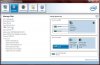
-
Screen is helpful I will have to check out what's wrong with mine. I am hoping that I didn't receive a faulted motherboard.
By thy way, I saw you have 2 hard drives as raid 0, 1 SSD, and 1 mSATA SSD, did you replace your DVD drive with SSD? I thought that 17 only have two drive and 1 mSATA. You do have great drives setup though. -
Yes I replaced the DVD with a Samsung 840 500g for my Origin and Neverwinter games then put the OS and Steam on the Raid 0. I find it very fast on Boot and like the speed and storage over the BluRay which I hardly if ever use. I have the OS on a Dell USB Alienware Tech sent me and backup on Alienrespawn. All in all I'am very happy with the setup. Thanks.
-
Can you check out your IRST version? I am having the latest intel 12.8.0.1016. My mSATA 64 cache still shows data transfer rate as 3 Gb/s. Any ideas what's going wrong?
-
Is the old AC adapter from M17x R4 works with the new model alienware 17 ?
reborn2003 likes this. -
The information I´ve got from a german forum is that Dell puts its own firmware on the liteon SSD that only allows/supports 3GB/s. The solution should be to flash the orginal firmware from the manufacturer homepage.
I haven`t checked it yet and you might have to reinstall the OS and I do not know if you lose warranty after flashing.
Here`s the thread (in german): Alienware 17 und 18 SSD (Firmware) - Limitierung aufheben - Seite 2reborn2003 and yzc like this. -
Does anyone find that the soft touch plastic at the top of the lid is easy to damage? Looks nasty.
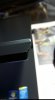
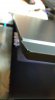 reborn2003 likes this.
 -
Good to know. I will check it out. Thanks.
-
-
Looks like either going into a ruff bag or someone is hard on the edges..
reborn2003 likes this.
*OFFICIAL* Alienware 17 Ranger (2013) Owner's Lounge Thread
Discussion in 'Alienware 17 and M17x' started by Mr. Fox, Jun 12, 2013.


