 Problems? See this thread at archive.org.
Hi there, my Alienware 17 | i7 4700MQ | GTX 770M | 16gb ram finally arrived!
My 3dmark11 score is P5127 : NVIDIA GeForce GTX 770M video card benchmark result - Intel Core i7-4700MQ,Alienware 068R5X
Is that low score ? Can anyone help me how to overclock without update vbios? thanks
-
That's a good score for a 770M! Download MSI Afterburner or NV Inspector to enable you to overclock the core and memory (the core is locked at a maximum +135Mhz limit for overclocking on the stock VBIOS). You could see if svl7 from TechInferno has done a modified VBIOS for the 770M here, which would remove the +135Mhz limit & might provide overvolting support:
BIOS / VBIOS modification request thread (svl7) - Page 7
Make sure you monitor your temperatures when overclocking (GPUz).eL_DoLaY likes this. -
Hello all you good people: :hi2:
Just wanted to say Hi as my AW 17 is currently in production, EDD a week from now. I went for the 4800MQ and the 780GTX so I have been reading about other users problems with a little anxiety: hopefully I get a sorted unit with a decent paste Job: I've never taken the lid off a laptop before but it looks like I may have to this time.
My plan when it arrives is to:
0.5) Put AVG free virus software on there.
1) update the BIOS/Drivers from the Dell website
2)update windows 7
3) install temp monitoring software and GPU benchmark software and use these to find out if my past job is ok.
3.5) put Bioshock infinite and test temps with game on ultra settings
4) ?repaste depending on results (using youtube vids and instruction manuals and hopefully not F@@king it up!)
5) Possibly use NVDIA inspector to overclock whilst looking at temps if I am feeling adventurous/confident
6) Set up Macro buttons as Vol up and Down.
7) Callibrate screen.
Anything I'm missing?
Am I doing anything in the wrong order?
Any recommendations about temp/bench mark software?
Although I love PC games, I am tech illiterate and apart from updating drivers in my old MSI GT725 I am really inexperienced so I am very grateful for any/all advice and expertise that you can offer/have offered on here so far.
From the sounds of it I have purchased a bit of a high performance beast: and in the same way as a High performance car requires fine tuning and tinkering to get it tuned up well, It sounds like my AW 17 will need some time and effort invested in it to get it running in an optimal way. I would much prefer to just get it out of the box and just turn the thing on and have it work... but that approach is probably why I have had so many problems with my MSI
Anyways: I look forward to your responses and thanks in advance for any answers to my questions.
Edit: and it it all goes horribly wrong I will send it back and just by a Desktop - I will never move the thing much anyway, I just prefer everything in one small unit (which of course causes all of the problems...) -
@Dukkha11 I think you've chosen a good way of going about it. I'd insert "Update to Latest NVidia Drivers from NVidia Website" as point number 2. That way you get the latest compatibility & performance from games.
Dukkha11 likes this. -
Seems like a good plan, but I would also do as Robbo99999 suggests and update the nVidia driver for better gaming performance.Dukkha11 likes this.
-
I recently repasted my Alienware 17, and it's running VERY cool. I stressed my GPU for for 30 minutes, it would reach 70c with the fan BARELY kicking in, I can only hear the cooling mat fan. Once it hits 71c that's when the fan starts to kick in and it sounds like a rush of air, but the temps would reach as low at 65c, and it would stay there for quite a while before the fans start slowing down and repeating. This laptop has one of the best thermal designs I've seen.


-
They're some very low temperatures, the lowest I can remember having seen, you must have done a good job pasting it up. You don't live in a fridge do you?!
-
My room temps are around 25c, it usually gets hotter due to the weather in Florida.
-
That's very good for a room temperature like that - certainly not like a fridge in your room!
-
Those temperatures for an entire Prime95 test have to be impossible. Was that picture taken a minute or two into the test? Is your CPU utilization even reaching 100%? Seems quite low for such a test... Even liquid cooled CPU's run hotter than that on Prime95.
EDIT: I'm not suggesting you're a liar or anything. I'm just shocked at those temps and can't believe it.
-
It was just a minute. I'm going to stress it for around 30 minutes and see my cpu temps.
-
Oh, that makes sense. The AW 17 does have the best cooling system I've seen in a 17" gaming laptop, in a long time. Most Alienware's do.
Glad you like it. -
Yes, those are quite low temperatures for the CPU under Prime95, and he has since come back to say it had been running for only 1 minute, but I reckon those kind of temperatures could be achievable for longer runs. If you look at his screenshot you can see that Prime95 is causing a 49W load on the CPU - that's not a huge load, so I reckon under ideal pasting conditions that you could achieve those 73 degC max temperatures. Mine gets to 83 degC with a constant 56W load, and mine only has a 2 pipe CPU cooler too, so 73 degC at 49W doesn't sound completely impossible to me. (Although I have to admit that the CPU cooling ability of the Alienware 17 hasn't seemed that good when looking in the forums, so praps when wewooo comes back to us he'll tell us the longer run produced a lot higher temperatures!).
EDIT: just did a 5min wprime run, which only uses 45W, and temperatures were 71degC, so I reckon the Alienware 17 could do the 73 degC that I mentioned in the previous paragraph, given that his CPU was using only 49W. -
What are peoples max GPU temps under load with the stock paste job? Im getting 80 running BF4 on ultra and debating a repaste (if needed) especially after seeing some of the temp reductions on here. Also what paste do people recommend?
-
Thanks to the replies I have had.
A couple of questions: What temp monitoring program/benchmark testing software would be recommended to people new to tuning laptops and also: How much memory is needed for the USB recovery drive?
Thanks in advance! -
Yeah, one minute into the test... I suppose it depends on the CPU, but more than 9 out of 10 times for a laptop, 73C (maximum) on Prime95 would be impossible at full utilization (100%) with only a simple re-paste. If you stuck it on top of an A/C unit, or perhaps inside a freezer, of course you could get less. But, in the conditions provided, under those circumstances, it wouldn't be possible.
-
I use GPUz to monitor the temperatures & clocks of my GPU. 3DMark11 is good for benchmarking the effect of any overclocking you do, and also as a quick test of stability for a new overclock. Unigine Heaven Benchmark is good for long term stability & temperature testing, because you can just leave it running on a loop for as long as you like, although I have used it more for temperature testing rather than stability, as some unstable overclocks were stable in Heaven & not in some games. Far Cry 3 & Tomb Raider I found good for exposing any overclocks that were borderline stability.
So, when I determine my maximum overclocks I use 3DMark11 as a quick 1st test to find the maximum, then I test that maximum using Far Cry 3 & Tomb Raider, and normally find I have to lower the overclock from 3DMark11 stable settings by one to two notches of clock speed (13 - 26Mhz) to gain long term stability, so as not to see any artifacts or have any crashing. -
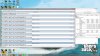
Alright I did an Hour with Prime95, Started at 7:44, ended at 8:45.(this is with a repasted CPU, if that helps)
EDIT: turns out there was a problem with my prime, It only used around 50% of my cpu. I redownloaded it and after 10 minutes it reached 79c
-
If the core clocks run above 3Ghz, color me impressed.
-
I saw 84 C max with stock paste, with temperatures usually hovering just below 80 at full load (which caused frame drops due to constant throttling). 6-8 degrees better now with my amateur paste job. Just be a bit careful with the GPU, had some issues there amongst them losing a loose heatsink washer that dropped into the machine which I then had to go look for which was a pain.
More than anything though, I would recommend the unlocked vbios if you don't have it. No throttling did wonders for my machine. I'm getting 300-400 better 3DMarks score on stock clock, just have to keep an eye out for high temperatures I suppose, which is why a repaste might be worth it. -
Was gonna ask, what's your guys ASIC quality score on your 780m's?
Mine is a 70.4% according to GPU-Z, which is a bit on the low side meaning that it has less OC headroom on stock voltage, but more overvolt potential if I understand things correctly.. whelp. Kind of scared of messing around with voltage. -
I got around 85c on my gpu on stock paste, It's not over heating but it's running a bit hot. But after the dell tech repasted it after replacing the GPU,then I got 72c, I decided to give it a go and now getting temps of 65c. The Paste that was used was IC Diamond. Some of the over heating problems some users get are clearing a manufacturing flaw, as it quite common with Dell, and other laptop manufacturers.
-
If it gets closer to 90C it's better to do the repaste. If you are getting 80C on BF4 on Ultra, I would say you don't need it.
-
Thanks for the replies everyone... I might continue to run it as is for now and tackle a repaste later on if needed
I've read through the issues you had with your repaste and your determination is far greater than mine! I'm glad you have everything sorted now with your GPU temps. I considered the new vbios but I don't want to invalidate my warranty especially if the card goes pop (which knowing my luck will happen!) -
Quick question, has anyone had successful OC's on a gtx 780m? I try to increase the clock and when I run a game the games crash instantly or my display driver crashes.
-
I've had alot of success overclocking my 780m. It is very stable even with what I would consider a pretty high oc. How high are you pushing it ?
-
I can't even get +1 on the core clocks, I wonder if it's just my drivers.
-
Hi guys, I have received my laptop this week. my specs are intel 4800, GeForce 780 m gtx and full hd 3d screen with 16 gb of ram. fans are quite loud when playing games and right side get hot after playing games like far cry 3 after 30 minutes to 60 minutes of game play, however game play is very smooth and I palyed game for about 2 hours. is it normal for alienware laptops to start fan during game plays. its not just with far cry 3. fan immediately starts when I was playing left4dead 2 and company of heroes 2 as well. also can anyone recommend which software I shall use to check gpu and cpu temperature ?
-
Are you using nvidias latest drivers ? If not i would recommend them.
-
GPUZ
HWMonitor
I think you can be happy the fan's spinning up, it's trying to keep the GPU cool, but you knew that! But checking your temps with those programs will give you peace of mind (or cause for concern!). -
I'm betting you haven't flashed the vbios to override Dell's restrictions on the card, if you flash with SVL's vbios you'll be able to set the target power % slider, I believe it will be greyed out otherwise in EVGA precision X. You basically wanna turn up the Power target I found in order to have a stable overclock. I had the same problem overclocking as you before I had flashed the vbios.
I now have +120 on the core clock +60 on the memory clock. I could probably push it more but would be concerned about temps, that and I'm already getting 8400 scores in 3Dmark 11 anyways and can run everything at full spec.
ps. flashing the vbios is a little technical and requires some prep work and confidence using command prompt. -
Hi, I've been using my Alienware 17 for 3 weeks since I got it. I have been playing games on this since rig with no problem at all. In that time I have never experienced any FPS problems. Last night, when I opened my Alienware I did an idling temperature check using CPUID Hardware monitor. And noticed my core idling temp was 5 C hotter than before after that I tried to play Battlefield 4 on campaign mode for a while and it seemed that i'm getting a really low fps. And then i checked my CPUID HM again and found out it's getting warmer so I stopped playing. Today I tried to play some of my other games. like Crysis 3 ,, Grid 2 etc. and discovered that my fps was still really low. I then tested out Battlefield 3 as it is a graphically challenging game and I never had any problems with it before. It seems I am getting low fps with all of my games . I normally playing these games at 45 to 60 fps. Now, It was dramatically framing at 15-20 fps max. BTW, my power option is at High Performance, Any tips or help would be greatly appreciated
-
I'd run HWMonitor & GPUZ in the background when I'm gaming, and then when I get low fps I'd 'Alt-Tab' back to the desktop & view the clocks & temperatures listed in GPUz on the Sensor Graph, and I'd also check cpu temps in HWMonitor. If its overheating & throttling, then I'd use can of compressed air to blow out dust from heatsinks, use the laptop on a flat surface without blocking the vents, and if temperatures were still bad, then I'd re-paste the CPU or GPU depending on where your temperature problems lie.
-
Make sure your not running on your CPU for graphics.. your GPU may be idle.
-
Thanks, for the tip tho. But still i do not see any problem with my 1 month old A17 .to have any dust blockage on its newly designed cooling system. And also my room has AC, so i think room temp and platform surface was not the problem.
-
Does anyone know how to make desktop shortcuts for steam games with windows 7.
Or can it be done . Or do have to go through steam every time just to play your games. Or is there a link already explaining this somewhere. Thanks for any help.
Just thought it would be nice to turn on computer and click on game you want to play instead of loading steam first. I know steam has to validate game before playing . Just curious thanks -
You mentioned your power plan is set to High Performance, but are you plugged in? The laptop cannot handle games while on battery.
-
You're not going to ever know what the problem is unless you monitor the clocks & temperatures of your CPU & GPU while gaming, that's the answer for you to start working out where the problem lies & then you can work out how you're going to solve it. It's the logical starting point.
-
Has anyone here with the new 17 upgraded from the R4, I am interested in knowing how the sound is in comparison in your opinion since they are not using the Creative sound card anymore if what I have found is right. Just curious how you think it stands up against the R4 and the creative solution. Keep in mind that the creative solution for a lot better if you tweaked the EQ settings.
-
They're very similar in sound. They both have Klipsch speakers, too.
MogRules likes this. -
Hi guys, been using my Alienware 17 R5 for about a month now, loving every bit of it except for one annoying issue which I am not sure if its specific to my machine only.
I am one of those guys that doesn't like my computer to go to sleep when I close the lid, so I have modified the default power option within my Win8.1 to "Do Nothing" when I do close it.
Power Options -> [High Performance] profile -> Change plan settings -> -> Change advanced power settings -> Power Options window -> Power buttons and lid -> Lid close actions -> On battery/Plugged in: Do Nothing.
Once I've set these up, every time I close my LCD screen, it just seems that I cannot get the screen to come back on when I open it even though my system is still on. No matter what mouse button/keyboard i press, the screen is just pitch black. The only way to get it back is a force shutdown with the power button.
I have tried open/close lid in BIOS/Diagnostic/POST, it seems my screen is able turn itself back on when the lid close/open, so I don't think it's a problem with my screen, just Windows is causing this problem.
I have a 120Hz 3D screen, can someone with a Alienware 17 R5 with or without 3D 120Hz screen able to check that you get the same issue if your "Lid close action" is changed to "Do Nothing" in Power Options?
My system is Win 8.1 with nVidia 331.65 driver, bios A05 and all drivers are latest from dell website.
Have already raised a case with Dell regarding my issue and just wanted to hear more from the forum to see if others are experiencing the same. -
I'm running the same software/firmware.
I've got Rapid Start set to a 0 timeout - so it is triggered immediately.
Before closing the lid, I press the power button to tell the system to go to sleep - which happens quickly - then the system comes back on for a few seconds before triggering the Rapid Start feature - and then shuts off. Then I close the lid.
I usually do this when I'm going to put the laptop in my backpack - and I want to make sure it isn't going to wakeup inside the backpack.
Since going through this sequence - which takes a few seconds longer than just closing the lid, I haven't had the black screen problem. And the resume from Rapid Start hibernation only takes a second or two - much faster than resuming from Windows hibernate. -
New to the forums, hi to all.
Could someone describe the fans behavior during idling or web surfing, using youtube etc. Is it like the M17xR3 ?
Does HWinfo works on alienware 17 ?
Sorry if I am asking much but I am just before buying.
Thanks in advance -
What are peoples average idle temps for the GPU and CPU with this laptop? Also if one is having a problem with their laptop, what is the best way to contact Alienware about it? I tried calling the support line and the guy ran me around with the "Have you tried turning it on then off again, do you have a screw driver handy did you try removing the battery?" and just had me run Dells diagnostic from the bios and while that was running got disconnected from the call (and everything came back fine). I'd like to know if there's a better phone number to call for support to explain my problem or an email address to send an email to fully explaining it.
Also does the esata port on the left hand side function as a USB port as well? I find myself always almost plugging things into it and have to stop myself and make sure it's the actual usb port, I'm just wondering if it will function as one or if it is specifically for esata. -
Support when you are having issues is absolutely horrid. I would just keep calling back until you get someone decent, it only took me a couple of tries when I was having issues with the 3D.
-
To All 770M & 765M users, I've spotted that svl7 from TechInferno forums has posted up modified VBIOS files in the second post of this thread linked here:
NVIDIA Kepler VBIOS mods - Overclocking Editions, modified clocks, voltage tweaks
Looks like the 765M VBIOS came directly from an A17, so that should work. For the 770M versions I'm not so sure if they'll work, as not sure if there is one there that origninated from an A17 - but if you're interested you could always search that thread and/or ask there to find out if it would be compatible. Just thought I'd let the 770M & 765M users aware of this, could give you a big boost of performance if you're willing to overclock quite high.Dusk Star likes this. -
Is there any way someone can create and share a Tactx profile for me with macro key C set to Volume Down and macro key D set to Volume Up? I've tried for ages to set these but it wont register when FN is pressed in the Assign Keystroke or Create Macro screens. Its driving me mental. If someone can do this I will be eternally grateful and will consider naming my next child after you. Thanks
-
Try this: https://dl.dropboxusercontent.com/u/1557352/volume.akp
It's the one I'm currently using. I remember you were the one having difficulties binding the keys from the dedicated topic. I also set B as Mute. Let me know if it works. -
I haven't tried connecting an eSata drive to my AW 17. According to the documentation, it looks like all 4 ports are USB 3.0 - with one port supporting PowerShare (to power devices while the laptop is off).
Haven't seen any references to eSata for this system.
Have you been able to connect an eSata drive? -
Thanks, good look with your AW17.
*OFFICIAL* Alienware 17 Ranger (2013) Owner's Lounge Thread
Discussion in 'Alienware 17 and M17x' started by Mr. Fox, Jun 12, 2013.


