 Problems? See this thread at archive.org.
Yes, there are lots of different ways to skin a cat! Although, on reflection, I will say that I think the X method might be an easy way to put too much paste on, which is not good to have lots of Arctic Silver 5 leaking over the pins in your board, even if it is only slightly capacitive there is still a danger of damage. (Which wouldn't be so much of an issue with pastes that are neither conductive nor capacitive.)
-
-
Well after the second repaste, I'm now at 1 C over stock GPU temps. Guess that's a small victory!

To top it all off I had to redo it one time inside since one of the washers that are supposed to be attached fell off one of the screws to the GPU heatsink and vanished into my computer. Spent 3 hours looking for it, removing hard drives, memory, the CPU heatsink (yay, another repaste). Glad I found it though, don't want to leave any pieces of metal in there.
I'm pretty much convinced it's a heatsink and/or fan issue and not so much my pasting method or technique (Went with small dot this time). Here's a picture of the heatsink after my last GPU pastejob from yesterday (descibed with pictures a couple of posts ago):
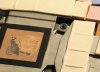
The paste was evenly spread out on the GPU, and it looks like the heatsink isn't connecting properly. The problem corner seems to be "Screw no 1" and it seems it won't go as far as the others even if the screw looks fine. I've been very careful not to damage or bend the heatsinks and I use the method J.Dre describes above, to slightly screw them on one by one until they don't go further.
Also I'm wondering about the GPU fan. Look at this gap in the picture below which was taped over when I got it and might need to be covered again. Wondering if the fan is in the wrong position? Have tried to screw it a bit less tightly to give it a more elevated position but that didn't help any. Does your GPU fans look the same when screwed on?
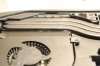
All in all the CPU fan and heatsink is much easier to work on. Fan and heatsink look properly aligned and sturdier screws.
Can't seem to get this one right and also can't be good messing around too much in there with all these fragile plastic connectors, screws and what not. At least I can play games again though. Small victory indeed. -
Hmm, that doesn't look positioned right. The fan seems to be a little bit too far away from the heat sink.
I don't know why you're only seeing 1C less in temperatures, that seems unbelievable. Aftermarket paste should be, at minimum, 5-7C less than factory paste. -
I know, it doesn't look right, but the position isn't really easy to adjust once you've put the screws in. I'm wondering if the heat sink is too high up.
Yeah, this thing is driving me nuts. I tried some extensive BF4 testing and saw 88 degree max temps, much worse than before. Guess I have to redo it again.. sigh. Something is obviously wrong with the heatsink and fan there. I'm starting to wonder if the heatsink is too high up.
Probably should try to get new thermal pads as well.. -
I think your assessment is correct, the heatsink is not sitting flat against the GPU core, which is why there is hardly any paste on the heatsink. That's the reason for your high temperatures too - if you've reported high temperatures (not checked back through posts). What you said about one of the screws not screwing all the way in is also hitting the nail on the head (almost a pun!). I think you could do with trying to work out what is preventing the heatsink from sitting flat on the GPU core, and if it's the screw you were talking about, then try to fix it somehow, or get Dell to replace your heatsink. The latter might be more effective, although it might be a fault in the X-bracket too, if one of the 'screw receptacles' is damaged & maybe not allowing for that screw to be screwed all the way down. Regardless, I think you've identified the cause of the problem, now for the solution!?
EDIT: Well done on your persistence, I would have been ridiculously infuriated by that lost loose metal part that disappeared in your laptop - you have patience!! -
What is the thickness of the thermal pad on the gpu memory?
-
Ok I've asked this before but I'll ask again as I got crickets last time. Is anyone else experiencing some strange kinda audio glitch sound combined with picture freezing for a second while playing games or watching video files. It seems to be happening to me a lot with my laptop. Thought maybe it was related to the overclock but my temps weren't anywhere near the threshold for the card, and besides I even gamed today with no overclock and I'm still getting the audio glitch sound. Any ideas on how to fix this?
-
I don't have the Alienware 17, but the problem you're describing could be related to a DPC Latency issue, which can sometimes be caused by driver issues associated with one of your devices. You can measure DPC Latency using this little program, if the bars in the chart go red, then that means you've got a DPC Latency issue that needs tracking down, here's the link to the program:
DPC Latency Checker
That could be a start to diagnosing the problem. Also some useful tips at that link above on how to troubleshoot such issues once they're confirmed. (Run it in the background when doing the things that cause these dropouts in sound that you have - while gaming for instance).dabrit likes this. -
Check into my account to see if I've moved off pre preproduction. Order is cancelled!!!!!!
I didn't cancel it and I certainly haven't been contacted to say its been cancelled either!
Ridiculous! -
Well I got to the bottom of my order cancellation.
An incompatibility on the UK site upgrading to the 780gtx card. They have the wrong part number for the power supply adaptor. Which doesn't become apparent until they are actually building your laptop. So I've just spoken to a sales guy who had now sorted that out.
If it was known that the wrong part was being used why couldn't they just substitute it at the build point? I'm sure it would have been a simple case of picking the plug next to the one for the 770... -
It's never as simple as we consumers expect it to be. Here's the order status discussion thread, by the way:
http://forum.notebookreview.com/ali...ions-order-status-discussion-part-5-a-12.html -
Hi J.Dre
I wanted to ask you what paste do you use? I have been using Arctic silver 5 but i really would like to try something better if possible.. Thanks -
IC Diamond. The "7 carat" and "24 carat" are the exact same - they only difference is the amount of paste (i.e. size of the tube). The "7 carat" comes in a 1.5g tube. 1.5 grams is plenty for at least two re-pastes, if not, more.
I used the "line method" for the CPU. Make a thin line across the middle of the CPU (seen below), and do not spread the paste. Just put the heat sink back on (carefully, evenly), and the tighten it down in a diagonal pattern.
![[IMG]](images/storyImages/2z50qhk.png)
Red represents the CPU
Black represents the paste
*This is just an example I drew up in a few seconds to give you an idea of how I pasted the CPU. -
Thank you very much. I really appreciate it.
-
Thanks, but I've got to admit my patience is running thin after all this to be honest. I was bricking it after I lost that metal part and half way through dismounting the keyboard when I tried a last shake of the machine and it dropped out. At least I've learnt a lot about the inside of the laptop.
I'll try another repaste tomorrow. I believe it's got to be the thermal pads that's blocking the heat sink from going down to where you want it. Thinking of getting some MX-4 paste. Readily available in stores over here and has received good reviews from what I've seen. Why not spice things up a little while I'm at it. I'll call Dell only as a last resort, but that might end up in a new bad paste job and possibly a bill.
Quite amazed I haven't managed to break anything yet
-
Yes, if the thermal pads are too thick or misplaced then it can prevent the heatsink from sitting flat. When I replaced my GPU with an upgraded model I spent a long time with the heatsink & card removed from the laptop, pressing them together & working out if it was sitting flat & where to build up or remove the pads. Are you removing your GPU & heatsink from the laptop & doing the pasting and assembly with both items removed from the laptop? That makes it easier to see what you're doing, and I think it's the suggested procedure anyway within the Owners Manual that I linked you recently.
Yes, I can see you're a bit concerned about damaging something by continuing to try & put things right. That's got to be your call though. -
When I do the repaste I leave the card in there. Thing is it's a pain getting it out. Only did it once when I was looking for that little washer, and the card was stuck so hard and I was thinking of the price of a new 780m and sweating, so would rather not go there again.
The owner's manual is a very good resource. I wouldn't have dared to open this thing without it. That's a cool thing with Alienware, that they give you a manual on how to completely disassemble your laptop. -
Yep, that's cool, it's your call how you paste it up. Are you gonna have one more go pasting it up, and then if it's not a good result get Dell to do it on warranty then?
-
Is there a sleep button configuration on the AW17? I can't seem to find one?
-
Hey man thanks for the help I did this, confirmed that the issue is due to a DPC latency issue however after installing the windows program that you use to use command prompt to diagnose, alas I can't get my computer to do the glitch thing anymore, played arkham origins for over an hour straight and it didn't do it once, not sure how installing that software would fix anything, or if somehow I'm just having good luck for now. Hopefully though either it never happens again or I get the glitch so I can figure out what's causing it.
-
That's OK, glad the info was useful for you. What software did you install that was supposed to fix the issue? (I've never had to track down DPC Latency issues as I've never had any, so not familiar with such software you talk of).
-
Try Resplendence Software - LatencyMon: suitability checker for real-time audio and other tasks look under Processes / Drivers tabs, read the full report.
http://www.resplendence.com/download/LatencyMon.exe
LatencyMon far better/complete than DPC Latency Checker which lacks Win8 support.Robbo99999 likes this. -
Thanks will give that a try, my guess is that I've been just downloading the latest video card drivers from Nvidia instead of from Dell perhaps not all updates are fully compatible this way
-
Exclude LatencyMon from AV real time scanner / Heuristic, C:\Program Files\LatencyMon folder and Process LatMon.exe, this will prevent anti-virus interference.
-
Glad I didn't have to. Finally got decent temps on the GPU. Have seen temperatures hover around the low 70s with a max of 74 C now playing BF4 which usually gets my card really warm. I used MX-4 and adjusted one of thermal pads that was blocking one of the corners. Don't know why it was there really, didn't seem to do any good to any part.. hopefully!
I would say temps are now generally 5-7 degrees better than stock, if not more but it's hard to say since it was throttling a lot before since I'm on stock vbios. Highest I saw on stock paste was 84 C. So at last I see some kind of reward. Still think I could get it down a bit but I need to step back and just enjoy what I have and not obsess anymore over these damn temps.
Next I'm gonna try my hands at flashing the vbios. -
Haha, excellent, yep don't obsess too much! Yep, so the main reason for the high temperatures was a mal-adjusted thermal pad - well done on tracking that down. You can finally enjoy gaming now without worrying about temperatures!
-
Just a little update following a saga of heat issues and parts replacements (cpu heatsink and fan followed by the motherboard). I spent a lot of time running benchmarks and test and a bit of Crysis 3 to see how the my system was performing. I varied the overclocking features in the bios (stock bios). In the end I found some benchmarks were fine others were too low. Not sure if it has to do with win8.1 pro or what, but I have had to move on to just using the laptop as intended due to time pressure from work. The low benchmarks are known to Dell and they said I should wait and see. The last thing I need now is to send the laptop off for a full repair session with Dell, so I'm just going to ignore the issue until I have time to deal with it. On the plus side having moved from continuous installations, benchmarks and testing to actual use of the laptop has been a relief and I have really come to appreciate it and even love my Alienware 17, despite our rocky start. While I would not want anyone to go through what I went through, I would now gladly recommend this laptop, with the hope that I was one of just a few unlucky buyers.
alienwolf likes this. -
Learnt something new today - downsampling. It's a way of increasing detail & removing jaggies in games. It's got quite a high performance overhead, but for you guys with 780M's I was thinking it would be useful when you're playing older games at ridiculously high frame rates & want to translate that extra frame rate into image quality. Downsampling is basically forcing your GPU to render at a higher resolution than your monitor, and then the GPU downsamples it to fit your screen resolution. So, for instance I now play Call of Juarez Gunslinger downsampled from 2400x1350 to 1600x900 (my monitor resolution). I was astounded by the increased detail & clarity that remained at distance, and it took my framerates from 130fps down to a more usable 79fps, but with the increased image quality. I'd highly recommend doing this if you're seeing framerates in the 90's & 100's, it's an excellent way of increasing image quality when you've got masses of fps to spare. Here's the link that describes how to do it:
Downsampling, a simple method for making your pc-games look better. - NeoGAF
(Not sure if this works with Optimus enabled laptops, mine's not Optimus enabled anymore).
I tested this downsampling on F1 2012 too, and it worked really well. It performs the same as 16CSAA in terms of frame rate, but detail at distance seems to be increased which seems to make it easier to drive, so has a functional benefit. (downsampled from 2400x1350 to 1600x900 with no antialiasing selected in the F1 2012 graphics setup).alienwolf, rednekcowboy and Chimed like this. -
I have a question about the soundcard in the AW 17...I plan on buying a new headset or headphones for gaming (Counterstrike mainly) and I want to be able to have very good quality sound and or surround sound with it. I previously had a Siberia V2 that stopped working, but I still have the USB soundcard for it for the virtual 7.1 sound. If I were to buy 3.5mm jack device, would I be better plugging it into the soundcard on the computer, or plugging it into the Steelseries soundcard I have for the virtual surround sound, or is the build in card capable of doing the same thing/overall better sound quality and the virtual stuff is not even needed? I'm planning on getting a pair of audio technica ath-ad700 if that makes any difference.
-
Nice cans! I think you'll be fine without an amp or usb sound card. My Sennheiser 598's which are similar, work really well just plugged into the computer. Maybe I could get them to sound a small amount better with an amp, but from what I've heard many don't notice any difference. The impedance on yours is 32 ohm, so I'm pretty sure you would not notice any difference.
It's when you take the next step up to Beyerdynamics class headphones and such that things become a bit more troublesome (not to mention expensive). In my experience, with large sound staqe stereo cans like these I think they sound better without any virtual surround. Plain old stereo works a treat for me
-
I think I've heard a lot of people say that these tricky sound processing features end up creating more noise in the sound, and reducing the purity, sounds like that's what you're describing too.
-
Yeah, that's exactly how I feel about it.
-
guys, want to ask is there anyone using 3Dmax with it ?
cause im having a problem when rendering, it will auto shut down when rendering.
I don't know whether true or not NVidia GTX can not use for 3Dmax, and NVidia GT no problem with 3D max......
I need some helps here, thanks. -
I have no issue with rendering, Mental Ray has been fine on this laptop. It seems like your laptop is overheating when it auto shuts down.
-
what should I do? should I replace some parts?
Mental Ray and V-ray also will auto shut down during rendering.
I wish to ask wish version of 3d max are you using ?
my system with Intel I7 4900QM,16GB RAM, 750GB HHD, Nvidia GTX 780m. -
I use 3dsmax 2014, use HWMonitor to check temps Here is the link HWMonitor CPUID - System & hardware benchmark, monitoring, reporting
-

I had install it, here is my tem.
is that normal? -
Try to render a scene in 3DSmax and leave that up, and tell me the temps it reaches under stress.
-

hi wewooo, thank you so much for your help.
here its.
I have found out some files I can render, but some files can not render and causing shut down problem. -
Looks like the CPU is doing all the work, your CPU temperatures are 100 degC, that's probably why your computer was shutting down, looks like the CPU is overheating. (Looks like the GPU isn't doing anything with your program, it's not being worked).
-
can I see your laptop's temperature? so that I can compare.
I don't understand we both have the same GTX780m, but my one is not working, hahahah........ -
You're joking right?! If you're talking to me I don't have a 780M, but your 780M is not being used by that program, which is why it's shown to remain at the lower power state & low temperatures during that screenshot that you posted. It's your CPU that's doing the work in that screenshot - 100 degC & 57W is what it's showing for your CPU. I guess there's two things that you might want to question: 1) should your CPU be being used as opposed to your GPU for the computation that you're talking about (you seem to be confused about what the program should be using - GPU or CPU, 2) Why is your CPU getting so hot? (It needs repasting or the dust blowing out or don't use it with blocked vents).UU_Ng likes this.
-
If the CPU hits over 100c it will force shutdown your computer to prevent damage, but those temps seems pretty bad, probably another bad paste job as when rendering on mine I get around 70c on all core. I would try to repaste it, if you don't feel confident with that just give alienware a call if you're still on warrenty.
Also Here are my temps when under stress.
 Robbo99999 likes this.
 -
I am absolutely livid. The replacement laptop arrived today. I got home from work, unboxed it, pressed the power button and it wouldn't even fully boot. I get part way through the setup and it would crash. After an hour of attempts, I finally got into windows, couldn't get connected to any nework. Rebooted the laptop and now it won't boot into windows at all. On top of all that, the laptop was supposed to come with 2 8GB sticks of ram, installed underneath the keyboard, not 4 4GB sticks.
-
You are having the worst of luck with Alienware... You going to stick with them? They'll probably send a tech out.
They always use 4 x 4GB sticks, unless you order 32GB's memory. -
I will not accept a tech coming out. They will have to send another replacement.
As for the memory, I am well aware but there was a special instruction sent not to do this, one that was ignored.
I am sticking with Alienware, but they are going to have to provide some heavy-duty upgrades on this next replacement. -
Hmm, yeah. I would definitely request another replacement. Good luck with that, you'll need it.
-
There last chance, 3 strikes and you're out with me!
-
At least they gave you a good deal to begin with. Didn't you get 2 extra years of warranty for free? They wanted me to spend $1079.44 dollars for three years, as an extension. Yeah, no thanks.
-
haha, warranty doesn't do much good if they can't deliver a functional laptop to begin with. They still haven't fulfilled their end of the contract....
*OFFICIAL* Alienware 17 Ranger (2013) Owner's Lounge Thread
Discussion in 'Alienware 17 and M17x' started by Mr. Fox, Jun 12, 2013.


