 Problems? See this thread at archive.org.
lol first thing pops trough my mind is:
INSTABRICK! and then the sound of a ninja chopping there balls off..
-
lol...i ddin't say it was the smartest to thing to do lol
-
Chuck Norris can do all of the above...without a laptop.
-
I released them, don't you know?
-
shhhhhhhh....let widezu be the champ for another day
-
Haha, champ or not, I'm only here to broaden mine and everyone else's knowledge
-
why is it that you make such an honourable statement...when deep down, i know you just want to be the CHAMP muahahahaha
-
shush you!
-
I'll chime in on "overclocking" the 3720QM in an R4 once I get it.
-
The 3610 did not have those over clocking options in the BIOS.
-
Do you remember if you enabled 'overclocking features'? Because the extra options will only show if you do
-
I'm currently testing ths 1.1v vbios and so far so good, been able to clock up to 1030/1500 @ 3dmark11 - more testing on the way
AMD Radeon HD 7970M video card benchmark result - Intel Core i7-2720QM Processor,Micro-Star International Co., Ltd. MS-16F2 score: P6802 3DMarks
Looks like the 2720 is holding me back a bit
-
-
now that is interesting.
-
Yes, the only things that showed up and were editable were the 4 turbo functions (which I don't really understand so I left them alone) and the RAM speed. The RAM speed didn't seem to actually work though, I booted once at 1866 and CPU-Z still showed it at 1600 so I put everything back to stock.
-
Hmm, thanks for confirming that. So now I wonder if the 3720QM has this option or not bizarre. Maybe you can squeeze out a better CPU out of Dell for your troubles? Maybe give it another chance?
Noice one! I see that GPU score is slightly higher than widezu's Is the overvolt stable when gaming or even capable of a Vantage run?
Yet another website paraphrasing the samn damn rumour, that's like the 5th one I've seen today..
EDIT - My posts keep going on the next page so I have quoted a lot of folks to make up for this annoyance. -
I have to agree with you G on the rumour bit.
Anyways, I did a 1030/1550 run and scored lower. I would not recommend anyone running any more than 1550Mhz on the memory. I tried 1600Mhz and my screen went crazy which I can tell is memory crash rather than core crash.
Looking at my scores, it seems that my card does not perform especially when it comes to the combined scores. I'll have to try and run it on an external monitor as I think that may be the issue. Plus I'll be able to use HWiNFO64 for high speed fans
-
Could one of you run a 3dmark/Vantage with stock CPU or at least lower CPU clocks to see if that will allow more power to the GPU instead?
-
hands on mode on
at least 330watt ac adaptor.
r3 with a08 bios will have some problem
r4 sweet....
but the heat still there
-
I notice in Afterburner it shows that the max my card's fan speed went was 20%, that can't be right. Do the card fans really only go up to 20%, even under intense gaming? Anyway to change that? I noticed on my desktop GTX 580 it would let me do a fan profile, but not on the laptop, could be though that the laptop is completely different for all I know when it comes to fan settings.
-
There is no "GPU fan" on the laptop. The fan profile setting in Afterburner reads it incorrectly because there is no fan. There is a dedicated fan for the GPU but no "GPU fan" per-se. HWiNFO64 can control the fans on the M17x but only with an external monitor whilst using the 7970m.
-
Pretty much what I figured, just wanted concrete confirmation. Thanks man. Would you recommend playing with fan speed? With my notebook cooler I'm only ever hitting 60C MAX under medium fan speed. -
Rumors are saying that the 680m will suport 1GHz CORE and will be able to overlock more than 15 to 20% more but the price will be a crazy maniak!!!
-
LOL, and other rumours say it can't even hit P5k in 3dM11... seriously, all pure speculation. The only thing which going to be true regardless of the performance is the price, it's gonna cost a fortune.
-
But hopefully nothing to me as I'm hoping to get an R4 as a replacement when the 680m comes out
-
Here we go, I've hit the upper limit of my GPU @1.1v I get crashes any higher at the same voltage and with higher voltages I get lower scores at the same clock speeds anyways here's the result. I was hoping for that fabled 7k but I guess we will have to wait for better drivers:
AMD Radeon HD 7970M video card benchmark result - Intel Core i7-2920XM Processor,Alienware M17xR3 score: P6951 3DMarks
Anyways I'm done with GPU benching for now, gonna work on 5Ghz on the CPU![[IMG]](images/storyImages/captureuef.jpg)
-
Nice run dude!! makes my system look slow
-
nice run Widezu! Almost 7k!!
-
Awesome, Widezu69. One good driver and you're home @ P7000. Ridiculous performance for a single card notebook.
-
Overclocking the 3720QM in the BIOS is working. Here are my wPrime 32M scores at stock and set to level 3 in the BIOS. I'm running all 8 threads in wPrime.
Before
![[IMG]](images/storyImages/aF91Z.jpg)
After
![[IMG]](images/storyImages/G6IHE.jpg)
When I set only one thread while running wPrime or Prime95, the multiplier fluctuates in CPUZ. It's mostly at x39, but it can get up to x40. it's clearly higher and faster than what it normally is.
I'll be overclocking the 7970M tomorrow. Hope I got a good one
-
damn,seriously??? this IB QM OC makes me wanna have an alienware for the very first time
why cant clevo just unlock our bios dammnit???
Sent from my GT-I9001 using Tapatalk 2 -
@GTRagnarok: Can you do some wPrime 1.55 runs, they're easier to compare since most overclocker use that version, due to the hwbot rules.
-
I'm glad I went with 3720QM.
-
Hmm...I get it now. In the BIOS, the level 1, 2, and 3 have their own preset multipliers. However, when I try to change each multiplier for 1, 2, 3, and 4 cores, the max I can get up to is different than the presets.
The Level 3 preset has x43, x41, x39, and x37. But changing them manually, the max I can get is x40, x39, x38, x38. This is more inline with what I saw previously (only seeing x40 in CPUz while testing one thread).
Okay, here are my best results for wPrime 1.55 8 threaded runs at stock and at 38,38,39,40:
![[IMG]](images/storyImages/kdydO.jpg)
![[IMG]](images/storyImages/mmW7j.jpg)
4.0Ghz on single thread:
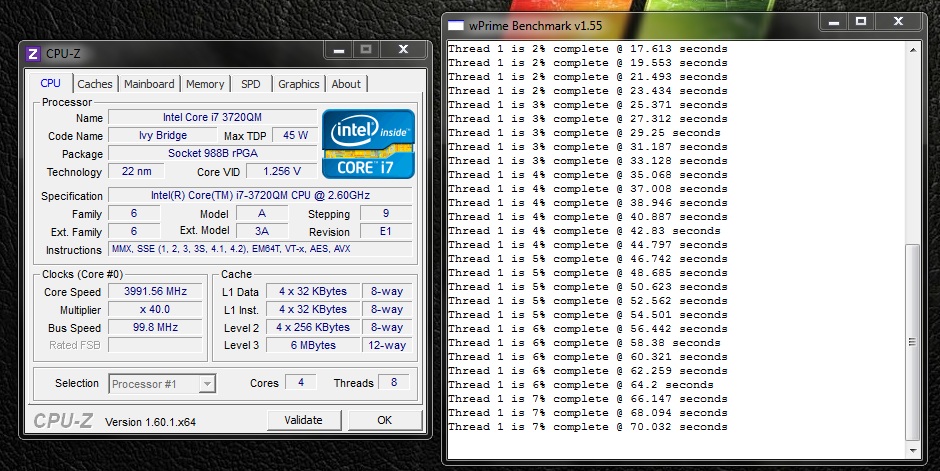
Is wPrime 1.55 supposed to be that much faster than 2.09?
I'm getting up to 90C on CoreTemp
Haven't repasted yet though. That might help. -
Thank you! These numbers are shockingly close to what I got when I pushed my 920xm to the absolute maximum (6.059s)
Yes, 1.55 is quite a bit different than 2.09. -
I wonder what it will get with wPrime 1.55 1024M 8 threads? Yea thats pretty good. I think my best was 6.2 on a 4GHz run with the 920XM.
-
I got 216.247 seconds on 1024M.
-
Nice, My best run on a 920XM was at 4GHz and 192sec. Though my temps were what lower
So the 3720 is definitely looking like a great chip.
These were my max temps for the whole run
Unfortunately the sensors for the CPU don't read as far low (as cold) as the CPU actually was. -
What the...? Do you have it submerged in liquid nitrogen? Lol.
My temps are better now that I've repasted with MX-4. Before, I couldn't run the OCCT CPU test for more than a minute because OCCT stops it once it got over 85C.
Been running it for a few minutes now and it's maxing out at 80C. My room isn't that cool either. I'm so happy about being able to overclock the IB QM CPUs.
Didn't bother to repaste the 7970M cause it's running plenty cool for me. About 70C max in OCCT. -
Ah yes... the 192 seconds... never managed to beat that run. My best is 195 seconds, at 30x
3720QM is quite impressive! -
It might have been throttled before. Now I'm getting ~6.35 seconds vs ~6.49 before.
-
That that 3720QM is performing rather nicely
I've been playing with my CPU recently as well. I've managed to get it to 4.7Ghz wPrime of 5.34secs, TS Bench of 6.933secs, only problem is that is isn't fully stable. Plus my CPU seems to top out at around 105w and I see throttling. If only my CPU could go to 110w then I would be able to fully sustain 47x multis at all times, provided my temps hold up
-
widezu? i wish i had your kinda "problems"
-
My 7970M 3DMark benchmarks:
975/1450
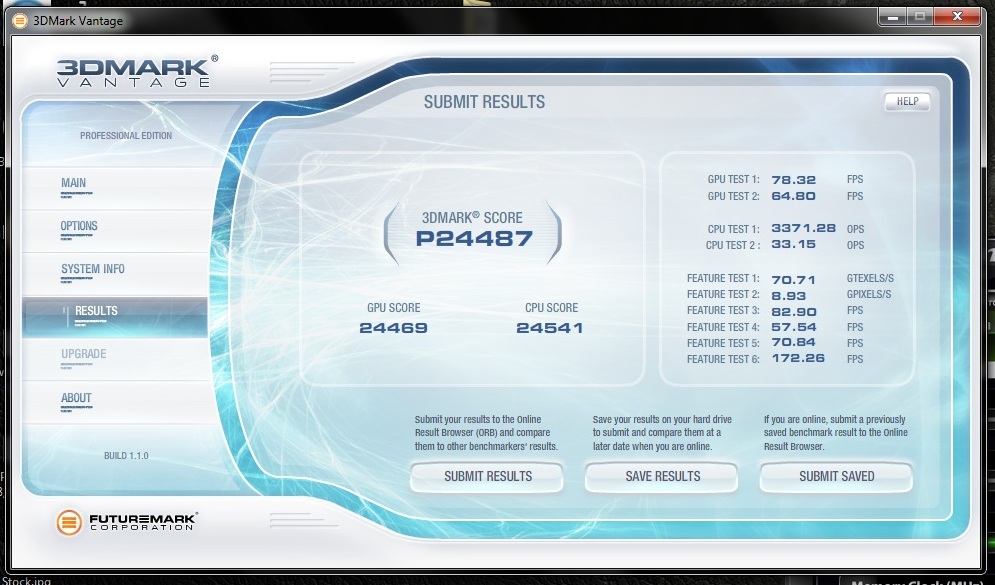
965/1450
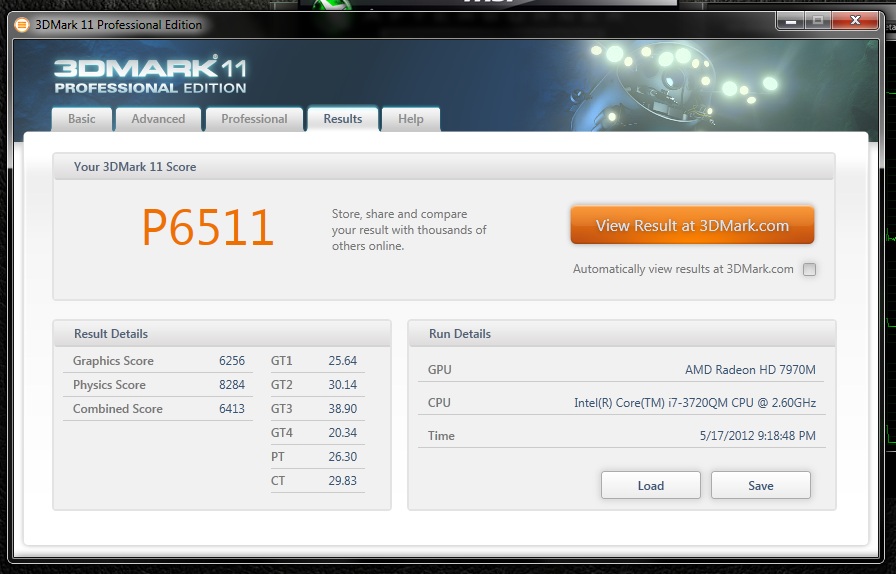
-
Nice scores dude!! +rep(when allowed)
-
Can someone with 7970M test out BF3? I cant push the OC anymore than 950 on this game, unless I want the screen to go black after a 10-15 minutes with sound noise.
-
I just played about 10 minutes of BF3 in fact. I used 955, the max I could get for Crysis 2.
-
Nice! Thanks for the heads up, havent try that specific range myself. Can you try push it up further? If yes than my card is a not so great one
, cannot stay stable at 1000 even when overvolted to 1.1v
-
@ R4 Users,
try to lower the FLEX VID in Bios Advanced settings.
1,26V for 4GHz is too much (wouldnt damage, but it would also run with less voltage)
Test with Linpack.
When ill get it ill decrease it in 5 steps with every run. -
I just tried at 965. How are you testing it? I was climbing up to the roof in Operation Swordbreaker and going through the sniper sequence a bit. No problem.
Settings are all turned up except I have 2x MSAA, no post AA, no v-sync, FOV is 70.
*OFFICIAL* Alienware 17 and M17x Benchmark Thread - Part 4
Discussion in 'Alienware 17 and M17x' started by BatBoy, Mar 11, 2011.


![[IMG]](images/storyImages/192tv.jpg)


