 Problems? See this thread at archive.org.
Haha sorry I didn't mean to do that lol :thumbsup:
Only my GPU was carrying the score there lol. The CPU stock is so weak HAHA as you saw in the numbers.
View attachment 97233 View attachment 97232
Cheers.
-
-
M17x R4
24/7 clocks
-
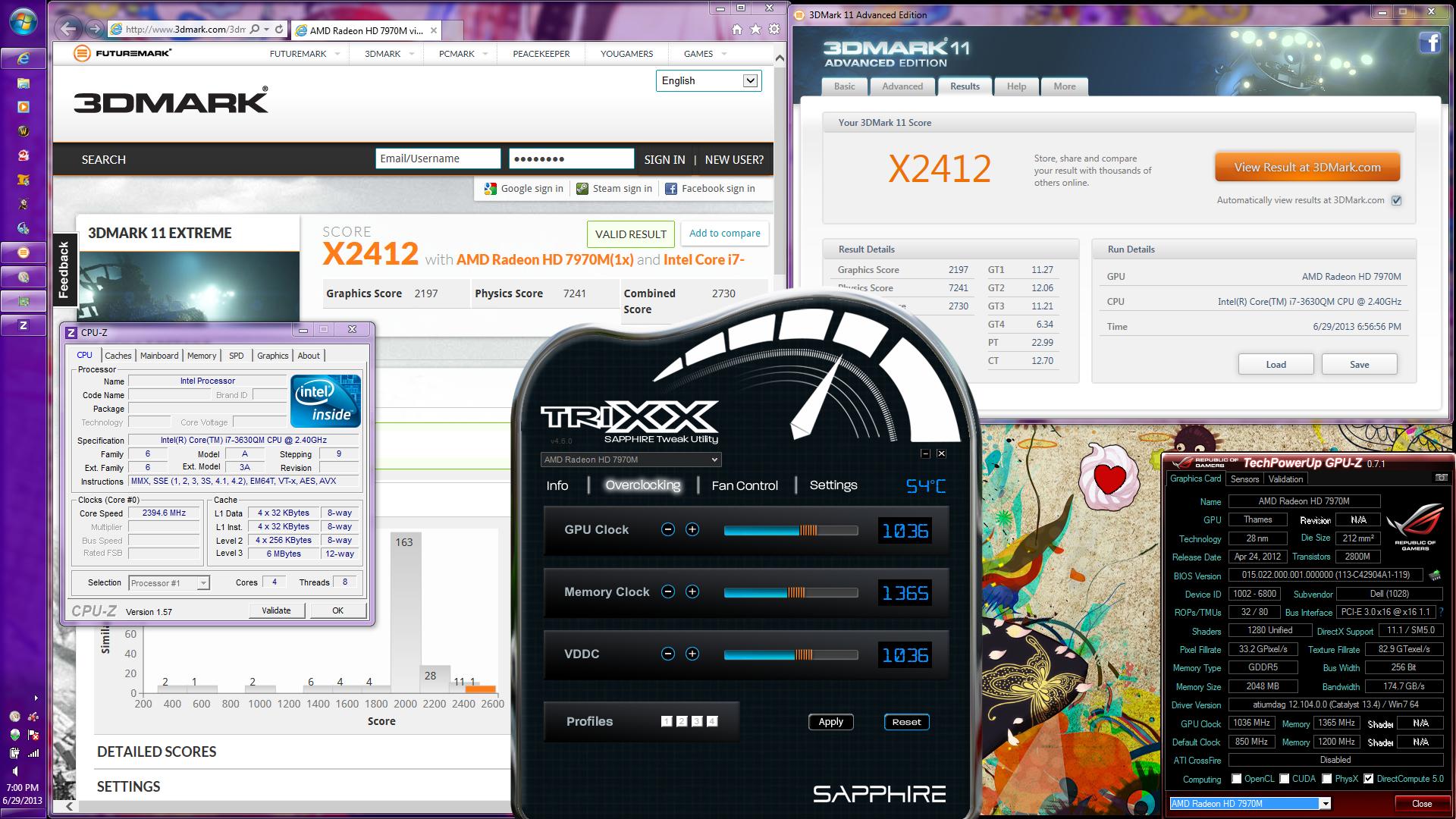
So is anybody here gonna beat my 3D Mark 11 score or what....i just got a little R2 and i see these new machines and i see i still don't have good reason to upgrade yet
The weird thing is, most of you have a powerful GPU but a weak CPU or vice versa....get your epic numbers sorted out guys c'mon and get serious
-
AMD Radeon HD 7970M video card benchmark result - Intel Core i7-3630QM Processor,Alienware M17xR4
So um...
I ranked #1 HD7970M
LOL
-
um, i meant.... dayum, good job buddy! awesome scores!
@ johnksss
Sent from my Galaxy Nexus using Tapatalk 2 -
Why you want to rain on her parade?
-
Nice but why did you ran Xtreme, there is little reference to Xtreme compared to performance.
Interested to see what you can do on the performance benchmark
Good job mate! -
someone on the overclockers forum put me up to it.
Said that "p score means nothing do an x bench"
I was like alright....
Ding #1 xscore 7970M
welllsnaapppp. lol.
Also my highest Pscore is P7718, but I've not pushed it further because I've yet to get a game to run at 1ghz+ stable. I can bench for hours at 1ghz plus, but as soon as I run tera or vindictus it is like "NOPE" and bluescreens.
(btw i'm female >.< and not too much of a fan of being called "he") -
It's not that hard... you didn't really push your system.
Even my M15x can beat that score... same hardware:
-
We got us a lady over clocker...
And going by this list....you're a bit far from first... Like 18 places or so off of it....
http://www.3dmark.com/search#/?mode...D Radeon HD 7970M&gpuName=AMD Radeon HD 7970M
If your score is valid, then about 4th -
It goes according to system configurations.
for my class I struck #1 out of single 7970M
Those others are duals or unknown cards.
My result is valid, it just showed up on the futuremark boards as #1 of its class. -
Im sorry, I thought you we're familiar with 3dmark11 boards.
You would need to set it to 1 card first.
Then check search.
Then set it to valid and then re check search.
This is how I got my calculations.
When you try to class it by cpu, that's more of a personal thing. Nothing wrong with it, just not how we class it when benching, but great scores non the less with a non extreme cpu. -
Nah I just use it for benching.
-
Nice.
Well here goes a bunch more you can try for free.
Overclocking, overclocking, and much more! Like overclocking. -
I'm good for now. I'll be doing some tdp turbo overclocking for my cpu later on when I can test power draw.
but right now its just not an issue. -
That's not going to go over well with a non extreme cpu that is 45 watts tdp max..
You would do better to bclk it up to like 105 if you can. that's good for like 250 mhz.
But, good luck! -
actually the 3630QM has an unlocked turbo boost, but the clocks are locked.
It'll be fine, I've got cooling that can handle an extra 4~5watts for that 3.5ghz turbo.
I'm not worried about it right now though. -
i7 3940xm inbound...
-
Long time no see. Glad to see your still around these parts.
-
Thanks Brother John. Also looking to get a GTX 780m preferably a MSI one because apparently those have better RAM chips...
-
So far, that has yet to pan out to anything other than equal to the fc04's, but once halogod gets going we shall see. We just released the 780m vbios so hopely that lets us know the real deal.
-
my new high score
did a new repaste
and flashed a 1.025V vbios
got this score
will try to break the 8000 barrier!
so happy!
:tongue:

-
Not bad, Sis! Good job!
Looks like the new 770M is very similar in performance to 7970M. Have a look and let me know what you think. What is the typical 3DMark11 "P" score in a M17x R3/R4 with a 7970M?
NVIDIA GeForce GTX 770M video card benchmark result - Intel(R) Core(TM) i7-4800MQ CPU @ 2.70GHz,Alienware 17 - 3DMark11 X2224 3DMarks
NVIDIA GeForce GTX 770M video card benchmark result - Intel(R) Core(TM) i7-4800MQ CPU @ 2.70GHz,Alienware 17 - 3DMark11 P6437 3DMarks -
nice score u got there!!here is mine with 1050 core and 1550 memory.cpu stocks speeds
![[IMG]](images/storyImages/7l3c.jpg)
-
Hm... Beta drivers keeps my card cooler, i crushed my previous score
Will post pics later -
Hi everyone,
I received my new Alienware 17 about 2 weeks ago. It's a great looking machine and I'm very happy with it so far. It's arrival coincided with the steam sales, so I've really had a good opportunity to put it through it's paces with some new games and mostly it's performed admirably so far. In its biggest test so far, I've started playing Bioshock: Infinite, and have the graphics settings running at 1920 x 1080 in "very high" quality. Note the highest quality detail is "ultra". I assume the game is able to detect what hardware I have and defaults to an appropriate setting. For the most part, the game runs brilliantly, very smooth frame rate around 80% of the time. The other 20% of the time, when the game's drawing something difficult, ie smoke, large panoramic shots with lots of activity the frame rate decreases somewhat, to a playable but certainly less than desirable standard.
I could drop the graphics quality, but after spending a large amount on a new high performance gaming system, I feel I should be able to run this game at the highest settings with a smooth frame rate. My questions are this: I realise Bioshock is pretty resource intensive, but should my computer be able to play it on full graphics settings comfortably? Is my system optimally configured? I installed the latest drivers for everything I could get my hands on, but perhaps not - is there a way to check across the board if everything is the latest and best? Is it worthwhile doing some benchmarking type tests to see if the computer is providing the output it should be, and how do I go about doing this (I am a complete novice in regards to benchmarking so I need my hand held here)?
Thanks everyone for reading - and I eagerly await your responses and advice.
Thanks!
Specs below:
Alienware 17
16GB Dual Channel DDR3L at 1600MHz
750G/7200 RPM + 64G caching mSATA
NVIDIA GeForce GTX 780M with 4GB GDDR5
4th Gen Intel Core i7-4700MQ
17.3 WLED FHD 1920 x 1080 AG 300 Nit -
I think you should ask the admin to move you reply as a new topic.
This thread is pnly dedicates to benchmarks.
Ps.
Bioshock has known bug that will drop your fps to 30.
Even my GTX 680 SLI will drop to 30 fps now and then.
Benchmark a syntethic benchmark or try crysis 3 -
Not M17x R3/R4 but I scored P6400 in my 4 year old M15x with 7970M running at 890/1420 x21 72/62. Glad to see my elderly alien is keeping up.
Yes those scores look like 7970M at stock but is that an OCed 770M?
View attachment 99659 -
Hi Unphoto, I actually created a new thread, but a mod closed it, and asked me to instead post right here.
How do I run a benchmark, ie what software do I need? -
Depends on which benchmark you want to run. A benchmark is just a video stressing utility to test your card, for instance 3dmark11.
You just need to download the software and download a log recording temperature monitor such as GPU-Z if you want to check your GPU's behavior at full load. -
OK so I've installed 3Dmark 11 and GPU-Z.
Not sure if this link will work, but here's the output from the 3dmark test - NVIDIA GeForce GTX 780M video card benchmark result - Intel Core i7-4700MQ,Alienware Alienware 17
Not sure how to interpret, or present the output from the GPU-Z program.
Some additional info, especially considering the comment regarding the driver version not being approved, I am currently running the Nvidia driver version 311.48. When I first started installing drivers and things, I couldn't install the newest version 320.49 I think it was, because it wasn't compatible with my card or some such.
What do you guys make of the results?
Thanks! -
Usually what you try to interpret from GPU-Z results is the maximum temperature of the GPU while it's under load (90+ is too hot) as well as the core and memory clock's behavior against the temperature (see if the clocks drop when it reaches certain temperature for instance).
There are newer drivers than 320.49 already, have you tried those? It's better if you completely remove your current drivers before installing new ones.
Uninstall all nvidia software through "Programs and Features", restart as many times needed until you have nothing left there. Open the device manager and make sure it says "Standard VGA adapter" instead of Nvidia 780m.
Install the new driver and give the benchmark another go -
I say you are well under way but, your system needs tweaking:
Show me yours, i'll show you mine -
Luis_Pardo - Thanks, I will grab the new drivers and install and see how that goes.
Unphone - Very interesting comparison..... My rig has much more RAM, bigger video card, better processor and scores 2000 LESS points on the benchmark.......! What type of tweaking are you talking about? Thanks for the feedback. -
The drivers section of the Nvidia website reckons that these are the latests drivers (320.49).
NVIDIA DRIVERS 320.49WHQL
Any advice where I might find any newer drivers than this? -
Here's a link to 326.19 beta driver, try that one.
Make sure your power settings are set to high performance. -
Well it's not really a fair comparison, i am the current record holder of the R2 with a 920XM and a GTX 680m
For tweaking, you can use Nvidia Inspector or something like MSI Afterburner
Your CPU unfortunately does not allow overclocking so thats where you lose points on the benchmark.
Use the OC tools to ramp up the clocks on your 780m, and get that puppy working.
Golden rule:
GPU Core first, when you reach instability, you clock the core back some 15 Mhz or so.
GPU MEM speed is next, use simple steps of 10 Mhz or so and when you reach instability, clock it back 20 or 25Mhz
You want to keep an eye on you temps (as mentioned earlier) at all times.
Good luck
p.s.
Amount of memory does not matter in speed, it's just a buffer (one you will never need unless you span your screen over 3 screens and photoshop and convert video at the same time haha) -
As promised a few days back...the new drivers and there results:
![[IMG]](images/storyImages/th_newfirestrike_zps7cc0b216.jpg)
125 or so more points then my old record -
Guys, how about this one? I think i need another driver (currently running on 326.19 beta)
Then again, the gtx 680m in my laptop is manually installed (prev. 6970)

-
Ok, so I've installed the new drivers (326.19) and have just rerun the 3DMark 11 test, with the following results: NVIDIA GeForce GTX 780M video card benchmark result - Intel Core i7-4700MQ,Alienware Alienware 17
Looks like I'm worse off with a score of 6436 with the new settings as opposed to my previous score of 6452 (though they are pretty much the same, and this might just be within testing tolerances for the program).
I do have my power settings set up for full performance......
What else can I try to boost performance? D: -
Ok, so I've installed the new drivers (326.19) and have just rerun the 3DMark 11 test, with the following results: NVIDIA GeForce GTX 780M video card benchmark result - Intel Core i7-4700MQ,Alienware Alienware 17
Looks like I'm worse off with a score of 6436 with the new settings as opposed to my previous score of 6452 (though they are pretty much the same, and this might just be within testing tolerances for the program).
I do have my power settings set up for full performance......
What else can I try to boost performance? D: -
why post the same text half a day later?
-
unphoto, was your gtx 680 from dell?
-
I guess you should read up the previous pages starting from around p 340 on how people did waht they did. look at screenshots, maybe it'll tell you if they overclocked or anything else. it really depends on the fact if do you need that higher score.
-
Yup
I thought i was using the volt mod. Turns out i am not so i can go beyond my current score... -
I dont do alot of overclocking since my main focus has always been battery life.
But I got a m17xr4 with a 680 in it, battery life went out the window with this purchise.
So I did some benching last night, stock was getting 6286, then I used nvidia inspector to give it a little bump. I got to 6601, these numbers look ok for a 680? -
Yup!
10 char -
Very good! We had the same idea, replace the GPU, no point buying a new laptop!
-
Just found this thread & thought I'd post my overclocking adventures! See sig for system, but for this run I overvolted & overclocked as far as I dare: 1124Mhz Core, 1100Mhz Memory, @ 1.037V, temperatures not above 66degC.:
NVIDIA GeForce GTX 670MX video card benchmark result - Intel Core i7-2630QM Processor,Alienware M17xR3
P.S. Practically all the results you'll see in the graph at that link are mine, it seems I have quite a unique system, looks like no-one bothered to whack a GTX 670MX in an M17xR3!
So 6584 GPU score on 3DMark11, pleased with that seeing as it's an 87% overclock on stock. A reasonable chunk faster than a stock 680M. But for gaming I use the clocks & voltage in my sig.
The highest stock voltage I've seen on a Kepler card is the GTX 750M, with a voltage of 1.156V and a temperature of 74degC. This makes me think that Kepler cards can accept up to that 1.156V as long as the temperatures & wattages are kept within reasonable limits. Is that the philosophy you guys use to overvolt & overclock? If I take that reasoning, then I still have quite a bit of room for overvolting & overclocking, as I am a fair way off 1.156V, and also my card is sucking only up to 80W at the moment (measured & interpreted from a watt meter measuring overall system wattage consumption). What do you guys reckon? Do you think there's much headroom left for me for a greater overclock/overvolt? -
@Robbo voltage differs between cards. The 750m has less cores than the 670mx. There are many more variables when it comes to comparing card power consumption. I think anything over 1.1v is pushing it too much.
On another note. My M17x R4 now has a 3940xm running at 4.0Ghz normal, and it can achieve 4.3Ghz without extra voltage. I also have a GTX 780m on the way...
Benching season is about to begin again.
*OFFICIAL* Alienware 17 and M17x Benchmark Thread - Part 4
Discussion in 'Alienware 17 and M17x' started by BatBoy, Mar 11, 2011.


![[IMG]](http://imageshack.us/photo/my-images/16/7l3c.jpg/)


![[IMG]](http://s1240.photobucket.com/user/unphoto78/media/newfirestrike_zps7cc0b216.jpg.html)


