Problems? See this thread at archive.org.
Thats a good price but they are used, are they reliable?
-
Thank you! I'll take a look to it. Hope it works.
-
yes. i have always bought my processors used and they all work 100%
-
Say no more. I just ordered it.
-
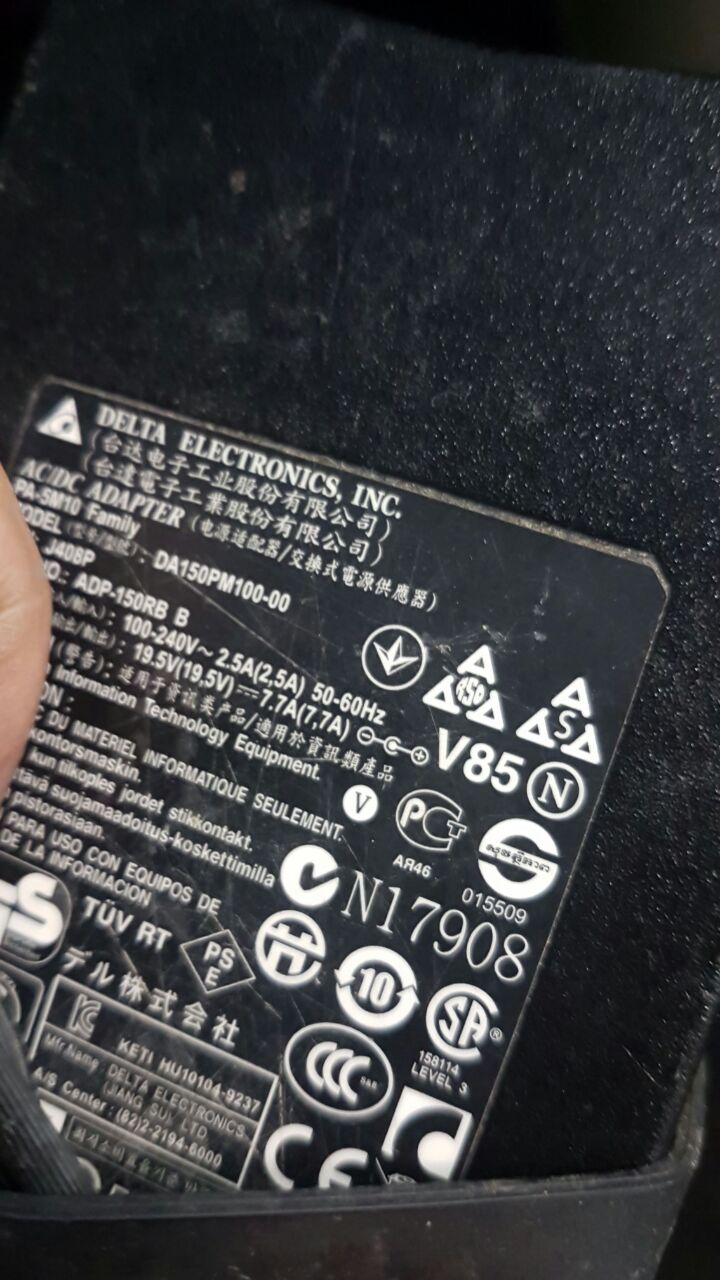
Hey, I'm back! Here is a picture of my charger. I guess it does work. I stay tuned.
Attached Files:
-
-
Your charger is 150W. For the time being while you have a 5870 you will be fine since that has a TDP of about 50W. The TDP of the 920XM is about 55W too so you are within its specifications with that setup. If you want to upgrade the GPU later i'd suggest getting a 240W charger, unless you want to go for 7970M crossfire in which case you'll need to modify a 330W charger to work with the M17X (wouldn't recommend that setup over a single card though). If you buy another though, make sure its from Dell or Delta. I've tried a different branded charger before now and the bloody thing popped while I was in the middle of a game (was 160W power draw at the most with 5870 crossfire). The thing also got uncomfortably hot to the point that I could literally fry an egg with it. Never had an issue with the Dell one I bought to replace it however.
-
The processor worked like a charm! Thank for the suggestion. Do you know where can I find the power button panel? The whole black strip. I can't find itit.
-
I bought one recently from eBay. If you can find one used it should be pretty cheap, though the condition may not be perfect. Nothing a bit of cleaning and polishing can't fix though most of the time.
Unfortunately for me though it seems something on my motherboard is stopping the power button from working, so i will have to have a look at that if i can find a schematic. Thankfully I can still use it with the little reset button in that crevice above the keyboard. -
Replaced the ribbon cable, still didn't work.
-
Weird point of failure, try cleaning the socket with 91% isopropyl. Never seen that kind of failure before.
Arrrrbol likes this. -
I'll give that a go. I will also try unplugging the display cables and keyboard to see if its some kind of glitch rather than a component.
-
Tried that, but after connecting everything back up and plugging it in all that happens is the left GPU fan comes on. That makes me think its something on the board which is not working.
-
I need a full replacement of the panel with the power button, the tech servicing my unit aren't able to find the hinge that attach the ribbon. Any good links where to buy it? Thank you!
-
Two benches on my M17x R2 using the 240W PSU:
940XM 25-25-25-25 @ 875/1300 crossfire (0.95V)
https://www.3dmark.com/3dm11/12683442
940XM 25-25-25-25 @ 925/1300 crossfire (0.975V)
https://www.3dmark.com/3dm11/12683533Last edited: Mar 5, 2018Arrrrbol likes this. -
Hi there! Can you please give me a hand with the question above your post? Thank you!
-
https://www.ebay.com/itm/GENUINE-Al...750396&hash=item23581efdaa:g:IxsAAOxyCSRSDP3L
here you go make sure you have the power ribbion cable still if not i have a link attached below to a oem one. i damaged my m17x r2 power cable and power board myself before lol.
https://www.ebay.com/itm/Dell-Alien...e=STRK:MEBIDX:IT&_trksid=p2057872.m2749.l2649 -
anyone able to get m6100 pro working with m17x r2 ? i purchased one and all i got was stuttering mess in bad company 2 it doesnt have native fan control
 and i cant force fan control
((
and i cant force fan control
((
-
Thank you! Fortunately some guy in here made one for me which is working fine. Now I'm facibg a problem with the video card (5870), the screen goes fully black and even when it's booting up, I can hear it booting, but no image. Need a new card but can't find a 5870 or a reliable seller.
-
you need to flash the vbios on the card very simple. you need a flash drive and download this software. make sure you have the oem dell 5870m gpu drivers installed first.
http://www.dell.com/support/home/us/en/19/drivers/driversdetails?driverId=MJVMN -
How can I install it without being able to boot because Ithe screen is fully black? Neither connecting over HDMI seems to work.
-
if you have a spare computer or even library computer you can just download the program listed and created a flash drive bootable then insert flash drive into your usb drive, and then press "f12" key on boot and his USB as the boot option with the enter key and follow directions from there. if you live in usa and cant do it i can create a flash drive bootable for you and mail it to you ?
-
Thank you so much for the help! Sadly I don't live in USA but if you can point me to how to create it (or at least the software use for it) I can give it a try. Thanks again.
-
the software needed is in the link posted in a previous post earlier. its directly on dells m17x r2 driver page to get the software for it.
-
Hi, good day everyone. I'm new to this site, I have an Alienware M17x and I was wondering if there is any option for upgrading this machine, it has LED effects problem, so need to look into that also.
And I'm planning on changing my main drive with SSD and the back up drive just HDD will do, do I need to have a caddy for both? Thanks a bunch!
-
You need a caddy for both, but the 2nd caddy should come with the laptop. You can easily check by removing the bottom panel. What you will definitely need though is an interposer such as this:
https://www.ebay.com/itm/New-SATA-H...236380?hash=item3d448f231c:g:U0AAAOSwiO9XjEKh
What kind of LED issues are you having? -
Quick question - the *key to the right of S* on my keyboar seems to have given up the ghost. Are the keyboars from the M18X compatible? They seem to have the same screw brackets an cables an are a little easier to fin than M17X R2 ones. Not a huge issue if they 'on't work as i can live with a non-UK layout.
-
Hi, actually I went to a computer technician here and they told me that it's a motherboard issue, even with the Alienware Command Center installed, it won't light up, not even at pc startup, I tried fixing it via button power drain, etc but to no avail.Arrrrbol likes this.
-
The same keyboard is used all the way even from the Pre-Dell Alienware M17 R1 , Dell M17x R1,2,3,4 through the M18x R1,R2Arrrrbol likes this.
-
Thanks, bought a new Norwegian one as it was less than half the price of a UK keyboar.
-
Hi guys, I have an Alienware 17 17mx (2014) I don't know if is it s r1 r2 etc... Anyway my concern is I have upgraded my Graphics Card from 880M to 980M however my issue is its not being detected in the bios or on the windows... I did some little research and tried a couple of things
Ex.
Change UIEF to Legacy etc in BIOS
Also tried safe boot mode by having signature graphics disable.
Is there still hope for this? or this is really not compatible with my Alienware?Last edited: Apr 19, 2018 -
Wow thys thread is still alive!
My old m17x R2 won't boot after flashing the a10 bios (downloaded it back in the day, executed it to unzip it, and it started flashing by itself within windows instead of just letting me extract it and flash it from dos... obviously it failed and bricked my pc). It power on, keyboard light up and fan run, but it won't display anything. It's not just the screen, tried plugging a screen in vga, hdmi and displayport.
One of my dead ram stick had died but if I put it in, I get the blinking leds indicating the ram error message. So, at least SOMETHING still work. I tried blind-flashing, no luck. Did multiple power drain (and full power drain after removing the cmos battery too), no luck. I bought a pre-flashed bios chip and soldered it in, it does the same exact thing. I also tried booting with both 5870 removed, doesn't do anything either. Also re-pasted the cpu. I'm kinda lost at this point. What could it be? -
probably the part where you bricked your computer in a bad BIOS flash.....
-
Do you have a programmer?
Getting a full working dump and flashing it would be your best bet, you can't be sure that flash chip has anything programmed inside at all. -
Anyone can lead me to the latest unlocked M17X-R2 bios ?
-
What is this BIOS for?
-
It has many more features to overclock with from my understanding?
-
Nothing to be gained really. I have it flashed, no useful optionsRengsey R. H. Jr. likes this.
-
Hello men? I am from Colombia also I have the m17xr2 you have been able to update the video card to a better one than the 5870m croosfire?Last edited: Jul 26, 2018
-
Hi! Sorry for my late reply. No, I just went with the reaplcement of a 5870. Have to stick with it for now.
-
Amm ok, and where did you buy it? Ebay? And what do you think about the gtx 580m?
-
I rather have the GTX 580, but I have few time to invest fixing this laptop, so I went for the easy way.
I bought it on eBay, but the publication I went through is not available anymore. Those are refurbished cards from China, and it's working like a charm, also kinda cheap, 70USD.
The only gap I have now is that the machine is running slow, maybe because I'm using the old hard disk with windows 10, I have to get a good deal of a SSD. -
Another question, you still have your ati 5870m?the one that failed? What was the symtomb to fail this card? -
no video, blurred video, no post, BSOD after windows logo, one long-2short beep upon powering on, etc...many signs of failure.
-
You resolve this? I’m interesting to buy one this FirePro m6100
-
Thanks, an other topic you tested e FirePro M6100 con AWm17x r2? This work? Or what need to get work this card?
-
firepro m6100 has broken fan control, you will have to use hwinfo. This is a deal breaker for me, so I use clevo 8970M
-
Yeah your right but the problem is the 8970m are more expensives than M6100. have you found a 8970m Clevo more cheaper? And another question if I use the M6100 the drivers and performance run well? The 5870m heatsink works? If I use the Hwinfo I need control the fan speed manually right?
-
Well it is now 2018. My Alienware m17x R2 has been used since 2010 I believe. I have upgraded it this and last year. I have installed a i7 920XM last year and a ATI HD 7970M this year. And today I also upgraded the RAM so it now has 16GB of ram. It runs damn well on a Windows 10 Pro and I feel like I have a all new laptop that runs smooth and efficient. The more of think about this then this has been one of the best investment ever. It was rather expensive back then but it has certainly lasted longer than I would think such a machine could and being able to upgrade the hardware on it for a low cost has certainly prolonged its use. Of course I had some hickups with Dells support back then but with Ebay and a screwdriver tool-set plus a anti-static wrist band stuff is so smooth with the R2 system.
I have since then aquired a m11x R3 system as well as a m14x R1 system but let us be honest here the bigger screen on the m17x R2 system with its great resolution(see signature) really still makes it stand out. Cheers to a fine old machine that still holds its stand against time and age!Nospheratu and alexnvidia like this. -
Yes, the old m17x R2 is still quite useful after performance upgrades. On single 8970M + vulkan + overclocked 940xm, I can get 45-60fps on doom maxed out, which is nuts considering it is using an 8 year old CPU and 5 year old GPU.
*OFFICIAL* Alienware M17x R1/R2 Owner's Lounge Thread - Part 1
Discussion in 'Alienware 17 and M17x' started by katalin_2003, Dec 6, 2011.