 Problems? See this thread at archive.org.
There isnt enough power from the battery to support the high demand.
Sent from my GT-I9300 using Tapatalk 2
-
-
Hi, yes, that is normal behaviour on battery as said. The video card automatically goes into it's lowest power state on battery. Very annoying if the power lead falls out during a game!
The caching/RAID is done in the firmware and is independent of windows BUT to reinstall windows you will need to extract the correct disk drivers from inside the IRST (intel Rapid Storage Technology) download and put them on a USB. When you get to the first screen for configuring the drives you need to load the correct disk drivers. There will be a keypress on-screen to load drivers. Once the intel drivers are loaded you can continue. If you do not do this either windows will hang during the install or the install will complete but windows will BSOD on first start up
Good luck
-
Of course the fps drops when you unplug. You realize how much power all your components need when gaming right? If the battery provided you with all that power you'd have next to no battery life xD
It automatically reduces clock speeds I think and other things to save power, that should be pretty obvious how long do you expect to play Far Cry 3 on battery life any ways xD
-
Does anyone know of a (good) Dell/Alienware rep in the U.S.? I posted on the sales thread; it did not help.
Also,
-
hmm.... I've had my M17x for quite a few months, and I can tell you right now, it's a refurb, and it hasn't given me one inch of a problem.
Mourin on these forums (as you'll have to look her up) is n't a sales rep but she can probably answer any questions you have. I cannot give contact information, only her name for you to look up via the forums. So def look her up.
Matte screen isn't always the best choice. I'd say alienware in a way would top the MSI GT60-0ne for the fact that i can punch my screen right now and not break it.... yes, i mean literally PUNCH it as it has a plexiglass exterior to protect the screen. Something I've found time after time (as available on some HP models) to be pretty darn good.
Build quality of both laptops, i cannot say, but the AW holds up pretty nicely, and i'm sure customer service with these laptops are pretty damn good.
Graphics is probably better than our AW's, ram-wise that is.... but the weight of the AW is, last i checked, mostly heatsink and battery. MSi, even though i don't own the newer series, but the older, have always run extremely hot and happened to of overheat on me a few times. So that does account for something vs Dell's laptops.
Also note, the MSI uses one heatsink fan. The Alienware uses TWO heatsink fans, which is also a big plus in my opinion as each fan is proprietary to their own purpose (one being CPU other being GPU), that is the way it should be built IMO.
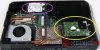
As you can see, both of those heatsinks go to one source, one fan, and my guess is there are two outlets to one fan. I'm pretty sure one fan cannot cool ENOUGH for all that. Then again I could be wrong, as I haven't tried the MSI GT60-0ne.
I can babble on and on and on about feature for feature. One downfall of the AW, is the speakers.... I will admit they dont SUCK, but they're not as good as you would expect, but i've come to live with it for the price i've paid for hte laptop.
If you wanna compare any further, feel free to ask as I'm more happy to help out
-
Send me a PM if you need any help, I'll hook you up with a good sales rep.
-
Thanks very much for the reply, I'm wondering could you advise me, or point me in the right direction on how I'd go about extracting the drivers?
-
Sure. Download the IRST suite from dell (under Serial ATA in the list drivers list) and run it. When it asks for where to extract put it somewhere you you remember like a folder on your desktop. Abort the install and you have all the files. Now, just where the actual disk drivers in the structure I can't say but you should be able to browse it (after copying to a USB) in the windows installer until it finds it. It will report intel mobile express chipset when the correct driver is loaded.
-
I'll send you a PM when you get a PT build of the 17xR5 so you can "loan" it to me.
-
I don't know... I might have to keep that one for myself! haha, can't wait for it
-
My PG friends don't have them yet, so it may be a few weeks before they make it down there. I'll send you a pic on Facebook PM when they come in. lol
-
I'm sure I can get some good benching scores with an XM haswell chip and some Nvidia flagship cards up here in Alaska. Was -47F Yesterday.
-
Hey guys, so when I did some research about my problem with games crashing and such... It sounds like bad driver installation. When I got my laptop I just installed Nvidia drivers right on top of Dell drivers... then laptop went for GPU replacement, I didn't update drivers for like 2 months
then put 310.90 on top of all that.
But yeah the newest Nvidia drivers are up, and I want to go home and try the Crysis 3 multiplayer beta which is highly improved by those drivers... How can I FULLY clear all remnants of Nvidia from my PC. I don't trust Driversweeper fully... What about device manager... or i don't know..
Some help please?
-
Is it working since the 310.90 install? If so then a straightforward install sohuld be all that is needed. I just upgraded to that beta without issue. If you really need to strip out then I can tell you how I did it back when I had problems
-
I really do need to strip out /: Games work... but nearly every game at some point (doesn't really bother me much) just quits, and I don't understand why. It shouldn't be doing this... so I want it fixed. But for now I'm going to install the latest drivers and try the Crysis 3 beta
But yes, MickyD, I'd really appreciate it if you helped me fully strip Nvidia from my computer
-
Sure. Now this is the way I decided to do it and I know that it may leave reg entries but it put my machine back to 'new' card install and I could install NV drivers directly, without needing a modded inf.
Use add/remove and uninstall all the NV components listed EXCEPT the actual video driver. Reboots may be needed depending on the order but I just worked through it.
Then open device manager and right click the video card and delete it. In the option box that opens select to 'also delete the driver software'. You will be forced to restart at this point.
When the machine restarts install your driver. On mine at this point DM showed 'VGA compatible' and not Nvidia 675
The only question I can't advise on is to whether you should install the latest dell approved release first. I did this and it is reccomended but your call. Worst case, you do it again!
If you are chasing down the 'XXX program has stopped responding... I doubt a video driver issue, usually that results in a BSOD or driver restarted message. But there are so many knock-on effects from making changes that you can never tell exactly what is going to fix a problem
Good luck
-
Okay, I'm pretty excited to receive my new laptop to say the least. I ordered a m17x r4 with a 680m and a few other upgrades. The order was placed on Jan. 25th and estimated arrival is Feb 8th which I'm cool with. However, I received an email yesterday morning at 8:05 am saying your laptop has shipped. I have next day shipping so the laptop should arrive today. Right? Well, as crazy as it sounded, I gave dell a call and they are clueless. I asked why would I receive an email saying it had shipped if it hadn't. The lady had no idea. Anyway, she's still showing Feb 8th as the estimated arrival. Anyone else had this happen to them? For all I know, a note will be on my door when I get home for attempted delivery.
-
Contact Luis with your order number, he'll be able to confirm its shipment (you'll need 5 posts to PM him). The estimated delivery is accounting for possible interference in the delivery process. For example, delayed shipment due to a storm.
When I ordered my M18x, the order details page said it was in-production during the whole time it was on the road. I'm sure your laptop is on the way, probably in your home town or on its way. -
It really would be amazing if it is on its way. That would mean it was built in one day
-
Well no note on the door. Maybe the email was an accident
-
Nah, it's not an accident. I thought mine was as well. It came the following Monday after I ordered it on a Friday. I was thinking, "How the hell did they build my system in two days and ship it already?!", but it turns out it was already in-stock. They made a bunch during the holiday season. Contact Luis as I suggested above, he'll help you.
-
I'll pm him once i find out how. Lol I'm on my phone and don't see the option. -
Hi Guys,
Anyone checked out the geforce experience beta software? Tweak your Game Settings Automatically | GeForce Experience | GeForce
Very slick to have all your game settings and launch from a single interface. I like the way a lot of games have screen shots with them that explains what some of the different detail settings do in that game. Update check works well too. V Nice
-
Add/remove/uninstall as in Control Panel uninstall or change a program? There I see 5 Nvidia things: physx, HD audio, graphics driver, 3D vision driver, and some random update...
So from there I delete all except NVIDIA Graphics Driver 310.90 ? Hm but the NVIDIA 3D Vision Driver also says 310.90.. maybe I should leave both of them there?
In Device Manager, there is no delete option.. there's "Disable" and "Uninstall" which do I do?
Thanks for the help MickyD I'm checking my device manager and stuff at work atm on my work laptop, so I'll be able to try this out on my M17x once I get home
-
Yes. everything except the graphics driver in control panel, add/remove programs and then uninstall the graphics card in device manager (sorry about the 'delete' mistake) selecting to delete the software when it prompts.
-
Thanks MickyD But you said it's probably not a driver problem... what else would you suggest?
First thought for me was fresh install of windows... but I've already got my hard drive full of games etc I'd hate to go through a hassle -.-
What could be the reason for a brand new laptop, with a new GPU, legitimate games... to have games crash every now and then, across various drivers? :S -
Yeah, it a real pain but sometimes the only answer. My R3 had the same problem and I put it down to 'testing' games. A particularly nasty root kit got in at one point. Every time I attempted to run an exe from an ISO image some 16 bit program would attempt to run. After trying to clear it out (and discovering there were registry entries that even windows could not change (locked) so causing system restore to fail) I gave up and went for the clean install.
Now I have a 'dirty' desktop I use for that, and then purchase a copy for the AW. Disconnect the internet on the desktop before any testing and I have an image to roll it back. So far this R4 only has occasional 'program stopped...' errors and I believe that is because I often use trainers (paid for and legit) and has only happened when I have one loaded. Really bad co-ordination is my excuse!
-
Hmm well I wouldn't have a problem with doing a full reinstall of windows, except I've got my games there...
I feel like if I moved certain things to an external hard drive... reinstalled windows, and put them back.. it would cause some problems or something..
What's the best way to go about this so that I don't have to redownload a couple hundred gigabytes of games xD -
I install all my games to a second drive and have found that almost all of them work by simply running them after a re-install of windows I keep the download install files as well coz I know a disaster is going to need one of them. Problems turn up when the game installs windows components as well. You can usually make sure things like direct x and dot net framework are up to date. Biggest issue is getting save profiles back. I have had to start again with a couple of games (BM arkham city being one that really p'd me off.).
For this I did a windows documents and settings backup and restored that. Steam and UPlay store the game locations at install and moving them can make the front-end not 'see' them but I had hellofa job with 'games for windows'. Got there in the end but it was close to a game restart
600+Gb of games on mine
-
:| yeah that sounds like way too much hassle for me
My 512GB Vertex 4 is already full... I'm just gonna go ahead with the clean driver installation and hope that helps a bit. It doesn't really bother me, most games have autosave and such so if a game quits... it's just a minor nuisance , with SSD I'm back where I left off in 20 seconds xD
-
That's what I'd do, not a show stopper or even a real annoyance, as you say autosave and an SSD make it far less painful.
Including the install files i'm up to 800Gb so may soon have to dump some old ones if a bunch of good new games hit
-
I recently ordered the m17x r4 with the 680m gpu and Windows 8. Still waiting for it to arrive, but I am going from using Windows Vista on my old Dell laptop to Windows 8 on the m17x. Are there any issues that anyone has had using Windows 8 on the m17x?
-
I used to move the whole steam folder (along with origin) with every fresh windows install. Recently I got an extra mSATA SSD so what I did is make it my boot partition and my M4 one the game partition. And yeah you can set Steam and Origin and other games to install to another partition instead. So now everytime I have to reinstall Windows my games are right where I want them to be and the worst I have to do is "Verify integrity of game cache."
-
hehe for some reason with my last install I installed origin to my regular Hard Drive, but it default saved all my games to my SSD so its pretty much full. How do you move the games around and then have origin detect them? I don't see a backup mechanic like steam has.
-
nah I just straight up copy their folders from one location to the next. I wasn't even using steam's backup function. Some games on Origin does allow me to do such thing like BF3 and ME3, havent tried others yet since I don't play Origin games that much
, not if I can help it. You put the folder in its place, then when you click on Download in Origin, it will detect and check if theres any file missing and retrieve them.
-
ah good to know I'll have to play with that and see if I can get these game installations moved. Having BF3 plus all the expansions and Crysis 2 on a 128gb SSD plus windows pretty much fills it up.
-
When your order gets put on a dock awaiting FedEx (or whomever) pickup, it gets scanned in and assigned a tracking number. When that happens, the online order status tool gets the tracking number pushed to it. If you go to the order status page, you can avoid calling in and asking reps who use the same tools that push the shipment information to the order status tool to check your order. They will see what you see. Where Luis and the like come in is when there are problems with the order (parts backlog, high volume in the production pipeline, bad weather, etc). More senior guys like him and his team can use tools that the phone reps don't have at their disposal to chase down the real story.
Order Support | Dell
Having said all that, many times the order status tool is comically inaccurate. It's a kind of a crap shoot sometimes. -
Could someone upload unlocked bios A10 pls ? I can`t get from techinferno.
-
Here's a link posted a while ago by Svl7 - BIOS A10 unlocked
Why A10 and not A12? -
Hey guys just wondering I have organised with dell to come and pick up my faulty m17x, can I keep the hdd or do I have to send it back as I received it.
Kind of hesitant in giving them the hdd cause if some sensitive info that I have on it. I have formatted it but that necessarily doesn't mean it's completely wiped. The last tech that came to replace parts on it said that I can keep it.
Maybe if any of you guys have been in the same situation have you kept it or if an alienware rep can advise that would be great
Thanks in advance
Sent from my GT-I9300 using Tapatalk 2 -
If it's going in for repair then you can remove the drives first. If it's a replacement or money back then you do have to return it. I used a shredder prog after a partition delete and recreate when I was getting a replacement.
-
I'm not 100% positive, but I believe they changed their policy a few years ago to where you could keep the drive. I'm not sure if there are extra steps involved. Are they exchanging it for a new one? If so, you can swap the drives if you want. You could also run a debug script from a DOS prompt. That wipes it clean enough so that only someone with advanced skills, tools and a strong desire can get anything off of it.
How do I use the MS-DOS® debug script to remove my DOS or non-DOS partition? -
Because I have m17x R4 and the newest is A10. Also I have read that there are problems with flashing when I am on A10 oryginal one. Is it safe to flash unlocked bios on alienware?
-
As safe as any other brand....
-
I got a replacement laptop cause this one had too many faults for a $3000 laptop so I have to send the faulty back because I received the new one. So I guess I have to send it with the hard drive?
Sent from my GT-I9300 using Tapatalk 2 -
You could always make a clone of one drive to the other if you have a period with both.
-
Same as me. I asked to keep the drive and they refused. It had a slight 'hardware issue' when I returned it
-
A good secure erasing program should be enough and avoid any potential hot water if you are looking for sensitive data to not be leaked, that and maybe on the fly encryption is something to look into.
-
Wrong post!
-
I received lately a replacement M17xR4 because my 2 month new one was bugy.
I just send back the "old" M17xR4 w/o hard drives and w/o the power brick ! Now I have a spare power supply and a new HDD
They don't realy care what you send back , as long as you send back the laptop !
*OFFICIAL* Alienware M17x R3/R4 Owner's Lounge Thread
Discussion in 'Alienware 17 and M17x' started by katalin_2003, May 4, 2012.


