Problems? See this thread at archive.org.
Hello Everyone,
I just got my M17x ( 7970m version ) last Friday and have enjoyed it so far, it was a long time to save but it should last me quite a while.
My issue i have or think i have is, i seem to have trouble updating drivers. I tired to use Alien Autospy and went to the driver updates but it seems that all the drivers suggested are OLD and outdated. Has anyone else seen this? should i not use that program. I know my AMD drivers are old becuse last date updated was 6/2012 and using windows to search for an update says its it Up to Date and so does Autopsy. I did download that AMD Cataylist to select the appropriate chip for programs but just cant seem to find a way to update drivers.
Any suggestions ?
-
-
Alien Autopsy will only offer the original drivers from dell so is only useful in getting a machine up and running after a re-install. You'll need to manually find (or get advice from AMD users here) the latest ones.
Steer clear of 3rd party driver updater programs, often full of junk and can use wrong drivers.
Good luck
-
hey guys, i updated to 13.3 beta 2weeks ago, everything worked fine. But since playing Bioshock Infinite via HDMI output, it wont switch the graphics anymore + wont change the brightness. Fn+F7 wont do the trick aswell as right click -> configuring switchable graphics using amd ccc...
Any1
graphics is 6990m -
Hey guys & ladies (if there are any), I'm new here and just saying hello. I've got an R4 on the way, should be here next Monday.
-
Welcome to the club dude!!
-
Thanks! Is there a specific intro thread I should use or is here ok? I'm mainly navigating from Tapatalk on my iPhone so it's a little harder than on a desktop/laptop.
-
Am I the only one who bought an R4, or any Alienware for that matter, that won't be using it for gaming?
-
Add my welcome
No gaming? Is kinda strange, are you into benchmarking/overclocking or just love the looks?
-
Well, I bought mine for the warranty and (what I've heard about the) build quality, ease of servicing, and ability to switch off Optimus/Enduro. I'm not a "crazy gamer."
-
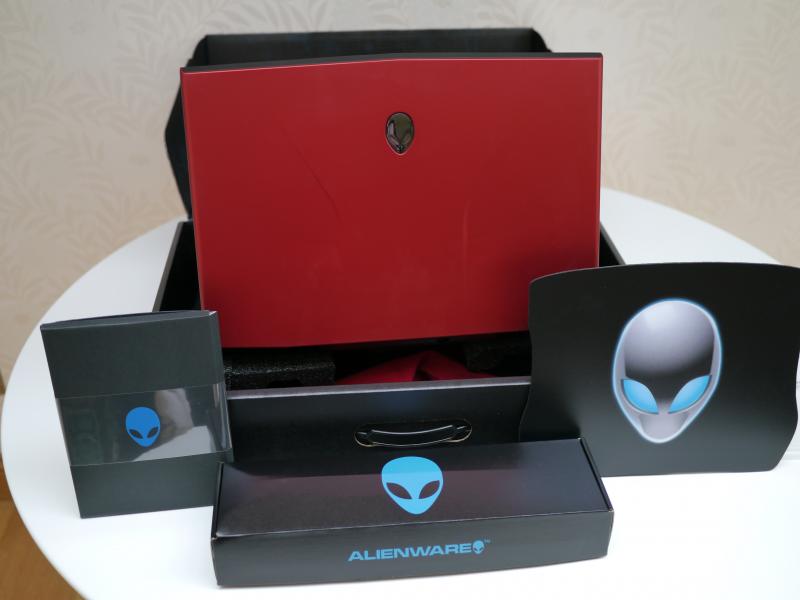
I received my new Alienware M17x R4 last week and absolutely love it.
![[IMG]](images/storyImages/004-1.jpg)
I call it the Red Beast for obvious reasons and put together a video review sharing my thoughts on it :thumbsup:
Attached Files:
Last edited by a moderator: May 12, 2015 -
-
Well, none of that really.....except the looks are ok. Here's what happened - I wanted a Dell laptop with a large screen, Win 7 and a BD drive. I looked at the XPS and Inspiron 17R but they all came with Win 8. So......here I am.
-
Cool, as good a reason as any. Now to see what it can do for you then...
Which video did you go for? -
I'm sure you mean video card, right? (I'm not very savvy with all of the terms :/ ) I got the 2GB GDDR5 NVIDIA GeForce GTX 660M, the cheapest one I believe.
-
Here's the stats:
M17X R4
Gen 3 i7 3630QM
8GB DDR3
1920 x 1080 60Hz WLED
2GB GDDR5 NVIDIA GeForce GTX 660M
500GD SATA HDD
Quasar blue keyboard
W7 Home Premium x64
Stealth Black
BD drive
Killer Wireless-N
Sound decent? -
NP. Both, but I see that you got the better display panel, the lower res one is widely panned. If you do find that gaming becomes a thing the card will probably need upgrading but it's good enough for running a medium/high combination of settings (not ultra) in the latest games.
-
Thanks for the info. I doubt I'll ever game but I'll keep that in mind. I built my last desktop but I know nothing about changing parts on a laptop. I basically thought it wasn't possible. Glad I joined here!
-
Nowhere near as easy as a desktop but one of the few that does come apart very easy, and a lot of good advice here on what can and can't be done. Even the warranty allows you to change parts yourself
I bought mine specifically as a desktop-replacement for gaming, and works great for me - and I love the 3D
-
That's good to know. I love item-specific forums! So much excellent knowledge!
-
Anyone with the AMD 7970m version? I'm having a hard time getting the new drivers.
Is Catalyst Control Center the way to do it ? -
So, after wondering for a while about why my "4" key felt a bit loose, I finally discovered that the left latch holding the key in place has somehow come off. I've tried reattaching it by using a small pin and trying to push it back into place but it keeps coming off which makes me think that the latch is probably broken. The right latch is completely fine so my key isn't falling off but the loose feeling is irritating.
Is it time I called Dell again to swap in a new keyboard or should I just deal with it...?
-
You paid for a good warranty so I'd say call it in. They are usually quite happy to send you the parts-only if you ask, so less inconvenience (if you're up for doing it yourself)
-
No need to call, send me a PM I'll take care of it.
-
Nope. I bought mine primarily for video editing - if I hadn't needed to do that, I would have purchased a much cheaper system since I do most of my gaming these days on my XBox and PS3. The only game I have installed right now is FM13 (though I'm enjoying how even that is amazing on this machine!) I may install a couple of games I would have not installed in the past, but my primary use is not gaming.
-
Hey man, Its easy
Do you often use the Intergrated graphics? if not here is the latest beta that I am using : http://www2.ati.com/drivers/beta/AMD_Catalyst_13.3_Beta3.exe
This beta should work with Enduro: http://www2.ati.com/drivers/beta/AMD_Catalyst_13.3_Mobility_Beta3.exe
And here this should work with Enduro: AMD Catalyst
I love the beta drivers as that is where the performance is at!
I would suggest to remove your previous drivers, then install one of the above; If you decide to use the driver that is made only for the 7970m make sure you have Switched to the 7970m by "FN+F7" then install!
Enjoy! -
I did not have any luck with 13.1 or 13.3 (BETA) as long as the HD 4000 was still turned on. I had to FN-F7 in order to completely disable the Intel HD 4000 before installing either of these. Leaving them on only resulted in further issues using Windows 8. I got a sad unhappy face and had to restore the system twice.
-
Did you select the 13.3 beta that supports enduro? They released that afterwards, I am using it and it works for me.
Sent from my GT-I9300 using Tapatalk 2 -
Thanks. No, I probably selected the standard one... I am guessing that would do it.
I have another question. I recently also purchased the Costco m17x which has the 680m, 1920 screen, etc... It says in the description that it comes with 2x500GB 7200RPM drives in a RAID 0 configuration... My understanding of this would be that it would look like 1 drive, but with a TB of space?
When I received the PC, I looked in the file manager and it listed both a C and D drive with 500GB each. Is this truly a RAID 0 configuration? Or is this a standard 2 drive configuration? How can I tell?
Thanks. -
So the Costco configuration does come with a 680m?
-
I had the same problem with my r4. I ordered raid 0 but it showed 2 separate drives for SSD. If it is set up correct raid 0 will show as only one drive. You have to go to the IRST and just click to configure your drives as raid 0 and it will do it easy.
-
Yes, the $1699 configuration comes with the 680m. $700 less than the exact same configured from Dell. This actually ships from Dell as well. Order it at Costco, ships from Dell!
-
Can I do this once I have already installed games to both drives? Safer to just start fresh? I may just keep it as-is. I am sure RAID 0 is much faster data access, but the risk of losing "everything" if one disk goes down is a little troublesome.
Thanks. -
You can make a HDD image of a RAID array as easily as a single drive Barnes. Creating regular backups and deleting the image(s) when no longer needed has provided me years of peace when the dookie hits the fan for whatever reason.
-
hello ppl
i got d windows 8 and i WAS SHOCKED 2 c i lost all my alienware wallpaper n stuff, so HOW can i make it windows 8 alienware edition and if not how can i revert back 2 windows 7, and by windows 8 alienware edition i dont mean just add some wall paper n stuff, i mean i should have the alienware logo at startup instead of the windows 8 flag thing and instead of d flowery stuff i should have d alienware thingy the start screen should be alienware [ and all the what do u call the extra things? the blogware or watever if possible]. thnx
AND IF THERES NO WAY THEN JUST TELL ME HOW 2 REVERT BACK 2 WNDOWS 7 and how to backup windows 8 pls!!!
AND another thing, how do i clean the fan thing and stuff, the SMALL wire thats attached 2 d mother board wont move and there just NO SCREWDRIVER out there that can open the second fan
-
What u should be asking these people is lessons in how to speak proper english and how to type.
-
I am REALLY frustrated. I used my 5% gift card to purchase a second A/C power adapter for my M17x R4. Ordered it directly from Dell, and the item is called "Additional Alienware M17x 150 Watt AC Adapter." In the description it says it works with the M17x R4. I am about to head out on a trip, and just tested it. It has the same blue lit up power tip that goes into the computer, but the flat adapter "box" is smaller than what comes with the computer.
I let the computer run down to about 90%, plugged it in, and the systray shows "plugged in, not charging." Apparently, even though it is specifically called an Alienware M17x R4 adapter, it doesn't charge the computer.
I tried to chat with someone at Dell, and got someone who was reading off a piece of paper apparently and tried to run me through a bunch of steps, then told me I'd have to pay shipping to return it, and wanted to just send me another one of the same thing.
Arghhhh!
EDIT:
Here's the link to Dell's site and description:
http://accessories.us.dell.com/sna/...note_bnrank=0&baynote_irrank=1&~ck=dellSearch
The adpater label says "Delta Electronics" rather than Dell, FWIW. -
I always thought the adaptor was 240W? Mine is and it sounds like your original is. Check the output amperage x output voltage (12.3x19.5?). I'm thinking that a 150w would only be for low end video cards maybe? I went through the build and the extra adaptor was listed as 240W
-
It is, I think they made a mistake possibly? sent him the dell xps 17 charger?
it happens haha, bad luck though! -
You're right, I think - so why did this adapter show up as an M17x R4 adapter? Dell should not have it listed that way - argh. Now I need to keep trying until I get a support person who will swap it out for the correct one.
-
Well you do have a link to an advert for the product that is deceptive at least, and completly worng at worst. Either way, they should money up and supply you with the correct part AND a returns box. Ask for a supervisor, you sometimes have to wait for a call back but usually within 1 hour.
Good Luck. -
It technically is compatible, but only if you have the lower gpu (660m as its lower TDP 75W i think). Your laptop should 'trickle' charge if you had it plugged in, but you won't be able game on it. Basically the laptop accepts just basic low power.
Just keep the pressure on dell support and tell them they sent an incompatible charger. Hopefully they will swap it. Otherwise just sell it and get a cheap one from amazon, they are exactly the same as the OEM one.
Good luck with dell customer service! -
Yeah, tested, it doesn't charge it at all, not even a trickle charge. I'll keep trying with Dell to get a swap.
-
Given enough time switched off the battery would eventually charge but you'd be waiting ages haha. Good luck with Dell, might be worth getting one from amazon if they are cheaper ( i would think they are significantly cheaper there tbh).
At least you have a primary adapter to use anyways! -
Are you in the US or CA? If so, send me a PM and I'll look into it.
-
Hey all,
Curious to see has anyone here over clocked there 7970m and run crysis 3?
Im curious to see if there is a gain in fps or not haha but I don't want to try it without some one else doing it first
Sent from my GT-I9300 using Tapatalk 2 -
That is very nice of you, thanks. I'm in the U.S. and I'll send you a PM now.
-
I ordered a mouse from Dell with my gift card, the rep said that she would give me a discount, and she processed the wrong mouse. Now I cannot cancel the order.
Dell is great. -
I still have yet to get my gift card or even welcome package.
-
Hey,
My AlienFX worked fine yesterday, but today a message come up about a problem relate to AlienFX controller cannot commute with the computer. When trying the the AlienFX tester in Command Center folder, it cannot changed the color and said there is a problem with AlienFX board. The last working color of the keyboard still working, but changing the color is impossible. I really dont want to reinstall or back-to-factory setting because I have done it several times already. Does anyone have this issue before?
P/s: I have reinstalled the CC to the newest version, clean up any leftover but still no go. -
I wonder if a driver sweep will do?
Can't guarantee anything, I have never heard of this problem? Could it be an i/o board problem?
I will do some research for you and get back later!
Sent from my GT-I9300 using Tapatalk 2 -
For the past few days my track pad would just spaze the mouse and I through it was something with divers conflicting so I reinstalled windows and it was still happening not my track pad doesn't work at all I have tried installing the track pad drivers but it still won't work idk what else to do also how would I go about fixing the black trim by the media bar I started to fade in places
m17x r4
Edit mouse still not working right but I can't get FN + F7 to work to install my and drivers /: and I can't find a setting to switch to decrite only in the bios
Sent From My AOKP Galaxy S III From Sprint
*OFFICIAL* Alienware M17x R3/R4 Owner's Lounge Thread
Discussion in 'Alienware 17 and M17x' started by katalin_2003, May 4, 2012.