 Problems? See this thread at archive.org.
Has anyone else overclocked their 1080p screen to 75hz, and can it go higher? (atm having it at 75Hz)
-
Yeah, Im running a 32gb cache drive in my m14x right now with a 1tb drive, Since I use my laptops to DJ also, I need tons of space.
-
lol, I kinda figured there was a good reason for wanting all that space, other than 'my laptop is bigger than your laptop!'. You know exactly what a cache drive can do so it's only the fact that to get to the msata slot you have to a little more dismantling than other parts - but not difficult if you can use a screwdriver

-
Yeah, Not really as easy as the m14x msata drive thats for sure... took me 5 minutes to put in my m14x one.
Either way, I plan to get one in there soon and get my speeds boosted.
Wondering if it might be possible to install a pair of 2tb 15mm drives in there I guess I will have to do some measuring and see.
-
To be fair, it's easy to find good reason for most of the "cost-cutting." At least for the m17x. The m17x r3/r4 alien head power button looks prone to malfunction, the grills dig into wrists and scratch easily, you need to push on the chassis to use the media buttons, and the keyboard surround flexes too much. The smaller battery and lost ports are not to easy to justify... Why not offer higher-capacity batteries for a surcharge?
The new 18 might be a downgrade from the m18x r2, but the 17 looks like an improvement over the m17x r4.
I want to see how the mainboard and internals hold up over time. -
Yeah but it must have cost a fortune to have a dual, multi-coloured, software controlled power button alone, cheaper by far to just loose it (and a piece of the identity).
Instead of the redesign I was hoping for things have just gone generic. Since there is nothing else out there that appeals to me visually I will also wait this out and see - awesome performance and reliability trumps everything for me
-
I've got mine at 75Hz, it will go to 79Hz though. I've got a different screen, the 1600x900.
-
hey guys
i was thinking about doing some regular clean up for my R4
so i have decided do some repasting, both cpu and gpu
and get a notebook cooler
so can you guys help me decide on a paste?
it should give a good performance, enough for atleast 2-3 applications for BOTH, cpu and gpu, and easy to apply and clean
also can someone guide me on how to remove the heatsink and apply the paste properly?
also which cooler would be appropriate? as the vents are on the corners of the laptop
most coolers i have seen, have a large fan in the middle, which i dont think would be effective for R4...
also do laptop coolers have adjustable fans? as in position can be changed?
thanks in advance -
I will get clevo GTX 680M very soon. Seller told me that its vbios is 80.04.67.00.01 and I've heard this vbios is for P570WM only, but I'm unsure. Will it work on my M17X R4 3D?
-
Hi, been considering the same upgrade myself. From what I read it will work just fine (and may be more overclockable than a dell vbios) but the 3D may be a problem. Depends on just how the '3d certification' in the main bios works. You should be able to flash the dell vbios and it should fix that IF it is a problem.
HTH. -
Do u see any differences between 60hz and 75hz?
By the way, you are using CRU, right? But this isnt supported laptops with switchable graphics... Its working fine? -
If your temperatures are good on your CPU & GPU I wouldn't recommend doing a repaste, because it wouldn't really be necessary, and there's always some risk involved with doing this (depending on your experience). Cleaning out the dust is always a good idea though. I use cans of compressed air to blow out the dust, I used to use vacuum cleaners until I suspect I damaged my RAM doing so, probably due to static!
If you do want to repaste I've always used Arctic Silver 5, which has been around for years. It used to be one of the best, but I don't think it gives the absolute top notch performance though now. A little tube of that goes a long way though, so you'll be alright for several applications to your CPU/GPU. Arctic Silver 5 can be a little trickier to apply because it's quite thick. If you do a quick google on thermal paste reviews you will see some consensus as to which is best for you. Differences between pastes are generally only a few degrees Celsius (less than 5degC difference).
Notebook coolers are a must for me. It means I can use it on my lap without blocking the vents. Also, the dust tends to accumulate in the notebook cooler rather than the laptop - a bonus! I use the Zalman NC2000, which I've had since 2008, so it has some longevity! It's very quiet & keeps the whole notebook cool. It's an indirect gentle non-turbulent flow of air through the many vent holes, which is a good thing because I think forcing 'high' pressure turbulent air directly into the laptops intake fans is likely to reduce the cooling efficiency of those fans. I move my laptop towards the front of the notebook cooler, so that there is about an inch of overhang at the front. This positioning ensures that the intake vents are located above the vent holes of the cooler. This helps with the cooling performance. It fits the M17x really well too, its almost exactly the same width as my M17xR3, and I think it looks good too, compliments the laptop. -
I see a difference between 75Hz and 60Hz in games like F1 2012 and that twitch shooter Nexuiz that got so much stick! Only makes a big difference for fast paced games, and obviously you wanna keep the fps at 75 or above to experience the difference.
Yes, you can only do this if you disable the iGPU (the intel one).
You can use NVidia Control Panel to create a custom resolution with the higher refresh rates -
So I've asked a lot of time to E-bay sellers and the other guys using M17X R4 about 3D function. Almost answers were "It works just fine, but 3D is not sure" (and even dell 680m. I don't know why). Truth be told, I don't need 3D because my eyes get red and sore whenever 3D is on.. but 120Hz is REAL good Later I will try cross flashing.
Thanks! -
Great
I like the 3D so much I don't want to risk it with a non-dell one right now. Keep us in the loop
Edit: The reason nobody is sure is that dell have a '3d compatibility' certificate somewhere in the BIOS. This will only list cards dell sell with that model. If the card ID is different the driver may not load the 3D. A dell vbios should make the BIOS see a dell card. -
OK thx for the info!
Oh and I have another question for you. I think you are using R4 3D either
Um.. My pch temp is too high. Even in idle, temp is keep rising.. starting from around 50℃ and finally almost 70 ℃..
When gaming? it reaches 90℃.. this is crazy.
Crazy temp caused by 120Hz refresh rate I guess. Just guess
I'm not sure because no one uses R4 3D around me.
What about yours? -
I've never looked at it, I just use the compal GPU temp as that is where I've had issues in the past. I did a quick read on what it is ( http://www.intel.com/content/dam/ww...7-series-chipset-pch-thermal-design-guide.pdf) and it appears that a max operating temp is 108c!
On mine it idles around 61c and running a game benchmark a few times (BMAC) to climbs to 79c so it does sound like there may be an issue on yours but within acceptable limits?
Edit: I tried with the 3d active or inactive and it made no difference
-
Hi,
Yes i'm using CRU, it works fine and yes i can see a little difference. -
Perhaps write a guide or a list of what to do, As i only get one display on my R3 and thats the LGD02DA Non PNP and it doesn't say that it's active, I put the Custom res in for 75hz press ok and apply, It's not in the catalyst control panel or anywhere else.
6990m
Disabled IGP
2630qm
idea's? -
Hi,
Don't overclock it, i got major artifacts using 75hz overclock, i turned back to 60hz and it's gone.
Not sure if it's the monitor or the videocard. -
Hey ladies/gents,
Having an issue with an otherwise issue free M17x R3. I'm trying to use a set of AX360 headphones in 5.1. They worked perfectly fine in my M17x R1. This headset uses Analog inputs (4x 3.5mm) for ease of use in PC mode. It can use SPDIF to a receiver, but that is a hassle. Anyway, I can't get the headset to properly set up. I can go into IDT, have the inputs plugged in and it recognizes it as a 5.1 set up. However, no matter the combination of inputs into ports I use, I can't get every channel to work. At most I could get 4/6 speakers/sub to work. Not only that, the ports are not color coded like the R1's were, so I'm not entirely sure each one is going in the right spot.
Any insight on this? I loved my R1/AX360 combo for the longest time, travelled thousands of miles together. The R3 works with the AX360s, but usually just 2 speakers in stereo mode.
Thinking I might sell my R3 pretty soon. Just not impressed with it like I was with an R1/R2. Hopefully I get this fixed and can be content. -
Just for general info for people reading this, my 1600x900 screen is fine at 75Hz, I think it's going to come down to which screen model you have, and perhaps maybe even unit specific like it is for GPU and CPU overclocking.
Signex, what did your artifacts look like? I'll keep an eye out on mine for the same problems.
EDIT: If your artifacts have gone when you turned it back to 60Hz I'm pretty sure it's the monitor, not the GPU that's causing them. -
I remember you posting this a few times before, and no one replied! I think it's because people don't know the answer, that's why I hadn't replied for instance. I'm just replying because it's not nice to be completely ignored!
-
I am just so happy now, just completed a repaste job
Paste- Cooler Master Extreme Fusion X1
just did a first burn test using Intel XTU and furmark
here are the initial results
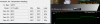
-
Good job, did you notice a change in temperatures? Hopefully going the right way - as in cooler?
-
yeah temperatures are much better now
cpu idle is less by almost 2-3C, now idling at 48-50
cpu load is down by a WHOPPING 20C! used to hit 95C+
gpu idle is down by 4-5C, used to stay around 59-60C
gpu load is also down by a HUGE 13C! used to stay ~85-87C on furmark, now its max 71-72C
ambient at around 30C
also cleaned both fans and heat spreaders
this paste has worked wonders! it also has a very high conductivity(9.5W/mK) as compared to others(3.5-4W/mK)
had a few problems with paste as it was very thick, and the nozzle was quite wide,
and was doing it the first time, lots of trial and errors
i also expect to temps to go down as the time goes by and the paste settles down -
Wow, made a big difference, well done!
Your thermal paste beat my Arctic Silver 5 on my GPU by 0.6W/mK! -
Yeah I'll give it a day or two then just make a new thread on it. Was hoping it wouldn't come to that.
-
has any one tried to record using the hdmi in
like recording your xbox or ps3 display out and then saving it on the laptop?
is it possible? as laptop goes non functional when in hdmi in mode, keyboard and mouse do not work, except the volume controls on the control bar -
Not possible it just passes through the signal to the screen. You can't capture it. -
damn, i wish i could do that
thanks for the info -
Any one know if the r3 keyboard is a direct swap with the r4?
I don't like the win8 key on my r4. -
Hi guys,
I was extremely disappointed to read (again) about GPU temp throttling of the new AW 17 and 14.
I have a AW m14x r2 (i7-3610QM, GT650M 1GB) at the moment and want an upgrade. Haswell is not necessary but the GPU should be a leap upgrade. As far as I know (from my last year’s evaluation) the AW m17x R4 should be ordered with the 7970m. The problem now is that the new AW 17 and 14 have this GPU throttle problem and the last m17x r4 available here in Switzerland is the one with an i7-3720QM and the Nvidia GTX680m. It’s the last of his kind and has the same price range as the new AW 17 with i7-4700MQ with the GTX770M.
What you would do in my position? Go with the glossy m17x r4, take the m17 r5 with the throttled gtx770m or go for MSI gt60 or Asus G750 with the same spec but without throttling?
Any downsides aside the sata-2 msata port in the m17x r4?
Thanks and cheers,
Nick -
Hi there,
First thing to ask is what do you want to do with it? Hobby, benchmarking, extreme gaming, hassle free gaming, multi-purpose?
-
Yeah sorry perhaps I wasn't clear enough. I don't need noob q&a I just want to know if the m17x r4 with gtx680m is a good deal or not. p.e. has the r4 with the 680m the same gpu throtteling problems than the r3 had or not?
thanks -
NP. I've not seen any throttling of the 680 but owners can say better. I had the 580m in my R3 and that was a nightmare throttling, this 675m in an R4 has no such issues (and it's just a rebadge
)
Personally (as you would expect) I would go for the R4, with all the issues being seen with the 780m
-
Yep, I'd go with the R4 & 680M, the 680M is faster than the 770M, and the 680M overclocks real well apparently (but I think you might need to flash a modded vBIOS to overclock more than +135Mhz on the core, because I think they're locked at that ceiling). (The flashing is an easy enough process, but it is likely to VOID your warranty). Stock 680M is fast anyway, and +135Mhz makes it even faster!
-
They should be interchangable, but I'd double check with someone who has done it before though.
No throttling I've seen, but I generally run it at stock clocks. I've ran it at 888mhz (+135 core) for 3dmark11 and it doesn't throttle for me, I havent repasted or anything, just stock running on a desk no additional cooling for me. -
Thank you, that's the kind of info I need. I guess the vBIOS is from TI.
-
TI? You mean Tech Inferno right? If so, yes, Tech Inferno, svl7, he does them.
-
anybody able to get 3d working with 320.49?
i still get errors and flickering screen when trying to enable it...
contacted dell and they asked me to install 307.17 from their downloads section
that is a pretty old driver!
why dont they update their drivers section? -
I think because that driver is rubbish (although dell do not update video drivers that often). It's always a dice roll with laptop drivers (IMO), just that up to the latest pile of bad stuff they have released the latest drivers have worked just fine.
I'd wait out a couple of weeks for a better update, there is a later one aimed for win8 sp1 (326.01) but reports of it working better on win 7 have turned up over in the NV forums. Might be worth a try. It's not like you are loosing much power from the card anyway, the driver should still update game profiles...
-
well, i'll just try the ones dell asked me to try,
i highly doubt that they would work ok with the latest games
after that i'll try the 326.01
any installation issues on win7? -
You might be surprised, a few FPS for sure but not the nasty problems people are getting ATM. Reports are that it works fine on win7
https://forums.geforce.com/default/...-driver-feedback-thread-released-6-25-13-/69/
Not much in the way of good info there apart from 'still not a good driver'
-
My god, these klipsch speakers go LOUDDDD.
Our whole backyard is almost filled with music.
Tomorrow i'm getting a pair of KRK Rokit 6 speakers, i hope their good i only hear good things about em. -
I've just installed clevo 780m in my M17X R4 3D (same graphic card url : Nvidia GeForce GTX 780M 4GB DDR5 for clevo alienware upgrademonkey pre order | eBay)
Just inf modded, it works fine. But there is a issue related with fan RPM. Because of difference between dell and clevo EC I guess. But with HWINFO64 FAN CONTROL, rpm could be modified Of course no 3D, vendor ID is different. I have 120Hz refresh rate, no problem at all.
ps- I have informed that clevo 780m can't be installed in CLEVO laptops but new pXXXsm model. -
Excellent, that is an awesome upgrade! When you say fan control is not working, how do you mean, what are the fans doing in relation to the temperature of your GPU? I have a Clevo card (from the same place as your 780M) in my M17xR3, and fan control is the same as when I had the GTX560M. The fan profiles are the same, and repsond in the same way to the temperature of my GPU. Isn't the fan profile saved in the BIOS of your laptop, rather than the vBIOS of the video card? I'm pretty sure, that in my laptop at least, that fan control is a function of the BIOS, not the vBIOS. So, I'm thinking fan control should be fine with you GPU, and work according to the same profiles as when you had your previous card installed, as long as you can read the temperature sensor off it? Is it reporting any temperatures using GPUz or HWInfo for instance?
-
Nope, no respite from 307.17 from dell
they are even worse than 314.xx
games run pretty bad on it, lots of lag, dpc checker shows lots of redspikes
also the 3d is not working
it even gave some new errors
will check the 326.01 later -
not able to install 326.01
getting this error
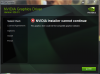
do i need a modded inf for this?
@Mr.Fox
*OFFICIAL* Alienware M17x R3/R4 Owner's Lounge Thread
Discussion in 'Alienware 17 and M17x' started by katalin_2003, May 4, 2012.


