 Problems? See this thread at archive.org.
That's how I have to install drivers for my card, because it's not a standard card for the M17xR3, so I'm familiar with this process.
Go to the following link, which is a link to a modified inf file, part of the LaptopVideo2Go website that I've been using for years:
http://laptopvideo2go.com/infs/320series/32018_win8x64/nvwin.inf
That will appear as a list of text in your web browser. You then just need to 'Save Page As', (and I only ever got it to save properly when using Firefox), and choose file type 'All Files'. This will allow it to be saved as a config file. Will be saved as 'nvwin'. EDIT: I've attached the modified inf here for your convenience (you'll need to unzip it). They update the inf periodically, so you'll probably want to check for new releases periodically if you're going to be installing drivers like this in the future.
Copy that nvwin.inf file & paste it into the display folder where the NVidia driver will have been extracted to (when you tried to install it): normally located at C:\NVidia. You'll know that you've pasted it into the correct folder if it asks if you want to replace the file, which you would allow: that just proves that you're overwriting the file & you're pasting it into the right place.
Run the setup installer file located in the C:\NVidia folder, and follow the onscreen instructions. It will show a warning that the driver has been modified, just go ahead and ignore that warning & continue to install. Should work fine.
Good Luck!
-
Attached Files:
-
-
Well, thanks a lot for the modified inf!
but it is for the 320.18 , which caused the blank screen issue on my laptop...
will it work for other drivers?
also dell have offered me a gpu and motherboard replacement
and my warranty is going to expire on 27th!
what should i do? -
Just saw, nvidia released a 326.19 for win 7,8 and 8.1
NVIDIA DRIVERS 326.19BETA -
Yes, that modified inf will have worked with any of those new drivers. But yes, I'd go ahead & try the latest one from NVidia now, I'm on the latest one you've just mentioned. 8% more fps in F1 2012 in comparison to 320.49, so good drivers!
-
And the overvolt appears to have gone! At last, maybe less 580m burnouts??
-
Also, should i go ahead with the gpu and motherboard replacement?
-
I don't know, what's the problem? If it's in warranty, and they're willing to fix a problem by replacing them, then why not? I thought you were just having driver problems?
-
well i am having issues with the nvidia 3d vision, just wont let me enable it, these latest drivers have wrecked my 3d
tried all beta and whql drivers
no avail, nothing works
getting screen flickering -
I guess you've checked to see if other users with your configuration are experiencing the same problem with the latest drivers? If they're not, and it just seems to be your laptop that's playing up then I could only suggest that it's a fault with your driver install (I don't know about hardware problems). You could try uninstalling all NVidia Drivers via Programs & Features in the control panel. Then use a program called Driver Sweeper to remove any and all traces of NVidia files on your system. Install latest NVidia driver that is on the Dell Website. Then use the clean install option in the NVidia installer to install the latest NVidia Beta Driver from the NVidia website. (You were talking about the intel iGPU earlier being enabled or disabled. As far as I know all 3D enabled laptops aren't compatible with the intel iGPU, so it's disabled by default). EDIT: maybe it might help setting you BIOS to default values too, if there's something weird happening with that.
-
@rjtnag Have you tried the dell NV3D separate install. It's an old version but strange it's a standalone install, maybe to do with 'kicking' the 3D into life?
Driver Details | Dell UK -
That could work! That's a similar idea to where I suggested he install the Dell Driver first (kick into life!), and then the latest NVidia driver from the nvidia website.
-
yeah, first they had suggested me the standalone 3d controller driver, but was really old! 266.08 or something!
then they suggested me the 307.17 driver for my gpu from my dell downloads
i tried that, odd enough, it started showing new errors when trying to enable 3d!
now 3d wont even work on 314.14! on which i could use my 3d!
and the latest 320.49 got me the blank screen! really worried now
now they have offered me a gpu and motherboard replacement, saying it will take two business days. Do they do it at home, or do they take away the laptop to some service center?
i have heard some horror stories about dell replacement services, like, damaged/scratched laptop, non functional or lemon parts etc -
Oh well, I just thought that since there was a separate install (when it is in every driver release anyway) may have something to do with dell specific hardware. The idea was, install that 3d component, test, then upgrade to a later driver if it now works. Shame but at least they have started to get you new parts.
Check the warranty specific to your country regarding on-site callouts. Here in the UK, and I had the same in the US, if they could identify parts to be replaced then a tech was sent next day with the parts. IF there is a question as to just what part is needed they can request that you send it into the depot. Sounds like with two possible parts to fix it they may ask for a depot repair.
It seems very country specific as to levels of service you get. Since you live in the country that supports much of the english speaking parts of Europe I would hope they have good local support and on-site service. I found that some Eastern European countries will not do on-site at all claiming that it needs to go to the depot for further examination.
Good luck
-
nope
326.19 did not help either
giving me the same errors
i really think that it might be a hardware problem!
but nvidia control panel and games do show that my display is 120hz
maybe the 3d mode has awry
also, i did a complete alien autopsy system test
it failed a test called 'Primary Surface Test' for the gpu

also, when enabling 3d, it give a similar error
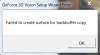
i guessing that these two might be connected
also, almost wherever i have read, failing of primary surface test, should warrant a gpu replacement, no questions asked
ALIENWARE ATI RADEON 7970M PRIMARY SURFACE TEST FAILED!!! I AM IN OTHER COUNTRY - Alienware Forum - Alienware Club - Dell Community
AMD Radeon 7970 issue - Alienware Forum - Alienware Club - Dell Community
really scared now -
HOLD ON!
I JUST CORRECTED MY PROBLEM!
I was running a OV vbios from T|I
flashed my backup rom
everything is back to normal and 3D is WORKING AGAIN!
on latest driver 326.19
So happy... and relieved! -
Glad you found it!
I always avoid OV on laptops - too many cards just burn out from what I see. If there's a problem that a vbios mod will fix look for one that does not raise voltage. I have to use one but only to match P0 and P1 voltages (to stock maximum) and clocks. Gets rid of the power throttle
-
yeah, unlocked vbios are very helpful
i just tried a OV just to see highest achievable stable clocks
i was able to reach P7880 in 3dm11
well, i'll just try the non OV just unlocked vbios
and check if 3d is still working or not
PS. Tomb Raider on 3D is simply MINDBLOWING. couldnt believe my eyes!!
the best 3D i have seen yet -
Yeah, it is fantastic. Have you seen batman arkham city or max payne 3? Both excellent 3D titles, not a trace of ghosting!
-
yup, its working!
cheers!
:thumbsup:
-
yeah, arkham city with physx on high was too good!
really good 3D there! -
That's my 'demo' game when anyone asks to see the 3D - console players can relate to the game. Always get the same response: 'how can you go back to 'normal' gaming after that!'
-
Ok, so kinda dumb question but I will ask anyways.
As the new owner of a r4 with a 680m in it Im wondering if the air coming out of back of the computer should be really hot? I ran a few games last night on it and it just felt like the temps were really high... but then again I have never had a top end gpu before.
coming from a x51 with gtx650ti, m14xr2 with a 650m and my m11xs with 335m Im not sure how hot some of these high end gpus should get. I have not run any temp readings yet, but will be benching it today. -
Cool, sort out msiafterburner to see the temps while gaming (OSD) to be sure but the air should be hot, at least while gaming - it's getting rid of it. You should be looking for around 65c to 70c at stock.
-
well, i shouldnt be hot, when running on idle. you should not be able to feel, the air comming out
on load, yeah, the fans are a bit loud and you will be able feel hot air
a lot depends on the ambient temperature.
you can use tools like gpu z or msi afterburner to monitor temps
as a thumb rule, i expect the gpu to not exceed 70C, 75C max -
I will run some temp checks today at work to see what im at.
But yeah, im just so used to my ice cold m11xr1 -
ofcourse, laptops with smaller chassis use low voltage or underclocked parts to prevent heat/throttle issue
they could be a reason as why no temperature problems on 11x -
Since I got you right here and you have the same computer as me but with the 120hz screen.
I wanted the 120hz screen, but there were none in the outlet so I settled for the 1080p 60hz. But does the 3d model have a manaul gpu switch or is the 680 always on?
Im not a huge fan of optimus which is why my m14x gets less use than my m11xr1 does. -
The iGPU is hardwired out on the 120hz display. Not even visible in the BIOS. No optimus or weak graphic at all. Big plus in my eyes...
-
yeah, the intel igpu is disabled and not connected to the display
the 680m is directly connected to the display
so no nvidia optimus
yeah, but in unlocked bios A11, i can change the option of the gpu selected, maybe if the display connector is changed, maybe it will work? -
Not unless you plug a 60hz display into the other port on the MB. I tried the unlocked bios and ended up with a bricked machine - blind flash time, and that is NOT a nice thing to go through
It's all to do with getting past POST, only an NV card can initialise a 120hz native display. I'm sure if there was a fix dell would have done it rather than having to design the MB specifically to work with a 120hz display. -
Hmm, I do like that idea of having to not deal with optimus.
-
Me too. You do loose a couple of hours battery time but I never use it on battery, it's a gaming rig
Even if you do not like the 3D (and most are surprised at just how good it is) I think it's worth it. -
I did want the 3d, but yeah, I never surf on the m17x... thats like using a nuke to remove a dandelion.
-
wont the 120hz display work if plugged into the other port?
-
No it's a native 120hz display and not multi-mode so until a driver is loaded after post it cannot 'do' 60hz.
-
I remember reading that the 60hz screen has a different plug than the 120hz screen, but I dont know for sure.
-
well, i dont care either
i am happy with the 3d!
now there is no going back
-
That's correct, you can't get it wrong when putting it back together.
Welcome to the 3D fan club
See: http://forum.notebookreview.com/ali...e-17-owners-lounge-thread-95.html#post9293059 -
Hello ppl,
Alienware has released its new line of laptops but unfortunately they aren't available and haven't been launched yet in India.
Alienware used to offer the BEST high-end laptops in india but unfortunately it seems that they have discontinued their laptop series.
I request all of you to pls sign this petition for the sake of my health and happiness. thank you.
http://goo.gl/5DWUR
MAY THE FORCE BE WITH YOU. SPREAD THE WORD. -
Thank you for your opinion. And I think you are right I thought fan rpm is a bit higher than the VGA load rate, but I was wrong. It's normal
Don't have to use HWINFO64!
-

NVIDIA GeForce GTX 780M video card benchmark result - Intel Core i7-3740QM Processor,Alienware M17xR4
CPU: 4.3/4.1/3.9/3.9
GPU: core +155/ memory +400
DRIVER: 320.49(tweak version)
This is my 3dmark11 score. I've flashed the vbios from TechInferno. It works great. -
That's great. I assume you give up the 3D though?
-
Yes. No 3D But refresh rate 120Hz I have
-
Haha, I could do with 120Hz! I don't miss 3D because I've never experienced it, not a movie or a game! I feel like it's time to experience 3D now, although if I do, then I'll probably just feel obliged to buy a new notebook! (So, I'll live in ignorance is bliss I think!)
-
So true!
Until I got this one I'd had a look at 3D a few times and just thought 'it's got potential', but after seeing a high end game work flawlessly you'll need to tear it from my cold dead hand
-
well this question might sound silly but,
does the gpu have some sort of a flash 'counter'(like as in samsung android phones) , which records how many times this card has been flashed and with what vbios?
and do the repair technician from dell/alienware check the gpu for any modifications before replacing it?
does it affect the warranty? (running out of it anyway) -
that is a mighty good score there!
never believed i would see 9k score on a single gpu mobile setup!
congrats -
WoW :O 9k on a single card, nice !
-
I see where you are coming from. In my experience (3 cards replaced) and others here, dell accept on face value a dead or dying card. If it is running then they may check the vbios version but they have never checked mine. You have already gone back to the original to see if that fixes it anyway. Of course if you say you have tried a modded vbios then all bets are off and they can drop a warranty call.
Unless it was logging flashes and versions (which it does not as far as I know), there is no way to tell what has been on it
-
yeah, thanks for the info
well obviously you wont be saying that you have flashed a modded vbios
well they did offer me a replacement for gpu AND motherboard(why?, i dont know) only after doing some driver changes
well, everything is working fine now, happy now
*OFFICIAL* Alienware M17x R3/R4 Owner's Lounge Thread
Discussion in 'Alienware 17 and M17x' started by katalin_2003, May 4, 2012.


