Problems? See this thread at archive.org.
too long. No offence but its like throwing a kid a ball and tossing it in a maze. Theres a lot of info there but sometimes I dont feel like digging through it all.
3d mark 06 seems to be a popular one? is there a free one? or do Ihave ot buy it?
-
About to run it in a few mins..
m17x r2
i740qm
8gb ram
128gb ssd
5870 x2 crossfire
1920x1200 rgb
are the basic specs. Running all drivers and stuff straight the way it came to me (pretty much no idea except I know it has 8.763 or something for the GPUs)
Any guesses? -
well here's a pic i took...
Is it normal for cpu scores and fps to be 0-2 fps during cpu test? I mean the i7 isnt THAT bad is it? just seemed odd seeing 0 fps lol.
I guess my graphics drivers are out of date or something? So my vbios is ok but drivers need updating? I received the m2 thursday last week.
![[IMG]](images/storyImages/ac19e835.jpg)
i added a pic of my Desktop for comparison. i guess im happy its similar !
desktop is 2.66 ghz oc to 3.1 atm ghz core 2 duo e6750, 4gb ram, gtx 470 , 2 raptor 10k drives
![[IMG]](images/storyImages/01315c3e.jpg)
-
I can't see the pic as I'm at work and they are blocked. To answer your question, yes during the CPU test your will get 0-2 FPS. It is a test strictly for your CPU and that's how it will show up normally.
What was the score? -
14526
'your result has the following problems.. - graphics driver is not approved ' is what it says at the top of the page. -
Sounds normal for an out of box config with that CPU.
I think that just means that the drivers are not microsoft certified. Someone please correct me if I am wrong. If that is the case I would not worry about it at all. -
As CptXabaras mentioned, just see post#1 (FIRST PAGE) of this thread - all of the common benchmark apps are listed there in the first POST.
-
anyone with a similar spec build blowing my scores away? should i look to oc the cpu? im guessing 14.5k is decent?
-
stock seems ok , i have a the exact same system, and i get around the same score @ stock. overclock it and you should be able to hit 19k, maybe 20k if your cpu will stand any kind of oc'ing , cause my 740m wont....i wnat my 640m back =(
-
Are we able to oc the 740? Everything I have read so far led me to believe the options are only for extreme CPUs or 920/940 etc? Can I crank the fsb in the bios? Also are there any settings that allow any overboost or turbo mode?
I'm going to be updating to the and drivers in about an hour. Then I'm gonna follow some guides in getting win 7 to boot and run faster. I'm also going to back up my laptop ( if I can figure out how ) and then uninstall mcafee. Il be doing 3dmark 06 after each change.
That test I I did was with mcafee running and I dis t check task manager what programs were running. I had the machine on for a bit to install iTunes and some other stuff so I'm not sure if that negatively impacted anything.
I also didn't think my fans got loud at all.. I heard them but they seemed to just turn 'on'. Maybe I'm just used to my desktop sounding like an airplane I dunno. -
I added a pic of my desktop vs my r2 on page 596.
anyone tell me why my memory says:
Memory4096 MB
--------------------------------------------------------------------------------
Module 12048 MB Mushkin DDR2 @ 400 MHz
Module 22048 MB Mushkin DDR2 @ 400 MHz
its supposed to be ddr2 @ 800 MHz !!!!! ??????? -
2x400=800
since it is DDR (DOUBLE data rate) -
ok cool just making sure. I guessed that but recently got this mushkin memory.. thought maybe I installed it wrong or something lol..
Cool thing is in the latest PC gamer magazine there is a sli vs xfire article. i learned that our 5870ms are actually more like 5770 desktop gpus and in the comparo 2 5770s performed very very similarly to a single gtx470 and my 3d marks pretty much show how close they are.
Can I expect gains from going to the ATI 10.12 drivers ?? Im thinking to do that now. Im also going to uninstal mcafee or disable it and I think Ill score better than my desktop ! -
New drives add fixes for newer games usually, if you are not playing any newer games I would sit tight. I am using 10.6 personally
-
Ok, so....just wanna see if any of you guys are experiencing the same thing as me using '11....
I have very recent clean install of my OS....nothing else loaded except '11 (only OS and Drivers and windows updates)
I thought what I posted in another thread wasnt quite normal so I wanted to do everything from scratch to see what happens ....
Basically, im running the latest version of '11 on th latest 10.12 drivers (new CCC).....they are the ONLY video drivers that have been installed after clean OS install..no dell drivers, just straight to 10.12 (vbios etc already done)
What I am experiencing is that the image while benching is kinda small and in the middle of the screen (not full size, like a 3 inch border around it, which may be normal - i dont know...obviously just running the basic version...
The other thing, between tests, as one test ends, i get junk/garbage displayed on the screen.....its only like for a split second and is kinda like just a flash of scrambled colours on screen for the briefest time before the next test starts.
So, does any one else have the same experience? - small picture in the middle of the screen? - maybe some junk inbetween tests?
Would just like to know...it doesnt happen with other Bench's from FutureMark and i dont seem to have any problem with gaming performance....would like to rule out anything that may be causing this if its not normal...
Thanks Guys...oh and girls..
-
On default settings, 3DMark 11 doesn't run at native resolution. So unless you've told your video cards to scale everything to full screen, you're going to have borders. That option is grayed-out for me, so everything scales to full screen. The garble of colors between benchmarks happens to me too, and I know that my laptop is in perfectly healthy condition.
-
Benched my desktop with it yesterday and got a P7219 running a 5970 on Vizio 37" running an i7 975 Extreme with 18Gb RAM and had the same screen you explained, if you want as full screen bench use either Unigine's Sanctuary or Heaven. I also noticed that 3DMark11 stated the driver I was using, ATi's 10.12 was not an approved driver.
-
You can run any of the 3DMark benchmarks (don't know about 2005) in full resolution. You've just got to tell it to do so. The problem is that most folks traditionally run the default settings when they bench, which 1280x1024. So you couldn't really compare your scores to anyone else, just yours.
-
You can also just adjust the setting on the Advanced Menu from Centered to Stretched to get full screen with 3dMark11 at 1280x720 (default Performance resolution).
-
Just to clarify, it does not matter if the benchmark is scaled to full screen or not, the graphics cards are not working any harder. It is when you change the actual resolution. Since the benchmark is not a playable game, I don't see the problem with it running scaled or not. All you're doing is trying to produce a number.
-
Thanks - good to know that Im not the only one who gets a bit of a "mish-mosh" of colours between tests...like i said, otherwise, everything is fine inc gaming....the tests themselves run fine with no distortion or artifacts or glitches too....i thought i may have had some kind prob on the gpu front but my scores are normal too....around 3930 for my system without any OC at all totally stock.
The weird thing is (one of them anyhow) is that when i originally d/l '11 when it came out and ran it, i WAS getting a full screen image of the tests and i was using the "basic" package....obvioulsy i cant change res or anything on basic and i didnt change anything in CCC either....weird!!!
Not bothered really anyhow...its the figures that im interested in, not looking at the benches too much as they run thru the tetst....im happy to know that its normal and nothings broken!
Cheers for the advice! ....repped.
-
Think this is absolutley fine...had the same happen to me when was on 10.11 when they just come out....not FM approved....they just havent added to their list of drivers that THEY approve yet....even tho they are WHQL, FM havent added them so they dont let you post to the public.....pretty sure they will approve them sooner or later....theres nothing wrong wiv 'em!
-
Hi all, i have a question when running Furmark (muilt GPU) my test result scores seem low,
Score: 3033 points
Submitted on December 31 2010, 12:54 am
App Version: Geeks3D_FurMark_v1.8.2_Build_Apr 16 2010_at_10:36:37
Main graphics card: ATI Mobility Radeon HD 4870
Number of Active GPUs: 1
GPU Clock: 550 MHz
Memory Clock: 888 MHz
Shader Clock: 0 MHz
Graphics Drivers: Catalyst 10.12 - 8.801-101125a-109591C-ATI 11-25-2010
GPU Temperatures (start/end): not available
Bench Duration: 60 ms
Resolution: 1280 x 1024
MSAA samples: 0
Window Mode: fullscreen
CPU: IntelR CoreTM i7 CPU M 620 @ 2.67GHz
CPU Speed: 2660 MHz
Operating System: Windows 7 64-bit build 7600 No Service Pack
But as shown above it stats that there is only 1 GPU. I have checked crossfire setting and also used Fraps which has produced the same FPS score. Any idea's? or am i reading this wrong
-
What does the Device Manager show for GPUs ?
It is possible the crossfie cable is loose -
I have an M17x r1 with 4870's in CrossFirex and just downloaded Furmark 1.8 and ran the test for the same duration as you. My score was 3006 and I know my cable is secure, my CPU and RAM is listed in my sig.
-
Device manager shows both GPUs, maybe the cable is loose, I will check
-
Maybe is useless but try to disable the xfire from CCC, then run the test and check result. I think furmark doesn't show up the two gpu's but is actually using them, wich is important. And also with hwinfo32 check both card temp and load.
Are you running the multigpu instance of furmark i guess -
look here is my run, as you can see it only show up 1 GPU, but actually both of them where running (both heath up and rised load to 100%)
is just the software
* Score: 5006 points
* Submitted by cptXabaras on December 31 2010, 6:25 pm
* App Version: Geeks3D_FurMark_v1.8.2_Build_Apr 16 2010_at_10:36:37
* Main graphics card: ATI Mobility Radeon HD 5800 Series
* Number of Active GPUs: 1
* GPU Clock: 700 MHz
* Memory Clock: 1000 MHz
* Shader Clock: 0 MHz
* Graphics Drivers: Catalyst 10.12 - 8.801-101125a-109591C-ATI 11-25-2010
* GPU Temperatures (start/end): not available
* Bench Duration: 60 ms
* Resolution: 1280 x 1024
* MSAA samples: 0
* Window Mode: fullscreen
* CPU: IntelR CoreTM i7 CPU Q 840 @ 1.87GHz
* CPU Speed: 1862 MHz
* Operating System: Windows 7 64-bit build 7600 No Service Pack -
Hi, i have checked all cables and all looks fine. Disable crossfire and my score was cut in half, so i guess the score i had is using both cards. Just seems low compared to 5870's?
-
Hi! I'm obviously new here, bought my new M17xR2 during the free graphics deal around early December (saved me $895). Just thought I'd jump in and say I really appreciate all the things you guys are doing here. You've helped me with a lot of new software and tweaks to get this nice piece of hardware going. I'm sure there are countless others out there as well... I was a previous owner of an XPS m170 and m1730. Obviously the new performance on this machine is nice, but the cooling system seems so much better than the m1730 (no more sweating hands
). Overclocking the m1730 seemed the only efficient way to cool the system, as it would force the fans to run at 100%. This machine doesn't even need to run at full speeds to keep temperatures cooler than the m1730. Anyways, my furmark has just finished after 20 minutes on 1920 x 1200 & 8x MSAA. I guess i'll get out of your way, time to do a little OCing!
System: Core i7-Q840 @ 1.87 GHz | 6 GB Stock RAM | Crossfire ATI Mobility 5870m (bout to test at 760(core)/1100(mem) | 320 GB SATA | 1920 x 1200 RGB LED (probably make a sig later...) -
I disabled Mcafee and gained a whopping 50 pts in 3dmark06 wohoo!
-
Just tried some overclocking and wanted some input. While I was on the dell driver I ran 14528 on stock clocks, overclocked to 800/1100 and posted 14788. I then loaded the lastest driver from AMDs site and overclocked (800/1100) I posted 14434. One thing I noticed while on dell drivers my cards showed up as 5870s and on the AMD drivers it just said 5800 series. Is that normal? Are my numbers on par with my set-up and clock speeds? Thanks for any input.
P.S. test were done with 3Dmark06 -
Firstly, yeah...scores seem normal to me.....you will get minor fluctuations on scores give or take, especially on '06 so i have noticed...i have ran it several times without changing anything and scores can vary by quite a bit....depends alot on what processes you have running to some degree. You also have to remember that 'o6 is a very cpu intensive benchamrking program.
Regards the ID of the gpu cards, thats normal....they only show up as 5870 when you run Dell drivers, when you run AMD drivers, they appear as 5800 series so thats perfectly fine too.
When I had my first system, it was identical to yours and my '06 scores were less than yours....just under 14k no OC at all.....that was on Dell drivers PRIOR to the new vbios and drivers..... -
I benched my R2 with 3dmark 06 today and I've got 13900,thats a little bit low?im so confused
anyone have configs like me in my sign pls confirm
-
That pefectly normal for that setup - i had a setup just like it and thats the kinda scores i was getting, so its perfectly normal and nothing to worry about!
-
thank you for confirm man
-
Does anyone have scores for the 6870?
-
I doubt it just yet. Its a new card, especially for AW systems. Notebookcheck may have some info if you look.
-
But I would not trust their info. Wait for a user here to get it, several have ordered and promised us benches
-
Ok this is very interesting imo. A computer site from my country Norway, have recieved the new Alienware M17x to test it out. It features 2820QM, 256 GB SSD, and......AMD HD 6970M!!
The article have just been put on the site, but they will update it with benchmarks etc later on.
Here is the link
Google Oversetter -
A must see for people interested in m17x r3, thanks.
-
It could just be a type too.....I did not see a GPU-Z screenshot
-
Yes could absolutely be a typo. GPU-Z isnt there because they haven`t tested it yet.
-
I am sure by next week, there will be 2 or 3 major reviewer that will have had access to the PC. Such as CNET review, PC Mag, Notebookreview, etc...
-
It has few pics and a claim they played some games. However there are 0 numbers and benchmarks. Am I missing something?
-
For now thats just it, soon they will put numerbers and benchs.
-
I just stumbled across Furmark 1.8 and i thought i'd give it a go.
I was quite confused though.
When i run the single GPU version, i get a score of 1700. No clue if this the score i should get with my setup.
When I run the Multi GPU version however, it gives me exact the same scores, sometimes a tiny bit lower even.
It does use both GPU's, i can see both temperaturs going up, and they are both stressed 95-100% all the time.
Crossfire is enabled, and is working correctly as far as i know (in starcraft when i disable crossfire my fps is cut in half, in various other benchmarks crossfire shows as enabled etc).
Am I worrying about something i shouldn't, or is there something not entirely right about the above? -
R3 score's list is up, once you have an R3 score, PM ME right away.
EDIT: THis is the 6000th post! -
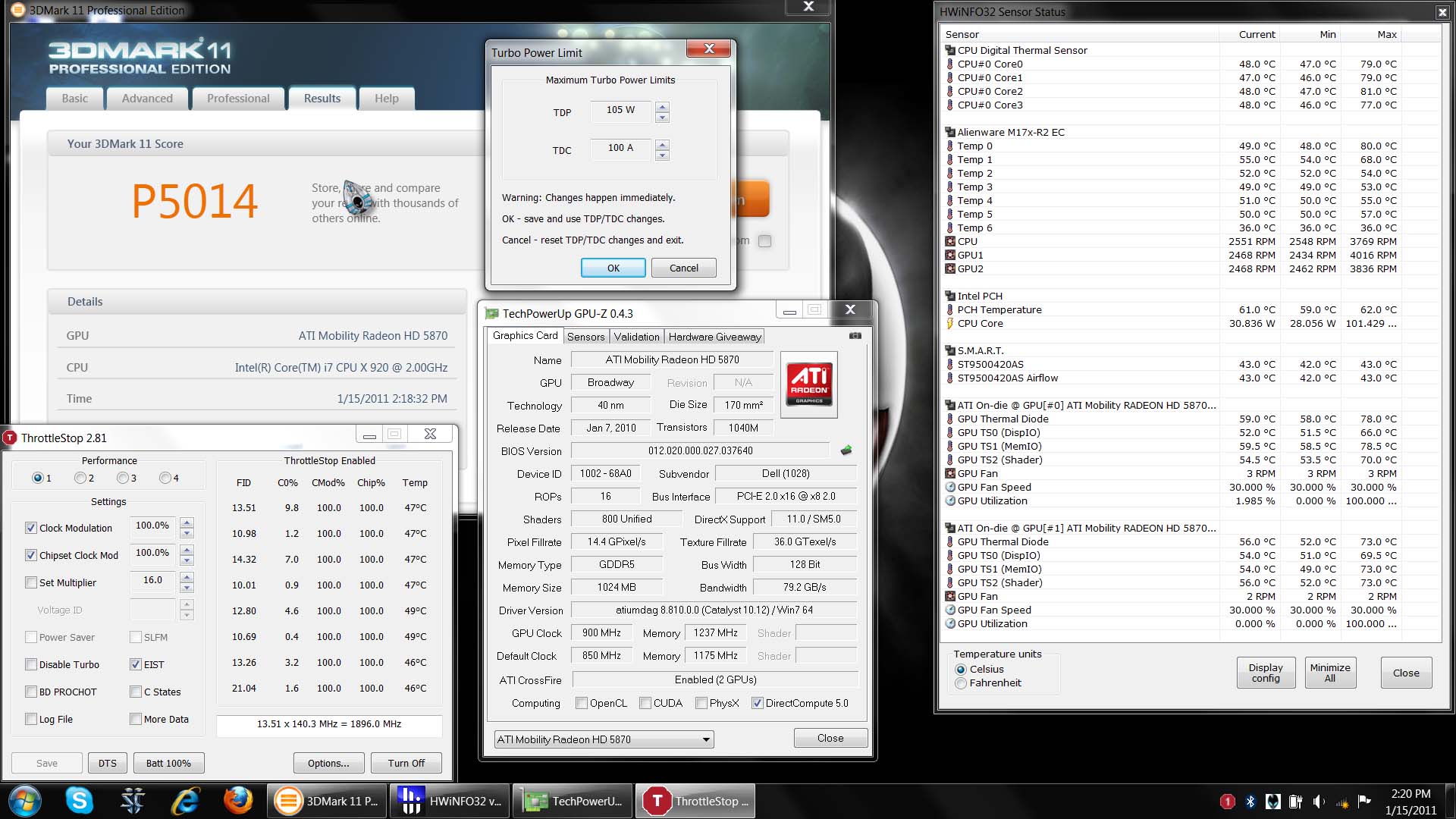
here it is guys. I finally broke 5k in 3dmark 11.
Attached Files:
-
-
Congrats Mazda! I dont even run it, it just depresses me lol.
*OFFICIAL* M17x Benchmark Thread - Part 3
Discussion in 'Alienware 17 and M17x' started by BatBoy, Jan 30, 2010.