 Problems? See this thread at archive.org.
Hmm.. Just installed riva 2.24c and i still dont have anything to change
-
Attached Files:
-
-
the change is not in rivatuner, but in the 3dmark11 help section...
run program
click help
right there... -
Thanx Johnksss.. Worked like a charm. Did a run, cpu stock i got 4340p. With my cpu oc to 1.75ghz i got 4450p.. Not that much of a improvement..
-
Would you consider it an improvement if you were at 4,891? Anything is good man.
-
cant really look at the score to tell anything...you have to look at the fps and see if your gaining anything other than.... .20 percent of an fps...lol
-
Is it possible for one of you--with crossfire ATi Mobility HD5870s and I7 CPU--to run the 3dMark06 benchmark at 1200p resolution and share the full results?
Cheers. -
![[IMG]](images/storyImages/1920x120006score.jpg)
and attached is a pdf file of EVERYTHING mark06 had to say about my benchAttached Files:
-
-
Looks a little low for stock but there are probably some tweaks you can make. Overall though I would not be worried
-
Gracias, señor!
Scook, would you mind having a similar run at stock for your own system? -
it was run at 1200p though, would that maybe account for a slightly lower than expected stock benchmark?
-
-
Thanks, Scook. I was hoping for 1200p readings with the HD4870s. Just give it a shot whenever you switch back to the Radeons.
-
Since it is 06 you have to remember my QX9300 makes a much weaker show than the 920xm
-
Of course, Scook. At stock, it won't be that great, although that CPU can become one hell of a beast when overclocked. Sorry, I digress.
I'm not even paying that much attention to the total score. What I'm really interested in is the average FPS across the SM2.0 and 3.0 tests with full resolution. I am comparing these rates to the general average for these cards at the stock 1024p resolution. -
nah stock my score was a little over 20k. look at my sig.
-
after installing the 10.12 package (finally got it to work right. didn't bother with the ccc2 cause i don't really care. drivers are what matter not a GUI) my 3dmark06 score jumped up 300 points! but for some reason my vantage score dropped 10 points? maybe this was some fluke. in the canyon flight test, at several points i had fps of almost 240!
![[IMG]](images/storyImages/3dmark06score1012.jpg)
the only thing that wasn't standard was i turned off post processes (in 06 and vantage). but my previous high scores were run the same way.
just a 5% bios overclock, nothing special. -
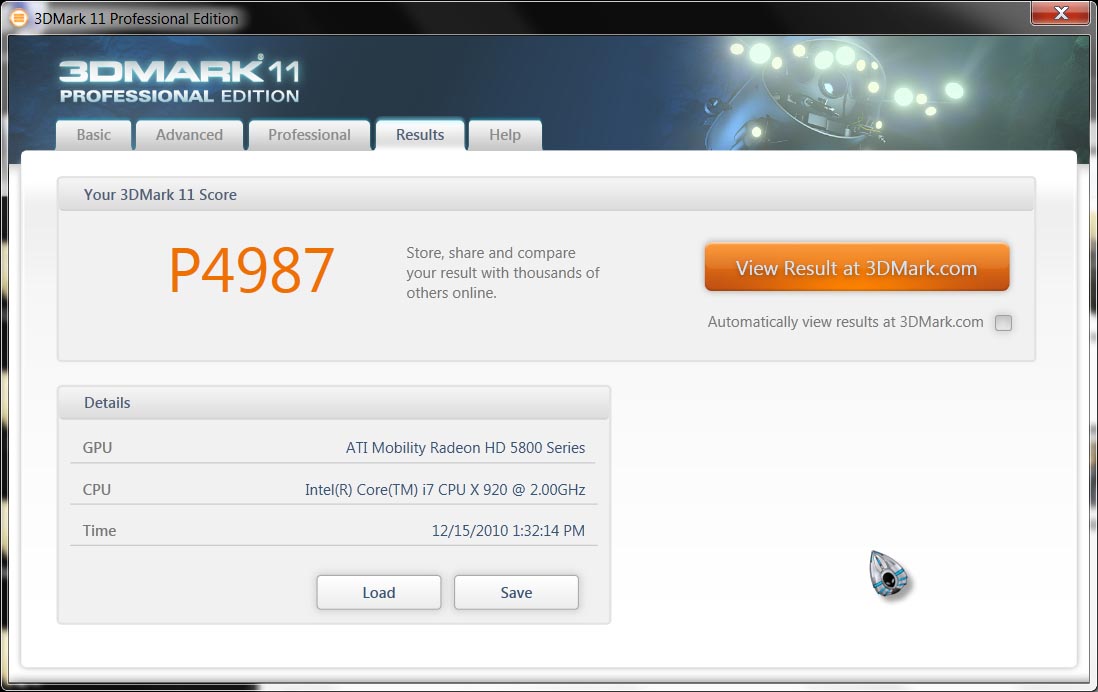
Latest and probably best score I'll get for 3DMark11 for now: Result
-
here was my mark 11 score:
Result #1 with 10.12 drivers & gpuz in background
and run #2:
Result #2 with 10.11 drivers w/o gpuz in background
joker, do you have your gpu's overclocked? how the heck did u get that high of a score when we have the same cards/ram and i have a better cpu? i'm confused...
also on my score it says my cards we only at 100/150 clocks? instead of 700/1000? grr...
i also noticed my fans were not going full blast either, except for maybe 30 seconds while the combined test was loading.
also gpuz says my slave card wasn't being utilized, but crossfirex was enabled, and 3dmark 11 says it was being used... weird stuff.
-
Thats a weird score ...both of 'em given your spec....this is what i got with my system at stock Result which is the same as your scores really and you have an xm cpu....i didnt have gpu-z open but that wont account for much in the way of points off.....
My clocks show the same too on '11 if you look at my result...must be a glitch in the software i reckon....I have run the test with Hwinfo32 in the background and my secondary heats up and shows its good to go....my fans didnt really get that loud or fast either but its not like running furmark which toasts your gpu's...even with furmark extreme burn in , the max my fans hit in Hwinfo32 is just under 4000rpm....
Maybe you have an issue with your secondary or crossfire cable or something....i thought that most people with an extreme would hammer the rest of us....if you look at Joker's result, yeah his gpu's were quite highly overclocked and his cpu was also OC too.....i think to just below 1900..... -
Anyone break 5K yet? I can't no matter how hard I try. I was using 10.12 in this run. gpus at 900/1235
Attached Files:
-
-
I have deleted a few off-topic posts
Note that this thread is for M17xR1 and R2 benchmark discussion only.
We welcome those posts,
However desktops and other system benches are not permitted here. -
How does this look for the pc in my signature ... totally stock with nothing overclocked
Does this look ok for a standard system .... i will upgrade cpu and ram and better graphics at some point but as a starter does this score look of for the spec ?
![[IMG]](images/storyImages/Untitled-6.png)
-
Looks pretty good to me....i get around 16.5k tops with my setup below....so i would say your good to go!
-
What are the 3d mark 06 settings everyone uses to gauge their scores?
-
Well people should be using the defaults but you can't compare scores with two different resolutions.
3dmark06 uses 1280x1024 standard some of the older versions used the lower res this guys test was run with. I had to connect to an external monitor to do myne at 1280x1024. For me 1366x768 or 1024x768 would have been the only other options.
I think its worth saying what res you ran at if you dont provide a screen shot that way someones not confused why their score isnt the same. The lower res will produce an artificially high score in comparison with the normal res the test uses, but is comparable to the same test at the same res on another computer. -
Ok. Thanks for the reply. I was just asking because i plan on running the 3dmark06 becnhmark in a few minutes but its the free/basic version and i'm not able to adjust the settings. Just wanted to see if the results i'll get will be comparable to everyone else.
-
In comparison with this guys score you would want to run it at his res. But the program will automatically goto 1280x1024 if the screen can support it. If it doesn't it means there was a detection problem.
The paid version gives you some more tests which if run well can bump up the overall 3dmark score. Any quality changes that can be made for the better only make the test harder to run which = less score. As far as a comparable score the free version is fine. -
So at completely stock settings and stock clocks, I recieved a 3dmark06 score of 14983. Does this seem right for a system of my specs? I used the basic version of the 3dmark06 and didn't tweak anything.
-
The CPU affects the score as well, as for your graphics setup there is a notebook with i7 720 benchmark with the same score as you. The guy who submitted his notebook using the same cpu as you got a 16,000 though. It can vary with drivers, os, etc.
You can expand sections to get test info - ATI Mobility Radeon HD 5870 Crossfire - Notebookcheck.net Tech
All of those 06 tests were done at 1280x1024 according to the site. -
Thanks a lot clutch for the help!
-
Yup, mine looks about the same as yours so looks good to me.
-
Ok. I'm wicked confused. For the entirety of me owning this laptop, my 3D mark 06 score on default setting was a bit over 13k.
I just run it again now, and I get 16735
Result
What happened? Why did it jump over 3k? I didn't change anything at all to my setup. -
Not sure but it says you ran it on 1280x800 and if you had run it in 1280x1024 like the overall default is then the score would normally be lower.
-
Also, are you running the clocks in your signature for both tests? - looks like they have been bumped up so may explain such a big difference too.....as Clutch said, the res plays a part in the score too...if you ran it at full native, the score would plummet and vice versa....
-
Your score looks pretty decent.
As a comparision, i have a similar m17x-R2 (not entirely but comparable).
i7 720q, 4gb 1066mhz, 4870x2, single 320Gb hd.
Start 3dmark06 didn't touch anything and ran benchmark which puts me at 12965. -
I've tested now for the first time 3dmark06 at 1440X900 resolution and I get close to 19k. If I change it to 1024X768 I get close to 20k. All other settings as default and NO overclocking... Is it because of my 920XM ES processor and crosfireX 5870m that high??? I am on last ATi driver and never had a issue i.e. BSOD or blue screen...
-
Im sure if i ran my tests at that res, i would be well over 20k....i think most people compare benches on the screen res that is defaulted to (same as default res with basic version)....
Your scores arent comparable because you are running suchn a low res that your scores will be much higher to those running at a standard res...
Stick to benching at those resolutions and then your scores will be comparable....
-
Maybe you have not seen aarpcard test specification (1280X800) and he got 16k. I get close to 20k at that resolution, so I really do not know what you are talking about. 1440X900 is much higher resolution than 1280X800 in case you have not noticed?!
-
All the clocks were at the clocks in my sig. Idk why 3D mark picked up my cpu to be only 1920mhz . . . but no, it was definitely at 2.12ghz. And it took the 2D clocks for my gpu's for some reason . . . but yeah they're at 650, 950.
As for the res, I'm pretty sure it's always been at 1280 by 800. . . i never touched anything - just ran the benchmark right away. Would the difference between 1280 by 1024 and 1280 by 800 really be over 3k points? -
This res is too low..i think your getting your results and resolutions confused cos you seep to have posted two different resolutions claiming to get close to 20k on both....of course you will get a higher score because its a pathetic res to run a true bench at.....like i said...run at a comparative res to get a comparative result....dont just go sayin" oh, i get 20k at this res....cos it sucks and isnt a true comparison.
-
Come to think of it, the last time I ran the test I was using 10.11. This time I was using 10.12. but 3K? idts.
-
Heres mine with a 920xm and a single 5870..
Hitting 15k easily~
![[IMG]](images/storyImages/920xm06.th.jpg)
-
Im still rockin it oldschool with my R1, but I managed to break 14k in Vantage with one of these ES quadcores.
http://img146.imageshack.us/img146/2179/futuremark.png -
pls help ... wondering why my scores so LOW...
im on R2 5870 CF I7 720qm 6GB ram... ive update the latest drives any everythings too..
the result was
SM2.0 Score 769.0
HDR/SM3.0 Score 759.0
CPU Score 1109.0
Game Score N/A
GT1 - Return To Proxycon 5.97 FPS
GT2 - Firefly Forest 6.85 FPS
CPU1 - Red Valley 0.37 FPS
CPU2 - Red Valley 0.53 FPS
HDR1 - Canyon Flight 7.71 FPS
HDR2 - Deep Freeze 7.47 FPS -
Check if your running in stealth mode first...the icon thats like a speedomoter on the touch controls - should be deactivated unitl you get the task bar icon message saying "full power mode"
Also, you could check that under "power" in CCC that you are set to "maximum performance" while plugged in... -
Can someone tell me what basic programs and where to get them to benchmark? id like to do it on my new r2 to see how its performing. free?
-
you might want to start from here http://forum.notebookreview.com/alienware-m17x/455435-official-m17x-benchmark-thread-part-3-a.html it is part 3, but on first post there are the links for part 1 and 2.
n'joy -
sorry , how do i know my r2 are running on stealth mode or not? when i touch the speedometer on the touch controls.. a msg just asked me "Stealth Mode access detected. Chooce yes to enable or No to cancel" so i choose no...
yea in ccc its maximize performace while plugged in... -
Hit the OK button and see if a Banner Appears saying " Stealth Mode" if not a balloon notification must appear from the AlienOSD app saying " Full Power Mode will be activated. Press any key to continue"
Note: Look at the intensity of the Stealth touch key dial, it should go bright when its activated and dim when its de-activated. -
after i hit OK.. but nothing appears...
sorry im new in m17x..
after ive update everything my graphics performance getting worse..
so i dont know what to do..
*OFFICIAL* M17x Benchmark Thread - Part 3
Discussion in 'Alienware 17 and M17x' started by BatBoy, Jan 30, 2010.




![[IMG]](http://img121.imageshack.us/i/920xm06.jpg/)


