Problems? See this thread at archive.org.
LOL I will give it a try later tonight and see... hope it will survive a single run. I still have to check the memory clocks cause I am sure they can go further as well
-
One of the things I found, when OCing the GPU, was that any OC with the CPU when you have the GPU OCed so high, will trip the power brick. It was a long time ago, so I don't remember, but I think I had the core up to 957MHz or 960 or so. I don't remember, would have to dig it up off the forum since my benching drive crashed and I lost the screenshots. Hopefully you can push further then I. Oh and this was all for Vantage.
-
yeah the PSU is not enough for sure.
I am also 99% sure it won't handle 1000/1200 but I am hoping for something close to 970/1220. We 'll see (I don't know about tonight... I have to wake up at 5am) -
Yea, I wish the PSU had more in it. Well I'll continue dreaming, and trying to find that screenshot. I actually want to say I had the clocks up to something like 976MHz. Maybe that was a dream. Ahh, the search goes on.
-
I can provide a screenshot with 1000/1250 since windows can boot perfectly fine, the problem is I cannot provide a screenshot after a run LOL
(Offtopic:Maybe the 330W PSU from M18x will do the job )
)
-
I would shell out a few bucks for that!
-
here is a vantage run with 11.1 beta drivers. no extra cooling.
Attached Files:
-
-
Very nice indeed
-
Nice run, whats your OS looking like? How slim?
-
Sweet my 920xm just got delivered. Took only 3 days total (including the weekend) which is lightning fast. I got it from PC-Best-Buy-1 on eBay. He's a good guy, I recommend him over shirleyfu and others. Going to install it, brb.
-
what about extremeprocessor he always ship by dhl express takes only 2 days and he give you stickers and thermal paste good guy too
-
Yep I bought my 940xm from him before, he's also a very good guy to deal with but not very flexible with pricing. PC-Best-Buy-1 will work with you on pricing and right now has the lowest price out of all of them. -
Nice, thanks for that Joker, the price looks great.
-
did you not have errands to run today...hmmm looks like you called in sick to bench that chip
-
ES, QS, OEM?
CPU-Z says ES, description says QS....
-
Qs is es, eBay just does not know that and block them yet.
-
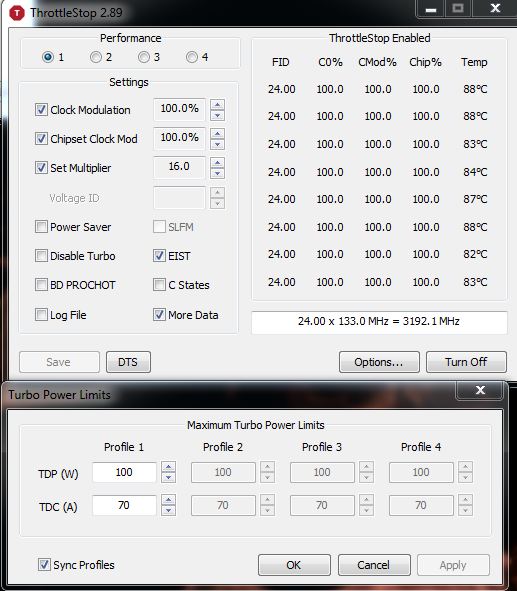
I just finished the CPU retention mod. Took a lot longer than I wanted because when I was removing the clips, one of them decided to take flight and it took an hour to find it in my room. Then I had to manually adjust the tension for each screw while TS + Prime95 were running for optimal temps. Here's what I settled on (I got better results with my last system but this should do).
Attached Files:
-
-
Any bet you gonna hit some good scores, on a side note, I think I have to do it too cause I hit 101 C LOL
-
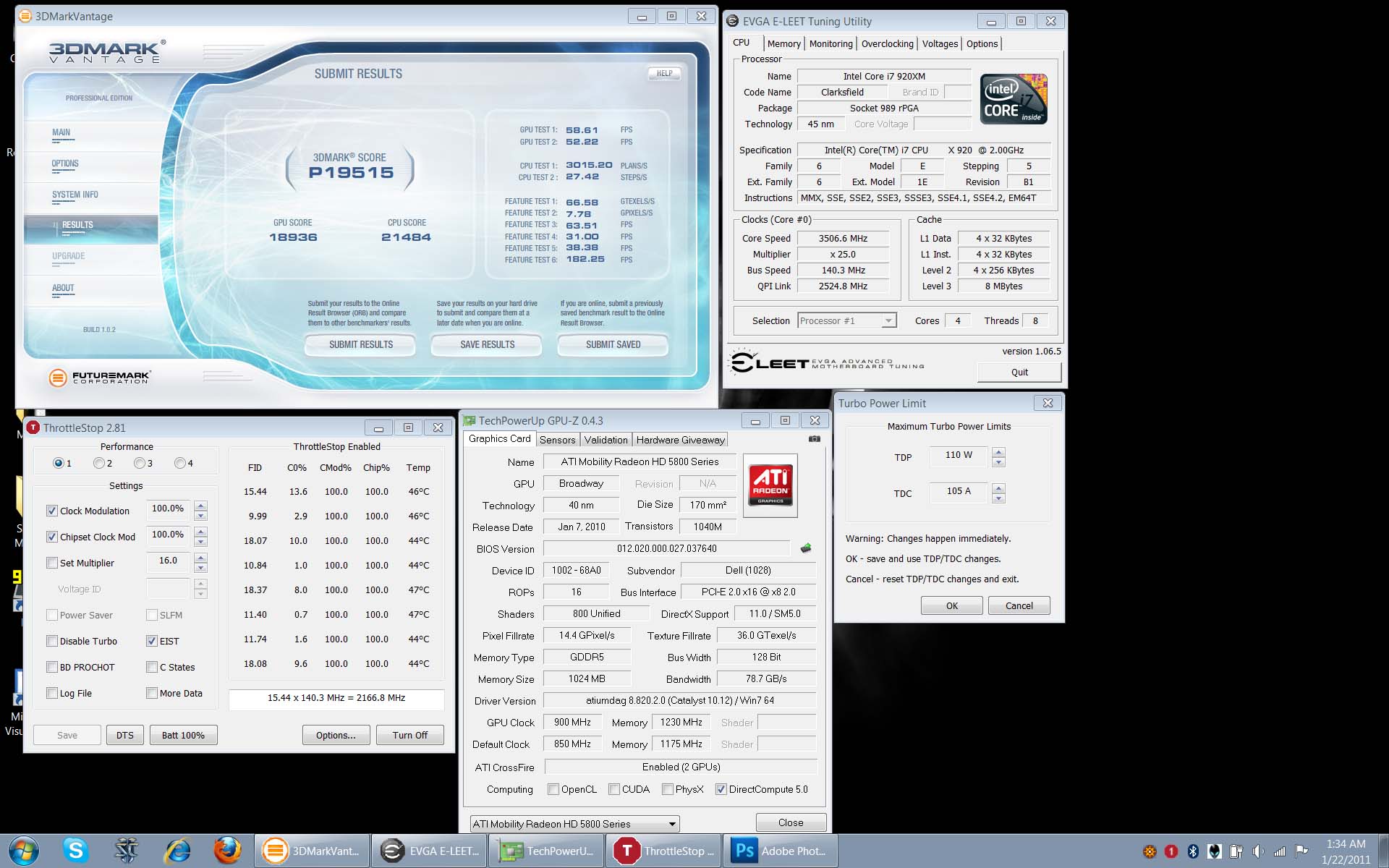
My GPU OC becomes limited due to power constraints when I OC the CPU Anyway, here's my first run with 3dmark11:
5380 points Do you think M17x-R3 will be able to beat that?
BTW this run was done all on stock cooling, no extra fans or outside chillboxes lol. I could theoretically run these settings 24/7 though I will scale the GPU clocks back down a bit. CPU will stay at 90W 24/7.
P.S. if you do the CPU retention mod, be sure to bend your heatsink downwards at the 4 corners using your hands (if you have the strength otherwise use tools). If you don't, the tension will be too great and it could kill your CPU and mainboard (just ask mfractal). -
R3? LOL yeah right...
yeah stock cooling was with mine as well, plus I run it on my normal Windows installation (I wonder what the score will be when I will setup the benchmarking partition -not any time soon unfortunatelly)
Yeah the cpu mod is kinda tricky... but if you see my results even with lower values on TS I still get a bigger CPU score, what surprises me is your GPU score (we use the same drivers) I doubt those 20MHz on your GPU's memory gave you 100 points extra... so did you change any settings from CCC? (my run was with the default values) -
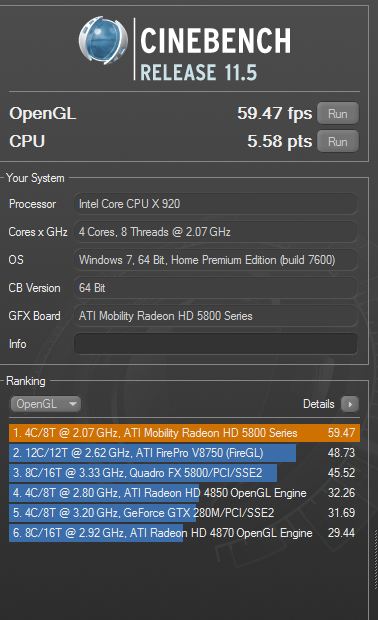
Yes I set everything to performance always. I just ran cinebench and although it beat the 2820qm, it wasn't by a whole lot surprisingly. I'm pretty sure I can do better, I should set my CPU back to default voltage and just scale the TDP higher.
Attached Files:
-
-
I found that without the extra voltage I can get better CPU results because with the stock cooling the temperature doesn't rise that fast and I can maintain higher multipliers for longer, I bet if I manage to keep my temps lower I can get much better scores with the exact same settings.
The only reason I don't keep my GPU clocks that high is not due to the temperatures but due to those black lines and the flickering when I extend my desktop, have you noticed that? -
Yup I'm finding I get better system performance (GPU and CPU) if I keep voltage at default and just raise TDP + GPU clocks. I maxed the cinebench CPU test at 5.62 earlier but forgot to save it. What I noticed is that these sort of tests are very short in duration so they probably give inflated scores to the sandy bridge CPU's thanks to TB 2.0 which temporarily goes above their set TDP for an x amount of time. I bet if we run 1024 MB Wprime 1.55 tests, SB mobile will show its true colors. One Asus G73SW owner with a 2630qm ran Prime95 for an extended duration and saw his CPU speed drop to 2.3 GHz. That's 1 ghz slower than my 920xm with TS..lol. Anyway, it's good to have a 920xm again, I got sick of that weak sauce 720qm. Time for some bad company vietnam at 60+ fps glory
-
yeah for tests that run for that long temperatures are the key and for the time being we have the advantage of TS
did you try a new 3dmark11 without extra voltage? I am sure you can exceed my CPU score since you have better temperatures than me -
Since the TDP controls are present in the BIOS I am 100% certain someone will get a windows program to achieve the same for SB (most likely UncleWebb and TS again) making it a monster (especially when/if the 2920xm becomes an option)
-
Possibly, kevin tells me that he suspects Dell put a lockbit in there. The bios only allows 1W TDP changes which is basically useless. If there is a lockbit, no software will be able to change the TDP. We'll know soon enough because a Clevo guy I've been PM'ing has a 2920xm coming his way and I intend to get him in touch with Kevin. But even if it works for Clevo doesn't guarantee it would work for Dell because of that lockbit.
Not yet, I'll run it tonight after some bad company vietnam. -
Hmm, I've been thinking about doing the retention mod, and I still might. As it stands right now, I have a good perfect heatsink, and one that is slightly bent and causes the temps to go up, so I'm thinking that one might be perfect for the retention mod. Hey, it's already bent. If it works out it would be great. Because now, without the retention mod, the CPU can heat up with much less voltage than what you guys have been running.
-
Joker are you saying that the 2820QM is almost as fast on stock clocks as your greatly OCed 920XM?
If that is true it is great news for the sandy bridge platform. It really sucks that we cannot OC these CPU. Imagine the power and the scores you could get with them... -
Nah, that's just one benchmark. What I'm saying is that SB mobile puts out good scores in short tests because of the way TB 2.0 works. But yeah, an unleashed 2920xm would be a monster. -
ThrottleStop with full Sandy Bridge support is almost finished. Adjustable TDP support has been added but I still need to copy and paste some code to support adjustable TDC as well. Hopefully later today.
Now here's the problem. Intel has included some lock bits within these new CPUs that the bios can set. Once a lock bit is set in the bios, it is impossible for any Windows software, including ThrottleStop, to raise the TDP limits. There is a separate lock bit for TDC but the same thing applies and another lock bit so you can't increase the multipliers on the new XM processors.
The only way around this is to rewrite the bios.
My friend burebista has a 2500K that does not support hyper threading. It shows 45W of power consumption at the CPU when running Prime95 at 2700 MHz and that goes up to 64W at 3400 MHz. A fully loaded 2820QM will be turbo throttling and likely giving you zero turbo boost just like the 720QM/740QM and 820QM/840QM do at full load. The 2820QM will be running at its default frequency which is only 2300 MHz. I know there are some efficiency improvements but there are going to be many tasks where a fully overclocked 920XM or 940XM is going to continue to shine.
Review sites that make comparisons to a 920XM or 940XM that haven't been fully overclocked are only telling part of the story. The 920XM and 940XM are completely different animals with the help of ThrottleStop. Depending on a couple of bits in the CPU and what kind of mood Dell is in, fully unlocking a new Sandy Bridge 2920XM might not be possible.
Intel added these lock bits for a reason. I'd be very surprised if their main laptop customer, Dell, didn't ask for these locks to be added and intends to use them to keep power consumption at a level they feel comfortable with. The max Sandy Bridge power consumption number is not likely going to be the 100W that 5150Joker was using in his new 920XM yesterday.
-
I say with much pride that you may be a key reason why they added those lock bits lol. I'm sure they got wind of throttlestop. Sad, but I think it's certainly possible.
-
That had occurred to me as well haha
-
think about it though, Intel locking the cpu this way due to TS makes no sence, why would they prefer an older technology outperform their newer one? why should I prefer SB when I get better performance with my current setup? I think there are different reasons behind their decision (they would rather prefer OEMs to take that kind of decisions and take the blame if something occurs due to overclocking).
-
Yea, my guess is that they won't be able to prove why a CPU failed, and rather then replace a CPU that faild due to throttle stop abuse, just lock it and minimize the number of replacements in order to increase profit. I know I pretty much fried an OEM 920XM. Won't overclock as much now. One of the reasons I bought a 920XM ES.
-
I think, enevitably, its the road to ruin. It may be the case that SB chips are not open to as much OC as the older xm's....it also may be the case that xm's with TS will outperform a new SB cpu.
My money is on the fact that as Intel release newer cpus in the future, they will be more powerful than current SB chips....(thats a given just time dependant).....if you think about it logically, lots of people buy a lower spec cpu with OC in mind to make it perform like a much costlier cpu.
I liken it to the fact that Ferrari would not be happy if you drove your Ford into their showroom stating it would be faster and cost you less....
From a business point of view, it makes sense for Intel to effectively "stamp out" cpu tweaking.....this would mean more sales for them on their high end chips as, eventually, that will be the ONLY way to get the performance.....
There will no longer be any room for making your "Ford" cpu work like a "Ferrari" cpu and, if you want the fastest, you WILL have to pay Intels price for it....
Thats how I see things anyway...which is a shame, but Intel wont be happy that you can make a 940xm perform better than a new SB chip without having to pay THEIR premium for performance.
Kinda brings us back to TS....great software for xm owners...obviously they wont like the fact that you can tweak an xm to perform like a SB, its gonna lose them money.....
Thats how I see it anyhow. -
I didn't see any benches for the R3 in any of the pages I've looked through(at work so can't be thorough) So...
Just a quick post for ya guys, got in an engineering sample R3.
Result
There's the '06 Bench on Alienware windows 7 with all bloatware still there.
Only have time for this quick post, can answer any questions or try to do a 3dmark11 later. -
No ones benched the system (R3) yet, but thats not a bad score for a single GPU. The CPU score is impressive. Looking forward to what a 2820M will do. But so far the 920XM still has it beat. With throttlestop anyway.
FaustKnight, what are your overclocking options in the bios? -
Also, it looks like you ran the benchmark at 1280x720. Can you rerun it for a better, more accurate comparison at 1280x1024? Run it at the default settings. If your monitor doesn't support it use an external. The default settings is the standard that we go by.
-
From my understanding Intel didn't disable overclockability, they simply throw the ball to OEMs like Dell to decide to what extend they will allow it ( Unclewebb said that those lock bits can be overridden through BIOS -a modified one) so it's not a hardware limitation.
I am not 100% sure about it, but Intel specifications do not include Turbo Boost on all 4 cores for 920/940xm -for instance 25x only on one core-, that we can OC the cpu and maintain TB across all of them is a courtesy of Dell. -
I only had a few minutes so I installed and clicked run haha, never even looked at settings. I'll see what I can do. -
Overclocking:
Enable/Disable Opens up the ability to override turbo settings.
Long Duration PWR Limit Manually Adjustable 1-100
Long Duration TimeWindow Manually Adjustable 1-56
Short Duration PWR Limit Enable/Disable
Short Duration Power Limit Manually Adjustable 1-100
Memory Overclocking:
Memory Override Support
Memory Voltage 1.5, 1.55, 1.6, 1.65
Memory Frequency
Auto, 1067, 1333, 1600, 1867, 2133
DIMM Profile (XMP)
Default, Profile 1, Profile 2, Custom Settings
Custom gives full range of Memory settings. 11 Settings for cas, latency, ect. -
Hmm, could be interesting to tinker with that stuff
-
Also I can't plug in to an external at this time, I *may* be able to in a couple of hours.
I've run enough 3dmarks I should have thought to check the res, our eng sample has the 1600x900 screen.
If I get some free time I'll remove the bloatware(reload NOT an option), try and update the drivers, and maybe overclock a little. When I plug into the external.
Worst case scenario, I can do all this Monday. -
Nice, looking forward to your thoughts on the system. +1
-
I was planning on ordering one of these for myself when I first learned about it, but I was expecting Crossfire or SLI
It would still be a large upgrade from my M1710.....but I think I may wait for the next system on the horizon.
15k for single GPU with all the bloatware and junk drivers is pretty danged impressive though.... -
Ah a little disappointing:
Result
The external became available, so I ran it.
I seriously think the drivers are junk, and it needs to not have all the Alienware and McAfee processes running.
At this time, I can't delve quit that far into testing it, it's needed elsewhere tonight with the software still intact. -
Remember the 6870M is a rebranded 5870M with slower clocks speed therefore the scores are not really expected to be much higher.
-
That's still 1400pts higher than an i740qm with 5870 Xfire. Pretty dam impressive if you ask me. Also around 3k Pts higher than the 460 3D marks I've seen so far.
**edit** just realized resolution isn't the STD one everyone uses for those results. -
That bios is great news. If Dell lets you manually set the long and short turbo Power Limits to 100W then all my fears that the world is coming to an end are over.
Can you try changing these values to 100 and then boot up and run ThrottleStop 2.99, click on the TPL button and post a screen shot of that window? This should show if your CPU supports these higher limits.
Being able to adjust the turbo Power Limits this high should easily let the 2820QM maintain 3100 MHz when fully loaded as long as a person can keep it cool. -
I was shocked to see the 100W value as well. The manual stated 1W change so when I saw the 100W I was pleased. Hopefully someone orders a 2920xm for the R3 and confirms whether or not it works. The fact that there is a lockbit and it can be changed with a newer bios release is troubling. Dell could for example issue a new bios for the R3 that supports the 6970M/485M but locks out TDP for power/heat management reasons.
*OFFICIAL* M17x Benchmark Thread - Part 3
Discussion in 'Alienware 17 and M17x' started by BatBoy, Jan 30, 2010.