Problems? See this thread at archive.org.
batch file
that way you just simply click the file and it turns them all off/on
-
-
I used to do that. Using a totally separate hard disk is easier.
-
i agree, this is what i do , i just never went as deep into eliminating services. might try it out later and see what kind of score i can get.
-
lol to get my 10k GPU I killed alot of stuff .... I left open CMD and ran everything though that because I killed explorer.exe
-
That's why it clearly states not to use this guide on your working OS partition...
-
Ditto. Thats what I do. Only reason for that disk.
-
really?
i ran the os as is. only thing i turned off was superfetch. even got a few records with antivirus software installed.
superfetch
nvidia or ati control panel settings
the right os and driver for the job at hand
and the right over clock for the bench.
cooling is a major part in going extreme
also, using multiple drives is a great way to jump in and out of os's, but bad if you dont have 3 or 4 ssd's...
so using multiple partitions would actually work better...(IMO) -
if it were on my working OS partition or not, I still need working Internet to submit results...regardless, it was a driver problem not a service problem.
??? why not just re-open explorer after the run using the task manager? -
What will be the safe temp for 5870CF GPU teperature under full load?
-
I personally don't like anything above the low to mid 80s C.
-
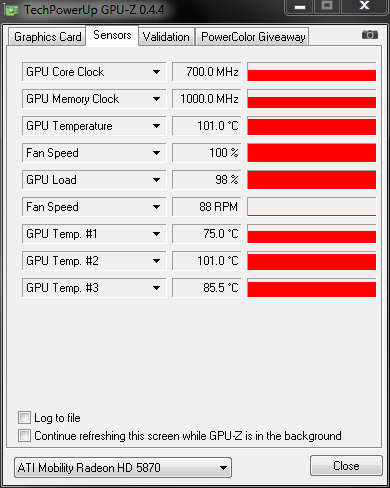
ARE YOU KIDDING ME? sorry, my stock GPU load temp is 104C without ocing... just received the lappy 4 days ago.
-
Not kidding. Something is not right with your laptop.
#1: The program reporting your temps is wrong. If not you should be throttling badly.
#2: Are your fans running at full blast? If so, go to #3. If not, fix them.
#3: If your GPU fans are running at full blast, there's a problem with your heatsink or thermal paste.
There were a rash of M17s that had tape between the thermal paste and the heatsink. I haven't heard of anything like that with the M17x. -
THe temp were observe from GPU-Z.0.4.4 while running FurMark (Multi-GPU) 640X480 window. -
im not running 5870s but i oc my 4870s to 695/1145 and they dont get that high even without the cooler underneath it. something is awry IMO
-
here is the temp
Attached Files:
-
-
Way too high. Raise the back of your notebook by putting something under it and then measure the temps again. You definitely need to contact Dell.
-
Also...what are the ambient temps in the room you are running the laptop in?
-
74F room temp with something lift up the lappy for better airflow
-
then those temps are just not right....call dell
But this discussion does not really belong in this thread
Back to benching, John, any tips for how I may be able to boost my Vantage score? I want that 15k! Also, any thoughts on what always causes my Vantage to crash whenever I have a high score (is the only time it happens )?
-
Scook check my signature... I wrote a guide after you said about your score and I posted it here a couple of pages back. I decided though to move it to a more appropriate place on a different thread
-
he's running furmark, 100+C is normal with that stress tester. I'm sure if he ran vantage and logg'd the temps through GPU-Z he'd find they only get up to ~ the mid 80s or even the mid-high 70s... Besides, a couple of people have speculated (myself included) that the 100C temps are the memory temps and not the core. The heatsink doesn't even cover all of the RAM chips and then it's just got that horrible gap pad as a TIM.
furmark is an absolute worst case scenario, which is why it's a great stress tester, however, I've never been able to duplicate 100+C in any other game or benchmark. There's nothing wrong whith his computer, and he doesn't need to call Dell. -
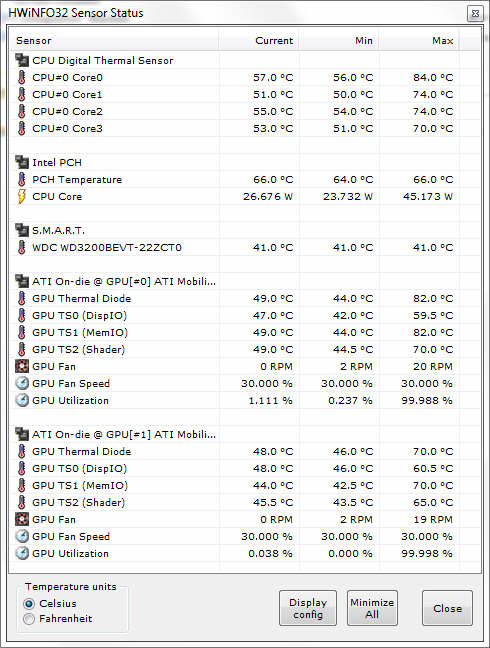
You are right. I run 3DMark2006, and it gave me less temp in GPU higher temp in CPU. I guess 3DMark2006 is more toward CPU speed other than GPU.
Attached Files:
-
-
now you know, and knowing is half the battle
furmark is *only* designed to stress test your GPU's, so it's doesn't use the CPU much. The only reason it exists is to test the stability of overclocks. -
It depends if he checked all the boxes in multigpu furmark and ran it with xtreme burn mode. If he just ran a windowed furmark benchmark, his temps shouldn't have come close to 100C. Mine top out in the mid 80s even with post processing and stability check enabled.
-
I only ran stability test check
-
you only get mid 80s after 10-15 minutes of running it?..running on coolers doesn't count. I managed 93C after only a 2-3minute run, and it was still climbing slowly. I know for a fact the pads are making contact with my card's heatsink too.
-
Well for what it is worth, I ran OCCT GPU test for an hour on my 4870s (stock voltage, bottom on, sitting on cryo but the cryo fans are all off) and my GPUs were at 86/76
-
a lot of the cooling power from laptop coolers actually comes from just having the laptop raised off the ground, as well as the fact that OCCT isn't furmark :/
-
OCCT will get the cards about as hot as FurMark actually
Try running the GPU test -
I'll take your word for it. I just think that he's fine. his 06 temps are spot on, they might be a couple of degrees higher compared to mine or yours, but that could be any one of a dozen variables.
-
Vantage is usually a good indicator of real world temps from games
-
The room temp is actually 78F after I check, but the load temp for gpu is still too high. I got amd gpu tool working, but cannot set memory over 1030......errrr
-
If you have stock temperatures that high, don't expect to go any further with overclocking...
-
Yes at stock clocks, I'll run it later tonight and post a log + screenshot. Mine sits on top of a targus pad but it's never active. -
a Chill hub XC I'm guessing? I have the same one, bought it @ sams club a few days ago, got tired of waiting for a cryo LX to come back in stock @ newegg. I'm sure I could get close to mid-high 80s with it just sitting on that thing. Lol, the 17x overhangs it so much the GPU vents basically have 1.5-2" of open air.
-
You're gonna laugh when you see it: Targus Lap Chill Mat Notebook fan
I got it because it's padded and light weight so it allows me to move the M17x to bed when I want to relax and play games on my lap. -
LOL, I'm laughing because I almost bought that. Decided against it because I didn't like the cloth(the newer versions of that are all cloth, there's only a vent @ the fans from the looks of it), thought it would hold in heat more. Not that I got anything significantly better.
Cooling | AWE01US1 | by Targus
It's a/c powered, which means I can crank it up to 6V with my universal adapter and run the fans on 'super-high' mode hehe. -
which cooler is best for M17x?
-
no kidding... I hate to open her up unless swich a new CPU. Is M17x easy to clean GPU fans? see couple pix of CPU but never see any od cleaning GPU fans -
If they sold them anymore, this would be.
Benchmark Reviews: Performance Computer Hardware Tests -
The GPUs are MUCH easier to get to then the CPU
-
any pix to share?
-
http://i813.photobucket.com/albums/zz56/blmlozz/100_1244.jpg
you don't remove the magnesium plate to just get to the GPU's, but this gives you a general idea of how far you need to go. I made a whole 45 minute long video, just need to get around to edit and upload it. :/
Joker
![[IMG]](images/storyImages/respect.gif)
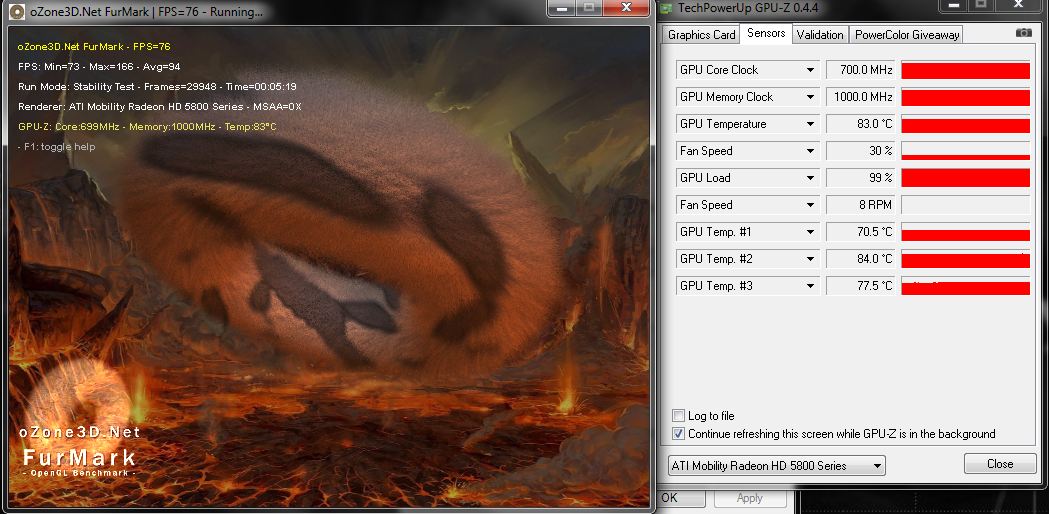
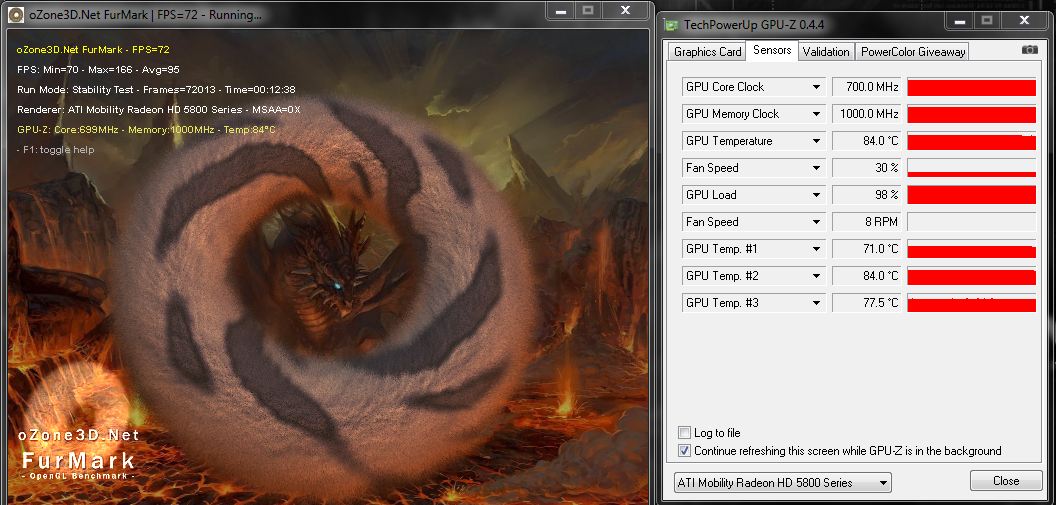
G751 is hawt. I confirmed that I had the AS5 applied wrong.. but multi-gpu furmark temps after 4-5minuites without a cooler: 84C
they were still climbing slowly, but at that point I'd be @ 90+ already. The CPU didn't have great contact either, so I hope I can get a few more mhz outta her. temps dropped an easy 5C just on idle. -
Which OS would produce better benchmarking results? Win 7 Home or Win 7 Ult. I have both as I use Win 7 Home for the M11x, and Win 7 Ult for the M17x. I'm going to guess Win 7 Home since it's lighter on features...
-
neither are different enough to measure any differences. They're the same kernel, they both run about the same number of useless services. If you want to lighten up the load, you should follow the service disabling suggestions a few pages back.
-
Thats pretty much what I figured but thought maybe there was something I didn't know. I've seent he guide and it's pretty much what I've done. Definately a nice guide to have for the new comers.
-
Attached Files:
-
-
why aren't any of you doing a full 1920x1200 FurMark run...?
-
Because the guy with 100+C temps did his at 640x480 so we were reproducing his test. -
Just checking
*OFFICIAL* M17x Benchmark Thread - Part 3
Discussion in 'Alienware 17 and M17x' started by BatBoy, Jan 30, 2010.