Problems? See this thread at archive.org.
Be sure to try different drivers and not just the latest ones too for 06 guys
-
-
Is that a hint?
-
Have you tried running the test with CF disabled?
-
To be honest I haven't but my estimate is that it won't do any better. Compared to the R1 those FPS are double. I will give it a shot though
-
-
it seemd stable for the most part, i had it uber cooled however. when i removed it from the cooling the temps shot up to 66 @ idle, i doubt that its a usable clock. actaully i was able to get it go through both vantage & 3do6 @ 710 core, but the memory is getting to hot. if turn it down it results in lower scores. i think thats the sweet spot on my cards. ill pull the key board off and get some part #s for ya in a few. they are def red ATi made cards. i can give you my bios i have saved if you wanna try using them.
-
I already have some R2 vbios's but if you put yours up as well I can give it a go. That is tonights or tomorrows mission, 15k vantage
-
I tried it and it was stuttering like crazy, plus the FPS where less than half. Weird right? ATI 10.6 and CF work just fine and out of the box on Linux...
I will install the lightsmark test and check the FPS there as well
*EDIT*
Stuttering was caused because of the Visual Effects, I deactivated them and the benchmark runs fine
![[IMG]](images/storyImages/lightsmark.th.png)
-
![[IMG]](images/storyImages/3d06695.th.png)
this is the best i could do had a 18556, but BSOD while i was trying to save the screen shot~ i couldn't get the drivers you guys are using to take the higher clocks would just bsod as soon as i booted into windows i had to flash it back then install 10.6 i couldn't get a run of 10.6 to finish either would always freeze on the deep freeze section. its crazy that you got such a high score with the stock drivers though i wonder what you could get with a higher oc. -
Well I am working on getting crossfire working now with the R2 vbios on my cards, so far is a no-go
Downloading the R2 ATI drivers now (since they are different from the R1 ones) -
06 is pretty much completely cpu dependent...I could do over 21k with stock gpus
-
ill try some lower clock runs with a 183 fsb Sunday when i get home then, i think i can get close to 15k gpu i might go for that would be impressive Imo. plus i only have 10 days of warranty left so i need to push it till it drops =)
-
In vantage the gpu scores are completely linked to the GPU overclock
and that bclk is insane haha -
That's a really nice score considering your hardware.
You have to find a balance between CPU and GPU power consumption and temperatures and try to keep it as cold as possible including the PSU.
Run each of the 3 tests separately. You can first overclock the GPU and leave the CPU stock. If it passes the GPU tests then revert back to stock and start pushing the BCLK and the CPU. Find a clock that lets you finish the CPU test. You can reverse the order by finding your stable CPU clock and then play with the GPU.
When you find your maximum values start running the complete benchmark and make adjustments till you are able to complete all 3 of them. Everything depends on the power balance and how low you can keep the temps. Be careful with throttlestop and the TDP limits -
Well that explains alot....the R2 4870 vbios is just plain better....since I have now jumped through the appropriate driver hoops to get crossfire working with the R2 vbios on my 2 cards, I will now proceed to break 15k GPU on my 4870s
Stay posted -
Very nice, looks like I will be running "competing" head to head with you. I have room to spare on my gpu's as far as clocks go yet. My cpu on the other hand is running just shy of 4ghz, and that is as far as it will go being stable. This all came with lots of patience and trying most drivers, and many countless sleepless nights of benching
. Will run Vantage on these new clocks quick here and post up. Ran it before on that same cpu overclock and slighty lower clocks on the gpu's, and my numbers were not far off of your goals. It cannot be stressed how important cooling is here though. I have an actual dedicated computer room for all my AW lappys that is constantly air conditioned at 60 degrees. That combined with my Griffin aluminum elevator stands works very well. I would highly reccommend them. I use them on all my m17x's. Can post pics of my setup's if anyone's interested.
-
Why aint ORB working?
Having to save vantage results to submit later is no fun -
Here are some updates, wont give a final high score just yet though
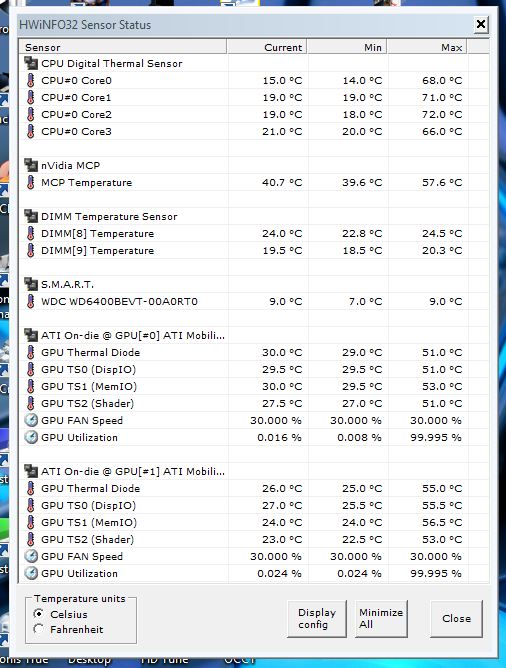
New High GPU score (14707) for 4870s and attached is why I need the chest freezer....these are the temps I am still seeing!Attached Files:
-
-
with those temps the next best thing is liquid nitrogen Scook LOL
-
So now you can appreciate why room temp is not good enough haha - I am putting 1.5V into my CPU afterall.....
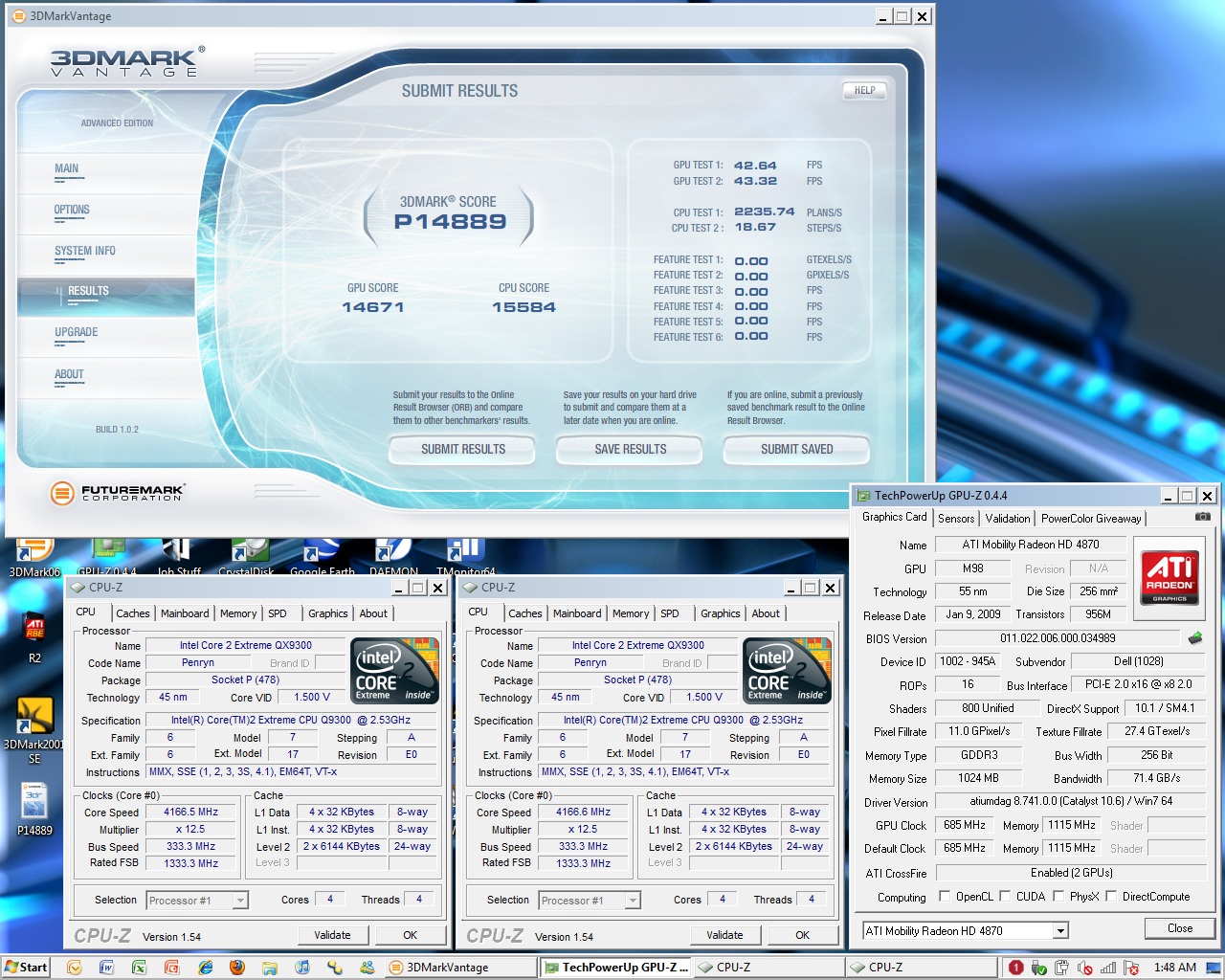
Well, got to call it a night (and I am bored of running vantage...I don't like it as much lol) so here is my progress for the night:
P14889
GPU: 14671
CPU: 15584
The CPU scores have just been low tonight compared to the other night Is killing me!
Attached Files:
-
-
Does your CPU throttle? Are those your max or idle temperatures?
-
the temps are both max and idle (max/min)
I am not experiencing any throttling but am just not getting as high numbers as I was the other night. If I was that would certainly get me closer to 15k
I will try to figure out how to get those up this weekend. As well as tweek the GPU clocks a tad, I think I can get a few more MHz from them and every one counts!
And I would be trying chilled water before jumping to LN2 lol (or at least phase change) - but that is not happening....what would be nice though is the ability to force all the fans to max speed - that would like half the gpu temps haha -
Yeah if we could probe the fans to work at max, that would help a lot
-
Scook
Noticed you got readings for both Dimms on HWinNFO32 i am unable to see this option on HWiNFO32 so possibly not available on R2 thats nice to see the temp reading's for Dimm's. -
Sauce I can see the temperatures as well...
![[IMG]](images/storyImages/tempsz.th.png)
-
Bizarre the only thing i can think of as to why i dont see those readings is maybe its to do with my memory controller being on a separate die on the 45nm side but saying that i get a temp reading for the IGP on that die showing up.
Attached Files:
-
-
No, the DIMM temperatures are available if your DIMM module contains a Thermal Sensor (JEDEC JC-42 / TSE2002).
The IMC/IGP temperature is available for 5-series chipsets in case it's properly implemented by design and configured by BIOS. Those chipsets allow few other values to monitor, but it seems neither of the boards properly support all possible options.
-
Does any software show temps for SSD's? They are SMART drives so I would imagine there is one..
-
is anyone having problems submitting results? I can't get vantage or 06 to submit any of my results, and I'm not even overclocked.
-
ORB has been down for a couple days now
In Vantage at least, you can save the results to submit them later. That is what I had to do -
I wouldn't call it a double, looks very close to what you had with R1 in Lightsmark. I'll look for that thread.
>>>>>>>>>>>>> Here you go -
Pull the wire casing back and unplug it from the mob o then simply use a correc@t psu to power them ... I had a old home phon e psu that worked perfect
-
This is going to haunt me
I did the math using my best CPU and best GPU scores (but from separate runs) and my overall would have been P15001
Formulas used from here
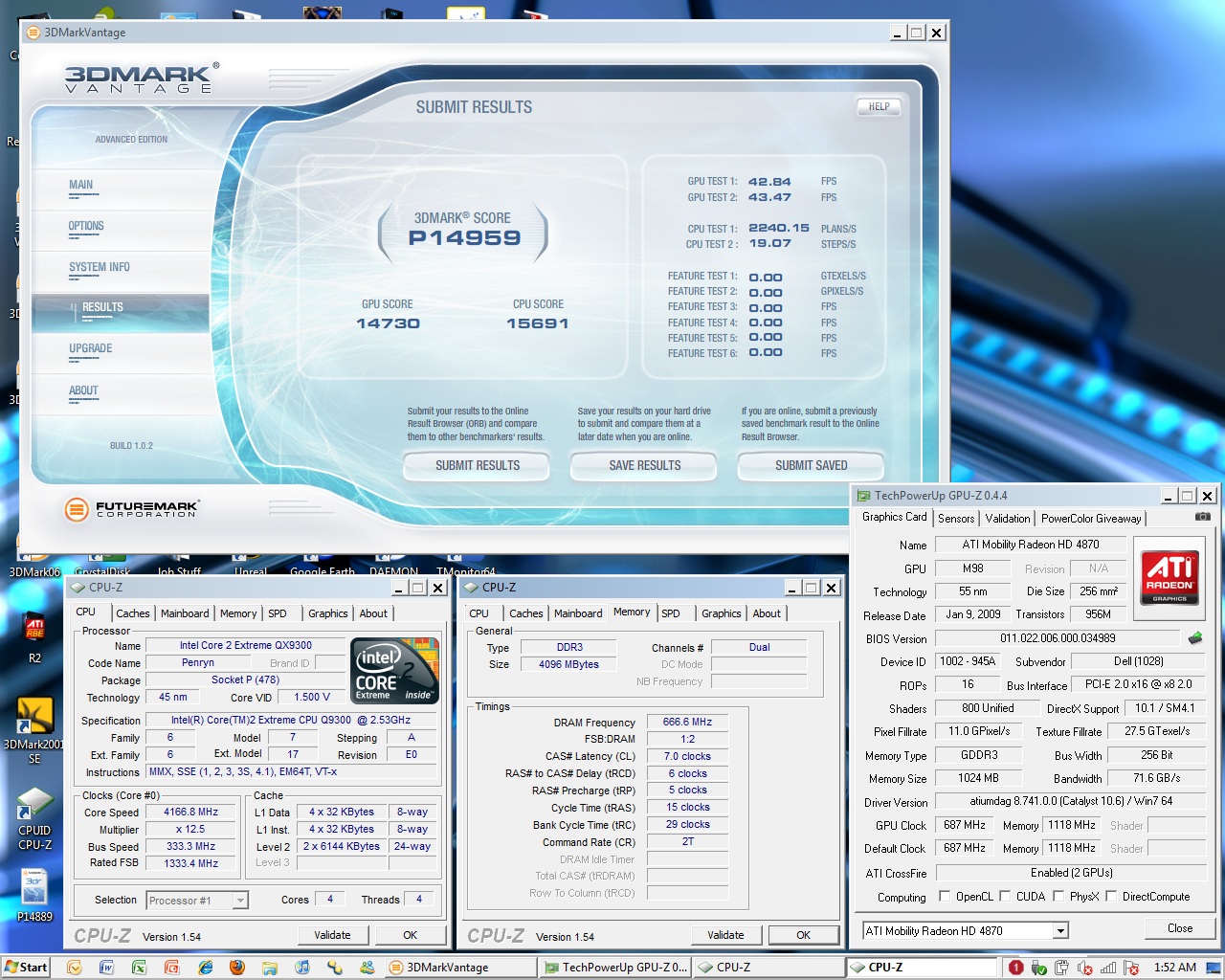
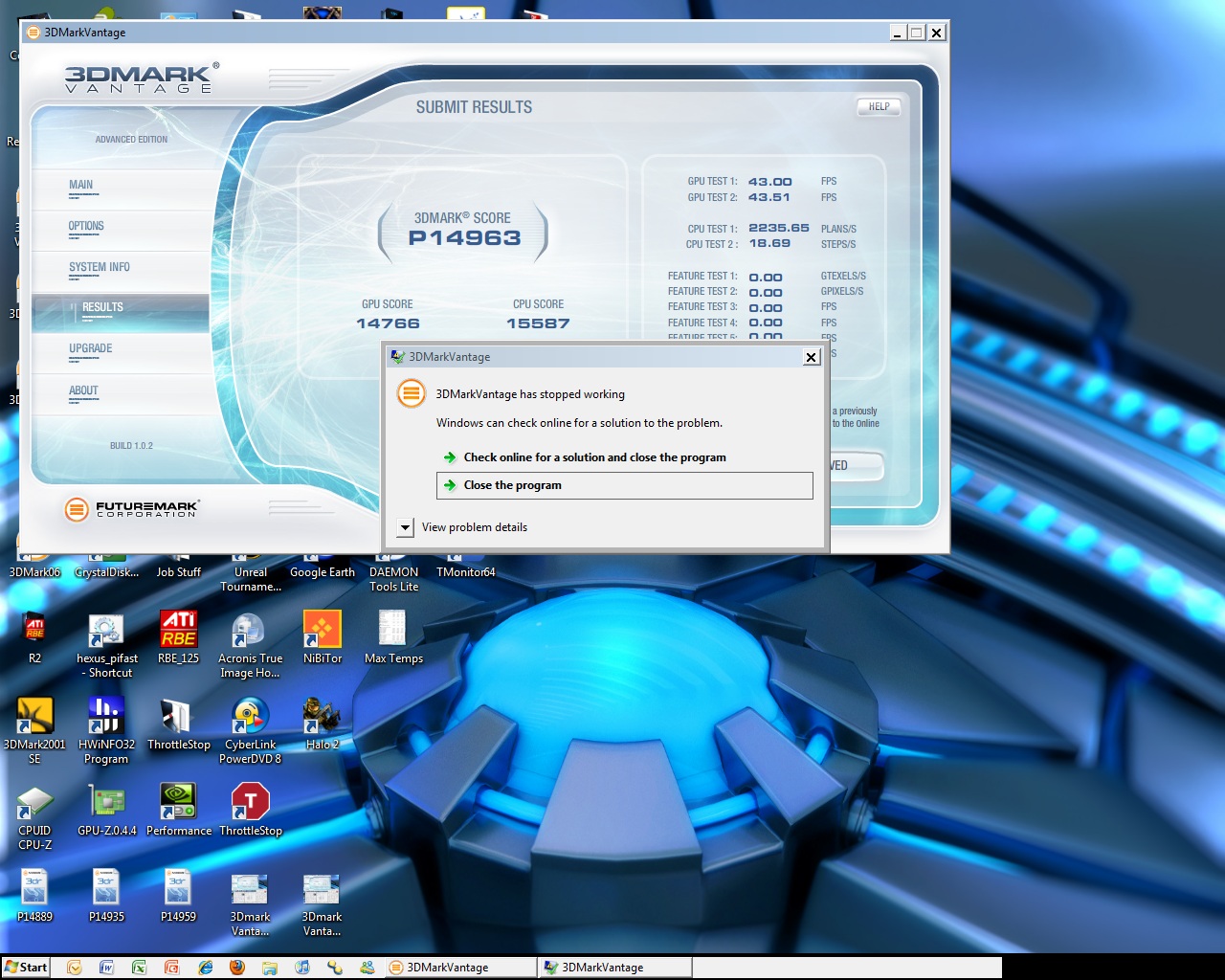
Anyways.....here are my best scores for the night (2 because one is a pretty lame screenshot as vantage crashed right after putting a score up - always seems to happen at my records too!)
P14963 (crashed)(best GPU)
GPU: 14766
CPU: 15587
P14959 (current legit best - fully documented that is)
GPU: 14730
CPU: 15691
P14844 (old best for me but still best CPU)
GPU: 14563
CPU: 15756Attached Files:
-
-
scook you are so close dude to 15K
-
I know....I practically already have it!
Like I said...haunt me lol
I just cant get the 2 best at the same time
Open to ANY suggestions. And I was not able to boot 12.5x 1066 then use NST to get it up to 1333 (kept crashing at 1240 no matter how small I step it). And to make it worse I can only get Cas 6 on the ram at 1066....so that aint happening either
-
Did you experiment with the services and the processes running in the background?
-
Ya. Like I said...the OS is running very skinny right now lol
But if you want, please send me a list of the ones I can turn off and I can see if there are any I missed -
Ok Scook I will, but not today, I will write down what customizations I do to the OS and see if those apply to others.Probably tommorow
-
No rush and thanks! I feel like P15k is my unicorn right now lol (but really I want to pass CodeBreakers score!)
-
I believe you can, let's see after a couple of OS tweaks how your score will be. Prepare a separate partition and a clean win 7 installation btw
-
That bad huh I didnt have 10.6 when i ran it, and i remember you saying you gained 300-400 more points with it, so thhat will probably help
I think the cpu should be getting a better score, maybe lower voltage or something, same thing i have going on with mine right now. -
I am preparing a step by step OS preparation guide for benchmarking so stay tuned...
-
+1 That will be great.
-
The OS customization post has been moved here:
http://forum.notebookreview.com/win...s-customization-benchmarking.html#post6456132 -
Scook got a spook
Now seriously, you are super close to 15k and I think you went further into M17x-R1 OC'ing than anyone else.
Kudos!
@ Stamatix,
Nice guide!
It should be put in sticky as a separate thread, IMHO.
Need to spread some rep ....
-
Thanks Aikimox
Yeah I know it's a bit too long for this thread, maybe BatBoy or Kamin_Majere decide to move it to a new one so we can discuss a few aspects of it... -
@Stamatix, Nice guide, should help out some n00bs who are interested in this. Also I think BatBoy should link that post to the Original Post of the thread.
+1 -
Thanks guys, please if someone has something else to add or suggest, be my guest, I will add it.
-
@ stamatisx, excellent writeup about the OS. Was going to mention it earlier in a few of my posts, because it's almost spot on how I set mine up for benching. Keeping it light and to the point does make a noteable difference. Black Viper's sight has some great guides for service disabling.
-
just be sure you don't go in there turning off services unless you know specifically what it does, otherwise you'll end up like me and spend an hour turning them back on wondering which one it was that stopped your wlan card from working. Then you'll just give up and uninstall the device and reinstall it only to find out that was the problem initially and it was probally that Intel wlanpro service you stopped that did it XD
lolol
Viper's guides have been around before the dawn of time, so he knows his services, but that doesn't mean the services he 'suggests' you turn off are ones you don't use. I'd use it as a guide, not an 'end all'. If you don't know what it does, just leave it be, its not worth the 640kb and .01% cpu utilization it saves. Fortunately, most have descriptions, and he explains most of the rest, so if you're not sure, you can click the service name, and if you still not, don't touch it. Of course this doesn't apply to most people in this thread though since we're smarter than that right? (except for me 10minites ago of course )
*OFFICIAL* M17x Benchmark Thread - Part 3
Discussion in 'Alienware 17 and M17x' started by BatBoy, Jan 30, 2010.


![[IMG]](http://img294.imageshack.us/i/lightsmark.png/)
![[IMG]](http://img694.imageshack.us/i/3d06695.png/)


![[IMG]](http://img249.imageshack.us/i/tempsz.png/)