Problems? See this thread at archive.org.
that ram is not holding up your benching...your bios is.
if it's 1066 ram, you need to drop to 800 and work your way up to and past 1066
if it's 1333 ram, you need to drop to 1066 and work your way up to and past 1333 or in this case....1550 or so.
-
you can't do that with the M17x Bios or any software that I'm aware of. If you want to blame things that are out of the control with the computer then yes, the BIOS/ motherboard is to blame, so is the small form factor, the close DIMM placment and lack of general airflow over the components, however with the limitations we have to work with, currently the ram is to blame. Don't take this in a rude way but, have you seen our BIOS? You can change turbo boost, DIMM voltage and CPU voltage, and that's it. It's only recently we had SetFSB working and only 2 days ago that I could change memory timings. chaning FSB to DIMM ratios are out of the question, unless there's something that can do that

-
but if you send me the bios, i may take a crack at it, but this new type of bios needs a menu editor. the menu editor allows you to open up the items you cant see. like the memory divider. trust me, it's there. but locked out.
i only give ideas or possible work around's or things to try and see what happens. if i were to sit around blaming ram this, cpu that, gpu this screen that...i would never get anything done.
you take what you have to work with....and you either make it happen or go down with the ship trying. this is the right attitude to have when trying to find solutions. have it the other way around...the m17x wouldn't be doing 3/4 of the things it's doing now.
if you do a search...i think you will find where i said the 5870's should be doing 18k. i said that way before they started getting 15k. now look, coming up on 17.4k now..using standard means and no extreme cooling yet... i know my parts and can read the tale tale signs....
so, as mr cook said...since you cant change it...you will need some high performance ram that can go the distance. or a multiplier based over clock... where your ram is not going to be the limiting factor. no multi over clock...then you have to try something else.
only idea's and suggestions lozz...if they work, great...if not..we try again...
-
that has to be done at BIOS, it is a shame that you cannot set the RAM speed like you can in the M15x
-
and it's a blessing...is it not, mr cook?
-
Well, it would allow him to alter the Ram multiplier
In the FSB setups (core 2 and older) I always keep the ram 1:1 (or 1:2 depending how you look at it) with the FSB but in the Core i stuff, the multiplier for ram is completely independent of the cpu and therefore allows a much more appreciated boost in performance from Ram overclocking.
But then there is also the issue of lower speed means that the bios will assign a lower cas latency which is better for performance as well (since you cannot touch these within windows)
It is only a blessing in the selfish sense that it allows me to compete with the 920xm in some benches lol. I can still appreciate the furthering of laptop performance overall with out just trying to cling on to some HWBot points -
No one can hang with the 940, so you guys may just need to bench against yourselves for the time being. I'm having a lot of trouble selling my other M17x, or I'd have one coming in the mail already.
-
The 920 can hang with the 940 just fine....they are the same chip
The QX9300 will have a little more trouble however....I can still do awesome in single threaded stuff against the newer chips though haha due to being able to bench at 4.16 GHz -
this is why i ask that the older benchmarking software be added.
then it becomes the highest over clock that wins.
and someone with a 5 ghz single core over clock would smash a 940xm if it couldn't clock that high
makes for a more even playing field for all involved -
This is frustrating
Explains why the PhysX test score sucks despite my overclock and also maybe why my 03 and 01 scores are not going up much at all. PCMark05 also saw a 6k point drop at 4.16 vs 3.33 I presume due to thisAttached Files:
-
-
Scook, do you have any CL9 RAM modules to try?
-
Nope
I can tell my ram to boot at something like 1600 though and see what happens lol (think that is my next step)
I would prefer to keep it at 4x FSB though
-
What settings did you apply for the FSB and the CPU multipliers?
*EDIT*
did you try FSB 1333 and multi 12.5 ? -
I have done the following:
Ram - 1333, FSB - 1333, Mult - x10 => Boot
Ram - 1400, FSB - 1333, Mult - x10 => Boot but ram at 1333 once in windows
Ram - 1500, FSB - 1333, Mult - x10 => No POST (system lock up)
Ram - 1600, FSB - 1333, Mult - x10 => No POST (system lock up)
I do not think the BIOS will put this ram past 1333. I cannot boot anything higher than 10x at 1333 FSB because there is not enough CPU voltage at boot (I can add it in windows though). Booting 12.5x and 1066 FSB gets to windows but from within windows I cannot raise the FSB back to 1333 (maxes out at 1240 before system freezes)
UncleWebb (maker of ThrottleStop) believes this has to do with latencies set in the northbridge at boot that cannot be altered and that when the CPU multi is changed it throws these out of whack therefore killing memory bandwidth. He will do some testing himself tomorrow (but on a QX9650 and P965 desktop setup) -
Keep the FSB then at 1333 and from within Windows raise as much as you can the CPU multiplier, i.e 12,5
-
That is what I have been doing. Look at the 2 mem runs I did. That was the same windows boot at the bios set 10x then the upped 12.5x
-
Does the performance drop to every multiplier (10.5, 11, 11.5 ...) changed from within Windows and above 10?
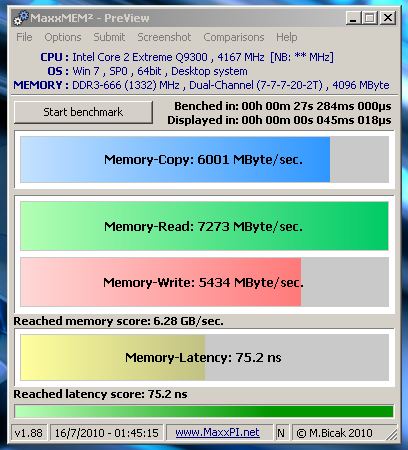
The same RAM you have on the R2 performs like that:
![[IMG]](images/storyImages/5percentoc.th.png)
-
If it is bios set to 8.5 then raised to 12.5 it is even slower. That is why i am bios setting it as high as i can. Seeing your speed there makes me doubt I am even getting dual channel performance.....
-
Why don't you put the default values, check the score of the RAM, start changing the values till you find what combination gives you the best score and then play from within Windows?
I just noticed that I run v1.50 and you run 1.88 maybe that's why there is so much difference -
Because half the CPU score (test 1) is clock speed and the other half (test 2) is memory bandwidth
Also, things like gpu performance are boosted by CPU clock speed so I cannot afford to drop that really.the gpu score contributes 3x to the overall score compared to the CPU score. I just feel like this cut in bandwidth is hamstringing me
-
It's half the bandwidth... not a negligible number
-
That is what I am saying, you have twice the bandwidth. I am getting right around 8500 MB/s (PC3-8500.....go figure) while you are around 17000 MB/s which would be that 8500x2 since dual channel (like RAID 0 with your ram)
-
I have to try my CL9 modules again and compare the numbers, If I remember correctly they were similar to yours, half the bandwidth.
-
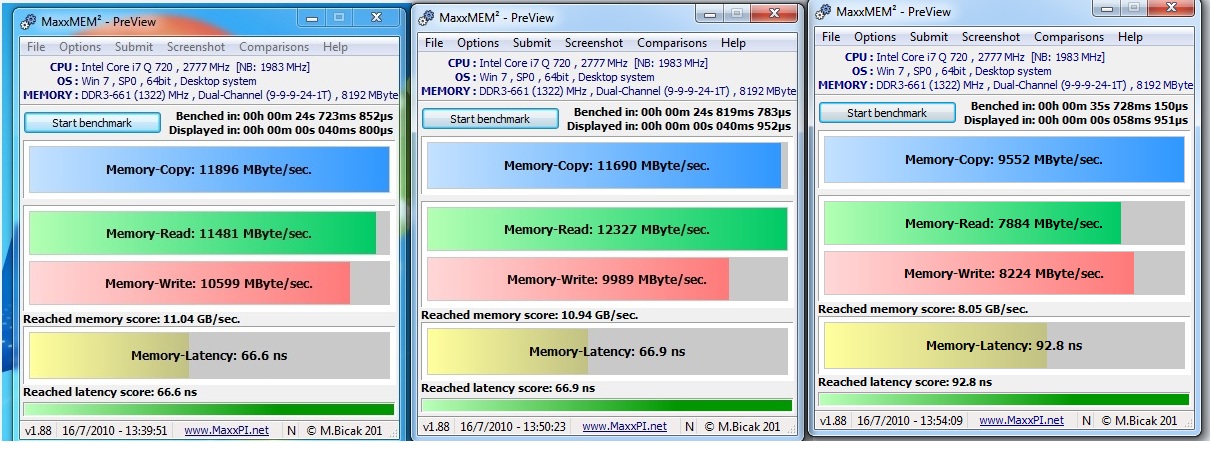
Did a few more tests, here are the results
Stock system: 1066 FSB 9.5x Multi 1333 Ram
![[IMG]](images/storyImages/fk0dqs.jpg)
Mild Overclock: 1333 FSB 8.5x Multi 1333 Ram
![[IMG]](images/storyImages/2ilit14.jpg)
Higher Overclock: 1333 FSB 10x Multi 1333 Ram
![[IMG]](images/storyImages/15ug41.jpg)
Now those 3 were all without using ThrottleStop at all. Now look at what using that does
High Overclock from 3.33 to 4.16: 1333 FSB 10x -> 12.5x Multi 1333 Ram
![[IMG]](images/storyImages/b9dezn.jpg)
High Overclock from 2.83 to 4.16: 1333 FSB 8.5x -> 12.5x Multi 1333 Ram
![[IMG]](images/storyImages/1rrf5t.jpg)
Now you have to keep in mind there will be minor fluctuations as these are ran more but the general ranges are rather indicative of what is going on I think. It looks like using ThrottleStop to change the CPU multiplier is pretty much setting the way the chipset handles the ram to make it think it is a 1066 FSB even though it is a 1333 FSB (if that makes any sense). And all indicators point to Dual Channel operation being enabled but the results are clearly reflecting single channel performance
I pretty much do not have any heart left for benching until we get this figured out or solved since it is heavily impeding any further progress I would make
-
it seems more like 1066 performance rather than single channel. As if the FSB drops lower than 1066 (last screenshot)
try not to use the 0.5 multipliers, with the x10 multi you get the best results so far, maybe you should try only integer multipliers and see -
I had the same performance problems when running a 12x multiplier as well. And you are right, I had my numbers mixed up:
DDR3-1066 = PC3-8500
DDR3-1333 = PC3-10666
DDR3-1600 = PC3-12800
But I also had an epiphany while going up out of my basement (laptop is now "defrosting" and out of commission for 7 or 8 hours so no more tests for tonight- while I sleep). In order to properly manipulate the voltage and multiplier with ThrottleStop, I always have had to Unlock FID/VID and then Reset FID/VID and THEN I can manipulate the voltage and multi successfully. I realized that it may be that when I did this reset operation it is resetting something in the chipset as well thus setting it back to 1066 (stock for the system) operation instead of the desired 1333.
Just a thought...and hopefully UncleWebb can make something productive out of these observations -
That's correct, so we have to wait until we have more info...
-
I am going to do some tests on my desktop to see if I can make any sense of it. Is a core i7 965 with tripple channel DDR3-1600
-
I think you will get even more confused because they are two different architectures
-
I am mainly focusing on the results of single vs dual vs tripple channel memory, trying to understand how those concepts present themselves in actual memory bandwidth
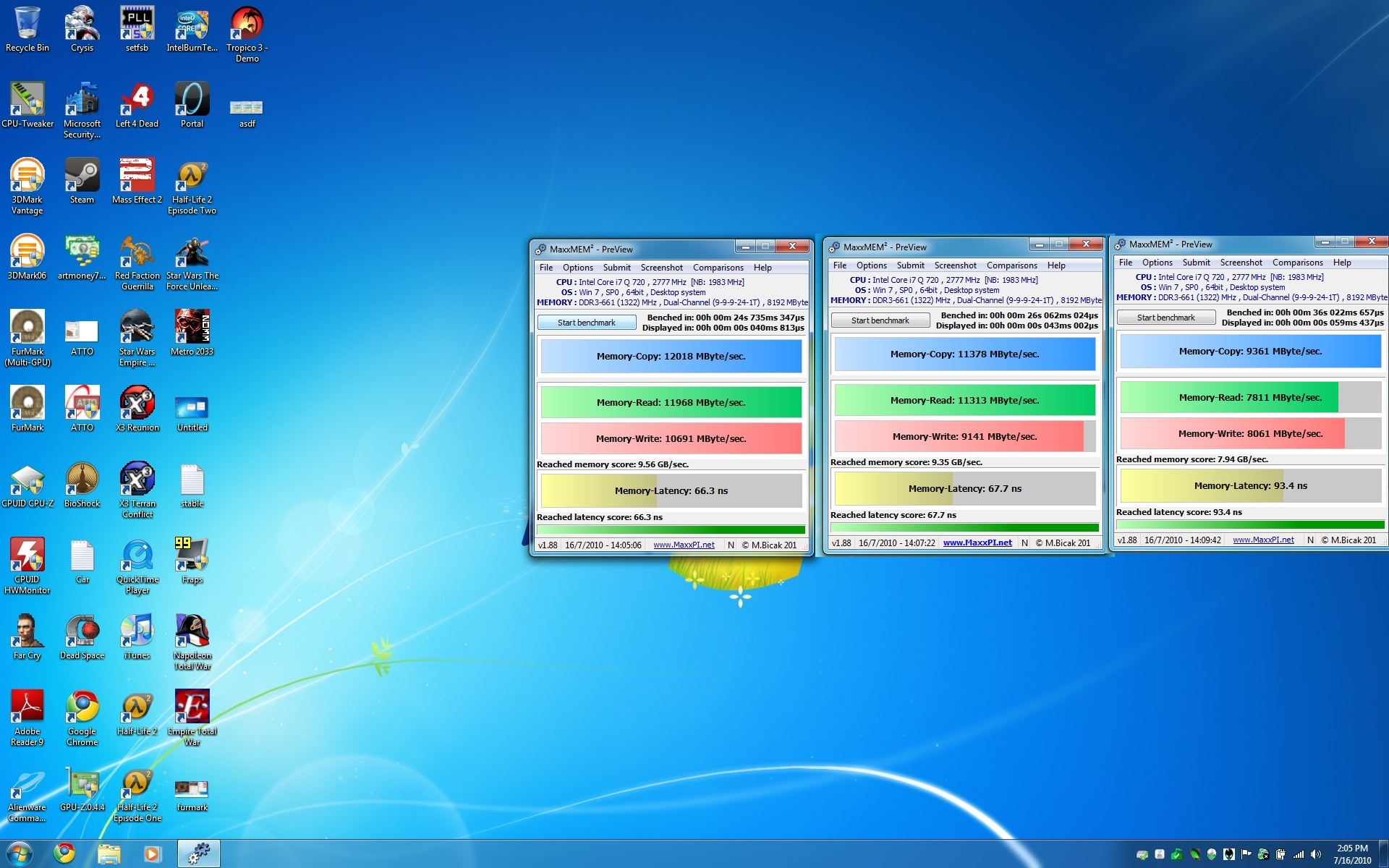
update: got some results to compare against now. First off, the rating (PC3-xxxx) is what you should get off a single channel setup (kind of obvious). Secondly, Running in Dual channel does not scale out a full 2x (few things do in computer land) but does give an appreciable increase in bandwidth. Tripple channel has been known to pretty much be a marketing stunt and rarely is actualized as higher bandwidth over a dual channel configuration. I forced single/dual/tripple channel operation by physically removing sticks of ram for these tests.
Tripple Channel:
![[IMG]](images/storyImages/4ujadv.jpg)
Dual Channel:
![[IMG]](images/storyImages/5jzq5c.jpg)
Single Channel:
![[IMG]](images/storyImages/5ywzkj.jpg)
This tells me a few things. I am getting single channel 1066 speed out of my laptop. And it looks like the desktop i7 (bloomfield) somewhat saturates it memory controller at about the same bandwidth as the laptop i7 parts (lynnfield) -
now try to run the memory on a lower frequency if you can, that would be interesting
Scook, btw check your "reached memory score" on your desktop and compare it with mine. I am quite impressed with the performance of HyperX on this laptop -
I will play around with a few things tomorrow. For now have to call it a night. But I am excited to hear back from UncleWebb on what he finds out.
-
very interesting findings there.
-
Like I said, I haven't begun either.
Eh I'm over the accent to be honest, its everywhere haha. -
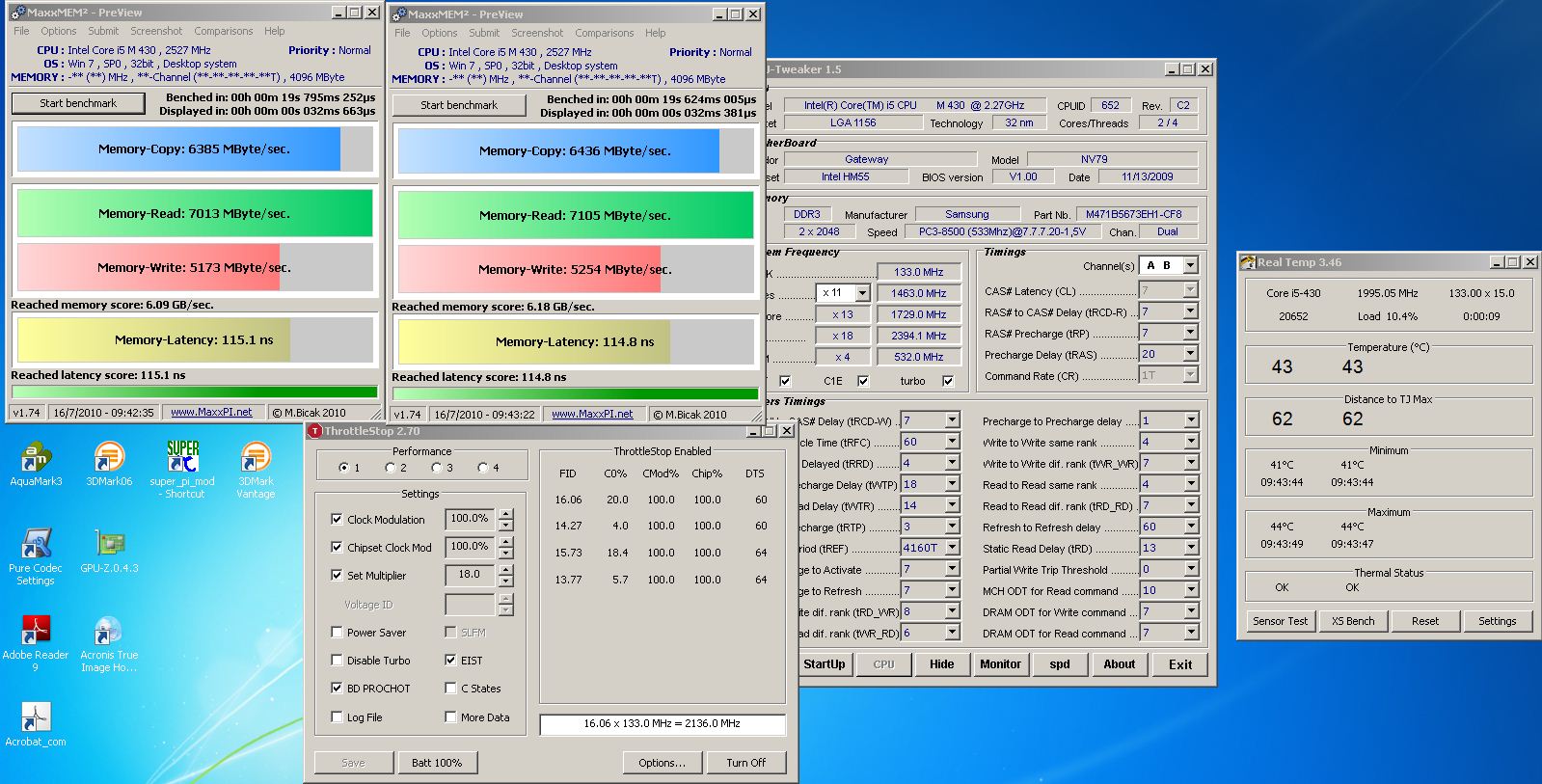
Some further testing shows that the problem is absolutely caused by ThrottleStop( because it is so awesome otherwise). I did a test with just a fresh boot, speeds are where they "should" be (8500 MB/s read). Then I started ThrottleStop but did not change any multi or voltage and ran it again - Clock Mod% and Chip Clock Mod % both were forced to 100% (from last time I used the program). Dropped to 7200 MB/s. Turned off both of those features, same thing. Turned off ThrottleStop, same thing. So When ThrottleStop is enabled, it is doing something that is hacking memory bandwidth down. These were all done at 8.5x 1333/1333. The clocks were never changed.
-
Scook what throttlestop version do you use? is it the same with an old and the new one?
-
I have 2.53
But wait there's more! It turns out just starting ThrottleStop even in monitoring mode (it was never enabled) is enough to drastically drop the memory bandwidth. So the program is absolutely the culprit -
hummm, let me try something...
ok, the one on the left is before throttle stop and the one on the right is with throttle stop running.Attached Files:
-
-
I did some tests with 2.72 and it does not impair memory bandwidth until you alter the multiplier. An improvement. However, the more the multi is changed, the greater the disability
-
TS only in monitor mode. Left off, Right on. Version 2.55 Last one is after disabling Turbo and changing the multiplier down to 11.0
Attached Files:
-
-
lozz.
did you get around to trying 2.70 and up yet? -
I can't for the life of me find it, I had a hard enough time finding 2.55 lol.
-
email in pm:
ok, it fit here.Attached Files:
-
-
I was just about to say I've been skipping it right in his sig all this time, but thanks! I'll get a result here shortly.
-
me too then...lol
if he has 2.72 out
2.72 -
I just did some testing on my desktop computer with the P965 chipset.
The first two benchmarks are by booting up at 11.0 x 333 MHz = 3667 MHz
http://img696.imageshack.us/img696/2735/boot11x.png
http://img43.imageshack.us/img43/5773/boot11x2.png
For the next two benchmarks I booted up with the 6X multiplier and then used ThrottleStop to increase that to 11X so it would be running the same speed as before.
http://img683.imageshack.us/img683/3374/boot6x.png
http://img716.imageshack.us/img716/5925/boot6x2.png
On the P965, I couldn't see any decrease in memory bandwidth performance loss. If anything there was a tiny decrease in latency and increase in bandwidth but it was within the margin of error.
Using this guide, it's possible to adjust the strap and change some settings in the chipset to increase or decrease performance. After doing this, memory bandwidth dropped like a rock.
Memory Tweaking
http://img51.imageshack.us/img51/3397/boot6xslowchipset.png
The CPU and memory are running at the exact same speed as before but a change to the chipset has killed memory performance.
When ThrottleStop starts up, it reads clock modulation information from your chipset. This might be enough to trigger some of the newer chipsets to change the latency settings or something odd like that. I might be able to come up with a test version of ThrottleStop so that the chipset clock modulation stuff is completely disabled and then you can see if this makes any difference to your bandwidth numbers. -
Same results with 2.72 essentially. Same pattern as before, off, on, multiplier adjusted. The 'on' can probally be associated with a small decrease since it looks like TS is actively looking @ the PLL which probally uses a small amount of system ram that the benchmark is trying to assess.
Attached Files:
-
-
Well if it helps UncleWebb, the effect is MUCH less with 2.72 compared to 2.53 so some change you made there helped me out. I will do runs using 2.72 tonight (all the previous benches were using 2.53) I hope to see some improvements
-
what turbo power limits are you using?
-
None....Core 2 Extreme Qx9300
I feel like removing any chipset involvement may help, I thought throttlestop works by changing CPU stuff not chipset anyway? Also, I cannot alter the multi and voltage with resetting FID/VID first (after unlocking) so maybe if you can make it so that is not necessary it may help - would probably be best to try that first?
*OFFICIAL* M17x Benchmark Thread - Part 3
Discussion in 'Alienware 17 and M17x' started by BatBoy, Jan 30, 2010.


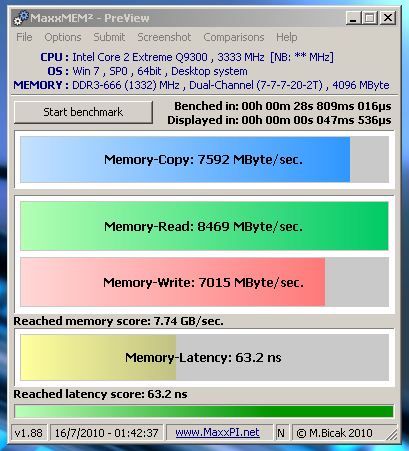

![[IMG]](http://img203.imageshack.us/i/5percentoc.png/)