Problems? See this thread at archive.org.
I'm guessing it's altering the power reduction features the chipsets uses to do what it does. the only way to bypass the chipset involvement that I know of is through the bios.
-
well this program is clearly making bios level modifications to the functionality of the notebook so that is not a worry of mine - I have confidence in Webb
-
scook9: Does your bios use clock modulation or chipset clock modulation when it is throttling?
You have to communicate with the chipset, read and write information to it, to control chipset clock modulation.
On my CPU if I choose Unlock Max FID/VID first, and then I select Reset CPU FID/VID, after that the FID and VID adjusters can immediately be adjusted higher than the default values because the CPU is unlocked.
If all you want is to use ThrottleStop to unlock and set your multiplier and VID then tell me what settings you would like it to be set to and I'll write something really simple to do this without any of the other ThrottleStop chipset baggage, etc. That might help you isolate the problem you are having. -
The only thing ThrottleStop does to the chipset is it reads and writes to the register that controls clock modulation. That's it.
Other than that it writes directly to the CPU registers to control and unlock the multiplier.
Thanks for your vote of confidence.
With some time and some testing, we'll figure something out. I like seeing your sky high benchmark numbers almost as much as you do. -
Lozz: Can you explain your screen shot above?
I'm guessing,
Off, means ThrottleStop is not running
On, means it is running but maybe in monitoring mode
Multiplier adjusted, does that mean you put a check mark in the Set Multiplier box and ThrottleStop is also in Enabled mode?
be as specific as possible so I can try to understand this bandwidth decrease.
There is some variation from one run to the next when testing with this program. Can you maybe reboot and run it 5 times and show your highest and lowest result without using ThrottleStop at all. -
mine got a bandwidth increase...
-
If you could make me something with 12.5x and 1.5v that would be cool
-
I have not documented the modulation much but it is the exact same setup elkay had and I think you have a lot of his data?
-
OK, I added an INI file option so you can totally disable ThrottleStop from accessing the chipset. It won't read or write to it in any way and for chipset clock modulation it will probably always report 100% regardless of what it's actually at. I just wanted to separate this chunk of code as much as possible for testing purposes.
Just add this option to the ThrottleStop.ini configuration file.
NoChipset=1
If you come up with a procedure where the memory bandwidth drops like a rock, and it is repeatable, just post exactly what you did. -
Awesome. I will test that tonight when I have some more freezer time
Can't do 1.5v at room temp lol -
I just had a look in the M17x-R1 stutter thread to refresh my memory. This laptop uses regular clock modulation that is not triggered by the chipset so there is no need to constantly monitor or adjust the chipset.
When you boot up at a low multi and use ThrottleStop to raise that higher, the chipset all by itself might be changing something internally which reduces memory bandwidth. Time for another 101 benches. -
101 benches of ram on the wall..
-
Well I'm in the process of setting up my 40GB Benching SSD. Probably have time to run a few benches tommorrow on the 520 CPU, though not with the cooling I'd want. That will come in a few days when I get the time. Then it will be the 920XM and the 940XM
![[IMG]](images/storyImages/rockwoot.gif)
-
Got my new M17x a few days ago and today ran 3DMark06 to check the scores out. I've seen scores all the way from 13,000 to 22,000 so I didn't know what to expect.
I got 13,885. Is that normal for my system?
CPU: 720QM
GPU: Crossfire 5870
RAM: 4GB
(ATI CCC set to performance and made sure Stealth Mode was off, btw) -
That is what I am getting too.
-
speaking of systems.
i went and checked out one of these today..that thing weighs a ton!! who the hell said this machine was light!!
i wish i had my usb drive with me, i would have loaded a benching program or to. might go back tomorrow and see what they say about it.
but it does have a great build quality feel to it. this model had the lessor screen though. -
Ya they are heavy. If a sales rep ain't there, the passwords for all the laptops at my location was "gear" may be the same at all Microcenter locations lol
-
this was at a frys, but they have let me load stuff a few times before. and then i would come back..and the next group of people would be presenting the benchmarks like it was their idea or something...rotfl!
-
Benchmarks sell systems
I quoted my desktop performance to customers many times when working at microcenter -
this is true!
grrrrrrrrrrrrrrrrrr, just checked...cant run vantage at standard.
1440x900 res.
side note:
wonder if they would bring a monitor over....i might try tomorrow just to see.
if it was microcenter...and the laptops where in the computer section. them guys would hurry up and load them up. no questions asked. -
Buy one and use your own monitor
Or "borrow" it haha -
i had thought about that, but have a few other things going on at the moment.
not to mention that i dont have 2300 bucks to float right now. -
hmmmm, does fry's also sell portable AC units?
-
Details.....lol
I feel you on the money. Is why I do not have an R2 already lol -
yep, they sure do.
but you can get one off of craigs list..a window unit with like 15000 to 2200 btu for far less...you can fashion a box with drain at the bottom and hole for heat tube to run out a window, with an extend tray for the laptop to sit on. or put it in the garage and have at it.
it sucks out here right now..credit card company said...oh, since your not using these 10's of thousands of dollars, we'll just take that and give you 500 bucks..wth...they did that with a few of my cards. damn broke azz state! -
Cash is king. Paid for my qx9300 and M17x same day with debit (essentially cash)
Saving it up forces you to research it and make sure is worth it too lol -
no credit cards huh..
-
I actually exhaust the AC toward the bottom of the unit itself. If I don't it gets too cold and stops cooling. Basically I have it fighting itself.
-
My stalker COP benchmark test
![[IMG]](images/storyImages/copbench.png)
-
lucky you.
-
Don't have anything to compare it to so it's probably worthless lol, someone else might be interested.
-
The benchmark was done in the past but you would literally need to look back through 10K posts....if there was only a way we could organize these benchmarks.


-
i was just about to say the same thing drake..
this screams gaming database...
-
The RGB LED is fantastic. I have it and it's easily the best screen I've ever had.
-
define this. im kind of at a lost.
-
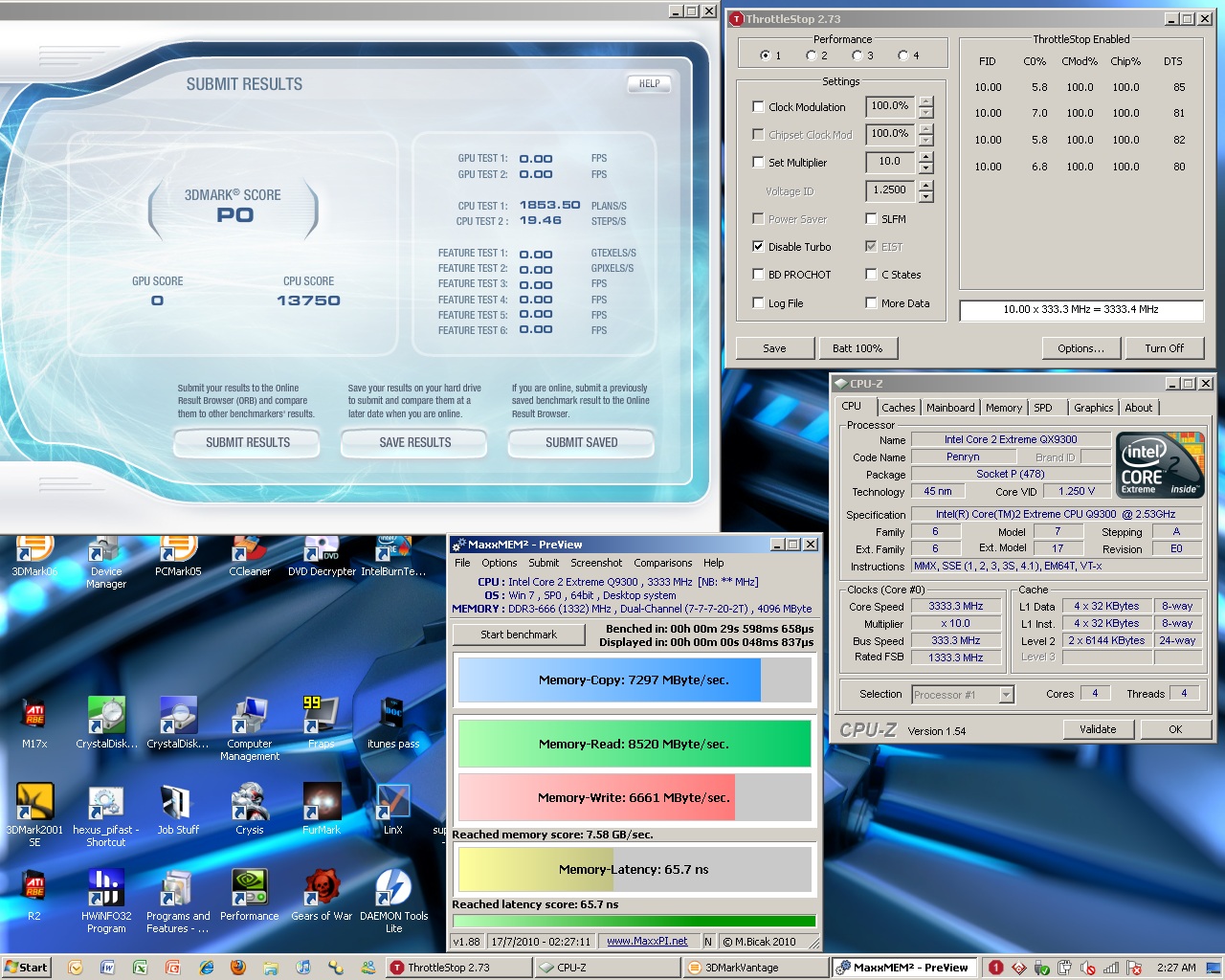
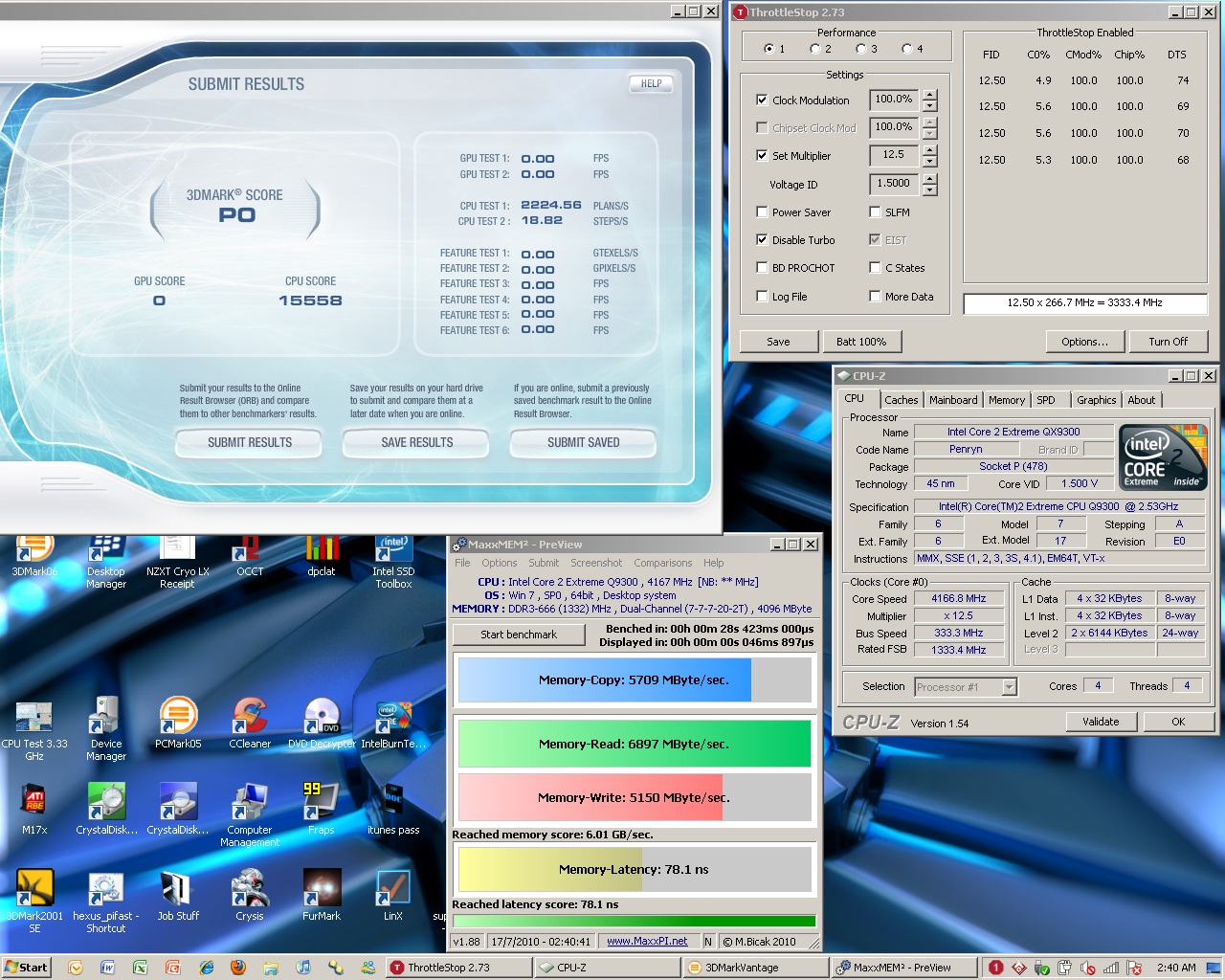
Unfortunately 2.73 did not fix my bandwidth issue. I was able to set the voltage and multi without hitting reset fid/vid by lowering it a few ticks than I was able to raise it and then once set I enabled the change. With the added line in the INI however the same drop in memory bandwidth is still there when I raise the multiplier upto 12.5
update: Also, if I step up the multi from the bios setting once in windows, the ram speed gets progressively worse the higher I take the multi. It looks like there is something in the chipset registers that is set at boot to sync with the bios set multi and any deviation from that bios setting of the multi after this results in a hit in performance. That would explain why it gets worse. Now if only I could somehow manipulate those chipset settings....( at your Webb)
-
Well you, like me, have and like the FDH2400.Almost everyone I asked at MicroCenter while there said they did not like the color output of this screen. Assuming people as a whole think similarly, everyone has been blown away with the RGBLED screen so far. If these same people would be dissatisfied with the FHD2400 that I am fine with, by that thinking I should be extra blown away by the RGBLED lol
Of course, at the end of the day it is completely subjective -
Thanks for testing that. My opinion is that the reduced bandwidth is probably a limitation or bug in the chipset you are using. On the older P965, it didn't make any difference to memory bandwidth whether I booted up at a high multiplier or booted up at a low multiplier and used ThrottleStop to raise it higher. I don't think there is anything I'm going to be able to do with ThrottleStop to get your lost memory bandwidth performance back.
For the P965 there was a program called PMem that let you get in there and hack away at the chipset strap settings and a few other things to improve memory bandwidth but I don't know of anything similar for the newer Intel chipsets. I tried PMem in Windows 7 x64 but the driver must be 32 bit only so it wouldn't launch. -
Know anything about low level stuff for nvidia chipsets? God this chipset is an achilles heal
If I just had the PM45 this system would be unbelieavable....let alone an x38 like the W90 had....
Worst case scenario....my system still screams in benches
-
I just did some digging and discovered that the R1 uses the Nvidia chipset. I didn't know that before. That helps explain why there is this loss of bandwidth on your chipset but not on the P965 desktop and P965 laptop I tested.
I was hoping it would be possible to find another tweak but I don't know much about chipsets in general or anything about the Nvidia chipset used in the R1.
I guess you'll just have to be happy with one of the fastest M17x-R1 laptops on the planet.
-
umm....nope.
see...he didn't know what i was talking about before making a comment.
had he asked...he would have found out that i was talking about screen resolution. im use to 1920x1200 and not 1440x900. this screen is 1600x900 and i still dont like it. just havent got around to replacing it with a 1920x1200 led. you see where i said i would need them to move a monitor over for me to bench the AW in the store?aaahh. the young jedi was not paying attention..lol. -
In that case, yes I am (was) confused lol
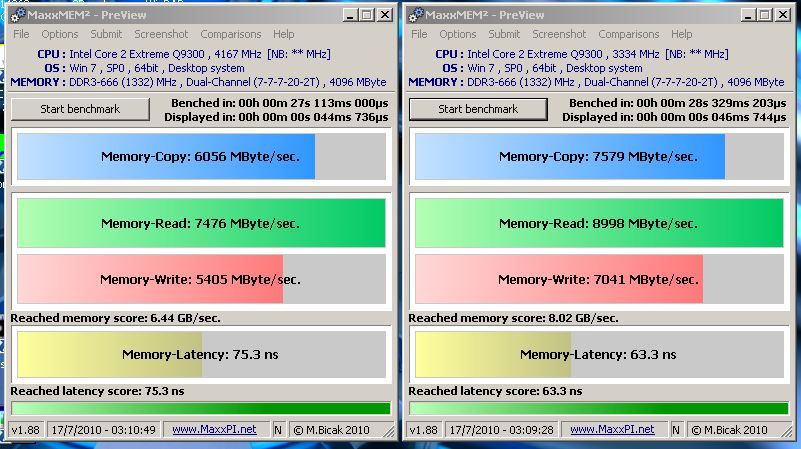
Back to benching though, I threw together 2 screenshots to pretty much sum up my frustration for you all (and for newcomers to understand what is going on in my machine)Attached Files:
-
-
do me a favor and re run those two test, but disable 2 cores..
just the memory test though -
Disable in windows (so boots using 2 cores) or just set affinity?
Just ran with affinity set to cores 0 and 1 (I know they are a pair - same die - from previous testing), so these are both done using 2 cores onlyAttached Files:
-
-
good call...try the bios first.
if it starts doing the same thing...slowly let off the voltage to see if it changes. -
The BIOS has no core limiting abilities, and see above
-
Scook did you try to lock to a different ratio?
-
Define ratio, ram:FSB?
The system will not boot if the ram is set to a lower speed than the FSB and since I want to max the FSB (1333) and the ram does not work higher than that, no I have not changed the ratio I guess -
From what I have seen so far, CPU voltage is not changing performance in this system, just aiding in stability
3.33 @ 1.1625V acts the exact same as 3.33 @ 1.2250V and 4.00 @ 1.4V is the same as 4.00 @ 1.5V -
try to lower the FSB and leave the memory at 1333, the system will adjust it. try to see if with different ratios you get better or worse results
*OFFICIAL* M17x Benchmark Thread - Part 3
Discussion in 'Alienware 17 and M17x' started by BatBoy, Jan 30, 2010.