 Problems? See this thread at archive.org.
Same here.
-
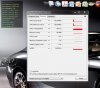
No Mr. Fox, I do not have Alien Respawn installed (I never use it). I have the temperature monitor on the screen all the time and I can see how the temperature for the first GPU raises without doing anything (this is happening on both with SLi disabled or enabled). There is nothing running in the background, CPU is at 0% usage (you can notice the temperature in the picture attached). I have to try 302.77 and see if this happens with that as well, then there is something wrong with that card. Now while typing, the temperature has raised to 62 degrees and the fan is not running for I do not know what reason... when it goes above 62, then it starts, drops the temperature for that GPU to 43-44 and stops...
-
Found that flash has been crashing in Firefox a lot after installing this driver. Not sure if it's related or not.
-
Julian, to an extent what your are describing is normal. I doubt something is wrong with your GPU, but the driver can certainly change its behavior. I frequently see 5° to 10°C difference between GPU temps and always have now and then in a dual GPU system. Just having a browser window open can cause the primary GPU to come out of 2D/low power mode and it will run warmer than the dormant card when it does.. The fans do not need to spin up to the point they are audible before 62°C because that's not very hot. You can change this behavior if you want to hear your fans kicking in before they get warm. Change HWiNFO64 to use your GPU fan control table for the chassis fans and raise the speeds in the tables to something higher or change the temp values to something lower. That should do it.
Bricktop, some AMD 7970M owners are also having a really bad time with Firefox crashing. Maybe it's mostly a buggy version of flash, or a bug in Firefox. Have you tried disabling hardware acceleration in Firefox? -
Mr. Fox, this has never been my concern (the difference between the temps, though this was not there with the previous driver). Since both the GPU's are in power idle mode there is no need for both of them getting hotter unless the load is way too much for one card to handle it. That is where the second card comes handy in SLi, CrossfireX mode.
My thoughts are about the driver crashing and restarting, it only happens is the system is on standby mode or the screen goes off after certain time. It's like the driver does not respond when the card / GPU asks for waking up the screen. After a clean installation it happened only once and I am waiting to see if this occurs again. If it does, then I am going back to an older driver to see if this happens there as well.
The funny thing is, after I installed this driver everything was so smooth and running so well for few days (I even mentioned this earlier on this thread) and now this driver crush thing popped out of nowhere.
I would highly appreciate if anybody can help me with a 680m vbios (Dell original / default). Thank you so much. -
GPU and CPU run hotter , regular BSOD's on start up. Back to stock 302's for me

-
BSOD's for me too.
-
thats interesting, i've had 306.02 beta had zero issues with BSODs the only problem i had was when starting windows it would sometimes crash the driver and i had to restart, and this has been fixed for me with 306.23, i'm sad to hear you guys are having this issue, but on two different systems my MSI GT70 with 670m did the same thing and 306.23 fixed this issue as well, and my m18x2 is running perfect now with 306.23 680m sli @ 1174/2400 everyday use.
-
Glad to hear yours is good man, for some reason they seem to come and go, during windows startup/login that is.
-
i dunno what it could be, i'm using a03 bios, and i'm using MSI afterburner and i use driversweeper and ccleaner before install and custom and check clean install, i've done this always and it works for me, i dunno if that helps.
-
Did you still have your HDMI out plugged in when upgrading the drivers ? I unplugged mine and disabled SLI , installed again and they were fine. Restarted and BSOD time after time until suddenly it booted into the Windows Logon screen. Cracked it I thought , restarted and multiple BSOD's
-
Thank God I am not the only one with the issues
I thought there is something wrong with one of my cards; but since the programs and games are running smooth, I saw no reason for that. I am going back to 302.77 (this driver gives a bit of a boost to the GPU's compared to the 302.72 from Dell and its stable too).
-
Maybe it is a windows update causing these BSOD.. hard to figure out what the cause is because they occur so random.
We really need to brainstorm and find out the cause of this. -
Yeah actually after a few days on this driver I have to report that I have experienced 3 BSOD's and 3 "Nvidia display driver has failed and recovered" notifications in my task-bar. To top it off Windows seems to take an additional 10 seconds or so to load (SSD).
While gaming no issues at all, but to be honest I cannot really "feel" the purported performance increase in the games that I have been playing a bit of lately:
GTA 4 with icENhancer 2.1 ENB
TES V: Skyrim with Sharpshooters ENB
Assassins Creed 2
Transformers FOC
The Witcher 2 Enhanced Edition
Thinking of rolling back to official driver. -
Gotta be something in relation to the 680m's because this driver works perfectly for me - no BSOD's, no hanging, good FPS....no downsides for the 580m really as far as I can tell apart from the odd bit of latency.
-
totaly agree, this driver is not good. have to report that I have experienced 3 BSOD!!!
-
i just dont get it, mine is working perfectly, with 680m's even the beta drivers weren't that bad for me, only a few driver crashes on start up, never a single BSoD, i dunno if it something else causing it, or my system is just immune to the driver issue that you are all experiencing its very odd and i wish i could figure it out because mine works fine, i played a ton of Borderlands 2, 10 hours plus and the only problem i had was black screening twice, probably a driver crash because of overclock 1174mhz, it isn't rock solid in every game, Trine 2 and Borderlands 2 seems to be somewhat unstable. guessing its a dx9 thing.
-
Just a thought but are those experiencing problems using an external display? - if so, does it work ok if the external is disabled/off ?
-
I've been getting BSODs lately as well. Mainly in the last couple of days. I rolled back to my old drivers and will see if the problems persist. My Windows 7 is up to date.
@steviejones133 I thought it was related to my external but it BSOD when it was disconnected as well. -
Weird. do you experience BSOD at stock clocks? - noticed your OC in your sig......
-
Yeah I do. So far though, I'm good on my old drivers.
-
That is one thing I always appreciated about NVIDIA drivers on my systems equipped with 8800M GT SLI and GTX 580M SLI... there is almost always a recent driver available that works very well even when the latest is not the greatest. With AMD the hunt for a good driver that does not have some kind of an issue has always been more of a challenge. They do have good drivers now and then, but they are often more of a challenge to identify.
-
Yeah man I'm with you on that one. I've been trying my damnedest to make this thing BSOD on my old drivers and it's not budging
-
All those that are having issues please leave your feedback here so Nvidia is aware.
NVIDIA Display Driver Feedback
The more that do so, the higher priority our issue will get. -
Small update, after taking these for a test drive I have to say I have yet to encounter any issues myself.
Sent from my iPad using Tapatalk HD -
It might be tied to the pcie3.0 bus, we will see if clevo 370EM encounters these issues too. Anyways all having issues please leave feedback in the link posted previously.
-
Hey Mobiusblack, you and I have similar setups. Whenever I close the lid of my M18X, after reopening I have no display and have to reboot to get a picture. Seems to have started this week when I updated to these drivers. Can you please try this? All my power settings are at the default and I am running the high profile. Thanks! -
Bradley toss in a report to that link, so Nvidia takes a look at these issues.
-
I did, but have resolved now - thank you System Restore. I think I can blame the Intel Extreme Tuning Utility, which is the only thing I have installed in the last couple of days. Seems like it also installs or updates a couple of chipset drivers (Intel watchdog timer driver and SMBus) which do not uninstall when you remove the utility. Soon as they were gone, all good.
-
Keep monitoring the next few days.
-
BSOD's always just before the logon screen with these. Its like the drivers are trying to initialise the external display as default even when its disabled or not plugged in. Tried resetting everything and still no joy , registery entry perhaps ? . The stock drivers are fine
-
You can stick with this driver for now (302.77). It is better than stock driver 302.72. All the others I tried, they work well but you will have some issues now and then... BSOD unexpected, driver crashes, screen does not come on - does not wake from sleep mode, etc. etc. I do not know if it is a good idea to post the link from this site, but you can get the driver from here v302.77 Windows 7/Vista 64bit | Dell Mobile - 30x Series GeForce Driver release - LaptopVideo2Go Forums (moderators, please delete if I am not supposed to post this link; thank you and sorry).
-
I am toying with the idea of using the latest desktop drivers with a modified inf and see what happens ??
-
Definitely try it out and post results but I think there will be same issues. But please do try. Guys continue to file trouble tickets at: NVIDIA Display Driver Feedback
-
Hey guys,
I think this is a more a hardware fault, but ever since I have installed both 680M's into my R1, the laptop speakers have stopped working. It comes up with a message that IDT PC Audio has encountered and error and closed. Interestingly enough, this happens when I'm halfway through the NVIDIA driver install, and has done it for the old drivers and now these twice in a row. Any thoughts?
Also, does anyone play around with the NVIDIA control panel in as much in the 'Manage 3D Settings' tab with relation to individual programs, or do you pretty much leave it generic and roll with that. Obviously I have re-enabled SLI after the latest install. Just wondering if there was any last few ponies to squeeze out of it? -
The only reason I dont think it is a hardware fault is because certain drivers work PERFECT with it. It is more of a compatibility problem. I hear that windows 8 fixes the bsod btw but not 100% sure.
-
It works fine with me but I don't have my PC set to sleep when I close the display. Its just set to turn off the display. Maybe its an issue with Sleep?
-
I can concur with the above. I installed Intel XTU 2.1 and my system, whilst running these Nvidia drivers, does not always successfully resume after putting the machine into a sleep state. The KB lights up but the screen just remains blank....it's kinda like the display signal is not being passed. On my U2410, it almost looks like it's about to resume but then the monitor reverts to a "no signal" state and falls into power save mode. Only a hard shutdown solves it. Also, upon rebooting, the killer bandwidth screen pops up and displays the message that I need to test speed before using........I think I will roll gpu drivers back and see if any previous versions are compatible with XTU. Sleep worked just fine before installing XTU, however, I would prefer to have the use of XTU than not, so these drivers are gonna go by the wayside for me....
-
This is totally normal and the same thing happens with 7970M, 580M and so on... I can assure you that it's not a hardware problem and no need for alarm. The issue is the sound card becomes unavailable while installing the video drivers because the HDMI audio driver is uninstalled which, in turn, is crashing the sound card software. If you were to kill the IDT services and background app before starting the driver installation, it would stop that error message from occurring. But, there is no need to take any extra steps because it is expected behavior and causes no harm.
The other thing thing is that we should typically be doing a clean driver installation as a best practice. After removing all your display drivers, stripping out all of the old registry entries and deleting installation folder, reboot. With NVIDIA doing an in-place driver upgrade is less problematic than AMD Catalyst software, but the potential for a driver conflict is still there doing an in-place upgrade. There is no harm in trying an in-place upgrade, and you can skip the HDMI driver update if the driver package contains the same HDMI audio driver version as what you already have installed. If you deselect the audio driver in the AMD or NVIDIA installation package you will not see this error message.
If your headphones work and the speakers do not, the problem could be a jammed trigger pin in one of the audio output jacks. If you remove the IDT drivers and let Windows install its native audio drivers, your speakers may start working again. If they do, then I am 99% sure it is a stuck trigger pin in one of the ports. See this thread for more information about that: http://forum.notebookreview.com/ali...g-after-using-optical-external-audio-out.html.
It is also possible you disturbed something while installing the video cards. Maybe one of the speaker wires is pinched under the front edge of the palm rest. I have not noticed anyone else having the issue, so I do not believe it relates to the 680M video cards. -
Same experience here, two consecutive BSOD's this morning, going back to stock drivers. Going to miss the GPU power management feature, but other than that the performance gains are negligible.
If anyone needs the original driver you can download it from Dell here:
Drivers and Downloads | Dell [United States] -
I didn't do a clean install, just express, and my multipliers are at 42 with 0 Flex Voltage, these reasons may possibly account for the BSOD's upon start-up. That said, I am back on 302, with an express reversion, and no BSOD and no hang-up at start-up or "failed display driver" notification.
Interestingly, the 302.72 driver retained the "power management feature", but it may likely have been there all along, or I have real problems and am going to have to go in in safe mode and use CCleaner and Driver Sweeper.
Edit: I didn't realize that you are using 580M, maybe it is 680M related. But the potential sources mentioned above should be eliminated before a fair review of the driver can be passed.
Honestly I doubt it is an issue of being a clean install or not, Nvidia seems to have the driver update via "express" method down reliably. -
For those of you sticking to 302.77 like myself, SLI bits can always be edited using nvinspector to enable SLi in the latest games. An example being borderlands 2 (sli will not work without making this edit on dell stock drivers) and torchlight II. This is great to ensure sli still working. Guides on how to do this can be found on google.
I honestly think the true causes of these BSOD's are that they are making changes to the drivers to accommodate for windows 8, some causing issues in windows 7. For example these BSOD's do not happen on windows 8. Only a month to go until some of these issues will be forgotten
-
I heard the 306.23 WHQL driver that is supposed to support Windows 8 refuses to install on a Windows 8 system. Has anyone been successful installing it under Windows 8 yet?
I had frequent 0x116 STOP errors with the 7970M CrossFire setup until I disabled Timeout Detection and Recovery (TDR). Those experiencing that particular BSOD should try what fixed my problem with that.
-
Just a quick FYI. After getting black screens after resume from sleep, I binned off the latest WHQL and decided to work backwards to find a driver that didn't have this problem whilst running a machine with Intel XTU installed. After a clean install, I'm "successfully" (touch wood) running 306.02 Beta's alongside XTU and have yet to have a black screen......gonna keep testing it out but it may be of some use for others having problems.....(you can bet that now I have posted this, I will get a black screen straight away LOL)
-
Hahah, sadly for 680M users those were just as troublesome. If you do have problems with those, try 302.77 from laptopvideo2go for kicks, the driver already supports dell oem cards no modding needed.
-
Cheers for the link, Bro. Sadly reporting that the 306.02 Beta's finally failed with a black screen so I will have to bin them off too.....
-
I think windows 8 will hopefully be more driver friendly.
-
I had no issues installing it on my partition of Win 8.
Weird thing is, my WEI score (I know how everyone feels) is I think in the 6s or 7s where as my processor and ram are much higher. Win 7 it is opposite. -
I'm not having any installation issues with the driver on Windows 8, either. I just installed the OS earlier, and the driver went on just fine. I'm on build 8400 at the moment. As far as 306.23 WHQL goes in general, I haven't had an problems so far (knock on wood).
In regard to the WEI, my processor and RAM both score an 8.0 while the 680Ms are scoring a 6.3 I haven't looked into the differences between WEI 7 & 8, though. -
I'm thinking about installing 3dmark11 just to see if there is an improvement with win 8. I only created a small partition so I don't have much room on it.
I'm on the same build as well. Still trying to get the feel of it. I don't want to say I don't like it yet, but I would like the option to run it as a desktop completly with the start menu. I'm slowly figuring out some of the short cut keys. It is real though.
306.23 whql
Discussion in 'Alienware 18 and M18x' started by littleone562, Sep 13, 2012.


