 Problems? See this thread at archive.org.
Hey everyone, I just had a rough week and decided I wanted to upgrade my monster. Also, in BF4 I noticed i'm on he edge of running out of ram, 7800MB used sometimes, so I picked up 2 sets of Amazon.com: Kingston HyperX Plug n Play 8GB Kit 2133MHz DDR3 PC3-1700 Non-ECC CL12 SODIMM Notebook Memory KHX21S12P1K2/8: Computers & Accessories . Which from my understanding is the very best ram you can buy. Expensive upgrade at 240, but what the hell. Anyways, this kit takes up all 4 ram slots, any advice after I get them installed in my beast? Any settings I need to play with or enable in bio ect? Or is it install and run at 2133 and be happy?
Thanks everyone!
-
-
The plug and play should just go, the timings are built in as the stock speeds and are not embedded as an XMP profile.
It is the fastest stock ram available and I know 2 sticks work just fine, I am not sure on 4 sticks though. You can always adjust the timings in the bios if needed. -
Hmm, can anyone confirm 4 sticks working? I just bought 4. 2 sticks would be no good because i'm at 8 right now and on the edge of running out!
-
Given that 2 sets of 4x2 kits are not guaranteed to run at the rated speed, I'd be happy if they did work at 2133.
Having said that, why not put in these babes ( Amazon.com: Corsair Vengeance Performance 8GB (2x4GB) DDR3 2133MHz Laptop Memory (CMSX8GX3M2B2133C11): Electronics) which have tighter timings (11-11-11-27) and run at 1.35V (so should be very stable under 1.5V)?northstar2320 likes this. -
Is the game itself using 7800MB or are you looking at usage since that does include cached programs by windows which it can dump out any time if a program needs it. Windows tries to fill the ram up for fast usage so your system is a responsive as possible.
EDIT: Interesting I did not realise corsair had put out a 2133mhz 1.35v kit, I wonder how they compare to my samsung modules? -
i just have the game open and a few windows in my internet browser, and we are at the 7830mb mark... i think its causing some of my stutter in bf4..
sponge, i thought some people were having issues with the vengeance ram, and the hyperx was more friendly towards the m18x r2? -
Well at stock speeds both would be pretty identical, it's having more ram that would impact performance.
Windows will partially load commonly used programs to speed up their startup time if you use them, so even if you are not currently using programs ram will be used to cache these so you can't just look at the total used. -
Indeed, I myself once bought Corsair Vengeance 1866 and they simply wouldn't work in dual channel so I had to return them. However, people (Mr. Fox immediately comes to mind) have managed to nail down exactly the botched-up SPD setting that's causing the problem on the R2 and found the fix. I find it somewhat unlikely that after almost two years the new 2133 DDR3L is still suffering from the same problem. I for one will be ordering a pair of them (at least) soon as my replacement-of-replacement AW 18 (a whole different story for another time
 ) arrives.
-
I am shocked that BF4 is consuming almost 8GB of system memory. I don't know if it truly needs that much or it is just a sign of it being a very poorly optimized game. If you use RivaTuner OSD and set it to show GPU memory utilization, how much of your 2GB of vRAM is it chewing up?
I am aware of no reason this would not work fine. I have 4x4GB of the 1866 that I flashed with firmware for this memory and it works flawlessly. It is totally plug and play and runs at 2133 with the BIOS memory speed set to "Auto" so I would expect this HyperX to do exactly the same thing.
Not only does it work correctly, but you can also overclock it... :thumbsup:
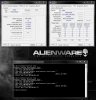 reborn2003 and dandan112988 like this.
 -
I'll check on the vram and report back, hopefully this gives me a little boost when running bf4
Sent from my SM-N900T using Tapatalk -
My vram use is around 1940 mb at max
Sent from my SM-N900T using Tapatalk -
Wow, so you don't have a lot of wiggle room with vRAM either. That's pretty demanding.
Does BF4 have any kind of built-in benchmark test? -
Hmm, not sure if it has a benchmark. ... MSI afterburner is saying it maxed out at 2034 today for the vram.
I've been having some buyer remorse on this ram purchase. The more I read the more i'm convinced it a waste of money because it gives little to no performance increases in games. I'm thinking of just buying 2 more 4gb sticks of the stock ram that came with my laptop with the part number. Its samsung ram, and call it a day. I really want to buy it but everyone is telling me its a waste of money. Can anyone convince me that buying these name brand high speed ram sticks do anything worth noting to a system?Mr. Fox likes this. -
High speed memory upgrades are nice for... well... memory benchmarks. For most games and many benchmarks that are not memory intensive it provides no discernible benefit. You can measure it, but can't really "feel" the difference. Going from 1600 to 2133, you may well notice a minor improvement in system responsiveness. That's a big jump in speed. I went from 1600, to 1866, then 2133, so it basically masked or minimize any kind of improvement that I could detect with normal use and gaming. If it were 2400 or higher it might start to feel more impressive. Just don't expect anything amazing like going from HDD to SSD or a QM to an XM CPU because you will be sorely disappointed.
Now, from what you are describing about BF4 it seems to be a rather ludicrous resource pig, so you might notice an improvement running BF4 than you would not with other games. -
Does Afterburner report double the actual vRAM usage for SLI setups? I know it does for Crossfire..
-
No internal benchmark as far as I am aware but there are console commands to give some info while you are playing.
-
I read about of god things about the corsair vengeance 1866 stuff. anyone have a comparison of running corsair vengeance 1866 8x2 vs hyperx 2133 4x4? Speed tests or anything?
-
I've no direct comparison, however, from what I've read on these forum boards, the Corsair Vengeance memory can be hit and miss. Personally, I've never had an issue with Kingston memory - it's always been rock solid and has never caused me any headaches whatsoever. I've read lots of comments from various people who have run into issues with the Corsair memory.
Anyway, strictly speaking, if you have 16gb of ram running in dual channel - regardless of populated slots - the faster clocks should prove to be better, performance wise.
That would be my take on it.....16gb @2133Mhz is gonna be better than 16gb @1866Mhz. Will it 'rock your world?' - probably not noticeable in everyday use, but you might see some slightly higher benchmark results I'd imagine. -
Well that depends on the timings too, if your memory runs faster but at much looser timings in non bandwidth limited situations you will get worse performance as your overall latencies are longer.
-
Corsair Vengeance 2133 @ 11-11-11-27 1.35V.. Grabbing a pair soon as Dell delivers
-
Grabbing 2 packs for 16gb? Can you link me which ones ones your getting ?
Sent from my SM-N900T using Tapatalk -
I would think that they are these ones: Newegg.com - CORSAIR Vengeance Performance 8GB (2 x 4GB) 204-Pin DDR3 SO-DIMM DDR3 2133 Laptop Memory Model CMSX8GX3M2B2133C11
Suitable for the new 18 because of the lower voltage @1.35v -
Right as ever, Stevie. I meant a pair of sticks though, nothing extravagant. Waiting for a good discount to come out of these incessant Newegg promotion emails..
A few days ago RAM was having 10% off. Guess what, they also quietly raised the price on that from the usual 104.99 to 109.99. Still cheaper I suppose but not quite as generous as they make it out to be
steviejones133 likes this. -
Because of that lower voltage, would it work for the r2?
Sent from my SM-N900T using Tapatalk -
Yeah - should be fine. UltraGSM had 32gb of low voltage ram for sale here http://forum.notebookreview.com/com...atsink-32gb-ddr3-1600mhz-low-voltage-ram.html that he sold, prior to selling, he tested it in his R1 and R2.
I think it's only Haswell based machines that cannot utilise memory over 1.35v because of it's "tree-hugging" nature. -
Haha, Ok good. I wonder if the corsair 2133 would work at 2133 in a 4x4 configuration
Sent from my SM-N900T using Tapatalk -
Desktop haswell can use 1.5V memory, I guess intel wanted to improve their general battery life numbers and forced people to use 1.35v memory with mobile CPUs.
-
Which is a real shame - just because the mobile variant accepts or can run on a battery is no real justification to cut the legs off it before it can walk. Note the 'can', because anyone who is looking at an Alienware (or any other high end mobile solution for that matter) isn't going to be wanting to run it on battery for it's primary purpose.
Mobile Haswell, with it's 'green nature' should have only ever been released for those who find energy savings attractive - the ultrabook brigade etc -not the performance laptop market. Just my humble opinion, though..... -
Ah but many 3rd parties would have used 1.5v memory if it was an option to save money. Since this would impact the largest market segment by far they went with it.
Due to the development cost of an architecture they will do everything possible to avoid adding in another design into the mix.
Do I like it? No, but that's the way it currently is with no pressure from AMD.Mr. Fox and steviejones133 like this. -
I agree with both of you... I don't like it either. You're not alone in your sentiments about the concept behind the 'green nature' of Haswell being a real vice for enthusiasts. Sacrificing performance for a savings of maybe $10-$20 a year on electricity is, to put it bluntly, pretty stupid. If battery life is critically important, buying a gaming laptop of any kind is using the wrong tool for the job. It's a nice little bonus if you can get it thrown into the package for free as kind of an afterthought with the manual graphics switching, but not at the expense of performance... even just a little bit of sacrifice in terms of performance is too much IMHO.
steviejones133 likes this. -
Maybe some "big little" core design could help us here, that way the very silicon of the high performance component as well it's general design can be tweaked for performance while one or two small cores designed for power efficiency could handle idle like tasks.
In fact I could see 2 little cores and 4 big ones working out very well.steviejones133 likes this. -
That's a great idea. If you had absolute control over it and it wasn't a dynamic mess so like so many things are now it would be dynamite. When they try to make stuff "intelligent" it really bites. I like having hardware that obeys orders and doesn't have any say in the matter.
-
I think that enthusiasts wants all cores pumping to the absolute maximum, where possible. I can imagine a 2 core/4 core 'mix' not working very well, or being implemented successfully. Sometimes, the more 'intelligent' people try to make things, the more 'imbecilic' they become. Take Windows 8 for example....touch this, swipe that....no thanks.
Mr. Fox likes this. -
Yeah, well that can be taken in more than one unsavory way... but, it is applicable to Windows 8 no matter how you interpret what "touch this, swipe that" means.
I was thinking something more like "manual switchable CPUs" like "manual switchable graphics" might work as long as it wasn't empowered with the ability to make any decisions on behalf of the user. I would not want anything that is conceptually similar to Optimus or Enduro only with CPU cores. -
It would be quite simple IMO to implement correctly dependant on the power plan.
1. Power saver - only use little cores
2. Balanced - dynamically manage tasks
3. High performance - little cores only manage background windows activities, big cores handle everything else. -
I cancelled my hyper X 4x4 order and went with corsair because it had cl11 vs cl12. http://www.amazon.com/Corsair-Vengeance-Performance-2133MHz-CMSX8GX3M2B2133C11/dp/B00FMRV7QW . I ordered 2 packs. Hoping everything runs well out of the box at 2133 at 4x4. Cost me like 260 with over night shipping so I'll be mad if I have issues. Should be coming today
Sent from my SM-N900T using TapatalkMr. Fox likes this. -
Cool... Let us know how the low voltage memory works.
-
will do, should be here any second. What programs can i use to verify that all 4 sticks are running at 2133?
-
Ok running it at 2158 high 2129 average and consistent [close enough to 2133] I used Intel xtu to stress the memory and saw the frequency on the graph. Is there supposed to be variation like that ? Such as memory rated for 2133 running at 2129? Not sure if it's supposed to be exact. It was plug and play for me . I have 16 gb in 4x4 configuration . Corsair vengeance 2133 ddr3l ram. Looking good so far.
Sent from my SM-N900T using Tapatalk -
Nice! Glad it worked well without any drama. I have not see it fluctuate like that before, but it may be something that low voltage RAM does by design.
Can you please run winsat mem from a command prompt and post a screen shot of the command window showing the memory performance? Thanks! -
Hmm I never thought about this.
The Kingston hyper X 2133mhz ram I just stuck in my machine I never considered voltage.
with the Alienware 18 should I be using 1.35v and not 1.5v? -
Ok I'll run that when I get home and report back. Ran into one issue with the ram, and I'm not sure if it's because of the ram, the frequency , or the low voltage but when running on integrated its super flickers all over the place. This is only on the igpu, with the NVIDIA gpus it works fine.
Anyone have an idea on what's going on with the igpu with this type of ram ? Looks all staticy/ flickery/jumpy
Sent from my SM-N900T using Tapatalk -
None the wiser myself but have you tried using one or two sticks at a time?
-
Not yet, just ran it with 4. Very weird because it works perfectly with the 680s, just not with the igpu.. annoying because i use my integrated when on battery. Ill try 2 stick instead of 4 for intregrated when i get home, but sure if that will make a difference though. The things I see on screen is like what you would see when you gpu is clocks wayyyy too high or about to fail..
Sent from my SM-N900T using Tapatalk -
Try down clocking the memory when on the iGPU (1600 or even 1033). The CPU uses system memory for the GPU function so there may be some timing issues. This will at least give you some breadcrumbs.
-
The M18xR2 really is not designed for 1.35V. That is primarily for Haswell.
Go into the BIOS and set your memory voltage manually to 1.5V and see if that fixes the erratic speed changes and flickering when running on IGFX.
I doubt using 2 sticks instead of 4 will be helpful. Even if it is, that totally defeats the purpose for which you purchased 16GB of memory.
Yes and no. The 1.35V memory was intended for Haswell, but the entire bogus idea behind Haswell is energy efficiency. Are you using 1.5V memory in the Alienware 18? If you are and it is working correctly, then don't worry about it. More is better if it performs well. -
I posted a video of what I'm getting on IGPU with this ram, YouTube I tried setting the voltage to 1.50,1.55,1.60,1.65 . Same deal. Looks like I have to return these and get the HyperX
-
the video is marked private so it cannot be seen by members of our community
-
Having the igpu on can often limit the maximum memory clock you can set.
-
What does that mean fox, market private ?
Edit: oh it was private. I just put it public, please take a look
Sent from my SM-N900T using Tapatalk
Advice on hyperX 2133 RAM
Discussion in 'Alienware 18 and M18x' started by dandan112988, Nov 15, 2013.


