 Problems? See this thread at archive.org.
There is no special bios requirement. but make sure you update system Bios to A10 or later for UEFI support.
-
Does the M18xR2 have any of the secondary fan issues like the AW18 with 980M SLI?
reborn2003 likes this. -
I wonder what the difference is between the M15x running the GTX 970M no problem, but we can't run 980Ms on the M18x R2 without UEFI and windows 8. Has anybody tried downgrading the M18x R2 bios to a version that is pre-UEFI, then trying to run the 980Ms?
TBoneSan likes this. -
I wonder too but it's a slim chance since the R1's don't have a UEFI bios and don't play ball with 980m's. I think running a pre UEFI bios is worth a shot on the r2. Something strange and probably simple is causing problems. I hope we'll find out.
-
Ok so in short... uefi.. windows 8... how about the vbios and drivers... is it really just plug and play? Auto fan control work? Where did you guys buy the compatible 980ms? Are they clevos? All the listing 980m I see for upgrade kits are only for the 17 inchers. None for the 18 yet.
Last edited: Jan 2, 2015TBoneSan likes this. -
Yes. In short just full UEFI windows 8. The cards being used by everyone are Clevo cards. They work on the Clevo vbios. The R2 has no fan issues to speak of. There are some throttling concerns with Alienware users. At this point the cards appear to be throttling under high CPU overclocks - go figure?! Some power handling issues somewhere (not PSU limitations) that hopefully will get nutted out - so watch this thread I guess.
As far as drivers go. It's just the normal driver mod that users have been doing with machines not factory fitted with that particular GPU. Ie 780m/880m in the R2 .
Most people are buying their cards from RJ Tech or HIDevolution. I've bought mine from HIDevolution.Ashtrix and Robbo99999 like this. -
If you do not mind me asking, And I ask because this thread is HUGE and no way Im going to be able to read 112 pages+ of post after post about experience..
How did you get 980M SLI working in your M18X-R2 fox ?
Could I have step by step instructions, or links to and such or a thread that starts off with the steps needed to make it work.
-
Okay Fellas I'm jumping in:
I installed win8, installed the classic shell, not bad.I ordered my cards form Eurocom. Should be here Wednesday, Thursday next week. When I put the cards in and make the bios change UEFI-enabled, legacy rom disable will I still get message, "Checking devices, can not find boot device press any key to restart." Or, once I turn on pc everything will be good to go. Happy days -
The difference with the older machines is how the boot process works and how the bios interfaces with the GPU, the GPU will have legacy and UEFI code, each will react differently.
-
So will this one work with the 18?
HIDevolution NVIDIA GTX 980M 8GB Upgrade Kit for Alienware 17 and M17x R4 -
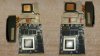
Yes, this 980m will work in a AW 18. But you need to adjust the heatsink: Here is a picture, how it must be adapted: (made from SteffRoe(aw-community.com))
-
Do you have a direct link to the page? Plus, what are those black things?reborn2003 likes this.
-
Can someone send me/upload Windows 8.1 Pro ISO to me?
I know I can download it from Windows homepage, but currently using a Windows XP computer and the downloader refuse to initiate on other than Win 7
I know ISO exist on torrent sites but Im very sceptical about downloading from there (I have a legit key of course) -
If I started that, it'd finish tomorrow. I suggest looking for an "untouched" or "OEM" copy via torrents. I've used them with legit keys in the past; as long as they claim it's a flat old ISO you'll be fine.
Also, I suggest finding a Windows 8.1 version if you can. Win 8 upgrading to 8.1 can be a bit of a pain.Cloudfire likes this. -
I found this one, but not sure. +20 in rating and is said to be untouched.
-
I had a look to see if I could find an 8.1 iso for you, from like Digital River (which is where I got my Windows 7 from), but no dice for Windows 8.1 - I think you might be limited to those more dodgy torrent sites or using Microsoft's official pages like you've already tried. As a real roundabout method you could first install Windows 7 from Digital River, and then download your 8.1 from Microsoft - but that is a major pain!!Cloudfire likes this.
-
Thanks. Yeah I searched around too and it seems that unlike Windows 7, the only site mirroring the Win8 ISO`s are Microsoft.
No way in hell I`m doing 2 installs lol. Downloading from that torrent as we speak. Just got to trust the uploader I guess. -
You can of course do a virus/malware scan on that file you download with different antivirus programs, hopefully that would catch anything obvious.
-
Well that wasnt the concern I had in thoughts. It was more like hidden software: keyloggers, backdoors which let the uploader see passwords and all my activity etc that no program can detect.
But will scan the file with spybot and avast like you suggested -
Its a German site, and since my German is only as good as that on Hogan's Hero thank goodness for Google translate. The black things look like the place on the cards which were milled/filed down. Here's the link:
Upgrades - Do-it-Yourself
The AW 18 upgrade thread is the 4th thread down. Anyone know what type of file was used? Thanks for the picture and heads up 1Schumsta11Schumsta1 likes this. -
Question:
Rufus couldnt do GPT partitions with Win XP 32bit. I made Win 8.1 Pro installation USB using MBR and UEFI.
That will work too I hope?
![[IMG]](images/storyImages/u2eo4Kb.png) Last edited: Jan 3, 2015
Last edited: Jan 3, 2015 -
Which USB drive you got? is connected through usb expansion hub?
-
Kingston 8GB Traveller USB3.0.
I found out that the reason GPT is gone is because I need a 64bit OS. This is 32bit XP. -
Yeah it may be cosz UEFI only supports 64bit. But on official Rufus web. state that 32bit or 64bit doesnt matter.
-
But I made a bootable drive for UEFI using MBR. Guess we will just have to see (monday).
-
Hit or miss... when 980M SLI wants to work well it is amazing. When it doesn't, it garbage. It seems to have a mind of its own. I am hoping it is drivers.
This is with stock vBIOS using the stock (crappy) 347.09 locked-down turd driver. Even so, the 3DMark11 run is a shade (300 points) better than my highest 780M SLI overclocked score ( see 3DMark 11 comparison, see Fire Strike comparison). So, even stock it is better except for the days it decides to throttle like a pile of junk, then 780M SLI kicks its butt.
Last edited by a moderator: May 6, 2015reborn2003, pathfindercod and mikecacho like this. -
Brother Fox does it show the same behavior in games too?
reborn2003 likes this. -
Yes, exactly the same. When it is having a good day it is totally amazing. I sure hope it is something with stupid drivers and not the M18xR2. I think it is, but it's hard to be certain. Worse case scenario, I have a pair of 980M cards ready for a Clevo P570WM3 if it is the R2. I can buy a less expensive one with 780M SLI and put those in the R2. Using modded vBIOS doesn't do anything for it when it has decided to play the "watch me throttle" game. In fact, I think vBIOS mods makes it worse when it misbehaves.
-
Here is another 3DMark 11 run exactly the same BIOS settings, ThrottleStop running but turned off and using driver 344.75 desktop mod and no GPU OC, and without any sub-3D clock GPU throttling.
344.75 Desktop Mod versus 347.09 Notebook Driver - Result

-
so throtlling is due to cpu at 4.6 ghz right? for gaming if cpu at 4.2 ghz 980m sli will not throttle right? it will give a much better performance and fps right?
also a couple of pages back i saw that you mentioned u can oc the 980m to 1300 + more but it makes no difference even if cpu max oced to 4.9 ghz because of bottlenecking?
so 3940xm/3920xm @ 5.0 ghz (even if possible) cannot take full advantage of 1300+ of 980m sli (even if no throttling) due to cpu horsepower and limitations?
so currently appropriate settings would be CPU at 4.0~4.4 ghz and 980m sli @ 1200 to make the most out of it in m18x r2?Mr. Fox likes this. -
Nope, not even a little bit, Brother Riddhy916... has nothing to do with it directly. It did not throttle even once at 4.6GHz. You're way off track with those assumptions. The throttling to sub-3D P0 clock speeds is related to power draw as best I can tell. With no CPU overclock whatsoever (2.9GHz) it still throttles like a son of a female dog when it is in a throttling mood. It comes and goes, but when it does it the throttling always occurs once the total system power utilization reaches 315 to 320 watts. It will drop clocks like a hot potato and then shoot back up again until it hits the same power demand range and then plummet again. I even tried this using my dual 330W AC adapter mod and it makes no difference. Then, for no reason I can identify, and without changing anything that I can identify, it will stop throttling and run like a bat out of hell for a while. It is really weird. After about 16 hours of testing while watching my PSU power meter, I have some theories, but nothing I can prove yet. I think NVIDIA has us by the short hairs with their power saving baloney and decent drivers might fix it. 347.09 (which is a horrible driver) almost fixes it, but blocks overclocking. One of my theories is NVIDIA drivers have something nasty that monitors system power draw (to support their new Battery Boost feces) and using a pure UEFI BIOS allows it full and unfettered liberty to molest the entire system through SMI.
Here is a run with a nice little GPU overclock and 4.6GHz CPU on a day it decided to behave right:
NVIDIA GeForce GTX 980M video card benchmark result - Intel Core i7-3920XM Processor Extreme Edition,Alienware M18xR2

Here is what it looks like in a "not throttling" mood. Nice flat line for core and memory clocks... the way it should always be, regardless of anything except for overheating. NVIDIA's "adaptive" trash has always been for the birds. I think they are morons for even attempting to develop garbage like that for a gaming system. It's nothing short of retarded, IMHO.
 Ashtrix likes this.
 -
The problem with this is that Battery Boost is flat out disabled on SLI setups. I'm actually curious now... can you install GFE and turn on Shadowplay (don't actually use it, and turn off Shadowtime; leave it manual only) and let GFE give you the message it shows me which I'll show below where it says that battery boost is disabled and see if the cards become consistent? I remember you and many others consider it bloatware crap and leave it uninstalled. Let me know if it makes a difference assuming you do have it uninstalled. Also, 347.09 sucks.
![[IMG]](images/storyImages/Screenshot1282.jpg) reborn2003 and Mr. Fox like this.
reborn2003 and Mr. Fox like this. -
I wonder if kind of power management we're seeing is some kind of preparation for the eventual dx12 rollout?
Mr. Fox likes this. -
Right, it's not supported... although access to it might be "disabled" in GeForce Experience UI, the cancer is still there, either in the drivers or vBIOS, or both, and the fact that it exists may be an explanation for the undesirable behavior. Whether it is Battery Boost or something else, there is a very strong correlation to power draw. With a pure UEFI system BIOS and NVIDIA's SMI talking to the BIOS, there is no telling what level of undesirable access to system behavior is possible for NVIDIA.
This short video is just one GTX 980M heavily overclocked in my R2 using Optimus mode. When it is throttling, on the days that it feels like throttling, the peak wattage you see in this video is the point that my core and memory clocks drop like a rock. The video is in a 3DMark11 Test 1 run with an overclock of about 1350/1400/1.100V. And, the peak wattage you see in this video is what my 980M SLI setup consumes running STOCK (no GPU overclock) in 3DMark 11 Test 1. Do this with a single-GPU AW17 OR m17Xr4 and a 240W AC adapter isn't going to end well either if Battery Boost is trying to save the day for weirdos worried about using too much power.
<iframe src="https://docs.google.com/file/d/0Bwdqi25LDwZyZVQ2ekpFYVk4Z28/preview" width='640' height="480"></iframe>Last edited by a moderator: May 6, 2015 -
So weird. I was hoping that GFE would trigger the drivers into realizing "disable all forms of battery boost". But I guess that's a no-go. The connection I'd made was to most Clevo owners who had them working being the people who'd simply do an express install of drivers (thus getting GFE). But otherwise it looks like the alienware machines just don't like them. The only user I've seen who has mass throttling issues is vitor, and he had it with his last PC the same as with his new one. So I count him as a special case.
Well, all I can do is hope I get them and the heatsinks I want one day.
Also, off-topic, if I told you my master GPU was 12 degrees hotter (at all times) than my slave (at stock) in furmark, would you say I need a repaste or a new heatsink? Or both? I don't remember them being that way when I got the PC; only 5-6 degrees separated them.Mr. Fox likes this. -
First, I would say that Furmark is not particularly good or useful, and can be damaging to GPUs. If you are not see it at all times using other programs then I would not give it another thought. If you see it at all time, doing all things, and it is not common to other P370SM3 owners, it could be either one. I would try the repaste first, but it could have a bad heat sink. I think the copper tubes are filled with a gas of some sort and if it leaks out or was never filled correctly it will not work effectively. I would check with other owners of the same machine and see if they are experiencing a similar variance. It could be a system design condition. My M18xR1, R2 and Alienware 18 often have the secondary GPU running about 5°C higher than the primary. It has to do with heat sink size, shape and chassis fan placement. As long as the temps are in a desirable range, I would not burn too many calories on it. Another explanation could be the primary GPU is being assigned the task of driving everything and processing PhysX. Try manually setting the CPU to use PhysX, then manually set the secondary GPU to handle PhysX and see if the variance changes with the manual configurations.
I think there is more enabled than we even know about, LOL. Have you noticed this folder and what is in it? C:\Program Files\NVIDIA Corporation\NVSMI ...and wondered how they do stuff like the 880M throttle flag that older drivers don't seem to facilitate? That tool doesn't work for Maxwell yet, but there is CLI access to clocks, power tables and other things using the executable in that folder. Look at the PDF in the folder. I think Pandora's Box has been opened with NVIDIA having access to affect system behavior and it does not set well with me at all.
You also have to consider what the BIOS is doing on Alienware or not doing on Clevo. The Alienware systems MUST use run pure UEFI Boot and GOP for 980M to function in discrete (non-Optimus) mode. If you run Optimus, you can run Legacy BIOS, but using Optimus is (a) undesirable and (b) not possible with SLI. If Clevo owners are using Legacy BIOS and/or there is no channel of communication for the NVIDIA vBIOS/drivers to communicate with the system BIOS and EC, they may be fortunate enough to be exempt from this problem. I saw some reviews where other systems that ship with 980M are throttling and not holding boost clocks. If these jokebooks that are throttling are also running a pure UEFI system BIOS we might see a common denominator there as well.
At any rate, I think the problem that surfaces on the Alienware products is both BIOS and power draw related and I think those two factors are linked. There is no reason we should not be able to run pure Legacy BIOS without access to the Intel iGPU apart from the fact that the design of Alienware's BIOS on the Haswell and earlier machines is not playing as nice with Maxwell technology as Clevo is. This may also be an explanation for AW17 and AW18 not being offered with 980M as a configuration option. They may have tried it and found it did not work correctly in their labs and instead of resolving the issue they are releasing new machines that have a BIOS that plays nice with it. This is just speculation, but the numbers are starting to add up. The AW17 and AW18 basically have the same BIOS as the Ivy and Sandy predecessors. -
but as usual, no alternative.
Also, it happens in games sometimes. 10-12 degree difference in temps; but usually my games are so cool it doesn't bother me. But eventually I WILL arrive at hot running games. I'll acquire some ICD or Gelid and do a repaste later.
Eventually however with that awesome 8970M heatsink it shall be glorious.
Edit: forgot to mention. My slave card apparently is build out of ice cubes. 82 degrees is its max in furmark 1080p. I think some divine being created the heatsink and pasted it this time.Mr. Fox likes this. -
Is there anything SVL7 has learned using a one of these cards in a m15x in Legacy mode (no optimus)? That seems to be the only AW machine capable of doing this.
Robbo99999 likes this. -
Very sad to hear gtx 980m going like this. Nvidia i really dont think will do anything about it. I remember many users from 880m suffered as it performed less than 780m...
some expert modders have to come up with good vbios and modded drivers and even mod some features of windows 8/8.1
how are clevo systems benching with 980m sli? are users getting useful results with gtx 980m sli with 4xxx mobile series? -
Clevo is doing fine. The problem is mostly Alienware. NVIDIA may have some junk facilitating it, but I would buy a new P570WM3/Eurocom Panther 5 and put these 980M cards in it in a heartbeat if I had the spare cash to do so.
When it is working right on my M18xR2 it is wicked and amazing. After throttling yesterday and almost all day today it mysterious runs like a top. I was getting ready to reinstall Windows to try to fix it, but I think I will image my OS right now in an effort to to capture whatever conditions are present that stopped my throttling.
Here's a nice run with a stock vBIOS and the most core clock and voltage the stock vBIOS allows me to apply.
Code:D:\nvidiaInspector\nvidiaInspector.exe -setBaseClockOffset:0,0,135 -setMemoryClockOffset:0,0,240 -setOverVoltage:0,25000 -setTempTarget:0,1,101 D:\nvidiaInspector\nvidiaInspector.exe -setGpuClock:0,2,1040 -setMemoryClock:0,2,2000 D:\nvidiaInspector\nvidiaInspector.exe -setBaseClockOffset:1,0,135 -setMemoryClockOffset:1,0,240 -setOverVoltage:1,25000 -setTempTarget:1,1,101 D:\nvidiaInspector\nvidiaInspector.exe -setGpuClock:1,2,1040 -setMemoryClock:1,2,2000

Not at this time. All indications are this issue is a system BIOS/Maxwell compatibility problem, and most likely not fixable in the vBIOS. So, that part is unlikely to ever get fixed. You can only run PEG (non-Optimus) mode or SLI with pure UEFI boot because the system BIOS only supports Maxwell with UEFI/GOP. When the integrated Intel iGPU is active (Optimus mode) the system boots from that rather than the 980M cards. That is the only way Legacy Boot will work for us for some reason. Regardless, I think using Optimus sucks and so does single GPU. I tried running my system with one 980M for a day and the performance decrease made me to dissatisfied to continue using it. One 980M is roughly the equivalent of 680M SLI... so, still decent and truly amazing for one GPU, but not good enough to make me feel satisfied.reborn2003 likes this. -
Good point! But I have a feeling that svl7 is likely not to say much on the matter until they have ironed out all issues possible & released their vBIOS - assuming that they do so of course!
-
Can you check how high the memory OC will go on those things by chance? Every OC I see so far stops short of a flat 1500MHz. The desktop chips are 1750MHz by default; so I was wondering how close one could get to that on these cards.
-
I know this is probably a stupid question but I'm still learning.
How come cpus can clock up in 4ghz range give or take but gpus are stuck around the 1 ghz range give or take. -
Today i've noticed 980m coil whine noise. I think godfafa mentioned this issue before. Well noise is only noticeable when 980m on P0 state. Yes both 980ms does make noise at 3d clock. Mostly i use external monitor and laptop lid shut, may be that's why never noticed before.
-
Don't hurt me for saying such a thing, but does this random throttling happen on the AW18 as well? Perhaps it's more compatible?
-
As the age old saying goes.... Each card is different. Mine do 1453 and im fine with it. For bragging, I would love for it to do higher.
This is almost like asking, "Why do gpus have 2000+ cores and cpus only have 10...
But an interesting question non the less.D2 Ultima likes this. -
The throttling seems to be mainly when the cpu is heavily overclocked?
-
XD this is true. Just most 780Ms (680 desktop base) were easily able to hit their 6000MHz clocks, but it seemed odd the 980Ms were hitting 1400+ core but not past 1500 memory.
WE MUST FIND HYNIX vRAM CARDS -
Mostly it is because of the function that each serves. CPUs have a much, much lower core/transistor count (these days) compared to GPUs, and this inherently leads to higher achievable clock speeds on CPUs vs GPUs. Keep in mind that with more cores/transistors = more heat = lower per core clock rates. Also, by their nature and architecture CPUs are better at some things such as serial computations, and GPUs are extremely good at massively parallel processing with the right coding.
This is a fairly simple explanation overall because Moore's law, architectural changes, shrinking die sizes, and efficiency increases play a huge role in the products that we see,
Aw m18x R2 Dual 980m SLI upgrade!!
Discussion in 'Alienware 18 and M18x' started by Peter, Nov 12, 2014.


![[IMG]](http://i.imgur.com/4Fh8UCG.jpg)
![[IMG]](http://i.imgur.com/FeprZkR.jpg)


