 Problems? See this thread at archive.org.
Only Problem i have is that my 980ms sometimes downclock from 1.02V = 1260.9MHz to ~0.970V = ~ 980Mhz at Full Load. Anyone experienced the same?
Here are 3DMark Firestrike Tests. Sry for bad res. But i think my problem can be seen.
Firestrike Graphics Test 1: https://www.youtube.com/watch?v=d4nf0TFx54I&feature=youtu.be
Firestrike Graphics Test 2: https://www.youtube.com/watch?v=3XxeCoEVcDQ&feature=youtu.be
-
-
A m15x is worth every penny. It just won't quit. Best $350 I ever spent.
Looking at the throttling trouble so many are having it makes me really nervous for my m18x r2. I just got a pair of 980s coming and I was hoping most of the kinks were worked out by now.reborn2003, Ashtrix and pathfindercod like this. -
This is freaking bull.
I made a bootable usb drive for booting to DOS to extract and flash my cards. Using UEFI you cant do that. So I enabled Legacy with UEFI and now I have 8 beeps and I cant even enter BIOS to change settings back.
This most likely mean I will have to reset BIOS once again. %##/!%.
There are so many pits you can fall down in this broken system Im about to call quit and sell the machine. Why the F cant I even access BIOS and change the settings back like you can on any other freaking system?
Screw this -
Yup totally so far out annoying

Unfortunately you have to stay in Full UEFI mode and can only flash the GPU vbios within Windows after disabling the GPUs via device manager atm. Until a UEFI secure boot flash NVFLASH version is supported.
Hope you can do your ram trick again to reset the BIOS.
Otherwise you may need to take out the GPUs and reset as a worst case scenario.Cloudfire and Robbo99999 like this. -
I think you can only flash Maxwell cards from within Windows, so I don't think a bootable USB will work for you. My understanding is that you need to use mnvflash (note the "m" at the front there!), and then use the "cmd" prompt from within Windows to run mnvflash. I think you disable one of your 980M's from Device Manager, flash the disabled card using mnvflash and the command line ("cmd"). Then you enable that flashed card, then disable the other card, then flash the disabled card in the same way. That's my understanding of it...check here:
NVIDIA Maxwell VBIOS mods - 900m series overclocking versions
The following is cut & pasted from that link above:
Flashing:
- Go to the device manager -> 'Display Adapters' -> chooser your GPU, right click on it and choose disable
- Flash the VBIOS with mnvflash, a modified version of nvflash (see attachments). Here are detailed instructions for nvflash in case you aren't familiar with it.
- After the flashing is done: Enable the GPU once again in the device manager.
- Reboot
--------------------------------------------------------------------------------------------------------
You do that all above from within a command line (type "cmd" into the search box to find the program), and you run that "cmd" program with administrator privileges (right click & "run as administrator").
My instructions are a bit fragmented above, but might set you on the right path.
Leave the BIOS settings alone - at full & pure UEFI.
EDIT: @Reborn: you beat me to it by 1 minute!Last edited: Jan 18, 2015reborn2003 and Cloudfire like this. -
@Robbo99999 Okay so it must work with AW18 + SVL7 vbios in Windows? Somebody tried it? Mr.Fox, what do you think about that?
-
I reset the BIOS. Didnt work.
Now I need to remove the GPUs and change BIOS without them then reinstall them.
Awesome. Love this notebook more every single day -
lol Better to remove both cards, enable UEFI and put it back again. Stock vBios works better at the moment on Alienware. I think we got to wait for next driver release for stable performance.
-
it would also remove both cards and then enable UEFI. Just remove them with Heatsinks. About 15 Mins of work
-
Call of Duty AW
980m SLI OCclock Core 1407 Mhz, Mem. 2907Mhz. Resolution 2560x1080
Last edited by a moderator: May 12, 2015reborn2003, Cloudfire and 1Schumsta1 like this. -
@Peter What vbios mod is used in your M18x R2? Svl7 or prema?
-
Yes, everyone with Alienware has problems with this. I'm surprised you have not seen us complaining about it already. Let's hope drivers help.
I'm sorry you have not seen at least one of my many posts complaining about the same thing. If we had a UEFI version of NVFLASH it would be less onerous, but having to dismantle and flash one GPU at a time is bull. I'm not sure how you can flash them in the 18. You need an unlocked BIOS and the ability to change the video configuration from PEG to SG mode (Optimus enabled), flash one GPU, shut down, take it out, put the other GPU in, flash it, shut down... GIGANTIC PAIN IN THE BUTT. I think you may have to flash your GPUs in a different machine since the 18 has the crippled BIOS that Alienware flash-protected to prevent it from achieving awesome status. These GPUs will not boot in an Alienware (except for the M15x) with Legacy BIOS unless you have Optimus enabled so it can boot from the Intel HD Graphics. Good luck doing that on the 18 without an unlocked BIOS. -
Svl7 but modified it to fix few issues..work in process
reborn2003 and TBoneSan like this.
-
CONGRATS cpu at what speed? also post firestrike score please
-
Is that a bug in the monitoring program, it says only GPU2 is being used with on average about 45-50% usage, GPU1 usage is fixed at 0%? However your GPU Power is at about 50% for each GPU. What's up with the monitoring program, or have you only got one GPU being used in that game. Also, that 45-50% usage is low even if it was on both GPUs. Looked weird to me, is the monitoring program bugged?Last edited by a moderator: May 12, 2015reborn2003 and Mr. Fox like this.
-
The EVGA Precision X OSD is really inconsistent. Sometimes it just stops working altogether. So yes, it is a bug with that monitoring utility. I don't have nearly as many reliability issues using RTSS and HWiNFO64 output for OSD. It also sucks that Precision X OSD has nothing for CPU information. MSI Afterburner has some limited CPU output to OSD, but not enough detail to be useful.
There are also some bugs with 980M sensor readings, as least in Alienware. If KBoost is enabled it will cause GPU utilization data to drop out from OSD no matter which program is used. If you do not disable SLI before turning on KBoost one GPU will show 0% for one GPU. If you disable SLI, enable KBoost and the re-enable SLI this will normally make both GPUs show as 0% on my system. This is the same way with 780M SLI when KBoost is enabled.reborn2003, Peter and Robbo99999 like this. -
CPU @ 4.5Ghz, Actually throttling is not fully fixed yet, as it will throttle in firestrike.
Actually i was using MSI afterburner and Evga precisionx at same time. hence it was just error. Honestly AW PC version is broken. Even at stock clock it uses around 65 - 80% GPU. But BF4 works fine without any issue. Both 980ms stayed stable at 1407Mhz during 36min of game play that's enough for me
-
EDIT: orginally thought when you said "AW PC" you were referring to Alienware18 PC being broken with 980Msli, now I realize you were saying that Advanced Warfare is broken on PC - in terms of low GPU usage with sli. All clear now!
-
has anyone thought of trying to upgrade their m18x r2s with the R9 M295X? Its supposed to be really good too? maybe it will work
reborn2003 likes this. -
My M15x was 4+ years old it had an i7 820QM + GTX260M I really loved that machine back during my undergrad & the last game it ran was BF4 on FHD but the tech support was awfully poor, can't even get a GPU change for a 5870M for $$$. As the 260M was heavily bugged with that throttling, making the mobo, GPU replaced 2x-3x times & changed almost everything except the CPU heatsink and CPU.
Unable to upgrade due to the Indian customs & heavy cash for international shipments I was strapped to that flawed hardware, In the end she died with processor crashing with RAM, GPU, HDD failures on me in the month of Aug 2014 and got an AW17 as a replacement I was glad that it happened at last but this Alienware's new catastrophic stupid direction happened and bam !! newer machines came with broken fans, BIOS lock and now this BGA filth !!
I wish I had only well maintained that beast at that time, Seems like that machine really blows these castrated newer AWs out of water...
Last edited: Jan 19, 2015papusan likes this. -
I thought these were strictly MAC version only??? Like it was with "680MX"Ashtrix likes this.
-
No, they are no only for Mac. That is a configuration option on the new Alienware systems. As far as whether or not they are any good, I suspect they are not. The specs are lame... high memory and low core clock.
reborn2003 and Ashtrix like this. -
well, it seems it should be more powerful than the previous rebrand gpu, this at least has almost 80% more shaders which plays big role in AMD gpus... I wonder if anybody here owns one of these to compare? havent seen or heard any benchmarks of these
reborn2003, Mr. Fox and Ashtrix like this. -
Well, hopefully it works a lot better in an Alienware or Clevo than it has for the Mac users... they are saying it is inferior to the 680MX and has thermal problems. If this is even partially accurate, it's going to really hurt AMD at a time they cannot afford to be hurt. I sure wouldn't want to use my money as a guinea pig. I'm still bruised from the money I wasted on the 980M SLI upgrade for the R2. What's with this stupid throttling trend, anyhow? Seems like a popular engineering defect for the green guys and now the guys in red are following their lead? What the heck are they doing?
AMD Radeon R9 M295X Core Clock Throttling, Heat, and Performance | MacRumors.comreborn2003, Cloudfire, UltraGSM and 2 others like this. -
So yesterday I reset BIOS back to Dell`s settings. RAID was back and so was 4 partitions on my SSD because the system thinks I have HDD and SSD from old times. Had to reinstall everything including updates.
BIOS reset did not work so do not by any means touch the UEFI/Legacy settings no matter what. This should be in bold text in OP in this thread. If you change to Legacy you will have to remove the graphic cards. Put it back together again to be able to turn it on. Remove everything again, and then install the GPUs and then put it back together again.
I also repasted my graphic cards because I wanted to be sure the paste is evenly spread and not using remains from my previous repasting.
So I did a BIOS reset, replaced the GPUs, reformated my SSD, reinstalled everything, downclocked my CPU through BIOS again. All because of one minor setting within BIOS.
I tell you, this is an evil plan by Dell to discourage any modifications on the system. Im sure that 90% of the people who get no post, just a black screen during bootup and have error beeps will call quit and send the notebook in. Any normal notebook or desktop would be able to use the 980M/970M on any boot mode, be it Legacy or UEFI. And worse case should be a BIOS reverse with flipping a few switches on the motherboard or like the old days, just removing battery and the CMOS battery. Frankly you should be able to just reverse the tiny settings you did in BIOS. It would have taken you 5 seconds to fix it if Dell didnt make a user hostile system like Alienware 18.
This is absolutely bull and you need to be extremely careful when using 970M/980M in Alienware 18.
So what I will do today is use the mnvflash and get a hold of my vbios. Modify the voltage with Maxwell BIOS editor because I am not happy with running the fans at 3700RPM thanks to the broken HWInfo. And 1700RPM is too little. But very little is needed. 2000RPM would be ideal to cool my 970Ms, but since thats not possible I will have to play around with voltage (undervolt).
And of course, risk again of screwing something up. But one more of these reinstall and take out the GPUs because the system wont boot and this system is going on ebay. No way I want to deal with this again.
Does anyone have an idea how much I can go down in voltage for the GPUs? Im thinking of just changing the highest state (P0?) and leave the other stuff be in case the P0 doesnt work and it will safely reboot with lower speeds.
Also, does mnvflash work on Alienware 18? -
Maxwell bios editor is not fully support 970m/980m, edit fan table is not possible on mobile cards. Hwinfo64 v.4.48-2350 is workin perfect without any problem. You just need to set fan control as custom auto and set fan speed as per temp. If your lookin after vbios to fix throttlin issue then i advice no to do so.
Nope it will not workin pure UEFI. There is no unlocked AW 18 system Bios, i dont think you will able to flash card on your system, got to wait for nvflash UEFI support. -
I am almost quite sure that this is just a crazy idea but as I am planning to join the 980M's club. I am breaking my head to understand the throttling problem and try something new or just give you ideas. I would like to test by myself but I do not have the cards already.
So my idea is to try to mod Windows 7 to make it UEFI bootable. I have been searching through the internet for that and I found this links, not even sure it would do anything to fix the current throttle issue but It is better to discard as many things as we can.
Windows 7: How to install Windows 7 in UEFI Mode with a USB -
Tried it and it didn't work.
-
Hwinfo is not working perfectly at all with Alienware 18
You have 3 settings.
0 = Does nothing
1700 RPM = Does something but not good enough to keep my GPUs at bay. CPU however is cooled fine by this after I downclocked it using BIOS
3700 RPM = Leaf blower. Way too noisy.
You can make fan tables based on temperatures. Say you have 1700RPM all the way up to 70C and 3700RPM on 70C/80C. Since 1700RPM isnt good enough the GPUs will eventually get to 70C. 3700RPM kicks in. 1 seconds goes, the temp is down to 69C. Its back to 1700RPM. 5 seconds goes, 70C and back to 3700RPM.
Freaking annoying fan cycle. You have a setting within HWInfo to increase fan cycle ms (how long its active) but that doesnt work for AW18 or most machines anyway (tried it a gazillion times).
HWInfo fan control method is broken on Alienware 18. Very little customizable and you are stuck with only a couple of methods that doesnt really work (for me) -
Here is what I get if I try to use mnvflash with Alienware 18. Basically its stuck there (had it on for 5 minutes to see if it just takes some time, but nope. Stuck)
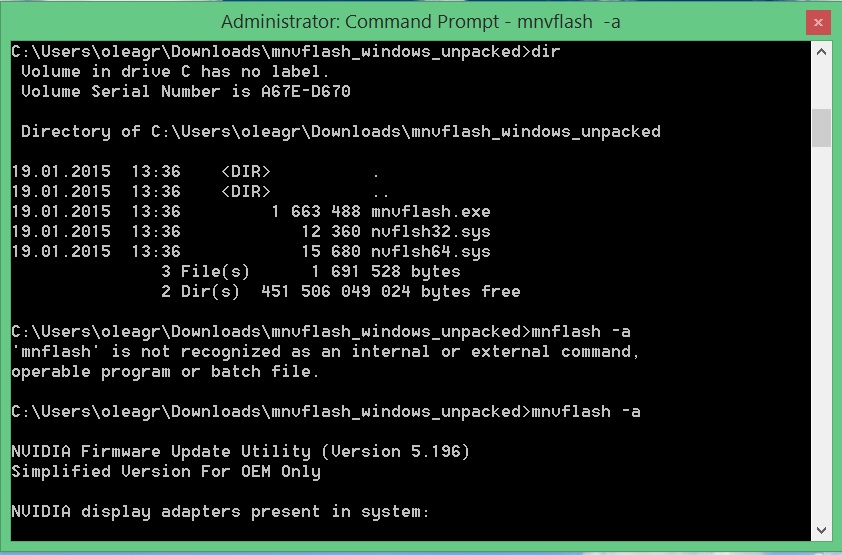
So you cant even flash the vbios with Alienware 18.
Im almost inclined to say that GTX 980M and GTX 970M are mostly useful for M18x R2:
You can flash the vbios on your cards and play around with them anyway you want because you have unlocked BIOS.
You can change the RPM anyway you like with HWInfo because the program can read EC. Thus creating profiles that can actually cool the hardware without sounding like a freaking jet engine.
If you do anything wrong with the BIOS, its very easy to reset BIOS.
I`m very dissappointed so far. Everything is locked down on the Alienware 18Ashtrix and Robbo99999 like this. -
Ahh it's not optimised for Aw18. Yeah that's annoyin. Alienware did not bother to fix auto fan profile on Aw 18. I dont see you got any other option.
-
Unless someone finds a fix, I`m stuck with a machine Im not happy with.
Selling this one will not be easy either if it comes to that.
Super awesome Alienware 18 for sale
- Do not touch BIOS settings. If you do that you may need to send it in to Dell because fixing it is a pain in the behind
- You can only use Windows 8. Windows 7 is a no go.
- One of the GPU fans doesnt work. lol not kidding. Its not broken. You just have to use HWInfo to control it. But if you do that you will have to make fan settings for both GPUs AND the CPU, otherwise the fans wont work and it will overheat. Did I mention that the fan control with the program is annoying as hell?reborn2003, Peter and Robbo99999 like this. -
Cloudfire, good summaries of the issues associated with 980M/970M sli in A18. (I didn't know some of those limitations before). In some respects it would be useful if there was a sticky somewhere with a breakdown of the Maxwell install options in all the different Alienware laptops combined with their limitations, workarounds & instructions. Kind of like a central resource for people who wanted to install Maxwell in Alienware without having to read long threads (some containing by nature contradictory information).
reborn2003 and Cloudfire like this. -
Best options is to let it go for the aw18/m18x.
It is just way to easy to make a mistake that could cost you hours on end. To only turn right around and make another mistake and you are back at it. -
Very little information about it on this board. Few if any have written about it except me.
- Mr Fox Alienware 18 fan control thread. "Ah cool, I can create my own quiet settings if I want"
Nothing there says you are locked to three settings and only 1 is useful (and LOUD). And I only have the 970Ms with 1280 cores. 980M owners are dead on locked to the highest setting because they have 1536 cores.
- Enabling Legacy. Many people have written about it. But I remember only reading about Windows not loading properly with UEFI and Legacy enabled, so I thought you atleast could go in to BIOS and rechange settings since BIOS loads first if you did anything wrong. Nope, you get a pitch black screen and many beeps.
- OS limitations I was fully aware of. And I dont mind. I only wrote that it will be a pain to resell the notebook because there are many who despise the OS. And nobody knows if Alienware 18 with UEFI will work when Windows 10 is officially launched next year, which Im sure many are interested in.
- Resetting BIOS. Just turn the notebook around, remove battery and one connector and you are set. Nope, you have to get to all the RAM slots which involves removing many screws, cables, palmrest, HDD, DVD ROM, palmrest. Remove palmrest, then reconnect cables and put on palmrest to power it on. Then remove cables and palmrest, and put it back together again. (And hope it did reset the BIOS)
Yep, I agree with you john. Sad to see Alienware not even being a viable option for upgrades. Boy have they buried themselves deep with these locked down systems. Older Clevo and MSI machines are just plug and play with the new Maxwell cards. Takes few minutes to do and you can use any OS you want :/ -
Hi, thanks for answering, Do you mind to be more specific about which part does not work?
-
@Cloudfire, maybe you should put the old GPU's back in the A18, then sell it. Then buy a second hand Clevo (or new one) with fairly rubbish GPUs, and then put the 980M's in it?
-
Just for knowing, would you mind to say how much may cost a system like mine on the second hand market?
Alienware M18XR2 - i7 3920XM @ 4.5 - 8GB Kingston 1866MHz - 680M SLI @ slv7 vbios OC-OV 1.05V - RAID 0 2x256GB Samsung 850 Pro SSD - Samsung 840 EVO 120GB
+ Custom Dual AC Adapter with Wattage meter AIO
Just want to do some numbers before buying 980M cards. -
They are putting then in the new Alienware arts an option aside from the 980m...
-
Benchmarks from my Alienware 18 with 4940MX and 970M SLI (and annoying fans)

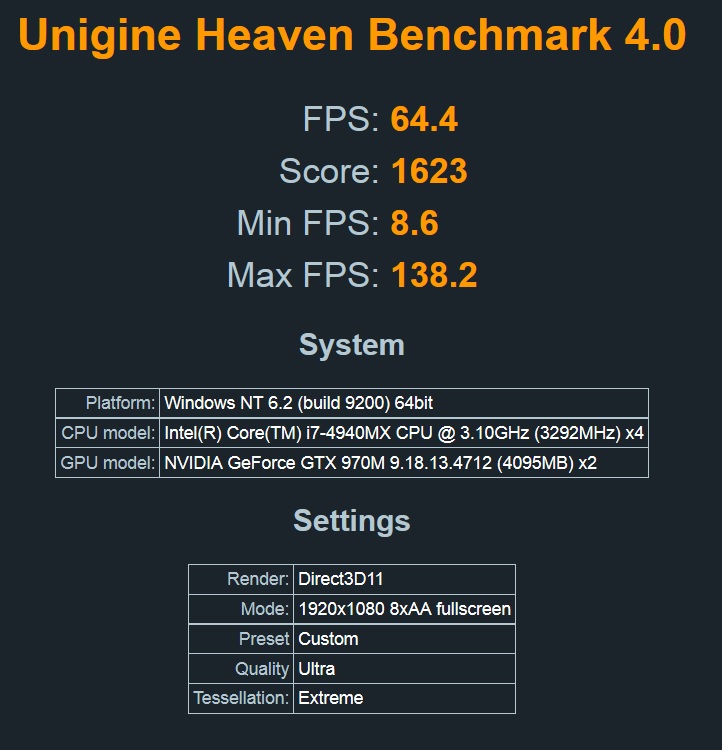
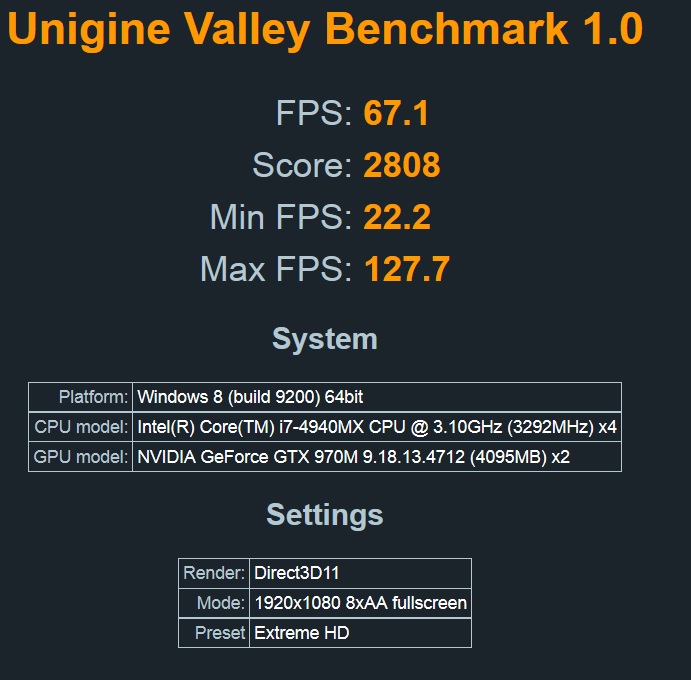 reborn2003, CptXabaras and TBoneSan like this.
 -
I still cannot believe how idiotic Alienware was with the 17/18 BIOS/NVRAM. How could you put non-volatile memory in a system, WITHOUT A RESET failsafe? Take a page out of apple's playbook and at least give us a keyboard reset method!
-
Yup, something as easy as a hidden dipswitch like they use on desktop motherboards would also have helped greatly.
-
I'm looking to upgrade my M18x R2 to 980m sli. But I can only get them 1 at a time since I can't buy 2 at the same time. Can anybody tell me if single 980m will work with windows 7 non uefi? Or do I have to switch to uefi windows 8 for both single card and dual card?
-
Technically speaking... The M18XR2 does in fact have these "pads" to reset the system. As to if they reset everything ....Remains to be seen.
-
How reset Dell the bios in the motherboard for Alienware 17 and 18(Viking) that they sell used one more time ?
-
Don't know. Never owned a AW17 or AW18.
-
I'm sure Dell know about this issue with reset of the bios. Dell may know of a better way to make reset of the motherboard .. There are very many motherboards that are bricked in the Alienware 17 and 18.
-
Hard to say. We have asked them that same question about 100 times already. And that was back when it first came out.
-
Can you remember the last time I posted any amazing GPU performance benchmark results with the Alienware 18?
Neither can I... that's why I hardly ever even talk about it. Great machine in most ways... but, seriously crippled... on purpose.
You're in for a lot of disappointment with throttling, but be my guest. 980M doesn't work correctly in the M18xR2 or the 18. It may never work correctly. When it works right it is absolutely amazing. Most of the time it does not and 780M SLI will kick its butt real bad when it is acting like an epileptic cyborg.
But, yes... you can run one 980M (only) in Legacy BIOS with Optimus (SG mode) enabled if you have an unlocked BIOS. If you have an Alienware 18, you are out of luck because the menus with the settings you need are hidden and they protected the BIOS with Secure Flash so it cannot be unlocked. -
Hey Fox,
Just a quick question about the throttling your experiencing. I know it happens in your benches. I was just wondering if during any gaming you see the FPS go from 100+ FPS down to like 40 or 50 or something like that. Does it keep going up and down like that at all and do you notice it affecting gameplay?
I only ask because I don't seem to notice any throttling during playing games like COD ghost, COD AW and BF4.
Gaming so far has been awesomes on stock 980M GPU clocks.Mr. Fox likes this.
Aw m18x R2 Dual 980m SLI upgrade!!
Discussion in 'Alienware 18 and M18x' started by Peter, Nov 12, 2014.


![[Nikos]](images/avatars/[Nikos])


