Problems? See this thread at archive.org.
![[Nikos]](images/avatars/[Nikos])
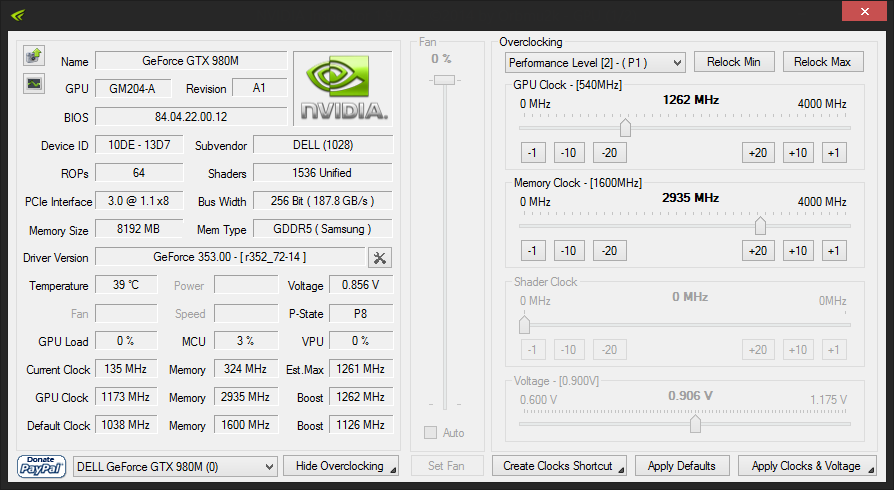
It is impossible to play with this cards to GTA V. Check logs (imagine the FPS Drops I am suffering):
Stock VBIOS
![[IMG]](images/storyImages/sdcOmGp.png)
![[IMG]](images/storyImages/slkNYu1.png)
![[IMG]](images/storyImages/SSHCMHF.png)
Driver used:
http://forum.techinferno.com/nvidia/6307-[alienware]-aftermarket-upgrades-driver-support-modded-inf-30.html#post135452
-
Attached Files:
-
-
Same driver, same game settings (GTA V maxed out) but this time I wanted to test slv7 vbios:
GPU-Z:
![[IMG]](images/storyImages/RSvTR3d.png)
NVInspector:
![[IMG]](images/storyImages/WmUlcrm.png)
![[IMG]](images/storyImages/dGWiB39.png)
![[IMG]](images/storyImages/y4W7rr3.png)
![[IMG]](images/storyImages/NOr78iH.png)
More playable but the % of the GPU being used is not always at high %. This two cards can run this game @ 1080p over 60 FPS with no problem if the drivers do what they should do.
I will test now with Prema vbios.
If you like I can post the game settings.Attached Files:
-
-
Wrong vBIOS, PM
-
There you go, it works for a while then 135 MHz
Attached Files:
-
-
I don't disagree, although it casts both Alienware and NVIDIA is a very negative, culpable light here. Thankfully, I can still use 345.20 drivers or older and update SLI and game profiles without newer drivers. But, yeah... this is really disturbing and I think we can attribute all of the 980M throttling drama to the same criminal acts on both of their parts. All they have done is increase my level of contempt and reduced the likelihood I will buy Alienware or NVIDIA products in the future. If they are trying to force upgrades, they will only succeed in forcing that through the use of competitor's products as an alternative.
I find it very hard to forgive biased acts of collusion. -
It seem like the latest drivers has a built in power meter and when you hit that zone the card change to other P-state. As with Prema or slv7 vbios does not allow the vbios to do so the drivers send the card to the sleep zone again.
Which previous drivers works with 1.1 or others? I mean it is impossible to play with 353.00/06 even PEG MOD with any modded vbios so I am thinking to roll back to others or stay in PEG-MODE with default vbios which seem to work just fine atm (I do have reboots sometimes but it is my cards or system nothing to do with the vbios or drivers). -
Same behavior occurs with my 780M SLI on newer drivers (starting with 347.88). I believe there is a power-sensitive throttling mechanism in the newer drivers that is communicating with the Alienware system BIOS. The power flag in the driver appears to be set for a single GPU system. It appears that 345.20 is the last NVIDIA driver that was released without this cancer. I urge you to do all testing exclusively with 345.20 or you're going to be fighting a broken driver that cannot be fixed, which will be a distraction from @Prema vBIOS testing. All of the new drivers are absolutely worthless on my M18xR2 with 780M SLI. Whatever is in the drivers that is ruining 780M SLI performance is going to do the same thing to 980M SLI performance. @j95 driver mods cannot fix SLI if the driver has a power limit setting that collects information from the BIOS/EC and is only high enough to accommodate one GPU. 780M SLI and 980M SLI both draw more power running stock than a single 780M or 980M does with a massive overclock. This problem is 100% attributable to NVIDIA drivers not being made correctly and not Alienware's fault. NVIDIA drivers should not even include such a component. It's none of their business how much power is being used by any laptop or desktop. Alienware's only fault in this is having a BIOS smart enough (or evil enough, depending on how you look at it,) to talk to the NVIDIA drivers. It's unfortunate that it does, but if NVIDIA was minding their own damned business and sticking to making display drivers that do nothing but drive video cards it would not matter, because their drivers would not have any cancer in them.
[parsehtml] <blockquote class="twitter-tweet" lang="en"><p lang="en" dir="ltr"><a href="https://twitter.com/PranavK_1998">@PranavK_1998</a> <a href="https://twitter.com/Alienware">@Alienware</a> SLI laptops all malfunction with <a href="https://twitter.com/nvidia">@nvidia</a> drivers. See this: <a href="http://t.co/sdG4TuswmT">http://t.co/sdG4TuswmT</a> <a href="http://t.co/ay1rSV7Ffw">pic.twitter.com/ay1rSV7Ffw</a></p>— Mr. Fox ([USER=165514]@Mr_Fox_Rox[/USER]) <a href="https://twitter.com/Mr_Fox_Rox/status/607925369975365632">June 8, 2015</a></blockquote> <script async src="//platform.twitter.com/widgets.js" charset="utf-8"></script>[/parsehtml]TBoneSan likes this. -
I am on stock Vbios and 353.00 hot fix driver running @ Stock clocks with no throttling on benchmarks or games. Haven't tried 353.06
-
@Juang1985 - All right, please stop. Let's not pretend everything is OK and add confusion to this thread. We both know that is not accurate except stock, and then only sometimes. Overclock the CPU and GPU and see what happens. Your system will run like a pile of trash. You already know this, so no... your system is broken and only works right sometimes. We don't give a rat's ass about stock performance any more. We want Alienware's SLI machines to not be broken garbage with NVIDIA drivers. Don't become part of the problem by saying it's OK stock Brother Juang. It's not OK... not now, not ever. An Alienware laptop that can only run stock clocks on CPU and/or GPU is a worthless piece of average consumer-grade trash. Not saying stock is bad, but when they totally own you and control what you can do, then there is no point in having an Alienware any more. There is no longer anything good or special about the experience. We need to stop making excuses for Alienware's stuff being broken and raise more hell about it if we ever want it to be fixed. It might never be fixed anyway, but with some of us making excuses for them and saying it works right when it does not it is guaranteed that it will never be fixed. It either works right under all conditions, or it just doesn't work right... period. No more of this, " yeah but it's OK stock" nonsense. This is misleading people into thinking things are different than what they really are.
-
@Mr. Fox Didn't mean to make any confusion. Sorry if I did. Yes as soon as I overclock it throttles back to stock clocks. I dont like it and like you said, we should be free to overclock if we want to. that being said, all games that i tried seem to be playable without overclocking. Its all I am saying.
Hopefully the new vbios fixes this problem and unlocks full potential of 980ms.Mr. Fox likes this. -
OK, fair enough. You know how people like to start at the newest post in a thread and assume things instead of reading everything and having a complete understanding. A lot of people are thinking everything is fixed based on one or two posts, but it's not. That's not your fault, but we need to be careful to not give that kind of person the wrong impression. That's all I am saying. Plus, that's how Alienware or NVIDIA would try to spin it as an excuse as well.
It's still massively broken and the cancer spread to 780M SLI with newer drivers. My 780M SLI behaves exactly the way 980M SLI used to behave before I moved them to my Clevo, and it's all the fault of the drivers. @Prema and @[Nikos] and @j95 are working hard enough, but need to work with a virus-free driver version to get an accurate read on things. If they are trying to get 980M SLI to work 100% correctly in an Alienware with drivers that are proven to induce throttling for SLI machines that is going to skew their results. On top of that, the latest drivers are causing all sorts of other instability issues for lot of people (desktop and notebook) that don't even own an Alienware.Juang1985 likes this. -
I wonder why Nvidia is doing this. I would think they will lose business if they keep going in this direction.
Well, Unfortunately AMD doesn't have anything to really challenge Nvidia mobile top GPU, If they would have a good competitor alot of us would have gone to the red side by now. -
I wonder the same thing. To be completely fair, it's possible they were unaware of the consequences and maybe did not know this was going to happen. This was never a problem in the past, but they are dealing with Maxwell now, trying to do really stupid stuff with power saving technology to accommodate the jokebooks with wimpy CPUs and inadequate AC adapters and probably didn't even stop to consider the implications for enthusiast-grade SLI systems with a "power draw aware" BIOS. Since Alienware doesn't make robust machines any more, and there are only two Clevo systems (one of which is only available from Eurocom because Sager quit selling it) this situation is probably not even on their radar. I'm trying to stir up enough attention so they will notice and correct their mistakes, but if they know and don't care then we are all doomed. It seems like the two Clevo SLI machines do not have a "power draw aware" BIOS, so this has become an Alienware exclusive feature problem. If the M18xR2 and Alienware 18 had a less sophisticated BIOS without any power tables to interfere with functionality we probably would all be having a great time with 980M SLI in our beasts.Juang1985 likes this.
-
Talking about BIOS power tables, Does any modder tried to remove that feature?
If Clevo can do it then Alienware should be able to do too. -
I don't know how, but it might be possible. @Prema might have some idea. If there are some dependencies on those tables for other areas of the BIOS removing them could cause problems or maybe even brick the system. If those tables (like the fan tables) are in the EC, that opens an entirely different can of worms. I don't know anyone that knows how to edit the EC content. It might be something that only Alienware would have the tools for. You would not necessarily need to remove them if you could bump the throttle trigger mechanism to such a high value, say like 800W, so that it has the same effect as not having them.
-
If they read us this crazy idea maybe they can tell us if this is possible or if this is the last thing we should think about. Lets wait and see.
-
sorry for repeated questions, but i can't scroll through 2xx pages, so please answer these quick quiz:
I have m18x r2 run perfectly with 780m SLI, but i'm in love with maxwell so i threw away those 780ms and intend to get 980ms
- Will my m18xr2 support 980m SLI perfectly? i mean will they throttle, overheat or something like that
- I have no intention of overclock or overvolt, just stock clock with unlock vbios from svl7 is enough
/btw my CPU is 3940xm QS if that info is needed -
There are some throttling problems when you overclock. Nvidia screwing us with messed up drivers to prevent us from overclocking these powerful GPUS. If you don't plan to Overclock, then using @j95 driver mod you should be able game without throttling issues. I got 353.00 With @j95 mod and works @ STOCK clocks.twin snakes and Mr. Fox like this.
-
Hi buddy... that is an AIDA64 sensor panel.
-
@Mr. Fox Between your Clevo & M18x R2, which one do you like the most? After my m18x r2 I doubt Ill be getting another alienware since they discontinued the m18 series.
Your clevo doesn't suffer from throttling on the gpus right? -
I will try to do a guess before MrFox answer you back:
If you are talking about peformance then Clevo.
Otherwise M18XR2Juang1985 likes this. -
You know me too well.

Overall, the M18xR2 is, in my opinion, the best computer ever built in the history of laptops. It gets ransacked by the P570WM due to the hexacore desktop CPU and factory dual AC adapter options. With the Maxwell throttling problems factored in for Alienware, if I could only keep one of my machines it would have to be the P570WM. Build quality, aesthetics and cooling are all superior on the M18xR2. At the end of the day, everything that I love about the M18xR2 takes a back seat to brute force. Overclocking and benching are the most important things to me.
Edit: forgot to answer @Juang1985 question about throttling GPUs. Short answer: zero GPU throttling.Last edited: Jun 9, 2015Kade Storm, ayylmao, TBoneSan and 3 others like this. -
@Mr. Fox , wanted to ask since I saw that sensor panel of AIDA64 on your setups...Atlast It's the perfect time I guess.
I can't figure out how to make it look that good with all info... Could you please share the format
Thanks !! -
I second that , mine looks basic and dull
-
If you search in the Forum you will find it, but best to ask Mr Fox to be allowed use it.Ashtrix likes this.
-
Think this is what you are looking for http://forum.notebookreview.com/thr...e-in-benchmark-with-on-screen-display.655138/
edit: everyone beat me to itLast edited: Jun 10, 2015 -
Ok, I've found the panel format ( thread ) needs some re-work though !
But seems like there's a trade off with Aida64, I get high DPC spikes above 10k causing unstable machine...better off with the manual monitoring I guess.
-
after some research i found that 980m in m18x r2 don't support native auto fan control, and must be controlled via hwinfo64, but as i know, hwinfo doesn't get along well with m18xr2 due to some EC compatibility, and i can only control the fan speed with only 3 phase: 0rpm, 2000rpm and 4300rpm as well as 3 fan at once
and any more problems with 980m and m18xr2? -
I am not quite sure that is correct, I do have control fan working flawlessly. (SLI 980M @ R2 over here)Kade Storm, TBoneSan and twin snakes like this.
-
Yep , fans are fine on auto in the r2. The AW18 has trouble.Kade Storm and twin snakes like this.
-
I have the 970m on the AW M18xR2, I can put any number in the custom fields
-
No Fan issues here. I also got 980Ms and I dont even have a fan control application and my cards stay cool. -
Hardmod done and working (just one GPU, anyway my card does not like to go higher than 1386 MHz @ 1.150V):
I will share more info regarding this matter as soon as I have both cards running. -
wow i read all 23x pages from last night, i must say, i'm so impressed with all of you, a touching story can be write into a novel
/thanks all you guys for the hard work, Mr. Fox, Prema, J95, Nikos, TBoneSan, SVL7, Johnksss... all you guys are heroes! -
Both cards up and running (this is stock core / 450 just for testing everything was ok after the hardmod to the second card):
http://www.3dmark.com/3dm11/9923555 -
Other than the typical Windows 8 killing CPU/physic performance, that's looking really good. Looking forward to seeing more details on your mod before I get started on mine. Great job to you, @Prema and @j95. Doesn't appear to be throttling with that 3DMark 11 score.
How are your Heaven and Valley results looking? Here are runs on the P570WM, CPU 4.3GHz and 980M SLI running stock clocks.
j95 likes this. -
Some testing:
http://www.3dmark.com/3dm11/9925494
http://www.3dmark.com/fs/5067528
This was done @ 1.137V - I am not quite sure if my MB has a power limit. I need more time to be sure but it is quite promising. -
Graphics score of over 30k.... Incredible performance
-
One card can clock higher than the other (1460 MHz vs. 1400 MHz) so I am not able to break 17K @ FS by now but I will try.
Papusan likes this. -
@ALL_ v353.17 Win10 driver 'restores' 980M performance , meaning next win7/8.1 driver 353.xx possible fix... @Mr. Fox & 780M SLI users let's see to what extent...anticipate feedback GF forums.
Windows 10 Insider Preview (x64) - Build 10130
GeForce 353.17 ModLast edited: Jun 12, 2015 -
It seems to me unbelievable to see what I am seeing. NVIDIA taking care of the issue for the next OS instead of focusing for the current one.
-
I sure hope so. I'm still very happy with 345.20 results with my 780M SLI, but that can only last for so long.
I don't even want Windows 10, but I am ready to try the final release version to see if it makes my 780M SLI act correctly. But, nothing surprises me in this regard. I think we are all getting a good lesson on how low we need to set our bar for expectations where NVIDIA is concerned. Yesterday is gone and they're not nearly as awesome as they used to be. -
Moderate OC - 1315 / 2800 @ 1.135V
CPU @ 4.299 GHz
Kade Storm and Mr. Fox like this. -
Hey everyone, as I am still a noob in this domain (never opened my AW18 since I got it), I just want to know if upgrading to the 980m Sli now would be a quick painless thing or are you guys still having trouble making it work. I just want to play @ clock speed and BTW I have the 880m Sli. I was thinking of upgrading to the 980m Sli once my 880ms struggle to run games at max settings so it will probably be in 2 years time. Also, I have been wondering if the 1000m series will eventually be compatible with our systems too?
-
We dont know about the 1000m series yet since there are no leak info about the upcoming mobile gpu for nvidia. As for the 980m sli upgrade, i would say its pretty well worth it, i pretty much have no issue with them on my m18x r2, they runs perfectly at clock speed, and you can overclock it a little bit at stock vbios if you want a better score on 3dmark.
Gaming with 980m sli pretty much ensure you ultra setting for pretty much any games on the market ,or even the upcoming games in 2016.
I heard that the AW18 with 980m sli dont go quite along with each other, the slave card's fan would not run at stock bios, but you can fix that by using Hwinfo.
Another reason you might want to get the 980m sli is they are going to be fully compatible with dx12(assume dev uses dx12)PC GAMER likes this. -
Thanks for your response. The 980m sli definitely delivers in terms of raw power but I was able to max out every game i played so far with my 880m sli and get above 60fps in all of them. I was able to get 50fps on average for the witcher 3 which is roughly 15-20fps difference between the gtx 980m sli even though it was optimised for the maxwell GPUs. I don't know if i should wait and use my 880ms to their limits and after that grab myself a pair of 980m. What do you think?Last edited: Jun 13, 2015
-
If you are using the 880m sli right now, i would say wait couple months to see what nvidia brings on the table. The 980m's price drop quite a bit now since its launch, if you decide to grab them, i would suggest you get them from rjtech.
-
I think that's what am gonna do cause right now the 980m sli costs around 1600 USD :/ For how many years do you think i'll be able to max out every game with my 880m sli cause I want to stick with them for as long as I can. BTW my 880ms don't overheat or throttle (only in benchmarks not in game) so it's a clean working 880m. I was thinking 2-2.5 years especially with directx 12 even though it won't support it at 100%. The 60% that it will use from it might increase its lifespan right?
Aw m18x R2 Dual 980m SLI upgrade!!
Discussion in 'Alienware 18 and M18x' started by Peter, Nov 12, 2014.