 Problems? See this thread at archive.org.
The 980m sli is roughly around 1500 if you buy them from rjtech. You can always sell your 880m sli if you plan on getting the 980m sli or the 1080m, i sold my 7970m cf so i can pay less for the 980m sli.
-
-
Yeah you are right but by the time I decide to either get the 980m or the 1080m (i more excited for the 1080m as the performance difference will be well worth the price) my 880ms won't be worth a dime :/. But anyways, I will be upgrading my 18 to the 1080m once it hits the market as the performance difference will be substantial, more than the 25-30% difference you have between the 880m and the 980m sli. I hope you guys will be working on making it compatible with the AW18 just as you did for the 900m series
 Cheers
-
i have one more question, i placed an order of 980m(s), and the seller will give me 980m of p1xx, which contain the metal plate bracket instead of x-bracket, like this
So will this full metal plate compatible with m18xr2, or i have to take it out and use the 780m old x-bracket instead?Attached Files:
-
-
I highly doubt thats gonna work in the m18x R2 since the dell Xbrackets are much smaller than that. I have never seen that type of bracket before but my guess is that is not gonna work. -
well it comes with the Clevo P177SM-A and its variants
so no one have tried this? -
Think it is mostly about the air exhaust, you need to examine that hole / opening where the fans blow air onto the GPU allowing it to build up a pressure of cool air before exiting and reducing temperature of the heatsinks .
Looking closely the distance between the GPU and that hole / opening is in millimeters. it looks risky when it comes to reducing that distance ( or even blocking it), there's a good chance it is for another model.twin snakes likes this. -
Hi guys, i'm thinking about upgrading my M18xR2 with 980Ms,
i didn't have the time to read the whole content of this thread ( 236 pages ... oh gosh ), so basically, my questions are :
- for gaming at stock frequences I read in the last pages it does work normally, do you all confirm that ? I assume Double PSU mod is not needed ?
- are there any other purchases required others than buying the cards ( from RJTech for instance). I'm thinking about perhaps new thermal pads, etc ? are the heatsinks of the 680ms fully compatible ?
i'm actually a bit afraid to open again my M18xR2, last time, plastic of a few connectors was very "dry" and broke just pulling them to disconnect stuff ... -
Vince here is my run down ClicK. I need to update it with J95's latest and greatest. It answers all your questions I believe though. I got mine from RJtech, make sure you get the screws add to your order it's in the drop down add on's. Double PSU is only need fot Extreme overclocking. I would not worry about thermal pads use your old ones and/or the one's with your new 980's. I order a crap load of stuff I didn't need so don't waste your money.
The main headache for me was windows mothf**#*@#*@%* 8.1 and Nivida drivers!!! I don't know why I can't put it into words but I had to reinstall windows like 3 or 4 times! no joke............
I would have asked for help on the thread but I knew what to do it just kept acting the f up. I am very scared to do anything to it now because I am deployed in afg and I don't always have the time to play around with it. I have the stuff to do the dual Psu I just don't want to mess with it right now. I have not even tried the latest from J95's hard work. I can game right now just not at what I should get. Basically I'm getting 35 to 45 fps in GTA V, Witcher 3 maxed out. Which is very playable but I can see the cards are only working at about 75% @ 70c temp. I'd like to get back into the run to help give feed back on the stuff I am getting to help the GURU's figure what they can, BUT nivida really needs to fix the issue. From what I understand and have seen myself is the drivers suck J95 is awesome for helping so much in trying to figure it out along with others but why isn't the manufacturer doing this? I mean why do I feel my only hope is a guy like me gamer? Not the million dollar company who designed the freaking thing? When I got it first installed I was getting like 19 fps?! the J95 helped and its playable.
So would I do it again yes because coming from 7980m this is a big jump but know it will not be as easy as swapping a stick of ram or HDD
Hope that helps
PS on the off chances that an Nivida rep that has some type of pull out there reads this, I'd like to say this. If you are going to make a product for a windows computer you should know it will show up in many different ways and as you may not have though it would end up in a three year old product it should not matter. All of the standards are there to support it, that's why it works but it needs to be optimized. That's your lane and Alienware you broke the mold with the M18x R2 that should be your standard, your bar. Anything less you appear to be greedy and uncaring of the gamers and fans that supported your products. Alienware you should be putting pressure on nvidia, on yours and our behalf. To make a laptop that is 3 years still to be able to compete in the tech world is amazing. You should own it! And continue with that level of quality to build confidence in your products like apple but with the modular design of the m18x to sell video cards and other upgrades to make money! I think you amp idea is what I should see from Alienware but where is the modular design of the laptop itself it's why I choose to upgrade my m18x.
I could go on and on but I think I made my point.
Actually one more point! Dell do you know why auto manufacturers have racing teams? or special performance programs like srt8, svt, nismo, V, or etc because people think. hey I got a baseline mustang but that cobra is built on the same platform I must have amazing quality in my version. (not even close haha) but people think that. SO you have a premium name like Cadillac to your Chevy but it's about to be consider Oldsmobile.Last edited: Jun 16, 2015Juang1985 likes this. -
The cards work Okay WITHOUT OC thanks to @j95 driver mod. Keep in mind, is not a easy swap as you would probably need to reinstall windows and follow this thread from now on. I can game @ stock clocks and i get very good playable performance, Using driver 353.00 (with j95Drivermod) We are currently waiting for a modified Vbios from @Prema to unlock the overclocking potential of these beasts. as far as teardown, I am not sure where is the link but @Mr. Fox made this awesome guide on how to take laptop apart. You should check it out before taking a part down ur laptop again. I am Scoring about 17k on rd Mark 11 on a single power brick. -
you should try driver 353.00 (with j95 modification) thats what im using and GTA runs much between 45-80 fps very playable with high settings. -
thanks guys for your answers, so
to quickly sum up to see if I understood well,
I have to order the cards, with X bracket and new screws, i'll have to rearrange previous thermal pads in order to cover all the parts of the card that heats ( for the 3 mm thick pad ? do you thick i can just put 3 layers of 1 mm pad ? )
then i'll have to reinstall windows with UEFI settings and install specific video drivers (from J95) in order to have stable performance.
i'll see if i'm ready to take that leap
another question, in order to compare stock 980m sli config with what I have right now, what average fps do you get on the witcher 3 ?
(i'm currently able to play it maxed out at constant 30 fps in full HD even with hairworks and that kind of things)
If Alienware was still making beautifuly designed sli laptops, i wouldn't consider an upgrade, i'd just buy a new one, but there is no sli anymore in Alienware's products ... so I think i'll have to upgrade my old one.
has anywone ordered his cards from this seller ? http://www.ebay.fr/itm/181770525229
do you think it's legit ? ( RJTech adds extra complication for sending items to Europe ...)Last edited: Jun 17, 2015 -
Hi Vince. Yes woodzstack is a reputable seller, however he's located in Quebec Canada.
-
@j95 I tried this mod with prema 1.1 vbios and the overclock does not hold. It throttles back to stock clocks. while benching & Gaming. am i doing something wrong?
Thanks -
I get the exact same result with the prema vbios or with the stock vbios.
They both hold stock clocks but dont hold any overclock. I am tempted to try the slv7 vbios. I have tried driver 353.00 and 353.06 with J95 modification.
have any of you tried slv7 vbios? -
-
Wow Mr Fox. U got a beast there.
I am about to unlock my bios hopefullythis weekend so i can unlock the full potential of my 3920xm. hopefully u can help me out since i know u have taken your 3920xm to pretty extreme overclocks.
Since i cant overclock my vidcards at least get the most of my cpu.Mr. Fox likes this. -
Well, 4.3GHz provides a rock solid normal everyday overclock with nice and cool temps using IC Diamond. With the warm weather upon us, you may have some environmental challenges with 4.5GHz or higher unless you run your AC hard enough to hold ambient temps between 68°-70°F like I do. Once your ambient temps get above 75°F clock speeds above 4.5GHz are tougher to keep in check without a cool environment and/or Liquid Ultra.
I'd be glad give you an XTU profile and BIOS settings for 4.3GHz. -
i got the 980m(s), pug it in, and it works out of the box, ran a fast 3dmark firestrike test, do you think this score 'bit low?
/Ah and by the way, it turns out that the full metal plate that come with the P177sm-a's 980m don't fit with m18x, the height is okay but the plate's corner stuck when plug in m18xr2's MXM port, so i have to remove 4 screws to take the plate outAttached Files:
-
-
that seems about right for stock clocks. Nikkos has manage to pull some much better scores but he has some special vbios that allows him to overclock and hold the overclock.
I just ran a benchie and i got this result. cpu 4.0 stock 980m clocks -
Here you go
-
@Mr. Fox that would be great!!! now, even tho i use your XTU profile i would still need unlocked Bios right?
i think 4.3 is more than enough for me.
-
Yes sir, you sure do. You need to disable the MSR Lock, at the very least. I also like setting a few other things in the BIOS more than XTU and a couple of settings are more persistent when set in the BIOS.
And, don't overlook the importance of having the unlocked BIOS on the basis of spite alone... even if you had a QM CPU and never intended to use any of the features on the previously hidden menus. It's so wrong, and very stupid, that they have hidden BIOS menus from us. This never used to bother me since we could fix it with help from @svl7. Now that we cannot fix it on the 17 and 18 due to Secure Flash cancer, it makes me mad that there is a reason to want to. When customers pay huge amounts of money for the world's best enthusiast machines they deserve unfettered BIOS access without having to resort to firmware mods to get full functionality from their expensive monster. Being treated like a child because we "might get hurt" really blows, but being locked out completely by Secure Flash makes me feel violated as a customer. -
I am with you on that one. Also is so lame that we still cant overclock 980ms with stable clocks. hopefully @Prema and @[Nikkos] get this figured out (thanks guys for all the testing).
I had an unlock bios before, but had to change the motherboard and sent it to the dell depot so i flashed back to stock, didnt want them to try to void my warranty or anything like that.
I am ready to repaste my system.Then im gonna flash the bios then. I am gonna do liquid ultra on my GPUS and CPU. I did it with my 780ms are they work really good.
I will keep you posted and let u know when i unlock my bios so you can share the XTU profiles with me. Do yo u happen to have a profile for the 4.5 clocks? -
I do 4.5GHz and 4.7GHz using ThrottleStop profiles for the settings. I work with the 4.3GHz overclock profile as a starting point in ThrottleStop and go up from there. That way you don't have Windows acting all stupid and spastic during boot and logon with the aggressive BIOS settings. The only thing you have to do for each ThrottleStop profile is bump the core voltage and multipliers, but everything else can stay the same.
-
Hey Tony, I was wondering, is my 18 100% upgradable to the 980m sli. Considering this thread is only about the m18xr2, I would assume that the steps mentioned aren't applicable to my AW18. I also heard that as the bios and fan are locked, the 18 cannot be upgraded to the 900m series? Any ideas whether this is true or not? Thanks
Last edited by a moderator: Jun 20, 2015
-
Yes, the AW18 can be upgraded to 980m SLI. Here is the thread:
http://forum.notebookreview.com/threads/step-by-step-980m-install-in-alienware-18.768916/PC GAMER likes this. -
Thanks a lot
-
Hey guys its been a couple weeks since my last post. Im not sure what the issue is surely ambient temps cant be this much of a factor (about 20c) its fairly cool in my house all day.
My MAX temps on my single 980m with STOCK clocks & STOCK fan speeds, fujipoly pads and GC Extreme paste is 82c. I cant get it higher than that, I have tried. I also run in 2560x1440 all the time on the stock screen...
Airflow is NOT an issue, I have it set on top of this metal wire basket I had laying around.
Is that a safe temp under full load for the m18x r2 on stock clocks? I thought the 980ms ran cool? I want to crack it back open and try again.. wish it was easy as the m17x.
Im thinking of milling down the raised square on the heat sink. -
I would say 82c is kinda high if your not really doing anything. Mine are at 40-45c when not really doing anything-surf web, word etc. when gaming the cards never get up into the 80s. My cards are stock, I'm using pads that came with them and IC diamond thermal paste. -
I am using ICdimond and is working great. About the 82c temps. is a bit high but depending on what you are running. For instance when i play battlefield 4 my temps never exceed 75c but when i play witcher 3 they do get as high as 80c.
if you are not seeing anything higher than 82c i would say is fine. just make sure you monitor ur temps u dont wanna run anything higher than 85c for a long period of time. -
@Mr. Fox Okay I am ready. Already paste with the liquid ultra both gpus and cpu and i unlocked the Bios too. I am not too familiar with throttlestop, If i can just keep the 4.3 24/7 without thottlestop I think i would be happy with that.
Can you share your XTU profile and ur bios settings with me? thanks! -
Hello people!
I just wanted to let you know we are still working on it, but from the bottom of my heart I hate the way NVIDIA drivers are getting done.
Why they do not want us to have a successful experience with their products is something that do not have sense to me.
Hope to have good news soon.TBoneSan likes this. -
Love your work bro. A 980m SLIed in a R2 with an XM is THE ultimate machine in my opinion.
For what it's worth they are up to no good with desktop drivers too.
I went from 980 SLI to a single 980ti because the microstutter was too much to bare and heat restrictions in my air240.. You think they'd have a working set of TI drivers? .. No of course not.
Every driver set also plays havoc with the CPU. I have to reinstall 3dmark11 sysinfo every time otherwise I'm met with lockups in the physics test. -
The stutter kicks in only under 30Fps rt ?
Why did you have such bad experience with those 980 SLI as they should run any game above that FPS mark ?! -
It wasn't a terrible experience - it was satisfactory and unremarkable. It wasn't low fps stutters, it was a case that games felt better (smoother) sacrificing a few FPS going to a single 980 than running a higher fps in SLI.
For example, running a game on a single 980 at 80-90fps felt so much silkier than SLI at 120+ fps. It wasn't the sole reason for me giving up SLI for now, but it played a part.
Other reasons were terrible scaling on recent games. Performance gains to be had with MFAA aren't available in SLI. Final reason was this spoiler below
![[IMG]](images/storyImages/K5WOyj9.jpg)
Having cards SLIed so close together is manageable. But when you have both of them only working at 80% TDP to manage the temps... once must ask himself "what's the point in that!"
At the end of the day, for gaming , performance a single 980TI seemed like a good deal for now. If Nvidia start taking SLI more seriously I'll get another card and look into water cooling them suckers.
Regarding the stuttering again, it's likely text book frame pacing. I've never been bothered by such a thing before. I haven't given up on Dual GPU (I do love it), so much as I am slowly and surely giving up on Nvidia and their lameness in all key criteria - Drivers, Frame Pacing, SLI profiles, Performance Gimping, Community Relations and Business Ethics. They build good hardware and fancy demo's and presentations that never get implemented into games properly unless it's to gimp performance as they see fit.
I've heard Nvidia are going to make vbios flashing much more difficult with Windows 10 too. But we've all seen the writing on the wall there.Ashtrix likes this. -
I kind of noticed the same thing with the Sager in my signature.
For me, what seemed to fix the microstutter in my case was to overclock the LCD panel. I realize that is not a ideal solution, but I stumbled across it by accident when I was just seeing how far I could push the refresh rate. I was able to get mine up to 100Hz. It ran completely smooth then. Even a lower refresh rate of say 75Hz made a noticeable difference.
Just moving it off of 60Hz seemed to do the trick.Last edited: Jun 24, 2015 -
Cool, I'd leave it at 100Hz anyway, means you can enjoy 100fps gaming, that's excellent! Before you decide to leave it at 100Hz though, check you're not getting any frame skipping, use the test at the following link and use a camera phone to take loads of pics of the screen when the test is running - you check for any skipped squares in the camera phone pics. Here's the link:
http://www.testufo.com/#test=frameskipping
I'm running my screen overclocked for about nearly 2 yrs without any issue, and I run my screen literally right on the highest overclock before it becomes unstable with a black blank screen.Keith likes this. -
-deleted-
-
I gave it a pretty good run through at 100Hz, and everything I threw at it behaved normally. Granted, I didn't do what you suggested to test for, but it seems ok.
-
You'd probably have an even better viewing experience if you're not skipping frames though, not saying that it is though when you've got it set a 100Hz. It's a very simple test at that link, and I'd do it for piece of mind, no point in stressing the monitor anymore than you need to - if it's skipping frames you'd lower the overclock. (Not that overclocking the display really stresses it though - most sources I've read say that the risk is low).
-
Quick question for you guys. When you guys run benchmarks like 3dmark 11 or firestrike
Do you guys mess with the nvidia control panel quality settings? or you guys leave it at defult. -
Default settings, if you mess with tessellation etc you will get an invalid score not sure about AA or other settings....
-
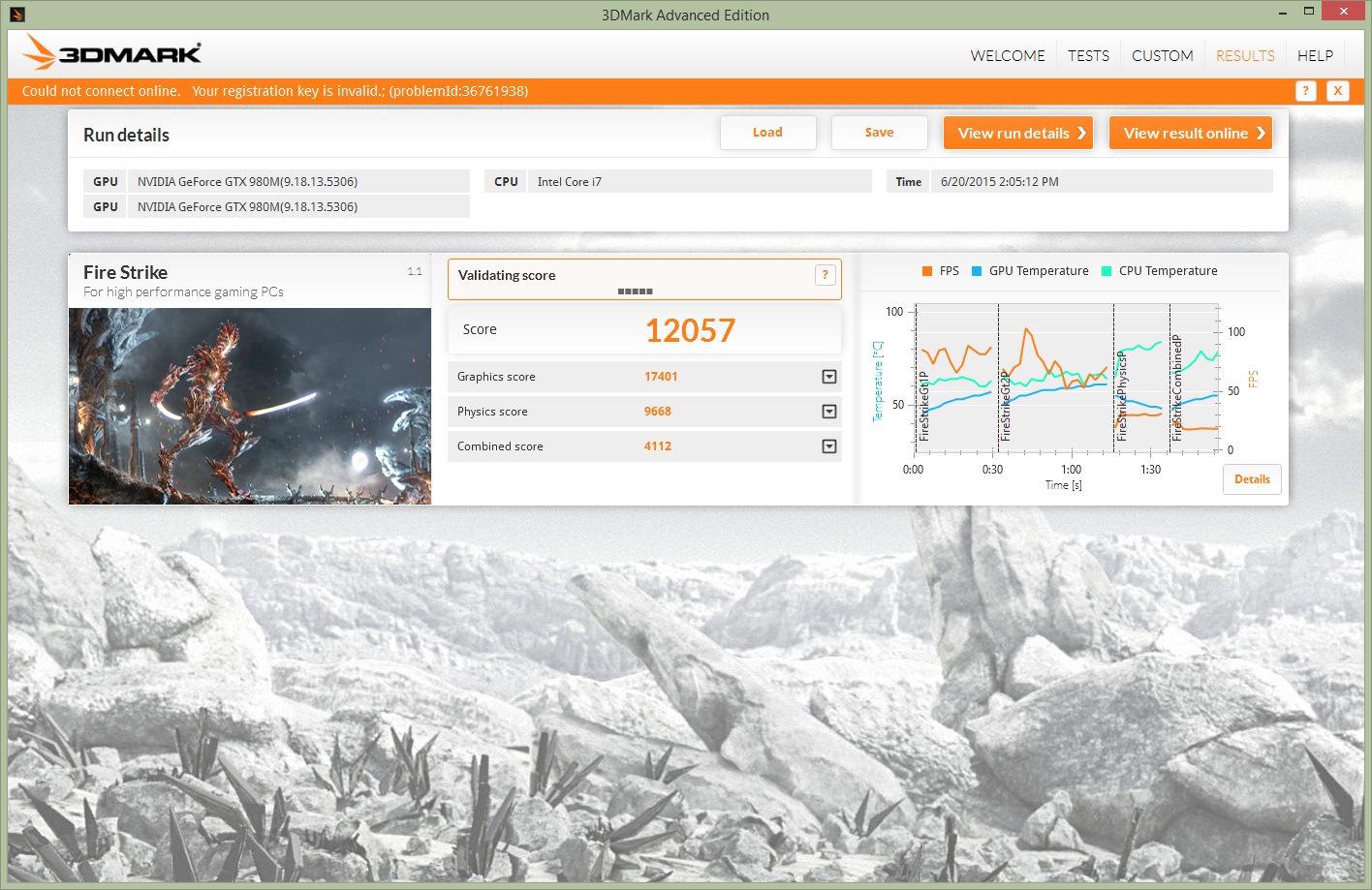
here is a run i just did. CPU 4.3
is this a decent score?
-
You can compare the results here: Fire Strike Results - GTX 980M
The CPU/physics score is appropriate for 4.3GHz, but the GPU and Combined scores are low. Probably due to GPU throttling.Juang1985 likes this. -
I took a look through that link that Mr. Fox gave you, I found the following result that looks like it's stock 980M sli and with a Physics Score similar (slightly lower) than yours - yes you can see the GPU score and Combined Score are a bit lower for your system for some reason - probably that throttling issue of the 980M:
http://www.3dmark.com/fs/4738050Juang1985 likes this. -
Does anyone know if it is possible to use G-SYNC feature with the M18X-R2's HDMI output? I am planning to buy a new monitor and maybe a new one with G-SYNC + 980M could be the best option. Thank you
-
SO MUCH THANKS!!! You made my day hahaha!
Any options you know as for gaming monitor?Last edited: Jun 26, 2015TBoneSan likes this. -
I don't know if this was explored by anybody, but I think I remember seeing PCI Gen X in the advanced video section or in the chipset section. Did anybody try messing with that and downgrading the PCI version? I believe the M18x R2 ran PCIe 3.0 and the M18x R1 ran PCIe 2.0, I'm not sure about the M15x.
-
thanks for the response guys. Yeah, My Cpu is kicking butt but the throttling on the gpus suck for benching. I wonder how much longer will it take for the Vbios to be released. Looks like Nikos and prema are having some new issues with the latest drivers am I correct Nikos?
Aw m18x R2 Dual 980m SLI upgrade!!
Discussion in 'Alienware 18 and M18x' started by Peter, Nov 12, 2014.


![[IMG]](images/storyImages/42825059376.png)


![[Nikos]](images/avatars/[Nikos])


