 Problems? See this thread at archive.org.
-
View attachment 125693
Sorry rushing to get out for holiday. Please deleteLast edited: Jul 4, 2015 -
I'm always keeping an eye on this thread--don't have much to contribute, but I just wanted to say that I'm in for one of these. Well, realistically, I should ask the estimated price first, then consider the price, and then make my decision.

-
THX@ALL
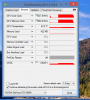
@Mr. Fox your voltage throttled too in that test, just run GPUZ sensor test as that will apply very low load...
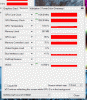
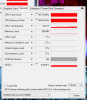
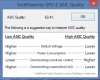
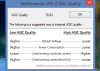
@Scanner your secondary GPU with 76.8% ASIC result looks off. It uses far too much voltage and is not reaching 1126Mhz are you sure its all running @stock?Last edited: Jul 4, 2015Mr. Fox, pathfindercod and [Nikos] like this. -
Hey Prema,
Those results were with your vbios v1.1, no OC. Just in case I screwed up I flashed back to my original GPU vbios. Here they are no OC:
-
THX, now if you could get the 76.8% GPU to clock up to 1126, that would be great (voltage is still a tad low,should be between 1.043v and 1.018v with that ASIC).
-
I just hope that all of the test results are not being tainted by defective drivers. Are you using known good drivers to avoid having one problem skew the view of another? Appreciate all the hard work by @[Nikos], @Prema and @j95 with this. @Prema - see the voltage in this video.
[parsehtml]<iframe width="853" height="480" src="https://www.youtube.com/embed/IGlGg01GOek?rel=0" frameborder="0" allowfullscreen></iframe>[/parsehtml] -
-
LoL good one...
Curious Mr Fox, once the vbios is available to the public are you planning to put ur 980ms back in ur m18x r2 beast? -
@Mr. Fox that video is showing 780M, we need 980M results...only use gpu-z render test to keep it from throttling at stock vbios when reading 3d voltage.
-
Yes, I realize that. My only point is that NVIDIA drivers are preventing a good vBIOS from working. I'm communicating directly with Manuel Guzman about the problems, and posting many negative comments, videos on YouTube, sharing them on Facebook and tweeting them in hopes that they will eventually knock it off. It's bad enough having to fix their messed up vBIOS year after year. They have been screwed up since Fermi (580M throttling issues), but now we have screwed up drivers further compounding the problem. My 780M vBIOS doesn't need to be fixed, but their drivers certainly do. They create new problems and induce malfunction where none was present before.
Not very likely. If I needed to replace my 780M cards for some reason, I might. More likely, I would just part it out instead of fixing it. I love the machine, but the new direction the company has taken turns my stomach. I probably will not fix anything that breaks on my Alienware laptops going forward.[Nikos] likes this. -
We have to spread all the info you are showing about drivers problem to bring their attention. Share and comment all Mr.Fox videos about that. We need to get NVIDIA fix that. Because next year 1080M is coming soon and there is no way I want to go through the same problems after paying 1500€ and Prema & svl7 and all the vBIOs modders are not going to save our asses all the time.Kade Storm, Mr. Fox, Papusan and 1 other person like this.
-
I know this is off topic but I wanted to take a minute to thank everyone on this forum for their amazing work and unbelievable dedication!
Specially @Mr. Fox, @j95, @Prema. I finally read through all 247 pages lol...(wasnt easy)
Got my M18xR2 upgraded to gtx980m SLi without any major issues thanks to all of you specially @N!IGHTHAWK for your clear step by step guide.
I'm new to the whole overclocking sene so please be patient
I will however do my best to contribute as much as I can.
I tried j95s hotfix driver v353.38 on stock vBIOS and it throttles like crazy benchmarking but runs smooth mostly when playing Witcher3. Can't test it using Prema's mod as I think he's taken it off his website. Found j95s driver v353.00 to be fantastic for benchmark no throttle at all. However when running Witcher3 it runs as if not optimised for the game (no throttle, just feels laggy n framerate drops). Is there a solution getting around this or should I wait for Prema's final mod to be released and try with v353.38 hotfix?Kade Storm likes this. -
Only the link has changed:
https://biosmods.wordpress.com/clevo-mxm/ -
Nice. Thanks. I will try when I get home.
Quick question as it's my first time flashing the vbios. When backing up the original do I backup each card or are the vbios identical? -
You can check current vBIOS revision for each card in GPU-Z.
-
Ok thanks. The new NVFlash works in UEFI correct?
Quick question is there a guide for flashing/backing up vbios using NVFlash in UEFI. Sorry to be such a noob. All the articles I'm finding are a few years old and no lo ger relevant. -
ok guys. So im having issues using NVFlash. It wont let me put any commands, keeps closing after 2 key presses. doesnt matter which key on keyboard i press it closes itself! i would like to make a backup of vbios before flashing Premas mod.
any ideas ??
im on Win8.1 Full UEFI -
@haxXBOXpro use GPU-Z to copy your GPU vbios. The newest one is GPU-Z v.8.4 get it here:
http://www.techpowerup.com/downloads/2506/techpowerup-gpu-z-v0-8-4/
If you have 2 GPU cards, back up their vbios one at a time.
Are you using the latest NVFlash? It should be NVFLASH_WIN_5.218_x64_PM, found earlier in this thread. The read me text file contains the instructions for using it. It takes less than 5 minutes to flash your cards.haXBOXpro likes this. -
You have to open the command window in Administrator mode first to run NVFLASH using a manually typed command line syntax. If you double-click on the NVFLASH.EXE file a command window will open and close as you are experiencing. Alternatively, you can use a batch file like those @Prema provides. The batch files in the zipped folder with NVFLASH with any vBIOS ROM file are templates Prema provided. You must edit them in Notepad and change the name of the ROM file to match the vBIOS file name in order to use those generic batch files.
Yes, that version does work under UEFI with no CSM/Legacy BIOS support.haXBOXpro likes this. -
Sorry boys. Finally, I dont understand if is possible to upgrade M18x r2 with sli 980m, without any issue like trhottling or game performance issue, or not.. sometime I understand yes, sametime I understand is impossible to dont have issue about performance in game, and in this case the upgrade have no sense..
Sent from my SO-02G using Tapatalk -
@supervendor, my understanding of reading this thread are:
1-the 1st half of this thread dealt with getting The 980m GPU to work in the M18xR2. In an off shoot, the owners of the AW18, also learned to get those GPUs to work in our PC.
2-The latter half of the thread NBR members like Prema, J95, Mr. Fox and others began focusing on the throttling problem. If you read from page 186 on you would see people working on the problem. As a side note, to me, the throttling issue really only became a problem when trying to OC. Actually, playing PC games never was an issue. I always found games I played worked well at high FPS. Except for those that were crappy to begin with. Batman AK is a prime example, it has nothing to do with the GPUs it's just a poor game.
3-An additional problem seen woven through this thread is the crappy Nvidia drivers that exacerbate the throttling problem.
4-Head way is being made to conquer the throttling issue. NBR member Prema has released a vbios for the 980m GPU that greatly helps and there maybe a 2nd version that helps even more.
So, yes the M18xR2 can be upgraded to 980m SLI. Great leaps have been made to address the throttling issues, which really raises its ugly head when trying to OC. None of those issues effects gaming on the PC. This is of course is from my perspective as an AW18 owner.Kade Storm, TBoneSan and Mr. Fox like this. -
I think as for gaming, the stock vbios has no problem so far,no throttle and the my max temps are 74 for primary and 70 for secondary, idle temp is around 55 on both, it can max out any game and can easily achieve 60+fps. If you are into benchmarking, then thats another story.
Im using a m18x r2(upgraded from pair 7970m and stock heatsink) -
Thank you Mr. Fox.
Just another question if you could help me please
So managed to backup my vbios with NVFlash (ran through cmd as admin). Flashed it using Prema mod. All seems to be ok so far though there's one thing I don't understand fully yet. Matching P0/P1 using nv inspector.
This is what I have done so far. Could you correct me if I'm wrong.
P1
Unlock Max
Matched GPU clock with Boost from left panel.
Matched Memory clock with Memory from left.
Now with P0 I'm a bit confused, where/how do I find correct Base clock and Memory clock offset values?? They are both on 0 atm and my computer crashes benchmarking -
@Scanner
What GeForce driver are you using? -
Sounds like you are doing that correctly. On P0 no core, memory or voltage offset shows up as zeroes. On other P-states you are seeing actual clock speeds, not offsets. The whole offset numbering concept is a rather stupid scheme, but apparently someone at NVIDIA thought it was cute. Using actual clock speeds makes a lot more sense and it is less confusing for folks that haven't figured out the offset crap. It is also misleading because zero offset can be overclocked on a custom vBIOS. Look at the offset as a starting point, where zero means the default programmed clock speed or voltage. The default may not be the same as NVIDIA's reference specification, which is just one more reason why going by actual clock speeds or voltage makes a lot more sense.
Anyhow, here is a screen shot for NVIDIA Inspector showing my 780M SLI with P0 at stock settings. If that 0 MHz and 0 mV is what you are seeing, this is correct.
haXBOXpro likes this. -
Thank you. So this means I've done it right then. Mmm... I wonder why my laptop shuts off suddenly then. I've had to unplug and plug back the PSU from wall! Only happens when I use furmark though. Could the benchmark app cause this? (nothing seems to be overheating max 72c)
-
Do people with M18xR2 and 980M sli still get low GPU usage though, so the GPUs not being used to their maximum efficiency? I think I remember earlier on in this thread the GPU usage was low (even if there was no throttling), lower GPU usage than say 780M sli in an M18xR2 - not talking about situations where there are fps caps or exceedingly high frame rates in games where it becomes CPU bound.
-
Stay away from that furmark disease if you want a healthy machineAshtrix, TBoneSan and Robbo99999 like this.
-
Only if I knew this earlier or at least paid more attention to the warnings! Seems like I can't stop the constant throttling now even while gaming. Could I have damaged my cards??
I'm going to do a clean install of windows see if that helps :/ -
maybe and maybe not, you may want to try another J95's driver to find what is most suitable for you, for me it is 350.06, anything but that give me insane throttle, other guys, like Juang1985, 353.00 is his best friend, so, it depends.
regarding Furmark, it's a piece of trash, a disease, i've seen tons of 7970m and some 580m 675m fried because of that sh!t. -
Is furmark REALLY that bad? I honestly have no idea. I've been told to move to OCCT because it doesn't tax the GPU the same way as furmark does. What (other than 3dmark) is a good indicator of GPU stability? I've had my cards stay on furmark for 10 minutes then instantly crash in 3dmark
-
I've always found 3DMark11, specifically Graphics Test #1 to be an excellent check of initial stability. I then find I have to dial back the overclock on the core by about 2 notches (26Mhz) to gain long term complete stability in games. When I was dialing in my current overclock a couple of years ago I used Far Cry 3 to dial in the long term stability - I dialed it back that 26Mhz (to 1124Mhz) because otherwise I was getting crashes say once every 6 hrs of gameplay (not that I played it 6 hrs straight of course - would crash say once every 3 days if I played it 2 hours a day).
Since then I have found that Titanfall and AC Unity are even more finicky about overclocks, and I have to dial the overclock back (just for those games by another 26Mhz) to 1097Mhz. All other games & benchmarks are stable at 1124Mhz.
So I reckon it's best to dial in your initial overclock with 3DMark11, then back the core down one notch, play some games, if you notice any weird crashing dial back the overclock another notch & retest.Mr. Fox likes this. -
How do I check to see if the GPUs are in good health? Need to find out if this sudden throttling is driver/software related or my cards. (reinstalling Windows clean to see if it helps now)
Prior to furmark crashing my system I was getting solid benchmarking scores with 353.00/prema mod. While gaming was at its best with 353.38hotfix/stock vbios. Now no matter which driver/stock or modified bios I use I get severe throttling and games are almost unstable! -
I doubt you've damaged your cards by running Furmark, unless you were running it for hours at high temperatures? 980M cards in M18xR2 and A18 seem to be a bit hit & miss anyway when it comes to throttling and the drivers you're using, so that doesn't mean that behaviour is related to you running Furmark before.
How do you check health of your cards you ask. I think you can only check temperatures & performance. So, are the temperatures OK? Are your previous overclocks (on the same drivers) that were stable now no longer stable - if that's the case then perhaps you have damaged your cards if they don't overclock as a well as they used to, but to determine that you would first need to know that your initial overclock was 100% stable otherwise you can't compare. -
Furmark and OCCT can both destroy video cards if you use the "burn in" (aka "I'm an idiot" features) tests and do not monitor everything closely, immediately shutting down the program at the first sign of a problem. Using Furmark's brief, but very taxing, benchmark tools is not a big deal. The trouble is the people that somehow think it is a good idea to "burn in" their CPUs and GPUs. That's just stupid, and there are lots of stupid people out there. You don't break in a new motor by throwing a brick on the accelerator pedal to see how long it takes to blow it up, and doing that same thing conceptually to any kind of processor is retarded.
-
I wasn't aware there was "burn in" time for anything digital...either it works or it doesn't. 1 or 0. I guess you shouldn't break in TIM using a burn test either.
Mr. Fox likes this. -
You're right. There is not any.
But some people seem to think so. Most things are that way any more. "Burn in" is just an unnecessary form of abuse. It's like torching dollars instead of spending them.
-
NVIDIA GPUs have a "protection measure" since GTX7 series which kicks in during extreme OCs and extreme load like Furmark or Kombustor.
Once this happens a bit on the card will remember this incident and clock the card down until it gets signaled by driver that everything is 'OK'.
Reinstalling Windows won't help, but uninstalling the driver, power cycling the system and then re-flashing the cards may help to clear the lock bit out.Kade Storm, TBoneSan, haXBOXpro and 2 others like this. -
Seems like they have extended that special protection "feature" to anything that uses 3D performance mode now with all of the silly throttling issues on some systems.Juang1985 likes this.
-
DamnVIDIA!
Pretty sure that's what's happened in my case :'(
I already reinstalled windows last night (even though now I know it won't help) my rig was running Witcher3 at least 60fps with no problems everything stock before furmark mess. And now it constantly drops to below 10fps.
Reflashed stock vbios a couple of times, still the same.
How do I power cycle the m18xr2? Removed the battery, unplug from wall, hold down power. Is this correct? -
without any nvidia drivers installed one of my cards is showing up with an "!" in device manager saying this: 'This device is not working properly because Windows cannot load the drivers required for this device. (Code 31)
The driver trying to start is not the same as the driver for the POSTed display adapter.'
any ideas? im guessing thats the one playing up. they were both showing up fine prior to my issues even only with win basic drivers
-
@haXBOXpro - that is normal. SLI systems always show a bang on one of the GPUs in Device Manager without drivers installed. Only one "Microsoft Basic Display Adapter" (Standard VGA Controller and similar names in older versions of Windoze) can be active so the OS disables the other one.
You will not be able to install drivers for any non-factory GPU options unless you use a modded INF file. If you have the correct INF mod the driver will install without a hitch. -
Thanks for clearing that up @Mr. Fox
i am aware of the need for a modded driver. was trying to figure out how to remove "protection measure' block Prema mentioned. Only other solution other than Premas suggestion i came across was hard reseting which keeps failing with Devcon. -
Some times clearing that throttle flag can be a real bugger.
-
Try to swap the cards in their slots 1:2 > 2:1
-
I would rather leave tearing up my laptop to last resort. It took me a long time getting everything done perfectly and still forgot to plug in front mesh lights! lol
i have it running smooth for now without throttle using
GeForce 353.06 PEG MOD - Throttling FIX
For some reason v353.38 hotfix initially worked perfect then severely throttled. tried all other driver mods, J95s v353.00 runs lower FPS in games but no throttle, the above driver seems to work for now (witcher3 running a solid 60-85FPS). So im hoping it was only a driver issue or my power cycle/vbios reflash worked!Juang1985 likes this. -
Gees, these 980M's are finicky beasts in these old Alienwares!
Aw m18x R2 Dual 980m SLI upgrade!!
Discussion in 'Alienware 18 and M18x' started by Peter, Nov 12, 2014.




![[Nikos]](images/avatars/[Nikos])
![[IMG]](images/storyImages/2062.gif)


