Problems? See this thread at archive.org.
ok yesterday before i sleep, use Eurocom modified drivers, and works amazing,
-
Instructions...'to the letter"...

'Eurocom drivers' muy malos.Last edited: Nov 13, 2015 -
Windows 10 - (358.91 WHQL) 1446/2935 +-1.2V || CPU @ 4.6GHz
With those clocks under Windows 8.1 I should have 17K points or so. Why is it performing so "poorly"? I do not have any clue...
Windows 8 score with lower clocks :/
![[IMG]](images/storyImages/lvwPcz3.png)
Best overall result with SLI GTX 980M vs my personal best result (Win8.1 vs Win 10):
![[IMG]](images/storyImages/NJMKlav.png) Last edited: Nov 13, 2015
Last edited: Nov 13, 2015 -
Not my GPU scores, try my PEG MODs...GPU 13k
Win8.1 v350.12 http://www.3dmark.com/fs/4772347
Win10 v352.84 (lower clocks) http://www.3dmark.com/fs/5053155
Time for TH2? https://www.microsoft.com/en-us/software-download/techbench don't run multiple monitoring/OCing tools simultaneously...Overclockers common mistake (GPU)Last edited: Nov 13, 2015 -
Against that laptop? no chance...
AW18 & P37xxx...
@sC_b4n3 follow my guide and you'll be fine.Last edited: Nov 13, 2015 -
Just talking about GPU's score, nothing to do with the others numbers.
Do you have your PEG MOD updated for win 10 :? -
17K so close :_|
Tested with your mod but still I do not understand where the hell went the other score's points
Core clock - 1.378 MHz (1466 MHz)
Memory bus clock - 1.453 MHz (2905MHz)
1.2V
![[IMG]](images/storyImages/T7fr47j.png)
http://www.3dmark.com/fs/6486357
Maybe it is time to give to the system a clean install or Windows 8.1 partition (wish I could go for Win7)
![[IMG]](images/storyImages/oFU9fvK.png)
PS: While testing![[IMG]](images/storyImages/RXnuPKY.png) http://imgur.com/RXnuPKY
Last edited: Nov 14, 2015
http://imgur.com/RXnuPKY
Last edited: Nov 14, 2015 -
@[Nikos] do you monitor core load while benchmarking?... you could do a stock run to determine what the core due to SLI scaling is at various points of the benchmark and then run your overclock, and see if the core load is mirrored in both tests... that should tell you if your getting any throttling aside from the normal SLI scaling.
You could also try backing the clock off 20Mhz or so, sounds counter intuitive but when I was benching my 7970ms I was "stable" over 1000Mhz but I got my best scores around 980Mhz.... something was obviously not happy at the higher speeds.
That's all that I can think of -
ive been running stock 980m with PEG drivers for several weeks, now that fallout4 is out im struggling to get 60fps so id like to flash different Vbios so i can OC the card....what's the best route to go about this? im already using inspector to match the clocks
-
AFIK, Prema did not release the vBIOS yet, which let you overclock 980M in R2. (Talking about SLI do not know if you can overclock just one card over R2, honestly I do not remember) You can use Prema vBIOS to prevent card throttling but the version to let you overclock is not out yet.
-
Still the only PEG AW/980M w/ Win 7 installed (26 GB partition)...pathetic...
http://www.3dmark.com/3dm11/9824193
Let's fix this flaw...
Display PEG & " Monitor input selection e.g. when using HDMI 1 set input to HDMI 2 >No scanning whatsoever<"
Both screen options will work fine.Last edited: Nov 16, 2015 -
GPT UEFI + CSM, v346.87/347.52 clock block mod.
![[IMG]](images/storyImages/nRnfogP.png)
![[IMG]](images/storyImages/OiWblVs.png)
@[Nikos], @kenny27
- Shrink partition 30 GB unallocated space.
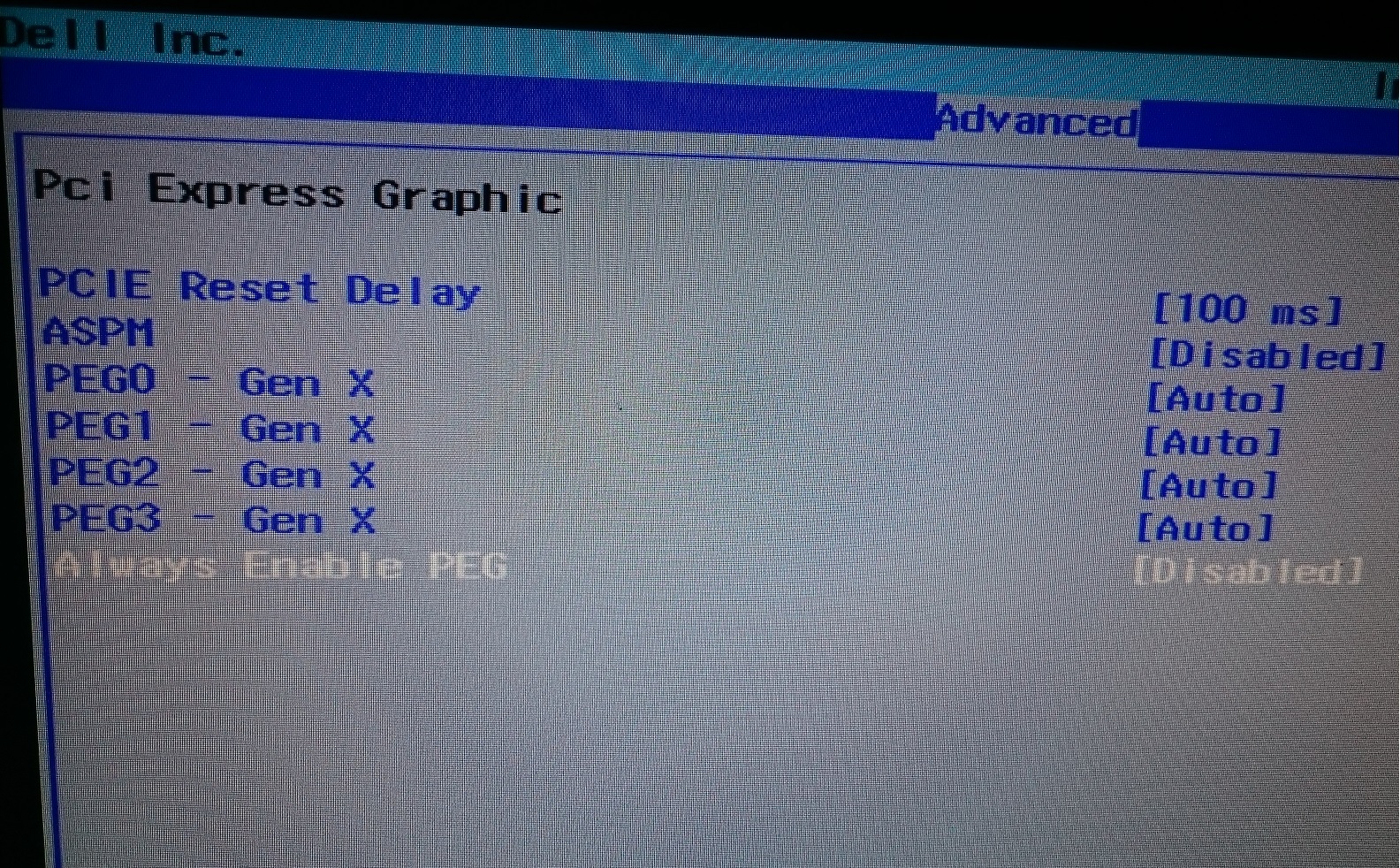
- BIOS settings -> IGP 'Auto' -> 'Disabled' -> Display PEG -> PCI Express Graphic -> "Always Enable PEG" disabled -> Peripheral Configuration -> Serial Port A Disabled -> "Azalia" Disabled -> Boot options -> "Boot List Option" UEFI -> "Legacy option ROM" enabled -> Exit menu "Save without exit option" -> Power OFF.
- Plug HDMI cable/external monitor -> Monitor/ input selection e.g. using HDMI 1 set input to HDMI 2 > While installing No scanning whatsoever -> Power ON -> F12 -> Win 7 USB installation media (GPT UEFI scheme).
- Turn off hibernation: cmd (Admin) Type powercfg -h off
- Setting a fixed size paging file "Uncheck Automatically manage..." Set custom size initial/Max 3072 MB
- Turn off Automatic Updates 'Don't download/ install any updates' -> 3DMark11-v1-0-132\redist install dotNetFx40_Client_x86_x64.exe -> reboot -> Install C++ https://support.microsoft.com/en-us/kb/2977003 -> Steam CommonRedist -> install DirectX.
- Intel Chipset (older versions) -> XTU v5.1.1.25 ( ME included) -> Intel RST v12.9.4.1000 -> Intel USB 3
- 350.12 PEG MOD
Last edited: Nov 17, 2015pathfindercod and [Nikos] like this. -
Superb guide buddy but unfortunately right now I do not have the time to do so with my main system which is the R2. I will buy a m-sata SSD (Any recommendation?). If this does not work I am going to have to remove cards, plug a GTX680M and repeat the process right?
I want to have Win 7 so badly but can not lose my current partition. -
Wow... Is it really possible to install the GTX 980M within a M18X-R1 with this technique? A friend of mine would kill for this. Why the need of a partition so small btw?
-
TBoneSan tried a similar guide but it didn't work, he probably missed something though... try first PCI Express Graphic -> "Always Enable PEG" disabled, if it fails try enabling it. Size doesn't matter, win7 mainly for editing/specific tools + 3DMark11.
I'll add Ubuntu later, needed to backup BCD Win10 TH2 clean install.
GPT UEFI + CSM, 350.12 PEG MOD
Win7 full BIOS mode MBR ( eSATA)
![[IMG]](images/storyImages/BfdkjkZ.png) Last edited: Nov 17, 2015
Last edited: Nov 17, 2015 -
I get up to the third step, "plug hdmi cable", I power on (monitor is set to hdmi.. no scanning) Lights come on CD drive spins but monitor and laptop screen are black, monitor reports no signal from computer. No beeps just black screens. Not sure what to do at this stage, I have tried using vga, starting with hdmi unpluged, plugging hdmi into hdmi-in port still same responce.
I can reset bios and try set "always enable PEG" enabled if there is nothing else to try with this bios configuration. That will mean gpu removal............
Using a blank ssd and a DVD windows 7 media while trying to boot..... if that makes any difference.[Nikos] likes this. -
You're almost there...Azalia disabled etc power off, power on monitor let it scan this time, plug HDMI cable and then power on laptop, hit F2 BIOS
Try different combinations, UEFI/CSM wasn't enough back then (nvflash) so I managed Legacy too. Still, you must stick w/ UEFI/CSM.Last edited: Nov 18, 2015[Nikos] likes this. -
@j95 I think the black screen (with no back light) I'm getting is before the bios screen (spamming f2 and then F10-Enter doesn't shut the laptop down) There are no beeps or screen output because the laptop doesn't get that far...?
I tried a few different things monitor scanning and not scanning IGP enabled/disabled, always enable PEG enabled/disabled, single and dual GPU.... No change
j95 likes this. -
@kenny27 the lack of beeps once you power on is a good sign...no conflict, we must find the 'switch', try these settings:
- Without installation media.
- IGP disabled.
- Both GPUs, single GPU defeats the purpose.
- Different monitors? (Samsung).
1
2
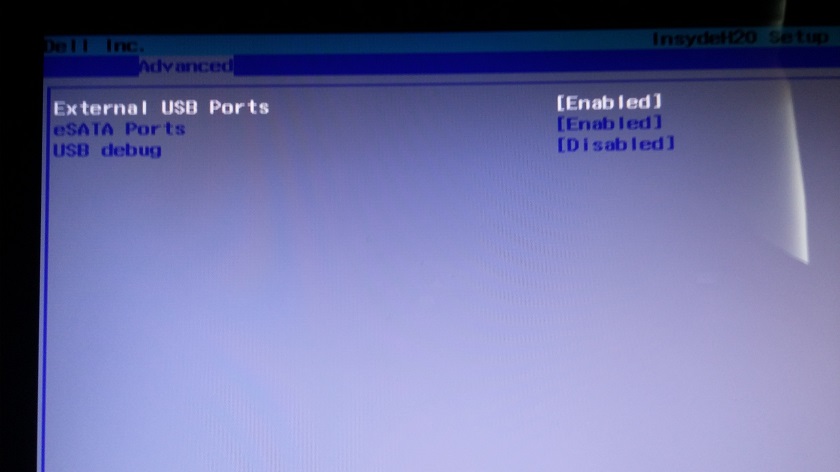
3 Warning: Don't change PCIE Reset Delay value "Always enable PEG" (M18x IGP) better try 'disabled' first.
4
5
Last edited: Nov 19, 2015kenny27 likes this. -
Ok @j95 I can probably try those settings in two weeks time when I have finished exams, its just so time consuming to have the whole system bits so I can remove the 980m to reset the vbios every time something doesn't work.
Also one question about trying the settings: do you think it could be a combination of settings that will do it or its just a matter of finding the one crucial setting (switch), trying all combinations is obviously going to take much more time to try and I would probably make a list of all the combinations and set the testing up a bit differently if that is the case. -
thanks for doing so, I know it is a pain in the ass, if I do have more free time along this time I will help you so if you like we can share a datasheet with tested combination to wipe them faster.
-
Not every possible combination, is likely to break something before...
Including screenshots/steps: 1 Boot options, 2 Peripheral Configuration, 6 Video Configuration, 3 PCI Express Graphic...in case you skipped it, then try the other settings.
Warning: Don't change PCIE Reset Delay value. BIOS reset or even blind flashing won't fix this.
- - - Updated - - -
PEG MODs Update:
GeForce 353.00 PEG MOD Win7/8.1 Profiles update: Full_Profiles_5_v353.00.txt (no need to reinstall drivers).
- NV Inspector -> Driver Profile Settings -> Import User Defined Profiles -> Import (replace) all driver profiles (Nvidia text format) -> Full_Profiles_5_v353.00.txt
- NV Inspector -> restore current profile to Nvidia defaults -> reboot
- NVCPL -> Manage 3D settings -> Set High Performance...etc.
352.84 PEG MOD Win10 Profiles update: Full_Profiles_2_352.84.txt.zip (no need to reinstall drivers).
*Install drivers at your own risk* Windows 10 + GeForce Drivers are Killing Samsung and LG Notebook LCD Display Panels
- Uninstall both PrecisionX & MSI Afterburner (Keep RTSS) including screen overclocking tools *Still at risk*
Last edited: Nov 20, 2015 -
Hi all,
please what vbios for the fan of secondary 980M 8gb works automatically ?
many thanks for your help -
Alienware M18X-R2?
Alienware 18?
Which system do you have ? More info needed
-
Hi Nikos,
Thanks for your answer !
sorry, the topic being dedicated to M18X R2 I have not said..., M18X R2 Bios vA12 Windows 8.1 x64. vbios both 980M 8gb 84.04.22.00.12
many thanks
Last edited: Nov 25, 2015 -
I want to be wrong but I found no vBios that fix this issue at the moment for M18X-R2, I had to install HWInfo64 otherwise my second gpu goes up to 94C and the notebook shut it down itself because of the heat
-
We have to figure out why this its happening because on mine m18x r2 980m Sli i dont need to use HWinfo64 the seccundary fan works perfectly so i think than have to be the bios because some models are shipped with windows 7 and other on windows 8....
-
I agree with you. My M18xR2 s secondary fan works fine since the upgrade to 980ms. Could be a bios related problem. Mine was shipped with Windows 7 but windows 8 ready. Currently running Windows 10
Sent from my Nexus 6P using Tapatalk -
Tulius, omar1000cc and haXBOXpro thanks for your help
omar1000cc and haXBOXpro
if possible I would like to know the version of your bios and and version of vbios 980M
many many thanks
-
Same mine works fine, also came with windows 7, currently running unlocked A10 bios, all the vbios I have tried have had working second fan control.
The other thing it could be is a different motherboard board revision? (just a stab in the dark)
Not sure what the fan control power supply is like but one could hook the second fan to run of the fan control wire from the primary fan.... -
Hi kenny27
Thanks, for some secondary fan work, for others, Tulius, mine and x I suppose he does not work...
we must find by comparing bios, vbios and drivers no ?
sorry for my very bad English I'm french, forced to use the translator
-
Could it be a different BIOS config settings or motherboards revisions, kenny27@ could you please post some of your screen sBIOS settings so we could compare with ours? I'm already running A10 unlocked BIOS anyway but where I find information about the motherboard version number? Installed Windows 8.1 but came with windows 7 too.Last edited: Nov 26, 2015
-
M18xr2 here, lastest stock bios, prema vbios 1.1.1, driver 352, windows 7 stock, current 10, both fans work perfectly
And i have replaced the motherboard once, the board's revision is newer
Sent from my iPad using Tapatalk -
My bios settings are totally stock except for turbo ratios and power limit/time, priplane, msrlock and AHCI (not RAID)
Just looking in the CPU-Z mainboard tab I have rev 09 Intel Ivybridge chipset and a rev 04 Intel HM77 southbridge... not sure it that makes any difference. Otherwise the only way is to physically have a look at the mobo and get the part/revision numbers of it directly....... -
SLI 980M 8GB work with Windows 7 ? I thought it was forced to be with 8, 8.1 or 10 in UEFI mode
-
VERY MISLEADING. you did not mention that you are NOT USING the 900M series. Many people keep referencing some of your posts, and have recently referenced you as a"King of Mythomancers".
I don't know what other posts you have that have caused mis-speculation and damage, but I have three cases of different clients complaining about things you posted, being wrong.
The fact these people do not know eachother and are in three different countries, makes me wonder if you do this deliberately, if you do not, please be more mindful and careful.
People will see the thread and its topic, and think you are confirming one thing over another.twin snakes likes this. -
NO, it will not work in windows 7 in SLi.
((side note, any chance your name is Charles, Peter, or Jean-Luc? just wondering if your one of the guys who just emailed me about this too...since I don't know your NBR forum name)) -
Oops sorry, i'm using 980m sli btw, I think it's not neccessary since this is "m18x r2 dual 980m sli"
I apologize for any misunderstanding
Sent from my iPad using Tapatalk -
For the record, 980M in SLi will not work on the M18X-R2 within Windows 7.
-
Twin snakes never said he was running windows 7 with 980m sli, he said windows 7 came stock on his system, and is currently using windows 10. This was said as @omar1000cc suggested that there might have been a change in the system when the m18x r2 was shipped with windows 8.
Kade Storm, Mr. Fox and twin snakes like this. -
twin snakes also said he work with prema vbios 1.1.1 and both fans work perfectly but the revision of his motherboard is recent...
http://forum.notebookreview.com/thr...re-18-970m-980m-sli-performance-vbios.783857/ -
Maybe there's something in my BIOS config interfering with the fans? Below is some fan settings in BIOS (A10 unlocked)
Or in PEG graphics config:Attached Files:
Last edited: Nov 27, 2015 -
-
Oh come on please, I said my system come with windows 7 as stock, what are you trying to do?
Sent from my iPad using Tapatalk -
Let's be nice, folks. I cleaned up the meanness. @twin snakes said... (emphasis added)
And, yes... @woodzstack is correct. You cannot use Maxwell GPUs in SLI with Windows 7 because the BIOS of the M18xR2 needs to be updated like they did the Alienware 18. Maxwell supports both VGA (Legacy) and GOP (UEFI) video, but an issue with changes in Maxwell architecture does not play nice with VGA with the original InsydeH20 BIOS implementation. Even the older Phoenix BIOS in the M15x works with Maxwell. It is only the InsydeH20 machines that seem to be affected. The Alienware 18 now works with Windows 7 running a Maxwell GPU because Alienware fixed the BIOS problem with A12, but it used to have exactly the same problems as the M18xR2 and M17xR4 booting with discrete graphics in Legacy BIOS mode, which Windows 7 requires. Unfortunately, the M18xR2 will not be updated because Alienware does not provide full support for EOL products.
If you want to waste a PCIe slot and live with a dramatic performance reduction you can set up an M18xR2 with Windows 7 just like a M17xR4 in 'Optimus' mode can be, but then it's a downgrade from 780M SLI and you have to put up with lame Intel HD Graphics crap. That only works because the system will POST using the Intel iGPU instead of the discrete GPU.Kade Storm, TBoneSan, kenny27 and 2 others like this. -
Okay so I have been using the 353.00 drivers from @j95 for a while and they rock. Problem is, Now i wanna play new tittles and they dont have the sli profiles for them. Any work around?
-
Download @j95 latest profile file from TI and enjoy
-
A friend of mine is selling a very cheap Alienware 18, for a amount like a thousand dollars, equipped only with one 770M and a i7-4710MQ . As I already have a M18X-R2 with 980M SLI, would be a good choice to transfer the SLI setup to this newer machine with updated sBIOS and vBIOS? If I buy it I will change the actual CPU for a 4940XM. Is this worth buying to be the substitute of M18X-r2?
Aw m18x R2 Dual 980m SLI upgrade!!
Discussion in 'Alienware 18 and M18x' started by Peter, Nov 12, 2014.

![[Nikos]](images/avatars/[Nikos])