Problems? See this thread at archive.org.
Hello all,
Dell are here with replacement 880M GTX GPUs.
However, only half the memory chips are provisioned on the GPUs.
Did the 880M GTX ever ship in a 4GB version?
Thanks.
PS: motherboard burnt-out damage visible, not GPU issue.
-
I do not recall ever seeing a 4GB version of 880M. Speaking of 880M...
I just took first place and set new world records on Fire Strike, 3DMark 11 and Vantage for 880M SLI... These comparisons links are against current first place scores. Once 3DMark adds my hardware ID these will show in search results and displace the guys currently in the #1 spot to the #2 and #3 spots based on what I have uploaded today. To my surprise, the top scores I beat were a P570WM with 4930K and 880M SLI. Compare these runs to stock 980M SLI.
http://www.3dmark.com/compare/fs/2402025/fs/9686855
http://www.3dmark.com/compare/3dm11/8510683/3dm11/11477498
http://www.3dmark.com/compare/3dmv/5067708/3dmv/5494902
![[IMG]](images/storyImages/pkUVOgE.jpg)
![[IMG]](images/storyImages/DFSVR84.jpg)
![[IMG]](images/storyImages/12zBxd8.jpg) smoking2k likes this.
smoking2k likes this. -
Hmm,
Well the modules he has here definately have only half the memory chips installed...
Interesting.Mr. Fox likes this. -
Well, I guess there must be some out there, but I never remember hearing about them.
Interesting comparison... 980M SLI (overclocked, but not top scores) and the above 880M SLI in quad core laptops. Not as good as 980M SLI, but getting closer than we might have expected.
http://www.3dmark.com/compare/3dm11/9171430/3dm11/10102817/3dm11/11477498TBoneSan likes this. -
Incredible work, by the way... that must be too close for comfort for many 980M users out there.
Anyway, here are the GPU pics:
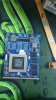
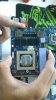
They will be back tomorrow with a new main board (hopefully).
My GPUs are back in the chassis for the moment. And they seemed to work anyway, just the SLi cable was in question.
Either way, I shan't be overclocking them, as I do not want to go through the mess of having failed components replaced.
This is annoying beyond belief, as my AW18 is my working rig, and its already taken the morning away from me...
Let me know what you think of the GPU pics..
Thanks.Mr. Fox likes this. -
double post - please delete.
Sorry. -
I have never seen those before. Interesting. I hope everything turns out well.
Thanks for the compliment. -
Gents, (and ladies?),
Since I don't possess a circuit diagram for my AW18, can anybody here tell me if my AW18 can run on IGP, sans mxm GPUs?
It is my desire to put my 880M GTX 8GB GPUs on a well-known auction site, as we all know what is coming, (before they are worth even less).
Futhermore, what test(s) results would suffice your curiosity, to be included in such as sale, to display functionality? I am assuming Firestrike / Time Spy would do it?
Cheers. -
Yes, if you pull the video cards it will switch to IGFX all by itself. Don't jump the gun though, Brother Erik. There is no guarantee what is coming will work correctly in the AW18. And, chances seem pretty good that having a heat sink that fits could be an impediment to upgrades. There is no MXM standard any more. The only OEMs using non-BGA now are Clevo and MSI and if you look at all of the buzz, it seems they are making increasingly proprietary MXM cards. My P870DM-G is less than 3 months old and I already cannot upgrade to 1080 SLI because of proprietary form factors are too big and there is not enough space between the MXM slots for two of them. I can install only one 1080 and that takes a totally redesigned heat sink. I anticipate a 1080 GPU (just one) will be more than $1,000 as well.
It would be a shame to sell them and find out there are as many or more Pascal issues as there have been Maxwell. Best to wait until you know for sure. They should not drop value too much. They will always be in demand for service/repair parts for older laptops.Last edited: Aug 21, 2016Kade Storm, ErikO, DreDre and 1 other person like this. -
Reese Bobby: Oh hell, Son, I was high that day. That doesn't make any sense at all, you can be second, third, fourth... hell you can even be fifth.
Ricky Bobby: What? I've lived my whole life by that!
-
guys is the windows 10 issue with alienware laptop fixed now the one which was killing the lcd panels , been a while so i dont know much about it .
-
the alien 18 i got is giving about max give or take 2 hours of battery time on intel gpu but i am using the net . watching some movies and copying large data files while doing so -
is the battery time ok for this laptop .
with dedicated gpu using the net with half brightness levels it gives max 60 to 65 min .
temps : - is doom not configred for sli - i ran it on the vulkan api and it picks up 1 gpu - i maxed everything out and just disabled the anti aliasing giving constant 45 and in some cases 60 fps in full hd .
will get back and see what sli figures are : -
temps : i lifted the laptop from the table via small objects and i have noticed a very decent drop of temps - 1st they would cross 84c on both but now they are like 75c , note that i have not installed hwmonitor as of now -
will get back when i get those installed . -
i wanted to know if i have selected the intel gpu in aliewnare 18 / and in this mode if i use hardware monitor i can increase the fan of the cpu - the fans of the gpus are disabled i mean i dont think they spin etc -is this ok --are they disabled or not in use ...
-
The fans don't spin as they are linked to the discrete gpu's which are switched off when using the integrated gpu. The Igpu is build into the cpu hence only the cpu fan going.
The battery seems slightly warn out as I get more than 2 hours out of the igpu. That being said it depends on screen brightness and cpu workload(background tasks n such) and other hardware in use, your never going to get extremely long battery running time using this beast.
pretty sure that was linked back to evga precision x utility or something or other(cant remember) as the limited edition with 980m and 970m came with windows ten as default and I don't think there screens imploded. try reading the forum about it.... -
well mr.fox says its still dangerous to install windows so i am not doing it for now --so far windows 8.1 is serving it purpose .
dont wana risk it - -
@Mr. Fox @TBoneSan @Phoenix @Cass-Olé @Ashtrix +++
From Alienware GM Mr. Azor aka @Alienware-Frank Still says that Aw18 was replaced by a better product. In fact this graphics amplifier + Aw15/17 gave desktop performance... Yeah. Alienware has sunk to the bottom. Listen from 41 min https://www.twitch.tv/alienware/v/95539068Last edited: Oct 18, 2016 -
That's crazy from the sounds and looks alienware is out of the 18'' category for good. Probable for the best as there implementation at this point would just be a bga Turdbook with a 18'' screen as Mr. azure said no desktop processors in laptop because of the compromises(read this in a Q/A somewhere). WTH. To be honest I would not buy another 18'' DTR that would have no upgrade path(GPU/CPU) at this point anyway. If these clowns could get it together and make laptops more upgradeable with more certainty of upgrade paths they would be a more viable option and probable sell more. I like how at least MSI tried to push guaranteed upgrades but got bit by it as the industry moves to BGA everything.....
-
Mr. Azor talk and talk only about Battery, Thin, thin slimmer, slimmest and power saving. Yeah. Even said the quality was very good. Although he talked about 4-5 years old Alienware laptops. You can't compare the new BGABOOKS VS. Older quality AW models from DELLIENWARE. Newer Aw laptops = 24 swapped motherboards for 4 owners of the TURDBOOKS. Is this quality?
-
Hi, I'm sorry if i restart the conversation, but i need your help. I have read on this forum about the problem of the second fan for the GPU 980m but i need to do a question because i'm not sure about the solution for this problem. I bought and installed a new cpu i7 4940MX + 2 SLI 980m but i have two problems:
1 - The cpu runs upper that 90° when i play
2 - The second fan of the gpu doesn't start
For solve these problems i use HWinfo, but i want to understand if there is another solution.
I use WIN 10 pro 64 bit, my Bios is A12, i don't overclock and i flashed on the GPUs the last vBios from dell web site (this http://www.dell.com/support/home/us/en/04/Drivers/DriversDetails?driverId=9W9F7 )
How can i do? I have to keep the HWinfo or do you know an alternative solution? Thank you for your time -
Hi there,
1. You might have to inspect the CPU heat sink, confirm if it is seated correctly with adequate thermal paste and vents appropriately cleaned out.
2. With this particular model, the second GPU fan is an issue, which is why Dell released a special vBIOS package with two distinct vBIOS files for each card. This allows the fan tables to run properly. You can get this vBIOS package at the following URL ( http://www.dell.com/support/home/us/en/04/Drivers/DriversDetails?driverId=9W9F7).
Additionally to point number 2, I would highly recommend @Prema's custom vBIOS files for this system, which not only improve clock stability (no throttling down from boost clocks), but also maintain fan performance across both tables while unlocking plenty of options for the cards. Please consider donating to him as it is with his effort that many systems, legacy and new, seem to have their full potentials realised.smoking2k likes this. -
4940mx is an insanely hot cpu. Undervolt (especially don't use the built in OC settings in the bios as those apply to much voltage) and apply liquid metal paste if you feel comfortable in doing so. You could also put some thin washers on the spring loaded retention screws that hold the heatsink on to increase contact pressure. When flashing the vbios's make sure you flash the right bios to the primary and secondary gpu as they are different. There is also a mod where you can steel the fan signal from the primary gpu for the secondary that was used before alienware released these vbios's. That shouldn't be needed though. And like Kade storm said look into hunting down the prema mod one over at techinferno.Kade Storm likes this.
-
1. 4940MX, like all haswells, are a very hot chip. They need to be pasted with Liquid Ultra, and then undervolted to make sure they stay cool and away from the thermal limit.
2. Alienware 18 uses master/slave type vBIOS for the GTX 970M and 980M. You need to make sure you flash each card with the corresponding vBIOS. I wouldn't use the Prema vBIOS, as it cranks up the voltage to a very high 1.067V instead of the default range of 1.000-1.060V, and the GTX 980M is not the most reliable of cards.
3. There will be no need for HWinfo if you complete both these steps.smoking2k likes this. -
Thank you at all.
OK i will buy a Coolaboratory thermal past for the CPU and I will reduce the voltage. Do you know if there are any guide to undervolt this cpu?
I understand. I make a mistake because I have flashed the same file in both gpu. But what you are meaning about the vbios.
do I have to flash first the vbios of Dell and after the vbios of @Prema? Have you a link for @Prema's vbios?
Do you know if I flash the prema vbios if I can install the latest nVIDIA driver?
P.s. i have another problem, when i try to use my new 4k monitor Samsung on alien 18 it starts to switch on and switch off and i can't use it! i use the original cable provided bye Samsung. Can you help me ? Thank you and sorry
OK I will donate to prema.Last edited: Dec 2, 2016 -
Forget prema vBIOS, makes 980M run way too hot in the Alienware 18. Open cmd prompt as admin, navigate to the directory where you extracted dell vbios, then run:
nvflash -i 0 -6 N16EGX1.rom
after it completes, run
nvflash -i 1 -6 N16EGX2.rom
drivers will install without INF mod because it is native card to Alienware 18
4k issue, try different HDMI cable.smoking2k likes this. -
Thank you for your answer. I will do. Do you know if there is a cable already tested with alien 18?
-
You talking about the minidisplayport cable or the hdmi?
-
I'm talking about the HDMI cable. Do I have to use the mini display port for the 4k?
-
well hdmi 1.4 supports only 30hz where as dp 1.2 supports 60hz so the DP cable would be better for 4k but that's up to you. Any high speed HDMI cable should be fine for 4k 30hz as there are really only 2 speeds (standard and high speed) companies like monster lie to people about all these different speed cables. Also make sure your not trying to put out more than 30hz to your 4k monitor over hdmi or that might be causing the display to cut in and out.
-
So i have to buy one 1.2 DP cable? My new monitor is Samsung ue590. I have checked on nVIDIA control panel and I saw that I use 30hz. I made a lot of test with different cable, open and close the lcd, remove and insert the cable and the better situation that I have found is the monitor with the original cable. With this situation I can see my desktop and a can use the computer but when I start a game or a benchmark the monitor starts to switch one and switch off. What kind of hdmi speed I can use with alienware? 1.2 or 1.4 or 2.0?
-
The default stock voltage for the majority of GTX980M (ASIC) cards is in fact 1.06 2v.
It is the default voltage of the Mods as it is the biggest common denominator.
(If someone sees 1.06 7v then that card is below average ASIC for these GPUs and it'll have the same with the stock vBIOS and Mod).
There is no ASIC which uses 1.0000v on a stock vBIOS. Many cards even crash at these voltages. There are ASIC which even use 1.085v at stock. These are the results of about hundred tested samples before making these mods.Last edited: Dec 2, 2016 -
I'm confused.
 what's the vbios that I have to use? Prema or dell?
Can someone reply to my question about the HDMI ?
Thank you -
Either dell or prema vbios and the fan will work if you flash them correctly to each one.....There is one for the primary and one for the secondary, you probable don't have them flashed correctly. The hdmi port is 1.4 (you need a high speed rated HDMI cable) or get a mini display port to displayport cable(1.2) . I don't know why this is confusing
Kade Storm likes this. -
Hi to all and thanks, i flashed the Dell bios on my 980m like you explain to me. Now the fans work good. I reduce the voltage of the cpu on XTU and I'm waiting the coolaboraty paste for replace the old thermal paste. So i have solved two of my problems. The only problem that i already have is related to the HDMI. I have bought another HDMI cable, very high quality HDMI 2.0 and high speed. During my test with this new cable, i understand that the problem begin when i try to open an application at full screen because if i connect the cable without software at full screen i can see correctly my desktop and a can use the computer until i start any software or folder at full screen. I tried to reinstall nvidia driver, but nothing. I have checked and my laptop use 30hz at 4k resolution on nvidia control panel (not at full screen). What's happening? Do you think that I need an HDMI 1.4 cable or there is something else? Thank you
-
No the cables for hdmi 2.0 are the same as 1.4. Sounds like a software issue what happens when you set it to only the external moniter (like disable/laptop internal monitor) and try to open the application???
-
I already tried. Same situation. :-( have you any other ideas?
-
Hi, I'm writing only for update you. Now everything works good. I used a DP. Thank you
smoking2k likes this. -
I have an alienware 18 mid 2014. Can someone tell me which "R" version i have? Ive been looking to upgrade my gpus to "80" series and need heatsinks and i keep running across listings that have r1, r3, r2 viking etc. and when i search for alienware 18. All the parts for these cant be interchangeable right?
Sent from my iPhone using Tapatalk -
Alienware 18. By some called "Viking" Haswell chipset
smoking2k likes this.
-
This doesn't seem to answer my question. I know i have an Alienware 18, but what about the "r"? Are you saying that i can use any part that is listed as compatible with an 18inch alienware laptop regardless of which year or model?
Sent from my iPhone using Tapatalk -
Its the Alienware 18 R1 (Revision1) - AKA ''Viking" commonly mistakenly called R3 due to the previous 18'' models where the Alienware MX18 R1 / R2. Parts are defiantly not interchangeable between the MX18 and 18.
-
Read http://www.dell.com/support/home/us/en/04/product-support/product/alienware-18/diagnose
If you go for Gtx880m. Forget the cards. One of the most crippled Nvidia graphics in history
ole!!! likes this. -
Yea with recent drivers my r9 m290x crossfire are reaching stock 880m sli levels now without the throttling nightmares....
980m is still really expensive but very decent step up. I would go used 780m or m290x for price to performance.
http://www.3dmark.com/fs/5615694
http://www.3dmark.com/fs/8031490
EDIT
Or even single 980m -
Can i use the same sli cable for my alienware 18 mid 2014 if i upgrade my gpus?
Sent from my iPhone using Tapatalk -
Yes, you can re-use the SLI bridge.
-
Well its official, DELL acknowledges that temps of 93 to 94 degrees are very NORMAL for the AW18 with 880ms and the throttling as a result of this is as per design!! See the mail from the senior support resource from DELL technical team.
Attached Files:
Papusan likes this. -
-
yep sounds like dell, well actually sounds like any frontline agent u'd speak with whos not familiar with laptop in general. use hwinfo and fan control, theres no other option lolPapusan likes this.
-
As well use a very good thermal paste. Like Liquid metal, ICD, Gelid Extreme or Grizzly Kryonaut.ole!!! likes this.
-
Well if that's the case, anyone with an 18 and the 880's should just run it til they explode and burn up and then force Dell to replace them. (if you are under warranty) at this point they will have to give you 980's or a new 17"
ole!!! likes this. -
I give zero support for BGA and I also have zero interest in a 17" gaming laptop. Just saying that if someone is having performance issues with the 880's, they may be better off getting a 17" machine with a 1080 in it, assuming it performs correctly and they don't have the same hangups I do regarding 17" gaming laptops. Even if they just want to sell it. Having said that, I do know of someone who did indeed get 980's to replace his 880's because they had no 880's left. And he was...persistent.
*OFFICIAL* Alienware 18 Owner's Lounge Thread
Discussion in 'Alienware 18 and M18x' started by Mr. Fox, Jun 12, 2013.