Problems? See this thread at archive.org.
they are not giving up any triple pipe heat sinks as of yet. that was the first thing i ask for. then the cpu and gpu's..
-
Those scores are simply incredible, alien brother. Good job showing that Clevo who the boss is.
I also achieved my best 3DMark scores yet this evening. They don't compare to this, but they're not too shabby. (My 3DMark11 is right on your heels, but nowhere near close on the Vantage runs.)
It's always fun setting a new record, evening when it is only a personal best...
3DMark11: AMD Radeon HD 6990M video card benchmark result - Intel Core i7-2760QM Processor,Alienware M18xR1 score: P8083 3DMarks
Vantage: AMD Radeon HD 6990M video card benchmark result - Intel Core i7-2760QM Processor,Alienware M18xR1 score: P25730 3DMarks
![[IMG]](images/storyImages/3dmark11p8083101411.png)
![[IMG]](images/storyImages/vantagep25730101411.png)
-
holy crap those scores are amazing and make me proud to be a m18x owner .
your 580ms are BEASTS.
lets hope these last before the new LGA 2011 Clevo comes in
-
Mr Fox awesome results yourself, more so considering the CPU you have.
As far as Clevo coming in with a new mode... does it also have a desktop CPU? what's incredible here is that John did it with a true mobile platform... Clevo cannot claim the same feat -
And also the 2960xm still beats the heck out of the Sandy E since you can't push it beyond 4-4.5ghz in the Clevo
-
I think it may have a desktop CPU, but I am going off of what I have heard from others. I haven't seen any hard facts on the specs first-hand yet. (The folks at Clevo have done that in the past.) I agree with your comments about my CPU, and especially your comments about John's benchmark magic.
+1 rep for being a proud M18x owner. Me too! -
that's just it...benching is suppose to be fun and entertaining.
in other words. nice run!!
they might get a few more points than you....and that might be it...no one knows yet... all forms of sandy seem to be a nice all around fit...and in the beginning...i thought sandy was a joke...not any more!
really?
i hear ya there.
trying to work some magic on dx11...almost a 8.4k gpu..hahaha -
The best I've seen with the 990x was slightly over 4ghz
-
and that's running dual psu's or one?
-
if i could turn off tessellation & throttling i would do about 9500 to 10500. (speculation of course)
-
Dear Aikimox,
I'll give you my first born child for one of those quad-pipe heatsinks.
PS. Any word on the possibility of higher performance (or quieter) fans for our CPU/GPU's? -
i would hold that thought....i would want to make sure it actually worked first.
-
dual if both cards are stressed.
Of course. At this point we don't yet have a working sample
-
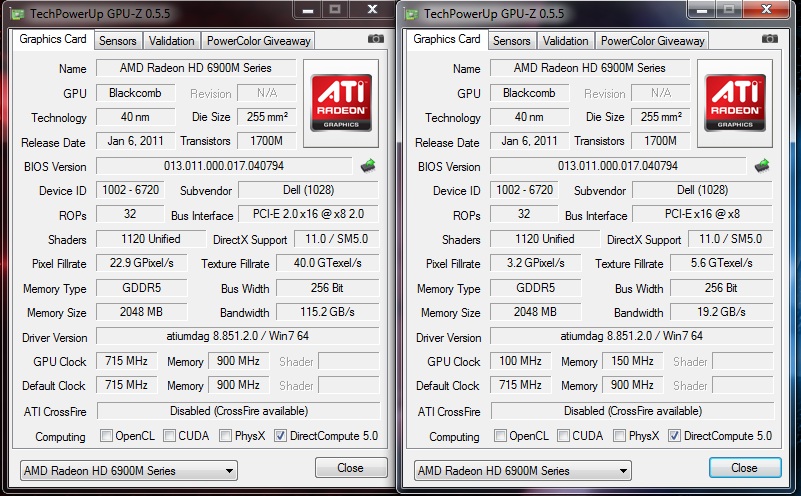
Meanwhile, my CF is not working again. Same story as before. If CF enabled performance is zero and if it's disabled the primary is working fine. Attached is a screenie of GPU-Z, it always shows those clocks regardless of whether the CF is on or off. I tried reflashing a few times to no effect. Replacing the CF cable didn't help either. Any more ideas?
Attached Files:
-
-
This is exactly the problem I had with the original set of 6970M modules in my first M18x. I think one of your cards is dying. Alienware replaced my first set with a pair of 6970M that had other issues. Have you tried swapping the cards in their PCIe slots to see if the problem follows the card to the new slot? (The cards and their vBIOS firmware are identical, so swapping them is not an issue.)
While it is not a permanent solution, as a diagnostic step I used RBE to edit the vBIOS and changed all stepping settings for clock speeds and voltage to the factory default maximums. When I did that, performance in CrossFireX was flawless. For some reason the card that is showing Level 1 (low) power clock settings in GPUZ is refusing to ramp up. -
That's gonna be the next thing on my list, thanks Mr.Fox. I also have a new mobo to try, just in case.
-
You can run GPUZ in the background on each card during a bencmark. In GPUZ, set the core and memory and voltage sensors to record the maximum readings rather than display current reading. If a card does not increase to its maximum limits under load, you can save a screen shot of the GPUZ readings as proof that the card(s) are defective. You can also easily replicate that with Tech Support remotely connected to observe the test if necessary. (See thumbnail)
EDIT: @Aiki - look back at your GPUZ screen shot. Look in the Bus Interface field and you will notice that one card is missing the "2.0" on the PCIe bus. The card that is missing this detail is definitely defective. This is another identical symptom to the problem with my first set of 6970M cards.Attached Files:
-
-
could be that the clevo cards are having issues with the vbios/mb...didn't you flash to the dell vbios?
-
@Mr. Fox,
yes I've noticed that but the problem is the cards are from Clevo and won't be replaced
@John,
Yes, I flashed the secondary with the dell vbios and then back with the Clevo one. -
how many people running clevo 6990m's in the m18x's? not counting you
-
Obviously, I am not. It's a bummer this will not be covered under warranty for Aiki.
However, the fact that Aiki is having an issue identical to the one I had with Dell video modules is interesting. In a sick sort of way it is comforting to know that the same defect is affecting some Clevo cards in addition to some of those sold by Dell. -
There's probably no other M18x owner with clevo cards, AFAIK. I'm thinking to flash them with Dell vbios and back again...dunno
-
What was the issue with the video modules Fox or Aiki?
-
CF stopped working. Performance is close to zero when it's turned On and fine when it's of (only primary is working in that case, of course).
-
im not sold just yet...
all sorts of things to try....if one has the patients and know how to do so.
so you tried these cards one at a time by them selves yet? and if so...did they both work exactly the same? -
not yet, will try when I get back to the office on Monday.
-
and also load up fresh drive with nothing on it
just drivers and teamviewer...
-
Goodness, just caught up on this thread from the last couple days. Dag Johnksss, bringing the serious heat, kudos man.
-
-
-
murphy1965 - welcome to NBR. We're glad you joined us. Nice work on the benchmark scores. Those are both very respectable numbers. +1 rep
-
Thankyou Mr.Fox i appreciate it, pretty new to this laptop overclocking , but i am very happy with it , just ordered 16gb of kingston pnp 1866 mem , and that will be it for the moment as its runs everything i need it to run , but maybe later when i am brave enough and have some time will prob upgrade the cpu , and relap the good old graphics cards and that will be it or will it lol o yea and the drive thinking of an m4 256 ssd heard they are pretty good , never had one before do they make a diff in benchmarking ?
-
Having an SSD did not really make a measurable difference in benchmark scores, but it did provide a huge difference (positive) in user experience. I highly recommend the Crucial M4 series.
-
thanks sir.
looking good. and welcome to nbr.
the m4 is a very respectable choice. also it's cost effective. -
Thanks for your reply will look into ordering one then .
-
Thanks Johnksss , not so good now looking at your score lol
-
my scores are based on a different type of over clocking...so no worries. we like all kinds of scores in here!. and yours are pretty damn good for a first timer..
-
Thanks Man , so will have a play and see if i can improve them , but really busy out in the middle east so dont get much time but i think the 1866 mem will help a bit running 1333 at mo anyway cheers.
-
Murphy, welcome and nice scores. Have fun out in the mid east. Spent plenty of time out there and passed my days benching.
-
Hi Thanks DR650E , well one of my pass times here is ragging my 1098S around the BIC (f1 Track here in Bahrain ), which has just started up again as it is closed during the hot months so thats what i will be doing most fridays and sats do love my Dukes
-
oven the cards
-
Can someone direct me to where I can find proper software for overclocking ATI cards; maybe a tutorial as well. I am looking to do a very small overclock on my GPU's. I have experience only overclocking Nvidia cards. I most likely well just try for 800/1000 for the two clock speeds. Thank you in advance.
-
Eliminater ... use Sapphire Trixx ... just google it, download. Ensure that in settings you click sync your cards and click Disable ULPS .... then play as you will
-
Anyone else having trouble posting results for Vantage to their account? I ran benches last night and again this morning and keep an getting error that it was not successfully saved. 3DMark11 seems fine. I achieved my highest scores yet last night with both and could only post the results for 3DMark11.
I also tried saving results last night and re-posting the results this morning and same thing.
3DMark11: P8092 AMD Radeon HD 6990M video card benchmark result - Intel Core i7-2760QM Processor,Alienware M18xR1 score: P8092 3DMarks
(will be pushing for 8100)
Vantage: P26029 (see thumbnail)Attached Files:
-
-
your running the newest version of vantage and the 4.2 system file right?
-
I am 99.9% sure that is the case, since I did a clean install with freshly downloaded files from Futuremark about 10 days ago. I'll check after work or maybe during a break today to be sure I have the latest on both. The only error message is "Submitting saved results failed." The bench completes successfully and there are no errors until I hit the submit button.
-
in the mean time ill make a quick run and see if i can submit.
ok, i think i know what your talking about now...when this happens i usually open up a web browser first...then i hit the submit button on vantage..some times as many as two times to get it to take. -
I had actually tried that before and tried it again after your suggestion and it did not work.
On a whim, I opened Internet Explorer and Google Chrome (my default browser) and with both browsers open (not one or the other) I could submit successfully. My guess is that a Windows Update or some other glitch may have messed up an association Vantage is using.
AMD Radeon HD 6990M video card benchmark result - Intel Core i7-2760QM Processor,Alienware M18xR1 score: P26029 3DMarks -
I have so many saved benches that I need to submit
I'm so lazy
-
Not yet, M8.
Here's what I did:
1) Flashed both cards with dell vbios - > no post, lol (kinda expected)
2) Put a dell 6970 as a master -> boot to DOS, flashed the 6990 with a clevo vbios.
3) Put the second 6990 in a slave slot and flashed it with a clevo vbios.
4) removed the 6970 and swapped the 6990's in their slots.
5) So far, everything is working... But I'm confused
*OFFICIAL* Alienware M18x Benchmark Thread
Discussion in 'Alienware 18 and M18x' started by BatBoy, Apr 30, 2011.