 Problems? See this thread at archive.org.
No worries, bro. It might have been so busy at work that I missed it when it was mentioned here on the forum. I discovered IXTU totally by accident last night.
It certainly perked up the 2760QM a bit. Using IXTU, I can adjust some of the TurboBoost settings higher than A05 will let me. After changing them with IXTU they are changed in the BIOS, too. It seems the maximum values available for selection in the TurboBoost settings menus with A05 are lower than the maximum values available with A03, but IXTU overcame those A05 BIOS limitations.
-
-
TBH, I didnt know of it till Fox told me. Im a total noob.
-
*facepalm* on me!
-
Double facepalm on ma'self!

-
Hola Fox.... Since we pretty much have the same computer. Please share your bios settings with me (top to bottom). You can send me a PM if you like.
Also this batch OC file you attached, how do i use this? Also I am on a04 (dell)
I see you are using a05- any benefit? Is it the standard one? Any benefit from a04? -
If you are using the the 580m setup...Then you are fine where you are now.
Also, you can get allot of help from Mr Fox's thread here. That's if you haven't checked it out already.
http://forum.notebookreview.com/ali...-throttle-fix-no-vbios-flashing-required.html
And for over clocking a non extreme cpu...You can use the bclk slider in xtu. With your cpu, you should be able to over clock to about 1.05 or 1.06 without doing anything out of the ordinary. -
No problema, señorita.
For the batch file the instructions are exactly the same as what I have posted at the link in my signature. You're simply using a different batch file to run at higher clock speeds. Instead of setting it up to launch at startup, you can simply store it in the folder with the other batch files and nvidiainspector and send a shortcut to the desktop to launch it on demand. In fact, I only use the 620-1240.bat file in the startup folder, as it is basically perfect for daily use and gaming.
The only value I can find in A05 with my NVIDIA 580M setup is the NUMLOCK state is on at boot. It is defaulted to off with older BIOS versions and no way to change it. DPC latency seems to be an issue with both A04 and A05. I have all BIOS versions saved and may go back to A03... I am debating whether to leave it alone and live with the DPC issue because the NUMLOCK thing makes me really happy. I don't see any point in you flashing A05 unless you prefer NUMLOCK to be on by default. If you still had AMD cards, then I would recommend moving to A05.
Now for the BIOS settings...
My system refuses to boot with the BCLK at 105 or higher. I am having good results with 104.8 (10477). My previous M18x ran very stable at 106MHz with the i7-2720QM CPU and 6990M CrossFire, but it may have been the A03 BIOS that allowed it.
![[IMG]](images/storyImages/biostn.jpg)
You can use the Intel Extreme Tuning Utility instead of entering the BIOS. A link to download was provided in another post this morning. This is easier, but you'll need to reboot in most cases to apply new CPU settings. If the settings choke your system, this utility will give you the option of restoring previous settings. I think this is a very slick utility and recommend using it instead of changing setting from within the BIOS. I'm leaving all the memory settings at auto defaults. Increasing voltage to 1.55 and 1.60 from 1.50 and manually setting speeds at 1600 or higher offered no advantage in benchmarks. No point in pushing things when doing so doesn't serve a purpose and yield no results.
![[IMG]](images/storyImages/ixtusettings.png)
-
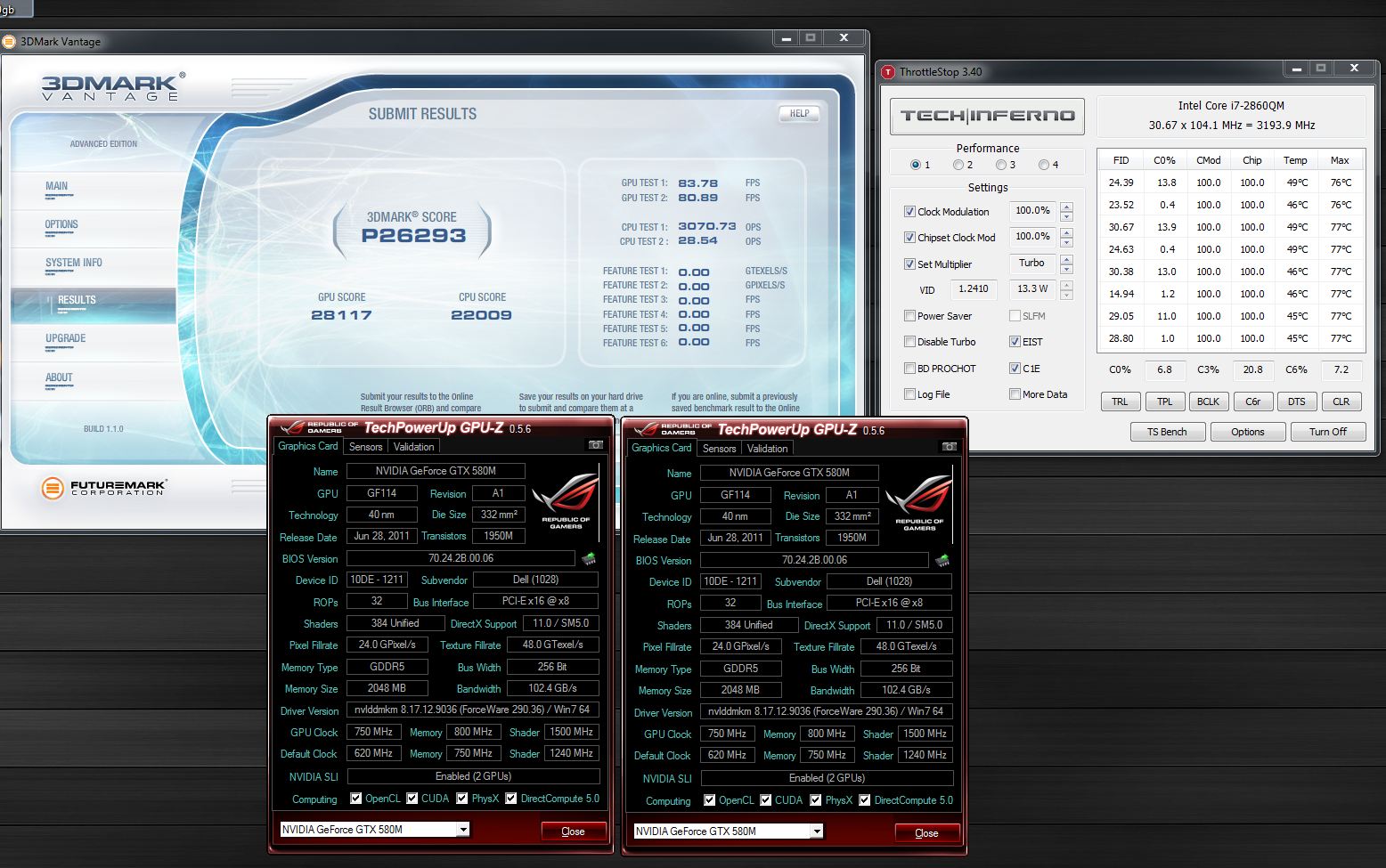
just a test run using the fox fix and his latest batch file too. wanted to see if gpu is up to par and it look good so far both gpu maxxed out at 73 degrees.
Attached Files:
-
-
Nice gpu score Inap!
-
Excellent, inap! Nice bench.
-
thanks guys, its actually my first oc run on this beast. is there a leaderboard or something? not that i think i have a chance at the moment, but would be nice to have one to compare scores and such. i really hate testing clocks and stuff like that normally i just look at the best score and start from there. hahaha
-
Hummm, Maybe I should start one....
-
I think we need a leaderboard
let the competition start now
-
That's a lot of pages to go through. Ill start getting on it.
-
Wow that would be awesome. Maybe just wait and let people repost their scores instead of trying to sort through everything yourself john. Maybe a seperate ATI/NVIDIA board.
-
Im thinking you are right. I will do it that way.
-
For now u can just put mine in 1st place as a place holder.
-
Sure thing
Temp Setup:
Requirements:
Your screen shot must have the following. No exceptions.
cpuz x3 (meaning - cpu/memory/mainboard)
gpuz
And when posting a screen shot of the screen.(vantage/3dmark06 and others) Do not just leave all the information covered up. Scores will be rejected.
Also. This is a pure speed benching list. So what ever you can do to make your system go faster...is open game!
(more to come to this list)
M18XR1 OVERALL
3DMARK11
1: Terry702 - P8569 - AMD
VANTAGE
1: Inap - 26293 - NVIDIA
2: Danxbix - P27926 - NVIDIA
3DMARK06
1: Danxbix – P28671 - NVIDIA
3DMARK05
3DMARK03
3DMARK01
M18XR1 NVIDIA
3DMARK11
VANTAGE
1: Inap - 26293
2: Danxbix - P27926
3DMARK06
1: Danxbix – P28671
3DMARK05
3DMARK03
3DMARK01
M18XR1 AMD
3DMARK11
1: Terry702 - P8569
VANTAGE
3DMARK06
3DMARK05
3DMARK03
3DMARK01
M18XR1 EXTREME CPU OVER CLOCKING (2920XM/2960XM)
WPRIME 1.55 32M
WPRIME 1.55 1024M
SUPERPI 1M
SUPERPI 32M
PIFAST
CPUZ
M18XR1 NON EXTREME CPU OVER CLOCKING
WPRIME 1.55 32M
WPRIME 1.55 1024M
SUPERPI 1M
SUPERPI 32M
PIFAST
CPUZ -
finally get my m18x^^
Attached Files:
-
-
Haha man I was just joking. But I'll take it for now.Lolz
I better take a screen shot now . or else it be gone by mornin.
-
latest vantage run P27926
NVIDIA GeForce GTX 580M video card benchmark result - Intel Core i7-2960XM Processor,Alienware M18xR1 score: P27926 3DMarks
Also can you move tally to page 1? -
So far.........
![[IMG]](images/storyImages/44x99short85long56secno.th.jpg)
![[IMG]](images/storyImages/42x99short85long56secno.th.jpg)
![[IMG]](images/storyImages/wprime45x.th.jpg)
-
This is what im talking about.
And when posting a screen shot of the screen.(vantage/3dmark06 and others) Do not just leave all the information covered up. Scores will be rejected. -
Ok fair is fair will run them all again at some stage.
-
lol. No worries right now. Still waiting for batboy or mr fox to move this to the front page.
Guys, any input is welcomed. -
new 3dmark06 benchmark 28671
-
This one is looking allot better.
-
update 3dmark06 29827
-
Thanks! im here now
-
While John moves his score post to the new thread, please refrain from posting in it until he has completed his post.
Continuation of the M18x Benchmark Thread is here:
http://forum.notebookreview.com/ali...alienware-m18x-benchmark-thread-part-2-a.html
*OFFICIAL* Alienware M18x Benchmark Thread
Discussion in 'Alienware 18 and M18x' started by BatBoy, Apr 30, 2011.





![[IMG]](http://imageshack.us/photo/my-images/853/44x99short85long56secno.jpg/)
![[IMG]](http://imageshack.us/photo/my-images/221/42x99short85long56secno.jpg/)
![[IMG]](http://imageshack.us/photo/my-images/857/wprime45x.jpg/)
![[IMG]](http://imageshack.us/photo/my-images/534/44x99short85long56secno.jpg/)
![[IMG]](http://imageshack.us/photo/my-images/838/44x99short85long56secno.jpg/)
