 Problems? See this thread at archive.org.
The best runs I ever had with 6990M CrossFire...
Vantage: AMD Radeon HD 6990M benchmark result - Intel Core i7-2760QM Processor,Alienware M18xR1 score: P25730 3DMarks
3DMark11: AMD Radeon HD 6990M benchmark result - Intel Core i7-2760QM Processor,Alienware M18xR1 score: P8092 3DMarks
-
-
Just ran mine with my everyday overclocks as follows:
M18x:
2960XM factory overclocked -Level 3
Dual 6990Ms running at 820MHz Core clock/1053MHz RAM clock
16GB DDR3 1600 RAM
Dual Hybrid SSD drives in Raid 0
Result:
7046 3D marks in 3D Mark 2011
Stock out of the box I got about 5700 so I'd say that's a pretty reasonable result with no physical mods, unlocked BIOS or overvolt.
GPU gets up to 69 degrees C, only 3 degrees hotter than stock. -
Not bad, Sentinel196... great temps, too. +1 Rep

Please run a Vantage benchmark with all of the same setting when you have a chance.
With your XM CPU you can wring a lot more performance out of your GPUs than I can with my 2760QM. I think you'll be able to hit 8k in 3DMark 11 and about 28-30k in Vantage without a huge amount of effort. You may need to force fans to 100% and bench with the system cold to get there. -
There are my runs with GPU's OC to 800/1000, obviously no CPU OC
AMD Radeon HD 6970M / 6990M video card benchmark result - Intel Core i7-2820QM Processor,Alienware M18xR1 score: P7118 3DMarks
http://3dmark.com/3dmv/3697604 .Stock best in my signature
Lately I did wprime 1024 test and noticed that after around 50sec my CPU slowed down from 3.1 to 2.8GHz on all cores(using HWiNFO64) even though my temp was 70 C, is that normal??? I thought it should be running 3.1 GHz all the time. Time taken 272 sec which I think is not bad for 2820QM, right? -
Yes, that is normal for a non-XM CPU. Except for the Extreme CPU line-up, clock speeds drop as more cores are employed.
It is only possible to run at maximum turbo speed when only 1 or 2 cores are being used with a non-Extreme CPU. This applies to mobile and desktop i7 procs.
Here is some light reading to help understand how it works: LINK and LINK
Those are good benchmark scores, bro. Nice job.
-
Uff... That's a relief i thougt my CPU is downclocking for some reason. Lately I flashed A05 bios even though my A02 was working fine and thought that was the reason for drop from 3.1 to 2.8GHz. So it's 3.4 for one core, 3.3 for two cores and 3.1 for four cores in 2820QM and then even 2.8 GHz, right?
Thank You Mr. Fox -
Yep, I believe that's correct... for the i7 2820QM.
-
Scores are looking pretty good. Nice job team alienware.
-
Mr. Fox I was wondering what will be Crysis benchmark score for your machine with all very high and 64bit no OC. I'm getting 47,3 fps and would like to compare to 580 SLI. Performence of our CPU's should be more less same. Thanks in advance .
-
Here's a run of '06 with stock clocks on cpu (OC disabled in bios) and gpu. No tweaks to anything bar the Fox-Fix for 620 defaults
NVIDIA GeForce GTX 580M video card benchmark result - Intel Core i7-2960XM Processor,Alienware M18xR1 score: 24264 3DMarks -
Good run, Steve. I'll give '06 a go again later this weekend.
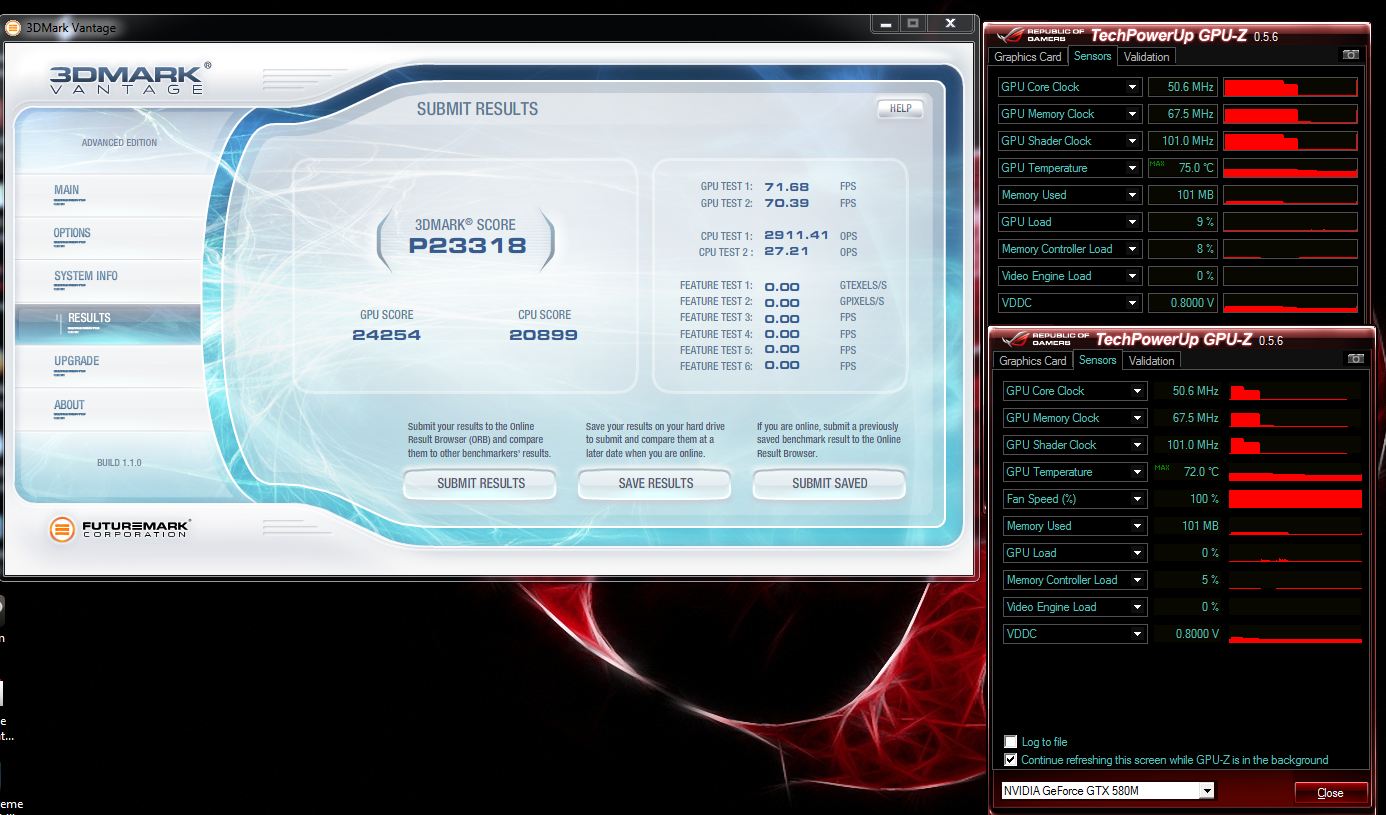
I just pulled off my 2 best 580M runs on 3DMark11 (P7226) and Vantage (P26010), and dog-gonnit, I forgot to save the Vantage result online after saving the screen shot. I ran it again at got slightly less. Luckily, I do have the screen shot.
3DMark11: NVIDIA GeForce GTX 580M SLI benchmark result - Intel Core i7-2760QM Processor,Alienware M18xR1 score: P7226 3DMarks
Vantage: NVIDIA GeForce GTX 580M SLI benchmark result - Intel Core i7-2760QM Processor,Alienware M18xR1 score: P25848 3DMarks
![[IMG]](images/storyImages/7226.th.png)
![[IMG]](images/storyImages/26010.th.png)
![[IMG]](images/storyImages/31102257.th.png)
![[IMG]](images/storyImages/42631598.th.png)
-
Damn fine results Fox.....I love watching those screenshots/tests....especially the bit where the missiles blow the planet up and the fire/explosion below ripples outwards....great stuff!
These 580's seem to run nice and cool....compared to the 6990's -
Yeah very nice Mr. Fox!
-
may as well post my stock score for comparison. everything stock inclucing drivers.
Attached Files:
-
-
Not really number chasing. I grew out of that after holding a few records back in the early 2000's
With the above mentioned overclock I got from 30FPS in Modern Warfare 3 to 70FPS running frame sequential 120Hz 3D with everything maxed out, so I'm happy about that! In Battlefoeld 3 the lowest FPS I see is 70, again, maxed out.
Will report back as soon as I get a chance to run Vantage. -
Mr Fox
Hola, On the right side of your screen (gadgets) Whar programs are you using to read temps, intel, GPU, etc.? -
Hola Mai... I use GPU Observer and Intel Corei Series sidebar gadgets and you can get them both here: OrbLog (same web site as nvidiainspector). You don't need to have any other programs running in the background like you do with some of the other gadgets out there. I run RealTemp in my tray sometimes and the temps match RealTemp (also match HWiNFO64) so I know they are accurate.
With GPU Observer you select the GPU you want to monitor and you can have one gadget open for each GPU. That's why I have two of them. -
Just ran the Vantage benchmark for you....
25499 3D Marks.
I noticed in the last two tests that the CPU was dropping down to around 2.5GHz when the temp went up over 90C. I'm guessing that's some kind of throttling to protect it.
I might run the benchmark again with a level 1 overclock to see if I get a better score. I'm guessing the temps will remain lower so I should actually see a higher average clock speed.
I also did some more testing of ym graphics card. I pushed it all the way to 880MHz clock and 1150MHz RAM and it was still going fine with no problems, however I don't get any real world increase in performance over 850/1100 and the temps were significantly higher, so I think 850/1100 is my sweet spot.
I'll report back when I've run Vantage with the Level 1 overclock.
Just ran again with Level 1 Overclock.
Temps only hit 85C on the CPU this time, but i still saw the clock speed alternate between 3.5GHz and 2.7GHz under full load. So it's not a thermal trigger I don't think.
Perhaps an additional core switching in and out causing the speed to fluctuate?
Do you guys see the same thing happen on the CPU tests?
Anyway with the Level 1 Overclock I got 25565 3D Marks in Vantage.
And........ 7403 3D Marks in 3DMark 2011 -
Good work! Nice scores, too. Since I do not have the XM CPU, I cannot specifically address your questions. I sure someone else will. It would be normal for throttling to occur with any CPU if the temps go high enough.
I just found this information from DELLChrisM. I thought it was interesting. It may have some application on mobile XM procs...
Alienware Area 51/Aurora Overclocking - Alienware Forum - Alienware Club - Dell Community -
Hello all, here is my bench result before and after using the "Fox Fix"
Guys, i wanted to buy the IC diamond 24 carat, how many tube will i need for 2 GPU and 1 CPU? -
One tube is way more than you need. It's enough to do it probably 6 times or more.
-
Thanks Mr. Fox, I'll go and order one immediately, or is there something better that i do not know about?
-
Nope... ICD24 is awesome. When I find a need to re-paste it is what I use. I am having excellent results with the Dell factory TIM on the CPU and GPU on my current M18x so I have not found a reason to re-paste on this one.
Nice work on the benchmarking, bro. I forgot to say so and came back to comment on that. I've already doled out as much rep as I am allowed to in 24 hours, but I will try to remember to come back and hit you with some for the post above. -
Yippee!
I'll rep ya again if it let me XD
I still wanted to go for 27000+ though but it's waay too risky for me i think
-
Unless you can do it with your wicked XM CPU, I would not push the 580M cards any harder if I were you. (Just my measly 2¢ worth.) Breaking 26k is killer. You're in the upper echelon even for desktops with that kind of score.
-
Here's a quick vantage run with my xm set at level 3 & the OC'd "Fox Fix" batch file getting ran for the gpu's.....
NVIDIA GeForce GTX 580M video card benchmark result - Intel Core i7-2960XM Processor,Alienware M18xR1 score: P26013 3DMarks -
P26013! That's what I'm talkin' about. You and ivander are rocking today.
-
Icd24 works great but be cautious cause the paste can scratch your die if done improperly. Icd24 also discolor the heatsink too.
-
I use the pea-sized method rather than spreading it across the die to help minimize the scratches. Diamonds are definitely harder than metal, LOL. Removing old ICD24 from the die using a razor blade instead of rubbing it off also helps.
-
Thanks for the info inap! Does discoloration have any negative impact? I'll definitely do the pea method!
-
no impact that i know of, just thought it was worth noting. icd24 is great in a single application, but if you like to tinker around or often taking off the heatsinks then i would recommend a different paste to minimize the risk of scratching your die.
-
No man, i wont be opening it for at least another 6 month at least
-
Technically...You should be fine. Just run the system the way it was meant to (with c states in place) and all will be fine on stock paste. The stuff dell uses now is pretty damn good.
-
I agree... the TIM Alienware uses is good stuff. I haven't seen any need to re-paste as the temps are already just fine.
-
Totally agree fox...
-
Agreed, Dell uses some nice TIM. I've only repasted my 4 year old Inspiron 1720 since I had to clean and put in a new CPU and my M17x R2 since I benched that a ton and swapped most parts. But every other dell system I won hasn't been repasted. That includes my M11x.
-
Hey DR. Question.
What did you use to put your 3rd hard drive in your M17X R2 and where did you get the en-closer. Also, do you think it would work on the M18x R1, thanks. -
Yea, it'll definately work. Fox and I were talking about it in another thread. He put his R2 optical drive in the 18x, so my enclosure should work. It's all linked in my sig. Let me dig up the link were I bought it from... Here's the HDD caddy and here is the enclosure. The enclosure should come with both a slot load and tray load bezel. In case it doesn't you can get a slot load bezel from here.
The felt put on the bezels to keep dust out is crap. I bought a bezel from mac recycling before I got the enclosure and both were the same crappy felt. I just pulled it off so it wouldnt scratch discs. It seemed to tight and low quality. But my enclosure came with both (slot/tray) bezels which I didn't realize when ordering. Didn't even see it in the box.
moar space!! -
Ok, good. I would rather run more drives than have a dvd in there. Besides...I can add a bluray burner later.
-
Exactly, I love the flexibility it adds. I can take everything with me and not have to pack a bunch of externals. Although I pack externals anyway for backups lol. I'm a bit of a pack rat.
-
+100 on that! -
A couple of runs before hitting the sack...
3DMark11: NVIDIA GeForce GTX 580M SLI benchmark result - Intel Core i7-2760QM Processor,Alienware M18xR1 score: P7226 3DMarks
Vantage: NVIDIA GeForce GTX 580M SLI benchmark result - Intel Core i7-2760QM Processor,Alienware M18xR1 score: P25914 3DMarks
![[IMG]](images/storyImages/p7226.png)
![[IMG]](images/storyImages/p25914.png) Last edited by a moderator: Feb 6, 2015
Last edited by a moderator: Feb 6, 2015 -
Arise and shine... happy Wednesday!
Vantage: NVIDIA GeForce GTX 580M SLI benchmark result - Intel Core i7-2760QM Processor,Alienware M18xR1 score: P26071 3DMarks
![[IMG]](images/storyImages/26071.png) Last edited by a moderator: Feb 6, 2015
Last edited by a moderator: Feb 6, 2015 -
Awesome stuff Fox - you even beat my score with Level 3 OC on my XM and your very own FoxFix at 725!!!
-
Very Nice indeed!! +1 (when it allows me to do so)Last edited by a moderator: Feb 6, 2015
-
Thanks, Gents. I actually goosed it a bit with a batch file set for 750/1500/1600. See attached.
I also goosed my FSB and TurboBoost power limits. If you haven't already found it, grab the Intel Extreme Tuning Utility 2.1 (direct from Intel Download Center). It's a nice alternative to trial and error booting in and out of BIOS, since it has a Windows GUI. It is designed for Extreme procs, but it still lets me change the same settings as what I available in the BIOS with my 2760QM.Attached Files:
-
-
Nice Fox!!!!
-
Thought we put you up on this already? My bad!Last edited by a moderator: Feb 6, 2015
*OFFICIAL* Alienware M18x Benchmark Thread
Discussion in 'Alienware 18 and M18x' started by BatBoy, Apr 30, 2011.


![[IMG]](http://img829.imageshack.us/img829/2200/7226.png)
![[IMG]](http://img197.imageshack.us/img197/8584/26010.png)
![[IMG]](http://img197.imageshack.us/img197/2210/31102257.png)
![[IMG]](http://img853.imageshack.us/img853/2200/42631598.png)



![[IMG]](http://img580.imageshack.us/img580/3861/p7226.png)
![[IMG]](http://img196.imageshack.us/img196/872/p25914.png)
![[IMG]](http://img214.imageshack.us/img214/5603/26071.png)
