 Problems? See this thread at archive.org.
I really wish that the cpu heatsink had three heatpipes on the Alienware17, such as on the Alienware 18.Then the temperature had certainly gone down a bit.
-
-
Power limit on AW17 annoyed me more than temp did.
It stops running at turbo after sometime if the temp > 85.
The clock start to fluctuate.
The only way to stop this is OC 3.9 or less.
or setting cache ratio to 24.papusan likes this. -
I am doing LinX 0.64avx x 20 times with 13368MB memory.
I will leave it being tested.
The GFlops value of first 3 tests are 108.15, 108.20, 108.19.
Very nice looking till now.
Gonna sleep now, hope my m18x R2 dont turn off. -
Hello Godfafa
Sorry I do not have time and give you answers.
Same answer in this thread: http://forum.notebookreview.com/ali...nware-m17x-benchmark-thread-part-4-a-390.html
Unfortunately there are not many with Alienware 17 who enjoy and keep on with overclocking of their laptos
Answer: I run Wprime 1024 benchmark test and my [email protected] have no problem with the clock fluctuates When OCed over 4.0. My processor is running at the maximum clock frequency through the entire test without problems. Wprime 1024 test is quite long, but my Alienware 17 has no problems with this. The same applies to other tests such as eg Trottlestop bench (1024) and Cinebench 11.5. Is possible 4700.4800 and i7-4900mq have this problem with the clock fluctuates When OCed of 4.0 or more after like 30-60 secs. I think this problem applies MQ processors.
-
wow good.
But no it's not the mq cpu. I've tested with 4930mx. Same result.
I dont know how you manage to do that. No fluctuation at all? clock is kept for ever in AW17?
Incredible!
DId you select cTDP in the bios to OC?papusan likes this. -
NO No NO This is useless.
No .. Puts Bios inside the extreme edition tab in the bios. Puts my numbers denominations inside the bios and use xtu. These Hotwell processors from Intel are of very variable quality. Some Hotwell clocks good, while others clocks appallingly bad. And in addition, Dell provides the world's worst overclocking profile in the bios. Total useless. It is perverse and only have the highest overclocking on only one core, and in addition provide a horrible high volt (1.279mv) and 0 AMP
-
Heh still better than my turd of a 4930K. 4.5GHz needs 1.39V to be stable, and is about as much as I can get it to go. Still insta-BSODs on Prime95 even at 1.45V if I push 4.6GHz, so I have clearly hit a wall here.
-
yeah I agree that dell made too high pre-voltage OC presets.
I am asking how did you manage to keep clock for a long time.
Can you show me your XTU settings?
godfafa`s XTU score: 1096 marks with a Core i7 4900MQ
this was my xtu setting when I used to OC with AW17. But I could not manage to keep clock stable at those benches.
Does your 4930mx keep 4.2 at XTU bench all the time?papusan likes this. -
I use adaptive voltage and not static (Volt increases more than standard, from 1.215 up to 1.285mv in xtu bench) on my processor, then clocks my processor down to 3.8 - 3.9ghz and up again under xtu bench (Xtu uses AVX Instructions that allows the clock frequency varies) . Do not think there are any overclocked laptop processors holding clock rate under this xtu bench. But under Wprime 1024 and Trottlestop bench (1024) is full speed through the benchmark test.
I also use the crippled win 8.1, which cripples processor tests.
http://hwbot.org/user/papusan/ -
The clock should stay even in laptop CPU. If it does not, it is not OCed well, I'd say.
Well OCed CPU always keep clock at the proposed clock.
My 3940xm does at @ 4.8-4.8-4.8-4.8 for all benches. Even in XTU bench it stays straight at 4.8.
And 4900mq that I used could hold clock for 30-40 sec but then it drops down and fluctuate after then.
If you OC like 3.9-3.9-3.9-3.9, your 4930mx will stay at the clock forever even in xtu bench.
I think there is a mobo power limit in all ''17 alienware inlcuding m17x R4 and AW17.
The clock you saw may be a fake number that always show highest clock in win8.1
(win 8.1 has a intel speedstep bug that always happen if you turn on HT) -
As I understand, several have tested the Hotwell Laptop processor under xtu bench with similar behavior. I think that Mr Fox's Hotwell and win 7 do the same under xtu bench. You better ask Mr Fox about what I say about these i7-4900 series processors.
It is only under xtu bench, the processor has the strange behavior. Under all other bench tests, then everything works fine.
There are several Alienware 18 laptops which have same problems with overclocking the Hotwell processor. Hotwell is probably one of the worst laptop processors Intel has created.
Edit: Godfafa what score you get with your i7-4900mq under Wprime 1024 and Cinebench 11.5? -
Yes you are right abot "it is only under xtu bench ...................then everything works fine".
But for laptop due to thermal problem, we can;t do linx or prime (which is more hard-loading benches) as desktop users do when they check the stability of OCed CPU.
If you check the max CPU TDP for the benches you did, xtu bench would be higher than most of other benches. This surely means it is harder tests than other benches.
I am pretty sure all CPU can stay at the proposed clock. Why dont you do XTU bench at 3.9. It will be straight from the bengining to end.
If not, it's either voltage / current limit that is stopping the cpu to keep clock.
Trust me on this. CPU must keep clock if not , there is something.
XTU bench.. is one of the very high loading bench. (not as hard as linx 0.65 avb or prime though) -
English is not my mother tongue. It is very hard for me to explain.
But I define well OCed CPU as CPU that keep clock at the proposed frequency in any tests.
If it keeps clock in some test and not in other tests, there is something that block the CPU to keep the clock.
And most of the time, it is voltage, current or power.
I haven't used AW18. So I can't tell much about that.
m17x R4 has a power limit problem. TDP is maxed at 68w, turbo time window is limited at 56s.
AW17 in my opinion has one too. It can't keep clock forever in win7. (win 8.1 is another story because it shows "fake"number due to intel speedstep bug)
m18x R2 has one power limit. The highest voltage we can give to CPU is 1.501v.
If everyone using AW17 or AW18 can't keep clock in XTU bench, then it must be MOBO power limit, not CPU.
(mobile and desktop CPU are actually the same except for the pre-set TDP by intel. So if desktop user can keep clock in XTU bench, then laptop can too. If not it's either OC fail or MOBO limit)papusan likes this. -
To answer your question. I have sold AW17. I played it for two weeks.
I have not done wprime and cinebenc R11.5.
But this was my cinebenc R15 score.
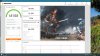
-
New Score: Current 2nd Place on firstrike
A18 : NVIDIA GeForce GTX 780M(2x) and Intel Core i7-4700MQ
NVIDIA GeForce GTX 780M video card benchmark result - Intel Core i7-4700MQ,Alienware 01W2J2
View attachment 117679
View attachment 117681
View attachment 117682
http://img.techpowerup.org/141112/nvidia_20141112_230847.png
Mod 780 vbios,The 344.56 + mod linked here
-
With many thanks to svl7, J95 & Mr Fox.
NVIDIA GeForce GTX 780M video card benchmark result - Intel Core i7-4700MQ,Alienware 01W2J2
9815 with NVIDIA GeForce GTX 780M(2x) and Intel Core i7-4700MQ
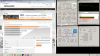

Firestrike Position 1 for 4700MQ & 780's
-
Why do you use Speed fan and not Hwinfo64?
Shall not i7-4700mq go on standard 3.4GHz and a max overclock frequency of 3.6? Your processor is clocked at 3.2 ghz. https://d2ssnvre2e87xh.cloudfront.net/media/1.PNG
By the way: Nice score :thumbsup: -
To be honest I've not spent the time to reading up how to use Hwinfo.. and I'm using Speed Fan to force the fans on constant.
I have problems pushing the CPU beyond the bios overclock, when I manage to push the CPU a little harder its seem to be to the detriment of the GPU's ..
So i have been playing a balancing game between the two.
Thanks, I picked my mark a few weeks ago.. then when the new driver came out 344.65 I smashed that, I need to set a new a new target now.
Maybe I should try to now to work up the scores of the other CPUs you pictured.
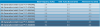
The next target along the line is 9981 with a Intel Core i7-4900MQ, I have a higher GPU score just need to work out how to push my 4700 a little harder.papusan likes this. -
Then you should not use the overclocking profile in the new bios from Dell .. It is useless. You should use Xtu.
Good luck :thumbsup: -
Some benchmarks of the Samsung M9T 2TB
Single
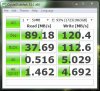
Single with SSD Cache
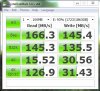
HDD raid 0
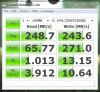
HDD Raid 0 with SDD Cache
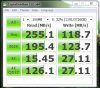
Strangly the sequential write speed drop using SSD cache on my raid 0 array. Not too sure why. Everything else is magic. Having 4TB of SSD Sata 2 like speeds is awesome.papusan likes this. -
I think that the reason that sequential write speed drop Using SSD cache is that the small mSATA drive has a normally very low write speed and are a lousy quality. I am reasonably sure, that there is mSATA drive that is the culprit. Take a look at my weird problems with the little Lite-on mSATA drive in the thread I created. http://forum.notebookreview.com/ali...t-64m6m-msata-64gb-issue-running-3-0gb-s.htmlTBoneSan likes this.
-
Yeah I'm pretty sure that's the case. I've also noticed so many mSata's have poor write speeds. I might look into nabbing another 64gb mSata that has acceptable write speeds.
Any recommendations ?
I think it might also be due lower capacity SDD's having slower write speeds too -
Hi
It is very difficult to give Recommendations about the small mSATA drives, then I do not want this junk. I only use premium ssd drives, and use my little mSATA disk to files I rarely use. If you continue to use a small mSATA disk, I would just looked for a
well known brand. I think it is especially important with a well known manufacturer if one should use
such a small mSATA disk to cashe hdd drives. Lite-on and such unknown brands I'm never going to buy .. It's just such a shame that such a well known brand like Alienware uses such rubbish. Should I replace my mSATA disk'm going to be picky on quality. There are not many mSATA drives to choose from.
-
Yeah I've got a older crappy Samsung rebrand that came with the machine. Sadly a 64gb is all I need for the caching. If I were to get a bigger drive and use the post cache SSD space for anything else it would be somewhat a waste in terms of volatility.
Intel RST only lets a SSD drive act as cache when there is no other data present (unallocated). Should I ever need to disable/activate cache (which I often do) I'd keep losing all the other data on the SSD.
It's also a shame they IRST doesn't allow us to allocate 64gb SSD from anywhere. I'd have loved to have used my Raid 0 SSD @ Sata 3 speeds to cache the HDD raid 0 array. -
There may be an opportunity to use a quality 80gb mSATA disk. They are perhaps a little better quality. The larger disks are, the better they work. If one runs several bench tests with such a small disk, then the speed falling reasonably quickly. Garbage feature works nor particularly well on small disks. They become very slow when execution large files.TBoneSan likes this.
-
You can use the extra space beyond the 64GB cache limit as a PrimoCache Level 2 cache and then the volatility part won't matter. Use that to accelerate the OS on SSD. I purchased PrimoCache a few months ago and have my 4TB RAID0 volume permanently cache accelerated using PrimoCache, but I don't have Level 2 cache because I am using my mSATA for Windows 8.1.
TBoneSan likes this. -
Thank you for the advice Mr.Vox gtx780m to buy a second SLI

Now that's a firecracker:laugh:
Remarkable because I can now choose intel or SLI Graphic -
key combination fn + iGFX - It works flawlessly ! :thumbsup:
Changing a single GPU SLI and back working on the fly
Now it is the power of
http://www.3dmark.com/3dm/4719740
http://www.3dmark.com/3dm11/8972021
I wonder if the newer bios check A11 ?
I am currently using on the unlocked A10Mr. Fox likes this. -
A10 unlocked is great. No need for A11. It doesn't improve anything.
godfafa_kr likes this. -
I believe i can hold 1st rank for few days!!! Here is Heaven 4.0 benchmark, preset= Extreme

-
So it's finally working without a hitch. Nice!
-
After replacing faulty cable, SLI working perfect! I think performance gona improve with better driver support.
-
3DMark primary tests, Results improved finally
Fire Strike: Score 13255, GPU 18735, Physics 10615, Combined 4700
Sky Diver: Score 29593, GPU 53782, Physics 10211, Combined 19395
Cloud Gate: Score 26604, GPU 94531, Physics 7569
Ice Storm: Score 156462, GPU 363563, Physics 52263
Generic VGA video card benchmark result - Intel Core i7-3940XM,Alienware M18xR2
 TBoneSan likes this.
 -
Nearly 19k GPU Firestrike is very impressive, is this stock or overclocked? What kind of temps? SIngle PSU or dual?
-
yes it is, at stock. GPU1 72C max, GPU2 68C max and Single PSU.papusan likes this.
-
Could you run a test with a moderate Overclock? :thumbsup:
-
My personal best score:
Alienware M18XR2
I7 3920XM @ 4.6Ghz - CLU - 11 months w/o repasting.
SLI GTX680M @ 1065/2500 - CLU 11 months w/o repasting.
RAID 0 SSD Samsung PM830 256GB
Single PSU 330W
10086 Points
![[IMG]](images/storyImages/MVe5Jma.jpg) Mr. Fox likes this.
Mr. Fox likes this. -
Looks like the P570WM can in fact break 21k gpu on 3dmark11
NVIDIA GeForce GTX 780M video card benchmark result - Intel Core i7-4930K,Notebook P570WM -
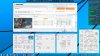
I am posting the benchmark below with a single AC adapter and a modest GPU overclock to come back and compare with the same CPU overclock running 980M SLI stock (when I get the GPUs). I want to see how the physics and combined score compare.
Nice job, Nikos. Glad so see a little more activity in this thread.
 [Nikos] likes this.
 -
Finally I am in the process of creating a new model of DUAL PSU slightly diferent, modifying the manual that I think you created if I am not mistaken, when I have it assembled and ready I will send some pictures about it.
I have been fortunate to have an electronic engineer father and this is his Christmas gift to me.
Besides that I wanted to share with you that I am considering the possibility mounting a website for orders for these devices since I have always thought that many people will want to have this adapter that Dell does not sell or has but at the moment it is just that a crazy idea.
At the moment it is only an idea and not really know how it can work or whether people will be excited to hear about it.
In any case, for now I'm thinking I want to make modifications to the original guide. One is almost certain to be, to include an LCD display with watts consumption in real time.
By the way thank you very much for offering Mr.Fox so long ago we talked about the Dual PSU. As I have always been thinking you are the engine of this forum.
Regarding my last benchmark, What do you think about it? High, mid, low?
Do you think I can go way further with the Dual PSU thing?
Thank you and have a good day you all!
Mr. Fox likes this. -
-
see if your father will create a howto on the new version!Mr. Fox likes this.
-
Here's something I haven't play with before.
Validation Link: GPU, OpenGL and OpenCL database

-
Adrenaline Game Benchmark Tools: Crysis 2; Alien vs Predator; Bioshock Infinite; Tomb Raider; Hitman: Absolution; Sleeping Dogs
CPU and GPU clocks are shown in the screen shot. K-Boost enabled. This is (more or less) the edge of the single 330W AC adapter's sustained overclock load capacity for the R2 with 780M SLI. Power and temp target sliders are maxed out and GPUs are at 1.050V. The last test in Sleeping Dogs has to be toggled down from 4.5GHz to 4.3GHz to avoid tripping the AC adapter. This happened twice so I began the test series over starting from scratch. Other than that final test in Sleeping Dogs, CPU was pegged at 4.5GHz with c-states disabled for the duration of testing. I will compare this against 980M SLI in about a week or so. This is run on air at room temperature of 70°F and max fans. Peak temps are: CPU 79°C, GPU0 71°C, GPU1 75°C. These are peak temps for the duration of all tests with no idle time between tests other than the amount of time it takes to launch the benchmark tools.
![[IMG]](images/storyImages/TM4euN5.jpg) reborn2003, triturbo and Branzy1987 like this.
reborn2003, triturbo and Branzy1987 like this. -
Here is something I stumbled upon this evening. Another nice third-party Windows 8.1 missing component atrocity fix...
WinAero: Winaero WEI Tool
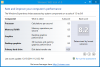 reborn2003 likes this.
 -
Hey guys
Being new to overclocking I've been a lurker on here and TI for a while now, doing lots of reading up. I have an M18x r2, 3940xm, 680m sli, 16gb ram, 840 evo and have downloaded svl7 unlocked bios with stock voltage.
I've done a few runs with 3DMark11 and various settings core and memory, single card and sli, and I have a question for the experienced overclockers.
Should it be possible to run the same highest overclock settings in sli as it is with a single card? -
Possible but difficult because each piece of silicon has its voltage tolerance (?) you con try to identify your best and weakest cards, use gpu-z with mouse right-click on it to read "asic quality" of each gpus (no need to remove, only switch cards name from gpuz sw) and other way, read from gpu-z log (or other sw) the maximum voltage achieved from both videocards to make your consideration.
-
It's going to be a similar to the current mod. He doesn't have enough time to give to this thing just giving me a hand with the electronics.
I think I will have it working in early January.
I don't want to say anything before I have it tested a little bit, but I think you are going to like the new mod.
![[IMG]](images/storyImages/lb160fI.png)
Thanks Mr.Fox I did the WEI benchmark through cmd's command...
PS: No way to have better score than 8.5 right? I don't get why it says that till 9.9Mr. Fox likes this. -
Also here I bring you a benchmark of my new Samsung SSD 850 Pro in RAID 0:
![[IMG]](images/storyImages/3rGxI3G.jpg)
Sorry for the size of the pic if any moderators can tell me or change it to the correct size... thank you very much and sorry for that :S
Mr. Fox likes this.
*OFFICIAL* Alienware M18xR1/R2/18 Benchmark Thread - Part 3
Discussion in 'Alienware 18 and M18x' started by Mr. Fox, Aug 31, 2013.


![[Nikos]](images/avatars/[Nikos])

![[IMG]](http://i.imgur.com/TM4euN5.jpg)

