 Problems? See this thread at archive.org.
Those are nice scores @johnksss . How have you been bro?
-
-
Thanks.
All is well on the western front.
How about you... -
I'm doing alright. Trying to be more active on here.
-
Less active means you are living a life is all. lol
bumbo2, kenny27, Papusan and 1 other person like this. -
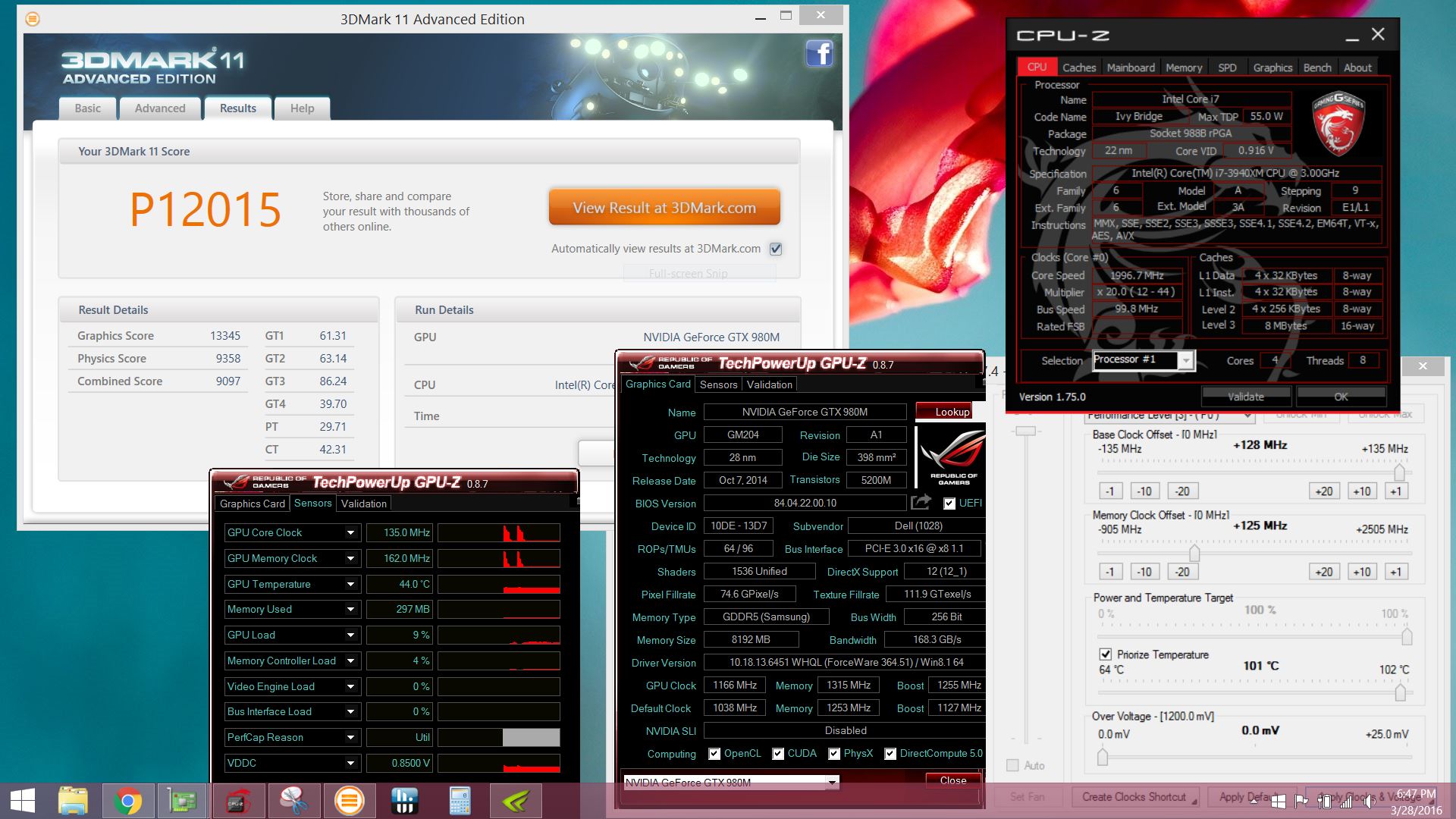
Did stock benchmark right off the bat when I just received it a few hours ago.
After ram upgrade to kingston Hyper X and repaste.
-
@Rengsey R. H. Jr. here is my stock 980m reference benchmark, looks like your getting a bit of throttling... what drivers/bios/vbios are you using?
-
@kenny27 I don't know. I just went back to check my details. My core clock shows 540 mhz. You think something is wrong with my cards ?
http://www.3dmark.com/3dm11/11075221 -
No. Only lack of info. Run a load on gpu and read the sensor in gpu-z.Rengsey R. H. Jr. likes this.
-
Just did another single run of the 980m gtx OC'ed. I'm wondering if I get the card a little bit cooler , would I get a higher score ?
Attached Files:
Papusan likes this. -
-
So long as the graphics card does not throttle with current temperature, will not the bench score increase with colder card. Higher overclock is only opportunity for higher scores...Rengsey R. H. Jr. likes this.
-
I haven't ever tested this since I never run a stock vbios so maybe someone can confirm - but apparently Maxwell has a soft throttle point before it reaches its hard throttling temperature.Papusan and Rengsey R. H. Jr. like this.
-
Just for fun...fired up M18x R1 with the 2920XM---4.52GHz 4 core and NO ADDED VOLTAGE
Absolutely takes a dump on anything made by intel in the mobile sector these days....sad
http://www.wprime.net/Scores/25870/View
http://www.wprime.net/Scores/25871/View
Last edited: Apr 7, 2016Kade Storm, TBoneSan, Papusan and 1 other person like this. -
Nice. I just sold my M18xR1 today. Got the money and shipped it off to the new owner in Puerto Rico. He's never seen one before. He is going to be totally amazed with it. It's in as close to flawless condition as anyone could ask for in a 5 year old laptop.
-
@ 4.4 Ghz on all 4 core is really stable on 4940mx just by Oc'ing in the bios itself. It has not shut down on any of the benchmark when running 3DMARK 11. Also the GTX 980m with @Prema v2 vbios mod is insane. I am pushing the 980m little by little and it's going strong still. This is the score for a single 980m OC. the 980m does not even get hot or near 60 Celsius (with my laptop cooler mod). I am going to keep pushing lol
Trying to break 14K
Last edited: Apr 10, 2016 -
That bright green color might be slowing down your GPUs a little bit... every clock cycle counts.
Prema, Papusan and Rengsey R. H. Jr. like this.
-
Lol ... Thanks for the tip. BTW , what's the highest score you think it will max out ? Right now I am able to get it to 13.6K ....Mr. Fox likes this.
-
Should be able to get closer to 15K if you can get the Alienware signature throttling problem under control.
Here's one with @Khenglish crazy memory mod and one 980M
http://www.3dmark.com/3dm11/10729005
And, here's one with @ssj92 Sky X9 with one 980M
http://www.3dmark.com/3dm11/10760182
ssj92, Papusan and Rengsey R. H. Jr. like this. -
Here are some baby-girl level GPU overclocks with single 970M and @Prema latest vBIOS. Seems I have a poor sample that has the famous black screen crap if I use more than 1.0250V. (Gosh, I am getting to the point that I hate NVIDIA garbage... seems everything these goons produce now is trash.) Anyhow, I ran these in my lap sitting in my recliner before going to bed. Please excuse the lousy (but fully expected) Windows 8.1 physics performance.
http://www.3dmark.com/3dm11/11169131
![[IMG]](images/storyImages/1cVB1iC.jpg)
http://www.3dmark.com/fs/8182099
![[IMG]](images/storyImages/XxeMHPH.jpg)
-
You lack only 44P to get the same Firestrike score as a brand new 17 inches AW BGA machine who run stock speed, but the BGA machine from Dellienware has Gtx980m But I will not talk about 3Dm11 score here. Could frightened those who have the new modern **** from Dellienware. They would probably begun to cry, LOL
Last edited: Apr 13, 2016Mr. Fox likes this.
-
Alienware 18 w/ 1.4Ghz 980Ms
http://www.3dmark.com/3dm/12030832?Rengsey R. H. Jr. and Mr. Fox like this. -
Tried out DUAL MSI GTX 980m not bad for stock clock and CPU at 4.0Ghz
Papusan likes this. -
that doesn't make sense....4.0GHz haswell should be doing better than that. Are you sure it's holding turbo clocks during the entire duration? physics score is awfully low. I can never get my Alienware 18 to hold turbo clocks. M18x R1 can get 10500 physics score on 4.4Ghz Sandy Bridge. 4940MX on 4.0Ghz gets about what you got, low 9000 range. I don't understand
-
Maybe has something to do with the physic driver .
This didnt show any different other than a higher 3dmark11 score of 17268
http://www.3dmark.com/3dm11/11266499 -
are you running win 10, win 8, or win 7?
Here my run, slightly overclocked 980M SLI + 4940MX at 4.0Ghz
http://www.3dmark.com/3dm11/11268918Last edited: May 22, 2016 -
-
Yup, sure does... cancer OS strikes again. Windows 8/8.1 and 10 all suck with physics performance. And, on top of that they have a crippled, downgraded and butt-ugly UI.Rengsey R. H. Jr. likes this.
-
Here's my new second-hand "baby beast" running completely stock clocks on CPU and GPU with one little lonesome 980M. The CPU score with BIOS defaults is over 11K. It does have @Prema BIOS and vBIOS installed, but nothing tweaked in this benchmark. Of course, this is Windows 7. Run the same on Windows 8+ and you lose a minimum of 1,000 3DMarks on the Physics tests.
http://www.3dmark.com/3dm11/11274066
![[IMG]](images/storyImages/FAiTOvI.jpg)
And, with a modest nudge it starts to develop a nasty disposition. Still breaking in the de-lid and need to order more Liquid Ultra. Only have IC Diamond on top of the IHS for now. More serious benching will have to wait.
http://www.3dmark.com/3dm11/11274106
![[IMG]](images/storyImages/WnFNYht.jpg)
![[IMG]](images/storyImages/AEtnyv3.jpg) Papusan likes this.
Papusan likes this. -
The little baby 15-inch BGA turd smasher is up to no good again...
http://www.3dmark.com/3dm11/11285049
![[IMG]](images/storyImages/q5VYrwB.jpg)
-
Last edited: Jun 6, 2016
-
[/QUOTE]
i thought u sold urs -
No, I just bought it. That is the P870DM. I no longer have the Panther.
http://www.catzilla.com/showresult/?lp=689712
http://hwbot.org/submission/3232392_
Last edited: Jun 4, 2016ole!!! likes this. -
Best I could do with the M18x R2 + Single 980M
http://www.3dmark.com/3dm11/11317034deadsmiley likes this. -
Testing latest @j95 drivers:
![[IMG]](images/storyImages/rI543Gy.png)
-
Nice score @[Nikos]....@Prema any chance you can release what ever vbios Nikos is running with a few different 3D voltages (1.00v 1.025v 1.05 1.062 etc) and just don't worry about the ASIC stuff, we're gonna be overclocking it any way, pretty please!
-
Does it have a G-Sync display? With the refresh fast approaching on the horizon I'm somewhat interested in getting a good deal on 980M SLI but only with a G-Sync display that will do more than 60Hz.
As for recommendations of external display, my current living situation is such that I can only use the native display (euphemism for, "I'm living out of my car among gross affluence in the SF Bay Area, thanks Neo-Liberalism").
Edit:
Ah yes, here we go, there is a G-Sync variant, denoted by the "G":
Sager NP9870-G
http://forum.notebookreview.com/thr...70-g-owners-lounge-phoenix-has-arisen.781814/
Edit again:
Trying to ascertain the G-Sync display's refresh rate I found this video with an exchange in the comment section referring to 75Hz out-of-the-box and 100Hz OC potential:
I would also opt for the Desktop 980 vs. 980M SLI (too many issues with SLI, take Doom 2016 for example).
I will actually probably wait for the refresh as I imagine this particular chassis will get a desktop 1080 shoehorned into it. 100Hz G-Sync and GTX 1080, holy crap I'm salivating at that.Last edited: Jun 12, 2016Mr. Fox likes this. -
@vulcan78 - Hi bud... yes, it does... 75Hz G-SYNC 1080p, which easily overclocks to 90~100Hz. The 4K is now G-SYNC also, but it's 60Hz and does not overclock AT ALL.
Almost all P870DM are the -G model... very few that are not. I'm not a fan of G-STINK or V-STINK and usually disable anything that limits framerate, but I'm not very sensitive to screen tearing. It has to be really severe before it bothers me and most of the time I never notice it. I'm more overclocker than gamer, so that may have something to do with it. I normally don't play games unless/until I get bored with being plateaued on benchmarks scores. -
gsync actually cause any problem outside of benching?
I thought it makes everything in the screen super smooth if your fps is below the monitor's physical refresh rate -
No, I just don't like it. But, it does exactly what it is supposed to do and works perfectly. If you disable it in NVCP it does not affect benching. Sometimes it turns itself back on again... not sure how that happens, but it is obvious when it does because Fire Strike, 3DMark 11 or anything else runs at a max of 75 FPS with the 75Hz display.
-
Ah, so it affects bench when turned on, because the max fps is locked to the display's maximum physical refresh rate?
I mean, if a disable is all it takes to run benches properly. I don't see how it can be an issue. But considering that g-sync turns itself on and off it could be annoying.
Thanks for the input though. -
G-Stink doesn't limit framerate! It's actually pretty amazing! Basically, you have V-Sync off, without it's input lag, and no screen tearing or stutter! The framerate is completely unaffected! If your display will do 100Hz overclocked then that's what you will get with G-Sync.
-
That's not what my benchmarks and gameplay experience shows. Plus, overclocking the display to 100MHz would not be enough. I would need to overclock it higher than my max FPS in benchmarks to avoid framerate limiting and score degradation, but the screen cannot overclock to more than 200MHz. I always have V-STINK disabled in NVCP (and in-game when playing games). If I run 3DMark 11 or Fire Strike with G-STINK enabled and V-STINK turned off the framerate is still capped and the scores are low. With both disabled they run wild and free. Not a big deal though, I just disable both and my machine works the way I want it to. I'd prefer to just not have it because that would be more convenient than disabling it manually. Gaming is a small part of how I use my systems in the grand scheme of things. I might appreciate it more if I played all of the time and screen tearing was more of an issue to me. It is very rare that I find screen tearing or stuttering to be an issue, so I don't really need it.
-
Yeah I figured the FPS limiting your benches is why you don't like G-Sync. Although, are you certain G-Sync is limited to 75Hz if you OC the display to 100Hz?
-
I think you misunderstood. Gsync will still work if you overclock the display to 100hz. But that's a speed limit ol'foxy don't want.
I've used Gsync for a couple of games now and I'm pretty unimpressed to be honest. I think it's visual value on games above 90fps is minuscule at best. It's a welcome addition but it should be open and free. If I were shopping for a new high refresh monitor I probably wouldn't care if it didn't have Gsync now I've experienced it. -
Its interesting how some people love gsync and others couldn't care less, for me I think its great, tearing is gone and so is input lag, both of which I really dislike. I just turn it off in Nvidia control panel for benchmark programs and every thing is good!
TBoneSan likes this. -
im hoping this is the correct thread for this.... i need some advice on an absolutely terrible benchmark...
http://www.3dmark.com/3dm11/11340114
initially it wouldnt pick up the 2nd gpu and was giving an even worse score. the gpu's - radeon 7970m's are both running at stock speeds.
the Intel Core i7-2860QM Processor however seems to give a maximum turbo core clock of 798MHz to 800MHz in each of the numerous benchmarks ive carried out, well under the stock speeds.
the psu is 330w so there shouldnt be an issue with an loss of power, power option is set to high performance.
all gpu drivers are up to date im also running windows 10 OS from a fresh install.
i have a 3940xm to swap in whenever i can manage to source the heatsincs but until then id like to get this operating as it should. -
Yep you in the right spot.
Your CPU underclock is definitely the reason for the low scores, what sort of temperature is your cpu running at both idle and load?
Also something to double check is; if you have you done any cpu overclocking (throttlestop, XTU or bios) that you haven't accidentally applied a really low turbo multiplayer or power setting such as TDP, package power limit or current (pri-plane in the bios) -
hi kenny, thanks for your reply.
i ran 3dmark 11 a few more times and at idle my cpu temp is 40-42 degrees and at load its only up to 63 degrees.
i havent done any cpu overclocking, the only thing i tried in the bios was to change the intel speedstep, ive tried it both enabled and disabled but there wasnt any change in results. -
just another update, i did a bios reset in case anything had been changed in it by myself in error, however the results are still the same, the processor speed still wont pass 800
*OFFICIAL* Alienware M18xR1/R2/18 Benchmark Thread - Part 3
Discussion in 'Alienware 18 and M18x' started by Mr. Fox, Aug 31, 2013.

![[IMG]](images/storyImages/CIYkXK.png)
![[IMG]](images/storyImages/HVclSr.png)
![[IMG]](images/storyImages/y6JNxj.png)
![[IMG]](images/storyImages/N2sGzu.png)
![[IMG]](images/storyImages/lFKuG7.png)




![[IMG]](images/storyImages/lMf9paV.jpg)

![[Nikos]](images/avatars/[Nikos])


