Problems? See this thread at archive.org.
+1 a write up would be tremendous!
-
Here you see the difference between a normal mxm Card and RTX5000.
Core is on a different Position and the holes to fix it on Mainboard are on different positions.
https://imgur.com/a/vPjsg2
https://imgur.com/a/qey1KDrPapusan likes this. -
Last Problem on the backside.
At the position of the screw-on bolt on mainboard.
There are some parts solderd.
https://imgur.com/a/qtTT5u5
The other side makes no Problem. No parts in the area.
https://imgur.com/a/TEiZuRb -
What i did:
I grinded down the Problem bold, build a metal sheet to fix the Card and isulated the other bolt.
https://imgur.com/a/o48ghZt
As heatpipe i use the full chooper Version, because the clamps are fixed with screws.
So i put in new thread, to get on the xspreader position.
https://imgur.com/a/d3l6jx8
That´s it. ssj92, electrosoft, Papusan and 2 others like this.
 -
Well done buddy, very creative! Did you manage to fix the card instability at 110W TDP?
-
People, judging by the map, it should also work on Alienware 18x R2, there is someone who tried to install it, because it was possible to get RTX5000..?
https://www.ebay.co.uk/itm/Zotac-nV...075514?hash=item36590a367a:g:azAAAOSw6vBd5euz -
Yes, i installed the Zotac Card in an m18xr2.
But it is not so easy.
I had to desolder the Network and vga plug on Mainboard, to get the space for the Card.
Next Problem is a chip next to the vga plug. It is to high. So i can´t build in the Card normally.
I had to go higher on this side. I used some spacers to get a 5 Degree angel from mxm port to vga side.
So i can´t mount the cover and the Keyboard.
I only did a few benchmarks to check if it is working correct.
But i never do heavy load Tests. I was affraid, to burn the mxm Slot, because of bad contact.
In this Tests it was running not very good. Optimus was not able to handle the full power.
Maybe with some Bios and Driver mods it could work as it should.
So for me it doesn't make sense to install the card.
I will search if i find some pics.ssj92, Mastersbest and Papusan like this. -
I'm going to install exactly the same card as your RTX5000, but I have an Alienware 18 laptop and how do I make the same radiator for it, I would appreciate your help, from what parts, give detailed instructions for manufacturing?
-
Order this one:
https://www.ebay.de/itm/New-Alienwa...e=STRK:MEBIDX:IT&_trksid=p2060353.m1438.l2649
The rest is playing around.
ssj92 likes this. -
And on Alienware 18 with the unlocked BIOS to start, problems with installation will not be or this card only works on R2? And I would like to know if there are any other working analogues besides the RTX 5000?
-
You Need a Bios with Video mode setting SG is possible.
The rest should be the same.
With the AW18 you should be able to run two Cards.
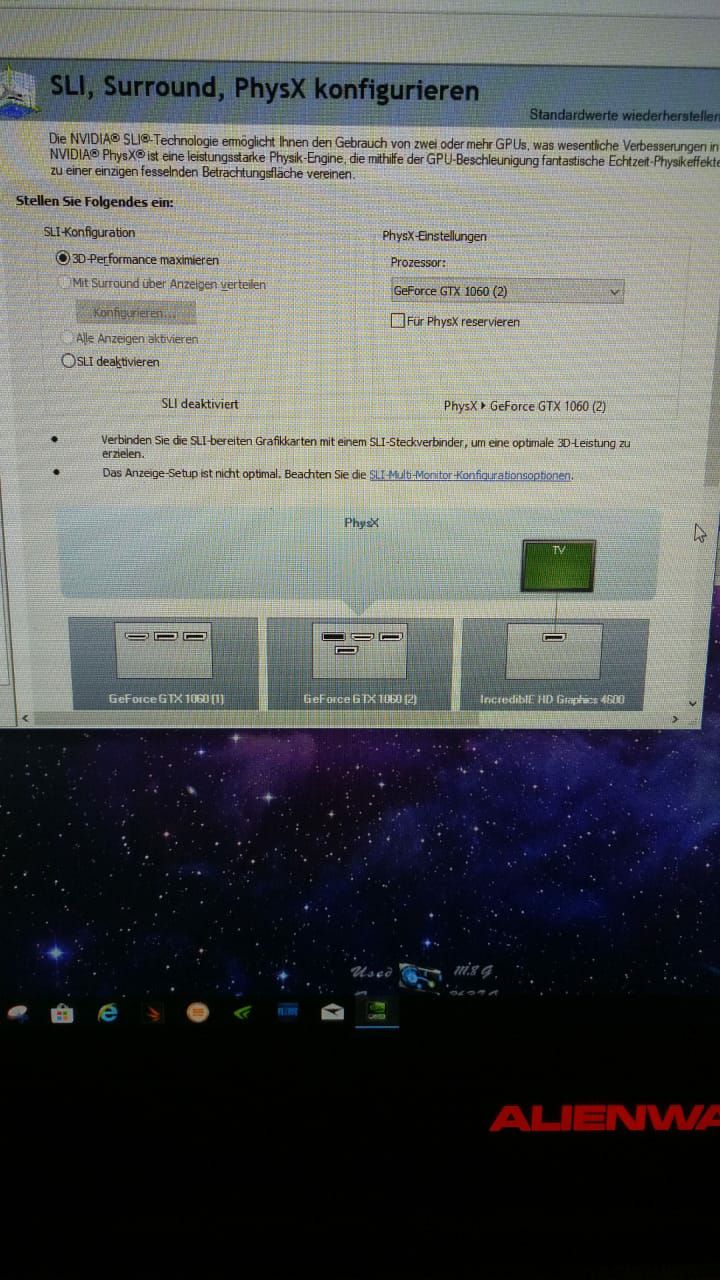
I managed to get a 1060 sli System in Optimus.Attached Files:
Last edited: Feb 7, 2020 -
-
I have two 880m and when I put the Sg mode in the BIOS, for some reason the menu with sli becomes inactive, that is, I can not set a tick on sli, but when I return the Peg mode, Sli is activated and you can either turn it on or off, and in Sg mode, why is this menu inactive.. ?
-
Woah rewind, did you just say you ran two 1060 in sli on a m18xr2 via SG mode (optimus)?
Chivalrous Roamin Knight and Maxware79 like this.
-
Yeah I just fell off my chair
Sent from my iPhone using Tapatalk@tomX and Chivalrous Roamin Knight like this. -
But i never get proper benchmark results.
There was massive framdrops. In firestrike the frames jump around between 6 and 120 FPS.
It looked like it permanet switch between interenal gpu to the sli system.
In games it was the same. -
Right, But did you have sli enabled in BIOS or not?
-
Yes, in Nvidia Control Panel it was enabled.
On disabled all run normal:
https://www.3dmark.com/fs/15384583 -
Last few then, what bios were you running and also did you mod the vbios?
I guess I am glad I bought a 1070 with a sli connector
Chivalrous Roamin Knight likes this. -
There was a problem can who faced? When overclocking the video card, the current clock does not rise in the BIOS, although the default frequency is specified in overclocking, which prevents the card from working at the frequencies I stated?
-
Tell me the settings for overclocking your card ?
-
I can´t remember the Settings.
Maybe +160/+500.Last edited: Feb 10, 2020 -
There was a problem, I have flashed BIOS A12 Unlocked on Alienware 18, but when I put the SG mode (mode with built-in graphics) then my card 780M works incorrectly, greatly understates the frequency and everything slows down, as soon as I change the BIOS settings on PEG everything works fine, I tried the driver to rearrange the sense there.... ?
Attached Files:
-
-
The best i can get out, at the moment.
https://www.3dmark.com/3dm/43846004?Attached Files:
@tomX, MagicMike and Rengsey R. H. Jr. like this. -
-
has no one ever encountered such a problem??
Attached Files:
-
-
Impressive! All that performance at a mere 83W peak power...really curious to see it spread its wings at 115W.
-
-
-
I figured out that to solve this problem, you just need to find a suitable BIOS and you will need to modify the drivers.
-
I have a question for you and everyone, does the cpu 4930-4940mx pull cards like RTX5000 and 1080mxm or for these processors a maximum of 980m ?
-
This cards should work without any problem. But without edp Display, you have to use Optimus. With Optimus the Performance will go down.
M18x-oldie and Papusan like this. -
Hi at all,
i have a problem with Firestrike Physic score. Looks like i´m hitting a wall.
Everything is fine up to 4,7. I get 12250.
If i go up to 4,8 and 4.9. There is no different. I´m not able to go higher then 12300.
In CB15 i can see the different. 4,7 ( 853 ) , 4,8 ( 883 ).
Do someone know, how i can fix that? -
The next step, but Cpu don´t want to play.
4,9:
https://www.3dmark.com/fs/22187075
4.8:
https://www.3dmark.com/fs/22188726Last edited: Mar 28, 2020M18x-oldie likes this. -
Firestrike is generally flawed when it comes to Physics tests. It is primarily a GPU test. Windows 10 exacerbates the issue because it further impairs CPU performance.
Do you see proper Physics score scaling with increased CPU clock speed running Time Spy, Sky Diver and 3DMark 11 benchmarks?M18x-oldie and Papusan like this. -
In Time Spy i see a upscaling
4.7:
https://www.3dmark.com/spy/10454350
4.8:
https://www.3dmark.com/3dm/45173964
4,9 did not work, because of board power limitM18x-oldie, Papusan and Mr. Fox like this. -
Graphics score very strong, equal to RTX 2080 max q. Only physics is held back because 9880H is a 8 core 16 thread processor instead of 4 core 8 thread in m18xM18x-oldie, Papusan and Mr. Fox like this.
-
Agree... that is more graphics performance than anyone might have ever imagined could be available in the M18xR2. Very nice.M18x-oldie and Papusan like this.
-
Thanks.
Here are the last benchmarks for now:
https://www.3dmark.com/fs/22229508
https://www.3dmark.com/fs/22229550
https://www.3dmark.com/fs/22229781
If someone can provide a RTX 5000 Dell (MXM 1xx Watt) Vbios, i will try again.
Time to start my M17x R2 projekt.
TruenoG7, M18x-oldie, ssj92 and 2 others like this. -
I have a question for you Baddemichl, I installed MSI 1070, but the card resets the frequency from 1400 to 800-900, I tried to mod the driver in different ways, but there is no result. How did you manage to stop throttling the RTX 5000 card ?
-
You should check the temp, when it starts throttling.
Do you use it in peg or with Optimus?
Could you sent the specs of your Notebook, please.Last edited: Apr 3, 2020 -
My configuration: Alienware 18, i7-4930mx @ 4.2 GHz / 32GB RAM 1800MHZ / MSI GTX 1070 8GB, 2 X 512 SSD RAID. Works in Sg mode and Optimus. Normal temperature, maximum 88°C.
-
First run: https://www.3dmark.com/3dm/45388213?
Edit:
First place at second run:
https://www.3dmark.com/fs/22248557Last edited: Apr 3, 2020M18x-oldie likes this. -
That config is not good for sg mode.
Cpu up to 4.6 / mem: 16gb, 4 sticks @ 2666, and a much better cooling. Temp should be lower then 64 Degree under full load.Mastersbest likes this. -
What GPU?
-
980m
-
How is that possible? Nobody got it working with internal LCD. Are you using external display?
-
Baddemichl so what might be the problem don't know?
-
Cpu up to 4.6 / mem: 16gb, 4 sticks @ 2666, and a much better cooling. Temp should be lower then 64 Degree under full load.TruenoG7 likes this.
-
Oh, nobody told me that is impossible, now it is to late.
https://imgur.com/a/Y0tigozTruenoG7, M18x-oldie and ssj92 like this. -
Do you mean that if I can continue to overclock both the processor and RAM, the video card will work without drawdowns ?
*OFFICIAL* Alienware M18xR1/R2/18 Benchmark Thread - Part 3
Discussion in 'Alienware 18 and M18x' started by Mr. Fox, Aug 31, 2013.