Problems? See this thread at archive.org.
when i download the Synaptics drivers a window comes out saying that its an older driver than the one my laptop has..
-
-
You will have to uninstal the stock dell drivers(remove the dell touchpad or whatever it is named program), reboot and install the new ones.
As for two-finger rightclicking it is mentioned just a few pages back in the thread twofingerscroll which is a google code program works excellent
-
i cant install the the two finger scrolling...
-
mine does this regularly, VERY annoying! If i let it sleep, it WILL wake up, and either drain the battery or if it's in a bag, drain the battery and run CRAZY HOT. So, I now only leave it to hibernate, not sleep. Annoying, but better than have it randomly wake up and overheat in a sleeve. There are no tasks scheduled, think it's a video driver issue, but no real idea.
-
Why not?
It doesn't really install, it's just an executable. -
he might be referring to the installer from scrybe that also installs multi-touch gestures
-
I wish switching between IGP and Nvidia didn't require MSN Messenger to close. That is always on for me along with steam. But steam's new beta GUI took care of that. WHY IS MSN MESSENGER a barrier! ugh
-
I wouldn't touch MS Messenger with a 10 foot pole.
 Pidgin for the win. Doesn't require closing when switching of course.
-
Beta GUI solved that? Good to know.
Any problems with using the beta? I remember reading about some issues. -
Minimizing it works for me... seems it just doesn't like it when there is an active window being displayed.
-
Hey guys. Little known fact. You can whitelist applications that should be ok when switching and it will not prevent you anymore.
Here is what I have in my registry from my Hybrid Graphics Master Set driver.
As you can see all you have to do is add the running executable to the whitelist and it shouldn't bug you again. You can always copy the above code to notepad and save as whitelist.reg then run it if you are not comfortable editing the registry.Code:Windows Registry Editor Version 5.00 [HKEY_LOCAL_MACHINE\SOFTWARE\NVIDIA Corporation\Global\Hybrid] "WhiteList"="nvvsvc.exe,msnmsgr.exe,Yahoomessenger.exe,PDVDDXSrv.exe,PDVDCinService.exe,PDVDOnService.exe,FAService.exe,WebCamDell.exe,DellVideoChat.exe,AlienwareAlienFXController.exe,AlienFusionController.exe"
-
hey guys since im gonna own myself a new M11X next week, i might as well throw some question here, well i don't read all the pages here, but a couple of things i would like to know is
about the Fan Switching issue
so as i understand, when you switch from Intel GMA to the GT335, the Fan will start to spin faster of course to blow away the heat, correct? and the problem lies here, when you switch back from GT335 to Intel GMA, the Computer reads that the GT335 is still running, hence the Fan kept spinning fast to overcome the heat, where in truth, the GT335 have stopped working, do i get it right so far?
ok my 1st question is, does this only happen to some user? or does this happen to all M11X worldwide?
2. is Dell aware of this situation / did Dell release an official new patch / driver for this known issue?
well, it's because im not a fan of modifying a Machine especially through it's registry tweaks and stuffs, ok i know what all the registry tweaks will do, and it's for the better of the PC itself, but err, im just not a person that will feel at ease after messing around the system
i always prefer the official fix patch one way or the other
thanks! -
As far a I can say:
Switching back from the GT330M(!) to Intel HD keeps the 335M powered. So it consumps power and needs cooling.
So the fan will work to cool the not needed 335M for nothing.
You have to reboot (Hybernate doesn't solve it for me) to get the 335M really OFF and the fan will not (!) work till high pressure on the CPU (in my machine)
Hope that helps
Andy
BTW: I don't know whitch registry tweaks should solve this. Seems to me its a problem within the HybridDrivers. Same seen on Dox/Nautis ones. Both Cards are powered and run the batterie low (quickly 2 hours) -
hm does everyone experiencing this? or only some? and is there a official fix for this already?
-
Its a system thing. They can't just shut the thing down and power it on like flipping the switch on the light bulb. If its on when it boots, its on until its shut down.
-
Ehh.. This issue seems to be specific to the M11x only, as the following Hybrid Graphics notebooks can power down the Nvidia GPU fine:
Acer Aspire 5935G
Asus UX50V
Asus UL30VT
Asus UL50VT
Asus UL80VT
BenQ Joybook S42
Dell Alienware M11x
Sony Vaio Z (Old VGN-Z Model)
Sony Vaio Z (New VPC-Z11 Model)
Fujitsu/Siemens Amilo XI 3650
The Nvidia device should NOT appear in the device manager when it is switched to power saving/stamina mode if it is working correctly. Is the Nvidia device always seen on the M11x under device manager? -
dell m11x is still in your list ;-)
Andy -
@nautis = I just tried and the GT is still in the device manager. Will check again in a few minutes.
EDIT: The GT still shows. -
I too can confirm that when changing graphics modes on the UL80Vt that the Nvidia GPU does power down and disappear from device mgr, (but there is a delay...it sometimes takes a minute or 2 to do so). I can also confirm that the Nvidia GPU on the M11x does not. Once you switch to the Nvidia GPU it stays active and visible in device mgr even after switching back to Intel IGP-unless you restart.
-
I'm wondering if this is a driver issue. If I look at it in Linux, both graphics cards are running.. My guess is that when windows boots up the graphic driver tells the computer which card to keep powered and which to power down.
-
This is exactly what happens. I am dealing with a similar issue for most other Hybrid Graphics notebooks with drivers above 197. Basically what happens with 197 and above is that the nvidia part stays powered down when switched from intel to nvidia. If you set a certain registry value and reboot however you can use the nvidia part again.
I am investigating this issue further for you M11x users. My hope is that it is just a configuration issue.
Do you guys have the taskbar icon that allows you to switch GPUs?
As seen at the left of this image:
![[IMG]](images/storyImages/Hybrid_Inst_Opt2.jpg)
-
Yes, we have that taskbar icon. By the way, thanks for all the work on the optimus drivers for us Nautis. I personally really appreciate the effort you are going through!
-
@nautis = We get the taskbar icon too but we cannot swap with them. We have to use the Fn combo.
-
I strongly recommend you guys to PM erawneila about this, if you haven't done already, since I am not sure Alienware is aware of this switching issue, with the Nvidia still powered on.
-
Well that is freaking weird. Let me take another look at the INF for the M11x and see if I notice anything wonky. So the only way you guys can switch GPUs is by the Fn combo?
-
Just wanted to point out that O/C-ing or returning to stock-clocks between Hibernation states will cause high CPU usage in the default state. Probably other problems too. Do a full reboot if you want to overclock.
-
I guess Dell needs to whitelist toaster.exe!
-
You can add it yourself and it'll work.
-
@nautis = we only get fn+f6 functionality. But another reader did get taskbar switching and lost their fn use. So i think its a matter of either/or instead of something broken in the driverset.
-
thanks for going through the GPU switching problem Nautis!
i hope you guys can find the solution soon! so sad i coulnd't be any help as im not very good with these technical thing
anyway i have another question regarding the executable whitelist
is there any bad effect for adding some programs onto the whitelist for Switching GPUs? like for example if i put WoW.exe to the whitelist, then during gameplay, i switch to Turbo Mode, will it crash my WoW or something? because by default, it should have been closed 1st before switching
oh and only what programs should be in the whitelist content?
as i believe those list of your whitelist are already customized by you? -
I know. I'm saying that they need to add it because it doesn't have an exit or close option, it ships enabled by default, and reviewers are taking notice (see Anandtech's review). It didn't block me from switching untila couple days after I started using my M11x. I just used it to make my recovery discs and uninstalled it.
-
normal behavior of the DOX drivers.... Dox and Nautis know each other as far as I read in the LaptopVideo2Go-Forum.....
It will only work one way to change - FN+F6 or Taskbar.
Both without turning off nVidia after switching to Intel.
Andy -
Dox used my instructions for implementation of HG in his drivers. I originally talked to him about using his optimisations in my package in talking further he decided to try to implement them into his set using my instructions.
-
lil help plz guys, no 1. can i buy for sure the bluetooth module for the m11x and install myself, and 2. even though it says 800mhz is the ram in the m11 800 or is it 1066, if its 800 can i add 1066 and will it run better? thx guys
-
Of course you can buy a USB Bluetooth module and install it. Internal is possible too. The RAM is 1066-rated but running at only 800 until you enter the BIOS/CMOS setup and enable overclocking. Enabling the overclock sets the bus/memory speed to 1066 and the resulting CPU speed is 1.73GHz.
-
thx for answering, one last thing, is the ram actually printed on it saying 1066 or will it just handle the bios turned up to 1.7ghz, the reason im asking is that i want to get the better 1066 memory but newegg wants like $100, if you guys say forsure that it has 1066 then i just add the 1066 through dell then cause its cheaper and as far as a hard drive I want to get a better 16mg, 7200rpm seagate, do you think this is better then the one from Dell??
-
loco4christ Check this out. May give you a better idea of the RAM issues. http://forum.notebookreview.com/showthread.php?t=472723&page=3
As for the HDD. I would only go for another one if it were cheaper. The reason being if your HDD fails, Dell will send you a new one as it would be covered under the warranty. If you get an HDD that isn't from Dell, and it fails, your outta the money. The 7200RPM HDDs from Dell are not going to be much differant then other 7200RPM HDDs. And with the cost of ordering and shipping, the additional price may render the upgrade more expensive then it's worth. -
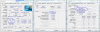
I have to damit, that my RAM stays on 800MHZ (400MHZ*2) while OC'ed. (see pic. attached)
It's the Memory-Devider that holds the RAM back from beeing faster - maybe if there will be any (Support) Bios by Dell for the M11x (grml) you might use the 533MHz-Ram (=1066MHz).
But for now - buy MORE ram than FAST ram - it'll boost you more.
And Harddisks: they are close to each other ... cause the limitting point is rotationspeed. But more rotation means more energyconsumption and more heat. So you will only have a benefit while using a SSD - and these are getting cheaper the longer you wait ;-)
AndyAttached Files:
-
-
Is there anyway to change to color of the logo behind the screen? It's currently white color now, Not the power-on switch
-
No you can't. You do see the Screen-Backlight through the "eyes" .... so its white only.
You can change it on the M15/17 - but not on the M11x
Andy -
yes its like macbooks. the apple lighting up is the lcd back light so changing the color of the alienhead is impossible.
-
Thanks for the info. The manual states otherwise. CPU-Z is known to misreport the CPU speed too, which is also reflected in your pic, so I don't trust its reporting of the related memory speed either. Then again, it isn't the only thing reporting 1.6GHz. Windows, the BIOS/POST summary screen, and many other utilities report 1.73GHz, so *shrug*
-
i would show, that mine is in oc-bios-mode - so i used cpu-z. The first m11x where sold (as far as i read) with 800MHz. So I think the RAM does not be oc'ed.
And in (the tool to undervolt a cpu - lost the name (BTW: dosn't work on M11x)) there you can see that the CUP runs on 1.7GHz but gets throttled to 1.6. So I would say that the CPU-Z is accurate (but Multiplier might be wrong)..
Not really sure about that - but 100MHz.... Its like driving on the highway - 80 miles/h or 83mi/h.... You'll be after 5 hours 10 Minutes quicker..... Not really to mention.
Andy -
Ah, thanks for your info
Anyway, is there anyway i could let my startup be faster?
It seems kinda slow and i have disabled the Facial Recongition
And i seen some m11x owner have their name etched on the back but mine comes without my name, do i have to do it manually? If so, how can i do it? -
How slow is your start up? I met a guy says 30-40s start up is slow, so he changed to SSD and start up at 15-20s. For me, 30s is fast already.
Maybe you can change to SSD? -
Most software overclocks are done by increasing the Front Side Bus, FSB speed, which in turn effects both the CPU and the RAM speed, hence most people assume that any overclock will work the same and both CPU and RAM must be overclocked by the same amount (excluding multipliers).
The m11x however is overclocked through hardware which alters the speed signal going only to the CPU, and also it seems to be undervolted.... anyhow this method does NOT change the FSB speed. Thus the RAM will be unaffected, and still run at stock 800mhz even when the CPU is overclocked. -
xblaze, you can always color the alien with a marker to change the color
j/k
As far as start up goes, I would start by going into the msconfig menu and removing unwanted start up programs. Then I would go into the "services" panel and start changing services to "manual" rather then automatic. Only services that you don't want to automatically launch on start up. To get to the services panel just type "services" un the start menu. -
How do i change to SSD?
Sorry i'm kinda new...
And also can i change the picture of the boot-up? The part where you can choose F2 for setup and F10 for boot menu, it is a picture of a alien head in black and red eyes, i wanted to change to another picture -
You purchase an SSD (Solid State Disk) and install it, then install your operatinig system. They have much faster read/write times the the standard Hard Drive Disk (HDD) since they don't use spinning platters. Theres some for sale in the Marketplace forum of NBR for good prices too.
-
So can i change the picture of the boot-up? The part where you can choose F2 for setup and F10 for boot menu, it is a picture of a alien head in black and red eyes, i wanted to change to another picture
M11x Optimization Thread
Discussion in 'Alienware M11x' started by BatBoy, Feb 26, 2010.