Problems? See this thread at archive.org.
@tacopicante123
well a quick look online says gud 4gb ddr3 ram is ~£80 but 256gb ssd's cost way more than the £300 dell asks..so i'm tempted to bite the bullet and put in the ssd nd upgrade the ram if i feel like i really need it. OCd 4100 doesnt seem to be much worse thn 7300 frm wat i read on here..nd i dont need virtualisation.
Thnks for ur input, its better than bouncing ideas in my own head..doesnt get me anywhere
-
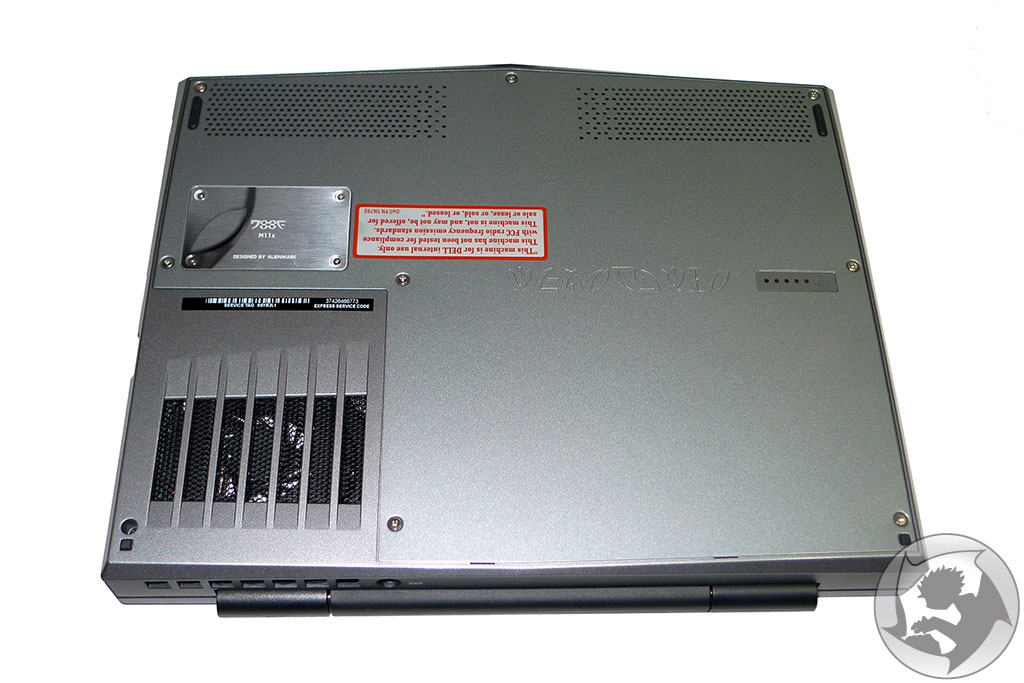
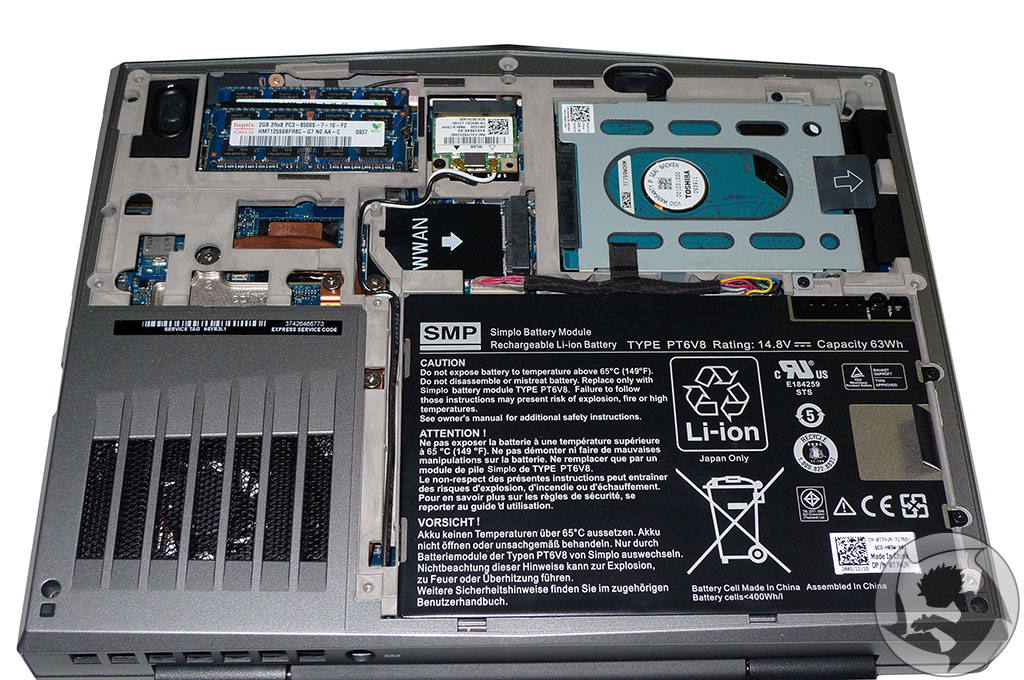
Just unscrew 8 screw and the 2 on the harddisk cabinet and pull and voilla
Check the pictures i added and if u can't manange to do it your self just go to a local pc repair shop and they will gladly put it in for a small fee
-
Perhaps the children from Me Myself and Irene could. Those three kids built a plane out of blenders and gardening equipment
-
Yeah, that was a funny movie.
-
I remember reading somewhere in an earlier thread that it has to be the same storage capacity ssd as hdd. Is this not accurate? My m11x is comin with a 500gb does that mean i have to get a 500 ssd? Haha that would suck
-
@Coathanger Cure
i'm sure thts not true..as long as the ssd has enuf capacity to transfer all the data if you were cloning ur old HD it'll be fine.
And if u were installing everything fresh then it wouldn't matter at all. -
What are the comparisons with the ssd and regular hd's?
will a 120gb SSD be enough to match 500gb hd worth of material or is it a 1 to 1 ratio?
for instance 500gb SSD is same amount of usuable space as 500gb hd
What im debating is getting a smaller SSD (60gb) for performance and just store all my files on an external drive or jump drive. -
craigery81,
500 Gb is 500 Gb. The 500 Gb hd has 380 Gb more storage.Yes, that is how I have my desktop set up at home. I have a corsair P128 for a primary drive OS and games then a 500 Gb HD for movies, files, music, Temp files, Temporary internet files, etc. So yes, that is possible and totally logical if you want super fast performance. Just remember 60 Gb will fill up fast. You may regret not going bigger... -
not true. if you want to use the alienware respawn/system recovery disks then it has to be the same size drive, but you can use any size drive you want and just make a new recovery set with win7.
-
I seriously love this laptop. Loving sound through HDMI.
![[IMG]](images/storyImages/IMG_2481.jpg)
-
Very cool.
If my laptop were plugged in to an HDTV I would just go ahead and disable the laptop screen though. No sense in running them as mirror images, just added resources consumption. -
Have any of you guys upgraded the ram?
I went cheap and left it at the 2GB standard configuration and I'm regretting it. Should I get another set of 1066 DDR3? What are some good brands to go with?
Thanks in advance. -
Crucial/Corsair/Kingston for ram.
And are you really feeling like 2gb is not enough?
And regardless, it's cheaper to buy your own 4gb ram and be able to potentially sell of the 2x1gb sticks you have now =) -
hehe no worries... I personally have a 500GB HDD 5400rpm that I will put into my M11X as soon as I get it. I chose the 4GB option as a minimum... I think you can do with 2GB but I always like to get as close to the limit as I can, and I think that 8GB would just be overkill as you will never have that much multitasking going on all at once. Go for the 4 gigs... you won't regret it
-
@impruv- Well I don't know how much cheaper it would be buying 2 sticks of 2GB DDR3 ram versus the Dell upgrade which is $50 US dolars at most... I don't know how cheap you can get 2 sticks of DDR3 these days
-
Ahh, well I was speaking from the dell Canada perspective. They ask for $100 for the 4gb ram upgrade in which I can get for around $80 and then still sell the 2x1gb
-
@chriztrax
Hi I'm kinda in your situation, only i havnet ordered mine yet, but I was gonna stick with 2GB RAM and see if i needed more and upgrade later.
Why do u regret getting just 2GB? Is there an obvious effect on performance? or is it just a mental thing
-
Hi,
I had a few pm's about this so here's the details about replacing my 320hd with a 128 SSD. Kingston V+
Hi,
The Kingsoton V+ drive is available with a kit to put your original hard drive in for the cloning process.
You have to use another computer though since the M11x doesnt have an optical drive. I have a usb optical but it wasnt recognized when booting the M11x so i used another laptop that i have around.
I booted with the cd, original hd in the enclosure (included in the ssd kit) and SSD in the laptop.
I added the SSD to list of availalble disks and selected the From and To disks and hit clone.
The software automatically scaled the partition so it didnt matter that the original 320 hd was larger.
10 minutes later i removed the SSD and put it back int he M11x. Done deal
i hope this is helpful -
@armoured
tht luks awesome dude! I was thinking abt how it was when u hook it up to a large monitor..gud to know it wrks fine -
Hello folks,
Got two question for you. One does anyone know a way to find out what state your graphics card is in (internal vs. nvidia)? FN+F6 goes by way to fast on my system to see the state.
Second question. I've had my system now for 48 hours and the serial number and service numbers are all ready rubbed off. Anyone else have this problem? Its like the ink was not dry.
System.
M11x 4gb, 256gb ssd SU7300 -
kbfk, right click on desktop, if you see nvidia options, you're on discrete. If not, then Intel integrated.
-
Hey, guys! I'm looking into purchasing a notebook/netbook/whatever for college and right now it's between waiting for a refresh on the Macbook Pro's and the M11x. My main concern with the M11x is its size. I will be bringing my desktop, so I don't need something amazing for gaming, but I'd like something with solid battery life and decent performance. Seems like the m11x is a no brainer.
However, I own a Dell Mini 10v, and I don't see how such a small screen would work for anything beyond light media and browsing. So, how does the m11x's screen compare to a normal netbook's screen? Is it much bigger? Anyone have comparison pics? -
There are pictures of the M11x with the Acer Aspire One in the Arrival thread I think.
-
It's not necessarily the screen size... unless things get too small for you. It's more the fact that this has a much better resolution as well as opposed to the 1024x600 netbooks usually get.
-
can the keyboard lighting on the m11x be adjusted brightness wise?
-
I guess it does have a lot to do with resolution, but the physical size of the screen on my mini 10v is a bit of an issue when it comes to extended use. The m11x does seem to be a solid bit bigger.
Also, is the keyboard as cramped as other netbooks? -
Which netbooks are you refering too
I know some that have almost a 98% full sized keyboard like asus 1000he and others. However, because this 11.6" has the chassis of almost a 13'3" the keyboard is relatively full sized. Definitely much better than the crammed netbook styled keyboards
edit: the arrow keys are a bit cramped on the m11x -
ink on serial and service number rubbed right off for me too!
-
You have 3 settings: off, dim, and full brightness.
-
Anyone have the Alienware TactX mouse?
I'm curious if the driver CD provided with the mouse is required to change the mouse's colors, or if the Command Center that comes with the M11x can control the TactX mouse colors as well? -
You guys should try and call Dell's customer support and ask for a replacement sticker or something. This is a quality control mistake and could lead to warranties not being upheld.
-
Playing back a DVD ISO using mounted via Virtual Clone Drive and using CUDA with WMP... processor usage is in the 3-5% range.... love CUDA
-
^kahi what drivers are you using? the stock ones that came pre-installed? 188.xx I believe
*edit* here's link to my M11x with Kabuto and Orochi pic. Great for travel. for those that care
-
dumdumdum... someone got cuda to work?
-
I know this may be a stupid question to some people seeing as how no one can be sure but do you think that the m11x will ever be upgraded to better prossecors? If so how soon?
Also should i get a m11x or m15x? There is about a 500-800$ difference when i finish customizing them, and I could wait if there is a significant reason. -
I suspect there will. But when - I think a Core i3/i5 option might be available within 6 months. Of course these aren't as battery efficient as the Core2Duo, but still likely to be a future option.
I was debating this myself - M11x or M15x. Ultimately, I wanted portability as I already have a desktop gaming rig, so it was the M11x for me. -
bennyboy: m11x = small, better battery life, less power
m15x = larger, much more power, much less portable.
It all depends on what you want.
As for the upgraded processor, it is expected to be at the end of quarter three ish? but no one really knows. -
Yeh i was thinking the same thing as far as m11x vs. m15x goes, but m15x isnt overly huge but does weigh twice as much. I wont be able to buy either for about a year though so ive got some time and by then im sure they will have upgraded the m11x. As far as battery life goes, its not a major concern because mine will usually be hooked up to the wall. Which is the main reason im leaning towards the m15x.
-
@aznguyen316 - question about the kabuto mat... do you use it to also clean the screen on the M11X? And if so, does it scratch the screen itself? I know it's microfiber... just wondering about how it works with the laptop. Rep+ for that pic by the way! Love that it fits the keyboard so well!
-
While the sticker rubbing off is an issue, it will not impact your warranty. Your service tag is stored in the BIOS, which you can view when you boot into the BIOS and with your Service Tag, you can access your Express Service Code on the support.dell.com site or have the tech pull up the relevant issue using your Service Tag.
-
@BatBoy Whoa, I never knew it was in the BIOS. As long as the laptop doesn't completely die and you can still access the BIOS, I guess it's alright. If you can't access the BIOS, though, you might have to use the glare trick another poster mentioned a few pages ago where he held it up to the light and could see the impression of the service tag.
Does Dell make you jump through a bunch of hoops if you don't have access to your service tag? -
thats why you go online and store your tag in your dell profile/account.
-
what do you guys think for college.. white macbook or alienware m11x, give reasons, opinions..thank you! I play wow, will play SC2, and play LFD..might get COD2
-
If it will mainly be AC connected, then the M15x would be my option. I got the M11x for trips when I may be away from an AC outlet for an extended period of time.
-
They are actually. The ULV Core i5/i7 setup is in fact more efficient than the current C2D setup in the M11x. Granted it's not much (~10%), but at the very least it will equal its current efficiency.
-
@Rambler358
Alright, Thanks for your opinion man -
also if you look in the notifications area the icon has one green "bar" for intel and two for nvidia. look like boomerangs
-
Okay my first video. Since unboxing and many game benchmarks were already done, I decided to showcase the Samsung SSD just briefly vs my 5400RPM Inspiron 1501. The SSD is blazing, especially since I'm offloading a lot of crap from my ext HDD etc. Anyway here ya go, enjoy it, my first youtube video upload ever, just for NBR.
<param name="movie" value="http://www.youtube.com/v/nRfTZ9R4vlc&hl=en&fs=1"></param><param name="allowFullScreen" value="true"></param><param name="allowscriptaccess" value="always"></param><embed src="http://www.youtube.com/v/nRfTZ9R4vlc&hl=en&fs=1" type="application/x-shockwave-flash" allowscriptaccess="always" allowfullscreen="true" width='425' height="344"></embed></object>Last edited by a moderator: May 6, 2015 -
Wow, huge difference there! I'd love to upgrade to the SSD but I don't think I have the cash available. Is it possible to purchase a SSD when the prices drop in the future and upgrade the hard drive myself?
-
quick answer : yes
complicated answer : yes ofcourse all you'll probably might need is a screwdriver(not sure if it's bolted)
*OFFICIAL* M11x Owners Lounge - Part 3
Discussion in 'Alienware' started by steveninspokane, Feb 2, 2010.