Problems? See this thread at archive.org.
Got my laptop, yay, its amazing, but first impression is its MASSIVE. Wasn't expecting a laptop this big. It's not a big deal, but can't begin to imagine how big the G73 is...
Quick question though. my wireless is getting dodgy reception dropping packets, I'm a little far away from to AP, but sometimes its fine, other times its horrendous. So im not convinced its purely the distance thats causing the problems. The dropouts don't seem consistent.
Went to asus site to update driver, registered my laptop etc. The wireless card I have is a Atheros AR9285 Wireless Network Adapter, but on the site I can only find drivers for:
Azurewave Wireless Lan Driver and Application for BT and non BT
WiMAX Wireless LAN Driver
Intel(R) WiFi Wireless LAN Driver
Which one should I try???
Thanks
P
-
Azurewave is for the Atheros WiFi card
-
OK will give that a go, thanks.
-
So... any news from ASUS?
-
If you are looking for available stock on the ASUS G53JW-A1, we have them as do other resellers here on the boards, and another shipment is coming in this week, and yet another next week.
-
Hi and welcome to the forum

I live in Norway and have been buying my last 2 laptops from US. The M50J from XoticPC and the M60J from GentechPC. They both are exellent and have top customer service and takes good care of your PC. They ship to international countries, included Latvia
I don`t know how much tax you have to pay in importing electronic to Latvia, but here in Norway we have to pay around 30%. And probably around $100 or so in shipping costs -
We also have lifted the Pre Order on the G53JW-A1. Shipments are smaller then last week but still coming in. Some tomorrow and then some next week.
-
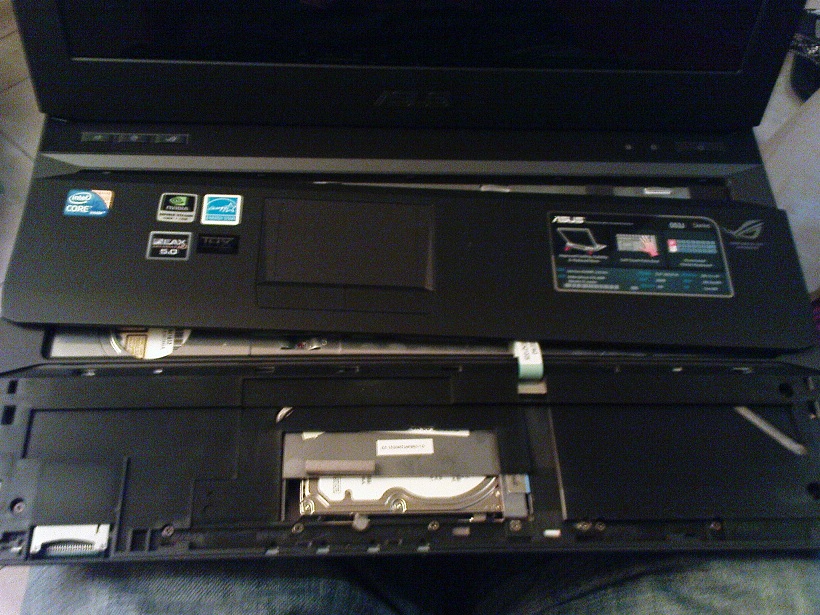
Thanks guys. Managed to open the palm rest but it wasnt easy. Installed the hard drives. This machine is sweet. Im playing all my favorite games on high settings and framerates. Yup, Im really happy.
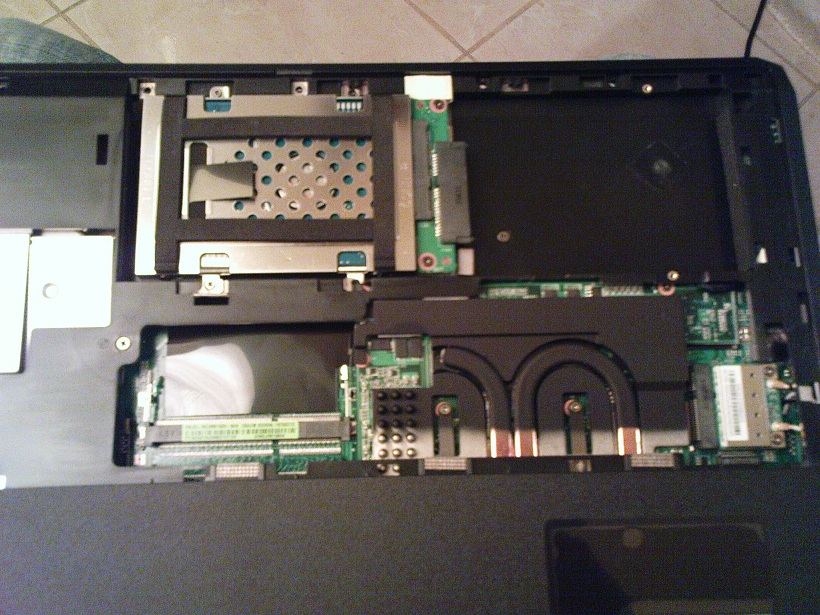
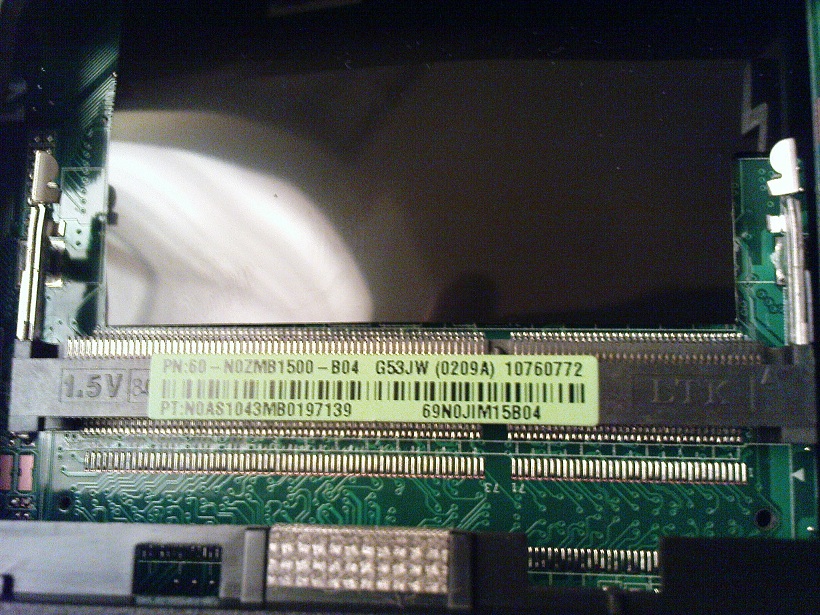
PS. I only found ONE RAM slot (located between the HDD bays) with a 2GB DDR3 stick in it. My machine reads 4GB but the location of the second ram slot eludes me)))
Question: my kb lights do not work (they do flash during POST), FN+F3(F4) do not work or any of those 3 buttons above the kb. How do i switch ON the lights or even configure the keyboard light pater (if possible) ? Thanks! -
COOL! Good to see that there's i5 versions. QUESTION: Do your i5 G53's support optimus? If so, then awesome!
-
Thanks for the reply. I tried to register an account @ GentechPC, but they don't have Latvia in their countries list, only Lithuania.
30% tax is quite a lot. But taxes in Norway are generally higher, so I'm hoping for something like 20% here.
~100$ shipping is what I expected.
But it's still worth it since this laptop will cost around 2700-2800$ here and ASUS gives a global warranty with their products, so I won't have to ship it back to the States in case something happens. -
For some reason, I do not think so. Anyway, Windows does not detect any video card besides gtx460m.
Can someone please explain how to configure keyboard lights and what does the 3 buttons above the kb do? And where is the second ram slot? Thanks!
Attached Files:
-
-
Peel away the black plastic stuff. Also, when you lift the keyboard off, peel the black plastic that's in the middle. See this thread for more info: http://forum.notebookreview.com/asu...bling-g53jw-installing-second-hard-drive.html
Have fun!
Also, another question, but this one's about the 740qm... Does it downclock or undervolt itself when it's not in high demand / high use? How about the 460m does it too? -
Dookie11: unfortunately my G53 is Core i5 based so there are some notable differences. The RAM slot directly beneath the keyboard does not exist in this version while on the belly of the laptop near the hdd bays there is only ONE RAM slot, not 2 slots like in the i7 G53 case.
Im lost...
-
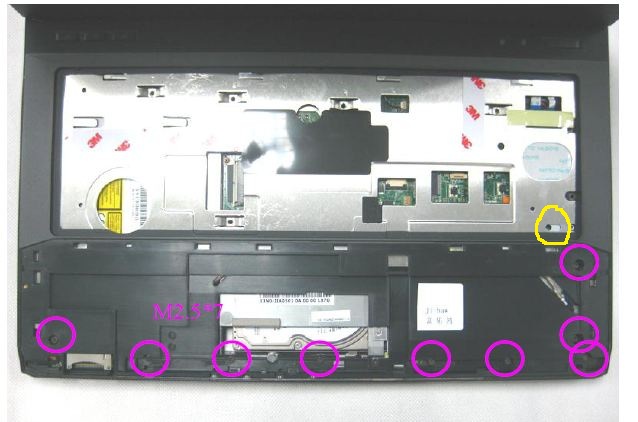
Hello everybody, i would like to put an ssd into my G53 but i didn't succeed to remov the Remove the palmrest, does anyone have a hint ?
Thanx and excuse me....i'm french ! -
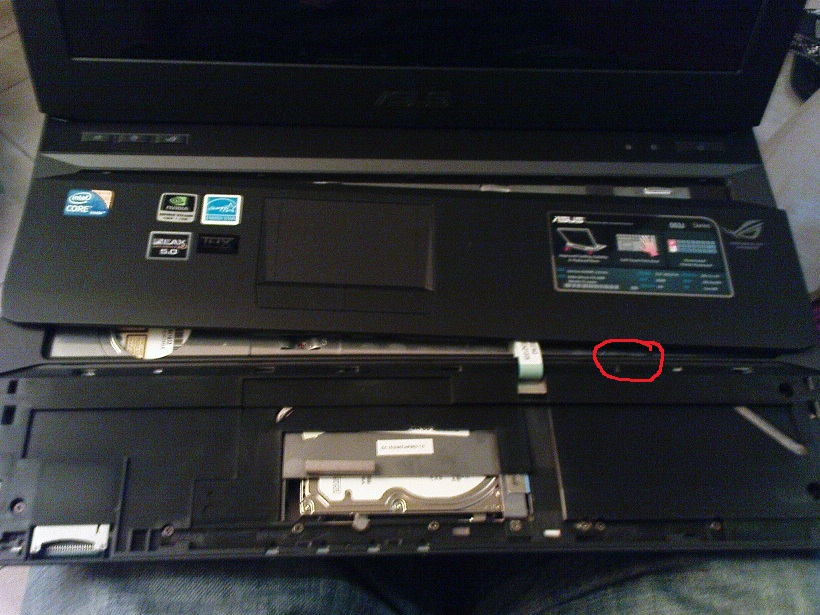
I had the exact same problem last night. Just use a "-" screwdriver in the highlighted place in the first pic (put the screwdriver between the palmrest and the edge plastic that devides the keyboard and the palmrest. gently! it will come off) and try to get the palm rest open. It will leave a small dent but once the palm rest is returned to its position, the dent wont be visible anymore.
PS. before trying to remove the palm rest, make sure you slide the perforated silver piece of metal to the left, like in the third pic, highlighted in yellow. -
Im getting my baby Today
-
It could be because they don`t have so many customers from Latvia that they havent bothered update their list of countries. You should try to email their customer support and ask there. Their email support ususally happens when you sleep so when you wake up you already have your answer
Or you could try XoticPc and order from there.
Yes the taxes in Norway is BRUTAL
But the reason why i order from the US is because here in Norway they are so slow in getting the new products and when they arrive, you cannot customize them. If you order from US, you can choose everything, CPU, RAM, HDD/SSD etc. And they apply much better cooling paste on your CPU and GPU to keep your system cooler than what is delivered from Asus factory.
So yeah, try them out. I have not had any problems with any of my two laptops i ordered from Xotix and Gentech.
EDIT: Seems like XoticPC have Latvia listed when i tried visiting their site
-
THANK YOU!!! you saved my life !
-
Hi g53 owners could anyone explain me why g53 is better than g73? Am stuck between these two laptops.. Dont know which one to choose
help me please
-
I don't think that it's ever been mentioned that the G53 is better than the G73. Other than size, weight, and price, I don't believe the G53 has anything that can factor it as being better than the G73. I guess you could count the missing keyboard strokes on the G73 vs. no keyboard issues on the G53. But either has been fixed or is being worked on.
G73 has better cooling, better screen (from what I've read), and is easier to open up.
I'm getting the G53 because its more portable than the G73, it's a bit lighter and most importantly the price. -
They are basically the same thing in different sizes. The standard issue g73 comes with more storage and ram at a higher price than the standard g53 plus the ~2 inch bigger screen. The G53 is smaller and lighter, I guess that is what's better about it... slightly more travel friendly than the G73.
-
I got mine today & am very happy
Asus G53Jw-A1 -
Kudos! Nice, AW vs Asus
-
Hey everyone, forgot to upload my pics, the first pic is of the g53 right after i applied the vinal covering, notice the air bubbles. The second pic is of the laptop after 2 days and now my laptop doesn't have any.
![[IMG]](images/storyImages/photo.jpg)
![[IMG]](images/storyImages/photo1.jpg)
-
Looks good, and very tempting. Could you please provide a link to where you bought the vinyl from and for how much $?
Personally, (when) I get mine, I'm gonna slap on faux-leather on the lid Just gotta figure out how to cut the Asus logo, or maybe I'll buy a small piece of vinyl for that spot, and just cut a rectangle in the faux-leather to show the Asus logo.
-
nicely done, any tips on how to do it, I rushed it and did a terrible job... i got rid of it.
-
You can get the vinyl on eBay from the metro restyling vender. It's 10 bucks including shipping. Just slap vinyl on the whole laptop and the. Take an exacto knife and start cutting away at the excess. Take a blow dryer and heat the vinyl up and stretch it around weird corners and trim that too. Simple. Makes ur laptop glossy though, so depends if u like glossy. I personally don't care because the reason I'm covering it i the first place isn't looks but high resell value. Btw metro restyling has vinyl in color, chrome and carbon fiber.
-
Hey guys I was wondering if any of you international buyers have paid gentechpc through wire transfer? Because It's been one and a half weeks since my wire transfer was supposed to go through and I haven't gotten a confirmation of my payment. Ken told me that my payment should already be there a few days ago, and I was just wondering if anyone has had a similar experience? (not that I don't trust ken, of course)
-
If you sent a wire transfer only your bank can trace it. If it doesn't arrive at the vendors bank, there is nothing they can do to trace it.
Therefore I would suggest you contact your bank and ask them to trace it. -
International transfers def take longer than a few days. Mid East to US... takes more than 5 business days. Only if the transfer is within US boarders... and you did it before 2pm... it would have been instant.
-
Great on everyone who got theirs
The G53JW is such a hot and sought out item, someone kicked in my house door this afternoon and stole it while I was at a meeting/hunting for a second job. Funny thing is, I usually have it with me the majority of the time, but I didn't feel like going to 30-40 stores attached to bags while dropping off resumes.
It wasn't password protected and I had just finished my 30 page Psychology essay too.
Protect yours with your life! Too many jealous people out there.
Now to debate between the G53JW and the upcoming G73JW-3D (which is something like 1730$ if I downgrade the HD x2 and Blu Ray) after my home insurance covers the claim ...God I hope it doesn't take weeks b/c I'm back on the 11 year old eMachine and exams are two weeks away.
PS: I hope it shortcircuits and starts a fire in his/her house
-
ouch... i'm sorry to hear that...
i'll go for the G73JW-3DE in January.
now, are there any resellers who accept paypal payment from Aussie? -
Voodooi: sorry to hear that
-
omg:!!!!!!!!!!!!!!!!
holy man!!! that sucks!!!
Next time password protect it, it's the first thing i do with my laptops, even my external hdds, phones, phone sd cards are all password protected... you never know.
you can track the laptop down by it's serial number btw...
I hate dropping the "2 Grand" bomb whenever someone asks me for the price...
maybe your next one will a lifetime
also, if it's the only thing stolen, then you bet your it's someone you know... -
Ouch, sorry to hear about your notebook being stolen, Voodooi.
I'm supposed to get mine delivered later today.
-
Paladin or Jason - Do you guys sell recovery discs for the G53? I am a little disappointed mine did not come with one because now I can't format the included drive like I had planned (I never keep stuff long so I need to be able to return this to factory spec.) Also, can you tell me what ram will play nice with the included ram (I am looking to add another 2 or 4GB) and if there is any ETA on the HD caddies?
-
rancid:
You can download an ISO of windows 7 online (and use the cd key on the bottom of your laptop), burn it then do your fresh install. Then use the included driver disc to install everything afterwards. Download here:
Windows 7 ISO x86 and x64 Official Direct Download Links (Ultimate, Professional and Home Premium) My Digital Life - get home premium since its for your cd key.
This is better than a recovery disk because there won't be a single piece of bloatware and you choose what to install from the driver and utilities disk. And you should be able to return it to "factory spec" by just installing everything off the asus disk.
Voodooi:
That really sucks dude. Next time install this piece of software on your laptop: Open source anti-theft solution for Mac, PCs & Phones – Prey
It's free. Maybe help catch the perp or at the very least mess with him. -
I loved my emachine! It was a great company before they were merged with Gateway - unfortunately mine had some kind of a loose connection on the motherboard that caused it to loose power randomly after 3 or so years of use. But, it was my first laptop and I have fond memories of it much like my first junker car.
I'm not sure about homeowners insurance but my experience with renters insurance has been very fast and problem free. I'm crossing my fingers that your outcome will be the same.
For those who have the G53 - I swapped the standard hard drive with a SSD and am curious about the differences. Can you hear any noise coming from the 7200rpm drive or feel any vibration in the palm rest? -
I have the same problem, but I'm sending from Canada to XoticPC, and I sent it two weeks ago.
Edit: Seems there was some bank miscommunication. Fixed now. -
Ben,
Thanks, I appreciate it! -
Hmm my bank told me that the transfer'll go through in 4 business days so...Ah well I guess I'll get them to trace it then. Thanks for the advice guys
-
Already replied to you on the 14th, was waiting for the shipment and it should be here tomorrow. just give us few days build your laptop and it'll be ship next week.
-
What do people think about the screens on these laptops? Mine has pretty severe light bleed on the edges and the black levels are horrible no matter the brightness. My screen actually looks gray in movies because of the bad blacks. I am thinking of returning for another one but wanted to see if this is a common issue? I even had my wife who knows nothing about black levels comment it looked gray on the opening screen to alien vs predator 2 bluray.
-
Any rebate for the g53 in the US?
Right now, ncix has $50 rebate off and they are giving out laser printers along with the purchase.
I have ordered long ago so I am providing this as information for people who want to order in canada local stores only...
But if you want 2nd HD bracket you best buy it from the US. -
My G53 has been delayed due to bracket shortages. I could have it shipped without the second hard drive installed, but I'd rather wait and get the bracket while I can so I don't have to track it down later.
Voodooi, that really sucks about your laptop! Sorry to hear that, but at least you had insurance. Hopefully your insurance company will come through quickly for you and you'll be up and running in no time.
Hint: for important stuff like term papers and the like, use an online storage service like Dropbox. That way, you'll always have access to your document from any machine, and especially if yours gets stolen! -
No waiting for 2nd HDD brackets here
-
Sadly, it is not much of a problem of a single unit. The G53 has a really bad quality screen, same as the MSI GX660R or previous fullHD G51s. The AuO15 panel is plenty bright, but too bright, with rather poor contrast ending in grayish blacks. Additionally, it has mediocre viewing angles.
The thing is, the average user doesn't really mind about those details so they just enjoy the machine, but if the screen disappoints you from the get go, it will be something that will keep eating you alive.
I suggest you look for another machine if you want a quality screen, otherwise enjoy the great bang for your buck that machines like G53/GX660R offer. -
I went to walmart last nite, and was looking at the various HP laptops, which I assume all have the "Brightview" monitor (dv6, g6x, g7x, etc). It's not that bad. It's about the same as most Dells/Acers/Toshibas/Lenovos I've seen at Frys or BB.
So what lappy has a quality screen? I'm very interested in this, cuz G53 is at the top of my list right now. Will be making my purchase very soon, y'all. -
dookie - This screen is bad. I've owned the G73, countless number of sagers, HP's, Gateway's, and a Dell XPS and this is the worst of the bunch. I am a little bit of a video snob though so my opinion may not count
The viewing angles on it are decent and it is plenty bright as mentioned, the problem is it has severe white-wash and the black's look gray. I am going to play in the Nvidia control panel to see if I can tame it some.
-
Following this thread for a long time and was getting close to purchasing the G53...while I am not getting this as a desktop replacement I want to use the laptop around the house and for the occasional trip. My main use would be for Photoshop and Lightroom and I like the power of the laptop.
My concern is the screen? What is better...the G53 or the G73. Based on a side by side comparison it would seem that the G73 isn't that much bigger and the weight is around the same and all of the specs.
Guess I have a couple of questions?
1. Would I be better off getting a G73?
2. Have all issues (overheadting / BSOD / Etc.)been worked out with the "JW" version?
3. Is the screen on the G73 better than the G53?
4. Is the finish of the G73 better than the G53?
5. Are there an issues with the G73 I should be concerned about?
Thanks, Tim
Asus G53, the smaller version of the G73jh
Discussion in 'ASUS Gaming Notebook Forum' started by yoyosupmang, Apr 14, 2010.