Problems? See this thread at archive.org.
I have 4GB of RAM installed on my G1S with BIOS 300 - no problems with 32-bit XP or Vista. Available RAM for the XP is 3GB though, but this is the limitation of 32-bit XP, not BIOS or G1S.
I have also tested a few 32-bit and 64-bit Linuxes with 4GB RAM and BIOS 300 - no problems here either. And using 64-bit Linux, I can get 3.86 GB of RAM to use.
You should be fine with 3GB RAM and BIOS 300.
/Tomi
-
This ramm do also work flawlessly ; http://www.norek.no/k/ki.aspx?sku=344664 ( Crucial DDR2 SO-DIMM PC6400 2048MB CL6, Non-ECC, 1.8V, 256Mx64, 200pin )
Memory is exeptionally cheap at the moment
Ummhh and finished touchup of the coolingmodification ;
![[IMG]](images/storyImages/cooling_resize.jpg)
It might be an idea to cover these holes again to ensure as good cooling as possible for the GFX module :
![[IMG]](images/storyImages/after.jpg)
-
Does this actually REALLY help?
-
yes - even for a "non-clocker" - your system will run a lot cooler = less noise
-
1) Do u use your laptop over an external cooling solution, like notepal infinite or any zalman's...?
2) What were the temperatures you've got on your G1S before and after the mods (if you could give me the degrees both in idle and under full load, that would be much appreciated)?
3) Has this mod affected only your CPU temperature or also your GPU's?
Thanks in advance, mate.
P.S.: I've been planning to perform this mod as well... that's the reason why I asked so many questions about it!
-
100% CPU speed maintained with RMClock - Vcore 1,25V
Running two instances of Orthos - one dedicated for each core - to maximize temperature, each test ran for 30 minutes.
Non modified cooling:
Core 0 90°C
Core 1 91°C
Coolingmod #1:
Core 0 87°C
Core 1 88°C
Coolingmod #1 & #2:
![[IMG]](images/storyImages/cooling.jpg)
Core 0 78°C
Core 1 79°C
GPU temperature shows very little - or none improvement after coolingmodifications .
But the CPU temperature falls drastically.
NOTE: These temperatures cannot be compared to earlier tests I did - since I had new TIM (AS5) at that time.
This little "test" was conducted by using gaffa tape over the already modified cooling intakes.
![[IMG]](images/storyImages/cooling_arr.jpg)
On the picture above you see the cooling arrangement in Asus G1S ; where "A" is the heatpipe from the GPU - this unloads it's heat into the copper plate "B".
I will classify this cooling to be neither a passive or active coolingsolution - VERY little cooling for the GPU/ GFX memorymodules.
In addition to this BAD GFX cooling - ASUS has used thick heatpads
"C" is the CPU cooling which unloads it's heat into "D" (picture underneath)
![[IMG]](images/storyImages/ready4_paste.jpg)
CPU Cooler dismounted (picture above)
Ever tried to tilt your G1S up on the left side ? What happens then is that the vapor in the heatpipe gets stuck in the end of the heatpipe - and the GFX ends up with no cooling whatsoever.
Tilting this laptop up on it's right side is also not reccommended - but the heatpipe will work since the heated gas travels upwards then - and the liquid is running back. But it will work very degraded since the heatpipe just isn't strong enough to operate this way.
The GFX cooling is constructed to work with the laptop standing flush on a table.
![[IMG]](images/storyImages/leftside.jpg)
I have recorded higher temperatures than on the picture above -137°C after some 10 - 15 minutes just by having 3DView in AtiTool running
But honesty this is not a "problem" - I can't think of any practically use for having the laptop standing on it's side
BUT: People who buy coolers with heatpipetechnology should know that these coolers work optimal when they are mounted in "correct" position - which for very many of them are with the heatpipe-ends pointing upwards. -
Nice NilsG. Tell me if i need to update anything
i still check this thread 2 times to many every day..
btw- now that you have opened the CPU cooler - how did it the cooling paste look? - ive considered replacing it with some "pro" paste. -
I replaced the heatpad with AS5 a month after I got G1S
The backdraw with many pastes vs. heatpads is that many pastes dries out ~much earlier than a heatpad - heatpads are very often made of graphitecompound that lasts for many years.
BUT heatpads in common do not transfer heat much better than toothpaste
AS5 is in my opinion perfect for laptops - it has better cw than any heatpads I know of - and it lasts easily a couple of years before it needs to be replaced.
If someone are so lucky that they have AS3 - and don't mind changing the paste every 6 month - USE IT
-
NilsG- i noticed my new ram is PC 5300 and your's is PC 6400. I wonder how much that alone can change the performance of the pc.
Lets just go over the Windows Exp Index. I score 4.9 now with my ram when it registers 3 GB of the 4 GB.
WinExpInd scores me 4.9 total, because of the hard drive is S-ata 5400 RPM and the ram might be a tad to slow. The CPU gets 5.3 (no OC) and the GraphCard gets 5.9 (no OC).
How does your score look? -
hi
I am trying to install windows xp on my g1s and i always get an error just after the file loading blue screen at the beginning of the installation. Here is the error:
![[IMG]](images/storyImages/mybuguw4.th.jpg)
I installed the bios 205 and i puted the ide/sata compatibulity mode.
Any help would be very appreciate!
thx -
install the 300 bios then put the drive in compatibulity mode.
Is all I can think of. -
Ok, i have a dumb question, but sadly need help on it..
My sliding key to open the laptop fell out, and i know it didnt break out so i tried to put it back in, but it just falls out (well no ****, due to the fact its suppose to be stuck there)
Anyone know how??
Also i seem to be having some problems with my direct console..
Sometimes when i try shutting down, there seems to be a error due to my direct console.. Next time ill ry to write down what it said, but anyone possibly know?
(Posted in two places since i wasnt sure which one was correct place) -
sorry kaze idk.
abt slider, if you aint able to make it stick its a guarantee issue and it should be fixed for free.
Direct console - try to reinstall the software / driver. You can find it on the asus.com page for downloads. -
You mean this ?
![[IMG]](images/storyImages/index.jpg)
Screenshot above is G1S 100% original - I can post screenshot of the memorytimings later today ; very often a better memory will give better timings (but not always)
Can you do the same ? ( http://www.cpuid.com/cpuz.php )
As you say - I have 6400 memory and I also have a Seagate Momentus 7200.2 160GB 7200RPM disk - and I have installed wxp pro mediacenter.
Runs flawless - a very fast desktop indeed ! -
I see, thanks
I just want to confirm this, but will i be able to keep my data if i had to replace something within the computer. -
This is my experience index. I have not overclocked or touched any timings.
Im running the T7500, GT8600 DDR3 256MB, Seagate S-Ata 5400 rpm 160GB.
which is factory default.
my "modd" is the ram i have, which i believe is the same series as yours, just a tad slower. Crucial DDR2 SO-DIMM PC5300 2048MB CL5, Non-ECC, 1.8V, 256Mx64, 200pin
on a quick look i can see your ram runs on CL6, which is slower then CL5, but i didnt think it had that much influence. I would find it normal if it was CL4 vs CL12 or something..
http://www.komplett.no/k/ki.aspx?sku=325699
![[IMG]](images/storyImages/WinIndx.jpg)
The weird thing is that i score higher then you in every one but the Hard drive, in graphics we are even.
This is the info i get from CPU-Z
![[IMG]](images/storyImages/nr1-1.jpg)
![[IMG]](images/storyImages/nr2-1.jpg)
![[IMG]](images/storyImages/nr3-1.jpg)
notice name saying T7700 and specification T7500 - this is the T7500 , but CPU-Z changes every day on weather its name is T7700 or T7500 tbh idk why... -
Sorry if this maybe off topic but as an ASUS G1S owner I want to know whether or not you feel guilty for downgrading back to XP pro Sp2 64bit and losing all the applications and programs ASUS offered when you first bought the laptop which came with vista?
-
all the programs that comes with asus is ****e, drains performance. - I still run VISTA and i deleted almost all of it. As far as im concerned 80% of the programs that came pre-installed would classify as spy-ware, mal-ware, bloat-ware!!
Asus offers loads of programs and most of them are not necessary...
But i do run Vista if that counts for anything in your book? I can't go back to XP, i like vista, its bull**** that it is so incompatible with games, you just need to know what to do to make them work. Most games i play never crash now, even Planetside, a **** game from SOE which has in no way been made for vista and still runs dx8 i think... - it crashed loads in xp, now its smooth.
Ive also looked into the T9500 vs the T7500, but didnt find much, it has 2 mb more cache and 400 mhz more. 2,2 4mb vs 2,6 6mb. The T7500 runs 65nm and the T9500 runs 45nm, other then that it runs on the same FSB. I googled for any benchmark tests between the two CPU's but couldn't find anything. I want to change my CPU to the T9300 due to the price drop between T9500 and T9300. - anyone know if our G1S supports 45nm tech? (i think it was announced that it does, but i forgot). -
My slider broke as well... I've just been using a pen to unlock it. I wasn't sure if it was covered under the warranty
-
it should be under warranty for that piece. Give ASUS a call and they may or may not replace it. But its worth a shot.
-
Howdy everyone!
Have any of you noticed that only one USB port (the second on top viewing the laptop from the back) remains powered even when the G1S has been completely turned off?
I don't remember seeing this before I upgraded the bios to the latest version.
Is this something common or is there something wrong with my USB port.
However I noticed no drastic power drain while off and unplugged so It doesn't bother me much but just wondering.
Thanks!
RayanMX -
its new to me, i never checked that tho .. -
-
The 2nd usb on the top is for charging cell phones, mp3 players while the notebook is off.
-
Are you sure? Where did you read that?
I use it for that purpose tho...
Thx!
RayanMX -
It's working as expected. The manual explains that. Great feature!
-
wait what? so even if the computer is off.. I can still charge cell/mp3's??
-
Yep! That's absolutely right!
-
Quick question, does anyone have a firm release date for the Asus G1sn A1?
-
COOLING:
Every once in a while you should remove this silver tape and clean out the dust inside of it. My normal load temp was 75c, after i cleaned it, even when ive overclocked the CPU to 2.4 ghz and the graphic card to 540/745 i never went above 65c while playing COD4!!
I also replaced the old cooling paste on the CPU with artic silver cooler. My system idle temp is currently 45 and 44 c. Core Temp Beta.
The graphic card is around 60c on idle 475/700 factory. This temp i got from ATItools, idk how correct it is.
![[IMG]](images/storyImages/stv.jpg)
-
Do you have the g1s-a1 model?
Reason I ask is that mine was getting pretty hot, so I sent it in for repair. They replaced the MB, fan and some case parts, but it seems to be even worse now.
The GPU was idling around 80C before the repair, and around 90C after... ouch. It reaches 110C pretty quickly now while gaming; I've noticed this is the point where it throttles back to self cool and becomes unusable.
FWIW to anyone: This data is from using rivatuner, and everything is stock. -
ahem.. the rate at which the consumer graphics cards are being produced, it is hard to timhe the switch from one to the other while refreshing platforms.
Asus is based in asia. so on each platform refresh from intel, they decide on which form to take for 6 months [ till the next refresh ]. This is a mess this time. The new 9xxx series is based on a 65nm process, so more energy efficient and the geforce go 9600Gt still due, they had to make a choice. I bet they wanted to fit the G1sn with a 9600GT if it was possible.
I think they would have made a better machine if they would have kept the G1Sn the 8600 GT [ 8700 GT needs better heat management ], and the G2Sn with a 8800GTS. This would have given the G2Sn a popular machine.
The G1 series needs to be thickened a bit. The inner heat is spreading everywhere, causing it to be quite hot. If Asus would have worked on the heat management and dared to equip the G1Sn with a 8700 GT or the 8800 GTS, it would have given the Alienware m15x a run for the money !!!
As we see, only Gateway is cashing on the 8800GTS, which is ~80 % performing as the 8800GTX, but not much of a premium price !!!
Now what we are thinking, the Asus might have thought it long ago. There must have been some problem which had led to such decisions. -
I run the G1S-A1 model yes, read the first page of the thread.
and your laptop is way to warm! - i suggest removing the lids covering the memory, hard drive and Cpu/gpu. This will allow it to run cooler immediately and does NOT void any warranty. Check that silver tape ive talked about, there was a thick layer of dust inside it on my laptop..
T7500
8600GT 256 MB DDR3
160GB S-ATA 5400 RPM
1680*1050 screen
4 GB ram Crucial PC 5300 (originally 2 GB) -
Irathi, I see you are very good in Asus G1S-A1 technical issues.. I have a very big problem, which annoyes me from the time I've got this lappy. I have updated the drivers on my graphics card, anf after that, i get a lot of stuttering in games: all games stutter no matter what.. It does not stutter on the stock drivers, but they are too old for me to use. I found a little solution - put the laptop in sleep mode and then resume; then i do not have stuttering, but it is very uncomfortable to do this all the time. I have drilled the holes like you, but nothing helped, temperatures are normal from 70 to 100. Help please!
-
First go to http://www.laptopvideo2go.com/drivers/vista and get the latest 169.09 driver for vista. Make sure you uninstall the old driver properly and follow the walk through provided with the driver on the page.
Can't say ive heard of your stuttering problem before, about the temp, check that silver tape and remove any dust inside it. If that one is clean, consider running the laptop without the lid on at all. I do that when i use it as a stationary. I remove all 3 lids to maximize cooling. Ive also ordered a Zalman notebook cooler - 1000, should be here soon
I also need to know if that 70-100 is the CPU or the GRAPHIC card's temp. Its not uncommon to have that temp on the graphic card when you use it actively. -
I have done everything you told before, 169.09 ones I installed at the first place, then, i tried a whole load of drivers (the only one that works fine is 163.хх but they give poor performance. Before drilling the holes, i first had a test without the lid at all, but no result (I still drilled the holes for best cooling=) )
The only thing i am considering on is the bios, which one do you use? Can you provide me a link for the latest one, because all the things on asus support site do not update)) The temp is the graphics card -
well my temp on the graphic card, when watching a movie for instance (red dragon to be precise) - is/was - 67c. So its not really that high.
i currently run the 300 bios. you find it on www.asus.com - GLOBAL
i have to ask again if you followed the instructions on laptopvideo2go?
If your normal work / idle temp is around 70 on the graph card, its acceptable. Work temp could reach 90-100. - ive seen 110 on mine. -
Ok, Ive been researching and expirementing)) The fact is, that the drivers from laptopvideo2go can maximum handle 95c, then they start to stutter, if you put your laptop into the sleep mode, it will handle 125c. What i have done, is i drilled more holes in the cover and could lower down the temp to 96c (Temps when using 3dmark05) still stutters =). So what I am going to do, is drill even more holes and get even cooler. P.S Using holes results better cooling then without the cover at all, because holes ventilate. =)
-
I mentioned it above, but I've run all sorts of versions form laptopvideo2go... and my 'stuttering' happens at 110c consistently. I can see the temp go down for a good 15-20 seconds all the while the game is unplayable.
Odd thing is that rivatuner doesn't show my clocks dropping, but I'm sure that's whats it's doing to 'self cool' during that time. -
Damn all these heating issues are turning me off the G1s. I've been planning on buying this notebook for 4 months now but I don't know anymore. What other 15.4" notebooks offer this much performance with sufficient cooling? I'm also waiting on a 9600m GT.
-
Its ok men, every lappy has problems, you just have to make a successfull aproach=)
-
Yeh and i doubt a more powerful card will solve any heat problems.
I haven't experienced stuttering with my 169.09 drivers so far.. But its not often that my laptop gets that warm today. Remember i have removed the Mermory lid and the HDD lid, these produce a LOT of heat.
Not quite sure about the "holes ventilate" thing - because - its the entire heat pipes that needs to be cooled down, allowing them to be in open air should by all reasoning result in a cooler environment. You could also tilt your laptop more so you get more air between the desk and the underside of the laptop. I use a book about 3.5 cm thick and put the laptops "Legs" on that one. It allows more cooling and i prefer the keyboard this way. Its an old habit as i hate a flat keyboard.
CHECK OUT THE COOL GRAPHICS I PREPARED!!! - paint ftw!
![[IMG]](images/storyImages/coooling.jpg)
-
Sorry, should have checked that first. I just got it back from repair where they replaced the fan, MB and some plastic parts so I'm not too worried about dust, but I'm at a loss as to how peoples GPU's are so much cooler. Maybe they put some bad paste on it or something.
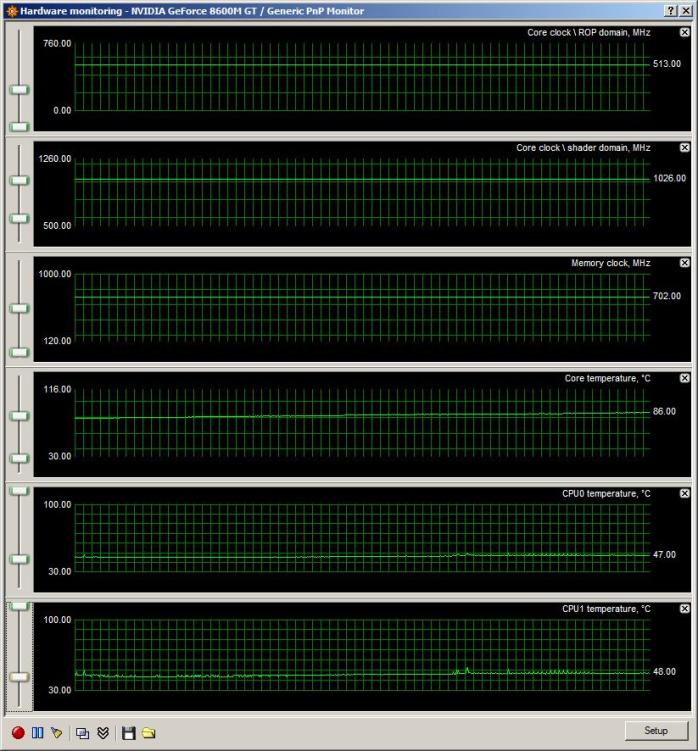
Here it is, with all the covers off (cpu, mem, hd) and propped up. It's in power4gear 'high performance' mode, but it's just sitting there doing nothing.
Taking the covers off did lower the CPU temp, but that really wasn't my main issue.
Attached Files:
-
-
hey guys, after clicking on the links from the original poster to the various WinXP drivers all three are different sizes?!?! and the mirror link below them is a different size as well, so a total of 4 different "WinXP drivers"
so my question is, which one is the best/up-to-date one? -
Your CPU seems to run at a very nice temp, cant complain about that one. The GPU is to warm, i agree.. Idle temp of 86c is 10 to high (15 compared to mine). Looks however like you have over clocked the GPU? - 513 / 703 - its supposed to be 475/700.
I just set mine to 500/700 to check the temp, i must say these numbers looks a bit weird to me, the temp was jumping from 70-99-70, on an average i guess around 80. Again i must say i do not know how accurate ATItool is on the temp! -
Ohhhh i just spoiled my plastic cover... I guess i just have to get a cooling pad..
-
Ya, I noticed the odd clocking as well... I haven't done anything (overclock or otherwise) myself to it. Maybe it's just a rivatuner thing. Maybe I'll force it back to the spec 475/700 or there abouts and see what she does.
-
Hi. I have big problem with my os. Could anybody help me to find drivers for Asus G1S with Windows XP Pro 64x? Im asking for your help!
-
hi boys, i maded a mod of the new G1Sn bios version 202 to work on the G1S, it seems that work fine, (i replaced the 9500m included bios whit the 8600m's one) now i have not much time to do 3dmark and other tests, i'll post the link of the modded bios, if anyone try it and if he can do more tests please post the result!
http://rapidshare.com/files/106139882/G1SnAS.202-8600mod.html
Asus.G1S.Resource.Thread
Discussion in 'ASUS Gaming Notebook Forum' started by Irathi, Jul 25, 2007.


![[IMG]](http://img413.imageshack.us/my.php?image=mybuguw4.jpg)