Problems? See this thread at archive.org.
46,54,48 as of right now after 15min of being on.
-
-
Fine as well.
Perfectly normal working temperatures for a notebook I would say are:
CPU: 40-60oC Idle 75-85oC Load
GPU: 40-60oC Idle 75-95oC Load
However due to ambient difference anything upto 90oC for the CPU or 100oC for the GPU is fine anything over though its time to get the compressed air can out or think about a repaste. -
lol ive seen furmar take the higher temp all the way to 113C and im sitting here thinking how can it idle so low anyway?
-
Yeah that is not good which section of the GPU is that? Check with HWINFO sensors. Its most likely the MEM(IO) and you will need to do a repaste as most likely the paste if either not covering the outer section or it has degraded. If it is stock paste that is not suprising.
-
Lol cool cool. no worries im a computer wiz in the whole mechanical part of computers. it is infact the memory IO .
-
If you are a computer wiz then you shouldn't have temps reaching 113oC get to work. I dont see above 80oC at Extreme burn since my repaste see my sig.
-
yea ill try some Artic silver. i like you guys(came from the gamefaqs board). so you know what their all about.
-
Yeah I used Arctic Silver 5 as my first repaste my results are here. Also shows how bad the stock paste job was done and that was only 6 months old it was degraded.
However, my IC Diamond results are far superior and the stuff is one of the best TIM's about. -
Hmm you made me think. ok ill go for you IC Diamond. does radioshack sell it?
-
Dunno mate im from the UK so I just picked it up from ebay, they sell OEM ICD7 over here for a fiver.
-
man i totally missed the flag your were waving lol. good to know bud.
-
ICD7 is available at your local MIcroCenter for $6.99
-
I compared in 3dmark11 and my results are the same as 1.5gb
-
To exactly the same drivers and clocks and not to the information on Notebookcheck which is a 6 months out of date?
Show the results. -
Benchmarks are fun indeed but it has to be on standard resolution. 3DMark06 and Vantage are 1280x1024, that's protocol
 3DMark11 is 1280x720 under performance mode. Extreme 3DMark11 are for SLI and X-fire systems.
Most importantly the highest score benchmarks should work fluidly on a game such as atleast The Witcher 2 on your native resolution with good temps.
Take it easy and have fun with benchmarks.. -
3dmark06 only allows me to run at 1280x720, is there a way I can force it to run at 1280x1024? I don't have an external monitor to hook it up to. I got ~13000 running at 1600x900.
-
I got all free benchmarks softwares from download from Guru3D.com
And in my case I can only run 1280x1024 and I can't change it My laptop's native resolution is 1920x1080 and no changes is made during test. Everyone that posts 3DMark06 and Vantage scores are at 1280x1024 with their 17" lcd monitor.. No external monitor.
Mine looks like this; Same as with Vantage. Only Mark 11 says 1280x720 which is the Performance mode and next will be Extreme (for high end PC, assuming SLI/X-Fire/High End Desktops). I can only do P mode for Mark11 also.
![[IMG]](images/storyImages/mark06.jpg)
When I OC and benchmark, I make sure it will run fluently with The Witcher 2. No point benchmarking if it's not going to run games with the added fps. I gained 10+ fps with the witcher 2 when OC @ 1080 res. Older games runs highest graphics with little to no OC needed. I'll get FEAR 3 soon and do OC testing there, I only want to run games now at 1080p and acceptable eye candy with fps 30 and above.
Lastly as guide, My 460M 192-bit does 14,169 on Mark06 stock (1280x1024), 8306 Vantage stock (1280x1024) and 1972 Mark 11 (1280x720 Performance mode), all on stock CPU clocks and 275.33 driver. Go check 560M bench scores and beat it
-
There must be a limitation of the 1600x900 screen, because on the free version of 3dmark06 1280x720 is the default. Maybe 3dmark06 picks the lowest screen resolution possible for any give type of monitor. 1280x1024 isnt even an option for me in windows resolutions or nvidias. I would actually have to force a custom resolution to attain 1280x1024. Im curious, does your lcd give the option for 1600x900?
Attached Files:
-
-
When I try to change native resolution, my next options are 1600x1024, then 1400x1050, ..1366 x 768, ..1280x1024, 1280x960, 1280x720..etc that's the order.
So I guess it has to do with nat. res. Unless you buy the software for $20
-
Lol, I bought the software thinking it would buy me 1280x1024, I was wrong. It only unlocked the resolutions that windows provides by default. Yea, I guess it has to do with native resolution. I assumed 1600x900 was a lesser resolution of 1920x1080. That makes me think that the screen sizes themselves are different from the two versions on the g73. I wonder if a simple swap out would be possible or if the bezel is slightly smaller/bigger on one.
I just noticed the only common ground we have is 1366x768. Care to post a 3dmark06 score at 1366x768? -
Comparison for the 128-bit at 1280 x 720. This is the 192-bit, 14,169 @ 1280 x 1024..
![[IMG]](images/storyImages/720.jpg)
This OC is Witcher 2 tested. ..At 1280 x 1024 it's 16,035
![[IMG]](images/storyImages/1270oc.jpg)
-
i got my G73SW back today from asus service center. now my 3dmark06 score is 16200 OC (192bit). compared to old 128 bit gtx 460m 15300(oc). not too much difference in syntethic benchmark. not sure in real life game.
-
06 is an old benchmark and the test resolution is low. It's going to make more of a difference in newer titles and at higher resolutions.
-
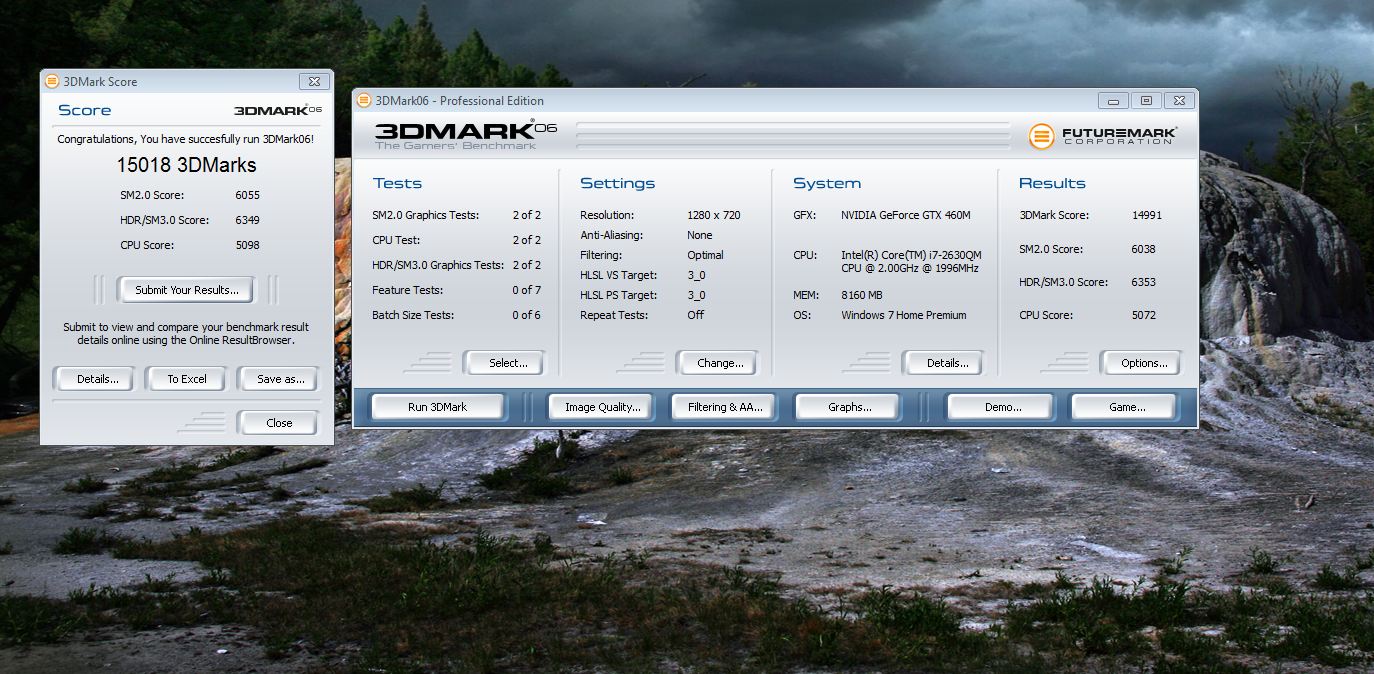
Ok, here it is. 15,018, all stock. About a 700 point difference between the 460m 192bit and the 460m 128bit. In games maybe 3-6 fps difference, not a huge deal. Soooooo.... all you guys with your better 192bit card can settle down. Yes your card is better, but the 460m 128bit is still more than capable of gaming especially considering the limitation of the lcd screen being 1600x900. The card is paired with a screen that it can handle and it will play any game the 192bit version will play at a sacrifice of 3-6 fps.
If i had the choice and paid full price for my bst6, I would not have purchased it. I would have bought the newegg version for 1249.99 versus be$t buy charging 1199.99 for theirs. So for future buyers keep that in mind. 50 bucks buys a better screen and a better card, but if you can get the bst for sub $1000 its still a great deal.
The reason for theif1956 running 3dmark06 @ 1280x720 is because its a common ground for us to bench and compare at. The 1600x900 screen, for whatever reason, will not default to 1280x1024.Attached Files:
-
-
What happens if you crank up the resolution to 1080p? Won`t the difference be bigger then between 128 and 192 bit?
-
Very much so that 20gb/s bandwidth loss will make all the difference at 1080p as games become more demanding.
People benchmarking at 720P and claiming the 192bit is the same are misguided by thinking 3DMark06 matters but in this day an age when Dx11 chews up the power output and resolutions are pushing 900/1080p + you need the extra bandwidth. We dont see this on the 5870M because our memory controllers push out 64gb/s more than the 192bit at stock but I remember how my 8700M GT (2007) suffered around 37gb/s so I could never accept 40gb/s in 2011. Seriously. -
Yeah that is what I thought. I mean, with the new G74SX and MSI laptops you have a 1080p display and a GPU that is strong enough to run the games on that resolution. It would be silly to compare the versions at much lower resolution like 1280 x 720 when you will be playing them in 1080p (or 900p with SW) anyways. I`d bet that 3-6 FPS difference will be much bigger in actual gameplay with higher res like 900p/1080p. And we all know how much the extra FPS matters very much in the next future games like Battlefield 3 and Skyrim, and present games like Metro, Battlefield 3 and Crysis etc, which we all know crush GPUs lower than the top models.
-
This is what my 5870M produces and im running it at 1600x900 and I am still not happy with the results in some games although it does produce some very good power.
I cannot bare to think about that poor little 1gb GTX running at 1080p
![[IMG]](images/storyImages/fsg.png)
GTX 460M (VRAM 1Gb vs 1.5Gb)
Discussion in 'ASUS Gaming Notebook Forum' started by NorthArmy, Mar 20, 2011.