Problems? See this thread at archive.org.
Yeah, its extremely annoying. I'm guessing something else thats in BIOS or maybe the VBIOS
-
Are you aware the link provided is for:
RAID: Intel® Rapid Storage Technology Driver for Intel Desktop Boards
According to Sarges' post as of june 23 this is the newest driver for G73 Mobile Intel RST. Maybe this is the cause of your problems? Someone correct me if I'm wrong.
http://downloadcenter.intel.com/SearchResult.aspx?lang=eng&ProductFamily=Chipsets&ProductLine=Laptop+Chipsets&ProductProduct=Mobile+Intel%AE+6+Series+Chipset&DownloadType=Drivers&OSVersion=Windows+7,+64-bit*&sort=Date&sortDir=descending -
i wonder if this symptom happens to another brand with i7-2630qm and gtx460m in their notebook??
-
Well, actually the Intel RST Driver for an OEM install is 10.0.0.1046, which is apparently a 1-off driver that Intel wrote for OEM Cougar Point chip sets and the like when the Sandy Bridge fiasco happened (my laptop was "born" on April 25, 2011, ie the day the software was originally installed at Asus factory). It was never posted at the Intel site, nor did that version ever appear outside of OEM installs, apparently. The reason I note this is that I don't have any issues with flickering artifacts, but chiefly I am certain it has to do with the 120Hz display in the 3DE models like mine...but coincidentally I am still running a Clone of the OEM installation without any issues at all!
OOps, you *DO* have the 3DE model....I don't know how I missed that previously! Remind me to get a new pair of glasses soon, ok? Hah Hah!
Ain't that the truth...no benchmarking for your SSD's from OCZ on high! I say screw that!--and I'm going to bench my SSD each month no matter what! I have found it doesn't do the drives any harm if you restrict testing to a short session of it, do the benchmarks, then allow the SSD to recover for at least an hour or so doing nada, nothing, zilch.
Do you want the battery run to last 25 minutes or less? That is the alternative, you dig? There is no way that an Intel Core i7 (Sandy Bridge or not) notebook is going to support a meager little battery for very long! If it were possible Asus would have figured out a way to achieve 3 hours battery life, but alas it is not possible, not in your wildest dreams. Be happy that we even have a battery, because they could have just left it out completely and it wouldn't have made much difference really. How often do you carry this monster around anyway?
About Folding@Home and the laptop with the 3DE designation: to do folding you have to LOSE the 3D! How about that? Yup, any of the newer graphics drivers are NOT compatible with the present generation of GPU Clients from Stanford, so I had to revert to v266.58 nVidia driver (without the 3D Stereo vision controller driver) to get the machine to do folding of any sort at all with the GPU! And the GPU does do folding well, or shall I say pretty nicely for a laptop's GPU...I figure it's good for at least 14K Points Per Day at the pace it is on presently, so I'll take those and run while I have the machine doing FAHome!
EDIT: I forgot to include the details...the laptop is doing FAHome with both GPU and CPU! The speed on all cores is 2.5Ghz for 100% CPU throttle, no hesitation or stumbling or throttling at all...all good. The GPU is folding at 825/1650/1450 settings in Precision, conservative and nice, and it's blasting through a WU in about 2.3 hours...about 1300 points per unit, so you can see where my calculations are coming in with respect to the points per day total (PPD) of the laptop...about 14K with both totaled up...is what I am estimating anway so far...no troubles, it's all good!
Temperatures are 70-degrees for the GPU and 71-77-degrees for the CPU Cores, very moderate for 100% juice pack on both Clients! I will keep you posted if I run into any difficulties but so far, so good!
That's the final report tonight about folding and my newest laptop the G73SW 3DE, you cannot have your cake and eat it too, ya know?
rexrzer727
2nd EDIT: I took a chance and a gander and tried out the updated VGA driver off the web site (Asus web site), just on the offhand chance that IT would be compatible with the Folding@Home GPU Client, and installed it and all of the 3D stuff on the web site also, and by gosh it works! So I can have my cake and eat it too with the laptop! I have renewed 3D ability if I want it, and GPU folding works 100% with the latest VGA drivers off of the Asus web site/3D features included, so that's a wrap there. All is well in the house now with my new laptop and Folding@Home+ 3D Vision works perfect again also, a most welcome change. I just hate it when you to compromise at all with technology to make one thing work...this way it all works fine! -
Did you try simply disabling the stereo in the driver control panel? Hitting the ROG button does not have quite the same effect.
-
Intel's readme file for the RST 10.6.0.1002 says the following:
=======================================
Intel(R) Rapid Storage Technology is designed to provide
functionality for the following Storage Controllers:
RAID Controllers:
- Intel(R) Desktop/Workstation/Server Express Chipset SATA RAID Controller
- Intel(R) Mobile Express Chipset SATA RAID Controller
- Intel(R) ICH7MDH SATA RAID Controller
- Intel(R) ICH7R/DH SATA RAID Controller
AHCI Controllers:
- Intel(R) Desktop/Workstation/Server Express Chipset SATA AHCI Controller
- Intel(R) Mobile Express Chipset SATA AHCI Controller
- Intel(R) 5 Series/3400 Series SATA AHCI Controller
- Intel(R) 5 Series 4 Port SATA AHCI Controller
- Intel(R) 5 Series 6 Port SATA AHCI Controller
- Intel(R) ICH10D/DO SATA AHCI Controller
- Intel(R) ICH10R SATA AHCI Controller
- Intel(R) EP80579 SATA AHCI Controller
- Intel(R) ICH9M-E/M SATA AHCI Controller
- Intel(R) ICH9R/DO/DH SATA AHCI Controller
- Intel(R) ICH7M/MDH SATA AHCI Controller
- Intel(R) ICH7R/DH SATA AHCI Controller
Intel's point to explicitely say that the "version 10.6.0.1002 for Intel® Desktop Boards" on the homepage because it supports newest technology:
Intel Z68 Chipset & Smart Response Technology (SSD Caching)
only for the desktop motherboards Z68 and up.
You can read about it here:
http://www.anandtech.com/show/4329/intel-z68-chipset-smart-response-technology-ssd-caching-review/2 -
About the battery: I know , thats true But it'd be nice for those 20 minutes every once in awhile
But yeah i see the point.
Man... wish i could get those clocks on mine! Some awesome temps though
Cant beat it with any other laptop .
-
I feel bad for ya [>>ahl395<<], I remember when everyone was OCing their JH's to like 900mhz core and when I got mine, I could barely hit 800-810. Was disappointing, I ended up returning the JH for other reasons, so I 'lucked' out, but I know the feeling of not being able to hit the clocks everyone else is. :\
I guess that is just how it is, I am fortunate enough that my 460m can safely clock up to 850, but I've just been leaving it at 775mhz for the summer since I don't see any temp increase at those clocks.
As for the gaming on battery, I remember my Gateway FX P-6680 ran games with no downclocking when on battery, but I guess it didn't have a 45w cpu and a 72w GPU like the G73SW has. It would be too much strain for our puney battery to run those at full speed. So it sucks, but I rarely, rarely need to be playing a game in battery mode, so doesn't bother me. -
Is there any benefit, or drawback to installing a fresh copy of windows 7 (purchased separate from the computer) VS. doing a clean install off the recovery disks using the windows version that comes with the laptop?
-
You can use Nvidia Powermizer to disable downclocking of the GPU on battery power. I don't know whether the increased power draw has any lasting effects on the battery, it might wear it down faster. Use at your own risk.
A fresh install removes all the crap that Asus had preinstalled. It also allows you to freshly install the latest drivers for everything, for maximum performance and minimal risk of issues. -
Wow nice
I could have returned this one to try and get another one with better OCing, but i didnt want to go back to my old laptop Luckily the card OC'd to 775Mhz. can handle pretty much everything, only a few games that need to have thier settings turned down
-
You are correct....the clocks are my easy clocks though, not the benchmark clocks. I think I already shared those with the nice people here and I don't want to make you feel any worse than you do now-- so I won't repeat them now. Temps are a little higher this afternoon as I've put the notebook out in my garage studio (!) where I've been working on a fresh polish on my ride all day, and I wanted to see how it will do in hotter weather. It's about 95-degrees F there now, and temps are 74-C GPU and 78-81 CPU but all is under control with the fans hitting their stride up to 5000RPM's!

You know there's a way to "train" your GPU to higher clocks, and you do it gradually, slowly but surely inching your way up to higher settings by making the laptop eat OCCT or Furmark lunches during the "training" period, just constantly working on the thing until it loosens up some. I had a GPU like yours with my G51JX-A1 notebook and I "trained it" to be a solid GPU doing that technique, over a period of about 2 weeks. It was work, not fun to do, but I pulled it off. :yes:
If you want me to detail how to do it with your GPU send me a PM with where you are now, and I'll give you a formula to make it better....don't want to bore the nice people here with any instructions, you know? Just give me your base settings and highest overclock achieved and I'll put something together for you, ok? :yes:
What type of CPU did the G model have in it, a Pentium 4 or a C2Duo? That would work for games on battery for sure, but not much else would...I am guessing of course, but that seems to be the logical choices for such a role in a G model. :GEEK:
If you are using the recovery discs all you'll be doing is reinstalling all the crapolaware and bloatware from Asus if you simply use those for a fresh install...it won't BE a fresh install, you dig? The fresh install is devoid of all bloatware and crapolaware and has fresh drivers off the OEM DVD ROM or the Asus web site that you downloaded, that's the difference and benefit...and the only reason for doing any fresh install.
I hope you understand...it's pretty basic stuff! :confused2:
As for where I am with folding and the laptop, I am happy presently that it's made it a whole day without crashing or locking up in any way even with a hot day here in SoCalifornia upon me. I don't know if it will last, but I'll take the fresh, free FAHome points for my average, which can use a boost right now as I am down one PC from folding here in my studio...I had an EVGA GTX-470 video board go South on me last week, and won't get back a new board on an EVGA RMA until the middle of next week, so that PC with the Core i7 920 o'clocked to 4.2Ghz is not on line right now...the laptop is "filling in" for the desktop right now, sort of anyway!

I think it's sort of amazing that I am seeing 2.5Ghz out of all 8 Cores (4 actual and 4 virtual HThreaded Cores) also, when the CPU is rated for 45W and only up to 2.9Ghz in one or two Cores by Intel. It is pulling down 41.3W right now, according to AIDA64 utility which monitors such things, and the GPU is pulling down 69.7W in its overclocked state presently. Thus the fans are working pretty hard but oh well, that's what they do...when it cools down later it will also cool down the laptop and the folding will be easier also. Honestly I don't like doing this to my pristine laptop, such as it is, but I need the points right now and if it is capable like it seems to be I'm really not hurting it for a short time this week...just a couple days, you dig? :wink:
It's an xlnt performance really, to me, and I'll turn it off on Wednesday when my new video board gets installed in the PC desktop...that's all I can say about it really. I love this laptop so much I'd never purposefully abuse it, and if I sensed it was being hurt I'd pull the folding off the unit immediately. So far so good, and I'm OK with the folding with that $2500 laptop! :wub:
:wub:
rexrzer727
-
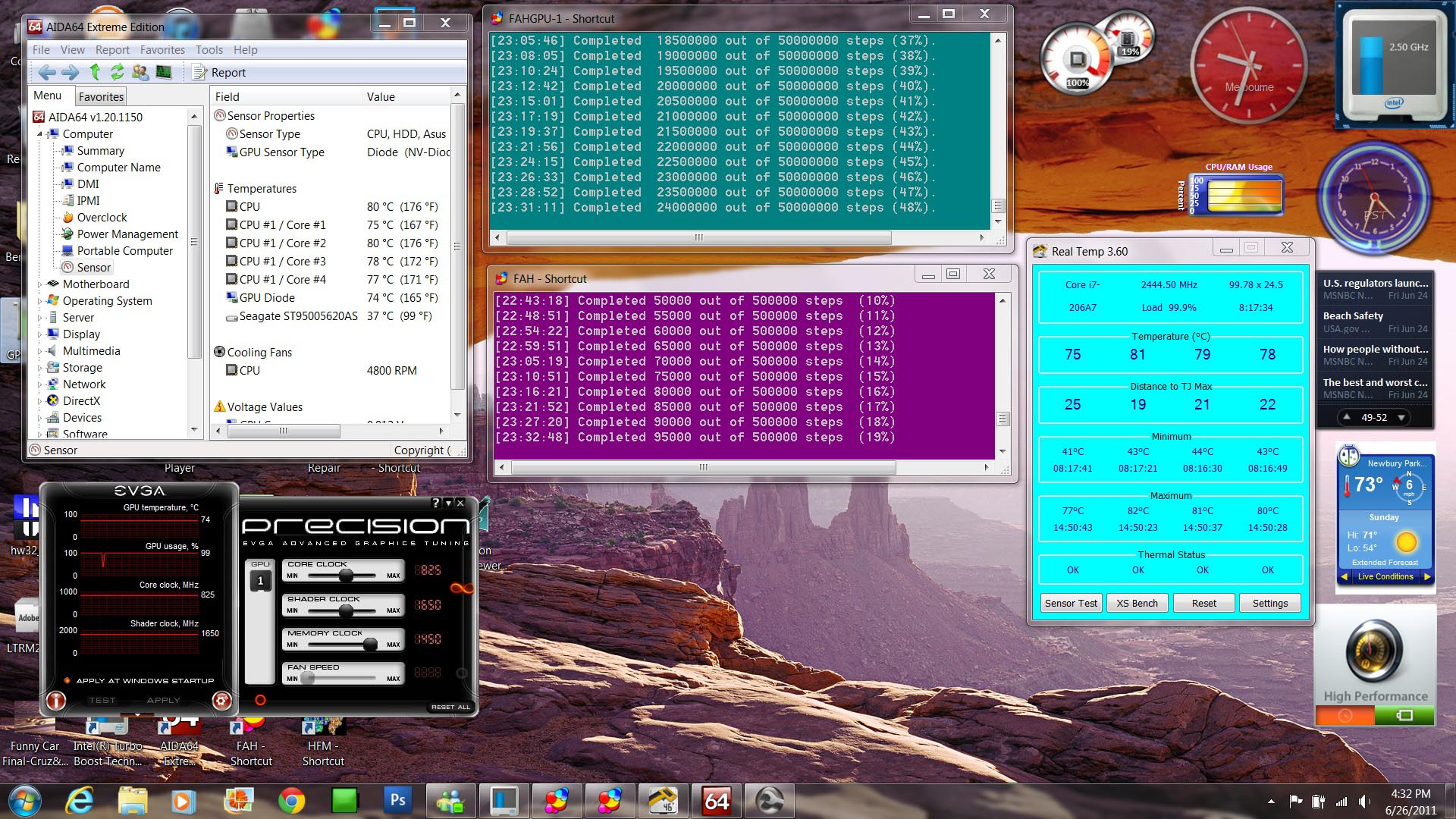
Here's a graphic of the laptop doing FAHome on both GPU and CPU clients, with the temps and the fan speed seen also, along with the load on the CPU in the CPU meter on the top, right and Real Temp both. This is with the laptop out in a 95-degree F garage for the day, so pretty reasonable temps really!
I didn't want anybody to think I was abusing the thing, that's the reason for posting this today...have to keep up my image, you know?
rexrzer727
Attached Files:
-
-
Hello. I bought my laptop a few weeks ago and friggin love it. My optical drive is a DVD player and I want to install a blu ray player in the near future. Can someone point me to a good one? Thanks.
-
Hey guys so I got the G73SW-BST6 a week ago and still waiting on it to arrive. Yea, yea I know, the Best Buy version is bad and I should have stayed away from it.
So here's my question. Should I just sell the G73 when I get it and save up some more cash to get the G74? Or should I just get the G73 (non best buy version)?
Thanks. -
Yup, it was a 1.8GHz C2D T5550, would only give me about an hour to 1.5hrs in games. But still not bad at all. I didn't have the p6860fx for long though, bought it used and within 6months I already was wanting a new laptop :>. Took me 1.5yrs though before I finally found a working gaming laptop, but meh, that is a story for another day. I'm pretty happy with this laptop sans the throttling, so all worked out in the end.
@Forkey - You should be able to return for a full refund once you get it. If can't refund, at least try to exchange for their new G73SX model(technically its a G74, it still is gimped with 128bit bus, but it is a 560m, rest of specs are same, just new outershell). Other than that, I would say having the full 192bit bus and a 1080p screen is nice, but there isn't any cheap G74 models out yet, so who knows how long the wait could be. -
Why not get the writer for BluRay and DVD+/-RW both? I highly recommend the Sony 5730S BluRay 6X DVD+/-RW writer/burner/reader which you can score at Amazon.com where I bought mine last year. Barring the Sony, which is arguably the best BluRay system out there for laptops (they invented BluRay technology and have a good handle on notebook assemblies too), I would go with a Pioneer slim BluRay reader or writer/burner/reader, and last on the list is our fine OEM Matsusheeeeta brand, such as they are cheapo and economy-minded units.
All three will get the job done, but the Sony is by far the most accomplished and fastest burner and reader out there. Optiarc is headquartered in San Jose, CA, and I had occasion to do an RMA with the company last year on my unit, which had a strange anomaly that nobody could fix or coach me through using, so they replaced it under warranty which is 2 years for all USA Optiarc units sold through retailers. So I can thoroughly vouch for the Sony company's backup of their stuff, in addition to it being the best mechanism out there--in terms of the motor and drive assembly itself, it's just the best there is!
Those are my recommendations, and they come from experience through and through...I've had multiple Matsusheeeeta OEM drives from owning multiple Apple notebooks of various sorts, and do not recommend them over the other two brands because they tend to be cheaply constructed with minimal heavy duty parts and pieces. I worked as an Apple technician for a few years also, and during my tenure there we routinely replaced the 'Sheeeta drives often, in all types of Macs, from Mini's to notebooks of all types they all come with those drives in them if they are made by Apple computer.
Good luck, and hope this helps you choose the right one for your nice, new G73SW.
I dunno what you would like us to coach you through as you already know about the Best Buy version apparently, but bought it in spite of that? That confuses me! Perhaps you would be best just keeping it and enjoying it for what it is, namely the cheapo skimpy-parts unit of the bunch that are sold these days...I think you should simply return it for a refund and get the full-blooded 3DE frankly, and it comes with everything standard so what's not to like about it?
Nothing will help you truly, really decide what to do about this conundrum that you are in presently, I guess, but that's my honest opinion and I will stick by it 1000%...the 3DE is the one to get, not the cheapo versions!
rexrzer727
-
lol..I fail when it comes to drivers! Seems I have more reading to do...thanks for the link! Anandtech has soo much info I feel like my head is going to explode!
-
Interesting, I'll send you a PM
I'll have to download this program I like HWInfo32... but i *would* like to know the power being pulled by the GPU and it doesnt say that
And yeah thats pretty awesome though it doesnt stay at 2.5Ghz 100% of the time does it? there's usually a time limit on it and itll lower down to 2.2Ghz or so
Speaking of the hyperthreaded cores, I've been wondering if anyone knows what CPU's are the main cores and what are the HT ones? (starting at CPU #1) is core 2 the HT of core 1? Or is Core #5 the HT of core 1? Or are they all created equal (pretty sure theyre not)?
Nice , thats when you know your laptop has some good cooling
The G74 has a 560M. which is pretty much just an overclocked 460M. I would definitely sell the best buy G73. After that, you could pick up a pretty cheap G73 and simply overclock it to a 560M, which you should be able to get stable easily, and possibly higher. thats what I'm doing and the testing results confirm this as they are right on par with a 560M
Otherwise the only difference is some design changes, which for the much higher price, I'd say aren't worth the cost
Arguably, you could [probably] OC the 560M in the G74 higher than the G73's 460M and beat it out that way. But you pay for that little increase
-
Let's not forget that the 560m can be OCed to 930 MHz, as one of the retailers already did. Max for 460m is 800 MHz, 850 if you're really lucky.
-
There's a couple things to discuss here in your comments, so I'll try them one at a time and see if I can help you understand a couple things about the CPU and the GPU both. :smile:
First, sometimes the teacher likes to pretend she knows something and does not, just to see if the 'Class is awake' so to speak! That's the headline for your comment about the GPU power being drawn...that is FICTITIOUS! I have no idea what power the GPU is drawing, and even though AIDA64 is supposed to have sensor data on our laptop contained within the program, which would potentially give that answer about GPU Watts per minute et al, the laptop is too new for the program so to speak. :GEEK:
There's no template for our sensors in AIDA64, in fact if you prepare a System Report on the laptop to send to AIDA64's background information lab (just like Everest Ultimate, the owners of the program keep active databases on all current designs of desktops and laptops, just so things like this can be answered EVENTUALLY, but probably long after I no longer own this laptop)...literally most likely a year or two down the road when the info is complete on these Sandy Bridge laptops, that are so new at this point for informational purposes anyway...this is unfortunately the case!
Next thing, the WATTS being drawn by the CPU are real, as I did get that info from your favoritei source, HWInfo32/64-bit, which I recently started using in addition to AIDA64 and my other utilities...it's a good one, but a bit messed up also, HWInfo that is. It says, for example, that my SSD is operating at 128-degrees Celsius! Hah Hah! Now that's funny! NO way Jose, that this is true! If that were the case, the silicon would be melting methinks! :cry:
It also says that the RAMDAC in the video board is actually 5800Mhz!! That would be the total processing power of the GPU considering that it has 4 multiprocessors inside of it (and it does); multiply that 4 Multiprocessors x 1450Mhz of the Memory overclocking setting I am running, and voila! A convenient way of pigeonholing the memory bandwidth of the GPU, NOT! That is NOT the way you compute the CPU power of the GPU, as it's a bit more complex than that simple calculation, but suffice to say I'm not going into it right now...later maybe.
Next point, about the CPU and Cores, both Logical and HyperThreaded Cores: Actually we start with number 0 for the Cores, and where there is 0 there are two components to the Core, one logical and physical, the other the CPU makes double time with so we call that a HyperThreaded Core for Core 0. So it's Core 0, component 1 and 2; Core 1, component 1 and 2; etc etc up to 3 Cores, not 4!! That is the correct way to define Cores in a CPU!
The easy way is to assign Core 0 a second participal and call it Core 1; then Core 2 with Core 3; Core 4 with Core 5; and Core 6 with Core 7 for a total of 8 Cores! There, now isn't that confounding! Hah! That is the actual way to refer to Cores properly-- now you can for all intents and purposes just call them what you want, as long as you standardize the things for actual publication, ok? But they are properly 0,1, 2, 3, 4 , 5, 6, 7 in actuality and don't ask me why it's like that, it just IS!
About the Cores doing what they do best, and that is sharing data! And about the speed of the various Cores, and why it's like that in the GUI vs the actual speed in Mhz! Things are NOT what they seem so let me explain that in the layman's language first, then actual Mhz and we'll see if that helps everyone understand the Core speeds of this particular Sandy Bridge Intel Core i7 2630QM CPU!
The Cores indeed DO ramp up to 2.5Ghz and stay there under 100% Load, as you can see plain as day in my graphic that I published earlier today, in the Real Temp window there in the graphic you can see the CPU is under 100% Load, according to the GUI, the user interface. Well that is true to a point, and then again it's inexact mathematically speaking. The Cores never actually are exactly on the money directly on a certain Mhz figure...it varies by the millisecond according to the way we interpret those numbers...and I will explain that in a second.
First though, let me briefly tell you that the Cores STAY at the relative figures they achieve, and let's say it's 2500Mhz for all 8 Cores for example for posterity sake, and there they all sit! And they will stay there until the demand on the CPU lessens and things are not needing to be up there that high and the values will come down somewhat. But NOT back to 2200Mhz or any other figure! The Mhz numbers also vary Core by Core! Ever so slightly so, and yet for informational purposes we can say that when the Load lightens that the CPU will ramp down mathematically speaking in the general sense of a couple hundred Mhz at a time. :confused2:
The only thing that would cause the Mhz to change would be temperature and Load, being the same thing really when you boil it down to facts and figures. If the temps of the Core reach anything higher than 95-degrees Celsius then the CPU volunarily throttles itself down somewhat, until the Cores cool off and then they ramp right back UP if the demand on the Load is high still, and that cycle can continue forever!
With Folding@Home the Load is pretty constant for CPU folding, and therefore the demand on the CPU proper, the CPU itself not the GPU here...The CPU remains at 2.5Ghz for an extended time during a Work Unit's processing time, and then when the WU is finished the demand is over with and the CPU goes back to its ready state and it assumes a neutral position in terms of Load and waits for the next assignment, somewhere lower than 2.5Ghz or shall I say waits for the next assignment in FAHome's stead, which will come up really soon after the old WU's completed statistical data is transmitted back to Stanford University's servers for the program!
I am looking at my CPU Meter (a Windows Gadget) and it says that the CPU is on 100% Load right now, and it has been for hours and hours doing this FAHome work unit of course it goes without saying, and there it sits! That will NOT change until the Load lightens up or temperature intervenes, which is unlikely here because the laptop's cooling mechanism is so efficient! Likewise the memory Load is at about 25% right now, and the GPU Load is at about 99% according to EVGA Precision and AIDA64 (really it is there!). So that's the state of affairs presently with my laptop. HOWEVER.... :yes:
The actual components of the real Mhz are the socalled bus ratio and the QPI index, and that means the figure is somewhere South of 2500Mhz, about 2464.7Mhz presently in actual numbers, and that remains inexact depending on Load again, and temperature, and demand, and the amount of data that the Core is accessing moment by moment as the Work Unit progresses! Thus even though we "see" 2500Mhz in the various aids and gauges that we use to see such things, that number is usually slightly LESS than the value displayed in the GUI or user interface! Just wanted to throw that out here for general discussion because it IS legitimate to know, and you all should know these things!
That's the story about Mhz, Load, Cores, and the User Interface! I could go on and on about things and really get specific and nail down the whole deal for you all tonight, but it would be, at some point, very boring and not worthy of your time, or so I think anyway!
( To the OP, I will write you a PM later tonight, after I gather up my stuff in the garage from my polishing and waxing job on the automobile today, and generally clean up the big MESS that is out here!)
I hope that none of the above DID bore everyone to death, because I didn't mean that to be the case. The science of Mhz IS inexact though, that's the bottom line, and it's all NOT what we all think things really ARE at, generally speaking anway! But just because things ARE inexact to the Mhz, we can still effectively think out how the mechanics of Mhz work and be pretty gosh darn accurate about it! :rolleyes2:
Thanks for indulging me in this discussion, about Mhz and Cores and the like, I really didn't mean to take up all this space here but inevitably it happens.
If there are questions about any of it by all means ask them, and I'll do my best to get it right again!
rexrzer727
-
Thanks for the input guys.
The main reason I went for the Best Buy version was because it was cheap.
Now I read up more on it, I'm not so sure I'm pleased with the decision. I can't return it because it was a personal sale and Best Buy doesn't even sell them in Canada. I think they don't sell them anywhere anymore last I checked.
I'll be making a bit more money in the summer so I'm able to hopefully sell the one I'm getting now and buy either a G73 or G74. It looks like the G73SW-3DE is a little bit more expensive than the G74SX-A1 and I'm not really interested in the 3D so should I just get the G74? Or should I go for the G73SW-A1 and save myself some money? -
Check the last few pages of this thread.
-
Thank you for the link. I think I'll sell the Best Buy version and go for the G74SX-A1 for the slightly better graphics card and extra vram. That way I can maybe use it for an extra year =)
Any other opinions?
EDIT: Slightly better graphics card compared to the G73SW-A1 not the BST6 -
.............
-
If you are using the recovery discs all you'll be doing is reinstalling all the crapolaware and bloatware from Asus if you simply use those for a fresh install...it won't BE a fresh install, you dig? The fresh install is devoid of all bloatware and crapolaware and has fresh drivers off the OEM DVD ROM or the Asus web site that you downloaded, that's the difference and benefit...and the only reason for doing any fresh install.
I hope you understand...it's pretty basic stuff! :confused2:
Not just a re-instal of the provided recovery discs. I am referring to a CLEAN (selective) install from the recovery discs. There is an article describing the steps to do so. -
Keep in mind that the gpu in the G74SX runs at a higher clock rate than the G73, and so may be hotter for that reason. That said, given that 3 dB is about twice the loudness, that's a bit of a large difference.
By the way, I tried the ICC color profile linked in that review, and it seemed to match perfectly for the G73SW-3DE. I've attached it in case others want to try it - the first time you enable it, the color change may look weird, but it's certainly a lot better than the horrible blue case you get from the default one.Attached Files:
-
-
.............
-
Ok so I read through a lot of this and I see a lot of hit and miss things. A lot of debate and I was confused by some things. So I would like to ask some questions now after about two weeks of lurking and reading and now being confused by a lot of mixed signals lol. I know this is a long post so please bear with me.
Model G73SW-3DE
Before I do a install with Ultimate 64 bit I want to do some hardware upgrades.
My question here is would running 1600 ram burn anything out, or would the computer be ok? I would like to upgrade the memory and the two I am looking at are:
Kingston HyperX 8GB (2 x 4GB) 204-Pin DDR3 SO-DIMM DDR3 1600 HyperX
or
Kingston HyperX 4GB (2 x 2GB) 204-Pin DDR3 SO-DIMM DDR3 1333
My next question has to do with the video card. I see the G74 is running on the 560M video card, would I be able to do a direct swap for the on already in this girl. I would like to run the 3GDDR5 GTX560m instead of this one.
I see a lot of people using different programs for monitoring temps. Which one has the most reliable support, and has good alarm features? The couple I have looked at are RealTemp, CPU Thermometer, and SpeedFan. Also do any of these monitor Ram Temps?
I see a number of overclocking software differences as well. Although a lot of users seem to be using AIDA64, what is really my best option? I want something that will let me run her to a safe limit, also allowing me to overclock my ram to a safe limit, and will still incorporate a feature that tunes her down if she starts to overheat.
I thank you for your patience and any help you guys can give me. After reading through all of this I am not really sure as to which decisions to make. -
Neither the BIOS nor the CPU that comes as default with the G73 supports 1600 RAM, so if you choose to use that, it'll simply run at 1300.
I'm not sure what the default memory loadout is though, as not all the memory slots on the laptop is easily accessible. Run CPU-Z to check how many slots are in use and at what speeds, and get something that matches. If all 4 slots are used for instance, getting 2 x 2 GB is simply going to replace two existing sticks. Mixing RAM speeds and brands can also be a potential problem, and you might have to replace all the existing ones to be sure everything works.
In theory it might be possible to swap the GPU for a 560M from the G74SX, but as no one's tried yet, no one knows if it works. Asus did some changes to the internal design on the G74, so it's possible that may cause issues. In addition when people have tried swapping other video cards on Asus G laptops, they've run into BIOS issues and fans being stuck running at 100% for instance. I suggest you not be a guinea pig and let someone else with money take the jump first - you can overclock the 460M to 560M speeds easily for now (I've yet to hear of one that didn't hit those speeds) and the 3 GB of video ram gains you nothing for gaming. The only real advantage of the 560M is a potentially higher overclock, but even that's not guaranteed.
As for overclocking the main memory or CPU, I'm not sure that's possible yet. -
any suggestions for a program to overclock my video card?
also it says I am running on all 4 sticks x 2. Latency was 9. So basically if I ran hyper x what it would do is either let me run at latency of 7 for all 4, or run at latency 9 but be on 16 instead of 8 gigs. -
MSI Afterburner or EVA Precision for overclocking the video card. The latter has a larger range for the core and shader clocks if you manage to actually hit the limits in former, but I prefer the temperature and speed monitoring in Afterburner.
RAM speeds seem to have very little impact in reality, maybe 1-2% at most, so 16 GB would be the better choice IMO if you multitask enough that you run out of memory and the swap file gets used. Look at the commit value in Task Manager during what would typically be your max load to see if that goes over 8GB, or if it's greater than used RAM. Windows will pre-emptively start swapping before you hit the limit so there's more free RAM for new applications - on my desktop right now I'm seeing 6 GB RAM used, with a commit of 9 GB, so it could really use more RAM.
Alternately I'd spend the money on an SSD if you haven't, and use the optical drive bay for the extra HDD you then get. Caddies are like $15 shipped and up. An SSD makes a huge difference, and even if you do get swapping when there's not enough RAM, the speed of the swap file makes up for a lot of it. -
Hmm I appreciate the idea to swap the optical drive, but I actually watch and burn blu-rays. I don't mind just swapping out one of the regular HDD and throwing the extra from this into my ps3 which needs a bigger HDD anyways.
-
So do I, but that's why I have a USB enclosure for it. The USB3 port handles the extra power needed without issue thankfully.
-
Try MemSet.
-
I don't get it, why even bother with the 1600 memory? There's hardly any difference.
-
Memset doesn't even work on SB I think, at least it doesn't on the G73SW.
-
Just an FYI, I just had what can only be described as a catastrophic file system failure on the Vertex 3. Before the crash, I had used 174 GB or so of 223 GB - after the crash, only 49 GB was left. Needless to say, recovery utilities couldn't exactly fix that. I have a recent backup, so I figure everything should be back to normal in a couple of hours though.
Things that could have made things go wrong:
1. I got some bluescreens while trying to install a Buffalo TV Tuner.
2. After I got that fixed, I was reinstalling the Bluetooth drivers as had some yellow exclamation marks for it in the Device Manager, and that's when everything started blowing up.
I guess I'll try those again right after restoring the backup, since I can avoid the BSODs now, and I'm curious to know if the BT drivers really are the issue.
EDIT: Verified it - it's number 2. If you have a Vertex 3 drive with firmware 2.09, you do NOT want to re-install the BT driver that's listed on the G73SW driver page.
EDIT2: Just tried the BT installer again on a regular HDD to see if it's SSD related or not. Same crash. -
The Bluetooth driver installer has repeatedly f**ed up the filesystem?? Woah. But so far you have been the only one to report this. It worked fine for me.
-
skywise are you on the revised g73?
-
+1 to MSI Afterburner It also has options for an On Screen Display of all the settings it monitors, so you can see it in game, and also has "hotkeys" for OCing so you can press a key combo and change your clocks whenever you want.
-
Thiers a version of GPU-Z with the ROG skin if anyone is interested.
Download TechPowerUp GPU-Z v0.5.3 w/ ASUS ROG Skin | techPowerUp -
Could you post a link to download the most current version of MSI Afterburner? I never know what sites to trust.
-
Directly left of "Version History" to download. It's their official page, so should be 100% safe, it's where I downloaded it from at least.
MSI Afterburner -
I did manage to reach Afterburner's limit on memory
Had to use NVidia Inspector to go higher.
-
If you mean the SATA bug, yeah I have a fixed one.
-
So basically maxing out afterburners settings didnt over heat the gpu?
-
Guys, may you tell me if g73jh with ATI 5870 is silencer than g73sw with NVIDIA 460m??
-
@Docbeech-
IMHO, either Kingston works well & won't hurt anything. It'll clock down, probably maxing at 1,333, as others mentioned. Their RAM seems to run stable, & maintains I/O's. I'd never had Kingston, but decided to give it a go, and I'm impressed. I'm running 4 x 4GB/1,600mh/HyperX-XMP on a 2920XM CPU, and it's great, but still not running full mem speed, and the XMP isn't supported that I know of. I'm also a firm believer of RAM matching, so if you're only hitting the outer mem banks,I would mirror the RAM regardless.
Sorry, can't help with GPU or programs...
Good luck & have fun with it! -
Hi g73 owners!
i have a question about battery care. is it safe to keep the batts plugged in even if the batt is full and hooked up to the electrical outlet?
ASUS G73SW Owners' Lounge
Discussion in 'ASUS Reviews and Owners' Lounges' started by Gooz, Jan 11, 2011.