Problems? See this thread at archive.org.
It will be a complete dis assembly of the unit.
BTOtech.com | G73Jh & G73Jw & G73Sw Disassembly Take Apart G73 g73jw service manual - YouTube
I found this video
-
-
i bought a 32' led lcd tv runnning at 120hz but on my g53sw nvidia control panel it only lets me choose 60hz is there any ways i can get my gpu running at 120hz to match my TV?
-
Its not hard to take apart, just try to put everything back together the same way and put thermal paste while your at it. I had to take apart mine to add ram to it and it turned out fine. Also clean the touch pad if you are having issues with it. I had to remove all the gunk and tape from underneath it and now it works perfectly.
-
It matter's slightly, i wouldn't worry about it.
-
I was pretty shocked to pretty much get a 'I dunno' -type answer to my question when I asked it from official ASUS support. It's their product, and they put that text in the manual so you'd think that they would know if installing it in a different order from the manual would matter.
But anyways. So you think I'd face no problems if I were to just stick a new 4gb stick in the free slot under the 'service hood'? -
Yea don't worry, it will be absolutely fine. ASUS support are slacking...
-
You will want to put back the ram in so that it's electrically capable of dual channel (1 and 3 or 2 and 4), usually in a notebook 1 and 3 and 2 and 4 are placed next to each other.
You can use CPU-Z to check what is currently installed in each slot (go to spd and then use the drop down menu to browse each stick). -
hey guys, i've been having troubles with my computer, (slow, won't restore to previous state, Slow internet no matter what i do, my C: drive is almost full while my D: drive is practically empty, it takes a Long time to shut off, i usually have to force shut it) and i was wondering how hard it would be to do a clean install?? i've put a hard drive in and installed windows 7 pro on it, but that's been Years ago when windows 7 first came out.. how hard would it be for me to do a clean install, and if so, will it speed up my computer to the way it used to be?? thanks..
-
Why not try uninstalling anything you can, move files over to D: and de-fragment it all.
-
thanks, i've tried that once and some of the files were reading that the drive was the wrong format?? i'll try it again and get back to ya.. Thanks
-
I need to buy a new keyboard for my g73sw. I found two that say will work but the one that's readily available doesn't match the part number on my keyboard. Does anyone have experience with using a 04gnv33kus01-3 to replace a 04gnv33kus03-3 on the g73? will it fit? Mine came with the 03 but no one has it, and the 01 is readily available, and people at places like amazon or ebay say the 01 is the correct one, but naturally they won't give my money back if it doesn't fit/work in my machine with the excuse of "well you should have done proper research before giving me your money, haha!" So here I am, asking if anyone has successfully replaced their g73sw's 04gnv33kus03-3 keyboard with a 04gnv33kus01-3 keyboard? And if so, is the 01 verified backlit? I'm leaving for Thailand soon and I need my computer fully functional. Now I get by with using a Logitech g13 to replace the left half of the keyboard (I got lucky that most of the dead keys are all in the same area) but it's troublesome when trying to work.
-
Hey everyone! I am new to this forum, having just purchased a G73SW... Long story short, I am disabled with a substantial amount of pain. Gaming helps a whole lot in controlling that pain. My illness progressed to the point where I could not work, resulting in all types of nasty consequences, not the least of which is a very pitiful income. I've become very versed in upgrading computer hardware, which I actually enjoy when my health allows. A very small grant from a private foundation helped me buy a decent gaming computer. After extensive research, I decided to buy this since it had every spec at a price I could live with. This came from amazon. Honestly. it looks brand new. Luckily it is the revised version so there shouldn't be problems with that. It even came with the accessories! (The mouse & backpack were still in their packages untouched). Needless to say, I am absolutely thrilled with this! When I was a working stiff I bought Alienware but this surpasses it in quality. My last laptop was an HP and there is no comparison between the two. Anyway, I was checking out this forum to educate myself about my new laptop and hopefully to avoid future problems when possible. Thanks for reading this and I welcome any suggestions.
-
Bit of a long shot, but can anyone with the 3DE model and working 3D do me a favor and check what the monitor is detected as in Windows? My screen got broken and after installing the replacement (same model and revision number) 3D is now no longer available. I'm hoping I may need a special driver for the monitor - if not, I need to go back to the drawing board.
-
Apologies for this simple question. I have searched the lounge & elsewhere w/o success. One of my few annoyances w/ my G73SW is the awkward Fn key combos to adjust volume, brightness, etc. Does anyone anyone know a way to simulate a Fn Lock setting or otherwise make these convenient single presses? Thanks, SW
-
Not usually possible with function keys unfortunately.
-
hey all.. just wondering something.. i've been playing a game (need for speed world) pretty heavy, and for a couple few hours at a time.. the temp for my gpu never gets over 72-73* celsius, on all cores too, but i'm wondering if long times at that temp might hurt my pc in some way.. plus i leave my laptop on from about 10am till around anywhere from 2-3am, and the only reason i do that is becasue i have an webcam trained on my door, etc. trying to catch a thief.. well, the last two mornings when i turned on my laptop, i heard the noise of the fan come on when it first started up.. now my old dell used to do that when it started to come awake.. or for a better example is when you can hear it checking the disc drive and going into the sign in page comes up. i've Never heard it do this before and it's got me quite worried.. is this normal like on the dell i had?? i'm in a nursing home and this thing is my only outlet to the world.. please help if you can.. thank you..
-
It's probably just dust in the fans and heatsinks. Get a can of compressed air and use it to blow out / clean the dust.
-
72-73 is acceptable for a notebook. Cleaning is not a bad idea, but the fans will just spin if something is over the temperature threshold it is set to.
-
thanks guys.. i Think its because i had a cd in my disc drive.. once i cut it off, and get some air, i'll find out if that was part of the problem.. i usually blow it out every week but my brother hasn't been able to get me any air from work.. i'll be getting some this afternoon thanks so much for everything.. i'll let you know how it goes..
-
Hello all
A couple of months ago my G73-XA1 battery died and I've been searching for a replacement for some time now. I noticed some offers on amazon that have a 14.8V battery (same 5200mAh but with 77WHr) .
My dead one has 14.6V with 75WHr. What do you say ? The voltage difference shouldn't be a problem (regulated internaly), right?
Or should I go for a genuine battery from ebay (top seller from china) ?
Thx !
-
A bit out of topic but i recently added a 3rd hard drive to my ASUS G73sw. I recently read a forum about changing your dvd optical drive for a hard drive, I was skeptical at first but I really needed the extra space. I use a KIngston 120g solid state drive for my OS and a seagate momentus 750g for storage. I have recently started recording video games with FRAPS but 20-30minutes of footage is abt 25 gigs and easily fills up my storage drive.
Anyway I went ahead and ordered a new hard drive and cd/dvd hard drive caddy. I'm happy to say it worked perfectly, I posted pictures in my blog on how to do it if anyone is interested.
Avenskypro
I bought a cd/dvd hard drive caddy and a seagate 1T sshd. -
OK, so I bought an OCZ 256gb ssd, but have still not installed it. I have a drive duplicator and have used it with great success in the past, but on regular HDs, never a ssd. I keep reading about alignment - but not simple ways to determine what it is.
So I have 2 questions: 1) how do I determine alignment and 2) how critical is it?
My plan is to dupe C (185gb of the factory 512gb, I think) onto the ssd, then obviously make that my boot drive. Once I'm convinced it's working well, I will expand the D to fill the rest of the original drive. Actually, the ssd will contain both the C and recovery partitions.
Does this sound like the correct path?
Also...can our fine G73sw take one or more of these mSata ssd's? -
Once you use the drive duplicator this is one easy way to check http://whirlpool.net.au/wiki/Checking_SSD_Alignment. If it is misaligned performance will suffer. BUT I would use a proper tool for cloning in the first place if you do not want to do a clean install. http://forum.notebookreview.com/solid-state-drives-ssds-flash-storage/716430-ssds-reflect.html. Searching this thread shows no mention of mSATA and I could not bing search any confirmation either.
-
i don't know if anyone can help me here but my core temps are running in the upper 60s while my gpu is staying in the 40's (celsius).. when i run my game the cores get up into the 70's while the gpu is only in the upper 60's at full resolution and running my game Hard.. not two days ago the cores were running in the 40's to the lower 50's.. anyone know what this could be or why it is.. oh, and i'm running the g73sw 500gb hdd.. i've looked at my task manager to see if anything else was running but ti read nothing.. can anyone help me??
-
WalkingHeart, I would verify that the fan on the CPU is working properly, HWINFO64 (or 32) will display fan RPM (I am not sure GPU fan speed is accurate) . Make sure the fan RPM changes as load increases. IF the fan looks good, I would recommned taking the machine apart and cleaning out any accumulated dust. A last resort may be repasting.
-
josea, thank you for your reply, i was surprised to get it so soon.. i found some malware on her that Might be doing it.. i've taken it off, and more, and now it Seems to be running alright right now.. but i will get the hwinfo64 and check in to the rpm's.. that's interesting to say the least.. one question though, would a game booster help?? thanks josea..
-
I confess I haven't read all ~250 pages of this thread, but a search is not turning up anything helpful.
I have been managing to connect my G73SW to my Panasonic TV via the HDMI lead to play stuff from the BBC iPlayer. I have even managed to get the sound coming out of the TV. However, I now want to be able to watch things on Netflix with the Netflix showing on the TV whilst having other stuff showing on my laptop monitor.
I've got up the nVidia control panel, which seems to show me how to "clone" the display over , but not how to have 2 different displays on the 2 different screens. Surely they wouldn't omit something as obvious as that - so I must be missing something.
What do I do to get 2 different displays? -
Windows 7 function/hotkey: "Win" + "P"
then choose the second option: "Duplicate" -
Thanks for the shortcut. I've got that up at the moment, but all it gives me is a view of this screen where I'm typing both on my laptop and on the TV screen to which my HDMI lead is attached. This is fine when I'm watching something engrossing which is being streamed, but not so useful when it's only worth half my attention and I want (for example) to check if there's anything interesting on the forums whilst some learned historian is busy showing us his profile (which I don't care about one way or the other) instead of demonstrating his learning - which is interesting enough to keep the man on my radar during the boring bits.
I can see that I have an option in your Win+P menu to "extend" which (since the other options were just turning off the displays) I assume must do what I want. However it produces a picture of my desktop background, but nothing else. That looks promising, but I can't see how to get anything up..
Perhaps,my next question should be, "How do I use the Extend function?" -
Ohhh, I said it wrong... you are right: It's the EXTEND function indeed!
It's really useful, I have another monitor here, and I love to use my huge Winamp (or a Messenger App) in the 2nd screen, while i'm working/surfing-in-the-web in the 1st)
You can set it up simply with your video-card driver, like this:
http://imageshack.us/a/img833/7439/e8yy.png
OR, you can be a "DualMonitor Professional", (humbly) like me!
and use these awesome tool, called: "Actual Multiple Monitors" (I use version 8.0.2)
then, you can configure all sort of thing (that are missing from Windows/Video-driver settings), Like:
1- A taskbar (for the 2nd monitor), that can be a "clone" or an individual taskbar, specific for "windows showing up at this 2nd monitor"
2- Lock mouse in monitor (I enable/disable it with a hotkey, adapted to work with my mouse Button 5 ***explained on the bottom***)
3- Different Wallpapers
4- Save/Restore your Desktop Icons Layout, specific for: 1 monitor & 2 monitor(extended)
So: here is my 'Actual Multiple Monitors' exported settings (it's A LOT of configurations):
http://www.mediafire.com/download/o9hbi40i010zim6/Actual_Multiple_Monitors_SETTINGS.zip
(it's Saved in a "zip" file, and it's Restored directly through this zip, so don't extract it...)
if you prefer to configure it yourself (or if you have downloaded a (very) different version) I made screenshots for you:
http://www.mediafire.com/download/pf8cwnei1798wf4/Actual+Multiple+Monitors%27s+SCREENSHOTs.rar
*** So, this "Lock mouse in monitor" function, can only be Enabled/Disabled by a "Keyboard" hotkey... (really anoying...), so I wrote a (VERY) simple "AutoHotkey" script, that redirects a Mouse Hotkey to the real Keyboard Hotkey of the application, it's very easy,
install AutoHotkey, and write a script with only this 3 lines:
XButton5::
SendInput, ^#!+X
return
(this characters ^#!+ are the "modifiers keys", Ctrl, Win, Alt, Shift, plus the " X" key)
(then let this script running, and configure the program to enable/disable the function with this exact key combination) -
Having that extra monitor space is extremely handy for all sorts of tasks, as pointed out the drivers should sort you out.
That multi monitor tool is interesting, i'll have to try it. -
Sup guys,
I'm wondering if is possible to change the G73SW GPU, anyone have any information?!!? -
It's possible but very difficult to do.
You can refer to this thread on the ASUS forum, it is mentioned that the system uses proprietary connection even though the connector itself appears to be a MXM connector.
G73Sw is it possible to upgrade the 460m card? -
Hi good afternoon.
I own an Asus Gamer G73 , had changed and then deleted the administrator password of the BIOS , but do not remove the user password , what happened was that when saving with F10 , changes guaradaron and I request the password user which I ignored , thinking to have a big problem, search the internet to find a solution without any possible since relog remove the battery from the bios for a few hours and nothing.
having a large and expensive paperweight , proceeded to think of giving up , however he had disarmed take the laptop , find a way to make a short board in what would be called CMOS , did not find any information on how to do without But what do my method and solve , so aquie leave some pictures of that part should make the bridge or short.
That worked for me, but I am not responsible for the results that can give them to you, just know that I run my me .
Image of motherboard :
https://www.dropbox.com/s/3ztks1b79akntyl/20140204_135710.jpg?m =
Image area to intervene
https://www.dropbox.com/s/yns2grbg0j7y76o/20140204_142358.jpg?m =
See red box indicating area.
https://www.dropbox.com/s/7lsxsfkhqyjyudn/20140204_142419.jpg?m =
Performing short , with the tip of a screwdriver.
https://www.dropbox.com/s/jpb5q6qqrtgkfsz/20140204_142441.jpg?m =
The short Realize what the equipment connected to the outlet, but then came back on and do the offline computer.
Result :
https://www.dropbox.com/s/nbi7p1qhjmk84a7/20140204_142536.jpg?m =
Well, that's all.
I hope they serve , greetings . -
Methods of getting around bios passwords are not meant to be shared on this forum BTW.
-
Luxury!!! thanks man! gonna keep this pictures saved here!
-
Made a thread also but guess this page works.
Updated bios and now my pc wont power up at all. No fans or sounds whatsoever or lights.
What can I do?
-
Hey people,
recently i start having random FPS drop downs in games . Im not playing anything new or demanding ,League of Legends(PES,counter-strike) mostly but even just regular Win use sometimes seems slower.
I tried all that came on my mind, started with upgrading video drivers,then downgrading to those recommended by asus, clean install of Windows, blowing the air through cooling vents even though i have no overheating problems.
Easiest way i can tell if it is going to have hick-ups in game is to minimize and maximize browser (chrome) for instance. I click on it in task bar couple of times and i see how fast it goes up and down,often it struggles and its noticeably slow so i don't even bother to start game. However randomly goes fast/normal but i have no idea how and why?
If anyone has any clue please let me know .
Warranty expired a year ago :/ -
Check the Windows Processes and use Resource Monitor (Start -> Resmon).
See if there's any processes that might be consuming more system resources even when you aren't doing much in the desktop.
The other thing is to clean up your heatsink and vent using compressed air to provide smoother heat dissipation. -
Thanks for reply
I cleaned it with compressed air, i do it quite often. As i mentioned i monitor the temps and they are all normal.
Nothing really consumes resources , just checked 5gigs of ram available, CPU not being overloaded, anything else i should pay attention to? Is there any software that performs certain tests for hardware failure?
Forgot to bring up that my graphics card drivers occasionally crash.... -
I see, so it is very likely a faulty hardware.
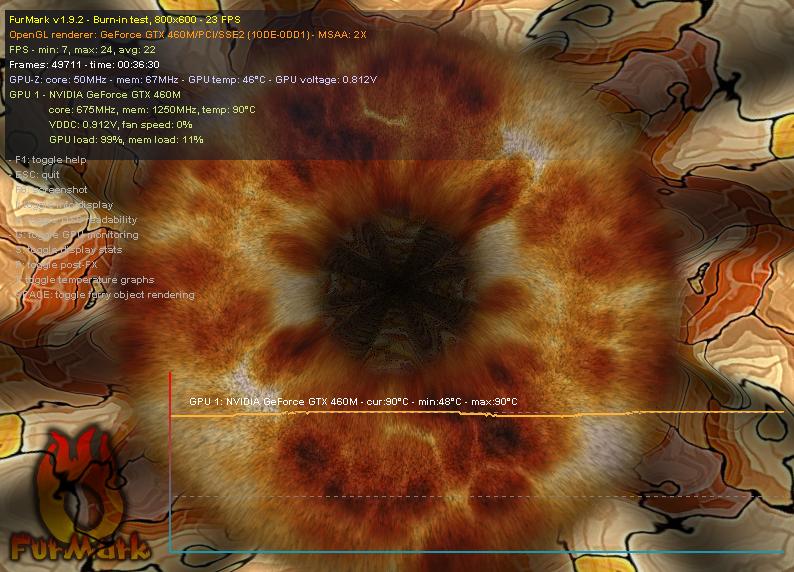
Can you try running Prime95 and FurMark separately? -
Can you share your monitoring results?
-
Which results? Resmon?
I will be doing the furmark and Prime95 now...Attached Files:
-
-
This thread is pretty old and possibly overheat issues belong somewhere else...
I have a G73Sw. It's overheating. This is a new development. The symptoms seem to be, after 2 minutes of powerup, the sound goes all grack-ully, then the sound goes completely away.
The cooling system is a bit odd. There's many holes in the bottom plastic panel, and I think air is supposed to be drawn in there and exhaled through the two fans in the back.
So, I put a whisper fan on the back heat-out, to put suction on the exhaust port.
Oho! Sound came back up from the blue! ( I just discovered that a couple minutes ago. )
This smells like a thermal-sensitive component to me! Time to warm it up and get out the ol' freeze mist.
I deeply hope this is not a motherboard chip problem. There are 798 of those little thin ribbon cables inside it, and too much heat can trip them up, especially if there's guck on the contacts.
*sigh* This laptop... when it's not in the shop, it's a pretty good laptop.
The screen is nice, the keyboard is nice, there's room for a second hard disk, and 16 Gb of RAM sounded awfully nice, so I got this. A couple days later Intel announced the SandyBridge fiasco and had to swap out ten gazillion chipsets. It's been downhill from there.
After its third DC adapter plug-in replacement socket, and the SandyBridge replacement, and then installing 16 Gb RAM into it, and on and on,
(they know this machine at the repair shop, and that's never good!)
I probably won't get getting another Asus laptop, but I don't know what brand to get!
Thanks for letting me vent (pun, pun),
Dave
BTW (I left another note on this) the MEMTEST.EXE program at boot (Linux) can hammer the D-RAM chips to where they are too hot to touch.
Then stuck-bits and so forth begin happening. My son actually figured it out.
(I haven't seen a memory test error in a very long time.)
Well, I guess it's time to strip this thing down and see if I can find the sound-thermal problem.
If anyone knows what's up, I'd sure like to hear!
Thanks,
Dave -
Hi all,
I was wondering. I have a G73SW-A1 (from Amazon) and I've been thinking about replacing the onboard wi-fi card lately. Can anyone recommend a compatible card that they have or know of that works well. The wi-fi situation I often use my laptop in is not ideal. I not in a position to change the network at all so I'm thinking of putting in a different wi-fi card and hoping for better results. If I'm not mistaken the OEM card does both the Wi-Fi and Bluetooth functions so the new one would need to do both as well. I'm looking for something potentially off of Amazon, Newgg, etc. Any suggestions would be most appreciated. Thanks. -
The Intel 6235 is the obvious choice Intel® Centrino® Advanced-N 6235
The 7260 might work too, but it's a lot newer Intel® Dual Band Wireless-AC 7260 Plus Bluetooth*
(scroll down to the bottom for a list of "Related products" that might work as well)
EDIT: The 7260 is not a good alternative looks like https://communities.intel.com/thread/46097
And yes, it's a good laptop when it's not in the shop. So far I've had it in for repairs for the following:
- bad bios flash due to bug in EasyFlash (dead laptop)
- replaced DC power board
- replaced AC adapter
- replaced screen that broke during transport. Replacement screen lost 3D compatibility, even though it was the correct part number and does support 120 Hz
I also recently broke the one thing that thankfully doesn't impact the usage of the laptop - the plastic hinge cover in the back. The laptop is now over three years old, so I've been considering replacing it, but it kind of sucks considering how much I invested in it. According to Notebookcheck, the 460M is only 40% of max performance in their charts, and an 880M is at 83%, for the best non-SLI GPU. A more mainstream GPU like 860M is only at 56%, which is kind of sad - there really hasn't been much of a performance jump in the past three years. I just makes more sense to wait at this point, at least as long as the laptop is still functional. -
Hi guys. How are you? I recently did a fresh windows 7 installation on my G73SW (btw the bios version is the last one). I've noticed that whenever the display is turn off, the left fan (CPU FAN) starts working faster. It goes back to normal speed when I'm using it for normal stuff like e-mail or web browsing (nothing hard like gaming o videos). Any ideas? any clues? Take care and thank you in advance!
-
what do you mean by "display is turn off" ? the normal (idle) turnoff function, or Sleeping ? (suspended)
-
Yes, the normal (idle) turnoff function. Any ideas? The left fan (CPU) is the one that start running fast. Then it goes back to normal speed when I'm using the laptop. bye!
-
The left fan (CPU) is the one that start running fast and also throwing HOT air!!!!!. Then it goes back to normal speed and temperatures when I'm using the laptop. bye!
ASUS G73SW Owners' Lounge
Discussion in 'ASUS Reviews and Owners' Lounges' started by Gooz, Jan 11, 2011.