Problems? See this thread at archive.org.
banjodido,
Many thanks for your prompt and informative feedback. There is a seller on ebay for a 12-cell with the same specs (14.8V, 7800mAh) at nearly USD 70 - here. It is not possible to be 100% certain but by comparing markings from the available pictures, it seems to indicate the battery mentioned in the German post is the same as that shown in the ebay posting. With a number of other ebay sellers at between USD 50-60 plus this piece of info, I am leaving this seller out of the potential list for consideration.
Just to share - I have a Lenovo S10 netbook for my son. Purchased in Dec 2008. By Nov 2011, the 6-cell had wear level of 70+% and a full charge lasts only approx one hour. I did some online search, took a chance and bought a third party 9-cell from a Hong Kong supplier on ebay for around USD 42. The 9-cell can provide a battery life of around 5 to 6 hours on a full charge (for comparison, the original 6-cell when new had a battery life of 3 to 4 hours on full charge). So far so good. Last I checked, the wear level after a couple of months was minimal. As regards the size, I selected a 9-cell which was a bit more compact than others available on ebay. I was aware the 9-cell will be heavier (extra about 200g) but was prepared to accept the trade-off for longer battery life as well as practical battery life once battery wear kicks in.
Given the experience with the Lenovo S10, I am prepared to do the same for my ul30vt. I realise that it is a bit of a gamble with third-party batteries, hence this request for feedback.
Once again, thanks.
-
I have a 12 cell bought on ebay for 40 bucks, 4%wear after about 4/6 months, lasts up to 14/15 hours.

It is a bit heavier and bigger, but it's worth it. -
I just saw your signature concerning the modded BIOS. Any chance you could upload it somewhere else?
-
Thanks to the fbi (Woot woot), i didn't save the bios, thinking it was safe on the megaupload servers...
PM me with the frequencies you'll managed to reach with a software like msi afterburner or evga precision on your G210m, i'll mod the latest bios with them and send it back to you.
Keep in mind that is just a bios modded to have the g210 o/c, nothing else. Therefore it could be hotter during games and such, or be instable. That's why you have to test the frequencies with a software first to avoid such problems. Plus all the g210m will not reach the same frequencies.
It really help in game though (3100 to 4200 in 3dmark06, L4d2 maxxed out is very, very playable with my frequencies.) -
Yeah, good advice adn thanks fr your offer. I'll hopefully catch some free time to play around a bit next week.
-
To my surprise, asus replace faulty motherboard even with all warranty seals broken and fixed the ul30vt.
-
I had the original Bios 211 Mod O/C @750/1700/850Mhz by Fendora on my HDD and have uploaded it to: http://www.filedropper.com/ul30vtoc
-
Thanks Sputnick. This weekend came somethig but I'll hope the next one I can play around and test it a bit.
-
Thank you Sputnick, i'll change the link in my signature.
-
Fendora,
Thanks for your info. Well done for having got a good third-party 12-cell battery. -
hey guys, decided to get the laptop up and running again, bought an ssd and decided to do a clean install, win 7 64, same as what the laptop came with,
i cant seem to get the nvidia drivers(the ones on asus website under ul30vt) to install correctly, ive tried installing them first, then last, and also i followed the install guide on this website ans still nothing, the device manager says that it can not load the driver error 39
the p4g visually seems to be working but i dont know if it really switching between the cards
i have also tried using a couple other hybrid verisons i have found, one on here i believe and one i found somewhere else that someone had some luck with but it has been a no go for me,
any help would be awsome, im pretty much fed up with it atm.
also my FN brightness up and down dont seem to be working on the intel graphics, is there something i need to install to get them to work?
thanks -
Strange it should be working. :/
I'd reinstall Seven, then immediately this .exe without connecting to the internet.
Then i'd make the updates from windows.
The thing is, Windows updates the intel chipset's drivers as soon as it's online, except if there's already a driver installed (other than the generic Windows provides).
It may be the reason you have an error.
Also, you should stick to P4G 1.1.25.
-
alright i am going to give it another shot. i also am unable to update the bios, running 207, for some reason it doesnt like the bios files, not having good luck i guess
another question is that it wont boot with the ide configured as enhanced i think they call it in the bios, the original hd booted fine in that mode but the ssd will only boot in compatible.
ill post back here shortly when i do another quick format. -
For the IDE mode it's normal, SSD requires some special settings in the bios. ^^
You should be able to update the bios though, what does it tell you when you try to upgrade it? -
Original Seagate hard drive on mine died last week. So sad!
Wish I had the money for a nice shiny new SSD
-
Any spinner in a laptop sucks. That said my 2 year old 7.2k Momentus XT has been super. Hopefully, when my 5 year warranty runs out, the cost of SSDs will be down to earth.
http://forum.notebookreview.com/har...t-hybrid-hdd-w-built-4gb-ssd.html#post6261327 -
micman : If you don't mind having a little amount of space, you could get an intel 80go for around 60 bucks on second hand, i think.
It's enough for me, I have windows 7 pro 64 bits installed, firefox, all the drivers, 2 or 3 softwares, L4d2, Portal, CS:CZ (5, 6 and 2GB) and i have 22GB left.
Make sure you have a ssd with the Trim functionnality though. And read the reviews before buying one, to avoid some problems.
But I agree, it's great to treat this laptop knowing it does not have mechanical parts (except for the fan, but it's not very disturbed by the falls, at least far less than a HDD ^^ ). -
ok well i got the bios to update, not that i needed to but i just didnt like that it wouldnt let me update it so that problem is done.
but the nvidia hybrid is still driving me nuts and i dont know what to do, the link you posted does not work but i think i found the link to some other hybrid drivers that had the intel 2020 part built in with it but it said no device for these drivers were found so it must have been for a different card or something
i reformated with a different copy of windows 7 just to see if something was going wrong there and still no luck, i have never connected to the internet when trying to install anything so far
i also was using p4g 1.25
i was having a problem with the drivers on the original HD so i re-installed them about 2 weeks ago with the ones from the asus website and everything was perfect, even the switching using 1.24, i dont understand what would make this so difficult and or problem with just swapping the HD out.
thanks for the help so far im still trying whatever i can and searching the internet for more ideas -
Sorry for the link, here it is :
http://www.nautisiandesigns.com/drivers/testing/HGMS_N26063_I2020_x64.exe -
downloaded and installed and it finished correctly but i still get the error 39 code in the device manager saying that windows cannot load the device driver for this software issue
-
i just did what mojoblue said to do on page 215 and it worked i cant believe it, i wish i would have found that earlier.
i went back to bios 203 and installed the stock drivers and both the intel and the nvidia display are showing up in the device manager and everything is switching perfectly and the brightness is now working like it should sooooo stoked
whats a good way to test and see if everything if working perfectly, run a 3dmark or something ?
thanks for all the help -
Glad you found out.
Yep, you could test your 3dmark06 score when on the Nvidia card. You should get around 3200/3400 irrc. -
Hi there, I'm very impressed with the way you've extended your battery life.... do you know if this kind of thing is also possible on my UL80VT??
If so, I'll have a hunt through the excessively long ul80vt thread
cheers -
If i remember correctly, the ul80vt battery is the same as the one used in the ul30vt, so i guess you could get a 12-cell battery on ebay for 30/40 bucks too. ^^
The undervolt and the SSD helped me reduce the power computer to reach 14 hours easily. =)
(When on the intel graphic card of course) -
I just did a clean install on my ul30vt. Everything's up and running fine, except.. when I'm on battery, using the intel graphics, the colour changes from warm to cold and back. The behaviour stops, when I change the energy saving settings in the Intel configuration thingy, but.. it's back to this, when I plug the laptop in and out again. I also know I had this problem before and solved it, but I just can't remember/find how.. anyone with a simple solution?
-
Maybe here :
http://forum.notebookreview.com/asu...0vt-faq-official-owners-lounge-redux-148.html
But I don't understand, isn't the colour change you experience only the result of the screen backlightning changes? If so, you should configure in P4G your desired backlightning level for each mode (4 in total), both when plugged and on battery.
You could try this too : -
Thanks! With G4P 1.0.24 I didn't have that option, for some reason; and changing the option in Intel's configuration tool was overwritten by P4G. I've now updated to the latest P4G (1.2.1) and there don't seem to be any problems with switching graphics, but I could turn off the power saving setting.
And no, the colour changing is not just backlight. It's Intel somehow changing screen colour (to save energy, apparently) and thus making everything weirdly blurry. A strange feature indeed. -
Wow.. Fendora.. how did you get 0.875v on SU7300 @ 1.73Ghz?
I can go only as low as 0.900V with throttlestop. Which program allows you to go lower? -
ThrottleStop allows me to go to 0.875. ^^ Perhaps it's due to the versions we use.
-
Which version of Throttlestop do you use?
-
i am using 4.1 and it allows me undervolt to 0.875
-
Can you post up a screenshot of your settings? Throttlestop 4.10 does not allow me to go below 0.900v
-
hope it help
-
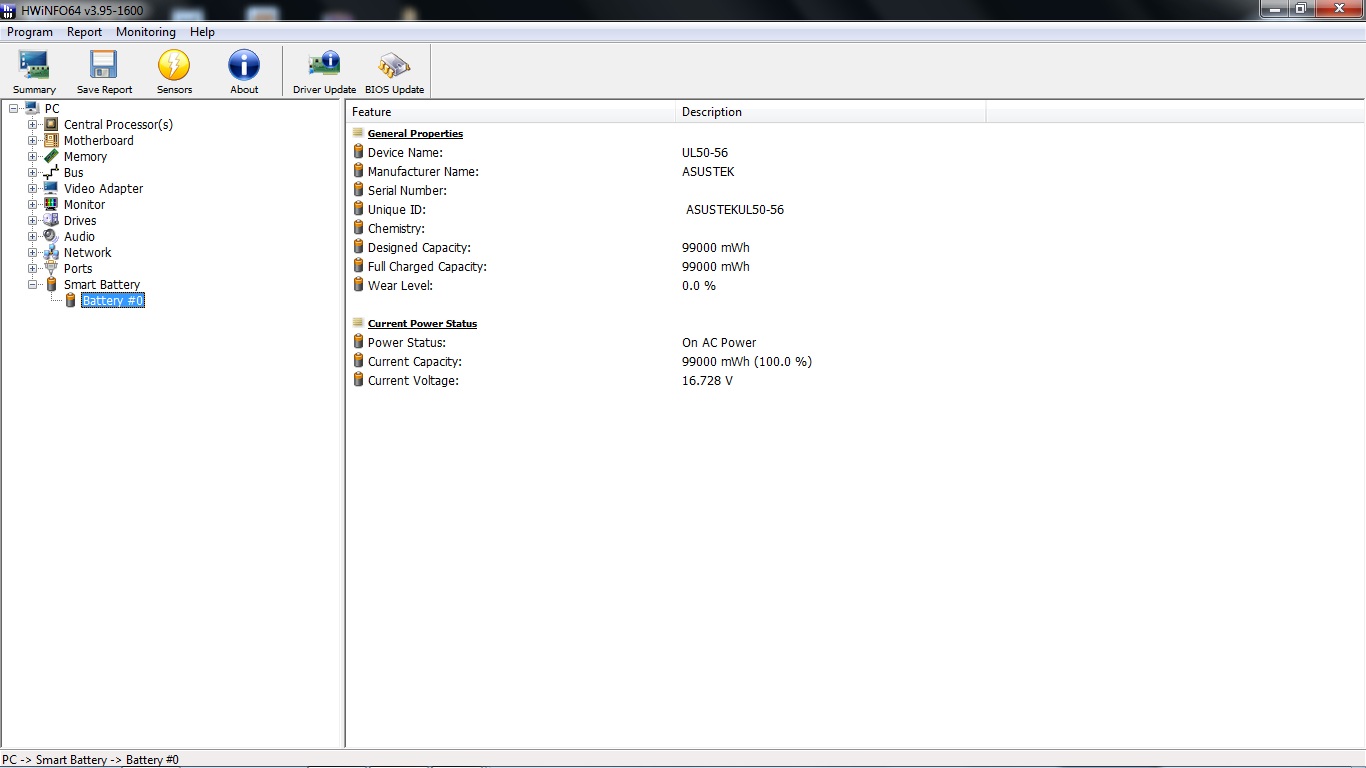
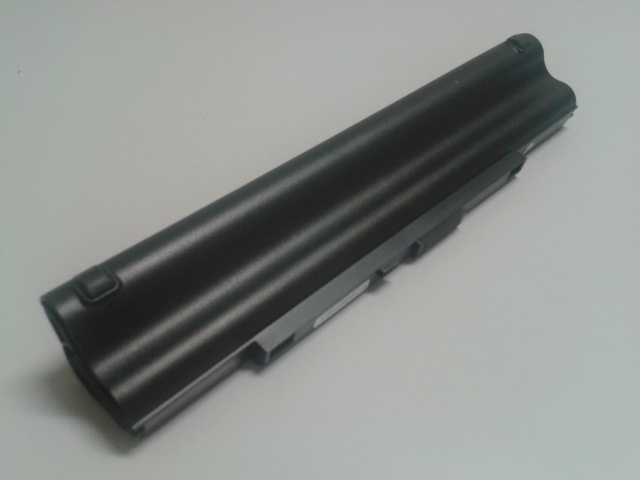
A few posts back (pgs 215 & 216), I enquired about third party 12-cell batteries. Well, I purchased one off Ebay for GBP 33.33 (about USD 53) with free shipping and it arrived today. Below is some initial feedback. Will update in future once have used it a while.
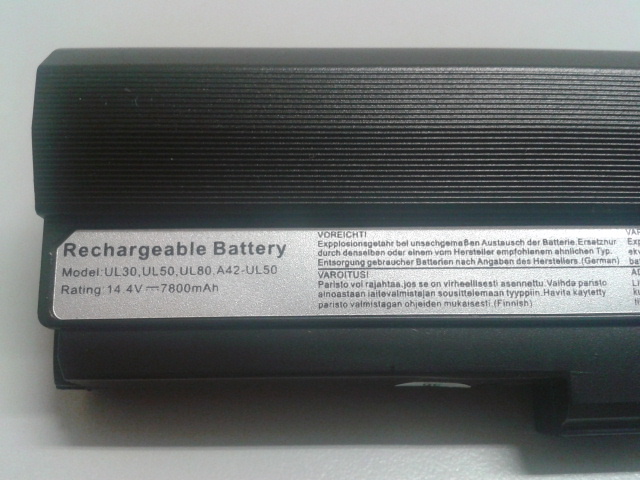
Most important is do not believe the battery capacity as claimed by the Ebay seller. For eg, it was stated as 14.4 V 7800mAh (= 112,320 mWh). The actual capacity shown by HWiNFO is 99,000mWh (see first pic below) Therefore, I think the battery is probably 15V 6600mAh (= 99,000 mWh) or 14.4V 6900mAh (= 99,360 mWh). Anyway at 99,000 mWh it is still more than the original 8-cell (84,000 mWh). So before buying, factor in some "discount" on the claimed capacity and only if you still feel happy about it do you proceed.
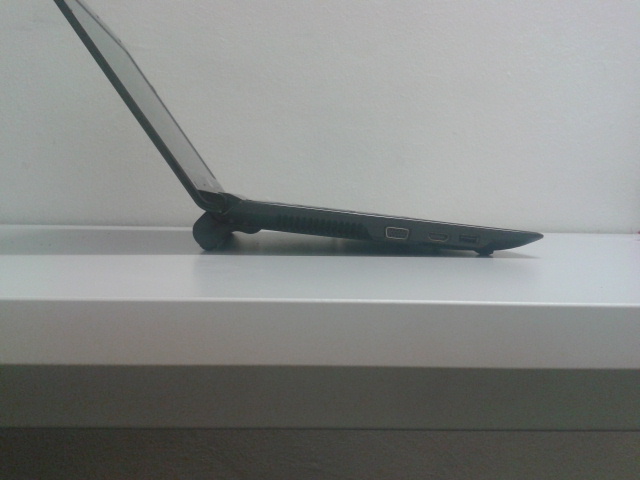
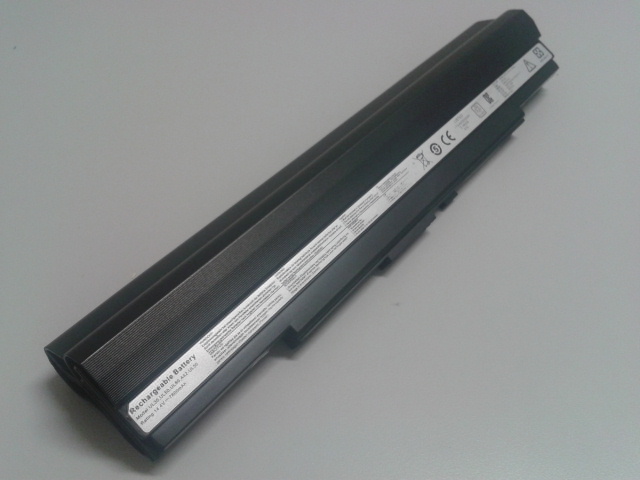
Some pics:- -
hmm... so weird.... My cpu only allow me to go down to 0.900v
-
m300 : From what i see we have the same.
Mine is doing great though, just has 4% wear level after 6/7 months now (and it has been like this since 2 month after i bought it, then it stayed at this level).
![[IMG]](images/storyImages/sanstitrelen.png)
As you can see, according to HWmonitor or your HWinfo, it's more like a 16,7V battery.
But i think Hwmonitor nor HWinfo is reliable on these points...
You should have improved battery life in any case.
Jackluo : Maybe it has something to do with your BIOS version, or your drivers? (Intel drivers, motherboard drivers...) -
Just to clarify, Your using this throttlestop program to undervolt the CPU? And your doing this while it's OC'ed? Sounds interesting. Is there a guide somewhere? Would like to check it out and test if I can improve the battery life. from the screenshots it looks like it has four profiles. Does the program has to run then all the time?
-
Fendora,
You are right. It looks like we both have the same type of 12-cell. I also checked using HWMonitor and BatteryBar, both gave the capacity as 99,000 mWh. I think you got the better deal having paid only about USD 40 for the battery! Good for you.
Your wear rate of 4% over 6/7 months is very good. Making a simple extrapolation to two years, the capacity of the 12-cell then at 83 Wh (0.84 x 99 Wh) is about the same as the original 8-cell (84 Wh) when new.
One additional piece of info for those who may be interested. I measured the weight of both batteries with an electronic weighing scale. The 12-cell is 612g while the original 8-cell is 430g. This means the weight penalty is 182g. This is 10% the weight of the notebook with 8-cell battery (1830g). It is a personal choice but I am OK with the weight vs longer battery life trade-off. -
OC : using PG. change OC level in Bios to 5%, then active Turbo mode using PG
UV : Throttle provides users with 4 options but I only use two of them : 1 for AC mode and 1 for battery mode. it is basically enough for me
-
I don't think the easy overclocking setting in bios work if its being 'turbo33ed".
Anyways, I OC to 1.906ghz from 1.3 while undervolted to minimum 0.9v locked to 6.5 multiplier. Wish I can go lower. -
Yeah as jackluo923 said, the 5% o/c in bios is cancelled when using the P4G o/c (Or the P4G uses the stock clock for reference to go 33% faster,it's a different way of seeing it).
But yeah, you should be able to have the SU7300 o/c @1.73Ghz AND at the same time seriously undervolted.
-
Is it me who has a special su7300 cpu that doesnt support voltage below 0.9v or is it because of windows 8. Just tested. With another exact same laptop. It gets to 0.875v with ease while my cpu can is limited by throttlestop to 0.9v
-
so I broke the lcd back cover. The hinges are screwed to a plastic! frame which is mounted to the aluminum lid. These plastic mounts snapped. I'm quite handy with mods/repairs, but where can I find a replacement?
Haven't found any on ebay for the ul30vt, ul30, or u35...
Only could find this
13GNWT2AM013-1, CSG America Parts 877.274.7620 -
Have you checked Asusparts ?
-
Hey guys, finally got to reinstall an OS on this, been running stock since I bought it.
Here's the deal, on Win7 install, installs fine, after first reboot I go to put in username/pass and the typical first use type stuff.
It becomes unclickable at certain points, tried to reboot ~10x and finish it, never gets by.
Then installed linux and used the laptop for a week with no issue. (Ubuntu)
Now went back to trying to install win 7, same issues. Tried a couple diff Windows install ISO's all the same thing. Makes me wonder if it's a default driver that's not working well. Any ideas here? -
num lock???
-
Nobody seems to check UV with stress test like Orthos, see my sig. I can only use .875 doing surfing or mild games @ 1.7 Mhz. At 1.9 Mhz, WFO, I use the .912 setting in gaming. My GPU will hit 85 to 90C, CPU around 88C maxed out on some games. Less, then I risk core #1 crash.
What happens if you use only pg4 to set for battery in non turbo? Cpuz still .9? Heat wise not a huge deal but curious why only .9. -
I stress tested w/ 0.9v @ 1.7ghz 100% stable and 0.915v for 1.9ghz. Both gpu + cpu stress test, temp maxed out at around 75-80 degrees
-
I recently installed windows 7 onto a new ssd and in the meantime wanted to finally update my graphics drivers to something newer than the 2009 drivers from the asus website. I just thought I'd share this link to be able to install the latest nvidia verde drivers:
Installing Nvidia Mobile GPU Display Driver on Notebooks Upgraded to Windows 7 x86 / Windows 7 x64 - Komeil Bahmanpour
The drivers can be found here:
NVIDIA DRIVERS 296.10 WHQL
The one thing I cant figure out so far is how to update the intel drivers to the latest (not windows update version) -
I also can't switch graphics anymore, it seems to be only using the intel chipset.
I'm using power4gear 1.21 though, is this new one not compatible with the ul30vt?
Asus UL30VT FAQ / Official Owners Lounge redux
Discussion in 'ASUS Reviews and Owners' Lounges' started by belzebutt, Apr 21, 2010.