Problems? See this thread at archive.org.
I emailed ZZF and they said it has the 9400....I wonder what the deal is.
-
It's more or less the same card as the 9300M GS. The card in the U6V was originally named 9400 but nvidia changed the name to 9300.
-
I noticed there's a new bios for the U6V. The only update mentioned in the changelog is a new video bios.
I'd like to try this bios, but I have a hard time getting Easy Flash to work. It simply refuses to find any bios files on my hard drive. I've tried putting the files in the root of the non-hidden Vista partition, but Easy Flash doesn't see them. Where do I need to put the bios file for Easy Flash to see them?
Furthermore I currently have bios 208, which isn't available at Asus' site. I'd very much like to save this bios, so I can roll back, in case the fan issue with the newer bioses (including 213, according to the Asus forum) also exists in Linux. But neither Easy Flash or WinFlash will let me save the current bios. Do I have to make a DOS boot CD, so I can rnu the DOS bios flasher? And will it even allow me to save the bios?
Are there any thirdparty flashing utilities that are recommended for the U6V? I'd hate to brick this otherwise wonderful laptop.
Thanks in advance.
Neurosis -
I don't recommend third party. Use WinFlash or Easy flash from within the BIOS. If easy flash does not find a file there must be a problem with the extension.
-
Something weird happened with my U6 today. I got to work...put the laptop on the stand, booted up Vista, opened outlook and 10 minutes later I hear my fan spinning louder than ever. I ran EVEREST asap and my GPU was at 85 degrees, processors at 80 degrees. I was using Outlook and Chrome. Nothing else and it went crazy. Now the temps are back at 55 GPU and 45 CPU but I don't think what happened is normal. I don't want to send it to ASUS
 .
.
-
I know this has been asked 20 million times but bear with me. I want to put XP on my U6 because Vista is a pain. I got fed up reinstalling it and not solving the stupid loading desktop error and explorer.exe crash.
If I put XP, how many features do i loose?
1. Will my keyboard work 100%? Shortcuts and whatnot?
2. Finger print reader?
3. Wireless Console?
4. Asus Utilities?
5. Will the Asus website XP drivers work properly? -
Do any of you play WoW on your U6? I was wondering since that would be the only game I play.
-
Yes. I play it on Linux (using Wine) and it runs quite well. It should run (even) on windows reasonably well.
I have a U6V, but it should run just fine an a U6Sg as well. -
Crap, I can almost play Need For Speed Undercover
. Heheh....the GC pulls me back... youse NVIDIA
.
-
I recommend against 3rd party utils. See my signature for a comprehensive BIOS update guide for ASUS notebooks.
Just a random ACPI bug... it happened to me sometimes as well. I don't think you'll have major trouble because of this.
Since we do not have a guide for the U6 XP downgrade, I cannot answer those questions with certainty. However, usually one can install XP on ASUS notebooks and, with a bit of work, get every hardware device working properly. That is not always the case with the utilities however (e.g., Direct Console for G50-series laptops does not work in XP).
All the keyboard shortcuts should work, I believe.
Also I see now that you say ASUS has XP drivers for this laptop? If so, then yes they should work, and most of your XP-related worries should be addressed. You will not need to do any driver scavenging. -
I used XP SP3 for a few hours before EPIC Fail. It all started like this:
1. Take XP Original Disk.
2. Download Sp3
3. Download SATA drivers.
4. Use NLITE to integrate SP3 and drivers.
5. USe NERO and create a bootable CD.
6. Reboot U6 and boot from Disk.
7. Install XP SP3.
8. Whilst the U6 was installing, I was downloading the drivers from the Asus website and created my OWN U6XP disc.
9. The fun begins.
10. The fancy design and animations are gone.
11. Power4gear has more states on XP than on Vista. HOWEVER, on battery it does not work on super high performance.
12. Battery meter refused to show up. I made it show up eventually.
13. Installed ATK hotfixes, drivers, everything.
14. Installed the NVIDIA driver from 2007 from the website.
15. Installed OFFICE 2007, CS4 Master
16. Installed my X-Fi and the sound was amazing. Crisp, clear and for those minutes I used it on XP i realised that my investment was worth it.
17. Used with shortcuts, I used win+e and the laptop froze for 30 secs and then opened it.
18. Updated the Intel Storage Manager, I thought it was my SATA driver. No change, windows was using a driver from 2001.
19. I made a test between my PRESCOTT and AMILO. I was clocking the response on win+e. Both my PRESCOTT and AMILO opened instantly, my U6 was on holiday and after 30-40 secs it opened.
20. I opened word and I noticed lag on the keyboard.
21. To confirm this, I opened explorer by creating a shortcut and double clicking. It opened instantly. Faster than on VISTA. My U6 was flying. At this point I was sure my keyboard had a problem.
22. Reinstalled the whole keyboard and drivers.
23. After reboot, I noticed lag on apps even with mouse.
24. Note XP+SP3 does not support multiple bluetooth connections (Asus mouse and Nokia Communicator at the same time) whereas Vista does.
25. Started timing Photoshop Opening on all my computers. Double clicking on my U6. I was seeing my U6 lag behind 7 year old pcs.
26. System restore. No change.
27. Note: 3GB in XP does not equal 3GB in Vista.
28. Format drive.
29. Install Vista
30. Install only Asus Power4Gear and Keyboard apart from Vital drivers.
31. No LifeFrame, Splendid, Power4phone, etc. These were stopping Vista from shutting down and I assume they are the cause for the eternal error I have : Cannot load desktop because the registry ends up corrupted.
32. Install Office 2007, CS4 Master, X-Fi, sounds like crap on Vista, every update and so far no problems.
33. Insert NFS Undercover Disk. Install Game...play a bit. It was framing sometime but...hey
.
34.Redid the tests and win+e on u6 works, explorer opens in an instant, my other pcs lag behind. CS4 Master opens faster than on my other pcs. The way it is meant to be.
35. I am not a happy camper. I cannot use XP and I cannot use Vista. Asus support for these operating systems is pathetic.
Thanks Asus and thanks Microsoft. I am forced to use an OS because my laptop won't work properly with the best windows os ever made. Should I buy Leopard? Put Linux? Don't know...simply don't know... -
So wait, what was the main issue in XP? Was it lagging? If so, did you check the processes list to see what could have caused the lagging? Was anything logged in the Event Viewer?
(sorry, quite tired and I find it difficult to distill the required information from the rather long post above) -
It was lagging badly. The event viewer was not helping at all. It is obvious that my BUS was not used properly. The HDD light was not working when I was opening apps. After that 30 second delay the led was blinking and the apps would open. When I saw my keyboard laggin in word i had a moment.
-
We don't? hmmm, I always thought we did.... Anyways, I'll try post all the working XP drivers for the U6 today or tomorrow
-
Hmm... have you installed the chipse\t drivers before all the rest?
Also, you could try installing:
a) in SATA Compatible mode, if you were using Enhanced
or
b) the other way around.
Also be careful with the drivers and utils you install, only install one at a time and watch the performance after each driver.
(all this if you are willing to invest the time...)
If it's there, I must have missed it since it's not in the Info Booth XP section.
-
Hehe...that is the first thing one does. I did not try compatible tho.
-
My Vista curse. 2 months of formats, minimum Asus drivers and apps and voila.
Fresh Vista Install with minimum, minimum, minimum Asus drivers.
Pic 1 before I went to bed.
Pic 2 when I woke up this morning. 2 reboots needed to load my desktop.
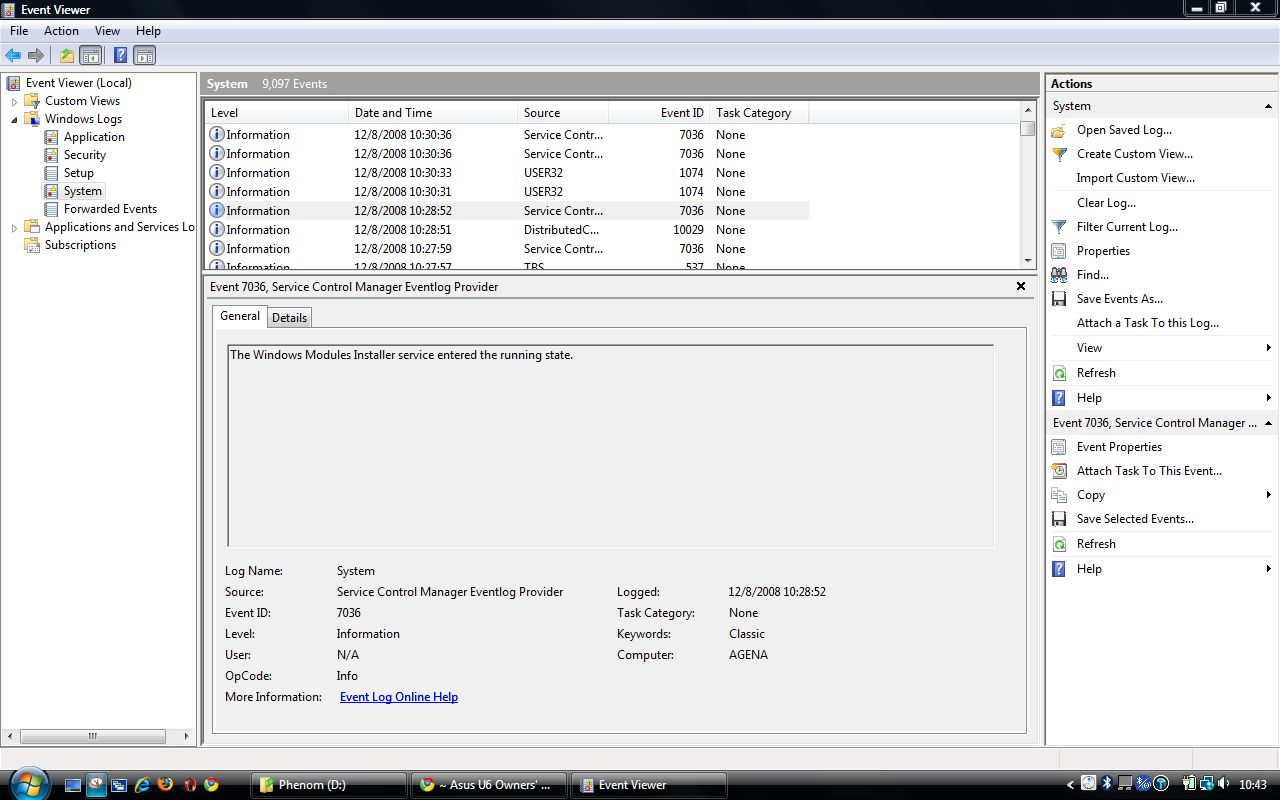
Pic 3: Event Viewer did not even record the problem. From 10:28 it jumps to 10:30. My snap was taken at 10:29.
I can't take this crap any more. No matter what I do this piece of trash OS gives me this error.Attached Files:
-
-
If you don't mind me asking, have you ever tried Linux? I'm sorry for not re-reading all 102 pages, but what programs do you mostly need your laptop for? I'm somewhat certain, that Linux could fulfill your needs. Ubuntu (ubuntu(dot)com - I can't post urls before I've made 15 posts. Brilliant restriction...) is a good place to start. You can boot it from a LiveCD and try it out without any changes to your harddisk at all.
If you have some reason for not wanting to run a (in my opinion) far superior OS, then just settle for XP.
Sorry for the ranting and Linux fanboy attitude, I just can't help it, when reading about all these Vista "features".
-
I did not try Linux because:
1. I am addicted to Office 2007 and I hate Office.org
2. I have CS4 Master and use it often.
3. I cannot do my work properly on Linux.
Regarding XP, I tried, and a few pages back I explained why I can't use it. My Keyboard and Sata drive are laggy. They are not responding the way they should. -
1 + 2) runs fairly well with Wine according to:
andCode:appdb.winehq.org/objectManager.php?sClass=version&iId=4992
3) Since I have no idea what type of work you do, I can't comment on this.Code:appdb.winehq.org/objectManager.php?sClass=version&iId=14318&iTestingId=33277
I would recommend giving Linux a try, since you might be positively surprised (granted that you give it some time to get used to it). You will find that it's a very stable OS, with few to none of the various Vista-issues. -
I am an old Linux user. I used Slackware and Redhat back in the day when I was hacking
. I still have the discs some place. Atm, I need windows but in the near future I will try linux maybe my Vista headache will go away. That bloody error is driving me bonkers.
-
I ordered these. Spending 80 euros on rams for a laptop I do not overclock was pointless. Is there a service manual for this laptop? All I gotta do now is hope Vista will see 3.5 GB and not less
.
-
Hi Mate, i'm working on XP with my U6sg-A1, and it works terrific
1. Will my keyboard work 100%?YES Shortcuts and whatnot? ALL SHORTCUTS
2. Finger print reader? YES
3. Wireless Console? YES
4. Asus Utilities? HELL YEAH
5. Will the Asus website XP drivers work properly? I FOUND ALL DRIVERS ON THIS THREAT, I CAN TELL YOU EXACTLY WHERE AND THE ORDER TO INSTALL THEM
and the sleep function works great when you close the notebook, about the overheat problem, it also happened to me 2 times
cheers wish -
Except for Smart Logon
I've uploaded them here
-
that's right, david uploaded them here
http://forum.notebookreview.com/showthread.php?t=308040
i told you the drivers were in this thread
-
Thanks mate but I had a huge problem with XP. Laggy keyboard and the laptop was not responsive. It had this sleep time before apps were open. It might be because I installed it in Enhanced with a slipped disk and not in compatible. I do not know but I had to leave to brussels for a meeting and I quickly put Vista back.
I would really appreciate some input here from you guys. -
In any case. I got them and this thing flies now!!! I can honestly feel a difference!!!! Next stop, a 64 bit os
.
![[IMG]](images/storyImages/th_4GB.jpg)
-
Congrats! I just saw your earlier post about the service manual, and I've posted one here. But you probably won't need it now
-
Thanks. , it is very complicated to get to more vital parts
.
-
Which Nvidia driver version gives best result for U6S running Vista 32-bit?
-
Both work fine (the one from the cd or website). On my U6 I noticed that the one from the website, releases the gc faster when you shutdown the laptop whilst an external screen is connected. WEI is the same, 3DMark is roughly the same.
PS. If you are interested in the modded drivers...I can't help you. I installed 1 from l2go and everything when nasty. Since then, Asus drivers "rule" . -
I have a U6S and I use XP 99% of the time on it. I have installed many different video drivers on it. The reason was that I had an issue with my external screen (Hyundai W240D v2) connected on HDMI: when returning from leaving the computer alone for a while until the screen powers off, I could not get windows to wake up the screen anymore, and I could never get video back to my LCD either, so all I could do was a hard reboot. It's only recently that I think I resolved it: I uninstalled Windows blinds! Now I installed the latest driver on laptopvideo2go (v.180.70) and I'm quite satisfied. The Asus driver for U6Sg/XP (based on forceware 156 I believe) wasn't handling very well my external screen resolution, from time to time I had to manually set it back to 1920x1200.
I tried a few optimized drivers from xtrem or ngo, but none was recognizing my HDMI output. Laptopvideo2go drivers are not optimized; it's only the INF that is modified to make sure the original driver installs for most cards.
Edit: I do not play games and my usage is mostly office and multimedia -
Who says Asus cooling is bad? Check out those temps
Attached Files:
-
-
I was playing Resident EVil 4 with my U6 very well, high settings, i was using the 176.28 driver from laptopvideo2go on windows xp 32-bits, i got a virus and had to format, just recently, and now when i'm playing RE4 the performance is not the same anymore, using the same driver, same OS, same version, nothing changed really, the performance reduced a 20%, any suggestions?
-
That is weird. What are your temps?
-
my themps are very low
-
Check event viewer for Throttling. I doubt performance drops without this happening.
-
I take it you're using the exact same settings (details, AA, AF, etc.). Any patches/updates to the game itself? Same DirectX version?
-
I am migrating to 64 in a few days. I backed up my laptop, everything is in order, however, I am still in the process of finding some drivers.
What I have so far :
1. ATK and KB Filter borrowed from U6Vc
2. Intel Sata Storage (intel.com)
3. Intel Wi-Fi (intel.com)
4. Smart logon (U6Vc)
5. Bluetooth (U6Vc)
6. Power 4 Gear (U6Vc)
I am missing :
1. Wi-Fi Console Utility
2. ATK OSD2
3. NVIDIA
Any help would be appreciated. If I manage to set this up on 64 I will write a tutorial step by step for every U6 user willing to do the same after upgrading to 4GB of RAM. -
Have you tried these:
1) Have you tried the 32 bit version?
2) http://dlsvr04.asus.com/pub/ASUS/nb/Apps/ATKOSD2/ATKOSD2_080912.zip (for U6V)
3) http://www.nvidia.com/object/winvista_x64_180.48_whql.html
http://www.nvidia.com/object/winvista_x64_180.84_beta.html
or http://dlsvr04.asus.com/pub/ASUS/nb/Drivers/VGA/nVidia/VGA_Nvidia_vt32_64_081105.zip (for U6V)
Otherwise have a look here: http://www.notebookforums.com/thread188206.html or here http://forum.notebookreview.com/showthread.php?t=100357.
You have a few drivers to install and test. Good luck! -
Thank you. Will try them as soon as I can.
-
It is up, it is running but I have no video drivers. The one provided needs a modified inf and I bet it will have some mobility issues. Trying the U6V link you gave me now.
Great 5 KB/s download from the Asus website. It will take me 2 days.
-
Hmmm... I didn't notice any specific drivers for nVidia laptop chips at nVidia's site. The probably presume that everybody uses the drivers supplied from the laptop manufacturer.
You could just go to Asus' download site ( http://support.asus.com/download/download.aspx?SLanguage=en-us) and locate the U6V drivers, that'll give you another mirror - hopefully with much better bandwidth. The reason I gave you that specific link, was because I couldn't link to other version (most drivers/utilities at Asus' download site has 2 mirrors - one that uses a Java script and one that uses FTP. It's the FTP site thats slow). -
ATM I noticed the following:
fn+f5
fn+f6
fn+f9
do not work. Could the brightness controls be related to the fact that I am still downloading the GPU driver?
I installed all the ATK things available. Everything works on the keyboard except those. -
nVidia driver could be needed. The only info I could dig up in so short time was this PowerPoint: http://download.microsoft.com/download/5/b/9/5b97017b-e28a-4bae-ba48-174cf47d23cd/CPA002_WH06.ppt
Page 9 (IIRC) states:
I suspected it could be due to Asus' generally broken BIOS'. Many Linux users are forced to fix the BIOS (dig out the DSDT from the BIOS, de-compile it, fix various errors, re-compile it and then load it at boot), to have various ACPI stuff (battery monitor, fan/temp control, Fn-buttons etc.). This may sound overly complex, but it isn't really. Furthermore it's only loaded at boot, so no BIOS flashing is necesarry, so no real risk of bricking your laptop.
I had to do this in order to get the Fn keys for brightness to work on Linux, thus I suspect it could be the issue with Vista64 as well. However it appears that the ACPI string for Vista is "Windows 2006" for both 32 and 64 bit versions. Vista64 could be more correct about following ACPI 3.0 spec, than it's 32 sibling, but I seriously doubt it.
Anyway, I hope at least some of this made any sense to you (or anyone else for that matter). ;-) -
Thanks, I fixed that. I found a mirror for a driver. No I cannot install the touhpad. Synaptics error message with some component not found. Because uf that my fn+f9 key does not work.
On the synaptics website now. Trying those.
L.E: My keyboard works properly. I needed the drivers. -
Now you can download the video card driver for laptop directly from NVIDIA website. They are supplying laptop driver now. It is in beta stage but final version will be launched after new year.
-
Can anyone recommend a good external monitor for the U6SG? We have been using analog monitors but the video card does not seem to like them much -- the graphics on the monitor are not very crisp and are slightly fuzzy. We have installed the latest video drivers but have not been able to solve the problem. We are now thinking that we should maybe switch to monitors with DVI/HDMI input and that might solve the problem. Any recommendations about monitors people have used with these machines? We are using XP on the instead of Vista.
Thanks! -
I've been using this Samsung 22" monitor with my U6 for a while and it's been great. I'm also using XP, but that doesn't have much to do with the quality of the images/videos that are produced on the external monitor. This particular samsung monitor has also received excellent reviews from critics and users. I don't think you can go wrong with it
-
I have the HP LP2475W 24", H-IPS panel, the cheapest H-IPS panel out there and one of the best 24" monitor out there. The color is rich. If you see any monitor with 5ms or faster, then those are the cheapy one, they have fast response for gaming, but lack color richness. If you see 6ms or slower, the price is a bit higher but the color is much better and they are still fast enough for game
Any1 know how to remove the video card, I have U6S-A1 which comes with the 8400m G but I have a 9300M G video card and I want to swap it. I know both are basically the same chip but the 9300M chip is enhanced for HD play back and it is built on a shrink die and thus hopefully lower heat dissipate. Any1 open up the laptop yet?? is the Video card soldiered in?? Please let me know because I dont want to open it and find out it is soldiered
~ Asus U6 Owners' Lounge ~
Discussion in 'ASUS Reviews and Owners' Lounges' started by osomphane, Dec 7, 2007.



![[IMG]](http://s266.photobucket.com/albums/ii256/Integrabyte/Forums/?action=view¤t=4GB.jpg)