Problems? See this thread at archive.org.
Hey all. I've been thinking about buying a new laptop for a while now and stumbled upon Asus' UXXJC-series. I've been reading tons of pages in this thread (Great info, thanks all!) but still have a few questions unanswered. Most of all I've been trying to find opinions on the sibling of U35JC/U45JC, the U36JC.
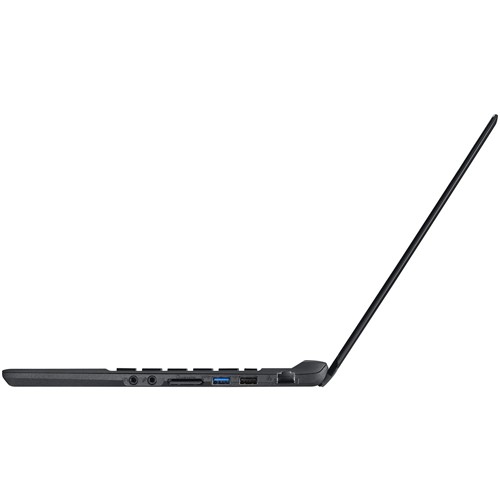
It seems to be an ultraportable version of the other two, just 1,9cm thick and 1,7kg. I haven't been able to find much info on it though, especially about batterylife. Asus own website doesn't list it at all, but it's on sale here in Sweden. Any of you use the U36 model or know anything about it?
Here's a list of specifications and some pics.
-
Never heard about that model. The specs should just the same with my u35j (look at my signature), but the overall quiet different. BTW, the build from that pictures look so nice! I do love the build. If you found anything else about that model, feel free to share with us here.
-
Finally came to resolution with the seller... according to them the weight/readings are 'normal'. Leads me to believe their claim of 7800mAh is false... as most of the other 12 cell ads are all 6600mAh. Seller offered me $6 refund for the 'trouble', which a accepted as resolution. Still 20% ish bigger capacity than the stock battery, so meets my needs... and at $55.99 it is cheaper than anything else out there... live and learn

So... bottom line for the rest of you is: The 12 cell battery fits great, is about 5 ounces heavier than the original and has an extra row of cells below the original ones, which raises the back of the laptop up. I actually like what it does to the angle of the keyboard, but could be more awkward to carry if you are using it on the road. I wanted it for transcon flights and other long-term periods away from power, so perfect for me. Reads 6600mAh when full... for some reason that changes to 7100mAh at about 50% charge... has given 10+hrs under moderate usage. -
^ why not use the Battery Care program. Its free and excellent!
-
You're right about that! Many months ago, when I first installed BatteryBar, it worked well, then after a time, it's time estimates became more & more odd.
Even when I uninstalled it & reinstalled it, same problem.
Just yesterday, I installed it yet again ... and again found that though it said I was consuming 10W of power, the battery would only last another 1 1/2 hrs.
Any idea on how to clear its cache or reset it?
UPDATE: okay, I've uninstalled it, deleted the directory, run a reg cleaner to remove references to it. Rebooted & reinstalled BatteryBar. (I had to turn off Kaspersky for it to install properly). In its options, I reset the battery info & reset the profile defaults & closed & relaunched it ... at last it shows 10-11W used and 7 hrs remeianing on my 84Wh battery that has become 77Wh. At least it's working again. ... nope, now it is showing this last 1/2 min that I'm discharging at 9.5W and with 99% battery left , it (wrongly) suggests that I have 4' 12" left at that power consumption.
I don't know why, but BatteryBar just isn't working correctly for me. Perhaps I have something like my AV that might be making it glitch up. -
I've already make a clean windows installation and I'm using AVAST, the result is the same. I just don't know why..
BTW, is there anyone here who put an SSD into their U35J? Is there any significant increase in battery life? -
i just got my u35jc, and installed the momentus xt on it and im pretty dissapointed by now.
look the performance of the XT
![[IMG]](images/storyImages/bgedjo.png)
Could be the Sata Controller from U35?
and the nvidia optimus geeeeeezzz make me miss my alienware R1
i just cant get it to work at all ...
![[IMG]](images/storyImages/20qggon.png)
im using the lasted asus driver, but i tested with 260.99, and still the same.
anyone?? -
ASUS does not list a U36Jc on their product page nor anywhere in their extensive full product listing (nor even on their Taiwan page).
To me that says there is no U36Jc from ASUS' side. It is, therefore, a typo on the U35Jc or it is a small variation of some kind on the U35Jc.
Looking at the specs (compared to the US & UK version of the U35Jc:
- It has the i5-460M (2.53MHz) instead of the i3-370M (2.4MHz) (or the i5-520M 2.4GHz version in Taiwan)
- 500GB 7200 HDD instead of 500GB 5400rpm HDD
- Black color instead of silver (though the U35Jc-XA1 is also black)
- SAME chipset
- SAME RAM
- SAME card reader
- SAME 0.3MP webcam
- SAME 1366x768 screen
- SAME 1GB 310M Graphics card
- SAME bluetooth (v2.1)
- SAME wireless card (non-WiDi)
- SAME ports
- SAME 8 cell 5600mAh battery
So, like I suspected, it IS the U35Jc with a small change in processor & HDD. -
One interesting side note. If you go to the Asus support site to look for software updates... it does indeed list a U36JC as a model number and has a full software list for it... so sounds like it is (or will be) a legit Asus product. It actually lists the WIDI software under utilities, which would be a change... also has a new P4G Hybrid version 1.1.41. This version can be downloaded from the generic 'apps' folder as well... I downloaded and installed on my U35JC... one obvious difference is it adds a gadget on the desktop.
-
On your nVidia GPU, just setting it as the default in the general settings will NOT turn it on ... because it knows you don't need it. But running any app that needs some video help & the GPU will come on. But not on your basic desktop use.
What benchmark are you using on your HDD? Can you show us your results using HD Tune Pro? Be sure to run it 3 times. Here's mine:
![[IMG]](images/storyImages/HDTune46_2_500XT.jpg)
Remember that the Momentus XT shows improvement if the test is repeated at least 3 times and even then, if the info isn't repeated, it won't help. UPDATE: running mine 3x didn't help at all. So this test won't show the power of the XT. It has to be a benchmark test that throws over the same files over & over to see the results.
The Momentus XT gets its boost from repeated actions of launched files like boot up or opening the same apps a lot. It does not help general disk speed that much. It is, after all, just a Seagate 7200rpm HDD with that little 4GB NAND flash memory being used as a very smart cache that is making the difference.
So I boot up in under 1/2 the time it was taking me. I launch my main 5 apps in half the time I used to launch them. But that's it.
Here's a benchmark roundup including the Momentus XT, to put it in perspective:
![[IMG]](images/storyImages/HDTunecomparison.jpg)
It isn't an SSD nor even close to one. I'd love an SSD but I just can't afford it. -
Quatro thanx for you reply... i got hd tach to bench the harddisk and what version of drivers for nvidia are you using?
-
Oops. My bad. You're right!
Well, the new P4G adds an (unasked for) gadget on my desktop too, & I'm using the U30Jc.
Looking at the specs, it still looks like a tiny variation on the U35Jc. But you're right, it is official.
BTW, I wouldn't count on the WiDi wireless card being there. Beyond the driver on the ASUS site, three sites selling the U36Jc don't list the wireless card beyond the generic label: "-802.11 bgn". It has to be the Intel wireless-N 1000 or above for it to be able to do WiDi.
... another difference on the U36Jc is its thickness, they are listing the U36Jc as 0.76 inches, "the thinnest notebook in the world".
The same as you, 260.99. -
I went to my local dealership and they couldn't find it in their system. We then realised it must be a new model, yet to be released. It makes sense when I think about it since the online store that sell it here in Sweden doesn't have it in stock until the 11th of december. I previously thought it was because it had sold out, but it must be the first batch set for release. Looking at the store I linked to in my first post it also says "Availability: Pre-order". No wonder it was hard to find reviews and opinions on it
I just can't get over how sleek the design is. 19mm/0,76'' thickness makes for lovely portability
Attached Files:
-
-
Hi - about two weeks into using the U35JC-A1, loving it, along with this forum, which is invaluable, thanks to all.
Only big issue so far -- videos played in Windows Media Center - whether recorded on the U35 or imported from a desktop recording in WMC -- are waaay too dark. Tonal range can be adjusted somewhat in the Intel control panel, but requires a brightness/gamma adjustment that makes everything else (desktop, internet, etc.) way too bright/light. On the other hand, internet video in WMC plays fine.
I've also tried to set WMC to use Nvidia in the Nvidia control panel in the hopes that it will yield better performance, but it does not work -- continues to use Intel. Is this possible?
Appreciate your thoughts. Thanks. -
the touchpad is horrible ... like other user said, seems that you are touching a vynil disc. is the worst touchpad so far, even the 1201n from my wifes with the lil dots its best than this.
beside it ... they could fit a 320m on the slim body? or the 310m came cause do less heat? a 128bit vga would be awesome, i dont see the point in have a 64bit ddr3 that is so close in performance of the integraded graphics. they could use a 128bit gddr3 vga. -
already flashed the bios to 208 & installed the 260 nvidia drivers...i still can't force my apps to use the dedicated video card..
wifey has stopped using the laptop..always complaining its slow & it can't handle her "cafe world" game in fb..hehe -
That's odd. The only time my nVida Control Panel won't let me force an app to use the GPU is when it is convinced it's not good for it (several of my DVD player apps like WinDVD now have the GPU option grayed out. Earlier, when I did force it, it crashed!)
But for games, my browser (when using Flash media like Hulu), it turns on the GPU every time. Works fine for me on my apps. -
Wow I want a u36jc now. Looks stunningly simple
-
I can't imagine a FB game that either graphics option cannot handle.
-
Try the newer touchpad drivers they made a HUGE difference for me. I also noticed that the camera seems to affect the trackpad... with the camera off (disabled in Power 4 Gear) I see zero jitter... with the camera on it does occasionally get some jitter even with the newer drivers... but with the new drivers and camera off it works flawlessly... even with gestures with the newest drivers (see earlier posts)
-
I eliminated the touchpad roughness and made it smooth by installing car paint protection film onto it. I used a rather expensive type called avery nano-fusion which is thin and most slick and because I have about a $500 roll of it. now the touchpad is somewhat slippery and I don't notice any difference in sensitivity (although I've never used the special features other than normal touchpad use). I also put it onto the aluminum so it does get scratched or marred.
btw, that new u36 is just a relabled eastern version of the u35 since theirs came with the i5, they just slapped a different name on in and started exporting the model to us now.
I plan of putting an ssd in mine if the price is right. But my issue is the hm55 chipset seems to have terrible 4k write speeds of around 35mb/s. I already tested it with my c300 and found the registry mod just to bring it to that 35mb/s (a thread somewhere points out that the hm55 has unusually low 4k read/writes until you do registry changes). When the same drive slapped into my sata II desktop (3yrs old) get 65mb/s. It kind of disappoints me that the chipset would bottleneck the ssd. -
You deserve an award for "Most Creative Touchpad Solution"! Clever.
This is very interesting as I'd read an analytical tech article that the HM55 chipset is also the actual bottleneck on the USB 3.0 included in ASUS' U33/43/53Jc Bamboo laptops.
Their implementation of the USB 3.0 port is faster than USB 2.0 (instead of the advertised 10x, it's more something like 3x), but still greatly held back by the HM55 chipset. -
Odd problem... my photos were just looking TERRIBLE - in both Chrome and Firefox... after a restart, everything seems fine ... any ideas what I did to make this problem?
-
Hi all,
I bought the UL30a couple months back and have to resell after a month of use because the flexing was just so bad that I'd be afraid of throw the laptop out of annoyance. But other than that I love everything about the design and portability of it. Anyway I just want to ask people that used the ul30a and u35jc about the flexing issue. Is the u35jc keyboard at least 95% better than its predecessor? -
I've wondered about that too yesterday regading that Bamboo usb 3.0 model after I tested the usb 2.0 port for maximum speed. I connected it to a drive (via sata-usb adaptor) that can easily read over 100mb/s and this laptop obtained a maxium 27 to 29 mb/s read where my deskptop obtained 33.5 mb/s on the same drive. I used various programs to test the speed and it was pretty conisistent across the board. The desktop has an p35 chipset with an e8400 & same 1.2ghz clock speed. Overclocking would do nothing anyhow.
(just for fun, I think I'll connect my c300 to the usb of the u35jc and see if anything changes, seriously doubt it though) -
does optimus kick-in even if SHE is enabled & under "battery saving"?
-
You may be confusing terms. When you say "Optimus kicks in", are you talking about the nVidia GPU?
Optimus is nVidia's brand name for the software/hardware they use to switch between the IGP+the GPU. That is always on, because you're always using one or the other.
I can say that on my U30Jc (which doesn't have SHE), when I switch to "Battery Saving" mode, when I open a Hulu TV episode under Firefox, my nVidia GPU still comes ON when the episode starts. My battery saving mode affects my CPU but not my graphic card. -
How bad is the build quality on the U35JC? The reviews I read were all pretty scathing of it.
-
Obviously a bit of a subjective call... but I am very happy with mine and I believe most would echo this. Only two build complaints I have heard on this board: some complain of a lip between the wrist rest and bottom on the front side that is sharp... some complain of keyboard flex. I don't feel either of these are true on mine, so there is either a variance in build (ie mine is better) or different folks have different feelings/standards. I have had mine since the computer first came out and am very happy with the build quality. My only three complaints are echoed on the board as well: Monitor has VERY narrow vertical viewing angle. Looks great when adjusted properly however. Touch pad was very erratic/jumpy out of the box for me, but the driver update fixed it completely... finally, there is an intermittent high pitched 'whine' that apparently comes from the CPU and affects all laptops with this CPU. Noticeable at times to me, but no worse than fan noise in other computers (my fan is nearly silent).
-
Anyone try the touchpad drivers that were released for the U36JC? Are they similar to the 8.0.x.x drivers?
I am dying to get the new 8.0.x.x touch pad drivers to work when I awake from sleep, but I have still been unsuccessful. -
Looks like the driver is for synaptics pad vs elantech... so they either changed the pad or have the wrong drivers posted.
-
Wow, quiet board the last couple of days! For those looking for info on the U36, there was an article on Engadget today... plus it is now listed as a model on the Asus global website (not US). Very similar to the U35 except: different case/trackpad, newer CPU, USB 3.0. Pretty much everything else is identical to the U35 (Screen, GPU, RAM, etc).
-
The U36JC is pretty sexy. I prefer silver laptops, but it sure is nice! The thinness is also incredible with a full voltage i5.
At least they ditched the gloss finish on the palm rest/lid. Although the gloss black bezel is still there. I can't stand the gloss black bezel on the U35JC. It scratches so damn easily which angers me as I stare at it in bright light.
If it really gets comparable battery life to the U35JC, it may be an awesome buy! -
magnesium casing, 3.2lbs, 0.75 cm thin, i5 cores,...I am sold.
-
YouTube - ASUS U36 is the World's Thinnest Notebook with a Standard Voltage CPU
definitely worth of buying. -
Where does it says 3.2lbs? That's pretty damn impressive!
-
-
i forgot to ask you guys, i got mine by a person who came from US and send me by mail without the box, and the laptop got some minor scratches on the aluminium surface. is there any way to take this out?
-
Damn, I was wrong, u36 is not the same: magnesium alloy case and usb 3.0. should have waited 3 weeks for the u36. I find my system to be somewhat slow, but I attribute that to W7 (xp user) and all the process running. Fresh install should fix that. I wonder if the fact that it has USB 3.0 means better ssd performance on the 4k reads.
-
"10 hours of battery life on a 4-cell battery"
uhhh .... what? -
Asus site shows the same battery as the U35JC: 8 cells: 5600 mAh 84 Whrs
-
The number of cells on a laptop battery does not determine how long it will last. It depends on the specs of the laptop battery by mAh (Milliamp Hour) or Whr (watt-hour).
An example is the 6-cell battery (66 Whrs) on the 4820TG lasts longer than the 8-cell battery (59 Whrs) on the Envy 14. -
Yeah, it just seemed odd - I thought, as mentioned above, it would have a very similar battery to the u35
-
hey everyone i bought the u45jc from xoticpc and received it yesterday and its a really nice computer. Only thing was it was a bit heavier than i expected at 4.62 lbs but its still really nice though its MUCH MUCH lesser weight than my 6.6lbs 15.4 dell laptop.
By the way, what battery mode is the best? I see entertainment and battery saving. However with battery saving, does the taskbar at the bottom always disappear if i choose this? I check the properties in battery savings mode and it seems the configs are something like this, dim the battery after 1 minute and close off the monitor if more than 1 minute of activity. Should you ever change these on battery saving mode or if you change it to higher minutes, then its not longer battery saving mode?
The only thing i do on this laptop is browse, play poker and play music and watch videos. I'm assuming if i watch videos and play music and play poker, leave it on entertainment mode whereas if i'm just browsing, its better to go on battery saving mode? Or just always be on entertainment mode and lower the brightness of the screen?
Also in general, what should the brightness on my screen be when my laptop is on battery or plugged in? Is it a horrible idea to put it to the max? Would having it in the middle be the best? -
Go into battery advanced settings and turn off "Battery Saving Desktop". This is why the task bar is on auto-hide. I would only put it on entertainment if you plan on playing a demanding game. Online poker should be just fine with battery saving mode. I ALWAYS have it on P4G Battery Saving unless I decide to play a demanding PC game in which I then plug it in.
P4G Battery Saving seems to be the best. I have always used that an get 7.5-8hrs on my U35JC.
Max brightness will definitely run down your battery. I am actually used to having brightness at 0 believe it or not. I occasionally bump it up 1-2 notches, but I have never been in a predicament where the max was anywhere near necessary. Your results may vary of course. -
ok..did a clean win7 ultimate x32 install & installed the intel hd + nvidia drivers..so far, optimus is working flawlessly..it kicks in when it should be..
i was wondering how much usable RAM you guys get with 4GB installed in your system using windows x64? mine is only showing 2.67gb usable after clean installing windows 7 x32..was expecting it to be around 3.25gb like my desktop pc
also..my WEI score under processor is only 3.3, however, when I finally installed P4G Hybrid it went up to 6.3 -
Mine shows 3.79GB usable. Win 32 can only address a total of 4 GB (including everything, ROM, RAM, video, etc)... which means it can't address the 4 GB of RAM in the laptop... that is partly why they shipped it with Windows 64
-
Win7 x32? Why would you install that? Win 7 x64 will run 64-bit programs faster and will see more RAM (as you noticed.)
It's the reason the market has switched to 64-bit Windows, or at least part of the reason: the RAM ceiling under x32.
So our x64 OS can use all of the 4GB installed RAM. They can use 8GB as well, if we installed it. 32-bit can only use, max, around 3GB (after shared RAM is removed) -- or so I understand it.
Here's a quote from a tech site:
"Windows 7 32 bit, Windows Vista 32 bit, Windows XP 32 bit, Linux 32 bit, all have something in common... 32 bit numbers go up to 4 billion. So to address each byte of memory, you need to have a number to address it by... once you run out of numbers, you can't address any more.
32-bit operating systems have what is called a 4GB address space. However, system memory is only one kind of memory, there is also graphic memory, for example, so each device shares in part of the 4 billion available addresses.
All this means in practical use, you will see 2.5 to 3.6 GB of available address space for system memory depending on what size of memory your hardware is consuming. This is one of the main reasons to switch over to 64 bit addressing.
64-bit numbers can address up to about 16 Exabytes of memory... so the hardware ceases to be a limitation.
So, on average, Windows 7 (and every other 32-bit OS) can use around 2.5 to 3.6 GB of system memory." -
Well the u36jc is really nice, but I wouldn't turn down the u31 too.
Asus U31 13.3-inch ultrathin laptop to hit European stores next month | TechConnect Magazine
I hope this is true... It has a nice GPU (GT 415M), looking at that picture, it seems that the palm rest is similar to the u30jc so I guess it isn't plastic.
And the 799 euro price is almost the same as for the u35jc.
I wonder if the battery will keep it running for 8-9 hours ?? -
Strange... on the official page of ASUS it is listed as the U31JG... but there is nothing about the nvidia gpu
Asus U35JC/U45JC
Discussion in 'Asus' started by eugenes, Jun 11, 2010.