Problems? See this thread at archive.org.
Just picked up my replacement UX302LA.
Keyboard backing plate is still a little warped.
As much is it goes against the grain to accept this poor attention to detail I am tired of going back and forth to BB.
The machine seems pretty good in all other aspects and at $799 (I see it's back up to $899 as of yesterday) it's a pretty good deal.
None of the wifi issues that many other makes and models suffer from.
Hopefully the only other time I post here is with good news.
-
Try playing around with the Intel display settings. Since the notebook GPU is hybrid, it may help. I have an older GT 330M and this fixed it for me.
-
I've already done that, but the only option for me is "maitain display scaling" After even more specific googling on this problem with intel igp, I found that people with the exact same problem solved it. What they did was change their desktop res to the lowest possible, then in the intel settings the option "scale full screen" would appear, after checking that and applying it they could just set their desktop resolution back to native and all games would stretch properly. Now every step works for me, except the very last one... when I set my desktop back to native intel resets to "maintain display scaling" and my dx11 games don't scale.
I also found out that if I disable dx11 in crysis 2 it immediately scales properly! So this must be a weird glitch between intel and dx11, because the problem that the other people had was over a year ago and intel fixed it in their drivers about 6 months ago I believe. I might just go and post this on the intel forum, maybe they can help. -
Alright I posted the problem on the intel forums aswell right here: https://communities.intel.com/thread/48442
If people are having the same problems you could head over there. But once I get a fix or answer, I'll post it here aswell! -
will there be a 2560x1440 resolution of the UX302LG?
-
As of yet, no. And right now you shouldn't want one either, scaling with 1920x1080 can already be a painfull process...
-
Hey there - Would love to know how you set up the ASUS once you installed the larger mSATA card. Did you do a clean install of windows to the mSATA drive and set up the HDD as second tier storage? That seems like it could be a great way to set the machine up, but if you went that route I would love to know how you did it and what your experience has been like since doing so. Thx in advance -
That's exactly what I did. Fortunately, the bios settings are set up where you can immediately format and use the cache drive, once the msata is replaced. Some computers require a bios setting and even disconnecting the HDD before accessing the msata as a boot drive. Not this one though. Once the new msata was installed, I booted with a Win 8 DVD and installed Win 8 on the msata. Caution: If you want to preserve the recovery partition on the original HDD, you really should disconnect it when you install Win8 on the msata otherwise you'll end up with a dual boot situation(i.e. it will detect both versions of Windows and still use the HDD as the bootloader). The other way to avoid this is to format your HDD before installing Win8 to your msata SSD. Following the install, download all the Asus drivers and install them(I omitted the Power4Gear, smartconnect & IRST drivers). You'll need to download the wifi driver on a separate computer to get wifi working. Then install Win8 updates, then install win8.1 and finally the win8.1 lan driver. That's pretty much it. It's been working perfectly for a couple weeks now. Read speeds are typical of what I'm used to seeing in a SSD. Write speeds are sub-par but it's really of no concern since writing isn't as common an operation and it's still faster than any HDD. It would be great if there was more than one option out there for half-sized msata but something is certainly better than nothing.
I actually just recently started to use dual msata SSD and I preserved the original HDD. The msata bracket is much lighter and fits right into a 2.5" slot. I got my weight down to 3lbs 3oz. I pretty much did a lot of tinkering in the past couple days and managed to fully take this thing apart. It's actually not so bad once you get the back cover completely off(Yes, it does come off and you don't have to prop it up with a screwdriver). I'll post some pictures tomorrow. -
So my first US302LG had a warped keyboard, like many others on this forum. Luckily the vendor I ordered it from supported a cross-shipment. The new one's keyboard looked perfectly fine with the exception of a slightly angled E key, which I'll live with since it types fine. Unfortunately though, the LCD screen had severe backlight bleed. It was horrible... So rather than decide which one to keep or try a third replacement, I decided to try and take then apart and swap the lcd panels(or keyboard, whichever was easier). Turns out, removing the back cover isn't so bad after all.
With all the screws removed, use a thin tool, preferably not metal, and pry the gap in the hinge in the direction shown. Once one side pops out like in the picture below, the other side pops off very easily. I don't recommend using your fingers or you might cut yourself like I did.
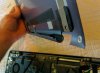
Photo of the cover completely removed
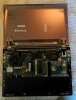
Three screws on both sides attach the LCD panel to the chasis.
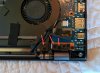
With the screws removed, pry back the tape holding the wifi adapter wires, and the LCD wires on both sides.
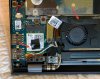
Carefully lift open the hinges. This can be done by carefully opening the lid or with needle nose pliers. Your choice.
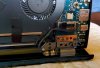
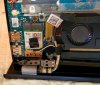 jimps likes this.
 -
Remove connectors on both sides of motherboard and the two wires on the wifi card.
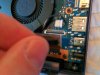
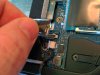
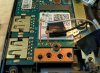
Picture of the LCD removed
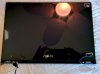
Reassembly is obviously in the reverse order.
Another thing I did was replace the ram module with an 8GB one. Some suggest gskill - I chose Mushkin. Works fine.
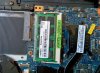
Also the HDD. I didn't get a before picture, but the HDD is contained by a big metal bracket. In order to remove the HDD, you have to remove the battery temporarily. No big deal.
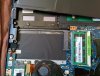 jimps likes this.
 -
Using an msata to sata adapter, I attached it into the empty bay and used electrical tape to hold it in place. It's snug without the tape and contained on all sides, so I think it will hold indefinitely.
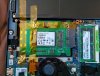
Final weight. Only 5 oz more than the Macbook Air 2011

It's sad I had to do this to have a non-defective unit but it was certainly fun. One thing is for sure is these laptops are fully repairable. I'm now satisfied. Hope this helps someone. If you have questions, let me know.
jimps likes this.
Hope this helps someone. If you have questions, let me know.
jimps likes this. -
So it seems that the ux302lg has popped up on Amazon uk Asus Zenbook UX302LG-C4014H Intel ® 1800 MHz 256 GB 8192 MB Flash Hard Drive GeForce GT730M: Amazon.co.uk: Computers & Accessories
This model appears to have 8gb of ram so I'm assuming 2gb soldered and another 6gb on top. To be honest I'm surprised at the price, it is roughly £1600 which equates to about $2650.
I am mainly interested in this model due to the dedicated graphics card but I am also considering the Ativ book 9 plus.
Any thoughts to share from anyone regarding the uk price and comparison of the ux302lg vs the book 9 plus? -
That's an insane price... I realize things are usually more expensive in the UK than in NA, but seriously? Converted to USD, it's $1250 more expensive than the model available here and the only difference is they put a 256GB SSD in lieu of the 500GB HDD. It also doesn't list the wireless ac card but I'm sure it's probably an error. We had some Amazon listings in the US too that were abnormally high. Luckily some Canadian resellers brought the prices down to earth(still a little high at $1400 IMO).
What's the import tax where you are? Might be worth it to have someone buy you the Canadian model and send it to you. I'm sure there a couple Canadian companies that will ship internationally(especially small businesses if you throw them a little extra for the trouble)
EDIT: If you do buy overseas, I would try and have them open it first to make sure the keyboard isn't warped... -
Thanks - that gives me all I need to follow your lead. Very much appreciated
-
Xentar712, many thanks for the detailed pictures.
I am noticing on my UX302LA (and on my older Toshiba laptop) that it doesn't take long for Firefox with lots of tabs open to slowly start consuming memory from about 200 on opening up to 500 and eventually over 1GB.
Right now with FF using about 500MB, my physical memory usage is already at 3177MB. If FF does what it usually does then physical will be up at 3600MB very soon and will remain at this level until I restart FF.
Based on this, would it makes sense to do the 8GB upgrade? -
Xentar I have considered doing just that but with taxes, shipping and all the issues surrounding warranty and repairs etc. I would rather buy it here in the uk. Also I am assuming the canadian keyboard is different, or am I wrong?
I'm really disappointed that the price is so much higher, and while I really want to buy it, I just can't justify spending that much when the US price is so much lower.
I may have to wait a while for more competitive prices in the uk -
You have 8GB currently, correct? If so, it's probably not going to be an issue for you unless you have a habit of leaving lots of tabs open lime me. I tend to leave Chrome open with 10-20 tabs and then play games. I never shut down - just close and open the lid, so my total memory usage hovers at 6GB a lot of the time. I also run virtual OS for programming, which hogs more ram. So 12GB makes more sense to me. Really, typical users can deal with 4GB but I think the gold standard should be 8GB total ram. Power users should have 12-16gb. People who say they "need" 32gb probably play a lot of Minecraft. My two cents.
-
The UX302LA only comes with 4GB.
I would need to replace the 4GB stick with an 8GB one.
Yes I also always leave a lot of FF tabs open and also rarely shut down.
My memory usage is continually in the low to mid 3's not leaving much wiggle room.
I just want to know if its worth paying Crucial $85 for the 8GB module. -
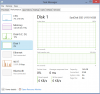
I have a problem with the 16GB SSD it looks Idle all the time, I checked from Performance at windows task manager, I tried to download IRST driver from Asus page, i tried also to play with IRST application, nothing happened, any ideas guys?
I have the ux302L 750GB+16GB SSD,
can u please tell me if you have the same situation? any suggested solutions for that?
Sherif//
View attachment 108299Attached Files:
-
-
Another question please, i have 2GB on board RAM + 2 external, I am planning to replace the 2GB external with 8GB to have in total 10GB, wondering if anybody was able to do it?? I am using UX302L model.
C:\Users\efarshe2014>wmic MEMORYCHIP get banklabel, devicelocator, caption, capa
city
BankLabel Capacity Caption DeviceLocator
BANK 0 2147483648 Physical Memory ChannelA-DIMM0
BANK 2 2147483648 Physical Memory ChannelB-DIMM0 -
You should have 2GB soldered and a 2GB module then. I would upgrade if I were you. Sell the 2GB on ebay to offset the cost. 4GB is too low for me and the main reason I returned a couple previous laptops.
-
I'm not sure if you've been able to get your laptop to work with the extra 8gb of ram but I just upgraded mine today and it works like a charm. I installed Patriot ram (PSD38G1600L2S) and I now have 12GB of ram. I hope that helps you out.
Cheers! -
What do you guys think of this backlight bleed:

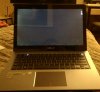
Is this common in these types of screens? Any possible fix? Thanks. -
That's way worse thatn it should be I only have those little spots on the bottom, but your top left is just insane. I don't know of any fix, but I believe a saw a post in this thread about a possible fix for this
-
I agree with Cheezzzus - bottom is typical but the upper left is unacceptable. That's what I saw in the other laptop that I sent back. I've only fixed this on desktop monitors, but the only fix I can think of is to find out what is causing the panel to "bend" and flatten it. Backlight bleed is more commonly caused by uneven pressures on the LCD screen, which allow more light to escape from the backlight. You might be able to temporarily fix this by lightly bending your screen in that corner. You can also cause this effect by bending the unaffected edges - showing you how delicate the tolerances in these screens are. This is why IPS screens are so prone to this. This also existed in previous LCD screens to some extent, but keep in mind those screens were nowhere near as clear and were also likely matte which washes out some of the bleed.
So to answer your question: If it were in the bottom corner, I would suggest messing with the screen screw mounts. Since it's in the top, it's probably a slightly bent frame or some unintended interference in the panel, both of which would require dis-assembly. I would only attempt it if it were my last resort and it really bothered me that much. In your case, I would exchange it. Unfortunately you might inherit another defect(i.e. bent keyboard, lid won't close, etc) so try and check as your exchanging, if possible. Best of luck - I know how you feel. -
Many people have done it.
Read thru this thread maybe 4 pages back or do a search on this thread.
-
What do you think by adding a straight line of foam or rubber as a sealant to the screen bezel? Perhaps that will help reducing that effect?
-
As long as it was uniform, all round the screen, it could work. It would certainly make things more uniform. From my experiences, adding material tends to cause more harm than good though. The added pressure causes the edges of the LCD to press closer to the backlight, thus showing the bleed he is experiencing. The bleed most of us have at the bottom would be more likely to be fixed from your proposal though.
I think in his case, I would take the bezel off and turn it on to see if pressures are causing the bleed or not. My guess is the bottom bleed will exist even without the bezel(I have a similar type on one of My QNIX monitors) but the upper left bleed should go away. Then I would test your approach with a thin but uniform layer of electrical tape all around the bezel. Then replace the bezel and see the result. If that didn't work, I would take it back apart and try to shave few microns off the clip(assuming there are clips) in the upper left so it didn't squeeze so tight. I can't imagine how small the clips on this panel are though. It might even be fused together. If someone gets the guts to take this panel apart, please share your findings.
-
Not too sure when they first appeared, but there are "new" drivers posted on Asus for almost all devices on the system in the W8.1 section. Previously, this section was pretty sparse. Some versions of devices remain the same version number, but interestingly, the checksums differ from the W8 versions. Some drivers have indeed been updated, but some, the IRST driver for instance, were reverted to a previous version. The only one I had trouble with was the Smart Connect driver, which it turns out, required that I uninstall the previous version.
-
I see that Amazon have Part Number: CT102464BF160B
which is the same as the CT5115077 from the Crucial website, for $67.50
Module Size: 8GB
Package: 204-pin SODIMM
Feature: DDR3 PC3-12800
Specs: DDR3 PC3-12800 • CL=11 • Unbuffered • NON-ECC • DDR3-1600 • 1.35V • 1024Meg x 64 •
I just ordered one. -
Thanks Xentar712 and Cheezzzus. Off to fill an RMA to NCIX.
-
Hmm....which 8gb mushkin model did you buy? I still have my old mushkin stick waiting for the crucial one I ordered from newegg to come in so that I can get a refund.
When I installed the mushkin, my ux302lg didn't even boot at all. The power button and the little light next to caps lock turned on, but about 3 seconds later it automatically shut off. After installing the original stick, it booted right back up.
Was there anything special that you did? -
How thick hard drives can be fitted in the UX302? I wonder if 9 or 9.5 mm would fit? Do you need the cage, or an you mount it without, alternatively with another cage?
-
Mushkin Enhanced Essentials 8GB DDR3 1600 Model 992038. It was on sale for $67 when I bought it.
-
Hmm...that's really weird. I have the same model and my ux302lg is still rejecting it.
Did you have to do something for your laptop to boot? -
It's probably just bad. I've come across bad sticks every now and then. And when I do, my system won't boot(sometimes won't even power on)
-
Even if the model of memory is the same but memory IC inside may be different/revised.
It's best to purchase to purchase a pair and replace them at the same time for best compatibility.
Also, use other brands like Crucial/Kingston/Adata for best compatibility. -
Yea I have a Crucial on the way. It's taking so long to get here.
-
memory IC?
-
Since the battery can be removed (to install SSD), does that mean you can replace the battery as well? Perhaps something larger like a 4 cell or would that be too big?
-
If they make a larger capacity battery with exactly the same dimensions, sure. It's doubtful they ever will though.
-
A closer up image of the cover when removed. Another person PM'ed me to add another pic to show how the cover comes off. As you can see, it requires a little force in the direction parallel to the cover since the bracket covers more than 180°. Cool design.
-
Hey guys
I am just about to get a ux302lg from ncix and am obviously going to do the standard ram upgrade but I wanted to get your opinion about what hard drive upgrades to do.
Option 1
Just do a Straight upgrade of the 500gb hdd to a samsung ssd leaving the 16gb cache dive as is
Option 2
Upgrade the 500gb hdd to a ssd but then remove or disable the 16gb cache drive (or another software settings change)
Option 3
Upgrade the 16gb cache drive to a 128gb mini msata and also upgrade the 500gb hdd to a ssd. I am not sure what the best software setup would be for this option though, I am guessing install windows onto the 128 and boot up from there with just the main ssd drive as storage?
Any thoughts on the best option would be welcome!!! -
I just got my ux302LA in today and it's pretty great. Keyboard is perfect and light bleeding is noticeable, but not enough to be a dealbreaker. HATE windows 8, though. anyway, i ran into a problem. i got all the updates, then updated to windows 8.1. Soon after, I noticed that the 1920x1080 resolution changed... it still showed 1920x1080, but it looked more like 1600x900. I changed it to 1600x900 and it was exactly the same. not sure what happened. Even though it's showing 1920x1080, everything is larger than it should be. Anyone have this problem? If so, any way to fix it? I'd prefer to avoid doing a factory reset after all the time I spent updating it and transferring files over. Otherwise, I'm strongly considering going back to Win 7. Thanks in advance.
-
How are you guys getting the rubber feet off for disassembly? I'm having serious trouble.
EDIT: nvm, got the little buggers with a credit card. -
Hmm, I'm having trouble installing Windows 8. Before I can even enter a key, I'm told that the key I'm using is not valid.
Also, can someone confirm the BIOS settings needed to install Windows 8 from a usb stick? -
You sure The disc version you are using is Windows 8 and not Pro? It shouldn't ask you for a key at all - it's imbedded in the bios. The new iso's out there automatically detect the version of Windows and install it, but I'm not sure what you are using for an install disc. I could install Pro but it would not let me activate it.
-
Option 3 has been working out really well for me. I boot from the 2.5" bay SSD and use the 128GB bay as storage. I chose not to boot from the mini msata since it was smaller and I will probably use it as a dual boot option. Later this week I'm going to try and install Hackintosh or Ubuntu on a split partition of the 128GB drive.
-
Yeah I'm sure it's standard not Pro. I've never dealt with bios security settings like this before. What are the proper settings to get W8 installed via USB?
-
Hiya,
first thanks for the disassembly tutoriual. Therefore i was able to replade the 500GB HDD with a 256GB Samsung SSD.
My question is:
What should i do with the 16GB m-sata? Can i leave it like it is at the moment, or do i have to disable/remove the little drive?
Asus UX302
Discussion in 'Asus' started by dogman216, Oct 7, 2013.