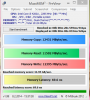
Problems? See this thread at archive.org.
I didn't have to change any bios settings to install Windows. The only thing I noticed was that the installation only booted from a certain usb port(right one I think). If it's asking for a key during installation, something is wrong. It should install and never ask you for a key. It also should activate on it's own assuming you have an internet connection at setup.
At one point I had two machines and they both had completely different bios options. One I was able to turn "fast boot" on and the other I can't. One had secure boot enabled and the other didn't. Finally, one allowed me to turn UEFI mode on/off but the other didn't. Right now, I have no option for Fast boot, there is no option for UEFI and secure boot came disabled. Not sure if that will help you.
-
You can leave it in, just don't enable the caching software. Format and use it as extra space if you desire.
-
The Caching software is? Intel Rapid Storage?
-
Typically yes, but Asus might have their own software. I have never used it so I don't know.
Edit: chances are if you can format the msata to FAT32 or NTFS, caching is no longer going to work -
Upgraded memory from 4GB to 10GB in my UX302LA.
Using ChrisPC windows experience, memory score went from 5.9 to 7.3.
Graphics dropped from 5.6/6.5 to 5.2/5.1.
Why would the graphics/gaming graphics drop with the increase in memory?
I thought maybe it was operating in 2 + 2 dual channel mode before the upgrade and now in single channel mode however CPU-Z reports memory as dual?? -
Great, thanks. I am going to get a 128gb msata to replace the 16gb and a 256ssd to replace the 500gb hdd. I will try booting of the 256gb and use the 128 mini as storage.
Any tips on specs for the mini msata upgrade? I can't seem to find any drive on ncix that looks like it would fit. What drive have others gone for? -
NCIX doesn't sell one. I got this one here. The specs they have listed are now correct(They had the write speed listed at 200MB/s when I purchased it). They ship quick and are a good company to deal with. You can also get it on Amazon but I think it's a couple bucks more expensive. It's really the only option out there besides ebay and a couple bulk sale vendors.
-
I'm having a metric -ton of issues installing Windows 8 fresh on a new drive on my UX302LG.
I used the LG for about a day with the default hardware, and it seemed to work fine. There's only marginal flex in the keyboard, and the backlight bleeding, while noticeable, is within an acceptable range. The hard drive really does seem to bottleneck the system, so I decided to swap it out. These are the steps I performed afterward.
- First I grabbed my key via one of the tools linked earlier, then shut it down and swapped the drive for a brand new Samsung 840 PRO.
- I put Windows 8 on a memory stick and tried to boot to it. No dice. The laptop returns to BIOS every time, regardless of the USB port I use. I confirmed that the drive was indeed visible to the system, as it showed up in the SATA Configuration settings in the BIOS.
- Turned "Secure Boot Control" off, which allowed me to turn on "Launch CSM", which made the LG recognize the USB key. I booted to that, and it seemed to work.
- Had a few problems with my Windows key but those seem to have resolved themselves.
- The Windows 8 installer prompted me for which partition to install Windows to. I of course selected the SSD, but it was formated for UEFI and apparently the installer wasn't in UEFI mode, so I just formatted it there and tried to install on the new NTFS partition. This didn't work. No matter what I did the installer insisted that it couldn't install to that partition.
- I edited my USB stick with Rufus and made sure it had bootable .efi files where they were supposed to be (At least I think so, the internet seems divided on where they go and what they're named). I made sure it was FAT32.
- I tried for hours to get the laptop to boot from the USB stick into UEFI mode, because I really want to use UEFI and I was running out of options to try. I just couldn't get it working. I tried all the USB ports, I tried doing it with Secure Boot on and off, CSM on and off, USB legacy on and off, and all sorts of combinations. No dice. At this point I called it a night and went to sleep.
- The next day, just now, I reset the BIOS settings to default, turned off Secure Boot, turned on CSM, and booted from USB. Magically, the installer let me install to the SSD this time. I was using the USB port closest to the SD reader if that has anything to do with it. Things seem fine, so I'm gonna install drivers, then Windows Updates, then Windows 8.1 to see how that goes.
So, I'm glad I have W8 working, but I really want to take advantage of UEFI. If anyone has installed Windows 8 fresh in UEFI mode, PLEASE let me know EXACTLY what you did, this is driving me nuts. -
Hello, can someone help me out with what kind of usb to sata cable I need to buy in order to migrate my data over to an ssd drive? tried googling around and I got confused with the seemingly different sata connections, sata, e-sata, etc. Thanks in advance.
-
Are you sure it's not a UEFI partition? I wasn't aware that you could turn it off on these laptops. When you go to PC Settings -> Update and Recovery -> Recovery -> Advanced Startup -> Restart Now -> Troubleshoot -> Advanced Options it doesn't show "UEFI Firmware Settings" as an option? If that's the case I would like to know what bios version you are using because I want it!
 I've been wanting to turn off UEFI since I got this laptop.
Another quick way is to right click "This PC" in explorer and click manage. Then check your drives to see if there are multiple partitions on your SSD. If there's more than one, chances are you're in UEFI.
One thing I noticed in your steps is you tried to install Windows on a formatted partition. If the installer is in UEFI, it will only work on unused space(i.e. no partition). You were on the right track before but instead of trying to format and install it on NTFS, you should have deleted the partition and clicked on the Unused space and then installed Windows. If it were any other version of Windows, what you did would have worked but UEFI versions require a blank slate to install all the other partitions onto(I think there's 4). -
I've been using this for almost 7 years now. USB 3.0 version would be better.
-
OK, so know I am getting a little confused. I just heard back from one of the techs at NCIX whi has responded to my questions on this UX302LG and he said he just spoke to asus directly. Asus said that the 16gb cache drive is just a standard msata, not an msat mini, and that the RAM is actually 2gb soldered with a replacable stick of 6gb. Both seem contradictory to everything being discussed on this forum. Are there multiple models released? Is the NCIX contact wrong? it seems unbelievable that the same model would vary so widely in basic build specs.
-
NCIX is wrong. They are customer service and will believe anything Asus says. They tried to tell me I had Win 8 Pro when I didn't. NCIX only carries one model and it has a 16GB half size msata and 4GB onboard RAM. The Best Buy model has 16GB half sized msata with 2GB onboard RAM.
Side note, NCIX price is perfect now. It was $1399 a couple weeks ago. -
Bit pricey, but it'll do. Thank you!
-
BravePhantomAsh
Where did you get the windows 8 os from? -
I spent about 2-3 hours with Microsoft tech support before giving up and just grabbing it from a torrent and then verifying the hash to make sure it was unmodified.
It still shows up as $1399 for me. -
It's a single NTFS partition. I tried to install it to unused space, but the installer insisted I format it to NTFS. I'm using the BIOS that came shipped with my UX302LGca
Unrelated question: What comes shipped on the 16GB mSATA? I've been thinking of wiping and using it, or just turning it off completely to save power, but I'm worried I'd be erasing something important. -
It's used as cache buffer to speed up the performance, if you simply delete its partition then it not be used but will consume power nevertheless.
-
What manages it? The BIOS or the OS?
-
Both. BIOS activates RAID, then OS uses IRST to configure SSD into cache for HDD to use.
-
If you install it on a ntfs partition, there's no way for it to be UEFI. When I install Windows, I delete all the partitions. Then when I clicked the drive and the next button highlights. Looking back, it's not intuitive at all and they don't really guide you in the right direction. There are a lot of instances where it won't allow you to do it and it gives you a useless error code. I'm aiming to get a msata to 2.5" bay RAID controller and have 3X msata drives running. If that's the case, I'll reinstall Windows and tell you step by step what I did.
If you pull the drive completely, it won't consume power. Other than that, you can't just turn it off(at least not with this bios) -
hmm that price is not bad. but NCIX offers only 1yr global warranty? some countries Asus offers 2yr international warranty.
NCIX also doesn't seem to be accurate with their specs. Does the laptop come with 500GB HDD or 750GB? In the heading it says 500GB, but under the specs it's listed as 750GB.
to those who have bought your laptops from NCIX, any issues with the keyboard warp or backlight bleed? as bad as the UX302LA models from best buy? -
Original post:
Quote Originally Posted by Mark_K View Post
BravePhantomAsh
Where did you get the windows 8 os from?
I spent about 2-3 hours with Microsoft tech support before giving up and just grabbing it from a torrent and then verifying the hash to make sure it was unmodified.
----------------
New post:
What kind or how did your conversation go with MS Support?
Did you explain what you were trying to do?
What was there advise?
Did they understand your situation?
Did they say they have had other calls like this? -
It's 500GB and not Windows 8 Pro, just plain Win 8. I had a unit with keyboard warping and the replacement had severe backlight bleed, which is why I disassembled and swapped screens(earlier post). Good company to buy from though. Their customer service is good. Although everyone I talk to on the phone is not very good at talking on the phones(mumbling, low voice), I've been satisfied with every call. Asus warranty kicks in after the 1st year NCIX warranty is up, so don't worry about that.
-
Please can the experts out there comment on my findings below?
-
Did you check to make sure the timings matched before you bought the ram? If they differ, they will both run at the lowest speed and the loosest latency. CPU-Z acted funny for me too so you might have to pull the installed module to get the actual timings and speeds(or look up the speeds from the module that came with the laptop - I assume Asus matched them with the soldered stick).
-
The pulled 2GB module is a Hynix DDR3 -1600 11-11-11 module (HMT425S6AFR6A-PB) and so is the Crucial (CT102464BF160B) one I replaced it with which is the one that Crucial recommends for this machine.
My memory operations per second jumped nicely from 5.9 to 7.3 so it appears that the machine is happy with the module. I just wanted to try and find out why graphics performance dropped.
The machine has become really snappy since I upgraded the memory with some applications that used to take ages to load loading really quickly so no complaints, just an observation.
I just ran the Crucial memory scan tool and it reported the following:-
Memory:
DDR3 PC3-12800, DDR3 PC3-14900
Memory Type: DDR3 PC3-12800, DDR3 PC3-14900, DDR3 (non-ECC)
Maximum Memory: 10GB
Currently Installed Memory: 10GB
Total Memory Slots: 1
Available Memory Slots: -1
2GB
8GB
This suggests that the on board memory is in fact 14900 while the supplied 2GB stick is 12800.
Crucial and the other memory suppliers all recommend the 12800 memory as a replacement. -
Hello everyone!
A small question: I have ordered the G.Skill memory from newegg that was mentioned on this forum
G.SKILL 8GB 204-Pin DDR3 SO-DIMM DDR3 1600 (PC3 12800) Laptop Memory Model F3-1600C11S-8GSL
Cas Latency 11, 1.35V
The one they have sent me is marked as DDR3L, everything else is the same.
Is there any difference between DDR3 and DDR3L? They both are 1.35 v.
I have never upgraded memory before. Do you simply plug it in and start windows as usual? Or do you need to enter BIOS so that it could detect the new memory?
Also, one helpful thing:
I have disabled the power button (power options -> choose what the power buttons do) because I constantly pressed it instead of delete. You can turn the laptop off either with the right charm bar, or by pressing Alt+F4 when in Desktop mode. -
I think the L means low voltage ie. the required 1.35v so you should be fine.
No bios editing required, just plug and play, the laptop will recognize the memory automatically.
Run a windows experience test before and after the new memory and see what effect it has on your graphics performance, please report back here. -
DDR3 = 1.5V
DDR3L = 1.35V (Low Voltage)
Power off the system, disconnect both AC adapter and battery.
Simply plug it in, reconnect power sources, and start windows as usual.
When you install it, be sure to insert the gold finger into the slot at 45 degrees, once it's firm then secure the memory by pushing it down and the clips will engage to secure it. -
Keep in mind that's USD and not CAD.
-
Interesting. Think we're looking at another manufacturer-induced bottleneck?
-
how long is the Asus warranty? when i read the warranty info, it said Asus has 1 year global warranty, so that overlaps with the NCIX warranty, doesn't it?
do you need to pay for shipping back each time you request for a replacement?
Thanks! -
I didn't really pay that close attention to the warranty as I already voided it so I'm not positive. Yes, unfortunately, I had to pay for return shipping. It's in their policy. Luckily I get a discount at work and it was only $5 for me
-
Interesting - I get the same thing with the LG model. Seems you could be right and we all just bought slower memory. I'll look more into this later when I open my machine up. I want to pull the removable module and see what speeds the motherboard is allowing the soldered RAM to run at. Good find!
-
Can you post CPUZ results on the memory tab? Let's see what speed the system is operating at.
-
Here is my CPUZ result after adding the Crucial 8GB stick.
So I guess we are not getting the benefit of the onboard 14900 which should be running at 933.
Makes you wonder why Asus put a 1600 2GB stick in there in the first place. I wonder if there's a 14900 8GB stick that will work in this machine and how much difference it will make.
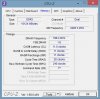
-
I would be most interested in your findings. Let's If it goes up to 933Mhz with only the on board memory installed.
-
Hi guys, i'm really interested in ordering the asus found here:
http://www.amazon.ca/UX302LG-DH71T-CA-13-3-Inch-Zenbook-Processor-display/dp/B00H5C5NJY
but the only thing i'm worried about is the 500gb + 16gb ssd combo. I'm coming from a Vaio Z series laptop, which had a 256gb ssd inside of it (VPCZ1), and
i'm not sure if i'm going to be in for a shock when I use the regular HD (with ssd combo technically) on the ASUS. I've never used this sort of thing before (hd/ssd combo),
so i'm not really sure what to expect. Will I be able to notice a significant slow down, coming from the world of SSD-only to this new kind of combo? -
Cost. 14900 ram isn't that common. A 2GB stick would be even less common. I'll post my results later this evening. Still at work and no T5/6 driver here.
-
I pulled the stick and ran a few tests. My onboard ram tests to be 12800(800 Mhz). I think the Crucial tool is messed up because it detected 4GB even after I reinstalled the RAM and it "detected" both 14900 AND 12800 when I removed the stick. There's no way it's both. Regardless, I uploaded my scores and tests in the zip file. 4GB for the first 3 pics and 12GB for the last 4. My graphics are unaffected because I have a GT 730M instead of integrated graphics.
Samsat, I recommend running memtest86+ to rule out a bad stick. Otherwise, I have no idea why your score decreased. I also don't put much stock in this ChrisPC experience index tool. This is my first time using it and will probably be my last - the test completed too quickly, so there really isn't that much it can be testing. PCMark is way more useful.
View attachment 4gb UX302lg.zip
View attachment 12gb ux302lg.zip -
Thanks for doing this. I cant get my laptop to boot from USB so cant run memtest86+.
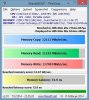
I did run MaxxMEM2 like you did. Quite a bit slower not sure if it's to do with the slower processor, less or different type of memory to you as follows:-
-
I managed to get memtest86 to work. After many hours of testing it reported no problems.
I am finding the UX302LA much faster since upgrading the memory which is the most important thing.
These performance numbers can drive one crazy.
I just want to know that things are operating as they should.
Your data transfer and latency figures are considerably better than mine maybe it's just that the memory you used is better than mine? It's not that important it would just be nice to know for academic value. -
It's because I have a higher clocked CPU - don't worry about it, your results are fine. Your numbers are higher than mine with only 4GB, even with the higher latency. That's pretty good. Latency and clock speed are pretty much directly proportional, so you having a slightly higher latency makes perfect sense.
-
Samsat, for me graphics score stayed the same. Though Windows took a long time to load the first time, and the computer seemed very slow. But I think now it seems ok, and it sees 10GB of memory.
BEFORE:
CpuScore 7.2
MemoryScore 5.9
GraphicsScore 5.7
GamingScore 5.4
DiskScore 5.9
AFTER
CpuScore 7.2
MemoryScore 7.3
GraphicsScore 5.7
GamingScore 5.4
DiskScore 5.9
I have also attached maxxmem results (why is it showing asterisks?)Attached Files:
-
-
Thanks Xentar. As mentioned I am happy with the performance since installing the extra 8GB ram it's always nice though to have a base line to work from and then to see if a bit more can be squeezed out. It's interesting that the Crucial tool identifies the soldered memory as being 14900 but other tools do not.I just ran Sandra Lite and it also says that the 2GB and the 8GB are both of the same type.
The ChrisPC tool is a gui front end for the windows winsat tool which you could use yourself to do the assessment. ChrisPC just presents it in a nicer way rather than using the command prompt. It should work fine as a relative performance measurement tool for before and after you make changes to your PC.
Janep, my cpu, memory and disk scores stay solid at 7.2, 7.5, 6.7 the graphics vary from 5.1 to about 5.3 depending on when I run the assessment. Your graphics are faster my disk access is faster but I doubt that either of us will notice the difference!
Enjoy your Zenbook. -
Has anyone else been getting this error message, "memory_management"? No mods yet on this machine, bone stock. Thanks for any help.
https://drive.google.com/file/d/0B-yShckcmVawTEttNEN2NUV5VDA/edit?usp=sharing -
Hi guys, I'm trying to do a clean install of Windows, but I"m having a really difficult time trying to figure out how to boot off USB. I have been playing around with the settings in BIOS, but don't see any options to boot from USB first. I have a bootable windows copy on my usb drive.. Thanks in advance
-
Can you take a picture of the boot options? Have you gone through all the lists?
Asus UX302
Discussion in 'Asus' started by dogman216, Oct 7, 2013.